haxeui-core
haxeui-core is a users universal entry point into the HaxeUI framework and allows for the same user interface code (either with markup or via haxe source code) to be used to build a user interface on various platforms using various HaxeUI backends. Below is a general overview of how haxeui-core and the various HaxeUI backends fit together. You can watch a presentation (given at WWX2016) about HaxeUI to get more of an understanding here.
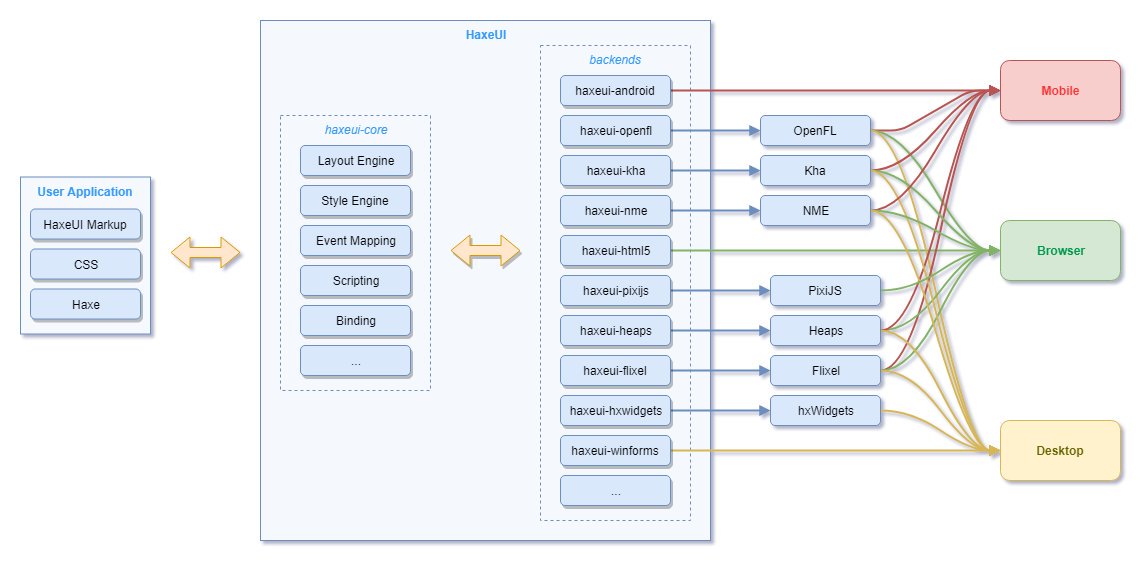
Installation
Installation of the haxeui can be performed by using haxelib, you will need a the haxeui-core haxelib as well as a backend, for example:
haxelib install haxeui-core
haxelib install haxeui-openfl
Backends
In general, using a HaxeUI backend is as simple as just including haxeui-core and the backend library into your application, for example:
-lib haxeui-core
-lib haxeui-openfl
Currently, HaxeUI supports the following backends. Please refer to each backend for specific instructions on how to set-up and initialise the host framework (if required).
| Backend Library |
Dependencies |
Platforms |
Components |
Build Status |
|
<td valign="top"><a href="https://github.com/haxeui/haxeui-html5">haxeui-html5</a></td>
<td valign="top"><i>none</i></td>
<td valign="top" align="left"><img src="https://raw.githubusercontent.com/haxeui/haxeui-core/master/.github/images/mobile.png" title="Mobile"> <img src="https://raw.githubusercontent.com/haxeui/haxeui-core/master/.github/images/browser.png" title="Browser"></td>
<td valign="top" align="left"><a href="http://haxeui.org/getting-started/native-backends/">Native</a>,<br><a href="http://haxeui.org/getting-started/composite-backends/">Composite</a></td>
<td valign="top"><a href="https://github.com/haxeui/haxeui-html5/actions/workflows/build.yml"><img src="https://github.com/haxeui/haxeui-html5/actions/workflows/build.yml/badge.svg"></a></td>
|
<td valign="top"><a href="https://github.com/haxeui/haxeui-kha">haxeui-kha</a></td>
<td valign="top"><a href="https://github.com/Kode/Kha">Kha</a></td>
<td valign="top" align="left"><img src="https://raw.githubusercontent.com/haxeui/haxeui-core/master/.github/images/mobile.png" title="Mobile"> <img src="https://raw.githubusercontent.com/haxeui/haxeui-core/master/.github/images/browser.png" title="Browser"> <img src="https://raw.githubusercontent.com/haxeui/haxeui-core/master/.github/images/desktop.png" title="Desktop"></td>
<td valign="top" align="left"><a href="http://haxeui.org/getting-started/composite-backends/">Composite</a></td>
<td valign="top"><a href="https://github.com/haxeui/haxeui-kha/actions/workflows/build.yml"><img src="https://github.com/haxeui/haxeui-kha/actions/workflows/build.yml/badge.svg"></a></td>
|
<td valign="top"><a href="https://github.com/haxeui/haxeui-openfl">haxeui-openfl</a></td>
<td valign="top"><a href="https://github.com/openfl/openfl">OpenFL</a>, <a href="https://github.com/haxelime/lime">Lime</a></td>
<td valign="top" align="left"><img src="https://raw.githubusercontent.com/haxeui/haxeui-core/master/.github/images/mobile.png" title="Mobile"> <img src="https://raw.githubusercontent.com/haxeui/haxeui-core/master/.github/images/browser.png" title="Browser"> <img src="https://raw.githubusercontent.com/haxeui/haxeui-core/master/.github/images/desktop.png" title="Desktop"></td>
<td valign="top" align="left"><a href="http://haxeui.org/getting-started/composite-backends/">Composite</a></td>
<td valign="top"><a href="https://github.com/haxeui/haxeui-openfl/actions/workflows/build.yml"><img src="https://github.com/haxeui/haxeui-openfl/actions/workflows/build.yml/badge.svg"></a></td>
|
<td valign="top"><a href="https://github.com/haxeui/haxeui-flixel">haxeui-flixel</a></td>
<td valign="top"><a href="https://github.com/HaxeFlixel/flixel">Flixel</a>, <a href="https://github.com/openfl/openfl">OpenFL</a>, <a href="https://github.com/haxelime/lime">Lime</a></td>
<td valign="top" align="left"><img src="https://raw.githubusercontent.com/haxeui/haxeui-core/master/.github/images/mobile.png" title="Mobile"> <img src="https://raw.githubusercontent.com/haxeui/haxeui-core/master/.github/images/browser.png" title="Browser"> <img src="https://raw.githubusercontent.com/haxeui/haxeui-core/master/.github/images/desktop.png" title="Desktop"></td>
<td valign="top" align="left"><a href="http://haxeui.org/getting-started/composite-backends/">Composite</a></td>
<td valign="top"><a href="https://github.com/haxeui/haxeui-flixel/actions/workflows/build.yml"><img src="https://github.com/haxeui/haxeui-flixel/actions/workflows/build.yml/badge.svg"></a></td>
|
<td valign="top"><a href="https://github.com/haxeui/haxeui-heaps">haxeui-heaps</a></td>
<td valign="top"><a href="https://github.com/HeapsIO/heaps">Heaps</a></td>
<td valign="top" align="left"><img src="https://raw.githubusercontent.com/haxeui/haxeui-core/master/.github/images/browser.png" title="Browser"> <img src="https://raw.githubusercontent.com/haxeui/haxeui-core/master/.github/images/desktop.png" title="Desktop"></td>
<td valign="top" align="left"><a href="http://haxeui.org/getting-started/composite-backends/">Composite</a></td>
<td valign="top"><a href="https://github.com/haxeui/haxeui-heaps/actions/workflows/build.yml"><img src="https://github.com/haxeui/haxeui-heaps/actions/workflows/build.yml/badge.svg"></td>
|
<td valign="top"><a href="https://github.com/haxeui/haxeui-nme">haxeui-nme</a></td>
<td valign="top"><a href="https://github.com/haxenme/nme">NME</a></td>
<td valign="top" align="left"><img src="https://raw.githubusercontent.com/haxeui/haxeui-core/master/.github/images/mobile.png" title="Mobile"> <img src="https://raw.githubusercontent.com/haxeui/haxeui-core/master/.github/images/desktop.png" title="Desktop"></td>
<td valign="top" align="left"><a href="http://haxeui.org/getting-started/composite-backends/">Composite</a></td>
<td valign="top"><a href="https://github.com/haxeui/haxeui-nme/actions/workflows/build.yml"><img src="https://github.com/haxeui/haxeui-nme/actions/workflows/build.yml/badge.svg"></a></td>
|
<td valign="top"><a href="https://github.com/haxeui/haxeui-hxwidgets">haxeui-hxwidgets</a></td>
<td valign="top"><a href="https://github.com/haxeui/hxWidgets">hxWidgets</a>, <a href="https://github.com/wxWidgets">wxWidgets</a></td>
<td valign="top" align="left"><img src="https://raw.githubusercontent.com/haxeui/haxeui-core/master/.github/images/desktop.png" title="Desktop"></td>
<td valign="top" align="left"><a href="http://haxeui.org/getting-started/native-backends/">Native</a></td>
<td valign="top"><a href="https://github.com/haxeui/haxeui-hxwidgets/actions/workflows/build-linux.yml"><img src="https://github.com/haxeui/haxeui-hxwidgets/actions/workflows/build-linux.yml/badge.svg"></a><br><a href="https://github.com/haxeui/haxeui-hxwidgets/actions/workflows/build-windows.yml"><img src="https://github.com/haxeui/haxeui-hxwidgets/actions/workflows/build-windows.yml/badge.svg"></a><br><a href="https://github.com/haxeui/haxeui-hxwidgets/actions/workflows/build-osx.yml"><img src="https://github.com/haxeui/haxeui-hxwidgets/actions/workflows/build-osx.yml/badge.svg"></a></td>
|
<td valign="top"><a href="https://github.com/haxeui/haxeui-winforms">haxeui-winforms</a></td>
<td valign="top"><i>none</i></td>
<td valign="top" align="left"><img src="https://raw.githubusercontent.com/haxeui/haxeui-core/master/.github/images/desktop.png" title="Desktop"></td>
<td valign="top" align="left"><a href="http://haxeui.org/getting-started/native-backends/">Native</a></td>
<td valign="top">...</td>
|
<td valign="top"><a href="https://github.com/haxeui/haxeui-pixijs">haxeui-pixijs</a></td>
<td valign="top"><a href="https://github.com/pixijs/pixi-haxe">PixiJS</a></td>
<td valign="top" align="left"><img src="https://raw.githubusercontent.com/haxeui/haxeui-core/master/.github/images/browser.png" title="Browser"></td>
<td valign="top" align="left"><a href="http://haxeui.org/getting-started/composite-backends/">Composite</a></td>
<td valign="top">...</td>
|
<td valign="top"><a href="https://github.com/haxeui/haxeui-android">haxeui-android</a></td>
<td valign="top"><i>none</i></td>
<td valign="top" align="left"><img src="https://raw.githubusercontent.com/haxeui/haxeui-core/master/.github/images/mobile.png" title="Mobile"></td>
<td valign="top" align="left"><a href="http://haxeui.org/getting-started/native-backends/">Native</a></td>
<td valign="top">...</td>
|
<td valign="top"><a href="https://github.com/haxeui/haxeui-pdcurses">haxeui-pdcurses</a></td>
<td valign="top"><a href="https://github.com/wmcbrine/PDCurses">PDCurses</a></td>
<td valign="top" align="left"><img src="https://raw.githubusercontent.com/haxeui/haxeui-core/master/.github/images/desktop.png" title="Desktop"></td>
<td valign="top" align="left"><a href="http://haxeui.org/getting-started/composite-backends/">Composite</a></td>
<td valign="top">...</td>
|
<td valign="top"><a href="https://github.com/haxeui/haxeui-raylib">haxeui-raylib</a></td>
<td valign="top"><a href="https://github.com/haxeui/raylib-haxe">raylib-haxe</a>, <a href="https://github.com/raysan5/raylib">RayLib</a></td>
<td valign="top" align="left"><img src="https://raw.githubusercontent.com/haxeui/haxeui-core/master/.github/images/desktop.png" title="Desktop"></td>
<td valign="top" align="left"><a href="http://haxeui.org/getting-started/composite-backends/">Composite</a></td>
<td valign="top">...</td>
Usage
Assuming that haxeui-core and the backend library have been included in your application, initialising the toolkit and using it should be relatively straight forward:
Toolkit.init();
The init function can take an optional Dynamic argument that allows certain options to be passed to the host framework. Please refer to each specific backend on how to use these.
Once the toolkit has been initialised components can be added in one of two ways:
Adding components using Haxe code
Using HaxeUI components in haxe code is simple and easy:
import haxe.ui.components.Button;
import haxe.ui.containers.VBox;
import haxe.ui.core.Screen;

var main = new VBox();

var button1 = new Button();
button1.text = "Button 1";
main.addComponent(button1);

var button2 = new Button();
button2.text = "Button 2";
main.addComponent(button2);

Screen.instance.addComponent(main);
Note: Screen was used here as a universal way to add items to the application, this is not required however, if you are using a single framework and are not interested in the cross-framework capabilities of HaxeUI, then you can use something more specific to the target framework (eg: Lib.current.stage.addChild(main)).
Adding components from markup
It is also possible for HaxeUI to take a user interface definition from a markup language (like XML) and use that to build code similar to above:
var main = ComponentMacros.buildComponent("assets/ui/demo/main.xml");
Screen.instance.addComponent(main);
If your xml isn't available at compile time you can use Toolkit.componentFromString:
var main = Toolkit.componentFromString('<vbox><button text="Button" /></vbox>', "xml");
Screen.instance.addComponent(main);
Additional resources