Store and reuse values using variables
Variables enable you to store and reuse values in Postman. By storing a value as a variable, you can reference it throughout your collections, environments, requests, and scripts. Variables help you work efficiently, collaborate with teammates, and set up dynamic workflows.
Understanding variables
A variable is a symbolic representation of data that enables you to access a value without having to enter it manually wherever you need it. This can be useful if you’re using the same values in multiple places. Variables make your requests more flexible and readable by abstracting the detail away.
For example, if you have the same URL in more than one request, but the URL might change, you can store it in a base_url variable. Then, use {{base_url}} to reference the variable in your requests. If the URL changes, you can change the variable value and it’ll be reflected throughout your collection wherever you’ve used the variable name.
Any changes you make to your variables are automatically saved.
The same principle applies to any part of your request where data is repeated. Whatever value is stored in the variable will be included wherever you’ve referenced the variable when your requests run. If the variable value is https://postman-echo.com and the request uses the {{base_url}}/get URL, then Postman sends the request to https://postman-echo.com/get.
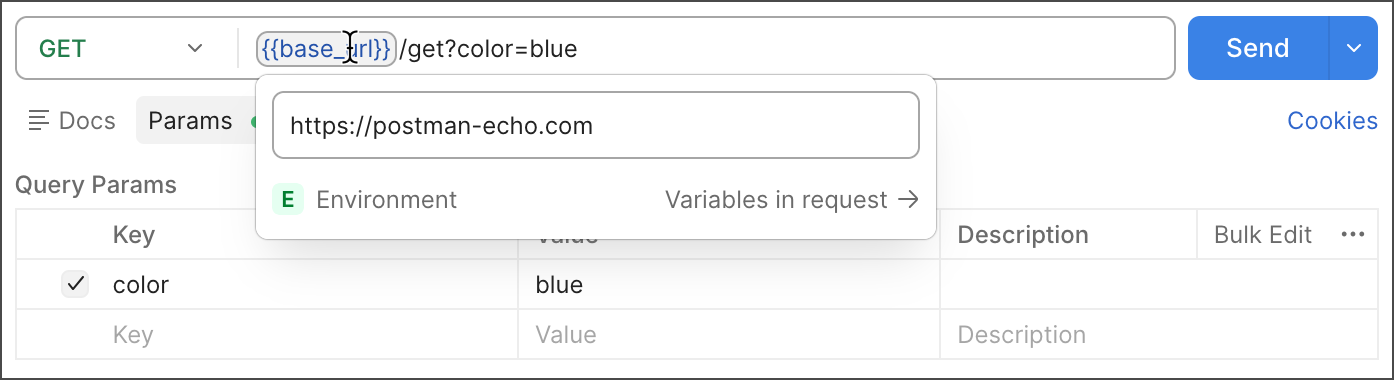
Variables in Postman are key-value pairs. Each variable name represents its key, so referencing the variable name enables you to access its value. You can use variables to pass data between requests and tests. For example, if you are chaining requests in a collection.
Use Postman Vault to store sensitive data as vault secrets and reuse them across your Postman workspaces. Postman Vault includes multiple vault types, enabling you to store secrets locally or share them with your team while keeping sensitive values separate from your collections, environments, and other Postman elements.
Postman stores variables as strings. If you store objects or arrays, remember to JSON.stringify() them before storing, and JSON.parse() them when you retrieve them.
Use environments to group sets of variables together and share them with collaborators. For example, if you use one set of config details for your production server and another for testing. See Group sets of variables in Postman using environments for more on how you can incorporate environments into your team workflows.
Variable scopes
Postman supports variables at different scopes, allowing you to tailor your processing to a variety of development, testing, and collaboration tasks. Scopes in Postman relate to the different contexts that your requests run in, and different variable scopes are suited to different tasks.
You can create a variable without a variable scope if it isn’t meant to hold a default value. You can also create a variable without a scope to try out the value before adding it to a scope. Learn more about creating variables without a scope.
If a variable with the same name is declared in two different scopes, the value stored in the variable with narrowest scope will be used. For example, if there is a “username” global variable and a “username” local variable, the local value is used when the request runs.
In order from broadest to narrowest, these scopes are: global, collection, environment, data, and local.
- Global variables enable you to access data between collections, requests, scripts, and environments. Global variables are available throughout a workspace. Since global variables have the broadest scope available in Postman, they’re well-suited for testing and prototyping. In later development phases, use more specific scopes.
- Collection variables are available throughout the requests in a collection and are independent of environments. Collection variables don’t change based on the selected environment. Collection variables are suitable if you’re using a single environment, such as auth or URL details.
- Environment variables enable you to scope your work to different environments, such as local development versus testing or production environments. One environment can be active at a time. If you have a single environment, using collection variables can be more efficient, but environments enable you to specify role-based access levels.
- Data variables come from external CSV and JSON files to define data sets you can use when running collections with the Collection Runner or the Postman CLI. Data variables have local values, which don’t persist beyond request or collection runs.
- Local variables are temporary variables that are accessed in your request scripts. Local variables are scoped to a single request or collection run, and are no longer available when the run is complete. Local variables are suitable if you need a value to override all other variable scopes but don’t want the value to persist once the run ends.

Variable values
By default, collection, environment, and global variable values are only available locally in your instance of Postman. The local value is used when sending requests, and it isn’t synced to the Postman cloud. Update your local value as you’d like, without sharing it with your teammates. Learn how to define a local value for your variables.
If you have Editor access to the element, you can share a variable’s value, syncing its value to the Postman cloud. Share a variable’s value to provide your teammates with a default value they can use to begin making requests to your API. Your teammates can continue to update their local value without sharing it. They can also reset their local value back to the shared value at any time.
Some Postman features that run on the Postman cloud also use the shared value when sending requests. These features include scheduled collection runs, monitors, and the Postman CLI.
If you’re more familiar with current and initial values, learn more about the previous way of defining variables.