For the complete documentation index, see llms.txt. This page is also available as Markdown.

Native Python API

Load a model with get_model, run inference on images in your own Python process, and visualize the results with supervision.

The native Python API is the simplest way to use Inference and involves accessing the base package APIs directly. Going this route, you import Inference modules directly into your Python code. You load models, run inference, and handle the results all within your own logic. You also manage the dependencies within your Python environment. If you are creating a simple app or just testing, the native Python API is a great place to start.

Using the native Python API centers on loading models, then calling their infer(...) method to get inference results.

Quickstart

This example shows how to load a model, run inference, then display the results.

We recommend using a Python virtual environment (venv) to isolate the dependencies of Inference.

pip install inference

If you have an NVIDIA GPU, you can accelerate your inference with:

pip install --extra-index-url https://download.pytorch.org/whl/cu124 inference-gpu
# please adjust the --extra-index-url to the CUDA version installed in your OS

Next, import a model:

from inference import get_model

model = get_model(model_id="rfdetr-large")

The get_model method is a utility function that loads a computer vision model from Roboflow. We load a model by referencing its model_id. For Roboflow models, the model ID is a combination of a project name and a version number: f"{project_name}/{version_number}".

Next, we can run inference with our model by providing an input image:

from inference import get_model

model = get_model(model_id="rfdetr-large")

results = model.infer("people-walking.jpg") # replace with path to your image
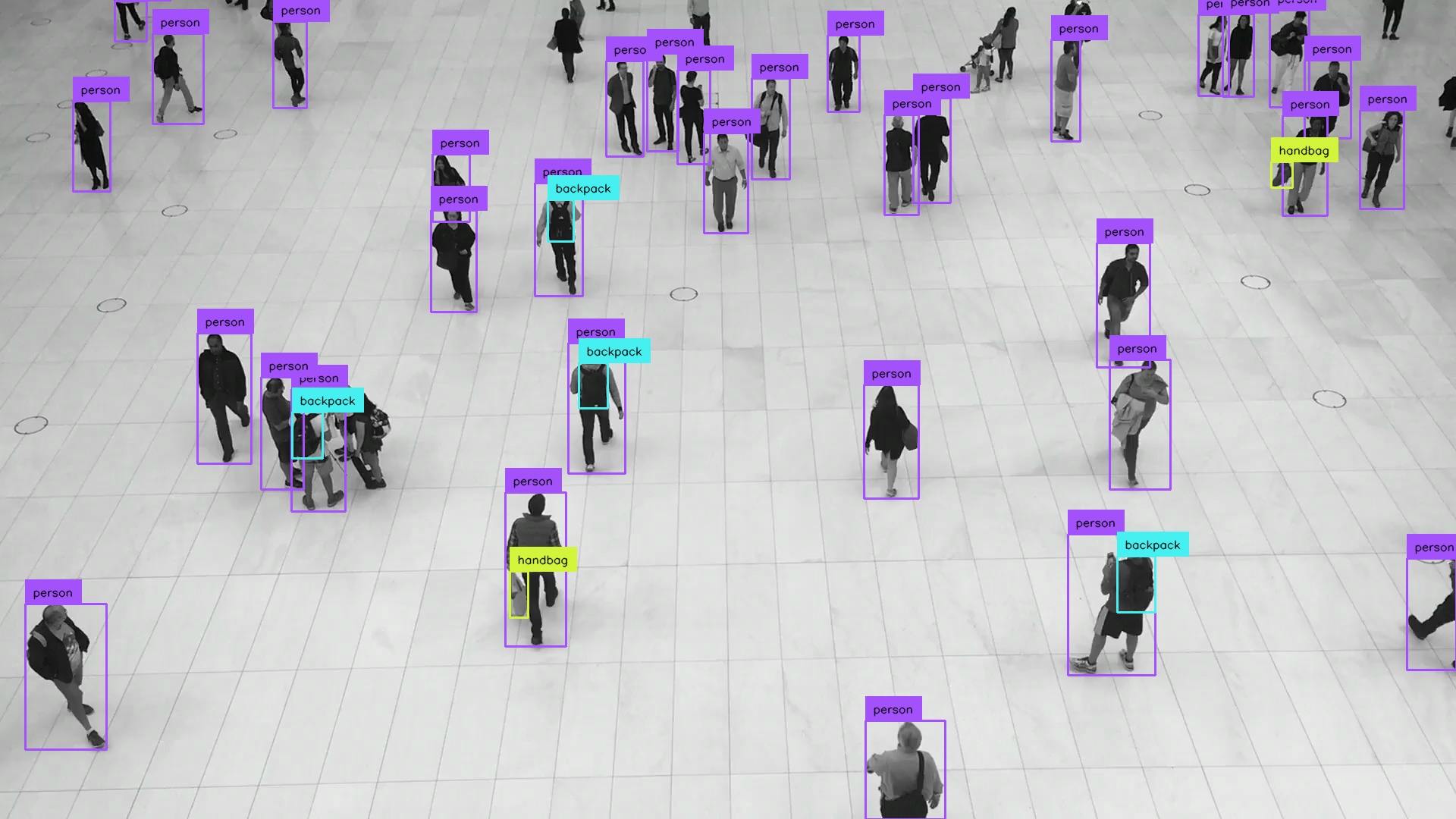
The results object is an inference response object (for example ObjectDetectionInferenceResponse, defined in inference/core/entities/responses/inference.py). It contains some metadata (such as processing time) as well as an array of the predictions. The type of response and its attributes depend on the type of model.

Now, let's visualize the results using Supervision:

people walking annotated

Different image types

The infer(...) method accepts images in many forms, including PIL images, OpenCV images (NumPy arrays), paths to local images, image URLs, and more. Under the hood, models use the load_image(...) method in the image_utils module.

Inference parameters

The infer(...) method accepts keyword arguments to set inference parameters. The example below shows setting the confidence threshold and the IoU threshold.

Next steps

Last updated

Was this helpful?