

Node lifecycle: maintenance, shutdown, decommission
Node lifecycle: maintenance, shutdown, decommission
There’s a set of system-management topics that often appear under alternative subtitles: “graceful termination and cleanup”, “shutting down and restarting”, “adding and removing members”, “joining and leaving cluster”, and similar.
All of these topics involve state transitions, so let’s start by naming the states and the transitions between them.
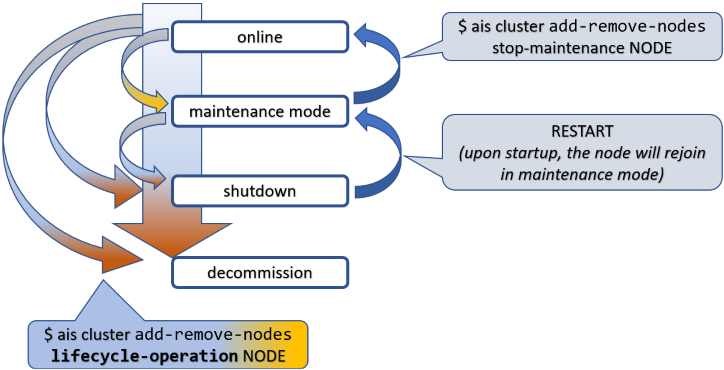
To put things in perspective, this picture is about a node (not shown) in an AIStore cluster (also not shown).
Tracking it from top to bottom, first notice the state called maintenance mode. This is the gentlest way to remove a node from an operating cluster. When in maintenance, the node stops keepalive heartbeats but remains in the cluster map and remains connected, unless you disconnect or shut it down manually, which is perfectly valid and often expected.
Next comes shutdown. Graceful shutdown can also be achieved in a single shot, as indicated by one of the arrows on the left:
online => shutdown
When in shutdown, the node can later return and rejoin the cluster. That takes two steps, not one: restart the node first, then take it out of maintenance. In the diagram, RESTART must be understood as a deployment-specific action such as kubectl run, restarting a systemd unit, or powering the machine back on.
Both maintenance and shutdown involve a certain intra-cluster operation called global rebalance.
The third and final special state is decommission. Loosely synonymous with cleanup - very thorough cleanup - decommission entails:
- migrating all user data currently stored on the node to other online nodes;
- partial or complete cleanup of the node itself; and
- removing AIS metadata, configuration files, and, optionally, user data in its entirety.
Needless to say, there’s no simple way back out of decommission - the proverbial point of no return. A decommissioned node does not come back by restarting it: depending on how far the cleanup progressed, it must be re-added with an explicit join or redeployed from scratch.
Table of Contents
- Joining a Cluster: Discovery URL
- Cluster
- Privileges
- Rebalance
- Putting a Node in Maintenance
- One Membership Change at a Time
- Clearing Maintenance State
- Removing a Node from a Cluster
- Checking Removal Status
- Summary
- References
Joining a Cluster: Discovery URL
AIStore clusters can be deployed with an arbitrary number of AIStore proxies (a.k.a. gateways). Each proxy implements RESTful APIs, both native and S3-compatible, and provides full access to user data stored in the cluster.
Each proxy collaborates with the others to perform majority-voted HA failovers; see Highly Available Control Plane. All electable proxies are functionally equivalent. The one elected as the current primary is, among other things, responsible for joining nodes to the running cluster.
To facilitate node joins in the presence of disruptive events such as:
- network failures; and/or
- partial or complete loss of local AIS metadata such as cluster maps,
AIStore uses the so-called original and discovery URLs in the cluster configuration. The latter is versioned, replicated, protected, and distributed solely by the elected primary.
March 2024 update: starting with v3.23, the original URL does not track the original primary. Instead, the current primary takes full responsibility for updating both URLs with a single purpose: optimizing time to join or rejoin the cluster.
When an HA event triggers automated failover, the role of primary is assumed by a different proxy, with the corresponding cluster map (Smap) update synchronized across all running nodes.
A new node, however, may still have configuration that refers to the old primary. The original and discovery URLs exist precisely to address that scenario:
Cluster
There is one cluster-level lifecycle command that deserves to be called out separately:
The above command destroys an existing cluster - completely and utterly, no questions asked. It is useful in testing, benchmarking, and other non-production environments. See --help for details.
Privileges
All lifecycle management commands and their associated APIs require administrative privileges.
Broadly, there are three ways to satisfy that requirement:
- deploy the cluster with authentication disabled:
Here, client_auth_required: false means protected client requests do not require authentication.
- use the integrated
AuthNserver, which provides OAuth 2.0-compliant JWTs and a set of CLI auth commands to manage users, roles, and permissions; or - outsource authorization to a separate centralized system, often LDAP-integrated, that manages existing users, groups, and mappings.
Rebalance
Conceptually, AIStore rebalance is somewhat similar to what is often called a RAID rebuild. The underlying mechanics are different, but the high-level idea is similar: user data migrates from some nodes in a cluster to other nodes to restore the correct placement.
In AIStore, rebalancing is the system response to a lifecycle event that has already happened or is about to happen. Its singular purpose is to satisfy one governing rule:
user data must be properly located
Proper Location
For any object in a cluster, its proper location is defined by the current cluster map and, locally on each target, by the configured target mountpaths.
In that sense, the maintenance state, for instance, has its beginning when the cluster starts rebalancing, and its post-rebalancing end when the corresponding sub-state is recorded in the next Smap version and safely distributed across all nodes.
Quick Example
Given a 3-node single-gateway cluster, suppose we shut down one of the nodes:
Once the command is executed, notice the following:
At first, maintenance will show up in red, indicating a simple fact: data is expeditiously migrating from the node that is about to leave the cluster.
A visual cue that effectively says: please don’t disconnect it yet, and do not power it off.
Eventually, if you run:
or simply check a few times manually, the output will report that rebalance (g47 in this example) has finished and the node t[QrmZvKdN] has gracefully left service. Simultaneously, maintenance in the show output becomes non-red:
The takeaway is simple: global rebalance runs its full course before the node is permitted to leave cleanly. If interrupted for any reason - power cycle, network disconnect, another node joining, cluster shutdown, and so on - rebalance resumes and continues until the governing condition is globally satisfied.
Putting a Node in Maintenance
To temporarily take a node out of the cluster, put it in maintenance mode. Nodes in maintenance remain in the cluster map but stop participating in normal request processing.
Alternatively, you can shut the node down as part of the same workflow:
If the node is a target, the cluster will rebalance after a short preparation phase. When the rebalance finishes, it is safe to power the node off.
Batch Operations
start-maintenance, stop-maintenance, shutdown, and decommission all accept multiple nodes:
NODE_ID [NODE_ID...], comma- or space-separated. TAB completion suggests the nodes not yet selected.
The batch executes as one coordinated operation. Each lifecycle phase updates the cluster map once for the entire batch. When rebalance is required, the cluster performs one RMD increment and starts one global rebalance, regardless of how many nodes you specify:
The three remaining targets receive the migrating data - a single g1 for the pair, not one rebalance per node:
Admission is all-or-nothing: if any specified node is unknown or is the current primary, the entire request is rejected and no node is touched. Conversely, once the transaction is underway, a node that disappears - keepalive-removed, for instance - does not abort it; the remaining nodes complete normally.
Operation-specific state checks also apply. start-maintenance skips a node that has already completed
the same transition, and stop-maintenance skips a node that is already active. If every specified node is
skipped, the command reports “nothing to do” and leaves the cluster map untouched. A node in
maintenance can be advanced to shutdown or decommission; stop-maintenance refuses a node that
is being decommissioned.
Note that advancing a node that is already in maintenance does not rebalance: its data was migrated
when it entered maintenance, and the batch contains no active target to migrate from. If it entered
maintenance with --no-rebalance, that migration never happened - run ais start rebalance first, or
the data stored only on that target may become unavailable when it is shut down or removed.
Incomplete Transitions
Each of the three removal operations is a three-phase transition:
The first phase marks the node in the cluster map. The second migrates its data. The third records
completion: for start-maintenance and shutdown, the target is marked post-rebalance; for
decommission, the node is removed from the cluster map altogether.
The middle phase can abort - renewed by a concurrent self-join, or aborted because another target left
the cluster (e.g., via K8s delete-pod => SIGTERM => rmSelf). When it does, the third phase never runs
and the target simply stays in maintenance. --no-rebalance reaches the same place by skipping the
middle phase outright, and the two are indistinguishable from the primary’s perspective.
Either way, the target is in maintenance and out of service. The operator can:
- repeat
start-maintenance. This is accepted rather than rejected, so a retry - or a rolling-upgrade script that reissues one - does not fail. It keeps the target out of service and reapplies maintenance on the node when reachable. If no active target is specified alongside, that is all it does; - run
stop-maintenanceto clear maintenance and return the target to service, with rebalance as required; - advance the target to
shutdownordecommission; or - leave it in maintenance. An explicit
ais start rebalancecan restore global data placement, but does not itself complete the transition.
Such a target specified together with an active one follows the normal batch path. With automatic rebalance enabled and without
--no-rebalance, that batch rebalances, and its post-rebalance step completes the transition for both.Specifying it together with a target that has already completed the transition changes nothing: the completed target is skipped, and the command behaves as if only the incomplete one had been specified.
Skipping Rebalance
Advanced usage only:
--no-rebalanceis not recommended for routine cluster operations. In normal operation, let AIS run rebalance automatically.The primary recommended use case is a controlled rolling-maintenance or rolling-upgrade workflow, where nodes are taken out of service and returned in a coordinated sequence. In Kubernetes deployments, this sequencing is typically handled automatically by the AIS Kubernetes operator.
If you use --no-rebalance, the node enters maintenance immediately without waiting for data migration:
Keeping automatic rebalance enabled is strongly recommended, but there are cases where skipping it is safe:
- all buckets are empty;
- maintenance was started with
--no-rebalanceand no objects were added or updated during maintenance; - all objects can be refetched from remote backends such as remote AIS or cloud buckets, understanding that this may incur extra cloud traffic charges; or
- multiple nodes are being returned from maintenance, in which case name them all in a single
stop-maintenancecommand - see Batch Operations - rather than sequencing them with--no-rebalance.
The --no-rebalance flag is available for start-maintenance, shutdown, stop-maintenance, and decommission.
One Membership Change at a Time
The primary admits one administrative membership change at a time. A second request issued while the first is still executing is refused. If the first request starts a global rebalance, the exclusion continues until that rebalance reaches a terminal state:
The rule covers start-maintenance, stop-maintenance, shutdown, decommission, the advanced
unsafe removal command, explicit join, and an operator-initiated ais start rebalance with or
without --cleanup.
There are two deliberate qualifications:
- Self-join is not serialized. A node starting or restarting and registering on its own - including normal Kubernetes restart and scale-up paths - is not subject to the administrative admission guard. It may join while a rebalance is running and cause that rebalance to be renewed.
- An exact inverse is not exempt. Taking the same nodes back out of maintenance while their causal
rebalance is running is refused like any other membership change. Wait for the rebalance to finish
(
ais show rebalance), then reactivate the nodes.
Do not abort a lifecycle-triggered rebalance merely to issue its inverse. Lifecycle operations are not rollback transactions: aborting rebalance does not restore the preceding Smap, can leave maintenance or shutdown transitions incomplete, and does not necessarily prevent decommission finalization.
To transition several nodes together, specify them in one command - see Batch Operations - rather than issuing requests one after another.
Clearing Maintenance State
Once a node is in maintenance mode, the cluster keeps it there until you explicitly clear that state.
If the node was shut down, restart or power it on first and wait for it to register with the primary proxy. Then run:
To skip automatic rebalance, provide --no-rebalance (advanced usage only; see Skipping Rebalance).
In general, automatic rebalance should remain enabled. The same considerations listed under Skipping Rebalance apply here as well.
The node starts accepting requests again after it rejoins and the cluster clears its maintenance state. You do not have to wait for the rebalance that stop-maintenance itself starts.
Note, however, that stop-maintenance is rejected while a global rebalance is already running - including the rebalance triggered by the start-maintenance, shutdown, or decommission that put the node there. Wait for it to finish (ais show rebalance) and then reactivate.
Removing a Node from a Cluster
To permanently remove a node from the cluster, decommission it:
When the rebalance finishes, the primary proxy removes the node automatically from the cluster map. On unregistering, the node erases its AIS metadata.
Skipping rebalance performs only the minimal preparation and removes the node immediately:
Note that decommission cleans up AIS metadata and stops the node. By contrast, shutdown only stops AIS services.
If the node is a target, shutdown takes full effect after the rebalance completes. If the node is a proxy, shutdown is immediate.
Checking Removal Status
Putting a node in maintenance does not automatically power it off.
AIS runs a rebalance when a node enters maintenance mode. You should verify cluster state via ais show cluster target before deciding that it is safe to power the node off.
In the example below, the REBALANCE column shows finished and the node is labeled maintenance - it is safe to power it off:
For decommissioning nodes, the status looks like this while rebalance is still running:
When rebalance finishes, the primary proxy removes the decommissioned node automatically:
Summary
All of the above are administrative membership changes. The cluster admits one at a time and refuses another while global rebalance is running; see One Membership Change at a Time. A node’s own self-join is not subject to this rule.
Assorted Notes
Normally, a starting AIS node (aisnode) uses its local configuration to contact the cluster and perform a self-join. That does not require an explicit join command or any separate administrative action.
Still, the join command is useful when the node is misconfigured. Separately, it can also be used to join a standby node - that is, a node started in standby mode; see aisnode command line.
The explicit join command is an administrative membership change and is serialized with the other
operations. A node’s own self-join is not; see
One Membership Change at a Time.
During rebalance, the cluster remains fully operational: users can read and write data, list, create, and destroy buckets, run jobs, and so on. In other words, none of the lifecycle operations described here requires downtime.