Table of Contents
Whenever we talk about documentation infrastructure, one of the most common pieces of feedback I hear from developers is that it’s too complicated to set up. There is just too much configuration, fiddling around and trying to make sure that the output is produced in a way that is expected. That’s why back in June I set out to build a documentation CLI that allows one to produce docs with one liners.
Take this example to generate documentation for a Python library from PyPI:
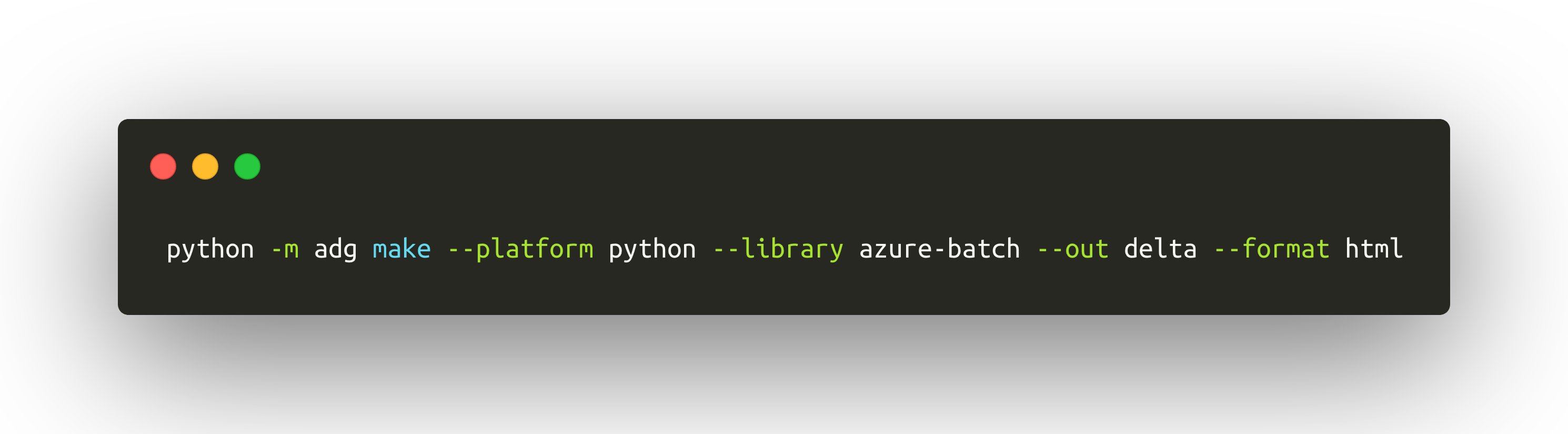
Wouldn’t this be much easier to use than fiddle with Sphinx? This week I got a chance to continue working on the tool, and the one-liner in the screenshot is now totally possible with adg!
Overview #
Behind the scenes, I am effectively combining several steps into one - completely abstracting out the complexity of the documentation process from the developer. This means that it’s now easier to construct this to be part of a continuous integration (CI) or experimentation scenarios. So what’s happening under the hood?
Create a virtual environment #
The most reliable way to operate with Python projects is in isolation. Instead of trying to install libraries machine- or user-wide, we install them in a pre-defined temporary directory, that has the latest version of python and pip binaries. Brett Cannon has a blog post that explains why virtual environments are important.
An environment is created where the libraries that need to be documented are stored.
Install library and dependencies #
Next, python -m pip install is executed to install the library that needs to be documented (and its dependencies, of course). In addition to that, sphinx-docfx-yaml and sphinx are installed to generate the documentation. You might be wondering - what is the purpose of sphinx-docfx-yaml? It’s an extension built to convert standard Sphinx output to something that DocFX can read and post-process.
DocFX is used behind the scenes because I am trying to make adg as generic of a tool as possible for all platforms and languages - and we built it on docs.microsoft.com to be just that. I consider it to be the LEATHERMAN of documentation tools.
The DocFX tool is downloaded from GitHub once everything is installed, and extracted locally. If executed on a macOS or Linux system, mono is used to run the DocFX executable.
Generate documentation #
Once everything is installed and ready to go, adg first uses sphinx-quickstart, sphinx-apidoc and sphinx-build to transform Python code into reStructuredText (RST) files. DocFX itself does not process source code - it relies on extensions to produce platform-specific artifacts, that are then pushed through the documentation tooling.
So, once RST content is generated, it’s converted with sphinx-docfx-yaml into structured YAML. This process is part of the Sphinx code-to-docs step - we integrate the extension in conf.py, so that Sphinx uses it before finalizing everything.
Once YAML output is generated, it’s copied in a DocFX project, and then, depending on the --format parameter, it’s either left as-is, or is built into static HTML, that can be then pushed to your hosting provider of choice, such as GitHub Pages.
Limitations #
Because the tool is still being developed, it currently can only run on macOS and Linux, and only supports documenting a single library from PyPI in one run. Short-term improvements will include being able to document libraries from GitHub, tarballs and from other package repositories. If you are using this for any of your projects, I would love to hear your feedback.