
Docco: Quick JavaScript Documentation
Docco is a free Node.js-powered JavaScript documentation generation tool. I was never big into documenting JavaScript methods within the source files themselves, but my team made the decision to go that route for a new project and I've come full swing. Pair the in-source documentation with the Docco and you have pretty JavaScript documentation along side the source code.
You can install Docco using npm or grab the repo directly. With Docco available, you can create code structures a la:
// The code in `oninstall` and `onactivate` force the service worker to
// control the clients ASAP.
self.oninstall = function(event) {
  event.waitUntil(self.skipWaiting());
};

self.onactivate = function(event) {
  event.waitUntil(self.clients.claim());
};

// When fetching, distinguish if this is a resource fetch. If so,
// apply the server selection algorithm. Else, let the request reach the
// network. Could should be autoexplanatory.
self.onfetch = function(event) {
  var request = event.request;
  if (isResource(request)) {
    event.respondWith(fetchFromBestServer(request));
  } else {
    event.respondWith(fetch(request));
  }
};

// A request is a resource request if it is a `GET` for something inside `imgs`.
function isResource(request) {
  return request.url.match(/\/imgs\/.*$/) && request.method === 'GET';
}

// Fetching from the best server consists of getting the server loads,
// selecting the server with lowest load, and compose a new request to
// find the resource in the selected server.
function fetchFromBestServer(request) {
  var session = request.url.match(/\?session=([^&]*)/)[1];
  return getServerLoads(session)
    .then(selectServer)
    .then(function(serverUrl) {
      // Get the resource path and combine with `serverUrl` to get
      // the resource URL but **in the selected server**.
      var resourcePath = request.url.match(/\/imgs\/[^?]*/)[0];
      var serverRequest = new Request(serverUrl + resourcePath);
      return fetch(serverRequest);
    });
}
Running Docco on the contents above generates a nicely formatted page with "inline" comments on the left and comment-less code on the right:
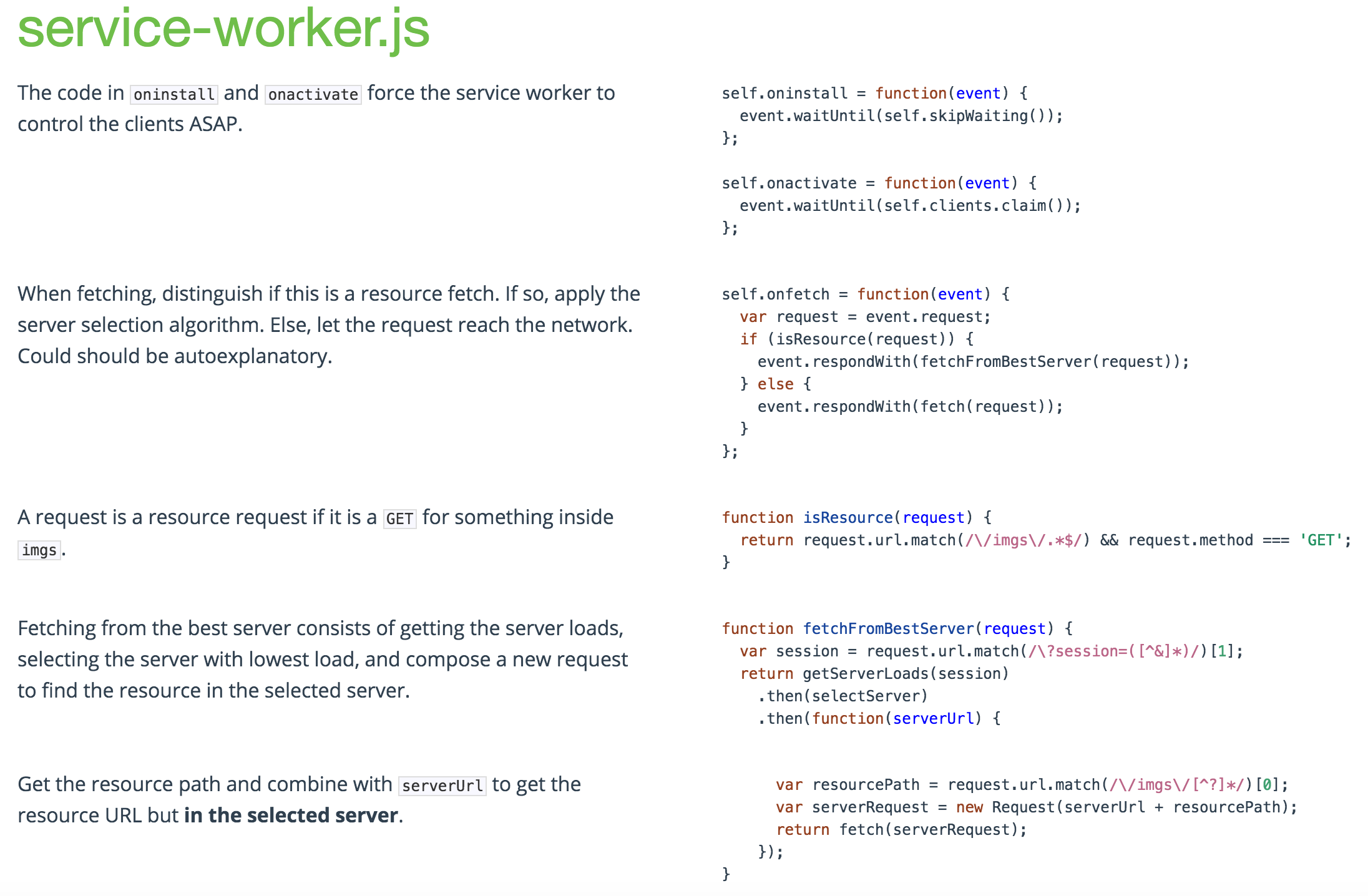
Docco has a few parameters for customization but the conversion is fairly simple and there are extension for gulp, grunt, and other utilities. This type of doc generation and display is awesome for both teaching JavaScript and for maintenance amongst a team. You can see Docco used within the Service Worker Cookbook code examples.




Is there any workaround to support block comments in docco?