
Home * Programming * Graphics Programming * 3D Graphics Board
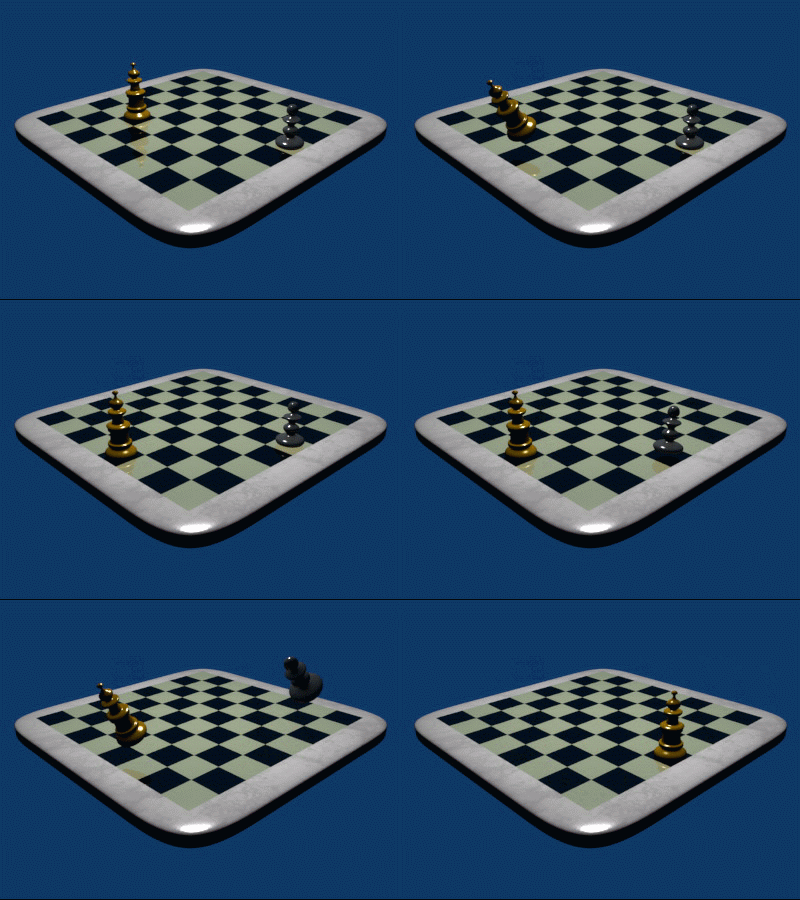
- Image selfmade with Blender, Author: J.A. Freyre, January 22 2006, CC BY-SA 2.5, Wikimedia Commons↩︎
3D Graphics Board,
a 3D graphics projection of a 3D model of a chessboard and the pieces of a chess position to the two dimensional surface of a computer display, either as fullscreen or board window of a chess GUI, or printer. For simplicity, some programs or 3D capable GUIs combine vector graphics for drawing the board with raster graphics for drawing the pieces. A perspective center projection applies for the board, where farther square trapezoids are scaled smaller, while a orthographic projection applies for the pieces, i.e. drawing fixed sized piece-bitmaps with 3D-effect. More sophisticated implementations use 3D vector graphics in the wire-frame model for the projection, and 2D raster graphics in the rendered display, and feature a variable camera's position, angle of view, field of view, may rotate the object around various axis, apply ray tracing with one or more light sources for photorealistic shading with shadow and reflection effects, and perform more or less sophisticated animations of piece movements.
A full perspective projected 3D board requires additional hardware and software resources, such as sophisticated graphic cards with GPUs and 3D graphic libraries or frameworks like OpenGL or Direct3D as subset of the DirectX collection.
Contents
Ergonomics
Despite the more challenging task for the GUI or graphics programmer and progress to simulate the view on a real chessboard, the 3D Board is usually harder to grasp for a human chess player than good 2D Boards. Pieces and specially pawns are often partly covered by pieces in front, and movement of head and eyes of the chess player lack the same visual feedback as looking on a real chess board. Therefor 3D Boards are often featured in mass market products and some programs where authors are interested in 3D graphics programming. The really sophisticated 3D boards of Chessmaster and Fritz are eye catchers and rich of features, but rarely used for serious playing.
Screenshots & Images
Early 3D Boards
 |
 |
Colossus Chess 4.0 3D chessboard 1 |
Chessmaster
 Chessmaster XI - House of Staunton chess sets 1
ChessPartner
 ChessPartner 6, 3D pieces 2
KnightCap

Nemeton
 Nemeton3D 1.51 with its 3D Graphics Board 5
Uragano 3D
 Uragano 3D board 6
See also
Publications
- Nina Amenta, Yong Joo Kil (2005). Defining Point-Set Surfaces. pdf 7
- Oliver Vornberger (2006). Computergrafik. pdf (German)
- Leen Ammeraal and Kang Zhang (2007). Computer Graphics for Java Programmers, 2nd Edition, ISBN-13: 978-0-470-03160-5 / ISBN-10: 0-470-03160-3 by John Wiley
- Eric Lengye (2011). Mathematics for 3D Game Programming and Computer Graphics, Third Edition. ISBN-13: 978-1435458864, amazon.com
Forum Posts
- Re: Going commercial, maybe by Andrew Tridgell, rgcc, March 9, 1997 » KnightCap
External Links
Basics
- 3D from Wikipedia
- 3D computer graphics from Wikipedia
- 3D display from Wikipedia
- 3D modeling from Wikipedia
- Introduction to 3-D Modeling by Delmar E. Searls
- 3D rendering from Wikipedia
- Camera matrix from Wikipedia
- Homography from Wikipedia
- Perspective (graphical) from Wikipedia
- Polygon mesh from Wikipedia
- Ray tracing (graphics) from Wikipedia
- Raytracing by Wilhelm Barth (German)
- Rendering (computer graphics)
- Stereoscopy from Wikipedia
- Texture mapping from Wikipedia
- Three-dimensional space from Wikipedia
- Wire-frame model from Wikipedia
Projection
- 3D projection from Wikipedia
- Graphical projection from Wikipedia
- Projection (linear algebra) from Wikipedia
- Axonometric projection from Wikipedia
- Isometric projection from Wikipedia
- Oblique projection from Wikipedia
- Orthographic projection from Wikipedia
- Parallel projection from Wikipedia
- Planar projection from Wikipedia
3D Graphics API and Frameworks
- Java 3D from Wikipedia
- Microsoft Direct3D from Wikipedia
- VRML from Wikipedia
- X3D from Wikipedia
- X3D for Developers from Web3D Consortium | Open Standards for Real-Time 3D Communication
3D-Editors
Blender 3D: MemoBook - Wikibooks
- Code archives/3D Graphics - Mesh/3D chessboard Rotational solids editor using example by Matt Merkulov, March 15, 2007 » Blitz BASIC
- Pointshop3D developed at the Computer Graphics Lab at ETH Zurich
- ShiVa from Wikipedia
Tutorials
- Chess set modeling tutorial « Tutorial-z.com
- Blender Magician: Model a Chess Piece requires blender and gimp
- How to draw a chessboard with central perspective from SlideShare
3D Chess
- 3D chess computing for browser « Chessforeva's Blog
- Chessforeva online 3D chess game in browser
- Chessforeva for Web developments
- Chessforeva 3D chess - play with Lokasoft java chess engine » Lokasoft
- Chessforeva: 3D chess diagram from FEN » Forsyth-Edwards Notation
- chessboard3.js JavaScript GUI by Jason Tiscione
Chessmaster
- Chessmaster 10th Edition - PC Review at IGN by Steve Butts, August 26, 2004
Fritz GUI
References
PC-Screenshots | Chessmaster XI: The Art of Learning | Ubisoft↩︎
ChessPartner Screen shots | ChessPartner - Lokasoft - Home of ChessPartner↩︎
Re: Going commercial, maybe by Andrew Tridgell, rgcc, March 9, 1997↩︎
Nemeton3D 1.51 by Stan Arts, CCC, June 04, 2017↩︎
Pointshop3D developed at the Computer Graphics Lab at ETH Zurich↩︎