AI Can’t Adulterate its Own Writing

My friend John Gruber is incensed by the idea that AI watermarking schemes adjust the output of a given LLM so that the output can later be assessed as likely coming from it in particular:

They say “imperceptible” and “doesn’t change the meaning, quality, or readability”. Their words. Not almost imperceptible. Not slightly changes the meaning, quality, or readability. That made sense to me, because that’s absolutely what I want — nay, demand — from any tools I use personally.

I can understand why Gruber, a nearly-lifetime professional writer, would balk at the idea that the words in a given stretch of prose might be altered to satisfy such an unpoetic goal as watermarking. But to be offended by “the perversion of writing” you need actual writing to pervert. Even if you grant that whatever pops out of an LLM is “writing”, a watermarking process would have to take place after the writing was complete for any treachery to occur.

I don’t claim to be an expert about AI or the watermarking schemes that are being used by Anthropic and Google (SynthID), but as I understand it these techniques work by biasing the internal selection of tokens within the LLM, so that the output of the model is attributable to it. The “writing” in this case is the result of a proprietary, model-based selection of tokens generated from the prompt.

While generating output, LLMs routinely come up with a variety of candidate tokens at each step, and select one based on their respective probabilities. They don’t always pick the “most probable” option, or the results would always be the same. In this context, “most probable” just means “most in-line with the model’s weights and the current context.” The most probable token at any given point might turn out to be worse by human interpretation than a less probable one. To complain about increasing or decreasing the bias in token selection suggests that there is “one true token.” As far as the LLM is concerned, all of the candidates are acceptable. Gruber continues:

It’s unacceptable for a tool to sacrifice an iota of clarity, coherence, meaning, quality, etc. for the purpose of embedding hidden clues within the text to suggest its provenance. That’s what I would and will demand.

Because any of the candidates are acceptable, biasing against one and towards another is as likely to improve the writing as it is to diminish it. The result of one watermarked Claude generation might be clearer, more coherent, even more artistic, than the result would have been without the watermark. Or, it might be worse. That’s the nature of LLM output, and it’s why it’s so easy to criticize it. With LLMs, you get what you get. Sometimes it’s good, sometimes it’s bad, And it’s always biased by some method of choosing from candidates.

An LLM is a device that takes a prompt and generates a result. You might compare it to any algorithm whose output is deemed to be either satisfactory or unsatisfactory. Consider a random number generator: it takes a seed value as input, which prevents it from generating the same random number every time, and produces a number that has been proven to have a certain amount of “randomness” by the algorithm’s designers. There are ways of “adulterating” the output of a random number generator so that it is no longer random. For example, if the random number generator internally replaced all odd numbers with “1” and all even numbers with “2”, the resulting number would no longer exhibit the required amount of randomness. But there are also ways of tweaking the algorithm that would not diminish its randomness. For example if a random number generator routinely reversed the order of the digits in a generated number, the randomness would remain the same.

For something to be adulterated, it has to be pure to begin with. The internal “work in progress” of an LLM is anything but pure. Everything about a model, particularly a proprietary one, is opaque to the user, such that the only way to assess its correctness is by judging the output. Anthropic and Google claim they can watermark output without diminishing the quality, and I don’t see a particular reason to doubt that. They have developed methods to “reverse the order of the random number” in a way that can be traced back to them. Like Gruber, I care about the integrity of the written word, but to my mind written words come from, or are at least edited by, humans. AI output isn’t writing, and the internal, work-in-progress draft by one most certainly is not.
Multinational Apple Accounts

If you ever travel to other countries, particularly to the same ones repeatedly, register an Apple Account for each country with an easy to remember format. For example joe.uk@example.com, joe.es@example.com, joe.jp@example.com. Obviously this example only works if you own “example.com”, but you get the idea.

Around the world, there are businesses whose services are available, intentionally or not, only to locals. These services often offer corresponding apps that you will be encouraged to install but, if you’re using your primary Apple Account, will appear as “Not available in this region.”

Even though I’m not exactly a global jet-setter, I’ve run into this repeatedly over many years. The problem is getting worse as more and more businesses expect customers to install their apps in order to make the most of their services.

Here’s where your local Apple Account comes in: switch the App Store login on your phone from your regular, at-home account, to the geographically local one. Now you can install whatever app is appropriate for the regional service you’re trying to use. Your old apps will coexist happily with apps installed under your international identity.

Loyalty cards are a concrete example you might relate to. At home, you probably opt in to the local supermarkets’ loyalty programs so you can save a buck or two on items with “club prices.” These loyalty programs exist in many if not all of the countries I’ve visited, but joining them, or at least easily using them in-store, requires installing a business’s custom app.

Many apps that offer in-store virtual cards also support the ability to add the card to Apple Wallet. This not only makes it easier to pop up at checkout time, but gives you the ability to share the card with anybody traveling with you. Just “Send” the card from Apple Wallet to your traveling partner’s phone, and they have it without even needing the Apple Account.

Bonus tip: always get an eSIM when you travel that offers data and a local phone number. You might not make many voice calls (though occasionally a take-out order still requires one), but you’ll be able to easily satisfy many companies’ expectation that customers have a local phone number. You will have one, at least for long enough to set up the membership, and the next time you visit, the app and membership will be waiting for you.

Thirty Years

Today marks the 30 year anniversary of my becoming a full-time employee of Apple Computer, Inc.

When I was hired on May 13, 1996, I was 20 years old, a week shy of 21. I was hired on to the Mac System Integration team, which was responsible for “System Updates”: the kinds of OS upgrades fellow Mac old-timers will remember being associated with the file in your System Folder called the “System Enabler”. Essentially it was a collection of patches to the main System File (and ROM) that fixed bugs, added features, etc.

At that time I had already worked in the same general area as a Quality Assurance engineer, contributing to the System 7.5 (“Capone”) release. It was called “Capone” in response to Microsoft giving Windows 95 the codename “Chicago”. Watch out, Chicago, we’re coming for you. Another project at the time alluded to Mrs. O’Leary, whose cow was wrongly accused of causing the great Chicago fire of 1871. The playful competition between Apple and Microsoft was still alive and well. From our side, at least.

I went on to work for Apple through the release of Mac OS 8, and then to the Mac OS X team where I worked on the very earliest adaptions of the Code Fragment Manager (for Classic Mac OS binaries), Folder Manager, and various fixes to the CarbonCore framework, part of Core Services. Our offices were right next to the Foundation and AppKit teams, and once or twice I was allowed to make microscopic contributions to that team’s work, primarily to the NSURL networking support code.

I quit in 2002, shortly after Apple released the first iPod MP3 player. I was antsy. Only 26 years old by that time, I wanted to go back to school for another college degree, this time in music. It’s funny to think back now at how “done” I thought our work at the company was. I was looking at the future through Mac-colored lenses, and it seemed as though everything important had been done. We had just pulled off the miracle of transitioning from classic Mac to OS X, and I knew we were in the process of moving to Intel processors. What else could the company possibly do, aside from making incremental improvements? Little did I know.

I love to consider the past with the well-known mental device that Merlin Mann calls a “chronanalogy”. This is the method of appreciating the magnitude of time that has passed since a certain date by imagining the same amount of time having passed back then. In this context, as I think back on my start date, I can compare the feeling to how somebody on that day might have reflected on their memories of May 13, 1966. The Rolling Stones had just released “Paint it Black”. The Vietnam War was raging. Martin Luther King, Jr. was alive and actively campaigning for civil rights in America.

In another 30 years, with any luck, I’ll be 80 years old. A week shy of 81. I’ll think back at the impossibility that an entire 60 years has elapsed since my first day at Apple. I can’t imagine what the company, let alone what society at large, might have achieved by then. I hope it’s good.

The Beginning of Programming as We’ll Know It

In the wake of AI coding assistants like Claude and Codex, which can seemingly perform the equivalent of a day’s work in a matter of minutes, many of us are wondering if the human role of “computer programmer” is coming to an end. Will the AI bots one day do all the programming for us?

Maybe so, but not yet. At this particular moment, human developers are especially valuable, because of the transitional period we’re living through. Just a few years ago, AI essentially could not program at all. In the future, a given AI instance may “program better” than any single human in history. But for now, real programmers will always win. Why? Because we are uniquely positioned to harness most of the power of AI while augmenting it with human taste, wisdom, and caution, among other qualities that an AI is thus far incapable of possessing.

There are many examples of stunned programmers who describe how they asked an AI to create an app from scratch and it “just did it.” They wrote a few paragraphs clearly defining the functionality and user interface, and let the AI run with it. A few minutes, hours, or days later, and tada! The app is complete. It runs, it performs the tasks required, and the interface “isn’t even that bad.”

If you interpret these examples to mean that any person can write down any list of requirements along with any user interface specs, and the AI will consistently produce a satisfactory product, then I’d agree programmers are toast. But in my experience that is not what’s happening.

There is a confirmation bias at work here: every developer who has experienced such a remarkable outcome is delighted to share it. It helps to contribute to a mass (human) hallucination that computers really are capable of anything, and really are taking over the world. It’s exciting! But people are less likely to share all the times the AI failed in some ridiculous way. When it produced thousands of lines of inscrutable code, betrayed a complete lack of knowledge in some field, or spiraled into a loop of deeper and deeper “stupidity.” In the same way social networks are filled with photographs that portray a false reality of endlessly joyful vacations, flawless families, and universal good cheer, the AI victory stories we read are not a trustworthy reflection of reality.

Why am I so confident about this? Because I work with AI every day. I patiently hold its hand, and pull it back when it follows the wrong impulses. I correct its mistakes. I rewrite its code. I sometimes speak to it sternly. I play one AI off another, asking ChatGPT to criticize Claude’s work, and vice-versa. In my opinion, the majority of code generated by AI systems is not great, but it’s the great quantity it can create in such a short period of time that makes it so powerful. And that’s why I go to the trouble to work with it at all. Because it’s so good at what it’s good at.

Speaking of goodness, I share the majority opinion that AI is generally good. That is to say that I believe it will prove to have a positive impact on humanity. It will accelerate productivity in virtually every field, lead to insights in science and medicine, and offer accessibility advantages to millions of people. And yes, it will inevitably “take the jobs” of many unsuspecting victims. But as I hinted earlier, the suspecting victims all stand to gain. So be … suspectful? That doesn’t sound right. But be wary.

A mantra I’ve been repeating to myself lately is that an AI’s code can not be counted as “work” until a human has reviewed it and fixed any problems. If we’re going to talk about computers replacing humans, then the “work” that is done has to meet or exceed the standard that humans have set. We have these standards not just because we’re fussy, but because they lead to less buggy, higher performance, and more maintainable code. They’re not going to take our jobs by writing unreadable functions that are 4-times as long and defy platform conventions. Once they’ve completely taken over, they can write the code however they like. But for now, they need to abide by human standards.

And so I repeat that mantra, because I don’t want to fall into the same trap that I’m sure many programmers already have: committing AI-generated code without review. And when I say I don’t want to fall into that trap, I mean I don’t want to fall into that trap again. Or at least not too many more times. Or not too often.

The truth is, it’s hard to avoid falling into that trap because of the illusion of perfection that AI so often projects. People used to talk all the time about Steve Jobs’s “reality distortion field.” It seemed that when he asserted some truth about a technology or product, people would eat it up in the moment, perceiving it all to be both inevitable and true. Only later, after taking a breath and pondering on what was claimed, would they determine he might have been completely bullshitting. He had a real knack for doing that, and AI has it to.

When I catch myself falling for one an AI’s bullshit ideas, I have to pull myself out of that reality distortion zone, apply my own wisdom to the task at hand, and set it back on course. Many technologies that seem like magic are, in fact, only useful or practical when a human plays a pivotal role. If, in horse-drawn buggy days, you had loaded a car full of people, pointed it the direction of a destination, and cued the horse to start moving, there’s a chance they would end up where they wanted to go. In that case, they would rejoice the miracle. The self-driving car is here! Alas, it turns out that as amazing as horses are, they can not be relied upon without the attentive management of a human.

The time may come, perhaps even soon, when AI takes over programming completely. But in the mean time, a programmer who embraces AI, yet is skeptical about everything it creates, is better-equipped than any comparably-skilled human in programming history. I’ve written specifically about programmers, but I think this also applies to writers, artists, musicians, and people in every other profession whose products can be described by any stretch as “creative work.” Anybody who maintains strict control over the final product may find that AI enhances, rather than replaces, their creativity. The computers will come for all of our jobs eventually, but those of us who refuse or decline to embrace the most powerful creative tools we’ve ever been given will be the first to fall.

Comfort Zone

Once, in 1994 or so, I was sitting in a cafe with friends, and I had the crazy idea that I was going to write my own web browser. I was a college student at the time, and had played with Mosaic and … well, probably only Mosaic. But had also played with Gopher, and other protocols like SMTP, UUCP, and NNTP. In some ways I was perfectly situated to pursue something great, but I was only 19 years old and had plenty of doubts. Browsers are big. There’s a lot I don’t know. And jeez, on top of everything, I need to finish my schoolwork! As fate would have it, I never ended up building that browser. It wasn’t in my comfort zone.
 
Instead I went to work for Apple. When I say I “went to work for Apple,” I mean that I threw myself at the mercy of a Cupertino staffing agency, convincing them that I knew the first thing about Macs (I didn’t), and insisting that the only contracts I would take were for Apple. I don’t know why I insisted on Apple except that my good friend, who worked for Apple, had recently hooked me up with a discounted PowerBook Duo 210. The agency connected me to a group within the company that needed a very short-term QA tester. I put on my nicest clothes for the phone call, to improve my confidence, and I got it! It was the best weekend of my working life. To that point.
 
I had a few more short-term assignments before they sent me to an on-site interview with the System 7 Engineering team, where I impressed the manager by describing a binary search method I would use for determining conflicts among classic Mac extensions: “Disable half of them, test. Disable half again, test.” It was good enough to get me the job.

I was actually working for a group at Apple! Where? 1 Infinite Loop. At the time, there was no more prestigious address to work at in all of Apple.
 
The moment I got my foot in the door, I let management know that I was really after an engineering job. “I’m going to be the best QA engineer you’ve ever seen, but I really want to write code for the Mac.” Or something like that. Having the gall to say something affected things. I got the attention of the Director of the department, who liked my initiative and assigned one of his staff developers to be my mentor.

My mentor gave me tasks to pursue on my own time, out of work hours. I programmed every night, at home, doing whatever he asked me to. In retrospect he sounds a little sadistic, but I ended up with a text editor written in Motorola 68K Assembly language. It was a learning experience.
 
When a new engineering job opened up in that group, I was among the first to know. Of course I applied. And I was interviewed, put through the friendly (though not easy) wringer of justifying my worth to all my co-workers and was ultimately hired. I really cut my teeth in that group. Some of the people I worked with are absolute legends. Every time I felt over my head, I was terrified. Like many people I worried I had made the wrong choice. I was in the wrong job. But inevitably one of my mentors would pull me out, put my head on straight, and teach me to move forward. What a blessing.
 
At one point I was assigned to a “special project.” I won’t give too many details, because I still respect the confidentiality agreement that Apple expects from all its employees. It’s been 25 years since I drew a salary from the company, but I’m still “employee emeritus.” Anyway, the only detail I’ll share about this special project is that it involved a custom, Apple-made web browser. Before Safari. Or maybe Safari was getting started and I didn’t even know about it yet, but we were going to make a self-contained web browser, expected to run on Mac OS 9. They put me in charge of it. No problem.
 
That project never went very far. Years later, I wondered if it was, at least in part, because people at higher levels knew about the Safari and WebKit projects. If so, no offense taken! The browser I was asked to create was a billion times more complex than what I had in mind when i dreamed about doing something in that cafe, but far less robust than what Safari ended up being. Still, I did end up “working on my own web browser” after all.
 
When faced with the prospect of making my own web browser in 1994, I said “no”, or at least I implied “no” by omission. But when faced with so many other challenges over the course of my career, I said “yes.”  Again and again. I said yes to interviewing at a contract agency. I said yes to interviewing at Apple. I said yes to joining an engineering team. I said yes to making a name for myself. I said yes to working on a weird custom web browser. I said yes working long and hard, and ultimately I said “yes” to a lot of other things in life. And I’m still not very comfortable getting out of my comfort zone.

Whither Help Scout?

Three years ago, when I abandoned FogBugz after having used it for nearly 20 years, I landed on Help Scout, a fantastic support system offered by a company that seems to have a positive spirit and, cherry on top, is based locally to me in Boston.

There are few companies I’ve been as happy to spend money with. As a one-person support team, $22/month ($264 paid annually) gets me a reliable service that ticks all the boxes for my needs.

This simple pricing system was a breath of fresh air compared to many other services, which often require minimum user counts of five or more, have overly-complex user interfaces, or which seem unlikely to remain a going business concern.

Since I switched to Help Scout, I have been convinced that they are the best at what they do, and that I’d be in a real pickle if I were compelled to switch to anything else.

A Real Pickle

Over the past few weeks, many Help Scout customers have received notice that our plans will change to a new pricing model. Customers who haven’t received notice yet probably will soon. The new system is based on a rolling average of customer interactions. As they cleverly frame it: “the number of contacts you help each month.” Once notified, customers are granted six-months notice before the changes take effect.

The problem, for most Help Scout customers, is that the new system increases their monthly costs. A little for some, and a whole lot for others. The closest approximation to my current $22/month plan starts at $50/month and covers an average of 100 customer interactions per month. They’re obviously sensitive to the sticker shock this will produce, so they’re offering a two-year “Loyalty Discount” of about $20/month, reducing my monthly cost to $28.60/month. That’s still a 30% rise, but coming out to $6, it’s something I can live with.

For larger customers, the cost increase could be much worse. Imagine my company employed a three-person support team, handling customer interactions for 500 unique customers per month. Under current Help Scout pricing, I would pay $66/month. Exactly three times the amount I pay today. But under the new pricing structure, the minimum cost is $266/month.

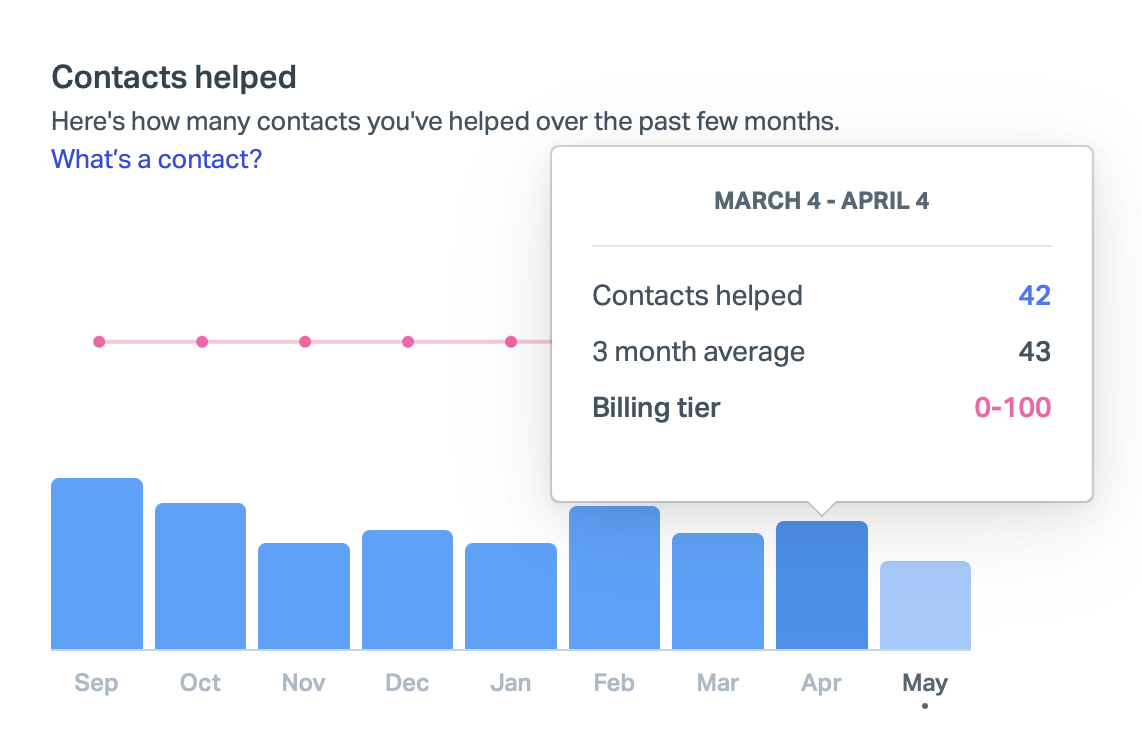
How do you know which pricing tier you’ll fall into? Once you receive notice from Help Scout that your plan is changing, you’ll be able to see a graph of your recent customer interactions on a custom plan migration page within your account. For example, my graph shows that I fall comfortably into the 100 customers per month tier:

For new customers, they suggest for estimation purposes that the likely number of “customers helped” is around two-thirds the total number of emails you receive. So if you receive 150 emails per month, you might fall under the 100 contact tier, but if receive 200 emails per month, you most likely do not.

The Upside

The new pricing will benefit some customers. A brand new “Free” tier is a fantastic option for new customers who assist fewer than 50 customers per month on average. I fall into this range, so I wondered if this option might suit me. I contacted Help Scout and they agreed that I qualified for the plan, with the exception that I was using more than maximum 100 “tags” included in the free tier. I tag some Help Scout issues with GitHub ticket numbers, but if I were willing to delete some tags, I could switch immediately and start paying $22 less per month than I do now. That’s tempting, but the big problem with the free tier is that it removes access to the Help Scout API, and the ability to “Export” your data. Restricting data export is very 2005, and I wonder how it will play out in Europe.

It’s also possible to imagine customers with a large number of agents assisting a relatively small number of customers. For example, if my imaginary three-person support team handled only 100 unique customers per month, the monthly cost would go down with the new pricing, from $66/month to $50/month. Or $30/month if they provide the same loyalty discount, but I suspect for customers positively affected by the price change, there will be no such discount.

Finally, customers who lean heavily on Help Scout’s AI features might see savings. Currently, customers who want to use these features have to pay at least $44/month per user, twice the standard plan. I wouldn’t know and don’t care how much these savings might be, because although I am not opposed to AI in general, I don’t appreciate or employ it in the context of customer support.

What To Do?

For a customer in my particular position, whose monthly price will go up by $6, the easiest way forward is to do nothing. I’ll keep enjoying the same glorious product I have enjoyed for the past three years, at only a slightly elevated price. After another two years, we’ll see how things shake out. I contacted Help Scout about the “loyalty discount” and what happens when it expires, and they assured me that they would “do something” to keep people in my situation from seeing too much of a price hike. They claim to be aware of a problem there, but just aren’t sure how to manage it.

For customers who will see a more painful increase in cost, as with the $66 to $266 spike I contemplated above, I have to imagine they will consider other options. While I maintain that Help Scout is the best at what they do, there are, of course, alternatives. I haven’t made a thorough evaluation lately, but my pal Paul Kafasis shared a list of potential options put together by Rogue Amoeba’s Support Manager Chris Barajas. You might stumble upon something you like while perusing these:

That last option, FreeScout, is notable for being open source. Another option that came across my radar is a system called Zammad, which offers full-service hosting with the same refreshingly-simple “per user” pricing I once admired Help Scout for. And like FreeScout, Zammad is also open source. This means that either of these options can be self-hosted on your own server, akin to hosting your own WordPress installation.

I don’t relish the idea of maintaining my own help desk, but with the ever-looming threat of changes in functionality and pricing, for such a critical piece of infrastructure, I am considering it. With the wide-spread adoption of technologies like Docker, which bundle software into self-contained, easily-deployed packages, and services from companies such as Amazon, Microsoft, and Google, which make it easier to host such packages, it has never been easier to maintain a “self-hosted”, yet highly reliable web service.

Takeaway

While I respect Help Scout’s right and responsibility to manage the destiny of their own business, I think they are making a mistake with these changes.

It’s one thing to assert that they are upsetting their current user base. I think they are, but worse, I think they will turn off prospective users as well.

People don’t like fluctuating prices. Businesses especially don’t like fluctuating prices. With Help Scout’s old business model, it was very easy to understand what you were paying for, and what you would receive. The new system requires work simply to determine if pricing is viable, let alone practical. And once you’ve settled into a tier, you run the risk of being “punished” for helping more customers. The idea that I might one day consider whether to help a customer today, at the cost of sending myself into a higher pricing tier, or helping them tomorrow, and saving a bit of cash, makes me both frustrated and a little sick.

I suspect that very-large companies will find these changes the most palatable. Not only because at greater scale the pricing is more predictable, but because larger companies have far more expenses, many of which probably dwarf the cost of their Help Desk software. The smaller the company, the more likely Help Desk software is to be one of the main monthly expenses.

In a private chat, somebody suggested to me that small-time companies like mine are not Help Scout’s target market. That might well be true, but if it is, I think that is also folly. Most companies with 10, 100, or 1000 customer support agents started as companies with 1, 2, or 3 support agents. Help Scout’s new “Free” tier is a nod to the importance of luring in customers when they’re small and have little money to spare. They just seem to drop the ball a bit when it comes to taking care of customers at slightly-more-successful levels.

I am not sure what percentage of customers have been notified so far, but the number seems to be accelerating. I suspect the amount of negative feedback Help Scout receives will also accelerate. Hopefully this will inspire changes that make this transition more palatable for everybody.

Apple Intelligence

As WWDC draws near, anticipation of Apple’s long-rumored VR headset is high. The company is widely expected to announce an impressive, albeit expensive new product at the June 5 Keynote event. In short: people expect Apple to make a strong showing in this field.

People are justifiably less confident about Apple’s prospective plans in the area of artificial intelligence (AI), and particularly in the realm of large language models: the technology behind such imagination-captivating products as OpenAI’s ChatGPT, and GitHub Copilot (which itself uses another OpenAI language model).

I zeroed in on ChatGPT and Copilot because it’s easy to imagine the functionality of these services shining in the context of two important Apple products: Siri, and its Xcode developer tools. In fact, technology is advancing so quickly that the absence of something like ChatGPT and something like Copilot in these products seems likely to be viewed as major shortcoming in the near future, if it isn’t seen that way already.

The industry-wide excitement around AI is so great that it’s hard to imagine any company of Apple’s stature letting a major developer conference come an go without at least mentioning the technology, if not enumerating the specific ways in which they are using it in their products. Most people I know are confident it will be mentioned in the Keynote, but less confident that any news will be Earth-shattering, or even Earth-tickling.

Which leads me to my somewhat far-fetched prediction for WWDC: Apple will talk about AI, but they won’t once utter the letters “AI”. They will allude to a major new initiative, under way for years within the company. The benefits of this project will make it obvious that it is meant to serve as an answer to comparable efforts being made by OpenAI, Microsoft, Google, and Facebook. During the crescendo to announcing its name, the letters “A” and “I” will be on all of our lips, and then they’ll drop the proverbial mic: “We’re calling it Apple Intelligence.” Get it?

Apple often follows the herd in terms of what they focus their efforts on, but rarely fall into line using the same tired jargon as the rest of the industry. Apple Intelligence will allow Apple to make it crystal clear to the entire world that they’re taking “AI” seriously, without stooping to the level of treating it as a commodity technology. They do this kind of thing all the time with names like AirPort, AirPlay, and AirTags. These marketing terms represent underlying technologies that Apple embraces and extends. Giving them unique names makes them easier to sell, but also gives Apple freedom to blur the lines on exactly what the technology should or shouldn’t be capable of.

Apple Intelligence won’t be as good as ChatGPT or GitHub Copilot, at least not to start with. But it will be Apple’s. They can frame the pros and cons however they see fit, working their typical marketing magic to make its shortcomings seem less important, if not downright advantageous. And, being an abstraction on the already broad subject of “AI”, they can evolve its capabilities over time, gradually improving on it and increasing its brand recognition. In five years, when every other company is still talking about “AI”, or whatever other buzzword has taken its place, Apple may well have already incorporated the technology into its own A.I.

52 Floppy Pickup

On the latest Accidental Tech Podcast, John reminisced about the early days of the Mac, when a single 3.5″ floppy disk drive was typically used not only to boot a Mac, but also to run any applications, and to save any user data. He described the painstaking process of needing to insert a different disk whenever programs required access to specific executable code or data. Depending on the complexity of a workflow, you might be prompted to swap disks once, twice, or potentially dozens of times.

The conversation reminded me of one of my first jobs at Apple. I was hired to work as a QA tester with the engineering team that shipped Mac OS system software updates. The first release I worked on was Mac OS 7.5, which was released in 1994. By this time hard drives had become commonplace and the kind of floppy-swapping John described had become a lot less common for most users. But when it came to installing new software onto a Mac, some amount of removable media juggling was usually required.

Typically at that time, major OS updates were installed from CD-ROM discs. The system used the same basic strategy: it would eject one disc and prompt you to insert another, until the installation process was completed. It was a little tedious, but because CD-ROM discs had a massively higher capacity than floppy disks, it usually only required a few swaps.

One day during the lead up to finishing System 7.5, my boss brought a massive box full of floppy disks into the lab I worked in. The System 7.5 update was remarkably backward compatible, and supported computers as old as the Macintosh Plus and SE, which did not include a CD-ROM drive. In fact they did not even support the relatively higher density 1.4MB floppy disks of the era. That massive box was the System 7.5 installer, split across 50 or so (as best as I can recall) 800K floppy disks. I was supposed to make sure it worked.

Another thing John recalled on the show was how some folks got amazingly good at floppy-swapping process, developing a muscle memory for fluidly withdrawing and inserting disks on command. Suffice to say, after testing that 50-floppy install process more than a couple times, my muscle memory was pretty darned good.

Spelunking Apple’s Open Source

Since the earliest days of Mac OS X, Apple has complied with the licenses for the dozens of open source components it includes in the OS by posting (sometimes a little belatedly) updated versions of the source code to its Open Source at Apple web page.

This resource is useful primarily to developers, but may also interest curious technophiles who want to take a peek “behind the curtain” to see how much of the magic just beneath our fingertips is made.

If you visit the page today, you’ll see a new emphasis on Apple’s high-level projects, such as Swift and WebKit. At first glance you might wonder if the extensive list of all the open source projects has been removed from the site.

There’s no need to worry: the whole list, indexed by the pertinent platform and OS release to which they belong, is still available on a separate Releases page. Even better, each of these releases now has a corresponding GitHub repository, hosted in a dedicated organization reserved exclusively for open source distributions.

As great as the old list of distributions by release is, it can be tedious to pinpoint exactly where a particular component’s source code might live. Sometimes it’s easy: for example, the source code for the version of the Vim editor that shipped with macOS 13 is conveniently located in a distribution called vim-136. But other tools can be harder to find. If you were curious about the “banner” command, which was historically used to generate ASCII text suitable for printing huge messages at dot matrix printers (!), and which is remarkably still available as a built-in command on every Mac, you’d have to know to go looking for it in the text_cmds-138 release.

Apple’s decision to host these releases on GitHub, under a distinct organization, solves the problem. If you want to find the source code to an arcane tool like “banner”, just type it into a GitHub search of the organization. If there are too many false hits, as is the case for a common word like banner, try searching on something unique like a term from the command’s man page. The banner tool is credited as being authored by Mark Horton, and a search for “org:apple-oss-distributions Mark Horton” brings up more hits than I would have guessed (he also contributed to vim and vi, coincidentally), but a reference to the banner man page is the second search result.

I was inspired to write this blog post by a situation that came up in a programming Slack, where one person asked for “an API that could list the open ports and their owning processes.” Another replied that the command-line tool “lsof” is up to the task, only the person wasn’t looking for a command-line tool. Using the knowledge of Apple’s open source distributions, you could go look for, and find, the pertinent source code, and determine which API it was using.

When questions like these come up, many times the answer comes from a wise old sage who happens to know exactly what you’re looking for. Other times, Apple’s increasingly well-indexed open source distributions might be just the ticket.

Disciplined Innovation

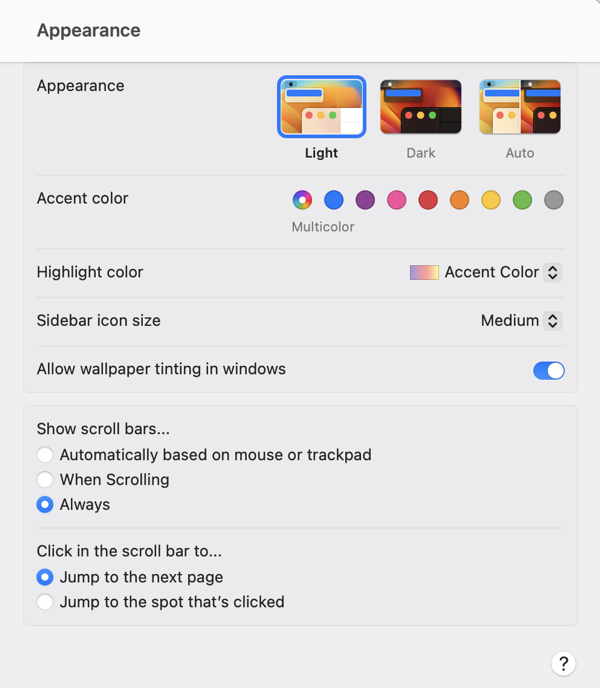
Apple’s macOS 13 “Ventura” beta features a major redesign of the System Preferences application. In addition to renaming it “System Settings,” Apple revamped the interface with an organization style that is far more reminiscent of the iOS “table view” organization than of the macOS status quo:

Screenshot of the macOS 13 Ventura System Settings Appearance tab

At first blush, there are apparent advantages to this design. Perhaps most significantly, the resemblance to iOS in both appearance and function may make the interface more navigable, and easier to understand, for users who are more familiar with iOS than with the Mac. The familiar “stack based” approach to delving deeper into the details of a particular preference pane has some advantages to the typical Mac approach of presenting detail as modal panels, which sometimes beg to be awkwardly nested in a pile of secondary or tertiary panels.

On second, third, and many blushes beyond, however, the design of System Settings appears to represent a major regression in overall usability and aesthetics. It has been taking public jabs since the first deveoloper beta, prompting a challenging question from John Gruber in his interview with Apple’s Greg Joswiak and Craig Federighi. Federighi replied with a compelling argument in favor of unifying the design experience across platforms, and removing historic cruft from the legacy macOS designs. Federighi further complained that Apple was being “judged for its betas,” implying that the UI would see significant improvements over the course of the summer.

We have seen improvements, but by the judgement of most Mac faithful (or at least the loudest among them), these improvements are not enough. Recently, a trending Twitter thread by Niki Tonsky reignited criticism, while many people pointed out that as the expected ship date for macOS Ventura draws closer, we are less likely to see dramatic improvements.

John Gruber returned to the subject in a piece yesterday, in which he asserts “the basic fit and finish of Ventura’s new System Settings is just bad.” He lays much of the blame for this on SwiftUI, which he further asserts that with SwiftUI “so many little layout details are apparently hard to get right.”

I have heard several people acknowledge that the successful transition to Apple Silicon was accomplished in part by focusing on the underlying architectural change while having the discipline to keep the hardware the same. The thinking is that with such a dramatic change in the underlying technology of the Mac, it would have been reckless to attempt other major hardware changes at the same time. In short: the Apple Silicon transition can be judged as successful on the basis that anybody using such a Mac might not even know they were using a fundamentally different computer design.

With Apple Silicon, Apple was able pull the proverbial table cloth out from under the exquisite place settings of the Mac, comprising its beloved hardware and software features, while leaving everything standing exactly as it was. That’s quite an achievement.

I think that SwiftUI would be judged as a more successful transition if Apple had pulled off a similar stunt. What if they had approached the challenge by making sure, first and foremost, that every Mac and iOS UI component behaved exactly the same as before? Then, as with the Apple Silicon changes, they could leverage the advantages of the new technhology to expand and improve upon the status quo, rather than attempting to replace it.

By choosing to change the underlying technology while also introducing new UI designs and behaviors, Apple has effectively attempted to pull the tablecloth out from under the place settings, while also pouring tea, cutting the cake, and serving the sandwiches. Messes will get made, some dishes are bound to get broken, and they’ll take a long time to put back together.

Dump FogBugz

Once upon a time, there was a fabulous service called FogBugz. Well, technically it still exists, but over the past many years, since it was sold off by Fog Creek Software, it has both stagnated and diminished in reliability as a substantial number of us long-time users has grudgingly continued to use it.

Several months ago, the whiff of abandonment became too great for me to bear any longer, so I devised a plan to migrate my data out of FogBugz, and into more reliably maintained services. FogBugz effectively served as both a customer-service database, and a bug-tracking system. Most apps don’t strive to achieve this, so I had to plan for two new services to fill the shoes of this app. I settled on HelpScout for customer service, and GitHub Issues for bug-tracking. HelpScout has turned out to be more of a solid home run than GitHub issues, but I’m happy with both.

Whether you’re also looking to transition away from FogBugz, or just want a reliable means of backing up your data, you’ll need to use the FogBugz API to get your data out. Once you have a structured backup of all your case data and attachments, you’ll be in a good position to evaluate how you might migrate that data into a format that is suitable for importing to another service.

I’ve shared a pair of simple Python scripts on GitHub that will help you to automate dumping your FogBugz data. Simply download my dumpbugz files from GitHub, follow the directions in the README, and you should be left with a “Cases” folder that includes all of your data and attachments.

For my transition to HelpScout and GitHub Issues, I wrote additional scripts to interface with the APIs of those services. Those are not ready for sharing at this point, but I may share them in the future. In any case, I hope the scripts make it easier for you to “Dump FogBugz” sooner than later.