The MorphOS development team is proud to announce the public release of MorphOS 3.20! This release brings major advancements across the operating system, including new hardware support, extensive graphics and 3D improvements, new utilities, filesystem enhancements, and broad modernization work throughout the platform.
MorphOS 3.20 introduces support for the new Mirari architecture together with several dedicated system components, drivers, thermal management support, and updated networking functionality. Radeon graphics support has been significantly expanded with support for additional GPU families, improved HDMI, DVI and DisplayPort handling, enhanced multi-monitor support, improved 3D compatibility, and major updates to TinyGL and Radeon drivers for better rendering performance and stability.
This release also introduces SFS2 support across the operating system, enabling support for files larger than 4GB and partitions up to 2TB. Many filesystem components and utilities have been updated for nanosecond timestamp precision and dates beyond year 2038. Ambient received numerous usability, performance and stability improvements, including enhanced icon handling, improved search functionality, better drag-and-drop support, external panel support, and updated multimedia format handling.
Several new applications and utilities are included in MorphOS 3.20, such as DriveImager, MirrorBackup, SMARTDoctor, OFHTTP, OFHash, OFDNS, Replace, and Automator for scripting and controlling MUI applications. Iris has been updated to version 1.53 and now includes the new Contacts companion application for CalDAV-based address books. FlowStudio received extensive improvements for project management, printing, Markdown support, and development workflows.
Networking and connectivity have also been improved with updates to OpenSSH 10.3p1, TLS 1.3 support in RDesktop, expanded SMB2 filesystem improvements, and improved USB, audio and multimedia subsystem stability. Numerous system libraries and frameworks including MUI, ixemul, Cairo, Harfbuzz, Freetype, OpenSSL4, and ObjFWRT have been updated or significantly modernized.
MorphOS 3.20 additionally contains a very large number of bug fixes, performance improvements, memory handling corrections, rendering fixes, and usability refinements across the operating system. For a complete overview of the changes included in MorphOS 3.20, please read the release notes.
We strongly urge new users to carefully read our installation and troubleshooting guides before they attempt to install MorphOS for the first time. Existing users can upgrade via the familiar procedure but are encouraged to read the guides as well. MorphOS 3.20 is available for download in our files section.
Added ZZFwUpdate, a new AmigaOS CLI tool for copying BOOT.bin or other root-level files to the ZZ9000 FAT32 microSD card over Zorro, without removing the card.
Improved RTG driver performance and Picasso96 compatibility.
Improved Poseidon USB root hub, HID idle, unload, and NSD behavior.
Expanded ZZTop diagnostics with clearer readouts, auto refresh, bus probing, scanline labels, and VideoCap/genlock diagnostic data.
Expanded zznetstats with firmware RX backlog/drop counters.
Refreshed the installer, release packaging docs, and main README.
Bumped changed component versions for the v2.1.0 release.
Component Versions
ZZ9000.card: 2.5
zzusbhw.device: 2.1
ZZ9000Net.device: 2.1
ZZTop: 2.1
ZZFwUpdate: 2.1
zznetstats: 2.1
RTG / Picasso96
Moved per-board state into BoardInfo->CardData, avoiding callbacks depending on global last-discovered-board state.
Switched current settings to native BT_MNT_ZZ9000 Picasso96 board identity.
Installer now backs up existing Devs:Picasso96Settings before installing the migrated settings file.
Added P96 driver audit fixes:
correct private library base allocation size,
close opened libraries on all FindCard paths,
add NULL guards in several callbacks,
advertise cache mode change and video capture capabilities.
Improved Zorro II rendering paths:
direct solid horizontal/vertical line drawing,
better small-rectangle thresholds,
fewer redundant blitter setup writes.
Restricted advertised RTG pixel formats to those the firmware/video formatter handles natively.
Added register-cache tests for the blitter register write reduction.
Fixed V-007 BlitPattern size overflow issue.
USB / Poseidon
Improved root hub handling and status reporting.
Stabilized idle HID interrupt polling so Poseidon keeps endpoints alive.
Preserved root port enable status correctly.
Aligned interrupt poll timeout behavior.
Implemented NSD NSCMD_DEVICEQUERYsupport.
Improved open/close/expunge lifecycle handling.
Prevented unload-time poll-task use-after-free.
Restored the frozen ZZUSBBase layout after a regression that could trigger guru 80000004.
ZZTop
Added $VER: version tag.
Improved diagnostics UI layout and readout alignment.
Added named scanline controls and clearer hardware status fields.
Added auto refresh modes.
Added non-destructive register/bus probe.
Added VideoCap line and pulse-width diagnostics for genlock investigation.
Updated window title branding.
Firmware Update Tool
Added ZZFwUpdate, installed to C: by the installer.
Supports:
default destination basename,
optional explicit destination filename,
local filename validation,
live upload progress,
busy spinner while firmware writes,
transfer speed summary,
partial-transfer cleanup via firmware abort.
Requires firmware with FWUP protocol support.
Networking Diagnostics
zznetstats now reports firmware RX queue/backpressure/drop counters in addition to SANA-II global stats.
Useful for diagnosing link, throughput, and packet-drop behavior.
Installer / Packaging / Docs
Installer includes ZZFwUpdate and zznetstats.
Release zip remains installer-focused: binaries are placed inside ZZ9000Installer/, not duplicated at the zip root.
Main README was restructured for clearer installation, component, build, and release guidance.
ZZ9000 Firmware v2.1.0
This release focuses on RTG performance, firmware robustness, FWUP updates, videocap fixes, and rebuilt FPGA variants.
Highlights
Faster RTG drawing and planar conversion paths, with NEON optimizations and a new host-side RTG regression harness.
USB proxy reset and split-transaction fixes for the ARM-side EHCI host stack used by Poseidon.
Firmware-side FWUP protocol for pushing BOOT.bin or other root-level FAT32 microSD files from AmigaOS.
Video capture fixes for NTSC, progressive/interlace detection, and native-PAL cold-boot setups.
FSBL boot image bounds checks.
Zorro III/A4091 coexistence and timing fixes, with rebuilt committed bitstreams for all release variants.
Standard and ns-pal release ZIPs are packaged for every supported machine variant.
Installing
Download the ZIP matching your machine variant, extract BOOT.bin, copy it to the ZZ9000 FAT32 microSD card, and power-cycle the Amiga.
Use the ns-pal flavor only for PAL systems that boot without the host driver and need native ~49.92 Hz videocap timing from cold boot. Use the standard flavor for NTSC machines or displays that do not accept the non-standard PAL timing.
It has been far to long since I did any updates to the project. One thing I can say is how proud I am of all the 4000 systems that have been saved, built and created from scratch. All those years ago when I made this project come to life with all of the help from the community I never imagined it would have come as far as it has.
Today I am happy to announce the project is at last available to be opened and continued in Kicad. You can find the project files you need to get started at the official repo in the Kicad folder. Please respect the project and add any changes back to the repo and give credit back to the original project. I look forward to seeing where this goes from here.
Time for showing the console work in my sites name for a change. Today we have a nice HDMI mod done to my original N64 I took out from storage. This came out great and looks amazing for a cheap $45 kit. It’s not an easy install, but was sure worth doing in the end. As a bonus I found my Z64 as well. That thing was responsible for many of the US dumps back in the day!
What a time we are in! It’s been a busy year for me and our awesome hobby. We had Amiga 40, lots of new hardware announcements, amazing open source projects and even major progress on OS updates. I hate that my real life job has me away so much and I haven’t been able to get more involved. Thank goodness for the community we have in our Discord Server here though! It’s been more alive and growing than I ever imagined. It’s truly become a place for all things related to the home electronics, retro and open hardware community.
If you haven’t joined and are looking for any help I can’t give, you will find it there for sure. Please use this invite link and become a member of the family.
It’s been ten years since the highly successful Amiga 30th in Mountain View, California. Over the last ten years, we have seen an incredible vibrancy in the global Amiga community. With projects like the Vampire, Emu68K, and Amiga OS 3.2 combined with AROS, AmigaOS 4 and MorphOS, never has there been so much activity and energy for the Commodore Amiga and its many derivatives.
2025 marks the 40th anniversary of the Commodore Amiga 1000 release. The AMIGA/040th Silicon Valley will be the central theme at the amazing VCF West show. Happening at the Computer History Museum in Mountain View, CA, we will offer all attendees a unique area on the show floor. In this area, you will explore the Saga of the Amiga Computer–before Commodore, during its golden era, and beyond… Expect to see unique historical artifacts from the personal collection of Dale Luck, the latest Amiga Community innovations like AmigaOS 3.2 and OS 4, alongside groundbreaking hardware projects such as Emu68k, and PiStorm.
Bookmark this webpage to stay informed of new developments – e.g. show schedule, hotel details:
The MorphOS development team is proud to announce the immediate availability of MorphOS 3.19. This release includes numerous important stability and security improvements.
For a more extensive overview of the changes included in MorphOS 3.19, please read our release notes.
We strongly urge new users to carefully read our installation and troubleshooting guides before they attempt to install MorphOS for the first time. Existing users can upgrade via the familiar procedure but are encouraged to read the guides as well. MorphOS 3.19 is available for download in our files section.
The little time i have for doing repairs and builds is limited, but i do enjoy doing it when I can. I test them always before they go out to new owners. Thats why when I was contacted from a recently completed one having troubles I was a bit concerned over it.
This machine worked perfectly in all appearances while booting into WB with no zorro daughterboard and cards installed into it. Great picture, sound and everything. I use a ZZ9000 with video passthrough to test further. When it was completed, it all worked.
Move on a few weeks and I get a message that the owners ZZ9000 isn’t working with his new 4000. It would through up a red “bad” screen at power on and just not show anything. I asked him to return it and I would look for the issue. When it arrived, sure enough it did the same for me. What was it you ask? Well it seems the owner decided to replace the Buster 11 from his original board I pulled the chipset from and it caused the socket to no longer make a good contact. After man many hours of troubleshooting, discussion on my Discord server and madness, the easiest thing I should have checked was the socket. The solution was to remove the socket and direct mount the Buster 11 to the board. No more issues and a perfect all new 4000 now.
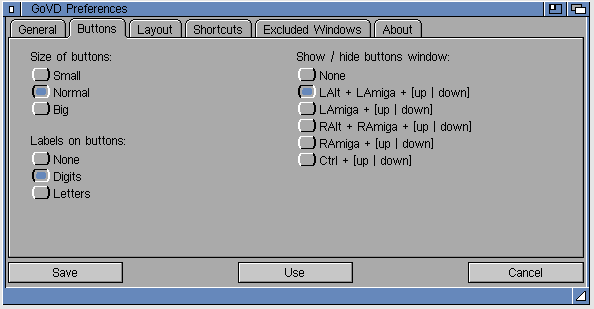
I dont post enough to this site but when I do its because I have free time and find something very interesting I feel needs to be shared. One such find is the GoVD vertual desktop application from developer Bit Plan. https://bitplan.pl/govd/ Since installing this I cant imagine how I’ve lived without it. It is shareware, but is fully functional with no limitations except for lasting only 20 minutes. Check it, I am sure you will enjoy it.
Check out the info from the official website below
About GoVD
If you use Workbench and often run multiple programs, you know how cluttered the screen can get, making it difficult to find the window you’re looking for. GoVD extends your Workbench screen to up to eight virtual desktops, making it much easier to manage your workspace. You decide which Workbench windows and programs are displayed on each desktop. Just switch desktops, and everything is neatly organized. With GoVD, you can break free from the limitations imposed by Commodore’s traditional desktop layout and take control of your workspace.
Main features of GoVD
Up to 8 virtual desktops
Intuitive configuration tool
Easy setup for the appearance and content of each virtual desktop
Define which programs and windows to display on each desktop (e.g. clock, calendar, ToolbarManager or similar)
Keyboard shortcuts for switching between desktops
Screenshots
Known Issues
Workbench strictly enforces the rule that you cannot open more than one window for the same directory. For example, if you open a window for the RAM: disk, you won’t be able to open a second window for RAM:. GoVD does not solve this issue, so a RAM: window may only appear on one desktop, regardless of how many virtual desktops you create. Therefore, GoVD allows you to enable or disable the display of directory windows on all desktops. Enabling the opening of multiple windows for the same directory is a challenge for OS developers — perhaps in AmigaOS 3.3?
Requirements
Any Amiga with AmigaOS 3.2+ It should also work with OS 3.1.4 with intuition.library v46




 Acill Classics