
Week 1 I was skeptical. Week 4 I was a believer. Week 8 I had 12 hours back every single week and my VA bill was zero. Here's the full story.
6 min read · Real results · Tools: n8n, Gmail, Google Sheets, Telegram, Gemini
I want to be upfront about something before we start.
This post is going to make some people uncomfortable.
Not because the results are fake. But because they’re real — and they’re going to force you to ask yourself why you’re still doing things manually.
Here’s the full story. No fluff. No exaggeration. Exact numbers, exact timeline, exact what-went-wrong.
I had a part-time VA. $400 a month. 20 hours of work.
Good person. Reliable. But I started noticing something that bothered me.
80% of what she did every week was identical to the week before.
Check the inbox. Flag leads. Log them in a spreadsheet. Send a follow-up email. Update the status. Ping me on Telegram when something needed attention. Repeat.
There was no thinking involved. No judgment. No creativity. Just moving information from one place to another — over and over and over again.
Most founders can’t replace their VA with AI because they’ve never catalogued what their VA actually does. They hired someone, handed over chaos, and things got better. That’s not a system — it’s outsourced avoidance.
That line hit me hard when I read it. Because that was exactly what I had done.
So I did the uncomfortable thing. I sat down and logged every single task my VA touched for two weeks straight.
Here’s what I found.
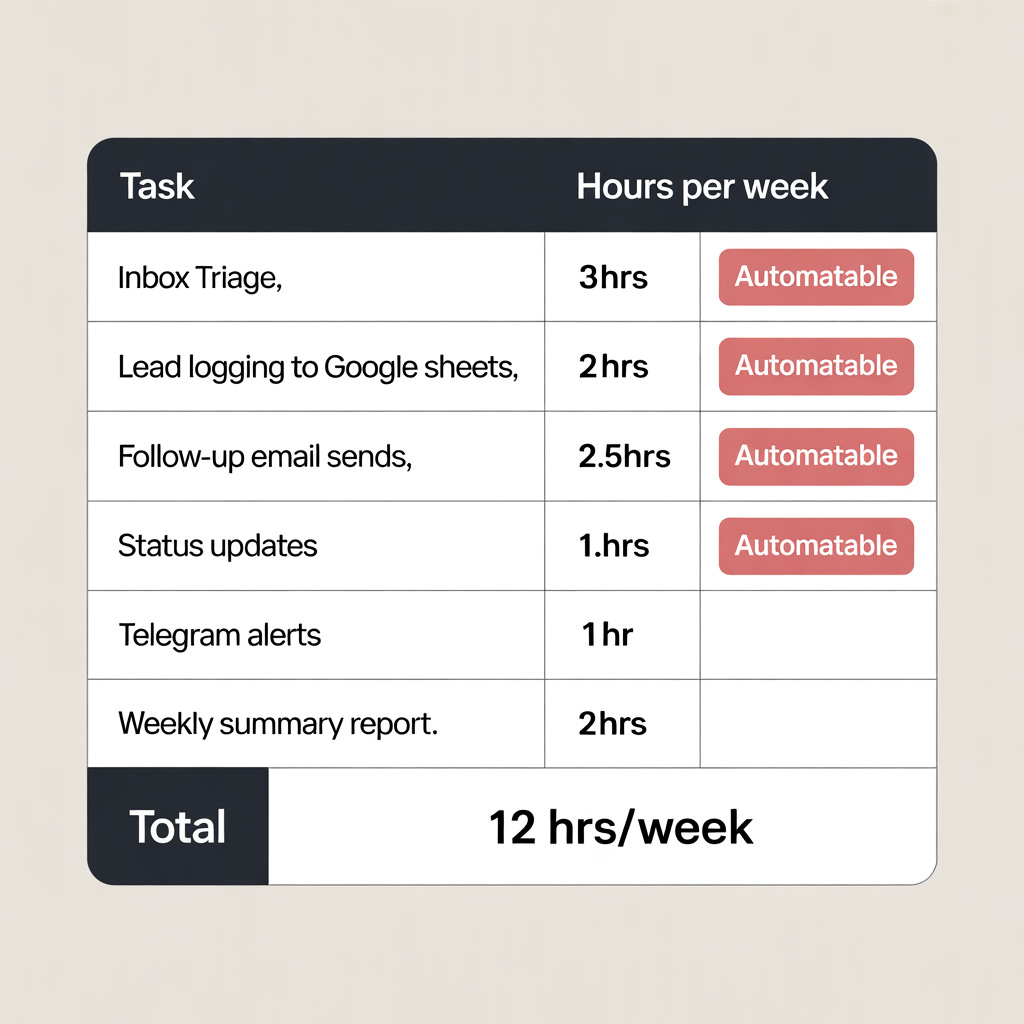
12 hours a week. Every single week. Every single task was rule-based.
If this → do that. If email contains “pricing” → flag it. If lead status is “Sent” → follow up in 48 hours. If no reply → move to nurture.
No judgment required. Just logic.
The key question is: which tasks are rule-based versus judgment-based? Rule-based steps are automation candidates. Judgment-based steps need a human.
Of the 12 hours my VA was spending — I found exactly 1 hour that genuinely needed a human. Client relationship calls. Everything else was pure logic.
I had been paying $400 a month for 11 hours of work that a workflow could do and 1 hour of work that actually needed a person.
That was the moment I decided to build.
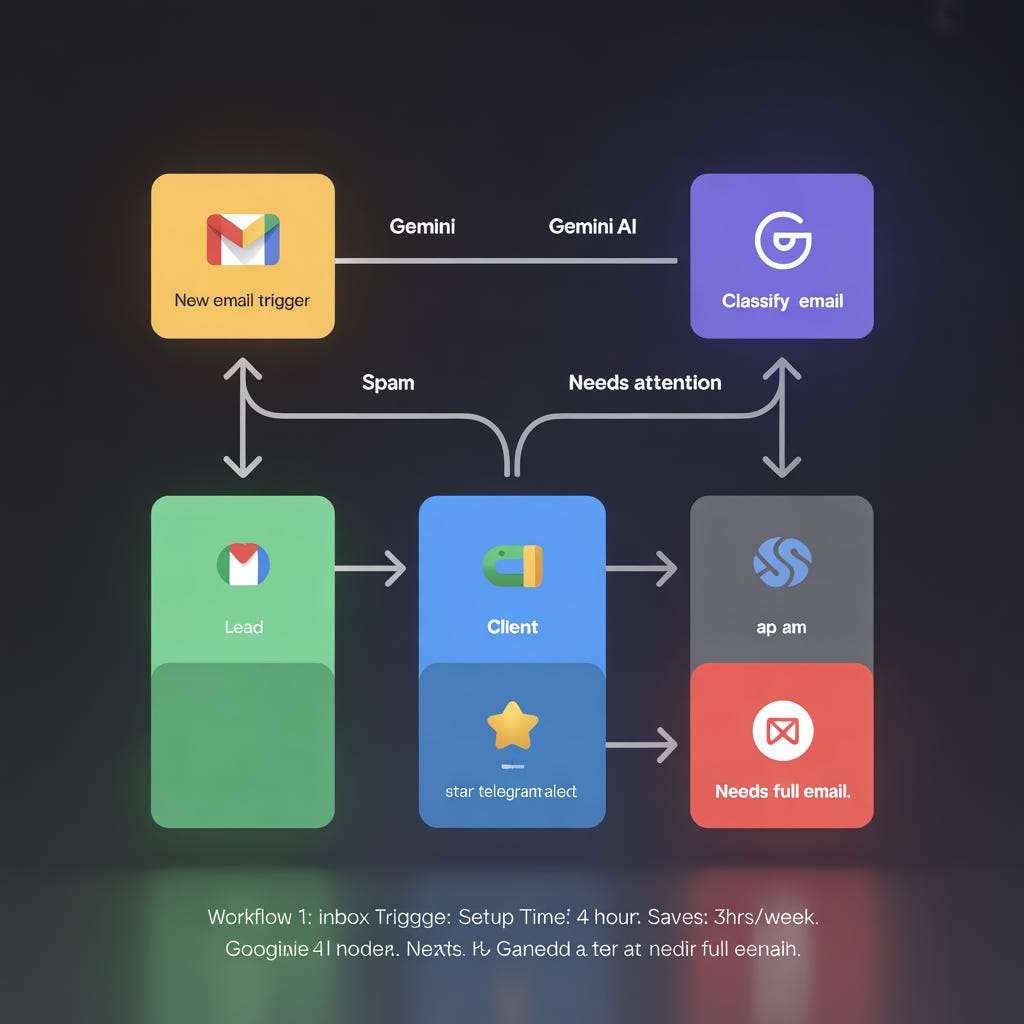
I started with the highest-impact task first. Inbox triage was eating 3 hours a week and it was the most painful.
Here’s exactly what I built in n8n:
A Gmail trigger watches my inbox for new emails every 15 minutes. When one arrives, a Gemini AI node reads the full email and classifies it into one of four categories — Lead, Client, Spam, or Needs Attention.
Based on the category, the workflow routes it. Leads get logged automatically to a Google Sheet with the sender name, email, company, and a one-line AI summary of what they want. Client emails get flagged with a star in Gmail and I get a Telegram ping. Spam gets archived without me seeing it. Needs Attention gets a Telegram alert with the full email body so I can deal with it fast.
Setup time: 4 hours including testing. Hours saved per week: 3 hours. Cost to run: zero.
First week it ran — it processed 94 emails. I touched 7 of them. The other 87 were handled, classified, and logged without me opening Gmail once.
This one scared me a little to build. Because sending automated emails to real leads felt like a big responsibility.
But I built it anyway. And it’s now the workflow I’m most proud of.
Here’s how it works.
Every 48 hours, n8n checks my Leads Google Sheet for any row where Status is “Sent” and Last Contact is more than 2 days ago. For each one, a Gemini node reads the original email I sent them, their company name, and their original enquiry.
Then it writes a follow-up email. Personalised. Referencing their specific situation. Not a template — an actual written email that sounds like I wrote it at 9am with a coffee.
Gmail sends it from my account. The Sheet updates to “Followed Up.” A Telegram message tells me who just got a follow-up and what it said.
Week 3 results: 14 follow-ups sent automatically. 4 replies. 1 became a paying client.
That client paid $500. The workflow cost me nothing to run.
My VA used to spend 2 hours every Friday pulling together a weekly summary. New leads, emails sent, follow-ups, replies, status updates.
I replaced it with one workflow.
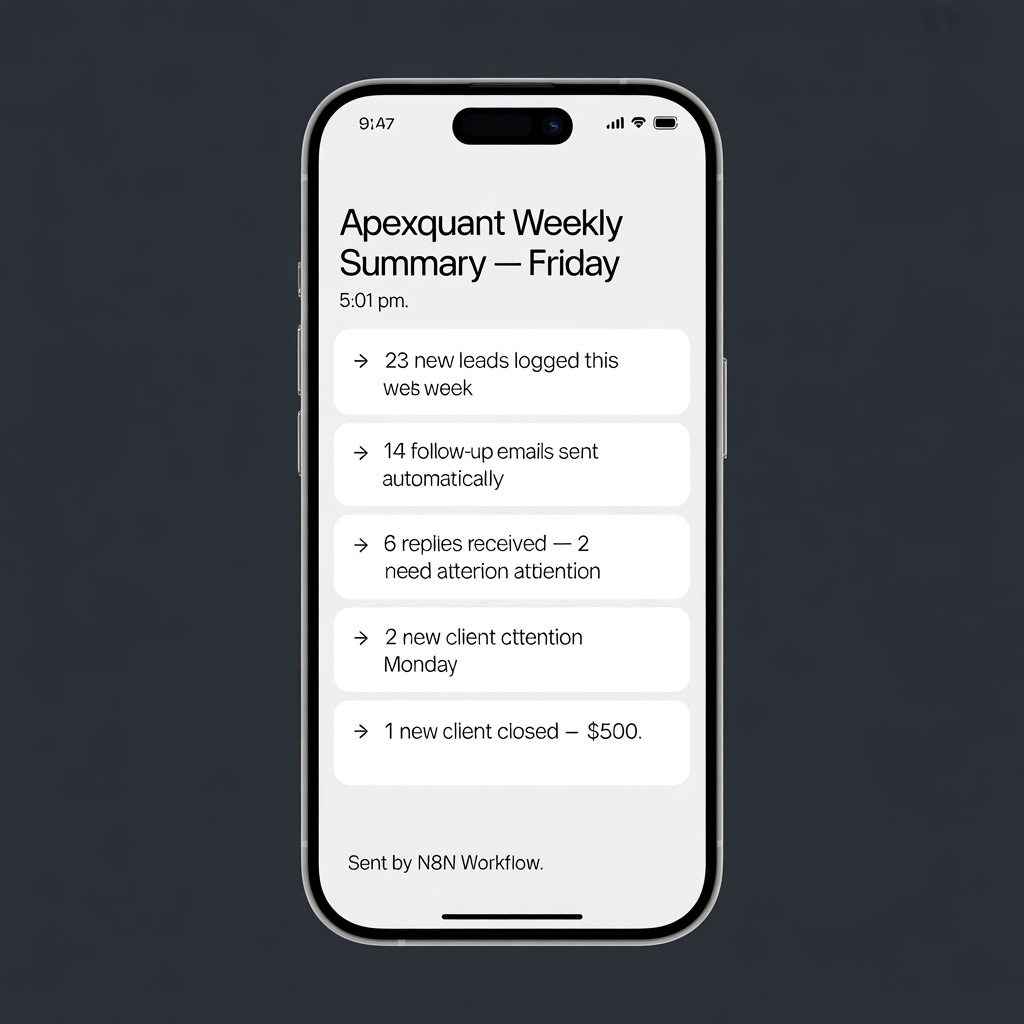
Every Friday at 5pm, n8n pulls all the week’s data from my Google Sheets — new leads logged, emails sent, follow-ups triggered, replies received. A Gemini node reads all of it and writes a clean weekly summary in plain English. No tables. No jargon. Just “Here’s what happened this week and what needs your attention Monday.”
It lands in my Telegram at 5:01pm. I read it in 3 minutes. My weekend starts.
Setup time: 2 hours. Time saved: 2 hours every single Friday.
Here are the actual numbers after 8 weeks of running these workflows.
Hours saved per week: 12 hours. Every single week.
VA bill: cancelled after week 4. Saving $400 a month.
Leads processed automatically: 340+
Follow-up emails sent without me touching them: 67
Replies generated from automated follow-ups: 19
New clients from those replies: 3
Revenue directly attributable to workflows running while I was doing other things: $1,500+
Total cost to run everything: the n8n cloud free tier and a Gemini API key. Both free.
I kept my VA on for 2 hours a week for client relationship calls. That’s the one hour of genuine human work I identified in Week 1 — except I miscounted. It was actually 2 hours. Worth every penny.
Everything else? Running itself.
Here’s something I didn’t expect.
Once the workflows were running — the bottleneck shifted. The automation was handling everything. But client-facing communications still felt robotic. Automated emails are great. Automated voice is better.
I added ElevenLabs to the stack in week 6.
I cloned my own voice. Now when a high-value lead books a discovery call through my workflow, they get an automated audio confirmation — in my voice. Personalised. Human-sounding. Generated in 4 seconds from a text script.
Users report saving 15–20 hours per week and boosting productivity by 40% within the first month of adding AI to their workflow stack. For me the voice layer was the difference between automations that felt mechanical and automations that felt like me.
One lead replied to the audio confirmation saying “love that personal touch, most founders never do that.” They had no idea it was automated.
That’s the goal. Automation that’s indistinguishable from genuine attention.
If you’re building any client-facing workflow and you haven’t added voice yet — this is the tool. Talk to their AI Success Agent directly and see what’s possible for your specific stack.
→ Try ElevenLabs and hear the difference yourself
Audit before you build. Two weeks of logging every task before touching n8n saved me from automating the wrong things first. Do the audit. It’s boring. Do it anyway.
Start with inbox triage. It’s the highest-frequency task in almost every founder’s week and the easiest to automate. Quick win. Builds confidence. Everything else feels easier after.
Don’t automate client relationship work. That 1–2 hours of genuine human contact per week is your moat. Protect it. Automate everything around it so you can do it better.
Add voice last. Get the logic working first. Then layer voice on top with ElevenLabs once you know which touchpoints matter most to your clients.
Test for one week before cancelling anything. Run your workflow in parallel with your VA for 7 days. Confirm it works exactly as expected before you change anything about your current setup.
Next Tuesday I’m dropping something I’ve been building for 3 months.
10 ready-to-import n8n workflow JSONs. The exact automations I use to run ApexQuant lean. Download, import, connect your credentials, done.
10 workflows for paid subscribers. 1 free workflow for everyone.
The email outreach workflow from last week is the free one. The other 10 — lead scoring, client onboarding, content repurposing, weekly reporting, follow-up sequences, and more — go to paid subscribers only.
If you’ve been on the fence about upgrading — next Tuesday is the week to do it.
Upgrade To Get All 10 Workflows
I’m taking on a small number of done-for-you builds this month. I map your workflow, build the automations, test everything, and hand it to you running.
$500 setup. $150/month retainer.
Reply to this email with “BUILD” and tell me what your VA is currently doing. I’ll tell you what’s automatable and what isn’t — no sales pitch, just honest assessment.
23,800 founders and agency owners. Tuesday, Thursday, Saturday. 30% open rate. 2.9% CTR.
→ Book your ad slot here or email: nefro992@gmail.com
💬 Two questions before you close this:
1 — Do you currently have a VA? What’s the one task they do most that you suspect could be automated?
Drop it in the comments. I’ll tell you if it can be done in n8n and how long it would take to build.
2 — Are you upgrading for the 10 workflow vault next Tuesday?
Comment “IN” if you’re upgrading. I want to know how many people to expect — and if the number is high enough I’ll add a bonus 11th workflow as a thank you.
Know a founder still paying for tasks a workflow could handle? Forward this to them. Might be the most useful thing they read this week.
— Patrick
Comments
Nothing yet. Say the first thing.
Sign in to join the conversation.