
Hello Antonis here!
Before we dive in, a quick note and a small apology. I know it’s been about a month since my last post. Life got busy and I hit pause to focus on something I felt truly needed building. That something is what this post is all about. Of course, Data Career Compass is to be continued and there will be five more post about data roles. So this Wednesday (and hopefully every Wednesday…) we are back on track with a new post.
I never planned to build my own app. In fact, for the longest time, I managed my mentoring with the usual patchwork of tools: Google Drive folders, email threads, random bookmarks, and the occasional spreadsheet. Every time I started with a new mentee, I found myself repeating the same setup. I’d create yet another Google Drive folder, collect links and docs from previous mentees, rewrite the same introductory notes and still have no real way to track how they were progressing. It got tiring, not the people, but the process. At some point, I had to ask myself:
“Why is this still so manual?“
So, I decided to change it. One weekend, I started vibe-coding with AI, to identify how hard/easy it was to create such a web app and deploy it without pain. And boom, I realised that I’ll have to dedicate some serious effort and pay some money, significantly less than building it without AI.
Finally, it’s quite easy for everyone and I managed to streamline my mentoring workflow. That little side project eventually turned into MentorHub. I built it for myself, to solve the exact pain points that had been frustrating me the last two years. MentorHub became the one place where I could do everything: build custom learning paths for each mentee, keep all our resources organized in one hub, track progress without fiddling with spreadsheets and actually see how someone is growing over time. In short, it took all those “manual” tasks off my plate so I could focus on what I love about mentoring…helping people grow.
What started as a personal project soon proved useful beyond just my own practice. I initially hadn’t planned on releasing MentorHub to the public. But after sharing the idea with a few fellow mentors, I realized I wasn’t alone in these struggles. The enthusiastic responses (“Where can I get this?”) made it clear that MentorHub addresses common mentoring headaches. So, at this point (and not forever) I’m now offering it to others for free so any mentor (formal or informal) can use it to simplify their workflow.
In this post, I want to give you a walkthrough of MentorHub: how it works, what problems it solves, and why it might just change the way you mentor.
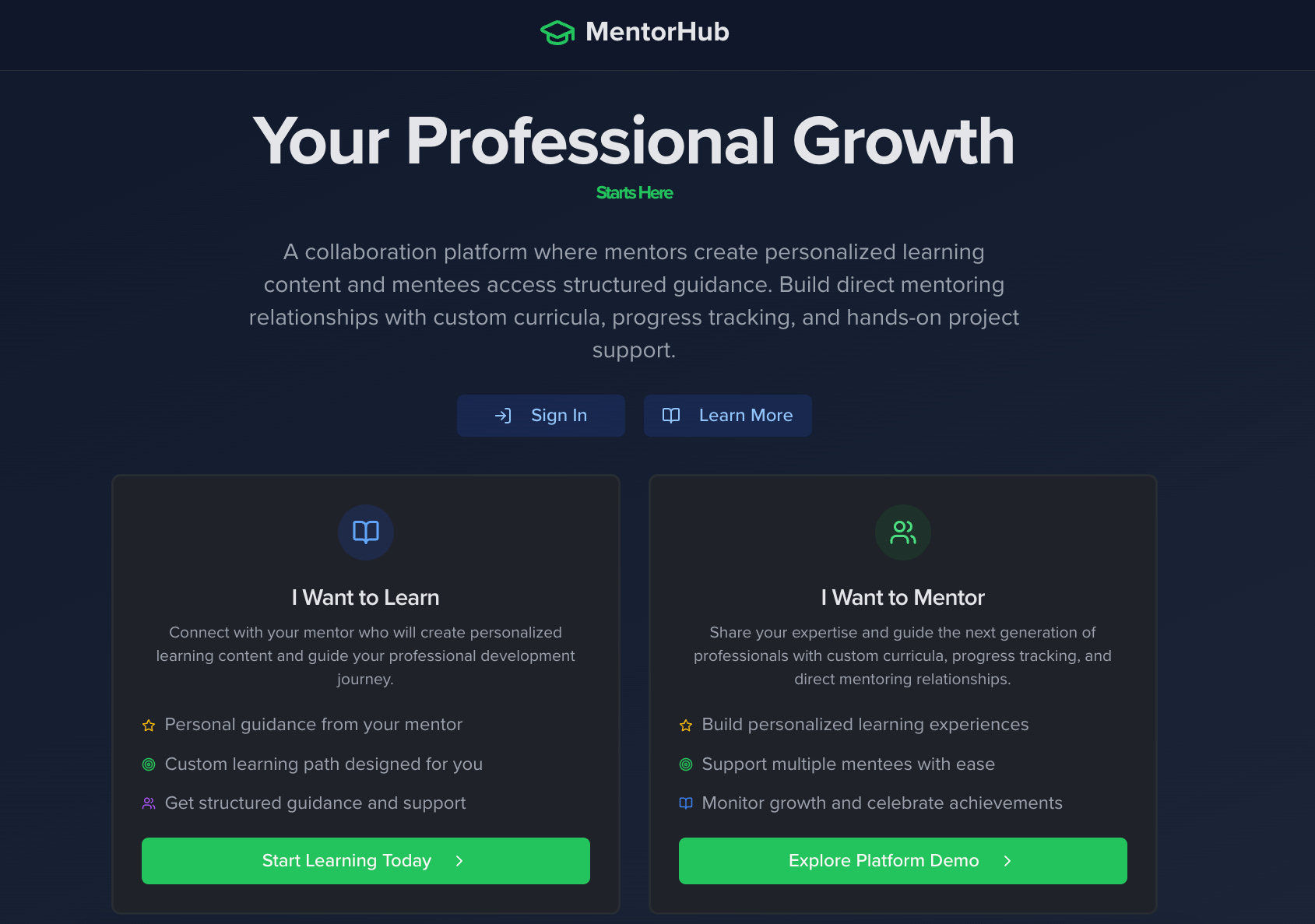
MentorHub is a web-based platform that brings all the pieces of the mentoring puzzle into one place. It’s designed as a collaboration hub where mentors create personalized learning content and mentees access structured guidance. In practice, that means MentorHub serves both sides of the mentoring relationship:
Mentors can design a custom curriculum for each mentee, assign resources and tasks, schedule and log sessions (with notes on payments) and monitor progress at a glance.
Mentees get a clear learning path laid out for them, a single portal for all the materials and tasks their mentor has assigned and a way to track their own progress through the curriculum.
Everything is organized by roles and topics. Think of it like having a template learning path for each type of mentee you mentor. For example, if you often mentor Data Analyst trainees, you can set up a “Data Analyst Learning Path” once and reuse it, instead of reinventing the wheel for each new person. MentorHub wasn’t built as a commercial product with all the flash. It was built by a mentor, for mentors, with a focus on solving real problems in a straightforward way. Let me take you through its key features. Of course there are bugs and stuff that needs to be improved.
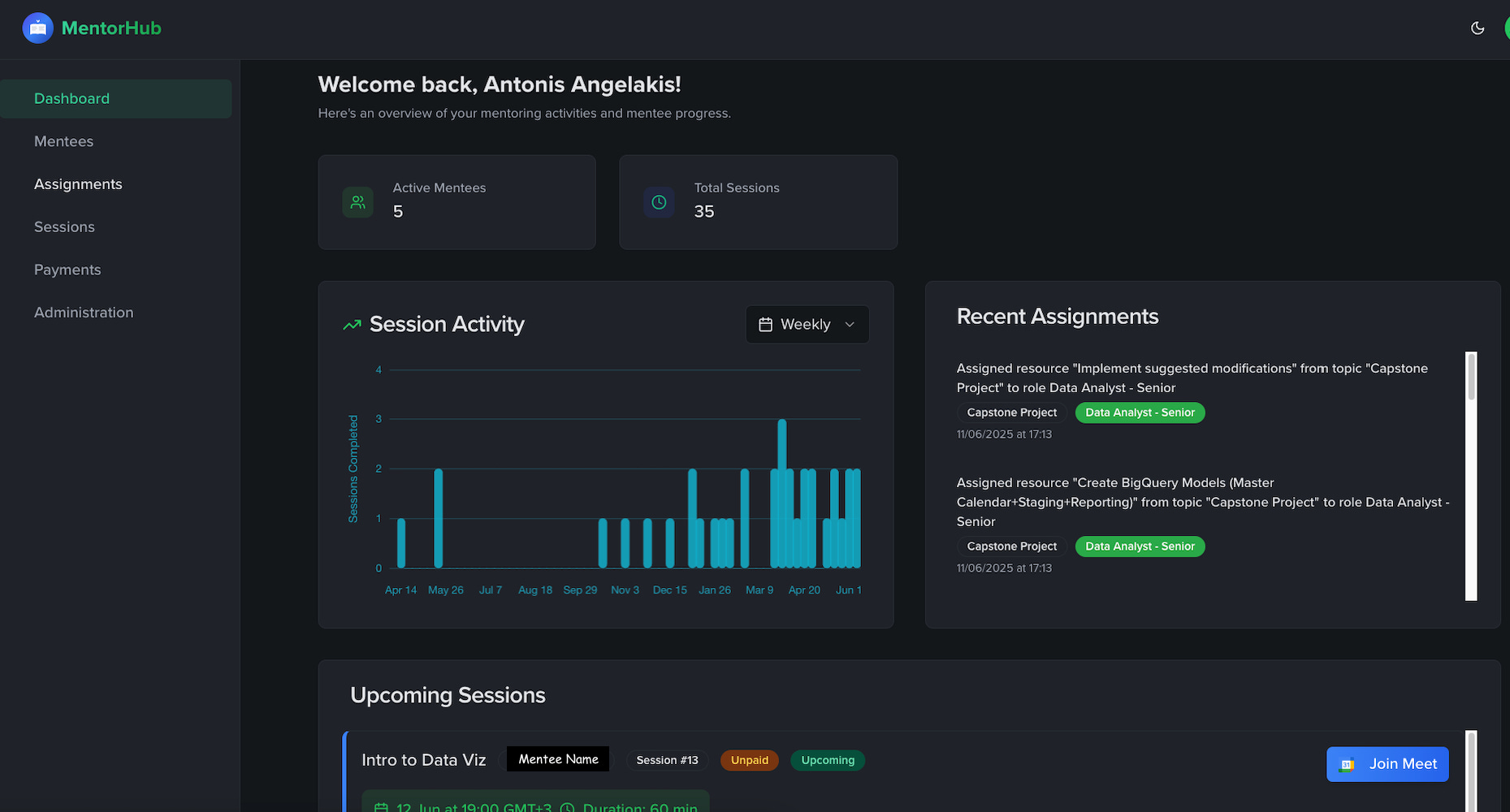
MentorHub’s Dashboard gives mentors a bird’s-eye view of all mentoring activity, from active mentee counts to upcoming sessions (as shown above).
The first thing you see when you log into MentorHub is the Dashboard. I designed the dashboard to answer the question, “What’s going on with my mentees this week?” at a single glance. At the top, it highlights the basics: how many active mentees I have and the total number of sessions we’ve logged so far (a satisfying reminder of the impact over time). A "Session Activity" chart shows the flow of mentoring sessions over the past weeks, for example, I can see if I’ve been more active this month than last.
Just below the stats and chart, MentorHub lists Upcoming Sessions with each mentee. This has been a game changer for me: no more digging through my calendar or email threads to remember when the next call is. Each upcoming session is right there with the date, time, and topic and there’s even a one-click link to join the video meeting when it’s time. Next to each session, MentorHub also flags whether the session is marked as “Paid” or “Unpaid”, a subtle reminder for me if I need to follow up on a payment later.
On the dashboard I’ve also included a Recent Assignments feed (visible in the screenshot’s sidebar). This feed shows the latest learning resources or tasks I’ve assigned out. It’s a running log of content I’ve been adding for my mentees. In practice, this helps me recall “Oh right, I gave Alice that SQL tutorial last week”, useful context right before a session with her, or when planning what to assign next. The dashboard, in essence, centralizes the heartbeat of my mentoring practice: sessions completed and coming up, and content being worked on. It’s the hub that ties everything together.
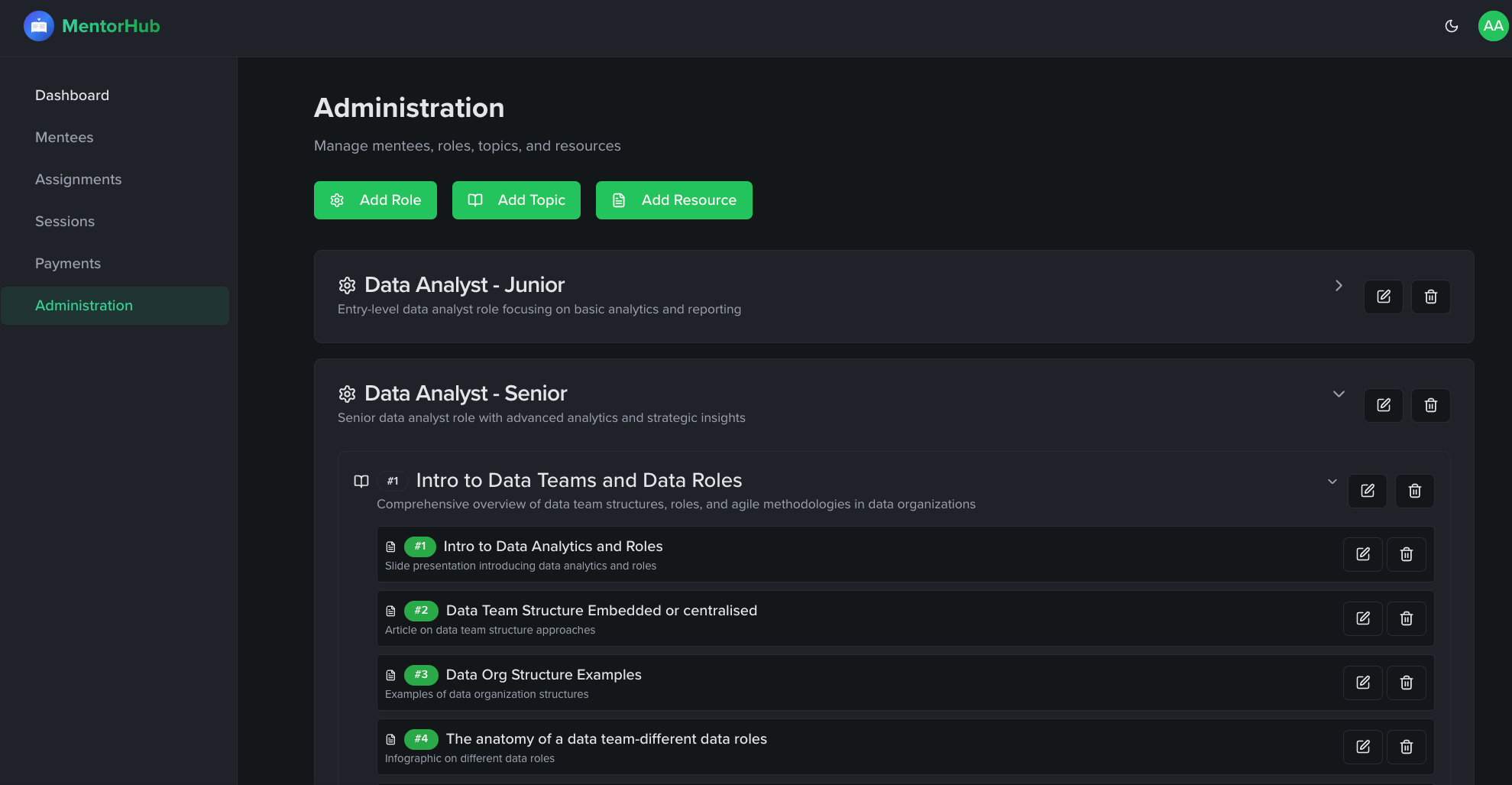
One of the aha moments that led to MentorHub was realizing how much of my mentoring content was reusable. Why was I manually compiling the same resources for every new “Junior Data Analyst” I mentored? MentorHub tackles this with role-based learning paths. In the app’s administration section, I can create a Role (say, “Data Analyst - Junior”) and define a structured curriculum for that role, broken down into Topics. Each topic is like a module or chapter in the learning journey and under each topic I can list specific Resources (articles, videos, PDFs, or any learning material).
For example, for the Data Analyst - Junior role, I might have topics like “Intro to Data Teams and Roles,” “Intro to SQL,” “Data Visualization Basics,” etc. Under “Intro to Data Teams and Roles,” I can attach resources such as a blog post on data team structures, an infographic on different data roles, or a PDF overview of agile methodologies in data. Building these content libraries takes a bit of upfront work, but it pays off immensely. The next time I onboard a mentee who wants to become a data analyst, I don’t have to start from scratch —> I simply assign them the pre-built learning path for that role and adjust as needed.
These learning paths are flexible and customizable. MentorHub lets me add or remove resources on the fly, or even tweak the sequence for a particular person. The content library lives in one place, neatly organized, so I “keep everything in one place” as I intended. No more hunting through old Google Drive folders or emails to find that one article I know I used before. By structuring content by roles and topics, MentorHub not only saves me time, it also ensures consistency, every mentee with the same goal gets the benefit of the best materials I’ve curated over time.
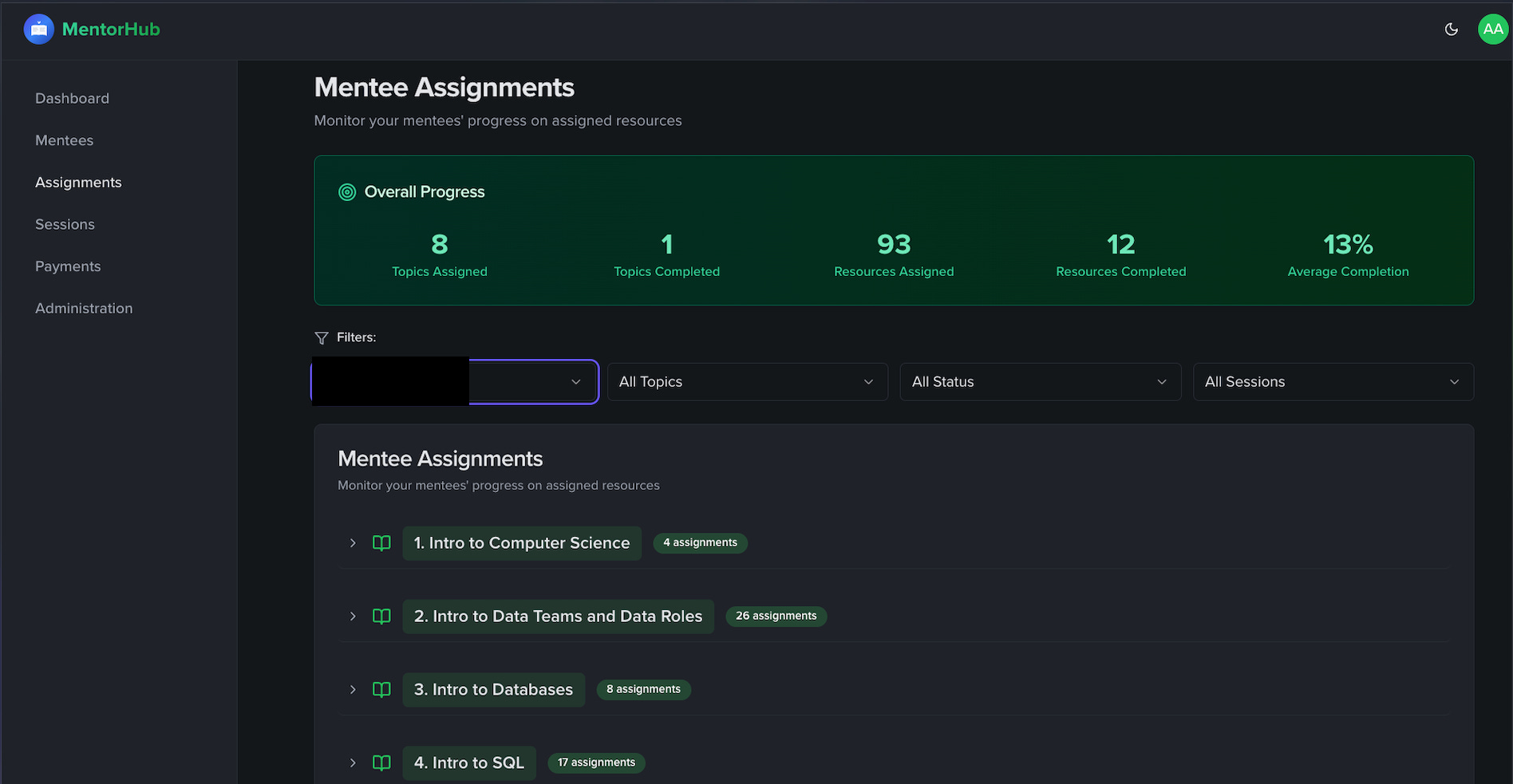
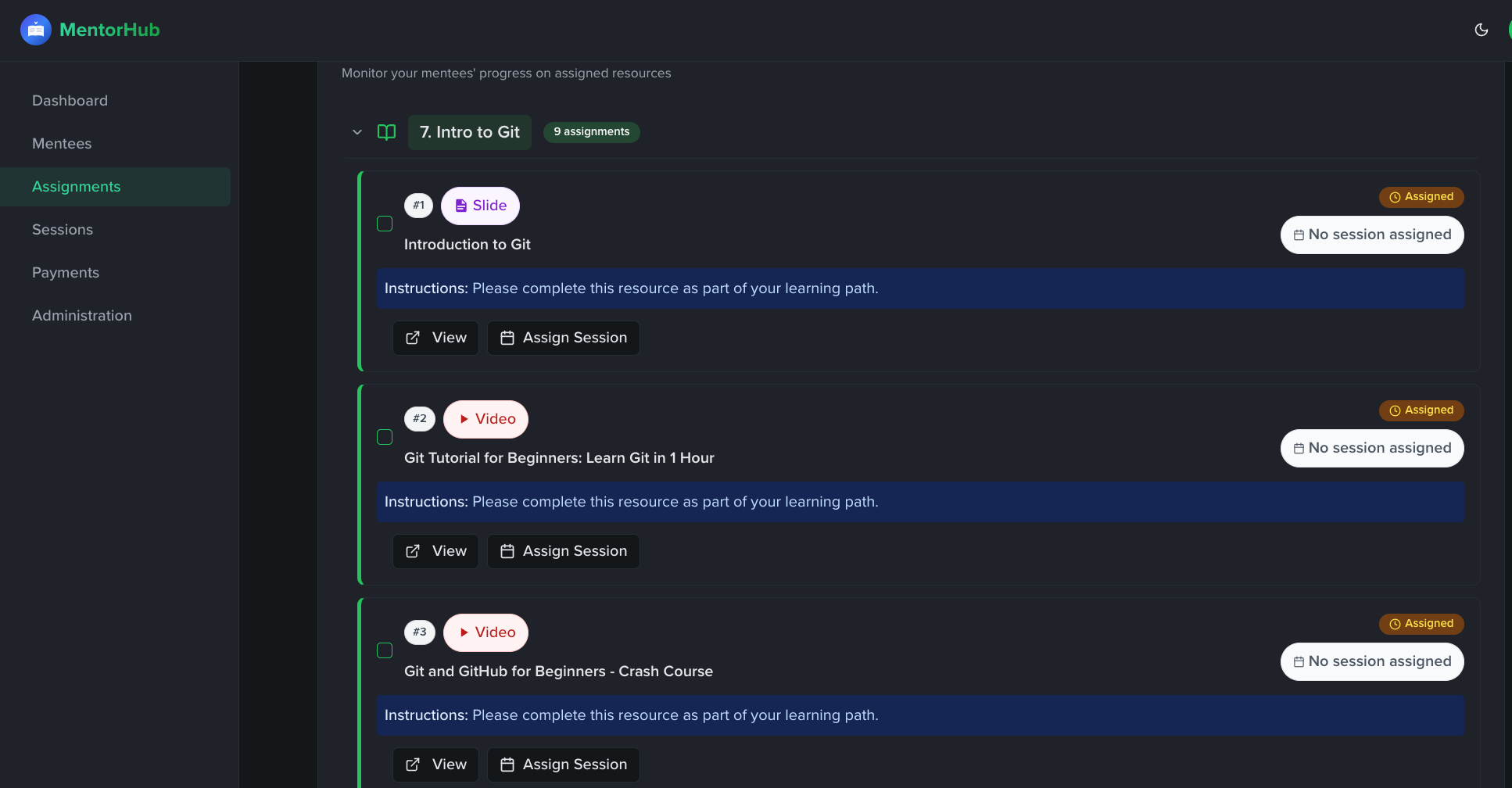
Perhaps my favorite aspect of MentorHub (and one that my mentees appreciate too) is how it handles assignments and progress tracking. Once I’ve assigned a learning path or selected topics for a mentee, MentorHub generates a tailored list of tasks for them. On my side, I can see a Mentee Progress Dashboard for each person, which shows at a glance how far along they are. For each mentee, MentorHub displays key stats like the number of topics assigned, how many are completed, the total resources (e.g. articles, videos) I’ve given them and how many of those they've finished. It even boils this down into an overall completion percentage for that mentee’s curriculum.
When I click on a mentee’s profile in MentorHub, I get a detailed breakdown of their progress. All the topics we planned are listed, each with an expandable list of the resources inside. I can see checkmarks or status indicators next to each item. For example, it might show that out of 8 resources under “Intro to Databases,” 5 are completed and 3 are pending. This means I no longer need to maintain a separate spreadsheet or checklist to track what my mentee has done. Both the mentor and the mentee can update the status of an assignment (so if the mentee finishes reading an article, they can mark it done). The next time I prepare for a session, I can quickly review what they’ve completed and where they might be stuck.
All this tracking is not noticeable but incredibly useful. It gives transparency to the mentee’s journey: I can actually see how someone is growing over time. If I notice a mentee hasn’t completed the last few assignments, that’s a signal to check in: Was the material too challenging? Are they short on time this week? If someone completes many resources, I know they’re hungry and can offer them new challenges faster.
In the past, I often only discovered progress issues during sessions (or when a mentee went silent). With MentorHub’s progress dashboard, there are fewer surprises. It keeps both of us accountable and aligned, and it does so without me having to juggle external spreadsheets.
Another area MentorHub streamlines is the scheduling of sessions. Before, coordinating a session meant an endless back-and-forth of messages: “Are you free Wednesday at 6?”, sending calendar invites, remembering to send a Zoom or Meet link, and so on. In MentorHub, I can schedule a session in a few clicks right within the app. I pick the mentee, set the date/time, add a brief description or agenda for what we’ll cover, and that’s it. The session then appears on both my dashboard and the mentee’s view as an upcoming event. When the time comes, we simply click “Join Meet” to hop on the call (I use Google Meet links by default, but any meeting URL can be plugged in). This has drastically reduced the friction in getting our sessions on the calendar.
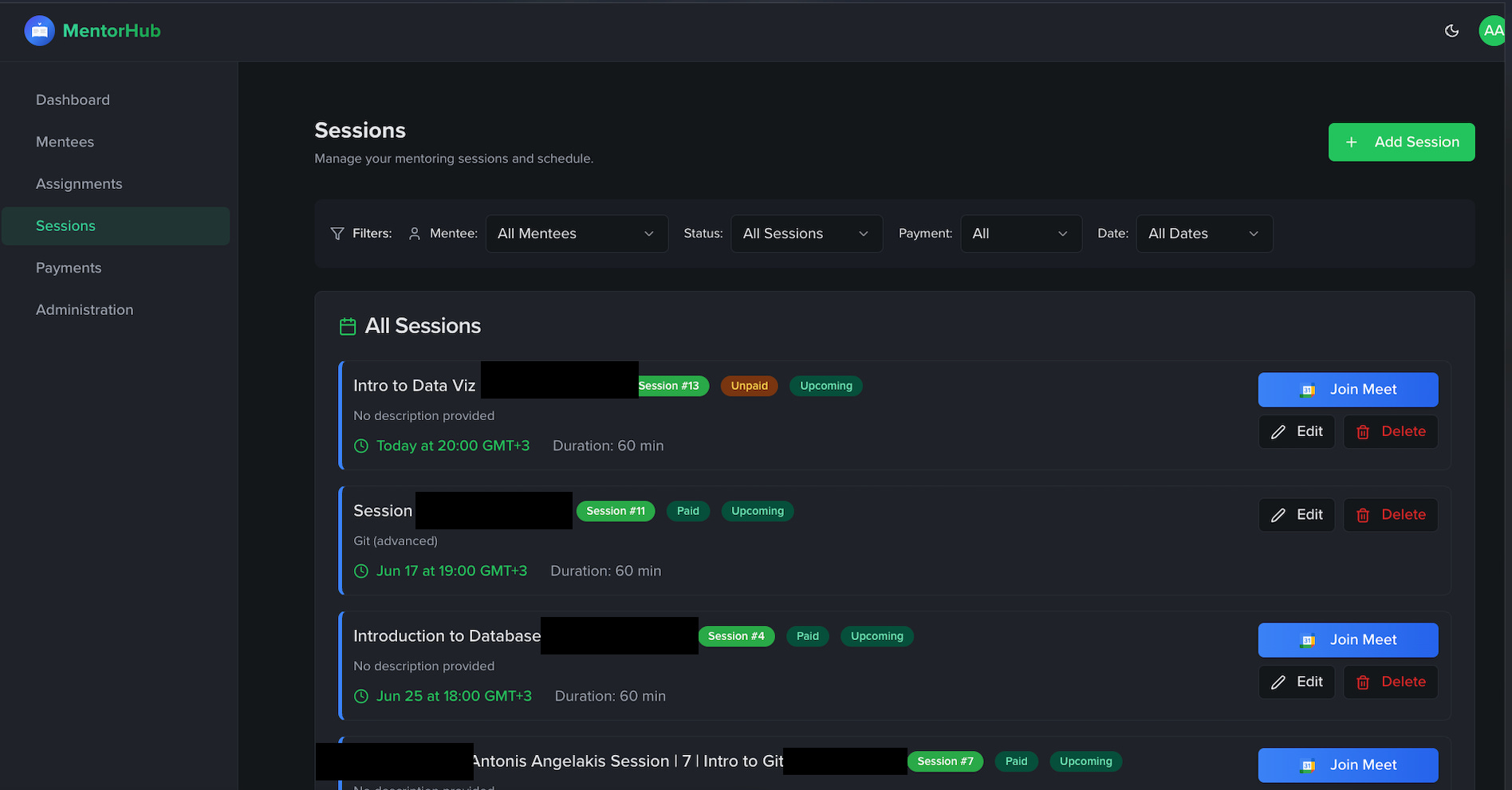
MentorHub also keeps a log of all past sessions, which is useful for looking back on what we’ve covered and when. Each session entry can hold notes or a recap (so I can see what we did, or what to follow up on next time). And importantly for those of us who mentor professionally, the app has a simple payment tracking mechanism. When I record a session, I can mark whether it’s been paid or is still unpaid. On the sessions list (and on the dashboard upcoming list), I’ll see a label next to each session indicating its payment status (e.g. Unpaid for a future session that the mentee hasn’t paid for yet, or Paid for completed sessions that have been settled). This gentle reminder system means no more awkwardly forgetting if someone has outstanding session fees. It keeps my mentoring sideline feeling professional and organized without me keeping a separate ledger.
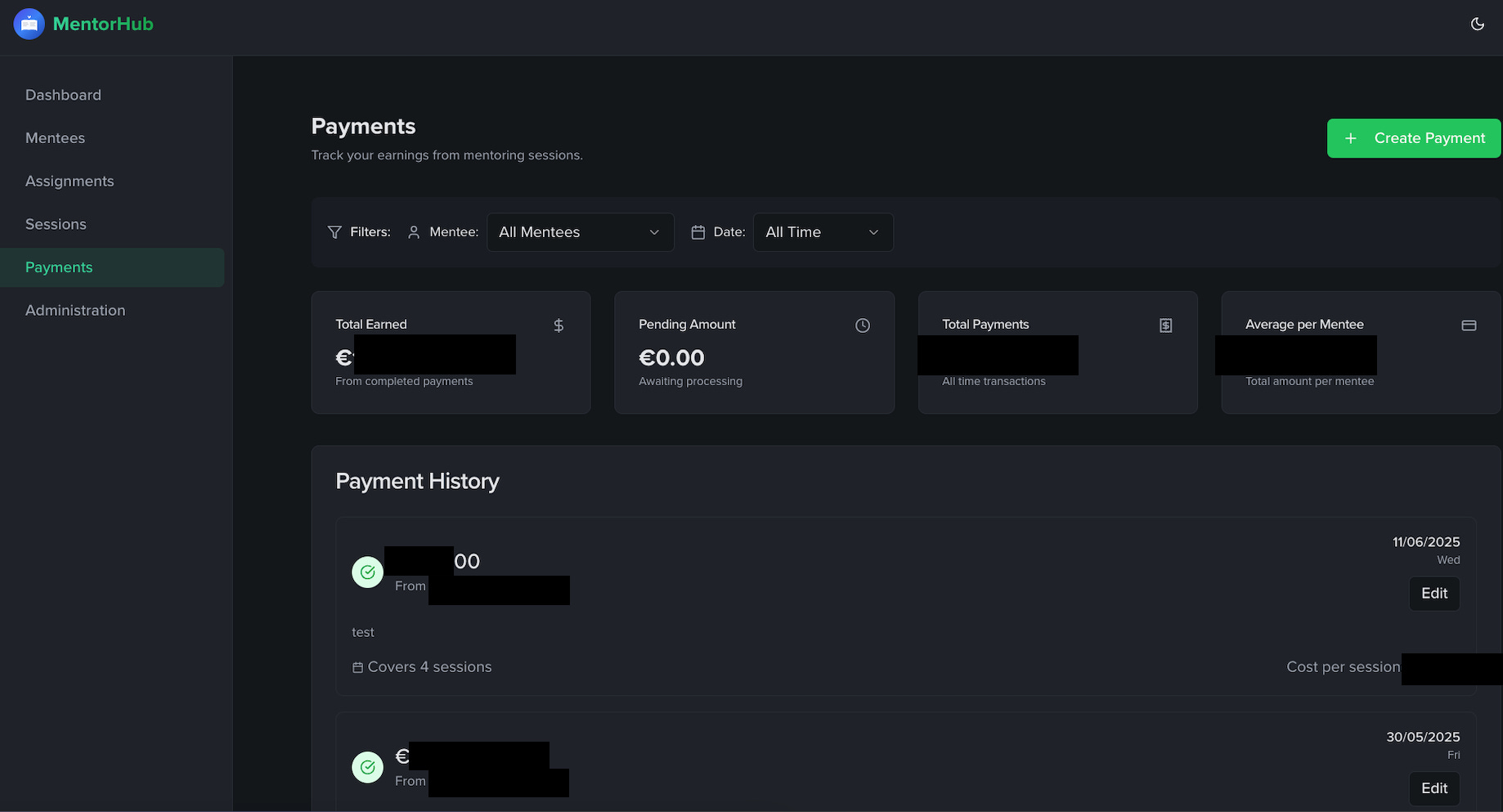
*Payments are getting filled manually, Stripe integration is not completed yet
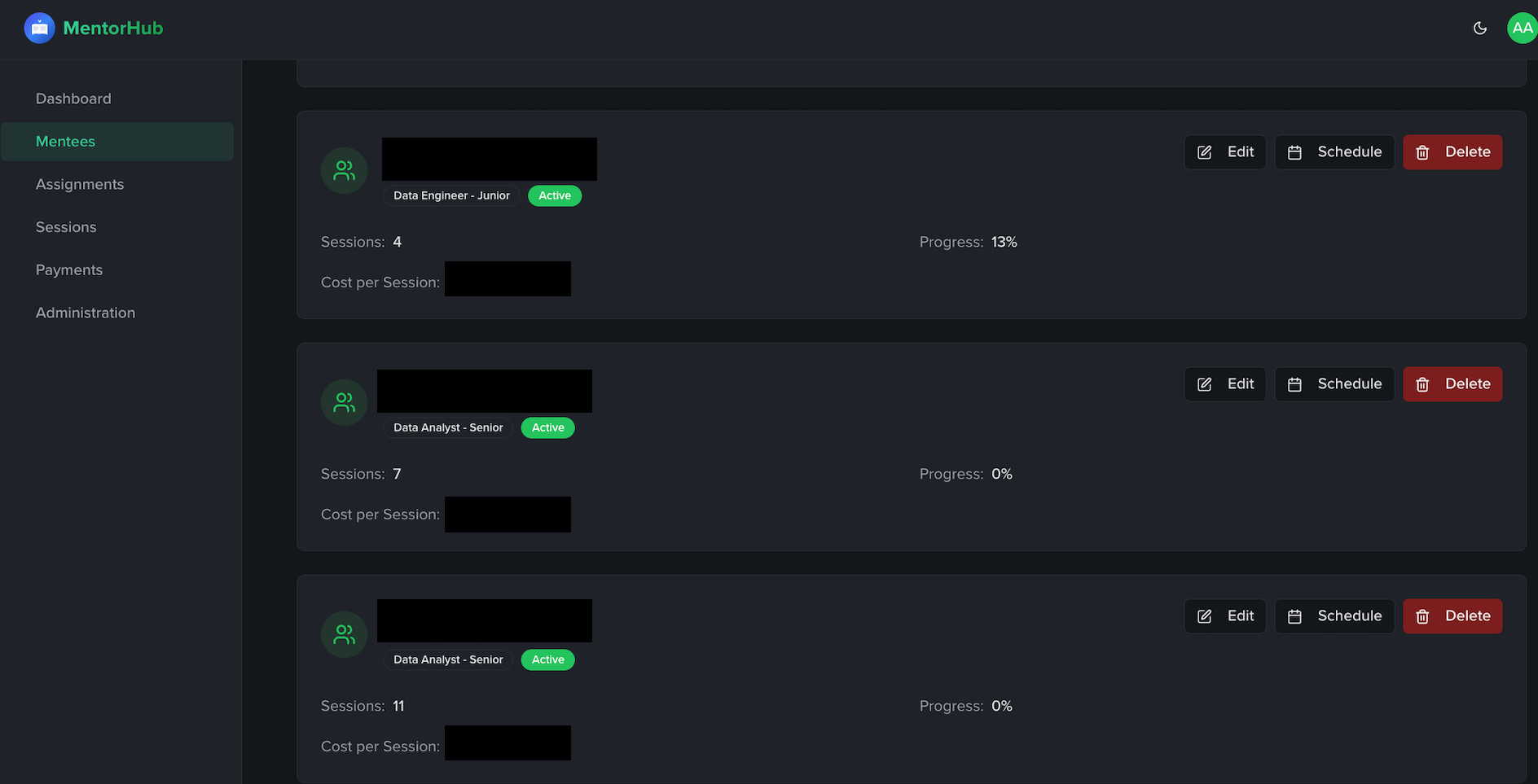
Finally, the Mentees section in MentorHub ties together a lot of the above features. Here I see a roster of everyone I’m mentoring, each with a quick summary: their assigned role/learning path, how many sessions we’ve had, their current progress percentage and even a note on their session rate or plan. From this view, I can jump into a specific mentee’s detailed progress dashboard or quickly schedule a new session for them. The mentee cards give me an immediate sense of who might need attention for instance, if I see one mentee at 10% progress and another at 80%, I know who might need a nudge or an extra check-in this week.
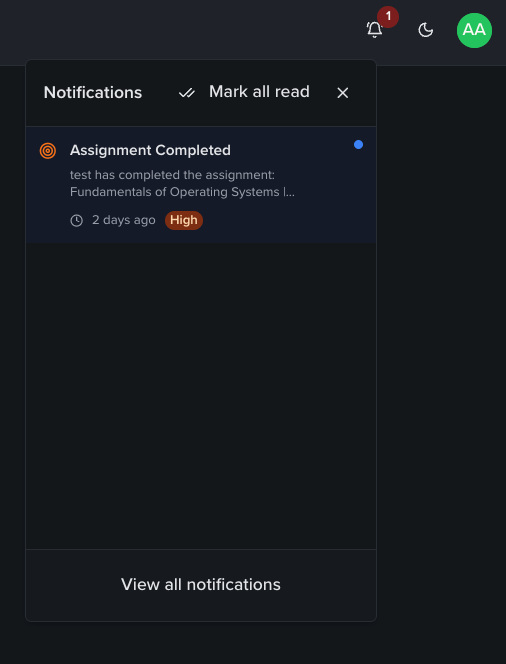
MentorHub’s notification center functions as a central alert system for key mentoring activities. When a mentee completes an assignment say, “Fundamentals of Operating Systems I”, the platform sends you a notification. This small feature carries a big impact: it allows mentors to acknowledge learning progress as it happens, enabling timely feedback, encouragement, or follow-up questions.
Whether you're managing one mentee or ten, this system ensures you're always informed without being overwhelmed. It's another way MentorHub helps reduce cognitive load and keeps you meaningfully connected with your mentees' progress.
By the mentee’s side, they are always up to date if new content (resources) have been added to an existing Topic. (e.g SQL Course (resource) to Introduction to SQL (topic).
Building MentorHub has fundamentally improved my mentoring experience. It started as a personal fix for a repetitive process, but it grew into a platform that makes mentoring more enjoyable and effective for me and my mentees. The app consolidates all the disparate parts of mentoring into one coherent workflow: from content curation and assignment, to tracking and feedback, to scheduling and administration. Instead of spending my time on admin work, I now spend it where it counts, engaging with my mentees.
What’s most exciting to me is seeing other mentors take MentorHub and run with it. I initially built it for myself and wasn’t even sure if I’d share it widely.
But the response from the community convinced me to open it up. If you’re a mentor (or considering becoming one) and any of the frustrations I described sound familiar, I invite you to give MentorHub a try. It’s (still) free to use and I genuinely hope it can make your life easier. You can access the platform here:
→→→→→→ https://mentorhub.replit.app ←←←←←←
I’m continuing to refine the tool (it’s a labor of love in progress) and I’d love to hear your feedback. Feel free to reply to this post or reach out to me directly if you’re interested or have questions.
I’ll give you free lifetime access forever at this point.
Mentoring is a rewarding journey and with the right tools, it can be even more impactful for both you and your mentees.
Happy mentoring, and I hope MentorHub can help you as much as it’s helped me!
I would really love to hear your feedback.
Konstantinos Siaterlis offers a concise, practical guide on how to use Terraform to provision and manage AWS Glue Jobs, including IAM roles, Glue connections, and job scripts. It walks through the infrastructure-as-code approach to deploying ETL pipelines on AWS. Ideal for data engineers looking to automate their Glue workflows.
Christos Chatzis explores the concept of Digital Archaeology in engineering teams, uncovering past decisions, hidden context and legacy patterns buried in codebases and tools. It highlights why understanding historical technical choices is crucial for effective leadership and decision-making in modern engineering environments.
George Dedes draws inspiration from Kintsugi, the Japanese art of repairing broken pottery with gold, to reflect on personal and professional growth in software careers. It explores how embracing imperfection, setbacks and emotional resilience can lead to deeper strength, authenticity and meaningful development in tech.
Thanks for reading until here. I know this one was a bit big :)
Great engineering starts with great awareness. Be mindful, be DataConscious.
❤️ Liked this article? Make sure to push the button
💬 Community needs your voice, do you have something to add? Feel free to
🔁 Know someone that would find this helpful? Feel free to share
No posts
Comments
Nothing yet. Say the first thing.
Sign in to join the conversation.