

Memory management remains one of the most challenging aspects of Android development, even for experienced engineers. After years of debugging production crashes, profiling performance issues, and conducting architecture reviews across multiple large-scale Android applications, I've identified recurring patterns that lead to memory problems.
This post explores the ten most critical mistakes and provides actionable guidance for avoiding them.
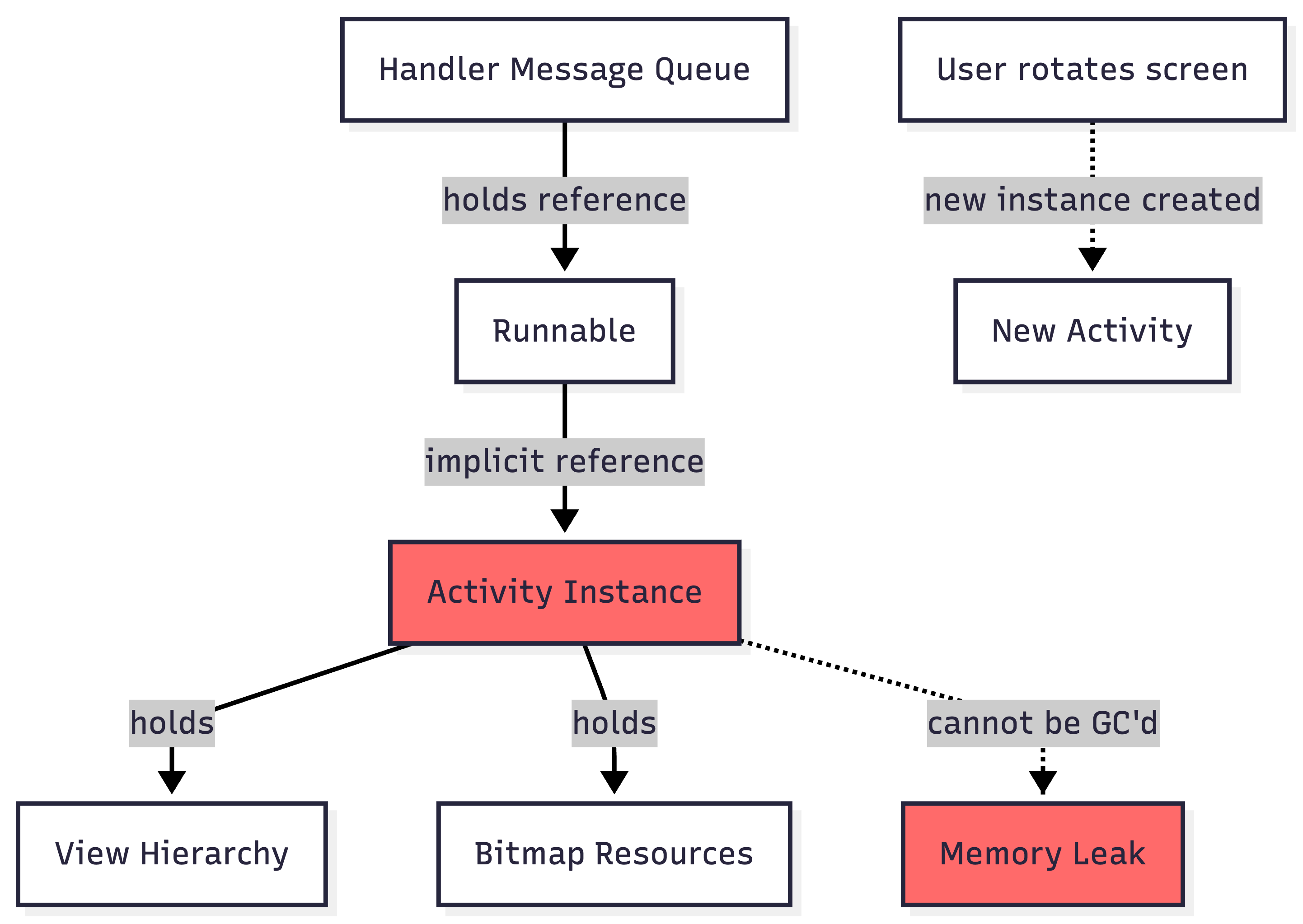
The most pervasive memory leak in Android applications stems from holding implicit references to Activity or Fragment contexts through inner classes. When an inner class outlives its enclosing context, the entire Activity (including its view hierarchy) cannot be garbage collected.
class MainActivity : AppCompatActivity() {
    override fun onCreate(savedInstanceState: Bundle?) {
        super.onCreate(savedInstanceState)
        // WRONG: Anonymous inner class holds implicit reference to Activity
        button.setOnClickListener {
            Handler(Looper.getMainLooper()).postDelayed({
                // This lambda captures the Activity context
                updateUI()
            }, 60000) // Leaks Activity for 60 seconds
        }
    }
}
The Fix:
class MainActivity : AppCompatActivity() {
    private val handler = Handler(Looper.getMainLooper())
    private val updateRunnable = UpdateRunnable(this)
    override fun onCreate(savedInstanceState: Bundle?) {
        super.onCreate(savedInstanceState)
        handler.postDelayed(updateRunnable, 60000)
    }
    override fun onDestroy() {
        handler.removeCallbacks(updateRunnable)
        super.onDestroy()
    }
    private class UpdateRunnable(activity: MainActivity) : Runnable {
        private val activityRef = WeakReference(activity)
        override fun run() {
            activityRef.get()?.updateUI()
        }
    }
}
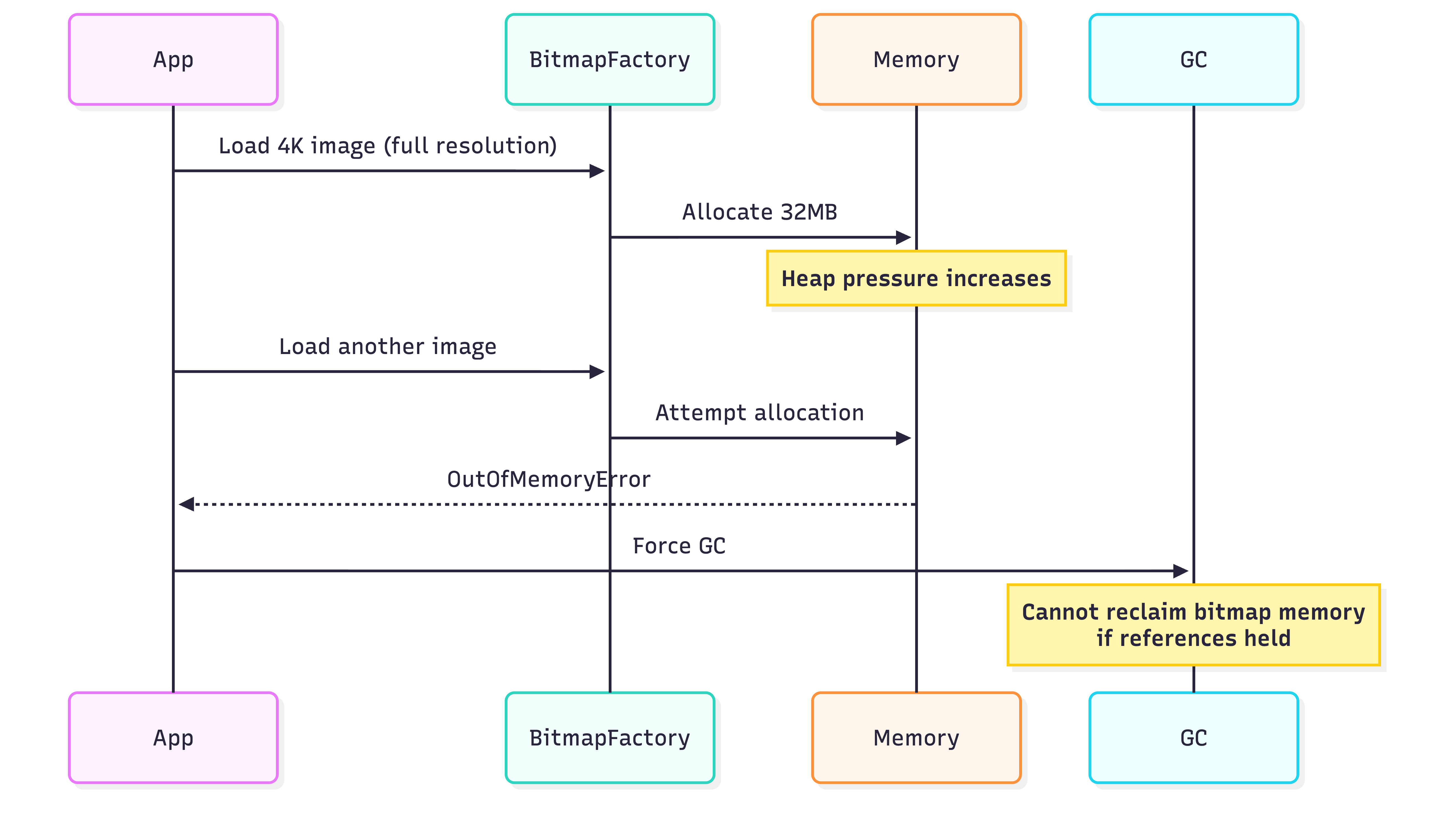
Bitmaps consume substantial heap memory outside the standard object allocation patterns. A single uncompressed 1080x1920 ARGB_8888 bitmap consumes approximately 8MB of memory. Failing to recycle bitmaps or implementing naive caching strategies quickly leads to OutOfMemoryErrors.
Best Practices:
// Use inSampleSize to downsample images
fun decodeSampledBitmapFromResource(
    res: Resources,
    resId: Int,
    reqWidth: Int,
    reqHeight: Int
): Bitmap {
    return BitmapFactory.Options().run {
        inJustDecodeBounds = true
        BitmapFactory.decodeResource(res, resId, this)
        inSampleSize = calculateInSampleSize(this, reqWidth, reqHeight)
        inJustDecodeBounds = false
        BitmapFactory.decodeResource(res, resId, this)
    }
}
// Implement LRU cache with proper sizing
class ImageCache private constructor() {
    private val memoryCache: LruCache<String, Bitmap>
    init {
        val maxMemory = (Runtime.getRuntime().maxMemory() / 1024).toInt()
        val cacheSize = maxMemory / 8 // Use 1/8th of available memory
        memoryCache = object : LruCache<String, Bitmap>(cacheSize) {
            override fun sizeOf(key: String, bitmap: Bitmap): Int {
                return bitmap.byteCount / 1024
            }
            override fun entryRemoved(
                evicted: Boolean,
                key: String,
                oldValue: Bitmap,
                newValue: Bitmap?
            ) {
                // Bitmap will be GC'd when no other references exist
            }
        }
    }
}
Static fields persist for the application’s lifetime. Storing Activity or View references in static fields creates guaranteed memory leaks that survive configuration changes and activity lifecycle transitions.
// CATASTROPHIC MISTAKE
class UserManager {
    companion object {
        var currentActivity: Activity? = null // NEVER DO THIS
        var userProfileView: ImageView? = null // OR THIS
    }
}
The Fix:
// Use Application Context for singletons
class UserManager private constructor(private val context: Context) {
    companion object {
        @Volatile
        private var instance: UserManager? = null
        fun getInstance(context: Context): UserManager {
            return instance ?: synchronized(this) {
                instance ?: UserManager(context.applicationContext).also {
                    instance = it
                }
            }
        }
    }
}
// Or use dependency injection with proper scoping
@Singleton
class UserRepository @Inject constructor(
    @ApplicationContext private val context: Context
)
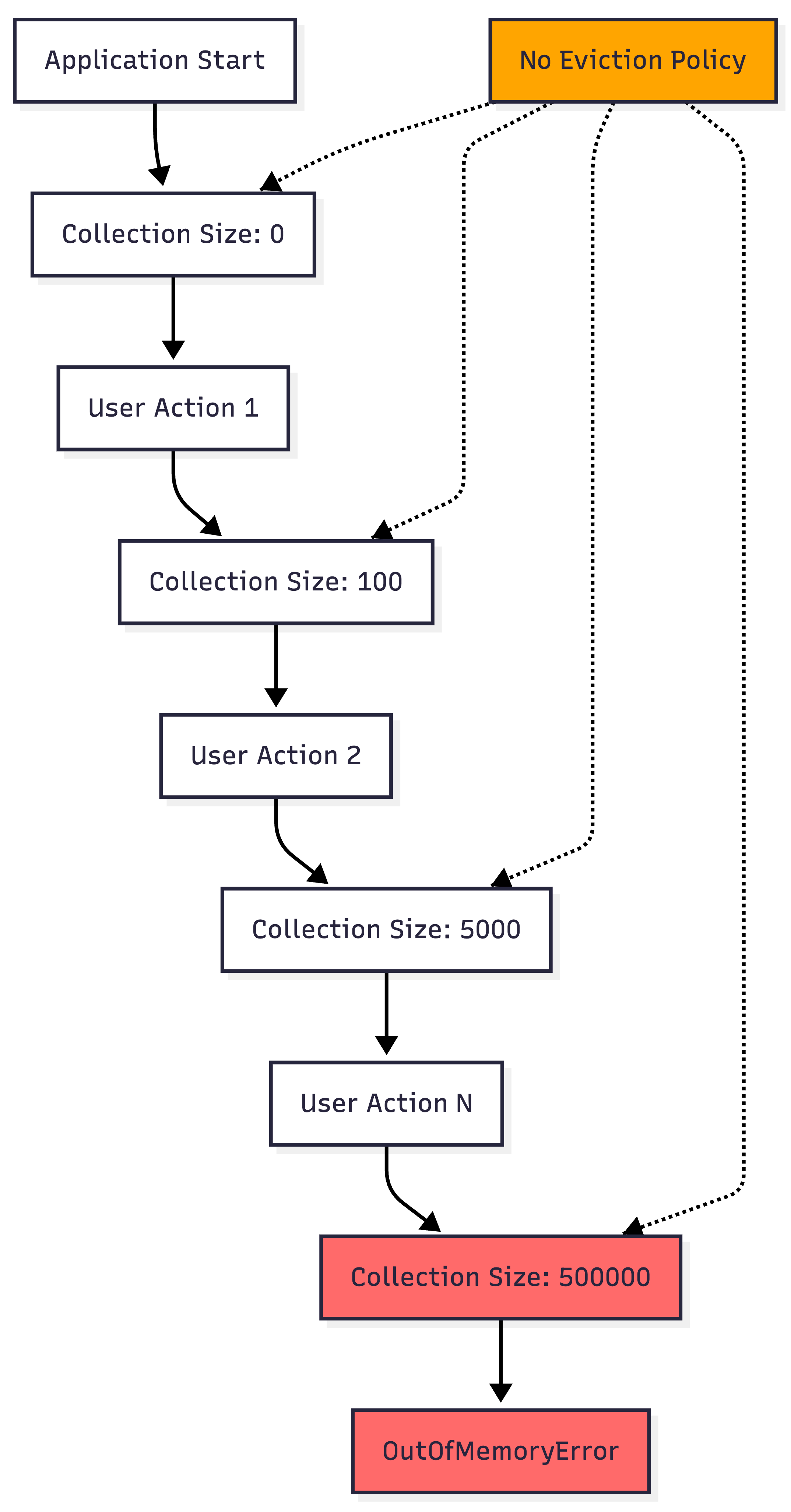
Collections that grow without bounds eventually exhaust heap memory. This pattern commonly appears in custom caching implementations, event buses, and observer patterns where listeners aren’t properly unregistered.
Example of the Problem:
// WRONG: Unbounded growth
class EventBus {
    private val listeners = mutableListOf<EventListener>()
    fun register(listener: EventListener) {
        listeners.add(listener) // Never removes listeners
    }
    // Missing unregister method causes leak
}
// WRONG: Naive caching
object ImageCache {
    private val cache = mutableMapOf<String, Bitmap>()
    fun put(key: String, bitmap: Bitmap) {
        cache[key] = bitmap // Grows indefinitely
    }
}
The Fix:
// Implement proper lifecycle management
class EventBus {
    private val listeners = mutableSetOf<EventListener>()
    fun register(listener: EventListener) {
        listeners.add(listener)
    }
    fun unregister(listener: EventListener) {
        listeners.remove(listener)
    }
}
// Use LruCache with size limits
class ImageCache(maxSize: Int) {
    private val cache = object : LruCache<String, Bitmap>(maxSize) {
        override fun sizeOf(key: String, value: Bitmap): Int {
            return value.byteCount / 1024
        }
    }
    fun put(key: String, bitmap: Bitmap) {
        cache.put(key, bitmap) // Automatically evicts old entries
    }
}
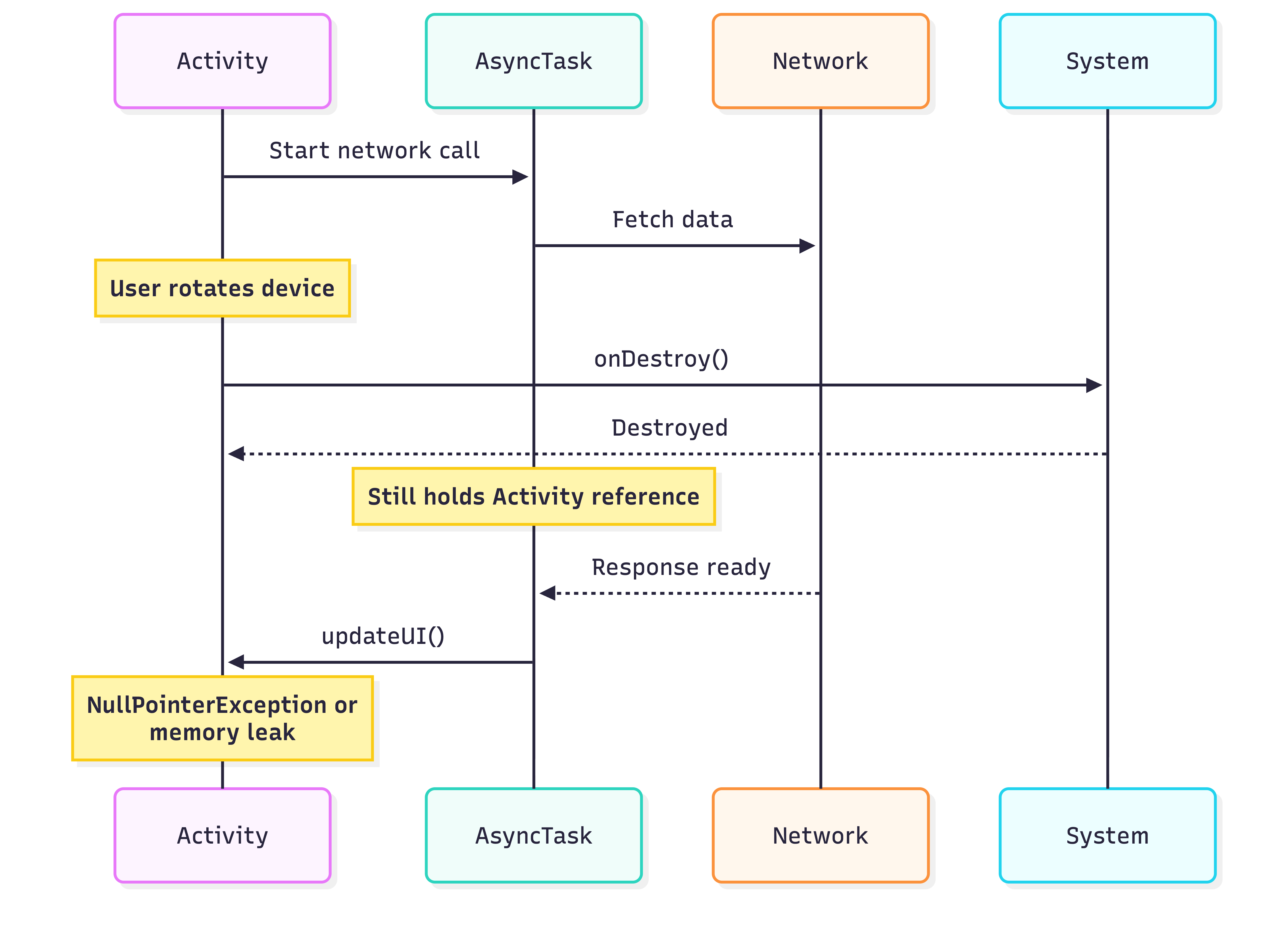
Asynchronous operations (network calls, database queries, background computations) often complete after the initiating Activity or Fragment has been destroyed. Attempting to update UI with stale references causes leaks and crashes.
Modern Solution with Coroutines:
class UserProfileFragment : Fragment() {
    private var _binding: FragmentUserProfileBinding? = null
    private val binding get() = _binding!!
    private val viewModel: UserProfileViewModel by viewModels()
    override fun onViewCreated(view: View, savedInstanceState: Bundle?) {
        super.onViewCreated(view, savedInstanceState)
        // Coroutine automatically canceled when lifecycle destroyed
        viewLifecycleOwner.lifecycleScope.launch {
            viewModel.userProfile.collect { profile ->
                updateUI(profile)
            }
        }
    }
    override fun onDestroyView() {
        _binding = null // Prevent view leak
        super.onDestroyView()
    }
}
class UserProfileViewModel @Inject constructor(
    private val repository: UserRepository
) : ViewModel() {
    private val _userProfile = MutableStateFlow<UserProfile?>(null)
    val userProfile: StateFlow<UserProfile?> = _userProfile.asStateFlow()
    fun loadUserProfile(userId: String) {
        viewModelScope.launch {
            // Automatically canceled when ViewModel cleared
            val profile = repository.getUserProfile(userId)
            _userProfile.value = profile
        }
    }
}
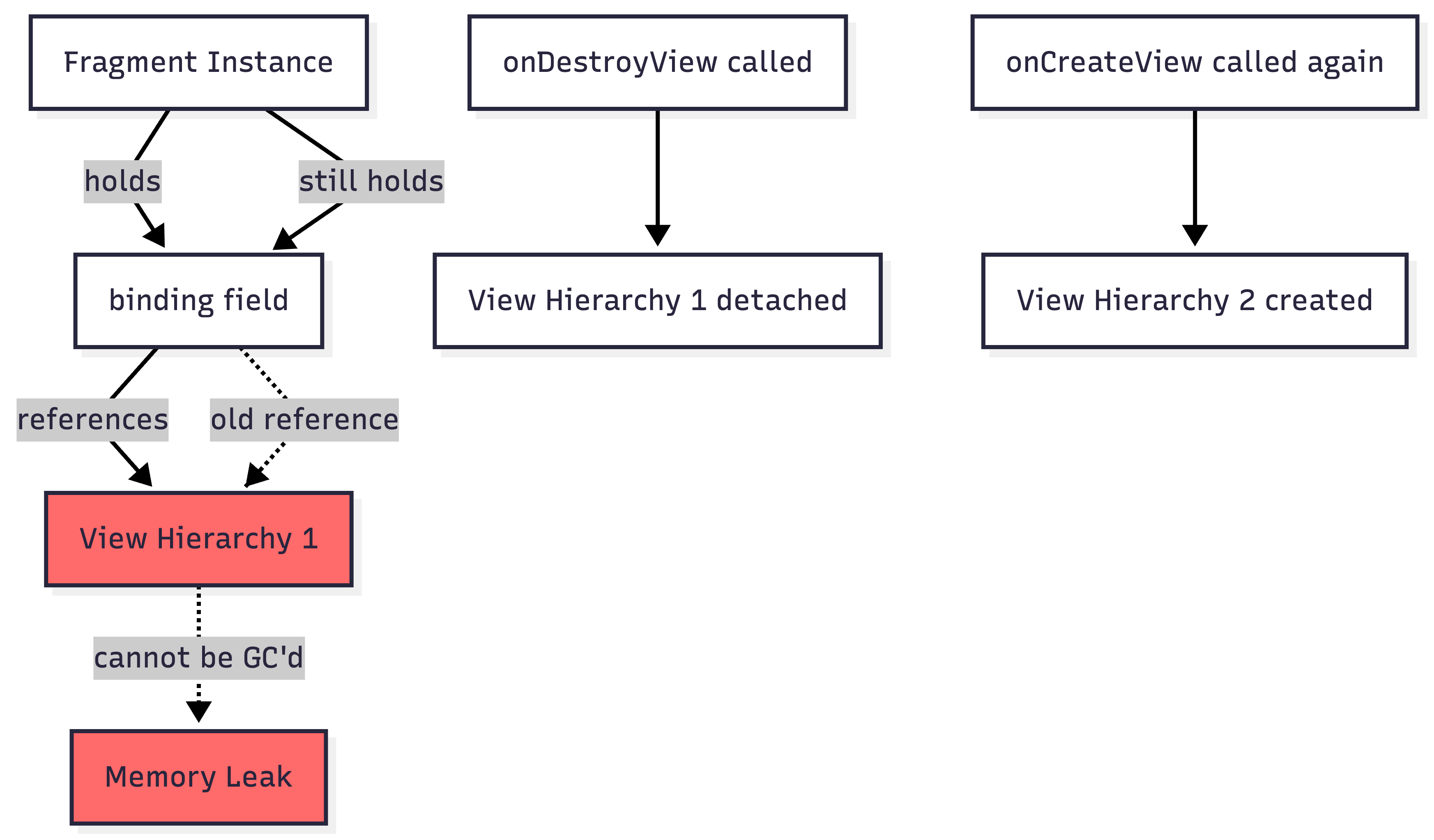
Fragment views are destroyed and recreated more frequently than Fragment instances. Holding references to Fragment views in the Fragment class creates memory leaks, particularly with ViewBinding.
// WRONG: Leaks view references
class ProfileFragment : Fragment() {
    private lateinit var binding: FragmentProfileBinding // Leaks view
    override fun onCreateView(
        inflater: LayoutInflater,
        container: ViewGroup?,
        savedInstanceState: Bundle?
    ): View {
        binding = FragmentProfileBinding.inflate(inflater, container, false)
        return binding.root
    }
}
The Fix:
class ProfileFragment : Fragment() {
    private var _binding: FragmentProfileBinding? = null
    private val binding get() = _binding!!
    override fun onCreateView(
        inflater: LayoutInflater,
        container: ViewGroup?,
        savedInstanceState: Bundle?
    ): View {
        _binding = FragmentProfileBinding.inflate(inflater, container, false)
        return binding.root
    }
    override fun onDestroyView() {
        _binding = null // Critical: Release view reference
        super.onDestroyView()
    }
}
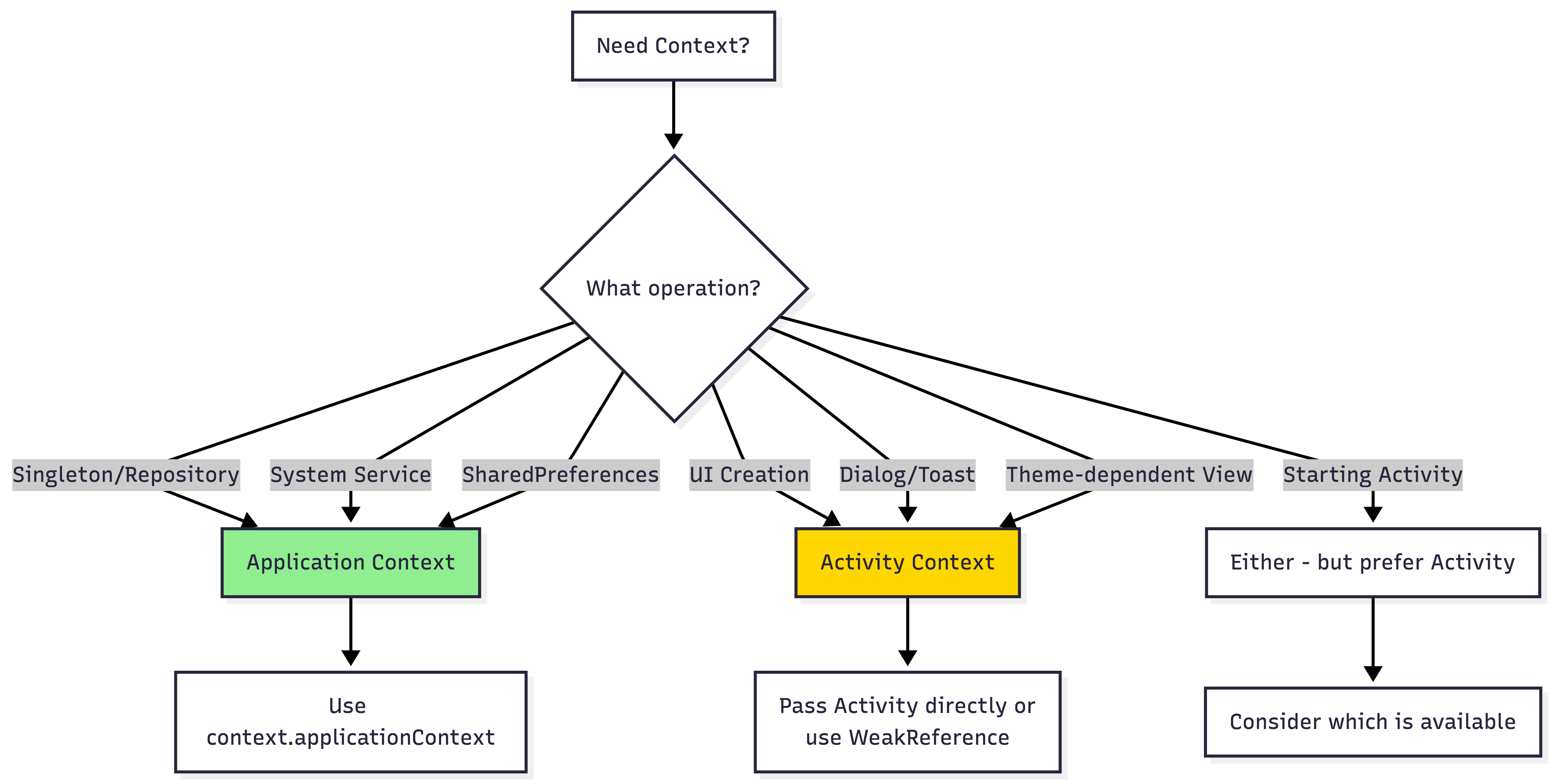
While using Application Context prevents memory leaks, it introduces subtle bugs when used for operations requiring Activity context (theme application, dialog creation, view inflation).
// WRONG: Creates views with wrong theme
class ThemeHelper(private val context: Context) {
    fun createThemedView(): View {
        // If context is Application, theme attributes are ignored
        return LayoutInflater.from(context).inflate(R.layout.themed_view, null)
    }
}
// WRONG: Crashes with BadTokenException
class DialogManager(private val context: Context) {
    fun showDialog() {
        // Application context cannot create dialogs
        AlertDialog.Builder(context)
            .setMessage("Hello")
            .show() // WindowManager$BadTokenException
    }
}
Decision Matrix:
Best Practice:
// Repository: Use Application Context
class UserRepository @Inject constructor(
    @ApplicationContext private val context: Context,
    private val database: UserDatabase
) {
    fun saveUser(user: User) {
        // Safe: doesn't need Activity context
        database.userDao().insert(user)
    }
}
// UI Manager: Use Activity Context
class DialogManager(private val activity: Activity) {
    fun showConfirmation(message: String, onConfirm: () -> Unit) {
        AlertDialog.Builder(activity)
            .setMessage(message)
            .setPositiveButton("OK") { _, _ -> onConfirm() }
            .show()
    }
}
// Or use WeakReference for optional UI updates
class NotificationHelper(activity: Activity) {
    private val activityRef = WeakReference(activity)
    fun showNotification(message: String) {
        activityRef.get()?.let { activity ->
            Toast.makeText(activity, message, Toast.LENGTH_SHORT).show()
        }
    }
}
Android provides numerous resources that require explicit lifecycle management. Failing to close Cursors, Streams, BroadcastReceivers, or unregister listeners causes both memory leaks and resource exhaustion.
// WRONG: Multiple resource leaks
class DataManager(private val context: Context) {
    fun loadData() {
        // Leak 1: Cursor not closed
        val cursor = context.contentResolver.query(
            ContactsContract.Contacts.CONTENT_URI,
            null, null, null, null
        )
        // Process cursor but never call cursor?.close()
        // Leak 2: Stream not closed
        val inputStream = context.assets.open("data.json")
        val data = inputStream.readBytes()
        // Never closed
        // Leak 3: Receiver not unregistered
        val receiver = object : BroadcastReceiver() {
            override fun onReceive(context: Context, intent: Intent) {
                // Handle broadcast
            }
        }
        context.registerReceiver(receiver, IntentFilter("ACTION"))
        // Never unregistered
    }
}
The Fix:
class DataManager(private val context: Context) {
    private var receiver: BroadcastReceiver? = null
    fun loadData() {
        // Use 'use' extension for auto-closing
        context.contentResolver.query(
            ContactsContract.Contacts.CONTENT_URI,
            null, null, null, null
        )?.use { cursor ->
            while (cursor.moveToNext()) {
                // Process cursor
            }
        } // Automatically closed
        // Streams also auto-close with 'use'
        context.assets.open("data.json").use { inputStream ->
            val data = inputStream.readBytes()
            // Process data
        } // Automatically closed
    }
    fun registerReceiver() {
        receiver = object : BroadcastReceiver() {
            override fun onReceive(context: Context, intent: Intent) {
                // Handle broadcast
            }
        }.also {
            context.registerReceiver(it, IntentFilter("ACTION"))
        }
    }
    fun cleanup() {
        receiver?.let { context.unregisterReceiver(it) }
        receiver = null
    }
}
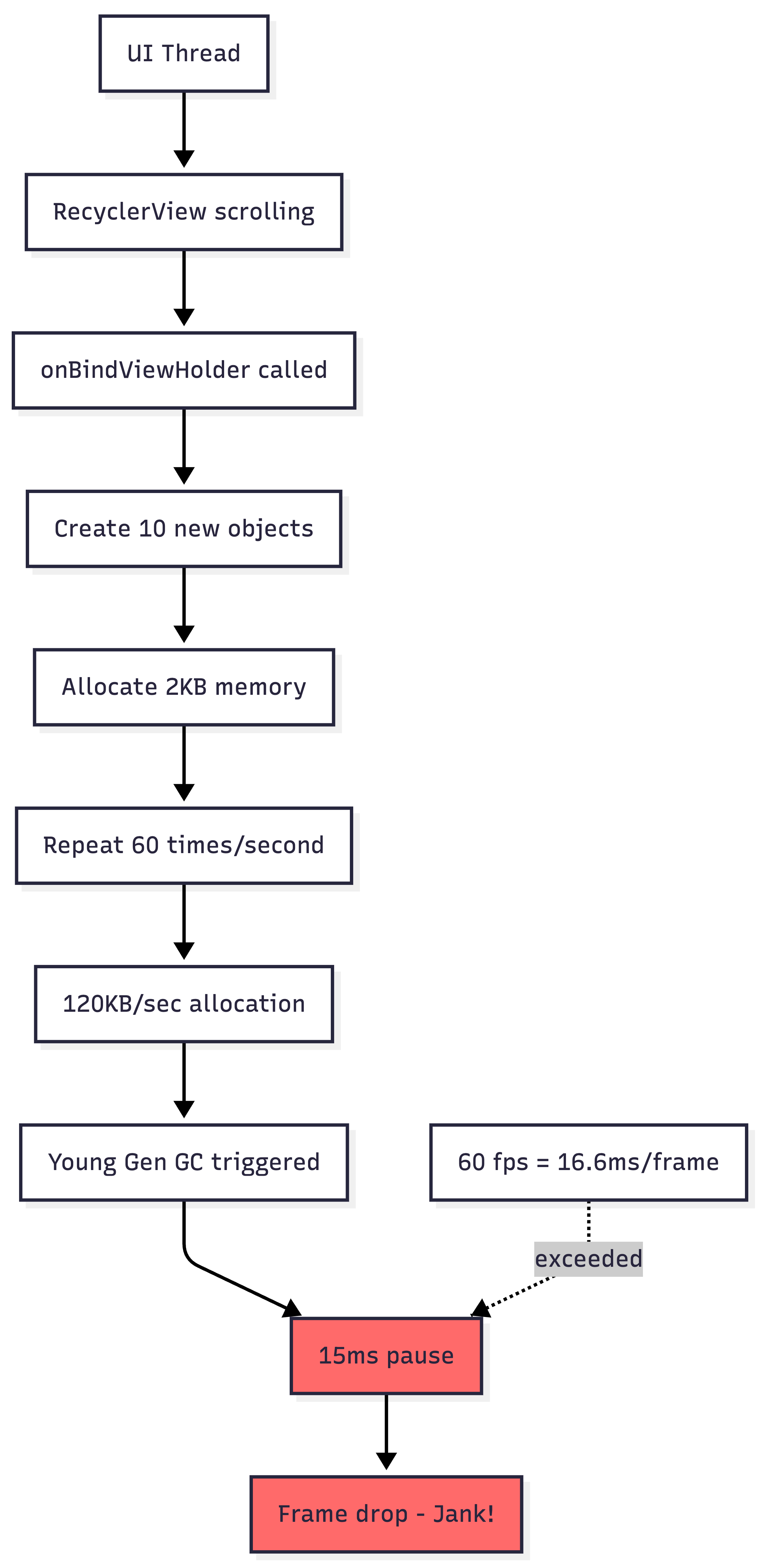
Frequent allocations in hot code paths (onDraw, onBindViewHolder, touch event handlers) trigger garbage collection, causing frame drops and jank. Each GC pause can freeze the UI thread for 5-20ms.
Bad Example:
class MessageAdapter : RecyclerView.Adapter<MessageViewHolder>() {
    override fun onBindViewHolder(holder: MessageViewHolder, position: Int) {
        val message = messages[position]
        // WRONG: Creates new objects on every bind
        val dateFormat = SimpleDateFormat("MMM dd, yyyy", Locale.US)
        val formattedDate = dateFormat.format(message.timestamp)
        // WRONG: String concatenation creates multiple String objects
        val displayText = "From: " + message.sender + " - " + formattedDate
        // WRONG: Creates new Paint object
        val paint = Paint().apply {
            color = Color.BLACK
            textSize = 16f
        }
        holder.bind(displayText, paint)
    }
}
Optimized Version:
class MessageAdapter : RecyclerView.Adapter<MessageViewHolder>() {
    // Reuse formatter and paint objects
    private val dateFormat = SimpleDateFormat("MMM dd, yyyy", Locale.US)
    private val textPaint = Paint().apply {
        color = Color.BLACK
        textSize = 16f
    }
    private val stringBuilder = StringBuilder(100)
    override fun onBindViewHolder(holder: MessageViewHolder, position: Int) {
        val message = messages[position]
        // Reuse StringBuilder to avoid allocations
        stringBuilder.clear()
        stringBuilder.append("From: ")
            .append(message.sender)
            .append(" - ")
            .append(dateFormat.format(message.timestamp))
        holder.bind(stringBuilder.toString(), textPaint)
    }
}
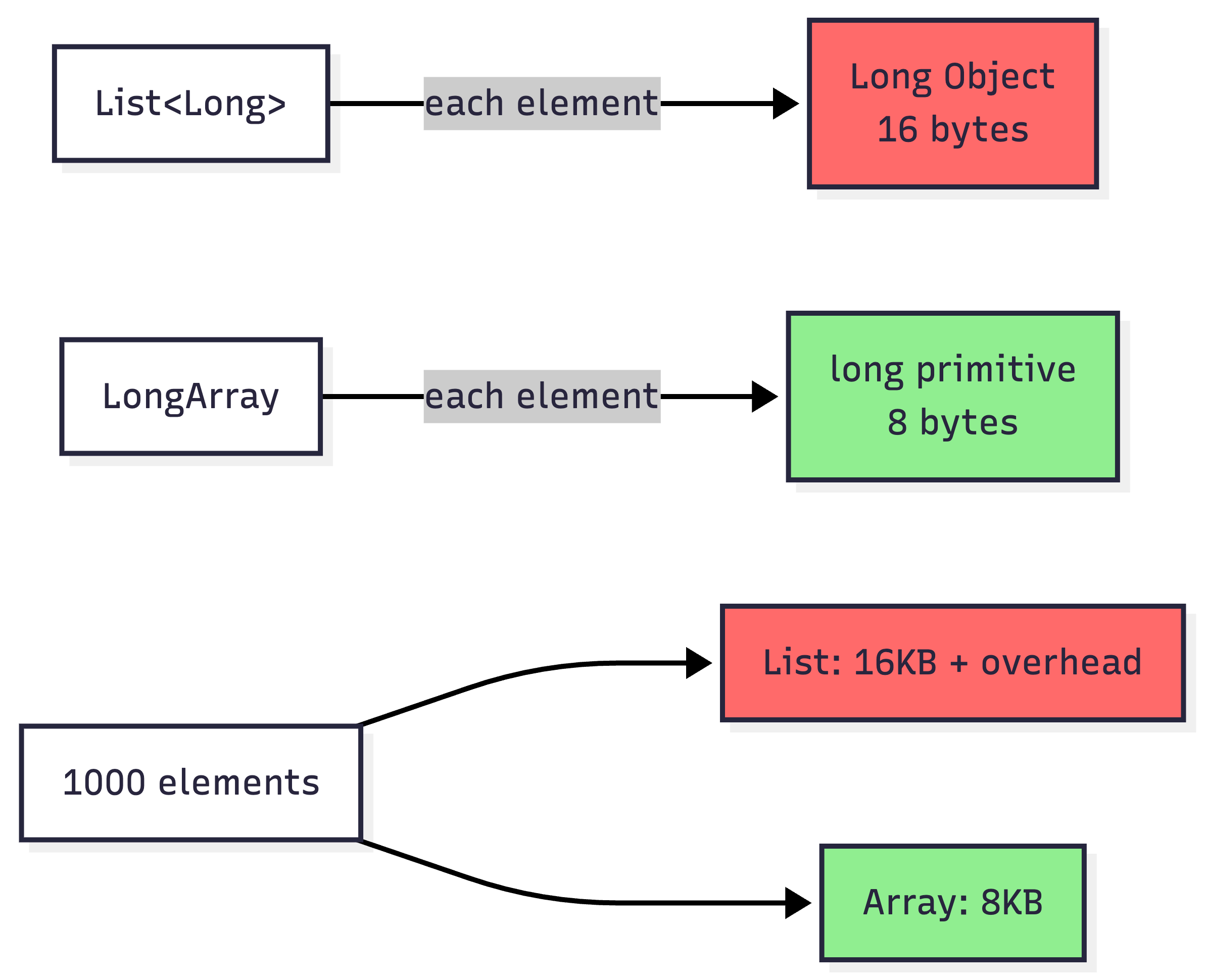
Kotlin’s syntactic sugar and Java’s autoboxing create hidden allocations that accumulate in tight loops. Using boxed primitives (Integer, Long) instead of primitives (int, long) in collections causes significant memory overhead and GC pressure.
// WRONG: Boxing overhead
class MetricsCollector {
    private val metrics = mutableMapOf<String, List<Long>>() // List<Long> boxes primitives
    fun recordMetric(name: String, value: Long) {
        val existing = metrics[name] ?: emptyList()
        metrics[name] = existing + value // Creates new list, boxes Long
    }
    fun calculateAverage(name: String): Double {
        val values = metrics[name] ?: return 0.0
        return values.sum().toDouble() / values.size // Unboxes each Long
    }
}
// WRONG: Excessive allocations in loop
fun processPixels(bitmap: Bitmap) {
    for (x in 0 until bitmap.width) {
        for (y in 0 until bitmap.height) {
            val pixel = bitmap.getPixel(x, y) // Native call overhead
            val color = Color.valueOf(pixel) // Creates Color object
            // Process color
        }
    }
}
Optimized Versions:
// Use primitive arrays
class MetricsCollector {
    private val metrics = mutableMapOf<String, LongArray>()
    private val tempList = mutableListOf<Long>()
    fun recordMetric(name: String, value: Long) {
        val existing = metrics[name]
        if (existing == null) {
            metrics[name] = longArrayOf(value)
        } else {
            metrics[name] = existing + value // Still creates array but no boxing
        }
    }
    fun calculateAverage(name: String): Double {
        val values = metrics[name] ?: return 0.0
        var sum = 0L
        for (value in values) { // No boxing in iteration
            sum += value
        }
        return sum.toDouble() / values.size
    }
}
// Batch pixel operations
fun processPixels(bitmap: Bitmap) {
    val pixels = IntArray(bitmap.width * bitmap.height)
    bitmap.getPixels(pixels, 0, bitmap.width, 0, 0, bitmap.width, bitmap.height)
    for (pixel in pixels) {
        val r = (pixel shr 16) and 0xFF
        val g = (pixel shr 8) and 0xFF
        val b = pixel and 0xFF
        // Process RGB values directly without allocations
    }
}
Memory management in Android requires constant vigilance across multiple domains: lifecycle management, resource handling, collection sizing, and performance optimization. The most effective strategy combines:
Static analysis tools: LeakCanary, Android Studio Memory Profiler, Lint checks
Code review practices: Scrutinize context usage, lifecycle handling, and collection growth
Architecture patterns: MVVM/MVI with proper scoping, dependency injection
Profiling discipline: Regular heap dumps, allocation tracking, and GC monitoring
The techniques outlined here form the foundation of professional Android memory management practices that scale from small applications to products serving hundreds of millions of users.
Comments
Nothing yet. Say the first thing.
Sign in to join the conversation.