
Time to write: 130 minutes
Before we get into things, I have an invite for you: Come to a live (and free!) masterclass!
You use AI every day and it works. The answers are satisfactory, the drafts are usable, nothing feels “broken”.
But when nothing is going wrong, nothing makes you go looking for better.
So you sit at fine, while the top 2% of users are saving tens of hours every month using the same AI tool as you.
Eight habits separate you from those top 2%. Six of those habits take less than a minute to execute.
In this free 60-minute live masterclass, Neo Aplin and I are going to walk through all eight. We will cover tactics that will help you:
Extract significantly better output from your AI, quickly and easily
Get an honest second opinion from AI instead of it being a sycophantic cheerleader
Run research you’d be comfortable to put in front of your board
Know which parts of your job are worth handing over to AI and how to set work up once so it happens while you’re asleep.
It’s free. It’s live. And everyone who registers gets access to the replay.
It is my very strong belief that before launching Claude, ChatGPT, Gemini and Copilot, the tech companies behind these AI tools got together and said: How can we make things as confusing as possible for our users in how we decide to name the different features we will launch over the next four years?
There are Agents, GPTs, Gems, Projects, Notebooks, Skills, to name just a few.
It’s very confusing.
So I want to help clear things up.
An agent, put simply, is an AI with one job. And it’s a job that is done repeatedly (otherwise, you are wasting your time building an agent).
Agent building typically requires instructions and most likely a couple of templates or reference files.
An agent (when built as a GPT, a Gem, or a Copilot Agent) is best created to do a task that it can finish in a minute or two and produces no more than five pages of output (i.e. don’t ask it to chew through a 10,000 row spreadsheet - it won’t end well).
Here are some examples of Agents that our clients have created:
The meeting cleanup agent. Feed it a transcript and an agenda, and it hands back a formatted summary with a table of who’s doing what by when. I’ve also seen some that tell you which agenda items never got discussed (handy).
The research scoper. Before you hit Deep Research (and churn through a lot of tokens), this agent interviews you about what you’re actually trying to find out and produces a comprehensive Deep Research Prompt. Two minutes of questions, and the research that comes back is dramatically better.
The job ad reviewer. Paste in a draft, and it checks it against your inclusive language rules and level guidelines before it goes anywhere near a candidate.
The brand voice rewriter. We have one at Inventium that we use for some of our marketing materials. It takes anything and makes it sound more “Inventium”. It has strong opinions about the word “leverage.”
*Claude doesn’t have Agents, so we typically recommend building a Skill in place of an Agent.
Projects are a place where knowledge lives. They are document and / or knowledge heavy and can also be conversation heavy. Projects are particularly useful when you want to group your chats on a topic, not just your files.
As a rule of thumb, use a project when context really matters.
Some examples that I’ve seen include:
You’re rolling out a new CRM. The project holds the vendor documents, the requirements, the implementation plan, and every conversation you’ve had about it. Six weeks in, when you need to remember what you decided about data migration, it’s all sitting in the one place.
An onboarding project holding every policy, SOP and process doc, so new starters can ask questions instead of reading 40 mind-numbingly dull pages.
I have an Inventium project with all our products, services and pricing in it. Very useful for proposal writing.
*Gemini doesn’t have Projects. However, it does have Gemini Notebook which is awesome for when you have source material and want to dive deep into it.
I think of Skills as a reusable recipe. A skill includes the steps, the outcome and sometimes a template.
Skills beat a giant prompt because adherence is better (i.e. the AI will actually read and execute every step in a Skill, whereas that is not always the case in a long prompt). Skills are also reusable anywhere and not locked to one chat window.
Out of all of these three features, I lean into Skills the most. Some of the Skills I have created and use frequently are:
A How I Work and How I AI title writer. Each show gets a separate Skill and after feeding in an episode transcript, it gives me a shortlist of 10 titles, from which I’ll pick (and sometimes edit) what I think is the most compelling one.
A Pre-Call Dossier Skill. This is one I use before every sales call I do. I give this Skill a name and a company, and it goes off to LinkedIn, reads the person’s background and recent posts, searches the last year of company news, reads the company website, and comes back with a one-page brief I can read in the two minutes before the call starts. It also tells me what it couldn’t find, which I’d much rather know than have it guess.
A Story Crafter Skill. When I am working on new keynote speeches, finding the right stories and thinking about how best to tell them is something I spend a lot of time on. I created a skill based on Matthew Dicks’ storytelling principles (I am such a fan of this work) that helps me workshop how best to frame stories that I share.
*Gemini doesn’t currently offer Skills. Copilot Skills are in Microsoft 365 company accounts only and your IT team can switch them off (in case you are trying to find them but can’t).
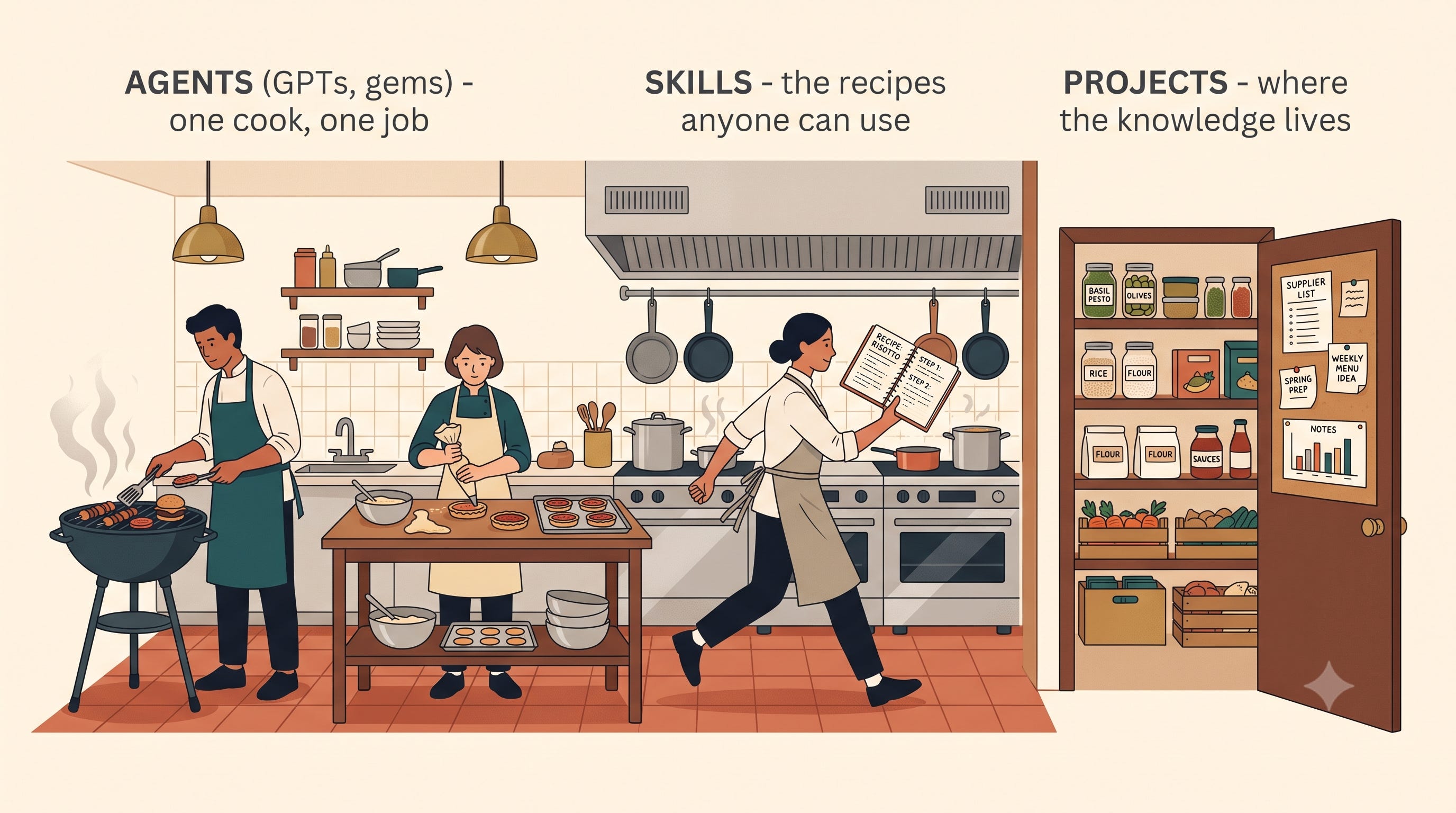
Neo Aplin, Inventium’s Head of AI, likes to explain the difference between these features using the analogy of a restaurant kitchen (because he likes cooking and happens to be very good at it).
Picture the open kitchen you can watch from the bar (arguably the best seats in a restaurant). There’s a grill cook who does “grill things”. There’s a pastry chef down the other end doing “pastry things”. Each one knows their job and does it beautifully, and each one does only that thing. That’s the equivalent of an Agent, or a GPT, or a Gem. One cook, one job.
Skill are like the recipes. It’s the method for how the thing gets made. So the head chef who can move around the whole kitchen using whatever recipe the moment calls for.
Which leaves Projects, and in this kitchen they’re the pantry where everything for one menu lives. All the ingredients, the supplier list, the notes stuck to the door about what worked last time. When someone needs to know what’s in the sauce, that’s where they go.
If you need answers from a body of documents → Project
If you need one task done again and again → Agent
If you need a repeatable method with steps, guides and templates → Skill
Found this useful? Be a nice human and share this post with someone who is currently confused about all of the above.
Now what I didn’t cover was how to create good Projects, Agents and Skills…
It’s quick and easy to create a mediocre Agent/Skill/Project. But there is a process to creating one that is excellent (i.e. does the thing it needs to do to a consistently high standard). And that’s exactly what we are teaching in AI Mastery (our brand spanking new AI program). Learn more here.
No posts
Comments
Nothing yet. Say the first thing.
Sign in to join the conversation.