

Three weeks after we moved the team to Claude Code, one of my best engineers got measurably worse at his job.
Not a little worse. His pull requests needed more review cycles. More test failures. More of me sitting in a diff thinking, wait, why did it touch that file? This was someone I’d have handed almost anything a month earlier.
The part that bothered me: he was on the same model, the same codebase, as the engineer sitting next to him. And she was shipping faster than she ever had on Cursor.
It took about thirty seconds on the monitoring dashboard to find the difference. He was opening files in VS Code to check what Claude Code had changed. Interrupting the agent halfway through a task. Reading half-finished diffs and re-prompting based on output that wasn’t done yet.
He was still working like a Cursor user. And Claude Code was quietly punishing him for it.
That’s the thing nobody puts in the migration guides, and it’s why I’m writing this instead of another “which tool wins” post. Moving from Cursor to Claude Code isn’t a tool swap. It’s an operating-model change. The config takes twenty minutes. Converting a .cursorrules file to a CLAUDE.md is mechanical, almost boring. The habits take weeks. And most people stall in that gap, because no one hands them the list of things that break.
Here’s the list. Seven of them, from running both tools across a small team for the better part of a year.
Alireza Rezvani is a reader-supported publication. To receive new posts and support my work, consider becoming a free or paid subscriber.
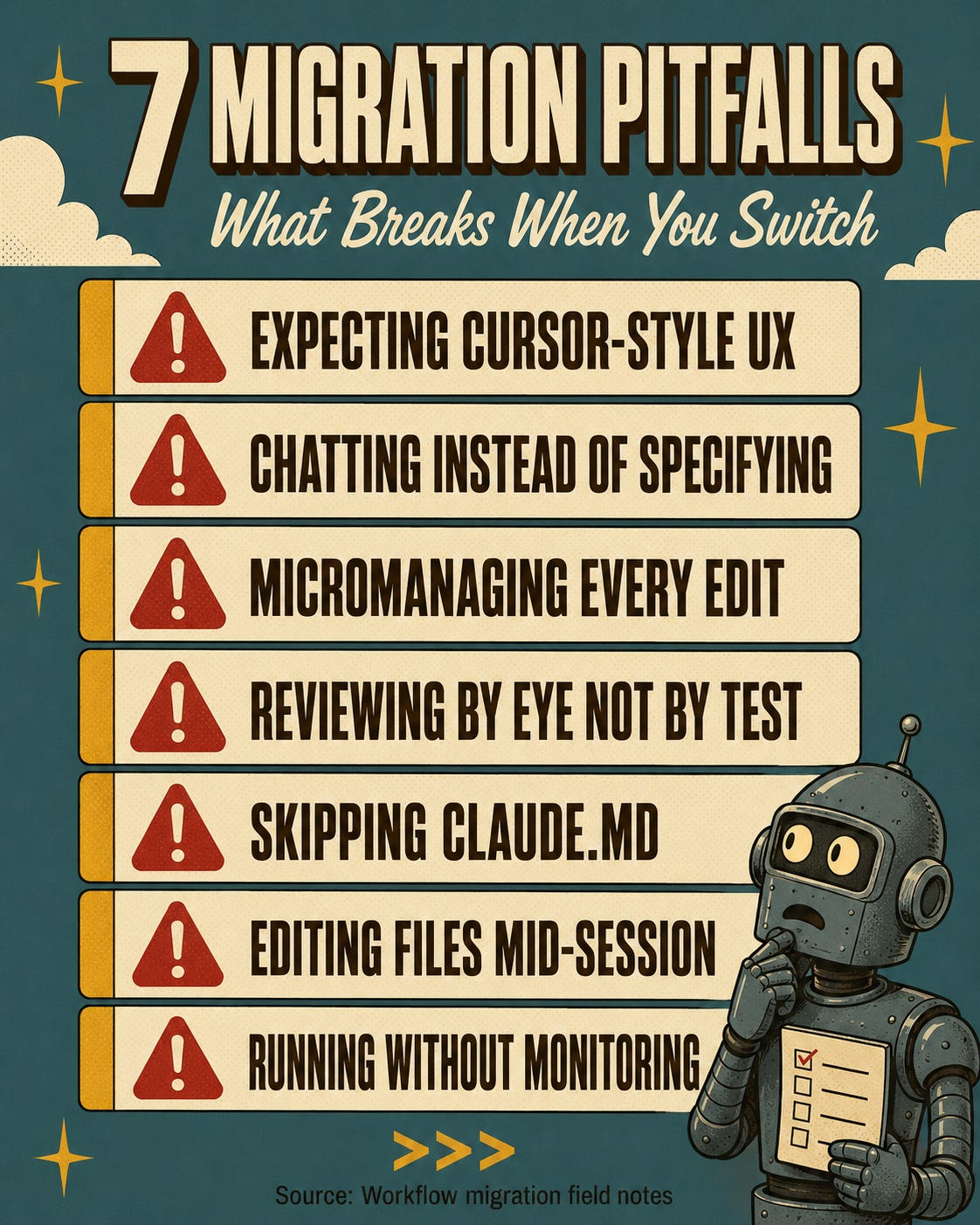
1. You’ll feel blind, and you’ll hate it
Every Cursor migrant says the same thing in week one. They feel blind.
Cursor trains a tight loop. You prompt, you watch a diff appear in the panel, you accept or reject, you prompt again. It’s visual and it’s satisfying. You’re watching the AI work in real time and you feel in control of every line.
Claude Code doesn’t do that. You describe a task, it reads the codebase, plans, executes across several files, runs commands, and reports back when it’s done. No inline diff panel. No green-and-red preview scrolling past. The work happens in the terminal and you see results after the session, not during.
The engineers who adapted fastest already lived in the terminal — tmux, Git from the command line, shell scripts for builds. They were comfortable not seeing every change as it happened. The one who struggled longest had his whole working life inside VS Code, and it took him almost five weeks to stop alt-tabbing to the editor after every prompt.
The fix is simple and uncomfortable: move your review to after the session. git diff once it’s done. The loop isn’t gone. It just moved.
2. A chat message is not a spec
This is the one that costs the most time, so I’ll spend the most on it.
In Cursor you can get away with “clean up this function” or “fix the auth bug.” The tool tolerates vagueness because you’re sitting right there steering. Output drifts, you nudge it back. The whole thing is forgiving because it’s a conversation.
Claude Code runs autonomously, and autonomy punishes ambiguity. A vague prompt becomes a vague plan becomes vague code spread across five files — all internally consistent, all confidently wrong in a direction you never specified against.
I watched this on our webhook system. An engineer prompted: “Add retry logic to the webhook sender.” Claude Code added retry logic. Exponential backoff, ten max retries, no dead-letter queue. Every default reasonable. Every default wrong for us, because we needed three retries, a fixed five-second delay, and mandatory dead-letter routing on failure.
The second attempt read like a spec: “Add retry to the webhook sender. Fixed 5s delay, max 3 retries, route failed deliveries to the dead-letter queue in services/dlq.ts, log every retry with webhook ID and attempt count.” Correct on the first pass.
One round of review instead of four. I started requiring intent specs for every task after that week, and it’s the single change that moved our numbers the most.
3. Stop steering every file
In Cursor, granular control is the product. You approve each suggestion, you watch each file, you steer line by line.
Some of the team tried to recreate that. They asked the agent to pause after every file so they could review. They chopped autonomous execution into manual approval gates. They turned a tool built to finish a task into a very slow, very expensive autocomplete.
The fastest adapter was a staff engineer who’d spent years reviewing pull requests. She figured out early that Claude Code output is a pull request, not a pairing session. She stopped reviewing files mid-session and started reviewing test results at the end. Her prompt was basically: do the whole task, run the suite, commit if it’s green. Then she read the diff once. Her merge rate went up and her review time dropped by roughly 40%.
Give it the full task. Let it finish. Judge the result as a unit. If it’s wrong, fix the spec and re-run. Don’t steer mid-flight.
4. Test it before you read it
Cursor’s diff panel trains you to inspect by eye. Green lines, red lines, you read them like you’d review a colleague.
AI code breaks that habit in a specific way. It’s internally consistent, because one model wrote all of it, so the style is uniform and the naming is coherent. It looks right on a scan. And it can be systematically wrong in ways a human reading at review speed will never catch.
Last February one of my engineers visually reviewed a Claude Code refactor of our billing module. Clean code. Sensible names. Logic that flowed. He approved it. Two days later a customer reported that annual subscriptions were being charged monthly. The bug was a getMonth() where it should have been getFullYear() in a renewal check. It looked completely plausible. It passed a human read. It would not have passed a test that actually verified renewal dates.
Stack Overflow’s 2025 developer survey found the single biggest AI frustration, named by 66% of developers, is exactly this: solutions that are almost right, but not quite. Visual review catches the surface stuff. Tests catch the systematic stuff. So run the suite, run the linter, check the build, and then read the code — for architecture, not syntax. Let the machine catch what it’s better at catching.
5. No CLAUDE.md, no guardrails
This one’s infrastructure, not habit. It’s also the most common shortcut I see.
In Cursor you can run thin on config because you are the guardrail. Your presence, your corrections, your pattern-matching in real time. Plenty of people never wrote a .cursorrules at all and got away with it.
Claude Code without a CLAUDE.md is an agent with no fence. It’ll make reasonable choices that don’t match your conventions. Import a library you’ve banned. Create files in directories that shouldn’t exist. Write tests in a framework you don’t use. All reasonable. None of it yours.
Ours went through five versions. The first was two paragraphs — project name, stack. The current one is 340 lines: architecture boundaries, coding standards, forbidden patterns (no default exports, no any, no direct DB access outside the repository layer), testing rules, file structure. The output gap between v1 and v5 isn’t subtle. It’s the difference between reviewing every session and trusting most of them.
If you’re switching and you don’t write a CLAUDE.md before your first real session, you’ve skipped the highest-leverage twenty minutes in the whole move.
6. Don’t touch the files mid-session
This is the race condition nobody warns you about.
In Cursor, the IDE and the AI share one editing surface. You can type while it generates because you’re both operating on the same buffer.
In Claude Code, the terminal agent and your editor are separate processes on the same filesystem. Open a file in VS Code and make a “quick fix” while the agent is mid-session on that same file, and you’ve created a conflict. The agent’s internal state no longer matches what’s on disk. From there it’s working on stale assumptions, and the output degrades. Sometimes silently, which is worse.
This hit us at least once a week the first month. So I made it a rule: nobody touches files during an active session. See something you want to fix, write it down, handle it after. Or use plan mode and review the approach before execution starts. It sounds rigid. It is. But a race condition between a human and an agent is a real failure mode, and discipline is cheaper than debugging a corrupted session at 6pm.
7. You can’t fix what you can’t see
Most migration advice stops at the habits. Nobody talks about what happens when several engineers are all running the tool their own way with zero visibility into what’s working.
Two weeks after I put OpenTelemetry on our usage, the dashboard showed something I didn’t expect. Three engineers had cache read ratios above 60%. The other four were under 15%. Same codebase, same CLAUDE.md, same plan. The only difference was prompt structure. The efficient group wrote structured specs with consistent terminology. The rest used conversational prompts, phrased differently every session.
Without the data I’d have assumed usage was roughly uniform, and I’d have been wrong by a factor of four. Claude Code’s built-in feedback is vague — rolling windows, weekly ceilings, no per-session breakdown. If you’re running a team, that’s not enough. You want cache hit rates, session lengths, token consumption, task types per person. The patterns are invisible without instrumentation, and the cost gap between an efficient and an inefficient user is real money.
What this actually was
Every one of those seven traces back to the same root: applying an interactive workflow to an autonomous tool. The migration was never Cursor-to-Claude-Code. It was interactive-to-autonomous. Once I said that out loud to the team, the individual fixes stopped feeling like a list of rules and started feeling like one decision.
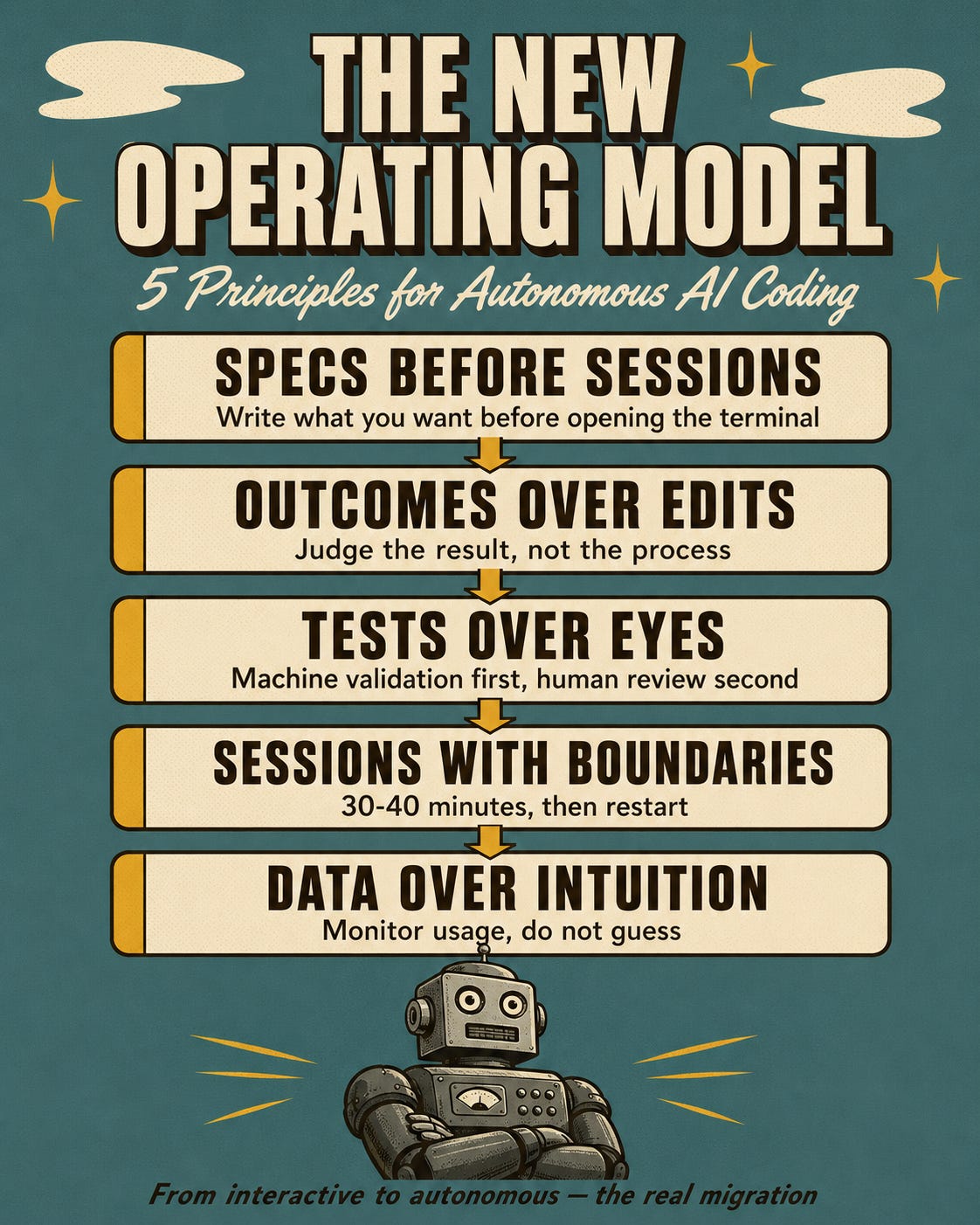
A few principles run our use now, and they’re all versions of that same idea. Write the spec before you open the terminal — the spec is the product, the code is the output. Judge the commit, not the keystrokes. Let the test suite go first and your eyes second. And watch the usage data, because “nobody’s complaining” is not evidence that your team is using the thing well.
Here’s the take I’ll defend: most teams shouldn’t fully replace Cursor, and “which tool is better” is the wrong question. We still run both. Claude Code owns the autonomous, multi-file, architecture-shaped work. Cursor owns the interactive, component-level, quick-utility work. The win wasn’t picking a side. It was knowing which mode I was in before I started typing.
What I still haven’t figured out
I don’t know the right length for a CLAUDE.md. Our 340 lines work, but more instructions mean more surface for the model to interpret, and contradictions between rules can fail silently. I’ve watched Claude Code skip an instruction that was plainly in the file. Knowing the constraint is there doesn’t guarantee it follows it. I’m still calibrating, and honestly I might be over-feeding it.
I also haven’t solved the handoff. When I start architecture in Claude Code and then want to iterate on one component in Cursor, the context doesn’t travel. I re-explain decisions to the second tool every single time. That friction is real and I don’t have a fix for it yet.
And seven months in, I still catch myself alt-tabbing to a file mid-session. The old habit is wired deep. The difference now is the dashboard tells me the operating model works — even on the days the human running it forgets to.
If you’ve made this move and something bit you that isn’t on my list, reply and tell me. I’m keeping a running file of migration failure modes and yours might be the eighth.
The paid deep-dives go further than I can here — the next one is on multi-agent orchestration patterns, where this “specs over steering” idea either holds up or falls apart. $7/mo, $60/yr, or just hit reply, I read every email.
Alireza Rezvani is a reader-supported publication. To receive new posts and support my work, consider becoming a free or paid subscriber.
Comments
Nothing yet. Say the first thing.
Sign in to join the conversation.