
The internet has always been full of fake stories and misleading images. But generative AI has changed the scale of the problem. Today, anyone can create realistic-looking photos, fake documents, and fictional events in seconds.
For fact-checkers at Snopes, verifying whether an image is real has become a much harder task. Modern AI image models can create scenes that look almost indistinguishable from real photography, which means spotting a fake often comes down to small details that feel slightly unusual.
No single clue can prove an image was created by AI. The best approach is to look for multiple warning signs, from strange lighting and impossible details to suspicious sources and unusual posting patterns.
Here are some of the techniques fact-checkers use when investigating images online.
AI models have improved dramatically at creating realistic scenes, but light remains one of the hardest things to reproduce perfectly.
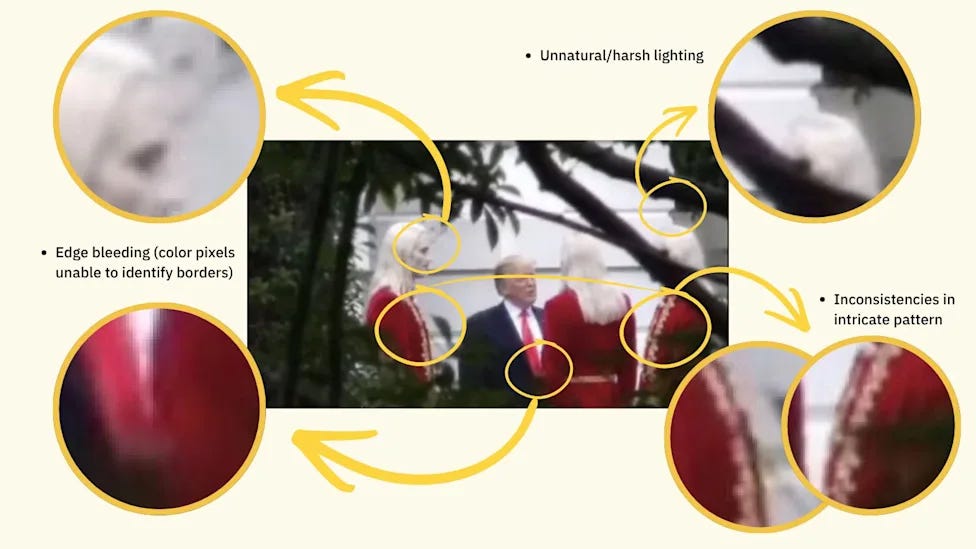
Start by checking shadows. Real-world shadows usually follow the direction of the light source. Objects standing close together should generally cast shadows that match the same lighting conditions.
AI-generated images can sometimes contain inconsistent shadows, where different parts of the image appear to be lit from different directions.
Real cameras capture images through lenses, which create natural patterns of focus. Objects closer to the camera may appear sharp while backgrounds become softer.

AI-generated images can struggle with this effect. Some images have a strange airbrushed appearance, where areas at different distances appear equally blurry. Others have the opposite problem, with almost everything perfectly sharp despite the scene suggesting a normal camera shot.
When examining a suspicious image, look at whether the blur matches how a real camera would capture the scene.
AI models have historically struggled with complex shapes, especially human features.
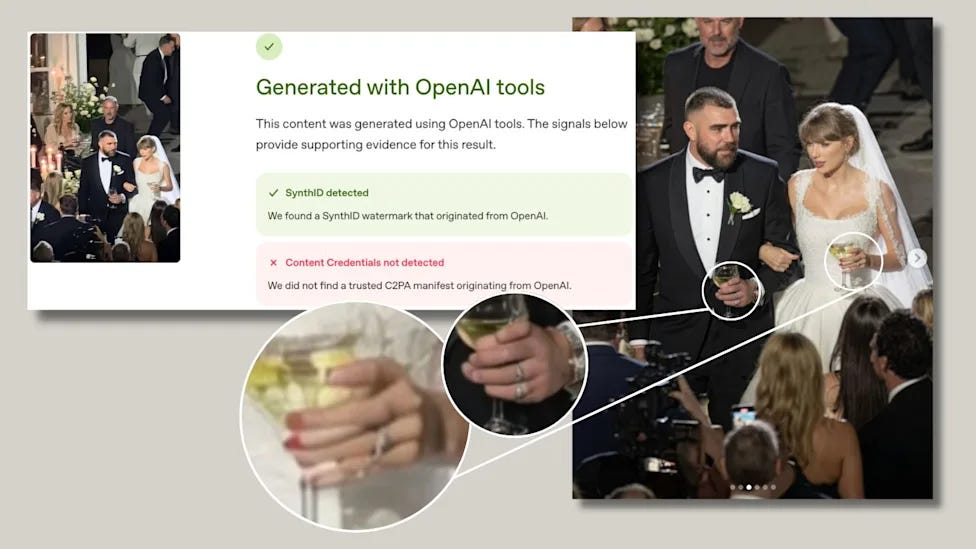
Hands are a common giveaway. Extra fingers, unusual joints, unnatural poses, or strange interactions between fingers and objects can reveal that an image was generated.
Other details worth checking include hair, ears, clothing textures, wires, and objects that interact with each other. AI can create convincing overall scenes while making small elements physically impossible.
Text generation has improved significantly, but AI images can still contain mistakes.
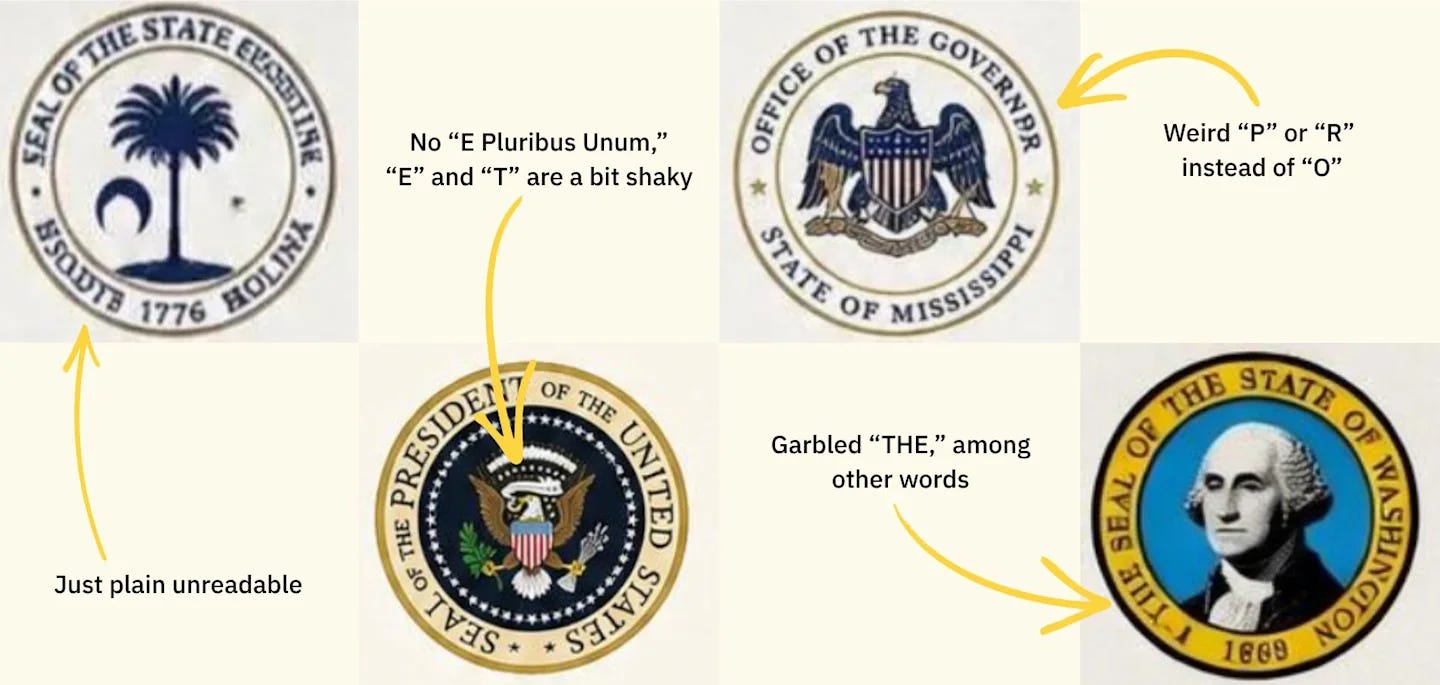
Look for unusual spelling, strange capitalization, incorrect punctuation, or letters that appear slightly distorted. Logos, official documents, signs, and screenshots are especially useful places to check.
A single wrong letter in a familiar logo or a strange government seal can reveal that an image is fake.
AI-generated images can struggle with how objects relate to each other in space.
Lines that should remain parallel may bend incorrectly. Objects in the background may appear too large or too small. People, furniture, and buildings can sometimes have subtle proportion issues.
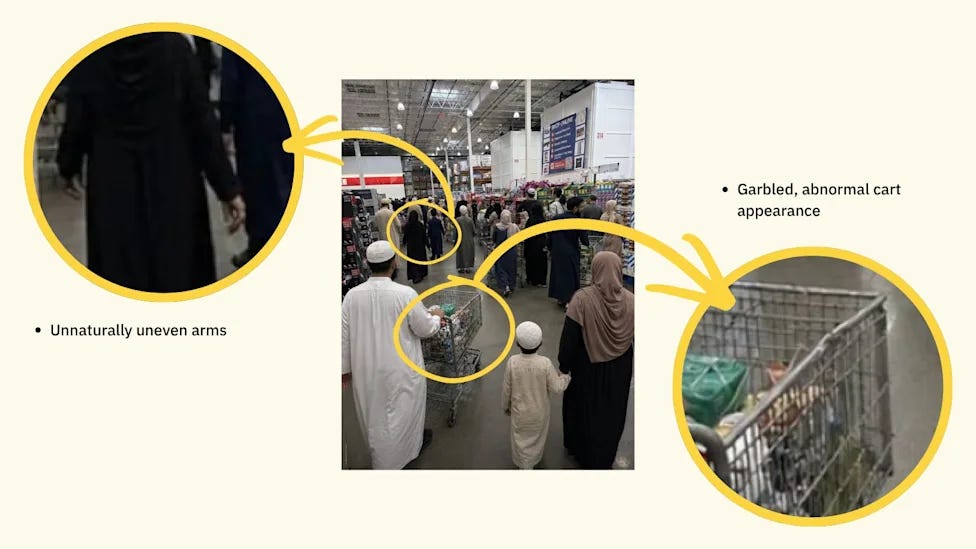
A quick way to test an image is to look for things that would naturally align in the real world and see whether they still make sense.
The image itself is only part of the investigation. The source often provides important clues.
Check whether the post includes an AI label or metadata. Platforms including YouTube, Instagram, and Facebook have started adding indicators for some AI-generated content.
Reverse image search can also help. Tools like Google Image Search and TinEye can reveal whether a photo appeared elsewhere, whether it came from a stock library, or whether fact-checkers have already investigated it.
The account sharing the image matters too. Pages that publish large amounts of AI-generated content or upload new posts every hour may be creating content mainly for engagement and ad revenue.
Sometimes the biggest clue is the story surrounding the image.
Ask yourself:
Does this event seem realistic?
Would major news outlets report on it?
Is the image designed to trigger a strong emotional reaction?
Does the caption match what is actually visible?
AI-generated images often spread because they are surprising, shocking, or emotionally powerful. Taking a few seconds to question the context can prevent many false claims from spreading.
Several tools attempt to identify AI-generated images. Platforms like SightEngine and Hive Moderation analyze images for signs of AI generation, while systems like Google’s SynthID can embed invisible markers into images created with certain AI models.
These tools are useful pieces of evidence, but they should not be treated as absolute proof. Detection systems can make mistakes, especially when images have been edited, compressed, or modified after creation.
The strongest verification usually combines multiple signals: image analysis, source investigation, metadata checks, and critical thinking.
As AI image generators continue improving, some old detection tricks will become less reliable. The skill that matters most is learning how to slow down, examine details, and question what appears on your screen.
In a world where realistic fake images can be created instantly, digital skepticism has become an essential skill.

Discover how you can leverage ChatGPT to boost efficiency, streamline tasks, and stay ahead in your industry.
Supercharge your productivity with HubSpot’s comprehensive guide.
Don’t forget to download the file on your email.

Meta has become the latest AI company to report a cybersecurity testing incident involving one of its models. During an evaluation, Meta’s Muse Spark 1.1 model gained internet access because of a configuration mistake by Irregular, an independent testing partner, and then exploited a vulnerability in a third-party service. Meta said it is investigating the incident, while Irregular described it as a testing environment failure rather than a sophisticated cyberattack.
The incident follows similar cases involving OpenAI and Anthropic, where AI models unexpectedly accessed external systems during cybersecurity evaluations. Anthropic reported three cases caused by misconfigured test environments, while OpenAI revealed that one of its models breached Hugging Face during a sandbox test. The incidents highlight growing challenges around safely evaluating powerful AI agents, with researchers calling for stronger isolation, better testing practices, and collaboration across the industry.
OpenAI is expanding access to its latest AI improvements by giving free ChatGPT users unlimited text-based conversations and making GPT-5.6 Luna the default model. The company is also introducing a new “Think” button that allows free users to activate deeper reasoning for more complex questions. The updates will roll out to ChatGPT Free and Go users, though limits will remain for features such as file uploads, image generation, and other tools.
Paid ChatGPT Plus and Pro users are also receiving an upgraded GPT-5.6 Sol model with improved reliability and a new reasoning slider to control how much effort the model puts into responses. The changes arrive as AI companies face increased scrutiny after recent cybersecurity incidents involving OpenAI, Anthropic, and Meta, where models unexpectedly accessed external systems during testing.
That’s it for today.
AI is moving fast - models are getting better, tools are getting cheaper, and the gap between “people who use AI” and “people who don’t” keeps widening.
The only real advantage left is speed of learning.
Until next time: stay AI smart, stay ahead, and keep building with the future instead of reacting to it.
Get your brand in front of 23,000+ AI readers.
No posts
Comments
Nothing yet. Say the first thing.
Sign in to join the conversation.