

Claude has become one of the strongest AI assistants available.
While it does not focus on everything competitors offer, like built-in image generation, it has become especially popular for:
Writing.
Research.
Coding.
Document analysis.
But many users are only using the basic chat experience.
Claude can do much more.
Here are some features that unlock its full potential.
Claude can go beyond simple answers.
With research mode enabled, it can search through information, collect sources, and create detailed reports.
Instead of asking:
“Explain the semiconductor industry.”
You can ask Claude to:
Analyze current trends.
Compare companies.
Summarize expert opinions.
Create a structured report.
The result is closer to having a research assistant than a chatbot.
Claude is not mainly an image generator.
But it can create useful visual outputs.
You can ask it to build:
• Charts
• Diagrams
• Data visualizations
• Explanatory graphics
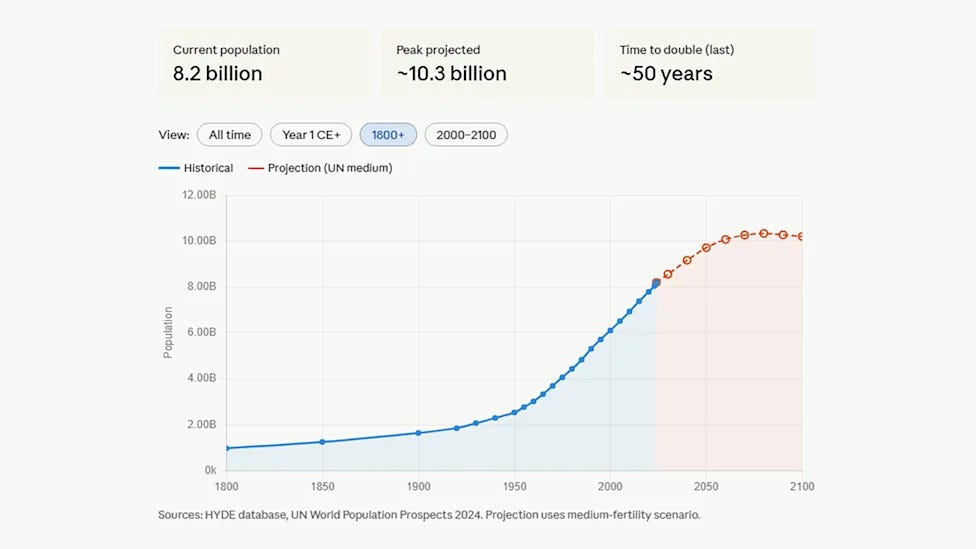
This is useful when information is easier to understand visually.
For example:
“Create a chart showing global AI adoption over the last decade.”
Or:
“Explain how a neural network works with a diagram.”
Claude can work with external tools through connectors.
This allows it to interact with services you already use.
Examples include:
• Gmail analysis
• Organizing information
• Creating workflows
• Managing content
Instead of manually searching through your apps, Claude can help process the information inside them.
One underrated feature:
You can customize the way Claude communicates.
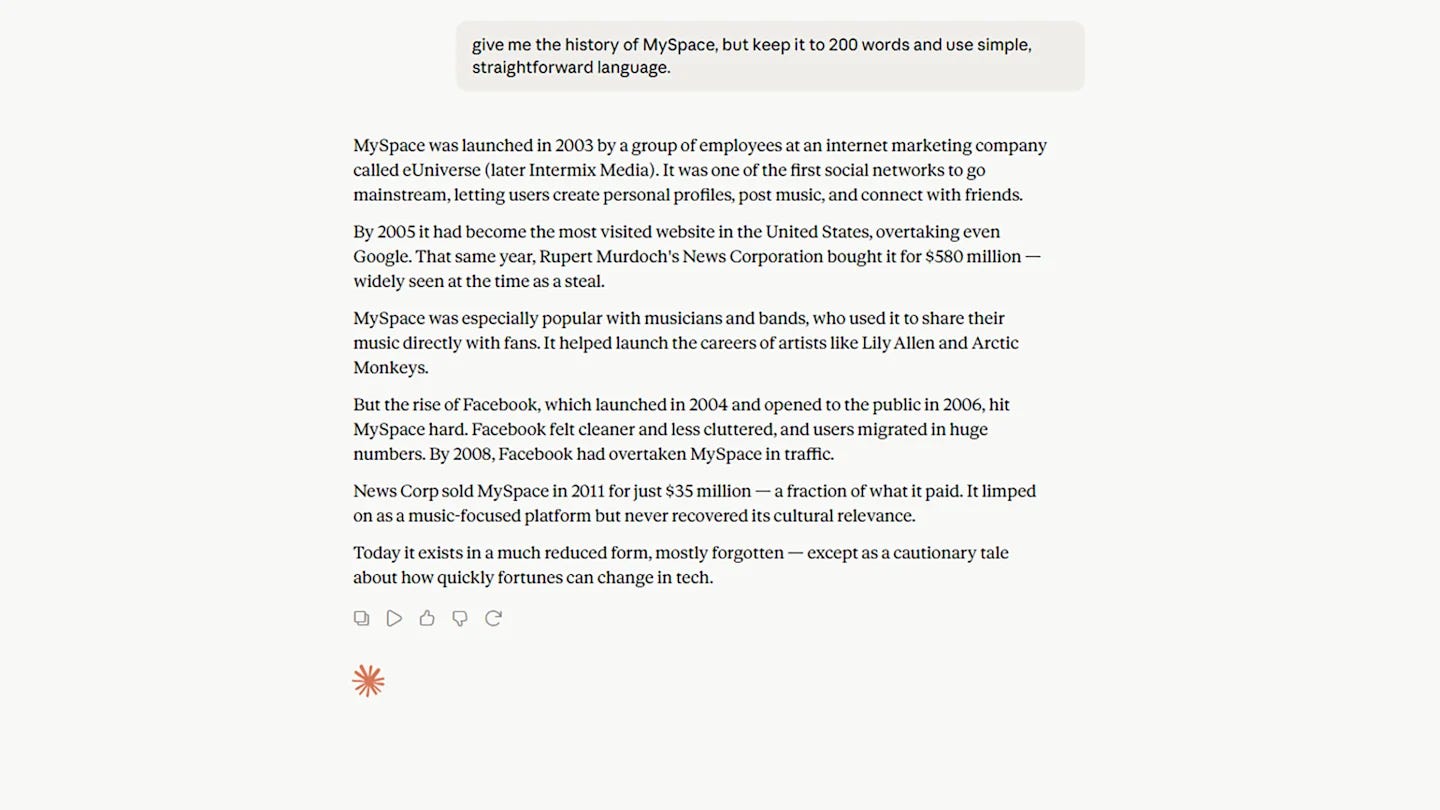
You can tell it:
“Explain this like I’m a beginner.”
Or:
“Give me a technical breakdown.”
Or:
“Answer in 5 bullet points.”
You can also adjust the tone.
For example:
Act like a professor.
Act like a consultant.
Act like an editor.
The quality of AI output often depends on how clearly you define the role.
Claude is built for working with large amounts of text.
You can upload:
Reports.
Contracts.
Research papers.
Emails.
Long documents.
Then ask:
“Summarize this.”
“Find the important risks.”
“Extract the key ideas.”
“Suggest improvements.”
This is one of the areas where AI assistants are becoming extremely useful.
The mobile app adds another capability.
You can point your camera at something and ask Claude about it.
Examples:
Identify an object.
Explain a sign.
Analyze a document.
Understand a menu.
It turns your phone camera into an AI assistant that can understand the world around you.
Claude also supports voice conversations.
Instead of typing everything, you can speak naturally and receive spoken responses.
This is useful when:
You are traveling.
Your hands are busy.
You want to brainstorm ideas quickly.
It makes the interaction feel closer to a conversation.
Claude can also help track information.
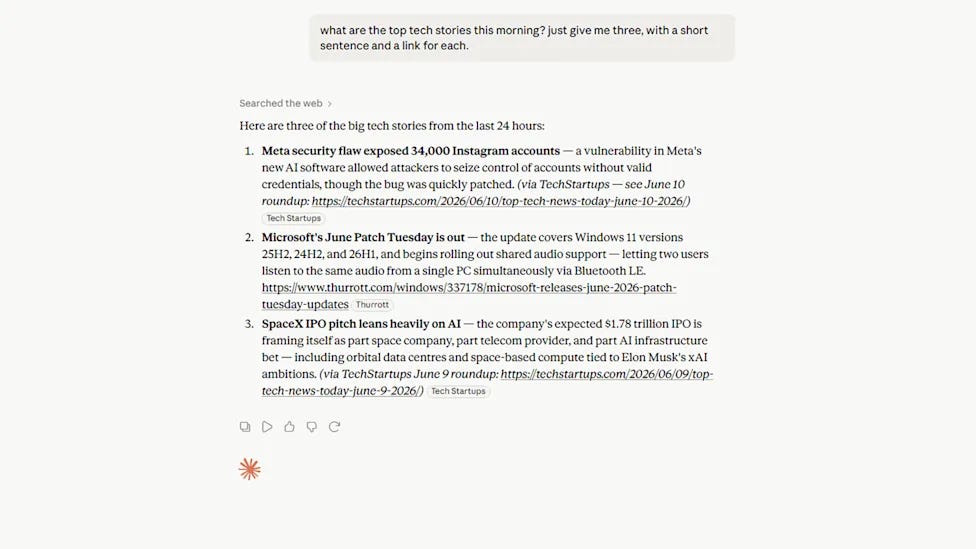
You can ask:
“What are the biggest AI stories today?”
“Summarize the latest crypto news.”
“What happened in technology this week?”
You can customize:
How many stories you want.
How detailed the summary should be.
Which topics matter most.
Claude can generate more than text.
It can help create:
• PDFs
• Word documents
• Spreadsheets
• Presentations
For example:
Create a business report.
Build a presentation outline.
Generate a financial template.
Instead of starting from an empty document, you start with a finished draft.
Most people use AI assistants like search engines.
They ask questions.
They get answers.
But the biggest advantage comes from using them as tools that complete work.
The future of AI is not just better responses.
It is AI systems that research, organize, create, analyze, and connect with the tools people already use.
Claude is moving in that direction.

Discover how you can leverage ChatGPT to boost efficiency, streamline tasks, and stay ahead in your industry.
Supercharge your productivity with HubSpot’s comprehensive guide.

When Washington blocked foreign access to Anthropic’s Fable 5 and Mythos, the goal was to prevent dangerous AI models from reaching adversaries. But the move quickly created controversy after Anthropic argued that the jailbreak behind the decision involved a coding task that other models can already perform, with no reported harmful outcomes. Critics, including international leaders, warned that the restrictions could become a form of AI nationalism rather than a security solution.
The situation highlights a growing AI power struggle where export controls are becoming a two-way weapon. China responded with its own restrictions on 56 US firms, showing that limiting access can also trigger retaliation. The bigger question is shifting from who builds the most advanced AI models to who controls access to them, while security risks continue growing as attackers target the AI infrastructure and tools developers rely on.
For software engineering teams, agentic AI is already becoming a major productivity breakthrough, but for business users, the impact is still uncertain. Box CEO Aaron Levie says the industry is seeing “two different worlds”: coding agents are delivering huge gains, while business-focused AI agents are still in the early stages of proving their value. The real opportunity, he believes, is using AI not just for productivity hacks, but as a way to create unlimited capacity for analyzing data, finding insights, and making decisions.
However, deploying AI agents to non-technical users comes with risks. Unlike traditional software, agents can make unpredictable decisions, access the wrong information, or generate incorrect results without proper oversight. The future of enterprise AI will depend on building strong verification systems, clear guardrails, and workflows where humans remain responsible for judgment. The next big challenge is figuring out how to safely scale agentic AI across everyday business operations.

Carbon helps developers create beautiful screenshots of code. It is useful for blogs, presentations, tutorials, social media posts, and documentation.
If you write about programming, this tool can make your code look professional.
That’s it for today.
AI is moving fast - models are getting better, tools are getting cheaper, and the gap between “people who use AI” and “people who don’t” keeps widening.
The only real advantage left is speed of learning.
Until next time: stay AI smart, stay ahead, and keep building with the future instead of reacting to it.
No posts
Comments
Nothing yet. Say the first thing.
Sign in to join the conversation.