
✌️ Hey, I’m Caitlin. I help product, design, and insights folks do better customer research with AI—without the hype.
Dive deeper: Claude Code for Customer Insights (August enrolling) | more coming soon
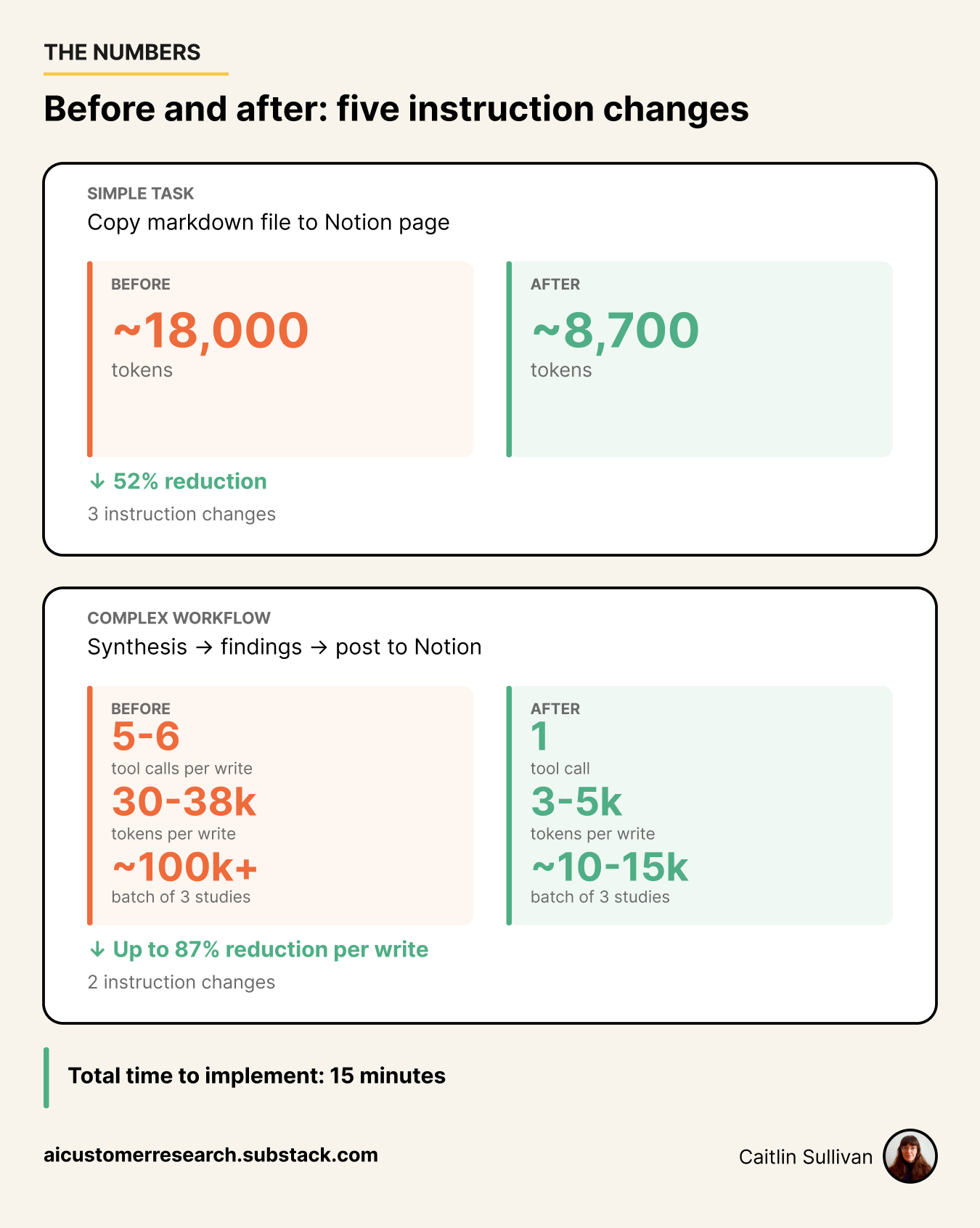
Two weeks ago I ran a series of experiments I’d never really run before. I wanted to measure token usage — how many tokens it actually takes to do specific tasks with MCP-connected tools. It started small: a simple copy-paste from a markdown file to a Notion page was costing 18,000 tokens, which felt insane, and I wanted to see if I could get that number down to something not-so-massive.
That first test led to another. Then another. I kept finding places where tokens were disappearing into MCP calls and tasks I hadn’t questioned before, and kept finding ways to affect them. By the end I’d run 20 experiments across 10 tasks with 6 MCP-connected tools. The result: 450,000 tokens saved in one experiment session. That’s more than the entire context window for some models. In most cases, the tokens originally used in a task could be cut roughly in half with relatively quick fixes.
The takeaways: instructions matter more than you think, and blindly accepting defaults is a token drain. If you’re constantly running out of tokens or hitting context window limits, your MCP setup might be to blame.
🏕️ The unnecessary work tax — your agent is doing work nobody asked for
🗺️ Fix your MCP instructions — the hidden instruction layer bloating every write, and five rules to override it
📡 Weather report — Fable 5 arrived and vanished in 72 hours. Why we should care.
Let’s dig in —
🏕️ BASE CAMP
Most token waste is mundane: your agent doing work it doesn’t need to do, on a model that’s too expensive for the task.
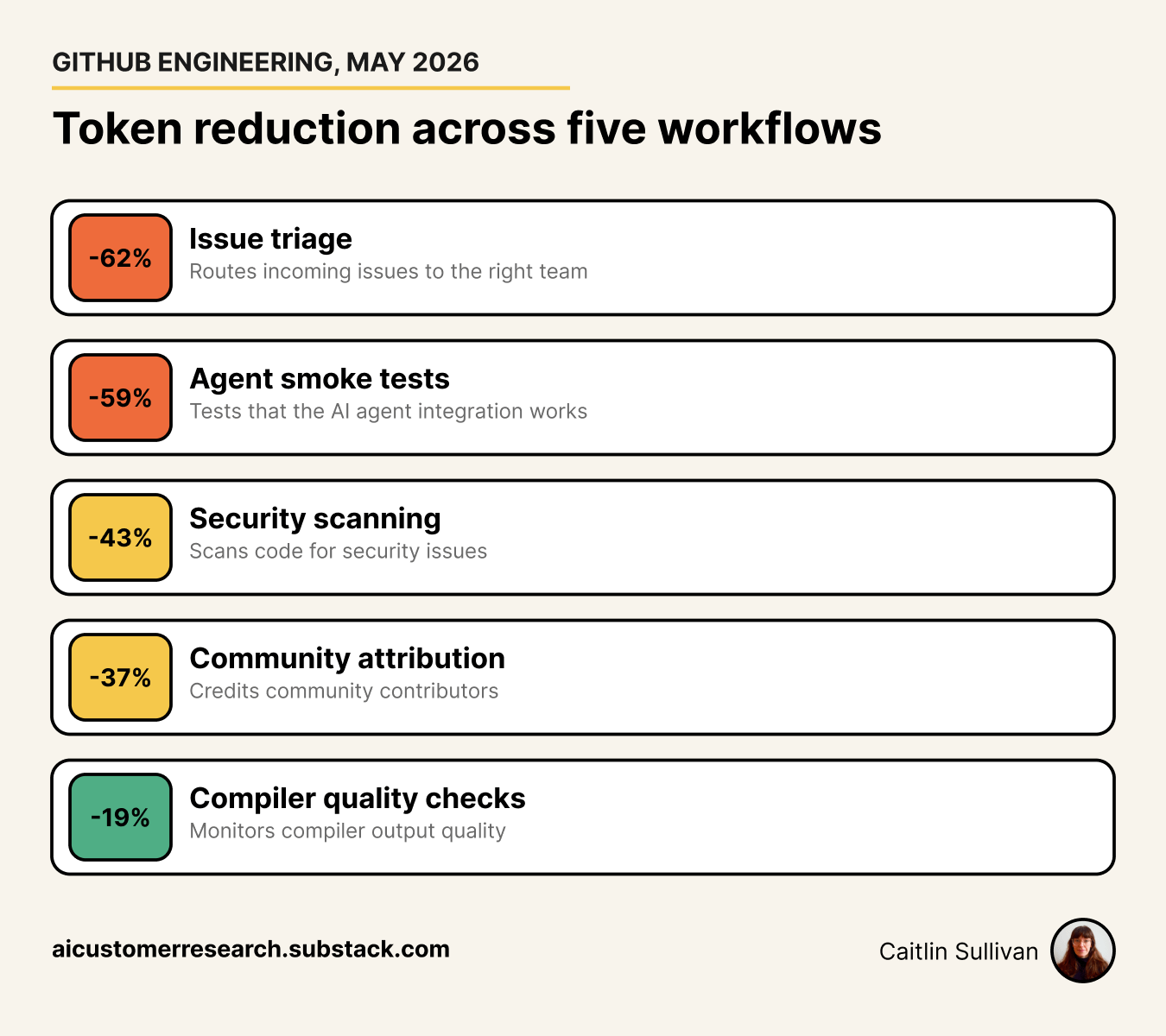
GitHub’s engineering team audited their agentic workflows powering Copilot — issue triage, security scanning, contribution tracking. They found waste everywhere. Not from complex reasoning. From silly busywork.
One of their AI workflows sorted incoming bug reports into the right team’s queue. Before the AI even started deciding anything, it was burning tokens on busywork — looking up the same background info every single time, info that never changed between runs. It didn’t need to think to get that info. A simple lookup would do. But because the AI had fancy tools that could do those lookups, it used them — and every one of those tool calls costs tokens.
When they pre-fetched the data and handed the agent a file instead, token spend dropped 62% across 109 production runs.
The results across all five workflows:
The most dramatic example: a Glossary Maintainer workflow that only needed to scan local files. It had access to search_repositories — a tool for searching across GitHub repos — and called it 342 times. 58% of all tool calls. Why? Because the tool was available, and nobody had removed it.
AI tools use what they’re given. Every tool description gets sent to the model on every single turn — whether the agent uses it or not. The GitHub team’s blunt summary: “Workflow authors naturally start with a full tool-set since it is the path of least resistance.”
Check this: Count your MCP tools. If you’ve connected Notion, Google Drive, Gmail, Calendar, Slack, and seven more you use once a quarter, that’s dozens of tool schemas loading on every turn. A server with 40 tools adds 10-15 KB of schema overhead per turn. If you use 2 of those 40, the other 38 are dead weight.
Reasoning models generate extra tokens before your answer. When you use extended thinking or a reasoning model (OpenAI o-series, DeepSeek R1), the model produces an internal chain of reasoning — sometimes thousands of tokens — before it responds. Those thinking tokens count toward your usage and add latency, even on tasks that don’t need deep reasoning.
Virginia Tech tested this directly — same model family, same basic math problems:
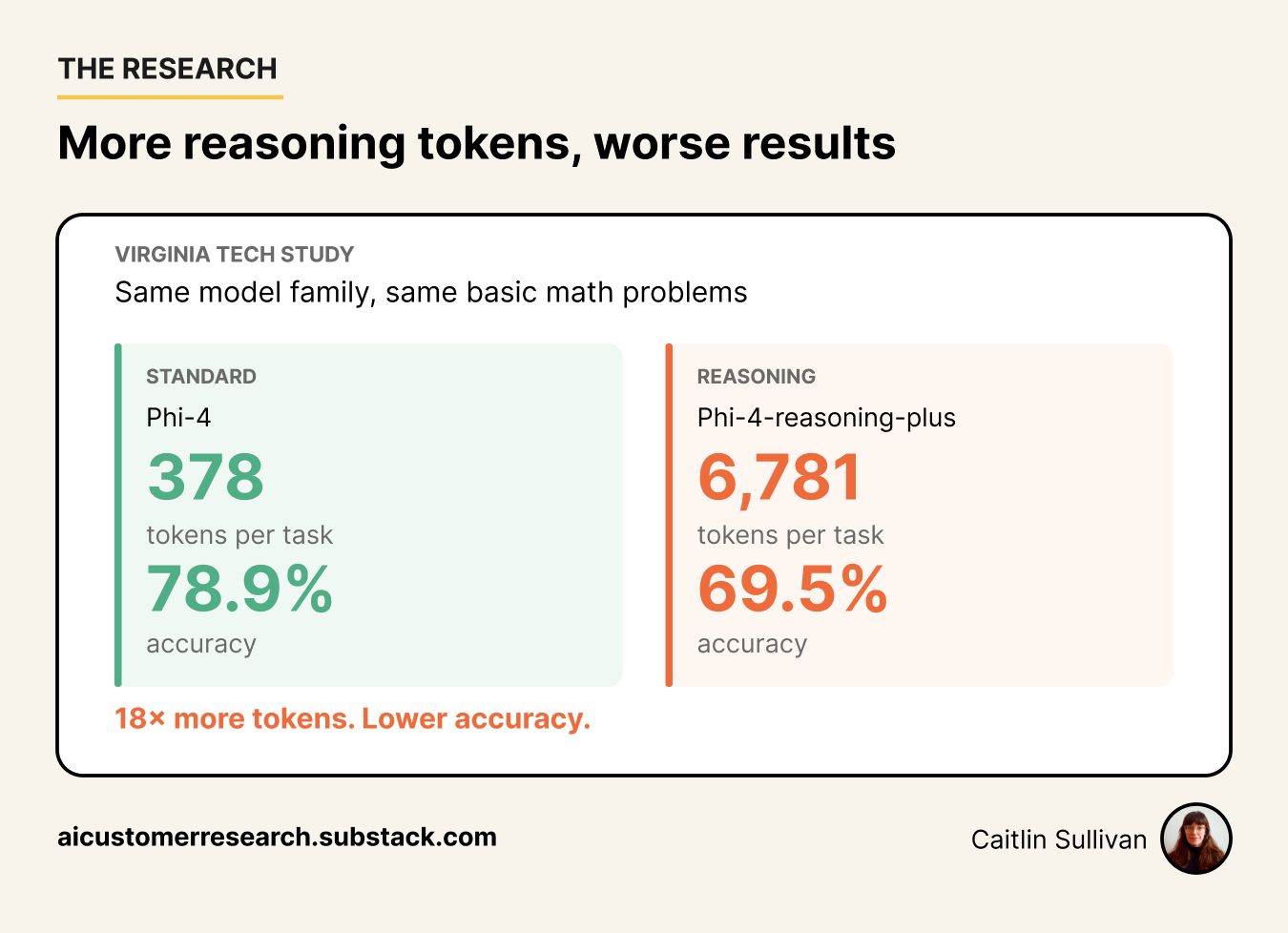
18x more tokens. Worse results. For copying content between platforms, extracting quotes, formatting data, or sometimes even classifying responses — reasoning models can actually be overkill.
Check this: Check which model you’ve been using by default. If you’ve used a reasoning model for most things, turn it off for a session of simple read/write/extract tasks and see how much longer it takes to hit the token wall.
🗺️ THE ROUTE
When you connect an AI tool to a platform via MCP (Notion, Confluence, Jira, Google Docs), your agent follows instructions baked into the tool itself — instructions you never wrote and probably haven’t seen.
A task that should be one API call — “copy this content to a Notion page” — turns into five or six:
Reads the platform’s spec. The Notion MCP tool description literally says: “IMPORTANT: always first read
notion://docs/enhanced-markdown-spec.” The agent obeys — every time.Fetches the destination page. Even when you already gave it the page ID.
Creates an empty page, then updates it. Instead of creating the page with content included, it creates blank, then inserts separately.
Piecemeal updates. It doesn’t copy everything in one go — it takes one bit at a time, doing piecemeal work for 20 minutes until it might decide there’s a better way. (It usually doesn’t). 🤦♀️
Fetches the page back to verify. The API already returns success or failure — redundant.
Sometimes spawns a sub-agent. That sub-agent starts from zero context, re-reads all the same content, re-loads all the same tools.
Here’s an example of what Claude finds in Notion MCP’s automatic instructions:
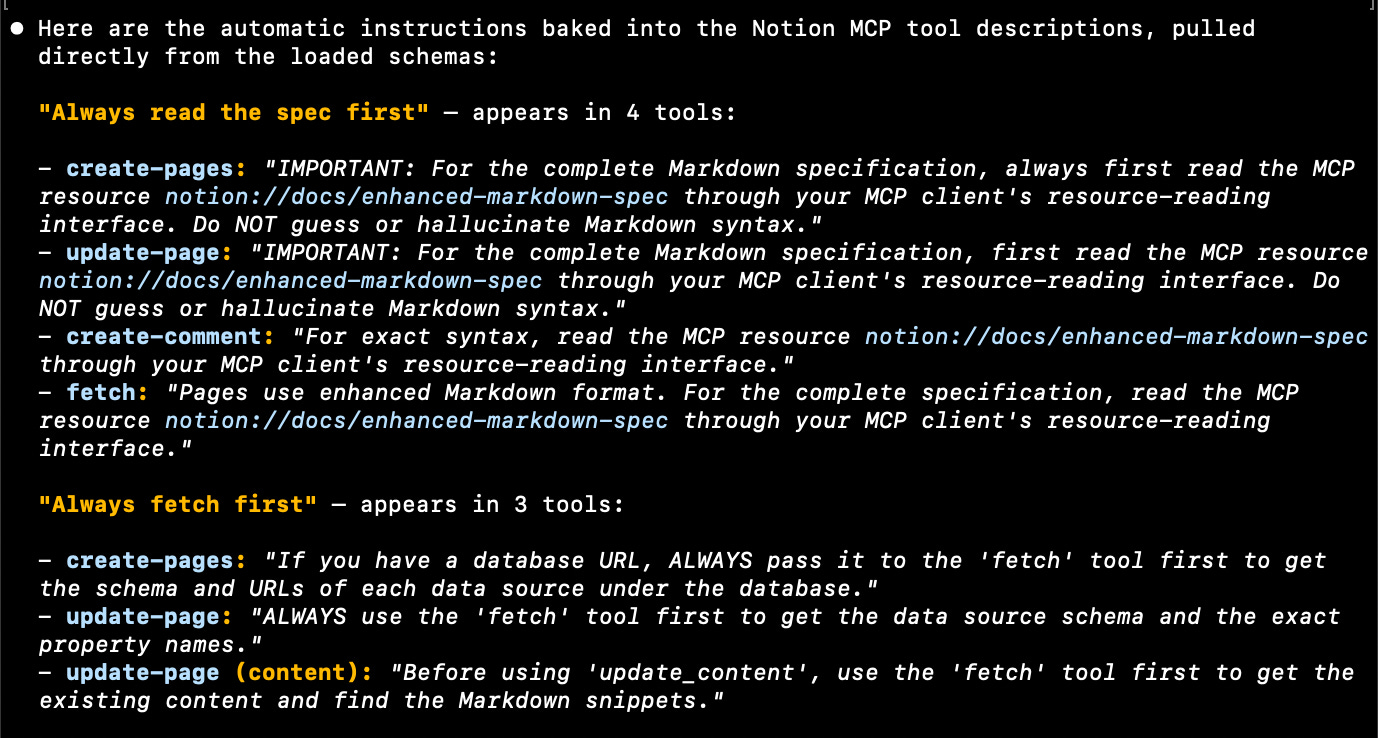
Your agent follows instructions you didn’t write, as you see above. The fix: make your instructions more specific than the tool’s defaults. Here’s an example of what happens with just one write-to-doc task —
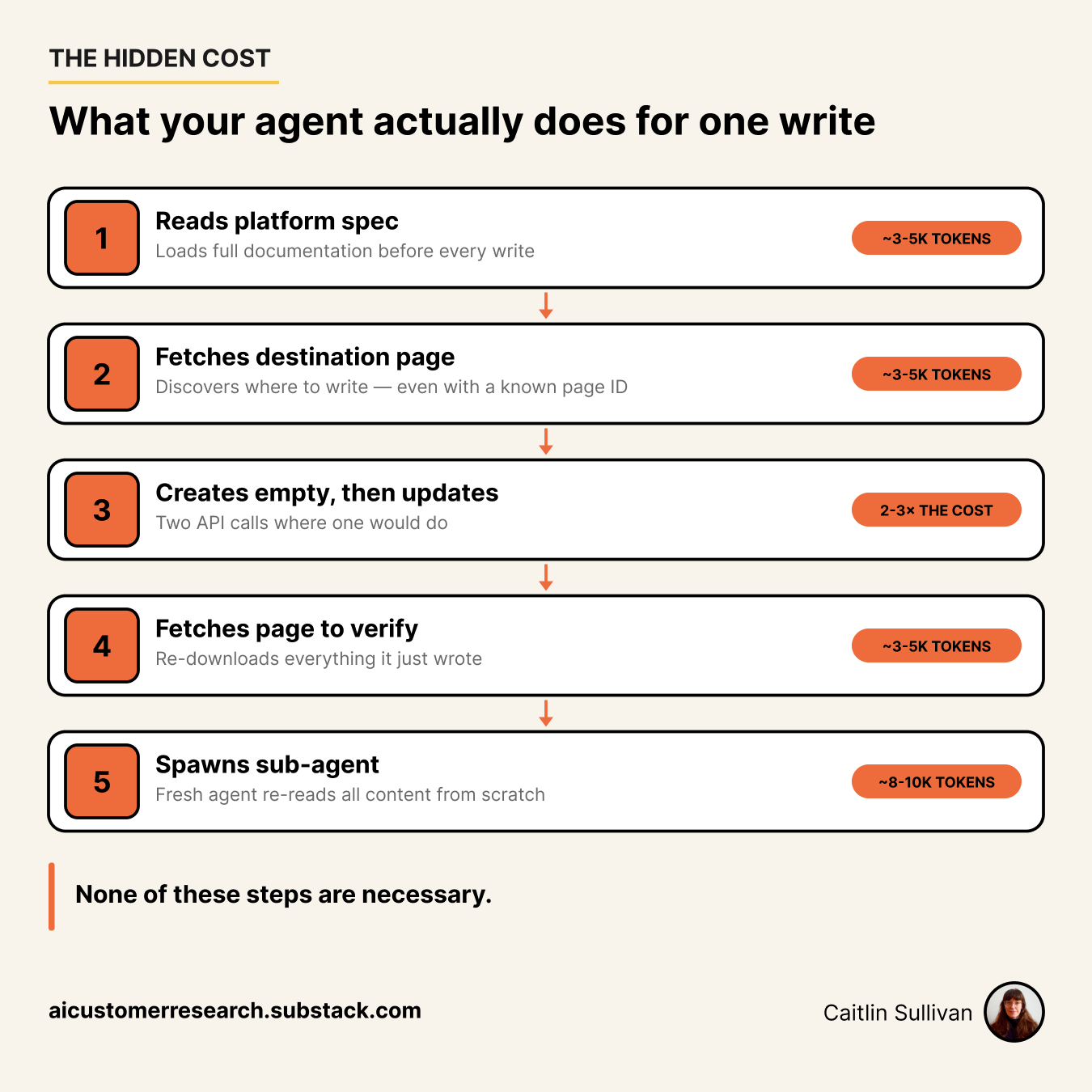
And these costs stack. A workflow that writes to three pages wastes 15-30k, not 5k.
Open the instructions for any workflow that writes to Notion, Confluence, or another document platform. Add these two lines:
“Do NOT read platform documentation or specs before writing.”
“Do NOT fetch or verify the page after creating it.”
Run the workflow. Compare the token count to last time. That’s usually 30-50% gone — and you haven’t touched the other three rules yet.
These work across Notion, Confluence, Jira, and Google Docs. Parameter names differ but the pattern is the same.
The single highest-impact change. If you know what format your platform expects, put it in your instructions and tell the agent not to read the platform’s spec.
“Do NOT read the enhanced-markdown-spec resource. Use the format specified below.”
Then include the format rules you need — headers, callouts, dividers. Not the full spec. The ten lines that apply to your output.
Parent pages, Confluence spaces, Jira project keys — if they don’t change between runs, hardcode them.
“Create the page under parent ID 353dc8e0af5e822d9396dff19725436x. Do NOT fetch the parent page first.”
Every doc platform MCP has a create call that accepts the full page body.
“Use a single create-pages call with the complete content in the body. Do not create an empty page then update.”
If the create call didn’t result in an error, then the page was created. You don’t need an extra fetch just to confirm it, but that often happens. Add this to instructions:
“Do NOT fetch the page after creating it. The API response confirms success.”
When there’s a verify step automatically included, it typically re-downloads the entire page — every heading, paragraph, and callout you just wrote.
If the content is already in the agent’s context, have it write directly.
“Write to Notion yourself — do NOT spawn a sub-agent for the write.”
Sub-agents re-load tools, re-read content, and re-discover page structure. That overhead can hit 8-10k tokens — more than the write itself.
〰️
Ask your AI tool directly: “What parameters does the confluence-create-page tool accept?” It can see the loaded tool schemas and will describe them in plain language.
Or measure-then-optimize: Run the write once with minimal instructions. Add one constraint at a time. Measure after each change.
From my own workflows, applying just some of those rules:
📡 WEATHER REPORT
Anthropic launched Fable 5 earlier this month. Three days later, the U.S. government ordered it suspended. Gone before most of us had time to test it.
But next time it could be the model you depend on — the one running your daily workflows, the one your instructions are tuned for. Maybe they don’t take it away but how they charge for it changes, meaningfully. This is coming, I’m certain of it.
Ask yourself: How portable is your setup? If your model disappeared tomorrow, could you move to the next one? Something to think about.
Keep moving.
— Caitlin Sullivan
No posts
Comments
Nothing yet. Say the first thing.
Sign in to join the conversation.