

Unlike many of the apps that make up the current Creative Cloud suite, Adobe actually built Lightroom in-house. The brainchild of Mark Hamburg, an Adobe engineer on the Photoshop team, it was born in 2002 but didn’t see the light of day until 2006. Now here we are in two thousand and twenty six and Lightroom feels every one of its 24 years. It pretends to be a modern app, but actually it’s a creaking hulk with rust in the footwell, an oil leak in the sump and a subscription meter bolted to the dash where the ashtray used to be. I think it’s long overdue for a proper reckoning, and I’m the man for the job.
Lightroom is the market leader and the default starting point for most digital photography workflows. Even after the introduction of subscriptions over a decade ago and welcome competition from apps like Photolab and Capture One, it has maintained its position as the RAW editor/asset manager of choice among photographers. And now, after 20 years on sale, a vast number of photographers find themselves so deeply embedded in the Lightroom ecosystem that they cannot sensibly walk away.
With Lightroom Classic, Adobe wrote the recipe for every modern combo photo editor on the market and slowly fine-tuned until nobody dared touch it. In fact they’re so desperate not to mess with that formula that they built an entirely separate version in 2017, with a slightly different feature-set, just so they could build it the way they want and not alienate vast numbers of photographers in the process.
Photographers were Adobe customers long before they diversified into vector art, page layout, web design and video editing and it’s high time they justified those annual subscriptions by giving one of their oldest apps a bit of love.
Take a stroll through the Lightroom subreddit and you might notice a recurring theme voiced by Adobe’s paying customers: performance (particularly on Windows) absolutely sucks. There’s no one bug in particular that stands out and no one type of hardware causing problems, just a long list of concerns, most of which are performance related.
But you know me, I like to bring the receipts, and so rather than just shrug my shoulders and vaguely reference ‘issues’, I scraped the last six months of data on Adobe’s own public Lightroom support forums and then combined that with the last six months of data scraped from the Lightroom subreddit and then I had Gemini crunch the numbers for me.
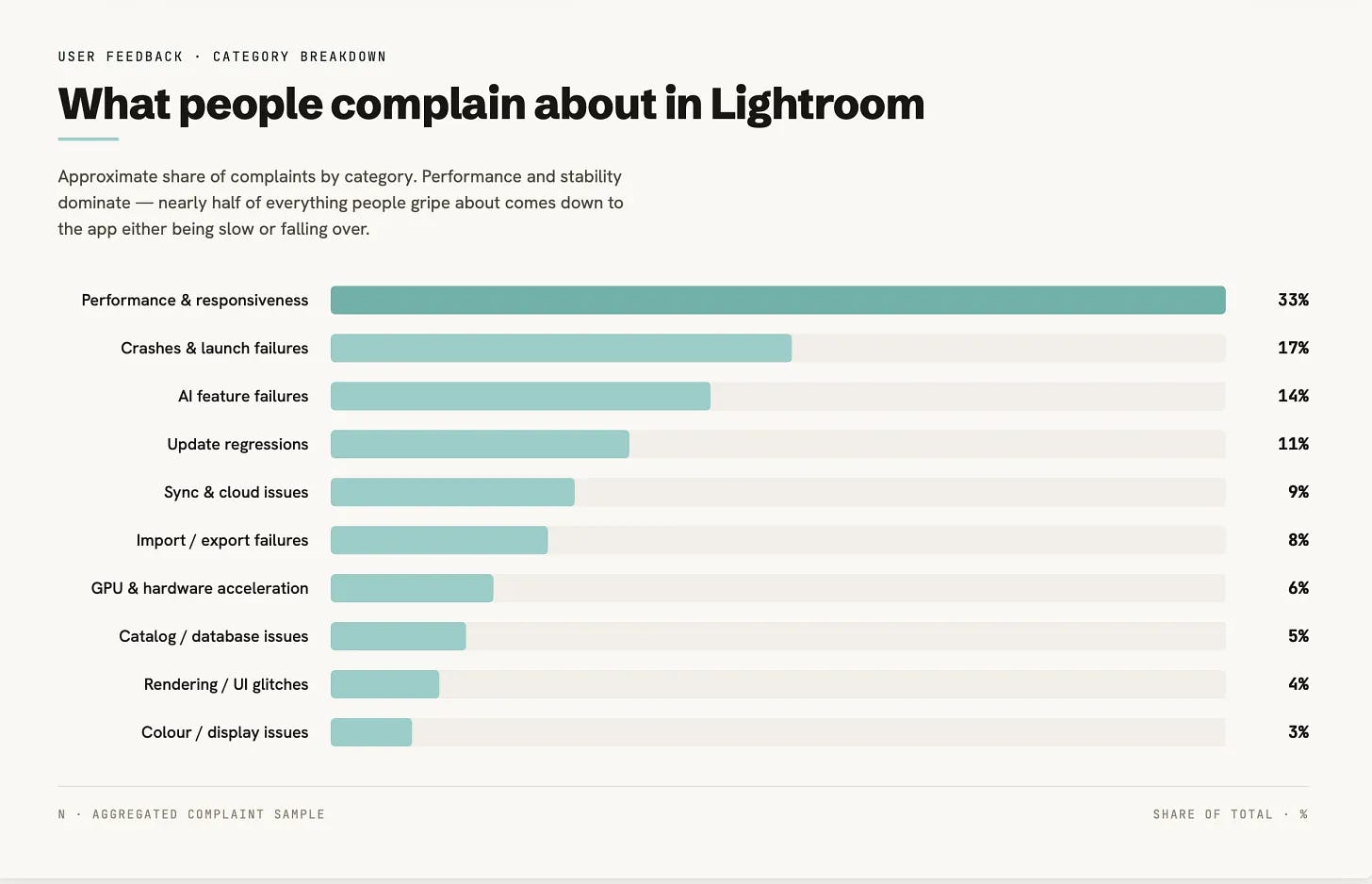
The most common complaints by some margin were related to performance and responsiveness. Adobe customers found that Lightroom made their entire PC lag, that having GPU on or off made no difference, that there were memory leaks, that the app was consuming huge amounts of RAM, that there were delays when switching modules and that the whole UI lagged.
And yes, most of these complaints were from Windows users, based on my data scrape, about 65% of them in fact, with MacOS making up 20% and the remainder for the mobile apps. It is worth pointing out of course that the numbers will be skewed because there are simply more Windows than Mac users, but this makes the problems even more perplexing. If Windows is Adobe’s largest sector, why aren’t they spending more time fixing the litany of issues their customers are having to deal with?
Then there’s that 17% figure for crashes and launch failures. Think about that: about one fifth of all the complaints about Lightroom pertain to the app either shitting itself or never starting.
I want to talk about the whole AI issue separately, but I’d also like to call out that 11% figure for update regressions. Looking at the data I scraped, time and again users would say, “Everything worked before version X”, rather than “I’ve always had this problem.” Which would suggest Adobe’s testing procedures are nowhere near as capable as they should be, given the money they’re charging for this product.
One thing also became clear: the problems are not platform agnostic. Many Mac users also complained about poor performance, crashes, AI-related failures and update regressions too.
Leaving aside the Slideshow for a second, on the grounds that that particular module feels more like an Elizabethan relic than a useful tool, the map module is without doubt the clunkiest of the Lightroom modules still vaguely justifying its place in a modern workflow.
It has always performed so poorly that you begin to wonder if your entire Lightroom install is corrupted. Maps draw in with all the speed of an asthmatic snail, climbing uphill, into a headwind. Make the mistake of scrolling with a few markers on it and enjoy watching it draw in like you’re on a 56k dial-up connection. Click on a marker cluster and instead of doing something useful, like showing you just that cluster of photos in the filmstrip at the bottom of the interface, a completely useless pop-up appears which, after an interminable wait, displays a slideshow of thumbnails so tiny they’re less ‘review your photos’ and more ‘guess what the fuck you shot’.
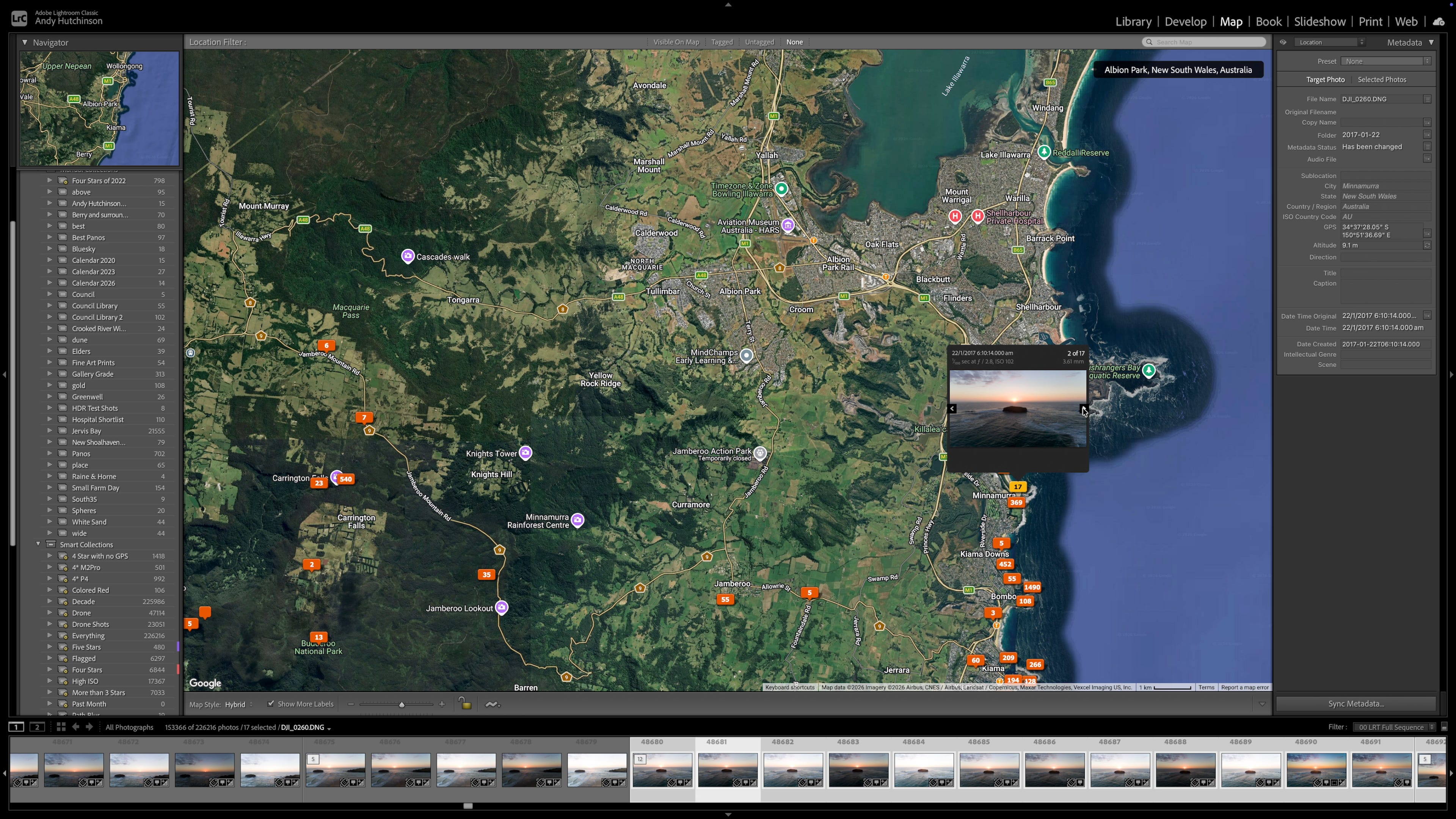
Evidently Adobe believe the map module is passé, because when they built Lightroom’s cloud version, they left it out entirely. Want to geotag your photos visually? Tough shit mate.
Longterm Lightroom users have been used to a litany of map bugs: it was broken outright in 2018 when Google changed its API pricing and Adobe simply didn’t bother fixing it, there was the famous quit-while-open bug that corrupted the display on next launch, and more recently we’ve enjoyed a blank grey screen instead of a map that Adobe’s own staff put down to an unresolved ‘race condition’. Things got so bad for a while that someone coded their own patch for the module and hosted it on Github.
In short, the map module is in dire need of a complete overhaul, not just in terms of its performance, but also its functionality.
But there are other modules taking up precious RAM that haven’t seen much attention since Obama was in the White House. I’m referring of course to the Slideshow, Book and Web modules, throwbacks to a more innocent time when people sometimes showed off their photographs on something other than Facebook or Instagram.
When was the last time you ventured into any of those modules ... on purpose? Did you find the cobwebs off-putting? Who the fuck is making photo slideshows in 2026? Do you burn them onto a CD and post it to your nan?
They need to be removed. End of.
One of the core strengths of Lightroom Classic is its database ... and one of its core weaknesses is its database. When Adobe created the app they opted to use an embedded relational database type called SQLite. This was a great choice because it’s a single self-contained file that stores all of your metadata, edit history, keywords, collections and develop settings in a single location. But over the years, the SQL queries made to that database have become more complex and the tables inside, the collections, keywords and AI masks, have increased in complexity. Combine that with thumbnail generation, smart preview management and 20 year old crap in the Lightroom code and it’s not as efficient as it used to be.
But from the data I scraped from Adobe and Reddit the main complaints actually stem from the way we store our photographs in 2026, perhaps because we have so many more photos than we used to, and the catalogue simply can’t cope with it. Nearly 40% of all the complaints were related to storage and workflow and it all seems to stem from the fact that very few of us have our photos in one single location. External hard drives fill up rapidly when you’re taking 60Mb RAW photographs and storing them alongside all the associated processing detritus such as sidecar files. So we add more drives, or perhaps a NAS and when we do, Lightroom starts choking.
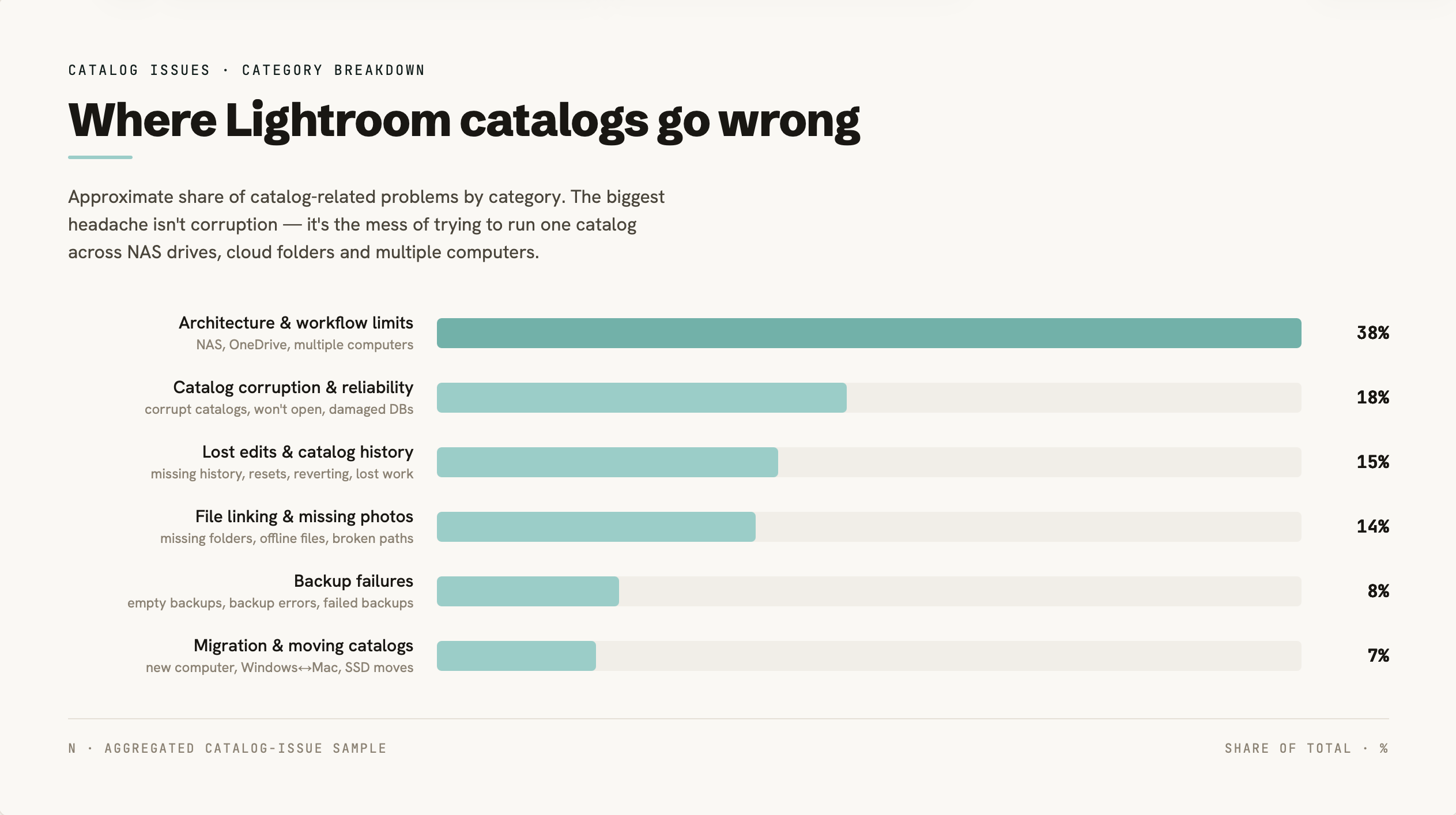
The next biggest complaint related to catalogue corruption and reliability and this is something I’ve experienced first-hand myself on several occasions. My main photo catalogue got corrupted one day (for unknown reasons) and couldn’t be fixed, so I had to grab one from backup which meant losing about a month’s worth of edits.
Adobe’s solution to this with Lightroom CC, was to move the database to the cloud and keep all the other stuff (the preview cache etc) stored locally. And that’s fine if you take a few hundred photos a year, but if I wanted to move my main catalogue to Lightroom Cloud I’d be looking at nearly $3000 per year in storage fees.
When Adobe announced Lightroom CC (as it was known at the time) everyone immediately assumed that they were going to grandfather Lightroom Classic and slowly force us all to transition over. That didn’t turn out to be the case, however, and the two apps have operated alongside each other for the last eight years.
From the data I scraped about 10% of all beginner questions referenced confusion between the two products with a considerable number of posts and threads related to switching between the two (in either direction) or using both of them at the same time.
The RAW engine you use to edit your photographs is the same, but Lightroom Classic has far more features than Cloud and, due to the afore-mentioned database design, it probably always will. And there are some genuinely sizeable feature gaps in the cloud version, including the map, which make it a non-starter for many photographers.
Adobe basically fucked themselves with this one, having two apps with the same name and slightly different feature-sets was always bound to cause confusion and encourage conspiracy theories.
Adobe have been at the forefront of using machine learning to create elaborate masks, ever since they introduced the first subject mask in Photoshop all the way back in 2018. And the complex array of AI masks now available in both versions of Lightroom enable you to make hitherto impossible selections using complex Boolean logic, chaining selections together in a dizzying array of combinations. But often they also don’t work as advertised, they have performance issues and there’s some clunky workflow around their use that slows the whole editing process down.
Typically speaking the most common complaint from users was related to masks failing to update or to even load at all. Nearly as often, users complained that the app would completely fail to recognise subject, sky or background even when they might be staggeringly obvious to any human observer.
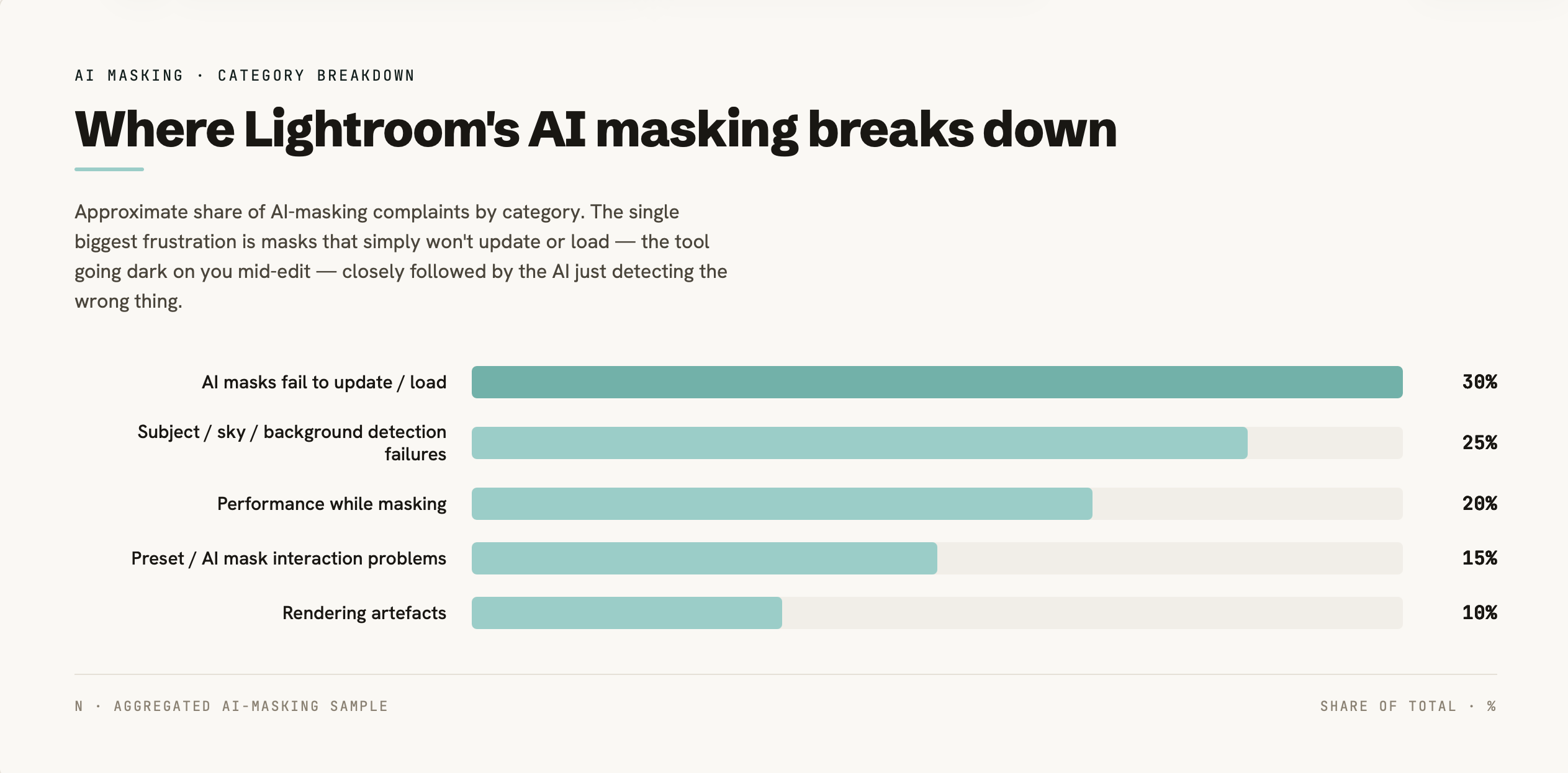
The new granular AI masks underneath landscape are notoriously shit, failing to successfully mask named areas such as natural ground with alarming regularity. They have been exposed as little more than a gimmick, a marketing choice designed to differentiate Lightroom from its direct competition.
It’s all the more confusing because Adobe already made a far superior alternative in the form of the Object mask, which consistently masks regions such as natural ground when the landscape mask fails to do so. Admittedly it requires a little bit of human intervention, but have we really sunk so far that we can’t swipe a brush over a part of the photograph instead of having an inferior automated version try and fail to do it for us instead?
There are also serious workflow issues related to those AI masks too. If you update a part of the photograph that has been tweaked using an AI mask you then have to sit there and wait for about 5 to 10 seconds while those AI masks update.
The main topics I’ve covered already don’t get close to the myriad issues that Adobe’s paying customers are experiencing on a daily basis with both versions of Lightroom.
Looking at the data I scraped the issue with update regressions is massive with large numbers of users complaining that features that used to work got broken and that bugs that had previously been banished (such as with banding, masking and AI denoise) had returned.
There are also serious and on-going problems with cloud sync reliability with users on Reddit and Adobe’s support forums complaining about perpetual syncing, disappearing photos, stuck uploads, non-synced edits and various cloud archive disasters.
Missing data was a recurring theme (and not just in the cloud), with users experiencing vanishing history, missing presets, DNG corruption and disappearing edits.
The export pipeline also seems to have serious problems with a large number of users experiencing colour shifts, washed out colours, over saturation, grain or a completely different photo getting exported.
It all adds up to a poorly coded app that has bloated over the years and with every update gained a new batch of issues that frustrate and anger Adobe’s most loyal userbase, the photographers.
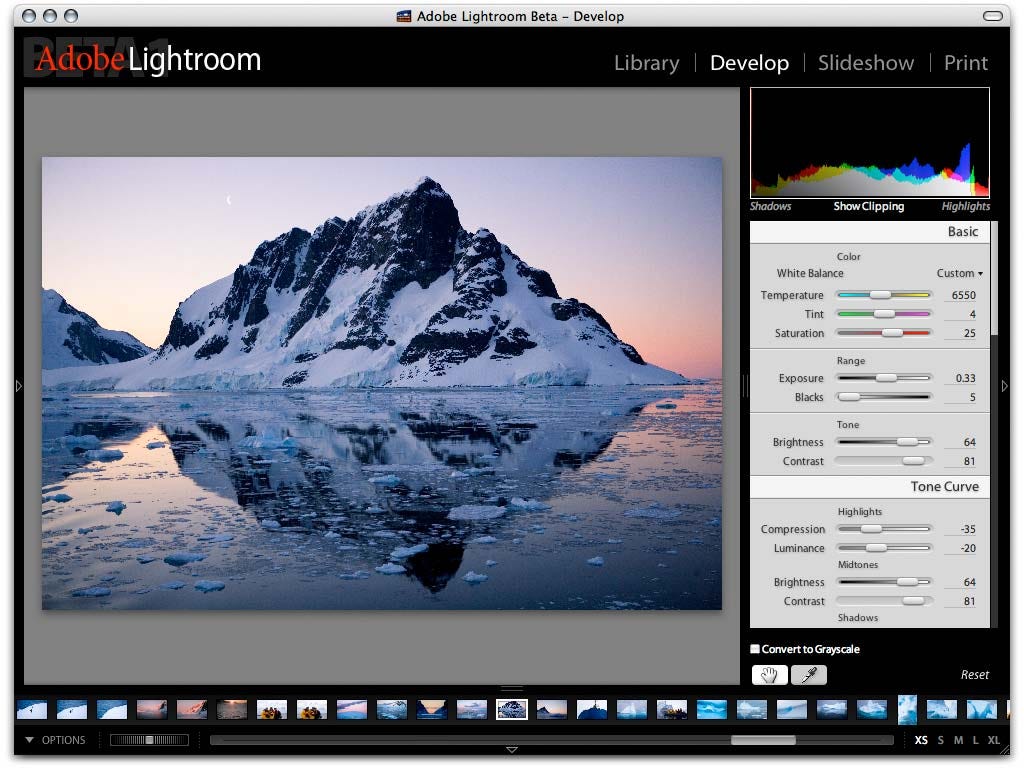
The way I see it, Lightroom leads for two reasons. One’s to Mark Hamburg’s credit: he got the fundamentals right twenty years ago. The other isn’t credit at all, it’s lock-in. Other apps can read the SQLite catalogue but not write to it, so Capture One’s import tool will move your catalogue and leave every edit behind.
But ultimately Lightroom is suffering from twenty years of technical debt and instead of fixing it all, they just add new features, most of which are poorly thought-out gimmicks. It’s like adding another floor to a house when the foundations haven’t been renovated in years. I don’t think that we’re asking for much.
We don’t want more AI bullshit. We don’t want another fucking cloud workflow. We just want Lightroom to be boring, fast, stable and predictable and then get the fuck out of the way and let us make photographs.
No posts
Comments
Nothing yet. Say the first thing.
Sign in to join the conversation.