
It’s July 19. The finall will be played tonight at 9pm CET. worldcupbracket.aguywithascarf.com
We still don’t know who will become 2026 World Cup Champion.
Deep dive - there is so much stuf in a one page web app.
One of the many ways to relive this World Cup, with many links to great external content.
This piece walks through every screen in detail, with screenshots pulled straight from the live site.
What it does
The radial bracket: The whole knockout stage as one circular diagram, winners flowing inward to the Final - click to discover more
Top Cards: Six leaderboards — scorers, assists, shots, saves, power ratings, fantasy
The Film: A cinematic, auto-playing recap of all 104 matches, or any single team’s run
Result cards: Possession pie + Goals / Cards / Subs / Stats tabs, synced across both teams
Tactitcal Line-up Rotation: How a team’s XI and substitutions evolved across every match it played
Controversy Tracker: 30+ incidents, most fact-checked with VAR crew, the law invoked, and press reaction
Most bracket graphics read left to right and run off the edge of the screen. This one is a wheel. Every nation sits on the rim as a flag token; each match is a score node; winners advance inward, ring by ring, until the two finalists meet the trophy at the centre. The Final and Third-place fixtures live in the middle with their dates and local kickoff times.
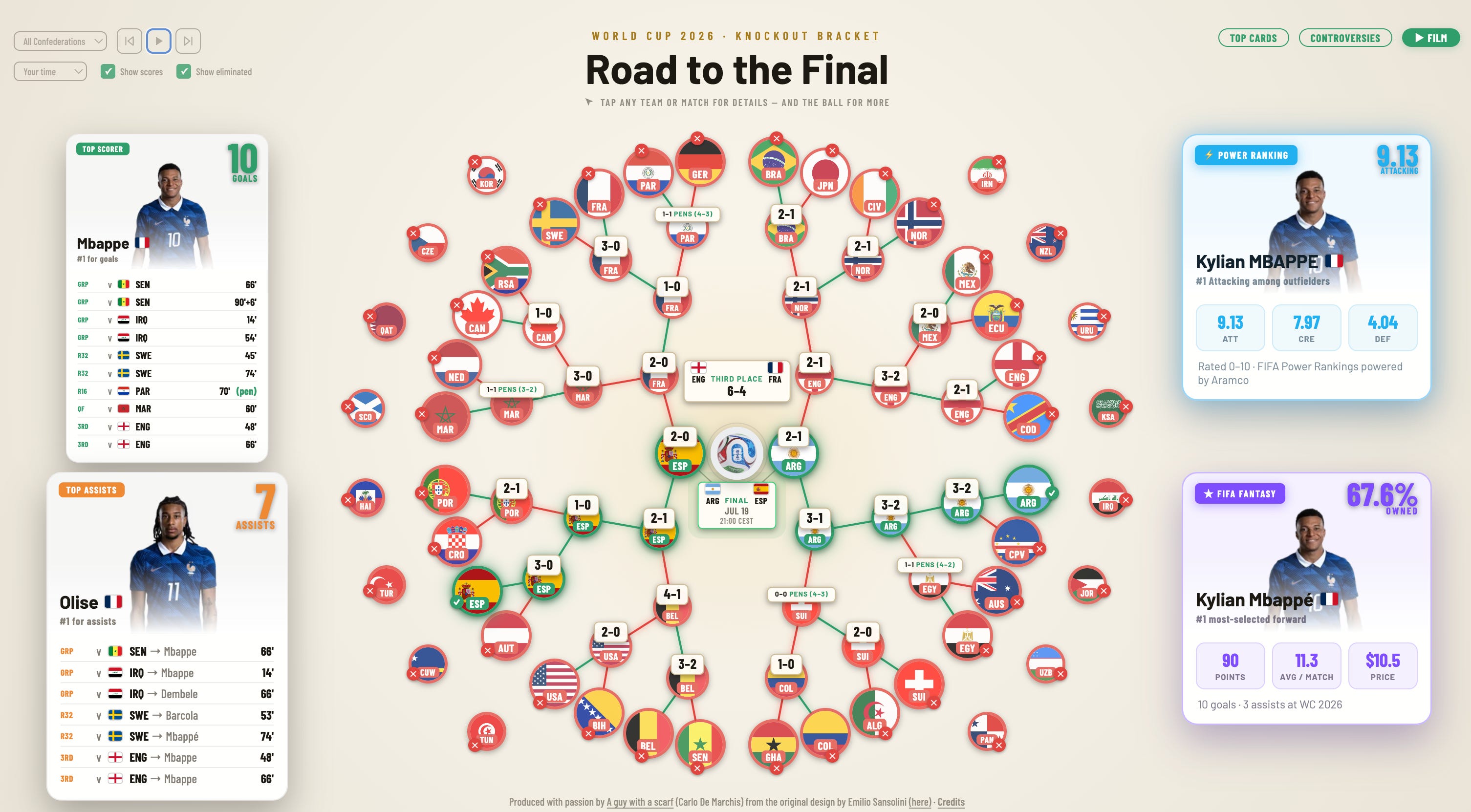
The full knockout stage on one screen. Green links trace the winners’ road to the centre; red marks the eliminated.
Colour does the storytelling: a green edge is the path a team is still on, red is a team that’s out. The floating cards around the wheel are ambient — they cycle on their own through the tournament’s headline performers (here, Messi’s goals and Olise’s assists on the left, Mbappé’s power rating and fantasy price on the right), so the bracket is never just static geometry.
The control cluster (top-left) keeps the view yours:
All Confederations filter — isolate UEFA, CONMEBOL, CONCACAF, CAF, AFC or OFC.
Timezone selector — every kickoff re-renders in your local time (UK, US zones, Brazil, Japan, Sydney and more).
Show scores / Show eliminated toggles.
Playback (⏮ ⏸ ⏭) auto-cycles through team and match detail cards, hands-free.
Turn Show scores and Show eliminated both off and it strips back to a pure survival map:
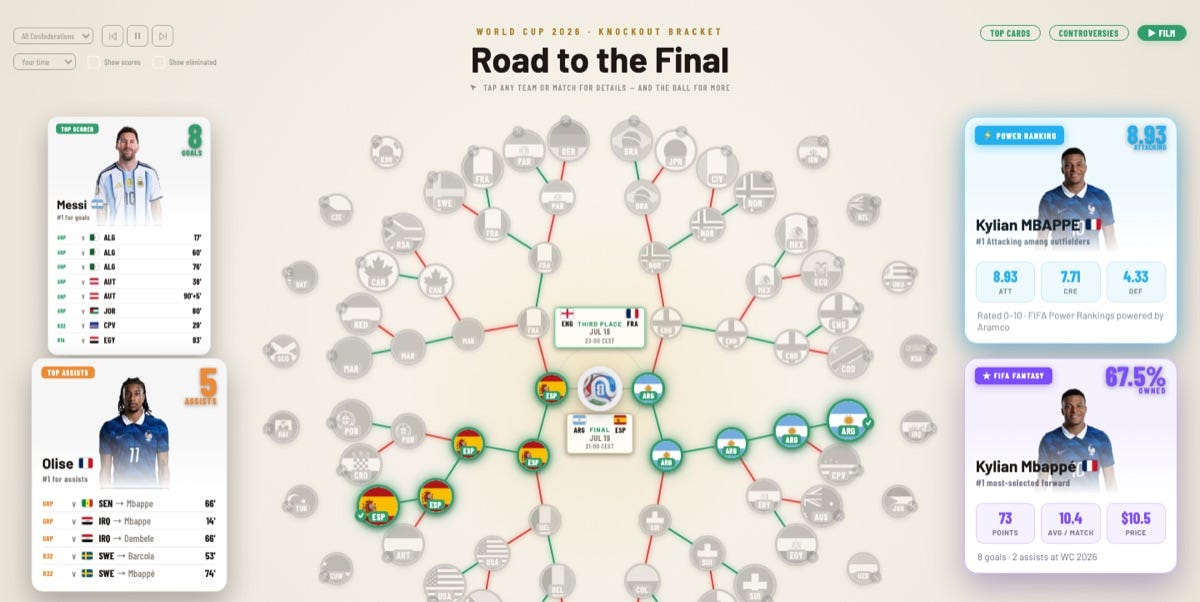
The wheel isn’t just a picture — every token is a doorway. Three kinds of things are clickable, and each opens a different card.
Tap a team (any flag on the rim) and its full dossier slides up:
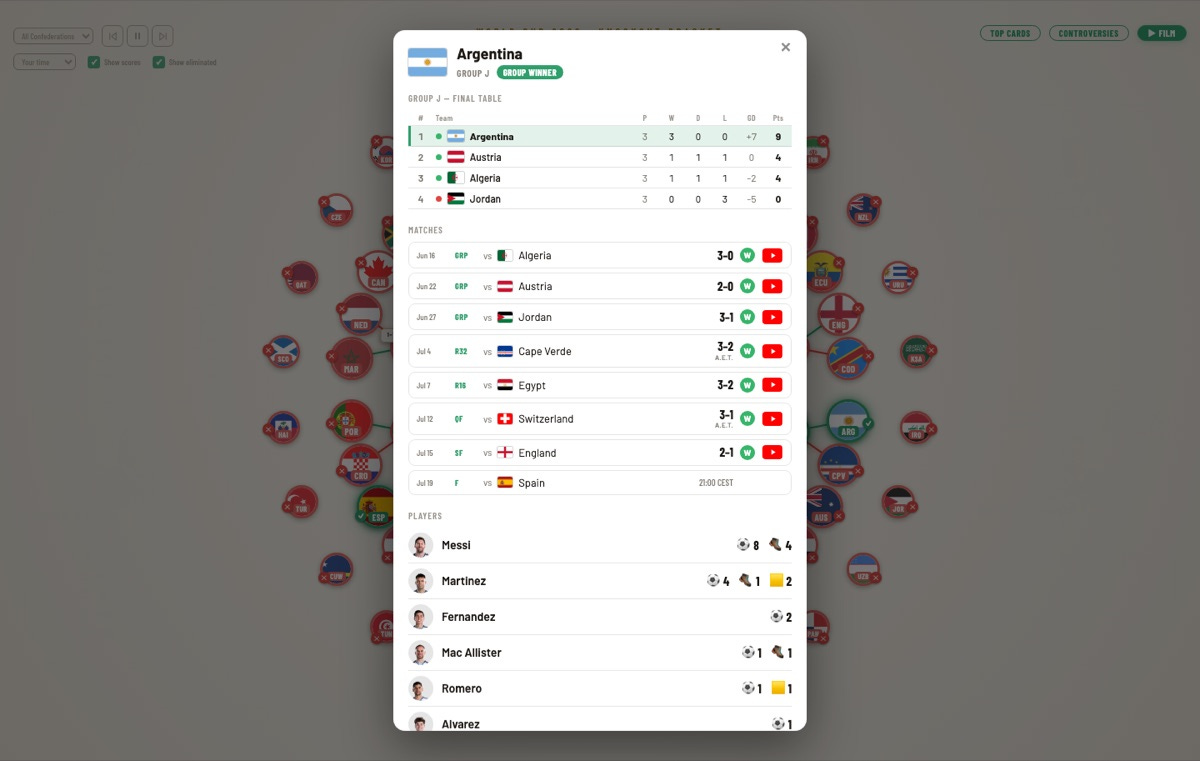
Argentina’s team card: group final table, every match with result and highlights, then the squad.
The header carries the crest, the group, and a status badge (Group Winner). Below it: the final group table — played, won, drawn, lost, goal difference, points, with a green/red dot for who advanced — then every match the team played, each row showing date, round, opponent, score, a W/L result badge, and a link straight to the highlights. At the bottom, the squad, each player line tallying goals, assists and cards. It’s a tournament-long summary of one nation in a single scroll.
Tap a match (any score node) and you get the game itself:
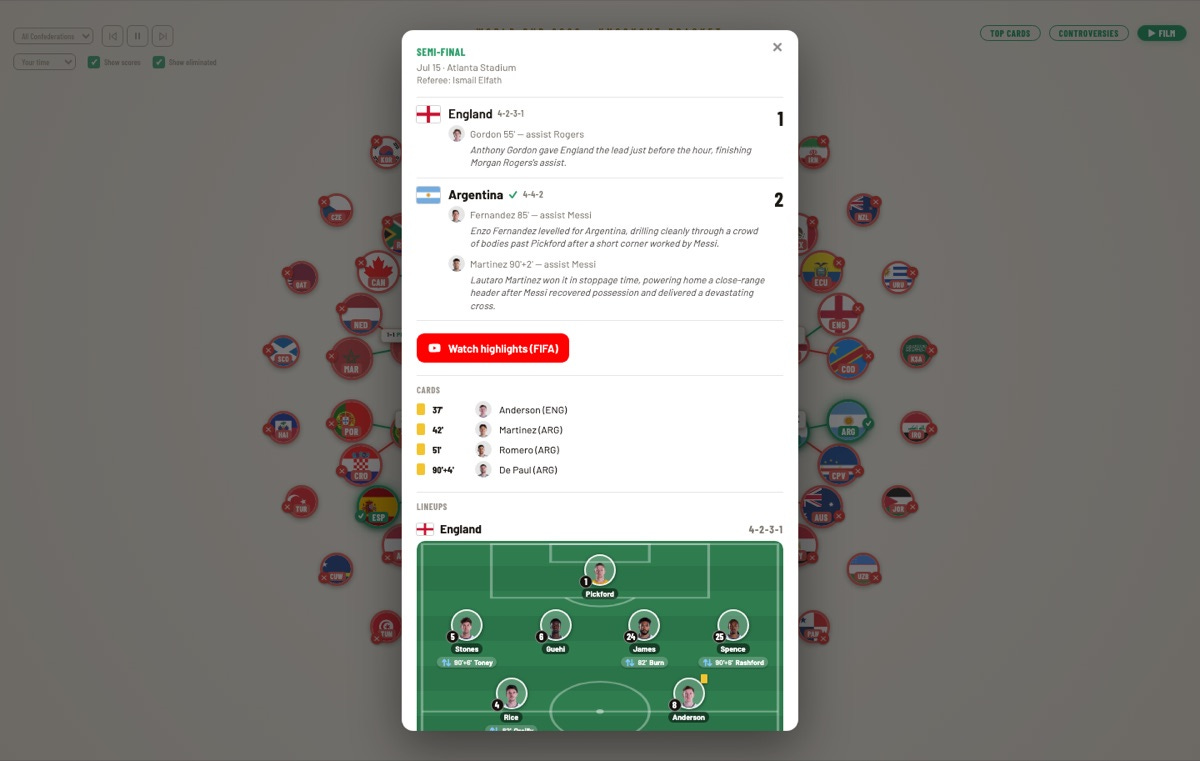
The semi-final card: formations, goal-by-goal with narration, cards, highlights, and both lineups on the pitch.
England 1–2 Argentina opens with the round, venue and referee, then each side’s formation and goals — scorer, minute, assist, and a written line describing how it happened (”Lautaro Martínez won it in stoppage time, powering home a close-range header…”). Under that sit the bookings, a Watch highlights (FIFA) button, and the full lineups drawn on a pitch, sub annotations included. It’s essentially a mini match report for every fixture in the bracket.
Tap the ball at the very centre and the whole tournament’s numbers open at once:
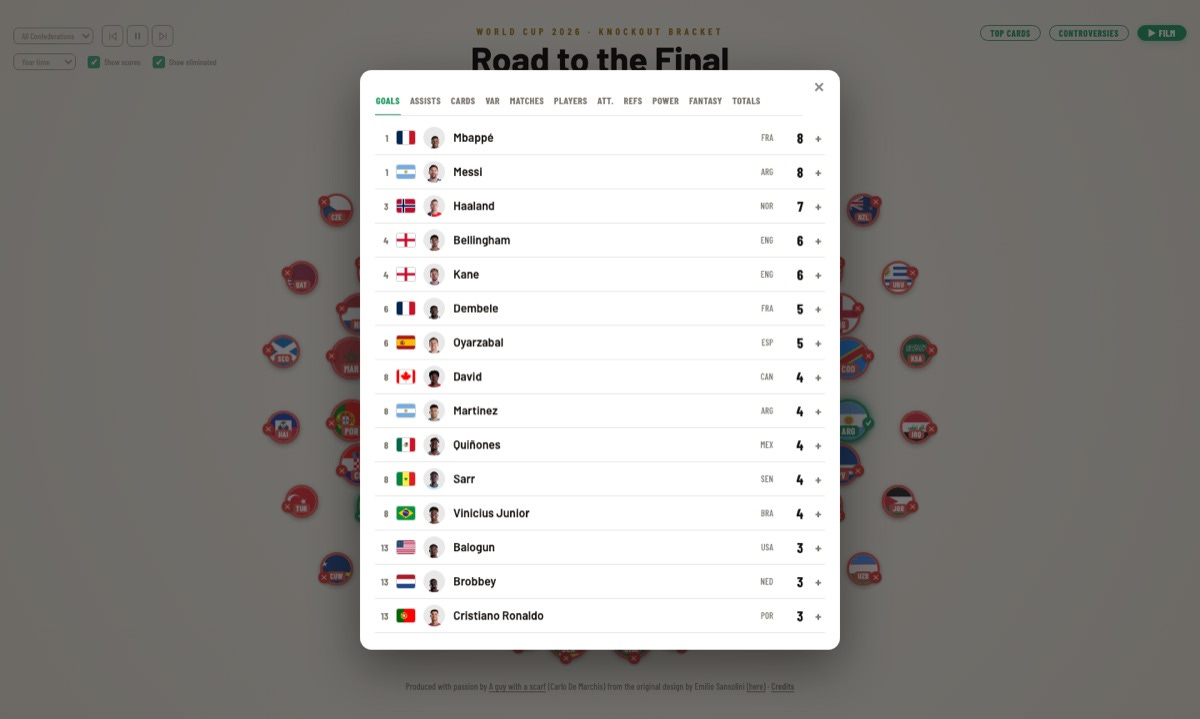
The centre ball opens a full statistical almanac — eleven tabs, from goals to VAR calls to referees.
This is the app’s data vault. Eleven tabs — Goals, Assists, Cards, VAR, Matches, Players, Att., Refs, Power, Fantasy, Totals — each a fully ranked table (the Goals tab shown here, with a + on every row to expand a player’s detail). It’s where the same feeds that power the Top Cards and the film get laid out end to end.
The Top Cards button opens a full-screen deck of statistical boards, each colour-keyed to its own identity and populated from FIFA’s official stats hub. A tab bar switches between them.
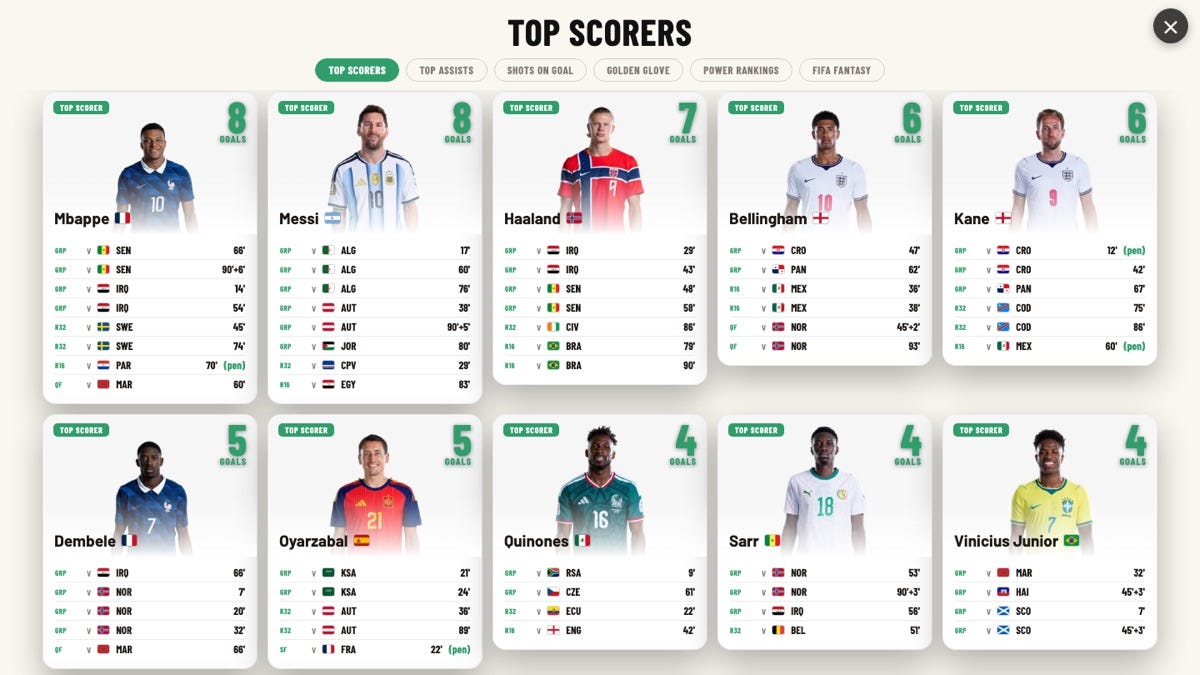
The scorers’ board: every goal itemised by round and minute, penalties flagged.
Each card is a player portrait in national kit with a running goal tally, then a line-by-line ledger of when every goal was scored — group stage through knockouts, minute-stamped, with penalties marked. Mbappé and Messi lead on eight.
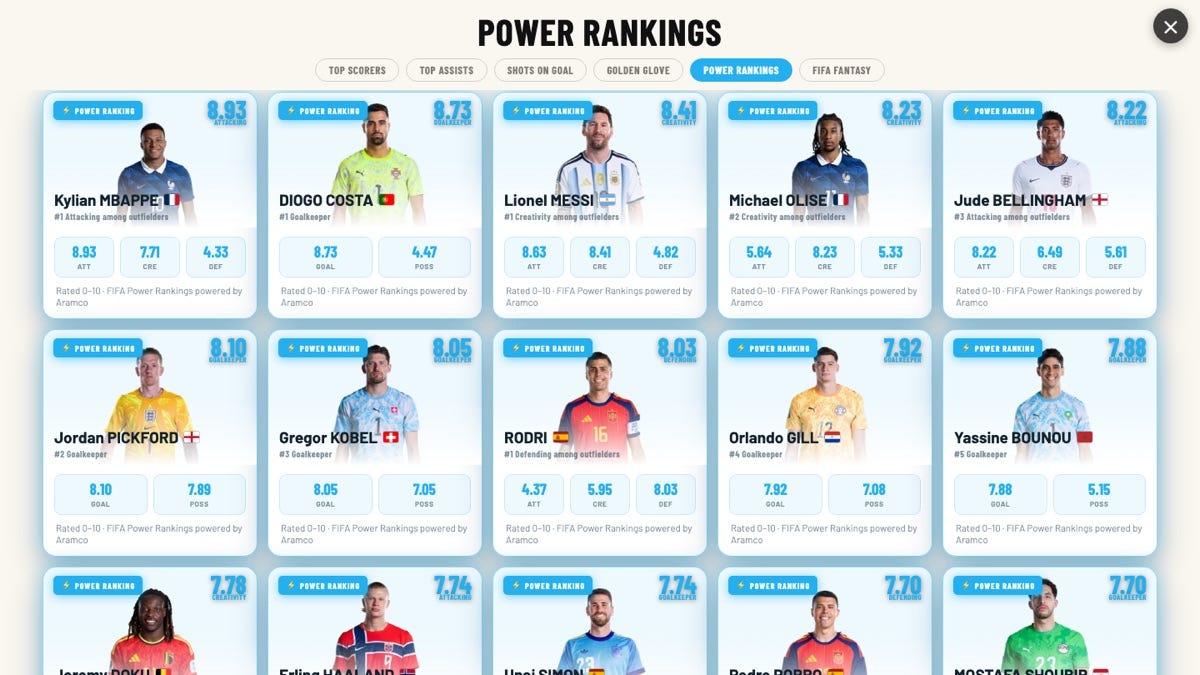
FIFA’s 0–10 Power Rankings, broken into attacking, creativity, defending, goalkeeping and possession.
The blue board surfaces FIFA’s official Power Rankings (the “powered by Aramco” 0–10 model). Outfielders get ATT / CRE / DEF sub-scores; goalkeepers get GOAL / POSS — so a keeper like Diogo Costa ranks on his own terms rather than being buried beneath forwards.
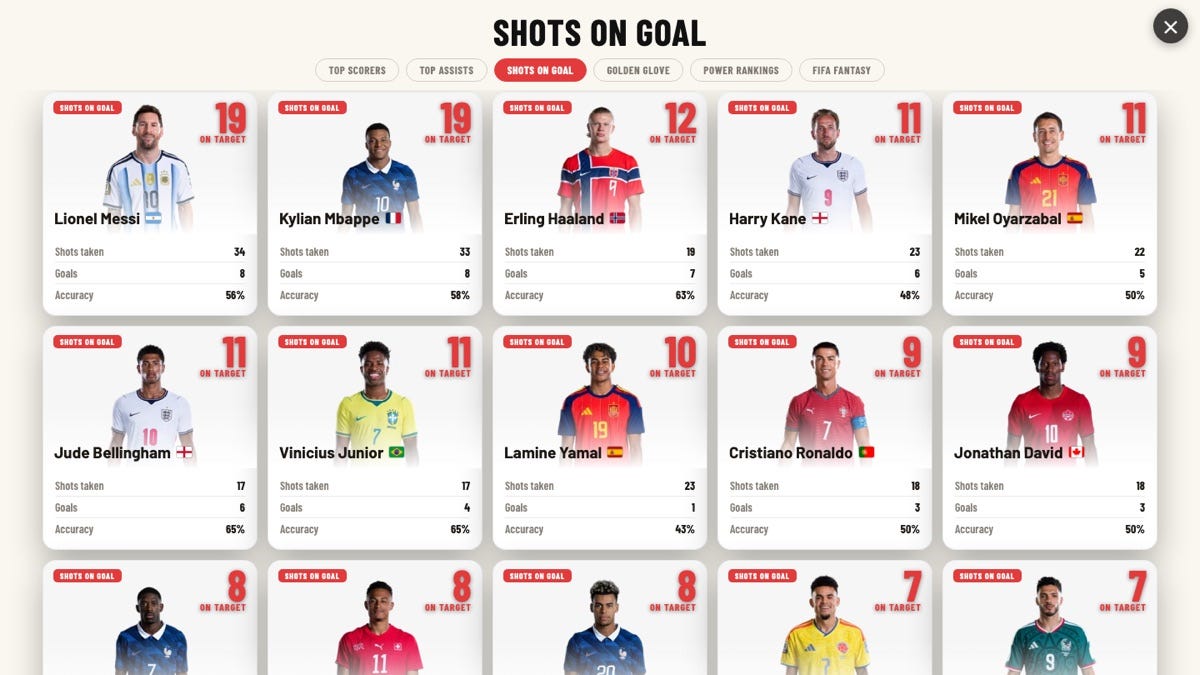
Shots on Goal: attempts, goals, and finishing accuracy from official per-match data.
The crimson board answers “who’s actually testing the keeper?” — shots taken, goals, and accuracy (shots on target ÷ shots). It’s a nice corrective to the scorers’ table: Lamine Yamal took 23 shots for a single goal; Haaland’s 63% accuracy is elite.
Two more boards round out the deck: Top Assists (orange) and the Golden Glove save leaders (teal), plus a FIFA Fantasy board (violet) with points, average and price.
Every figure on these boards is pulled from FIFA’s public stat feeds, not hand-entered.
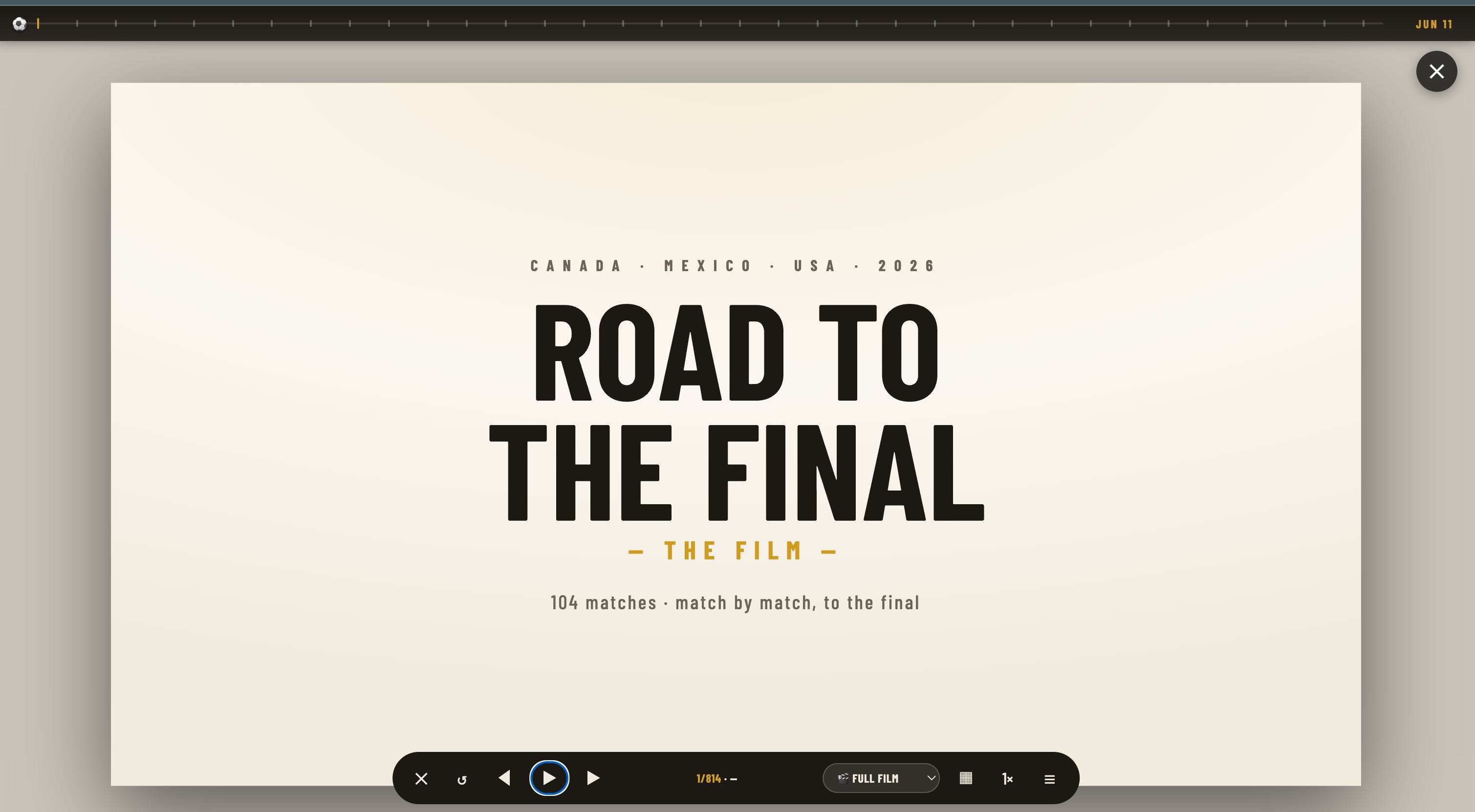
The ▶ Film button is the app’s centrepiece: a full-screen, auto-playing recap that narrates the tournament beat by beat — 796 of them in the full cut. A timeline scrubs across the top; a control bar sits at the bottom.
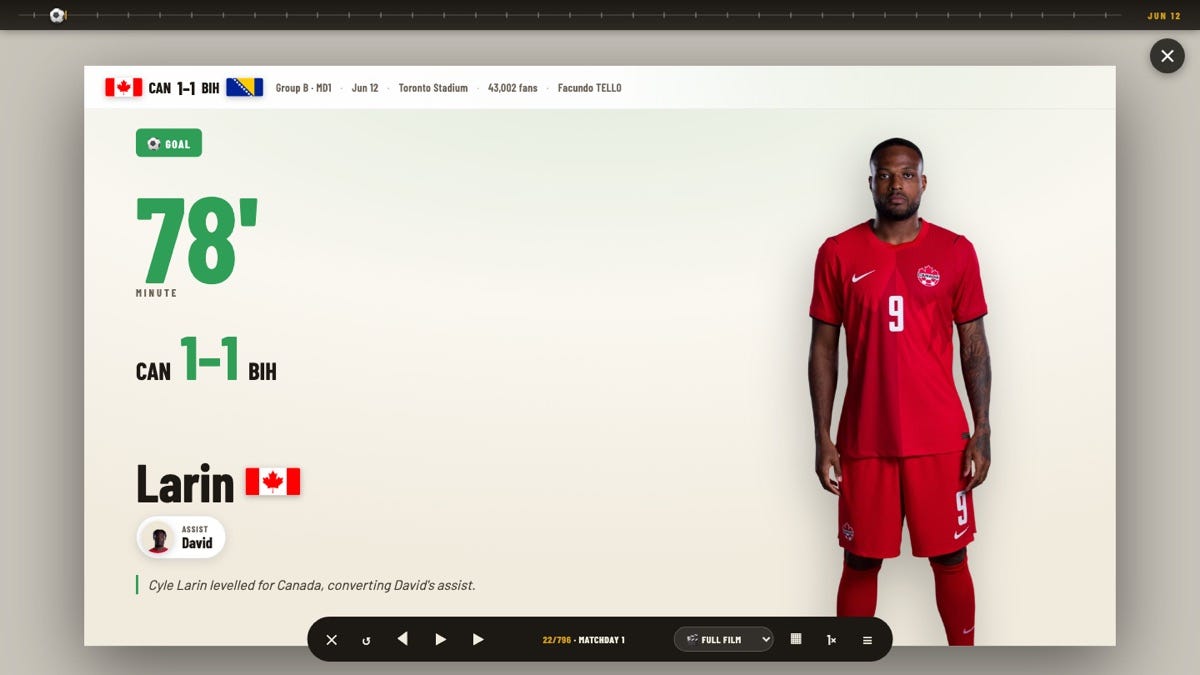
A goal beat: scorer portrait, minute, running score, the assist, and a one-line narration.
Each goal gets its own frame — the scorer full-length in kit, the minute in huge type, the score it made, the assisting player, and a written line of commentary (”Cyle Larin levelled for Canada, converting David’s assist”). Red and yellow cards get their own beat cards too.
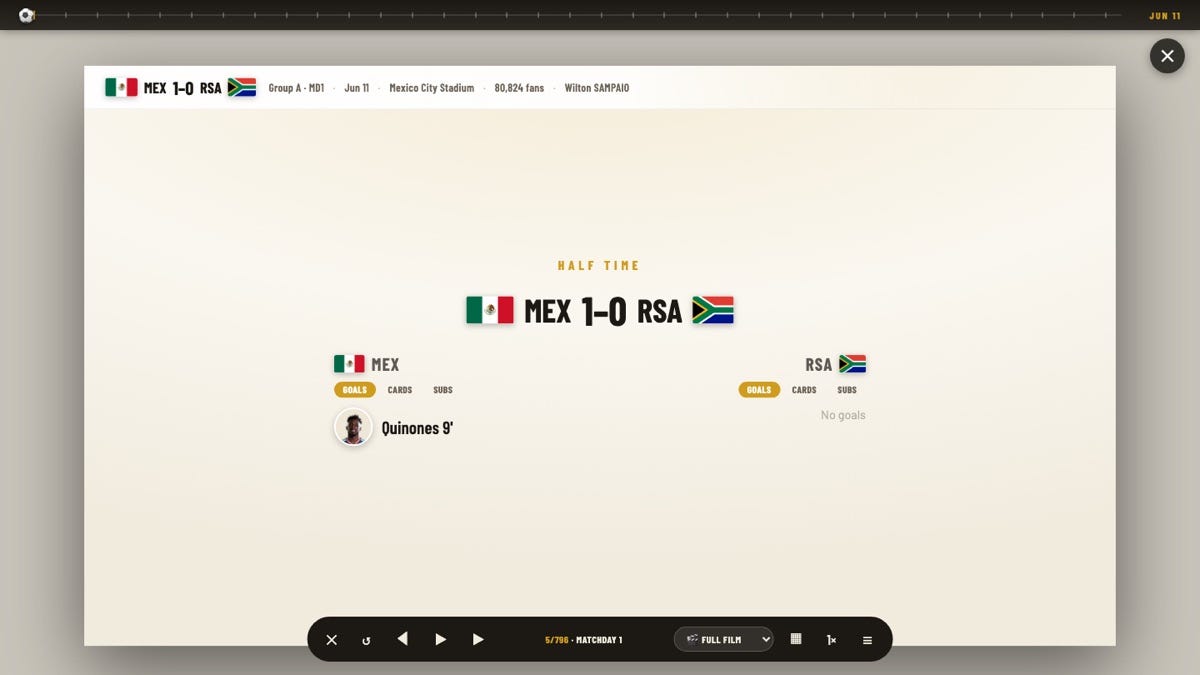
A half-time summary card: the score at the break, with each side’s first-half goals, cards and subs.
At half-time the film pauses on a summary card — the score so far, and each team’s tab bar of Goals · Cards · Subs, filtered to only what had actually happened by the 45th minute (subbed-off players get a small red down-arrow). Full-match figures like possession share and the team-stats breakdown are deliberately held back for the full-time card, where they’re real rather than a final total masquerading as the state at the break.
Every match ends on its full-time card — the fullest single frame in the app:
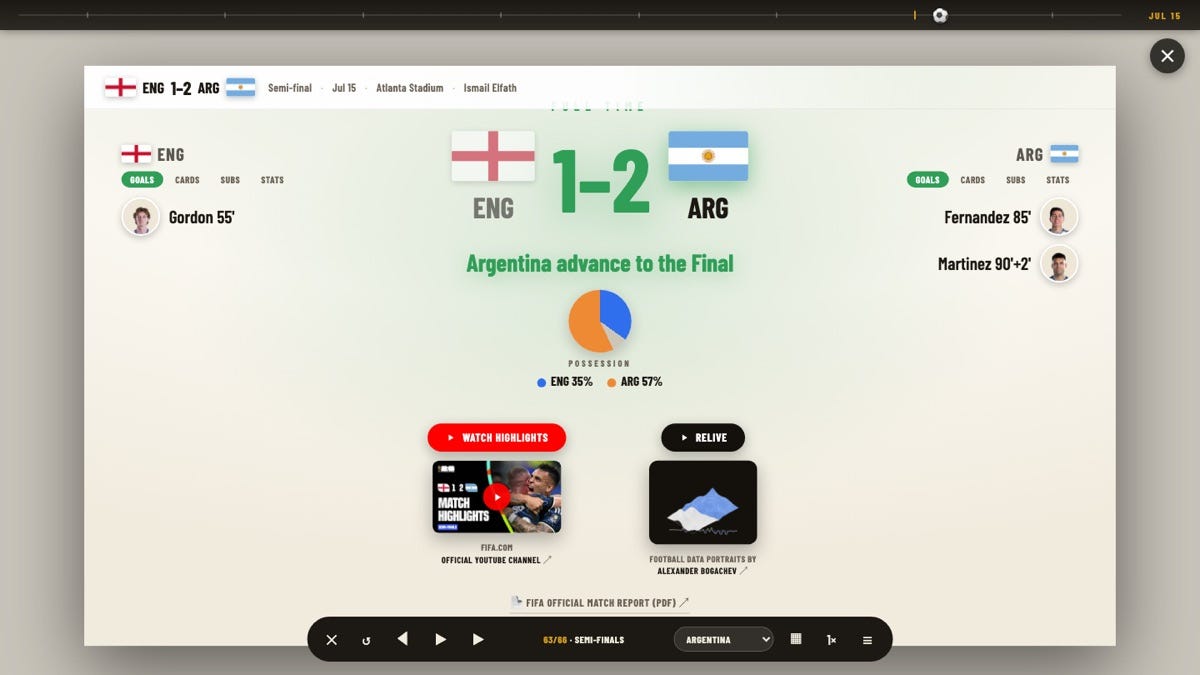
The semi-final’s full-time card: final score, who goes through, possession, both sides’ scorers, and three ways to relive it.
Under the big FULL TIME score sits a line telling you what it meant — “Argentina advance to the Final” — then the possession donut and both teams’ scorer lists side by side, each name carrying a portrait. This is where the full-match numbers belong: the Goals · Cards · Subs · Stats tab bar stays synced across both sides, and the Stats tab lays out shots, shots on target, passes, pass %, corners, fouls and offsides from the per-match FIFA feed. Beneath that, three ways out to the wider web:
Watch highlights — the match on FIFA’s official YouTube channel.
Relive — Alexander Bogachev’s “football data portrait” of the game.
FIFA Official Match Report (PDF) — the federation’s full stats sheet.
The bottom bar drives it all: a restart (↺), prev / pause / next, a team selector (watch the Full film or just one country’s run to glory — here, Argentina’s), a jump to the Rotation view, a speed control, and a menu. Close the film and reopen it later — it resumes on the card where you left off.
Reached from the film’s grid button, the Rotation view answers a question a bracket can’t: how did a manager’s team change across the tournament? It lays every match a nation played side by side. Two modes share the screen.
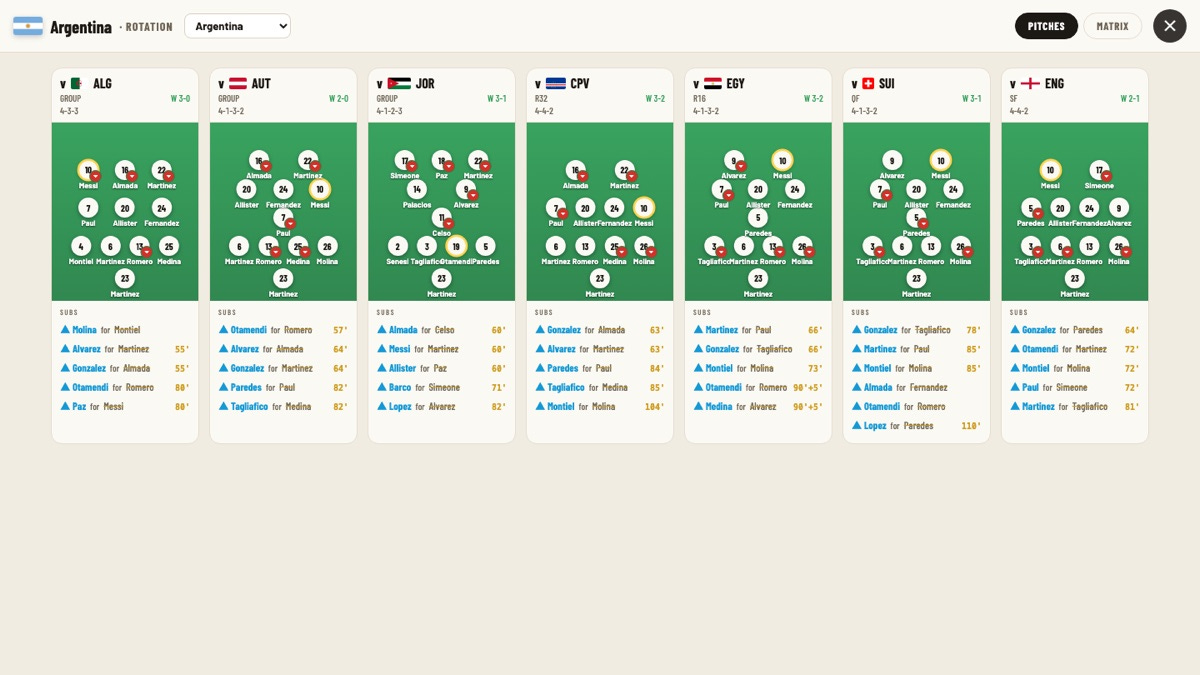
Argentina’s every match as a formation on a pitch, with that game’s substitutions listed beneath.
Each match is a mini-pitch showing that day’s shape and starting XI, with the result and formation in the header and the game’s substitutions listed underneath (with minute). A gold ring marks the captain; a red down-arrow flags a player who was later subbed off. Read left to right and you can watch Argentina flex from a 4-3-3 against Algeria to a 4-1-3-2, rotating bodies through the run.
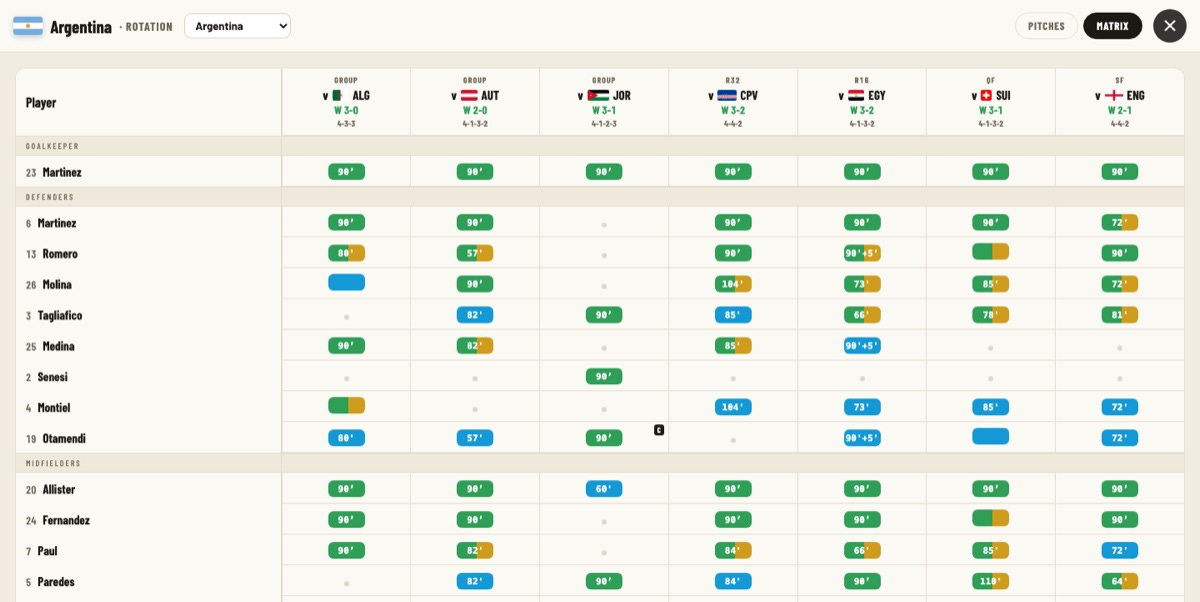
The same run as a minutes-played heatmap — one row per player, one column per match.
Flip to Matrix and it becomes a participation grid: players down the side (grouped by keeper, defenders, midfielders…), matches across the top, and a coloured bar in each cell encoding minutes — green a full 90, green-to-gold subbed off, blue came on, a faint dot didn’t feature. The little C marks where a player captained. It’s the clearest possible picture of who the spine of the team really was.
The Controversies button plays a second, darker film: 30 of the tournament’s flashpoints, each one researched and fact-checked before it earned a card. This is the app’s most reported feature — every claim is sourced.
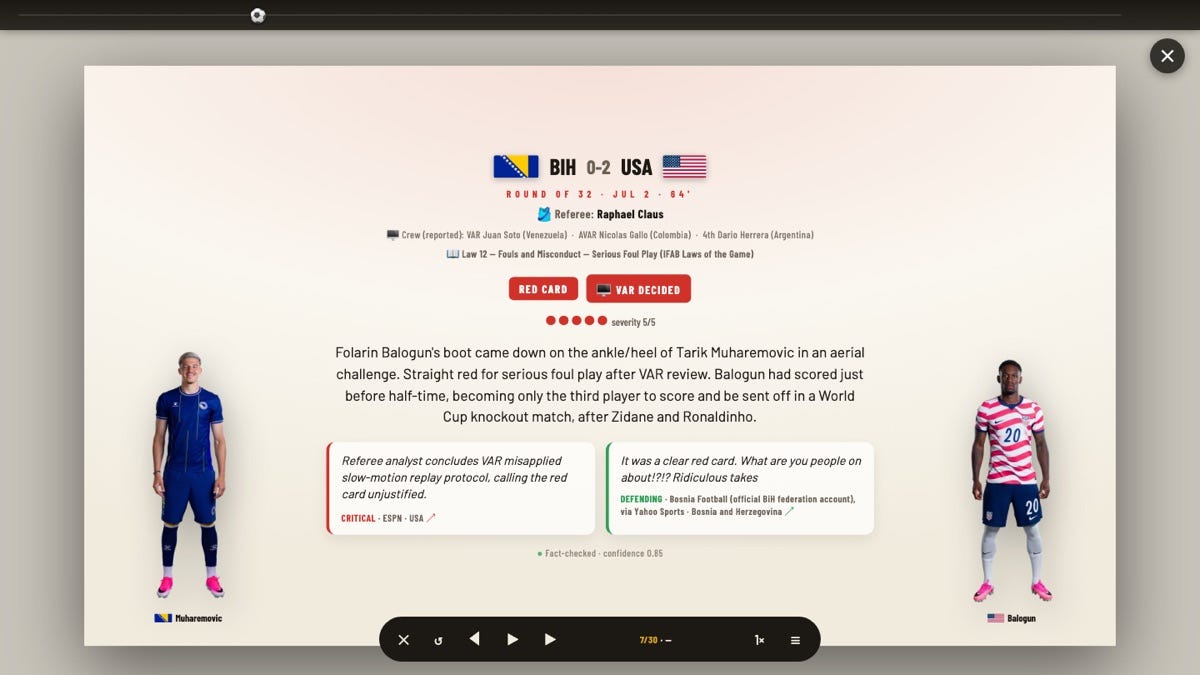
A controversy card: the match, the referee and full VAR crew, the exact law, severity, a sourced summary, and press reaction from both sides.
Take Bosnia 0–2 USA. The card lays out the match, referee Raphael Claus and the reported VAR crew, then the precise law invoked — Law 12, Serious Foul Play — with badges for the outcome (RED CARD, VAR DECIDED) and a five-dot severity. Below the written incident summary sit two press-reaction cards, deliberately opposed: a critical take (ESPN) beside a defending one (the Bosnian federation), each tagged with outlet, country and a link. A quiet footnote records the verification: Fact-checked · confidence 0.85. When an incident named specific players, their full portraits book-end the card.
Some incidents span more than one card. Balogun’s red rolls into its sequel:
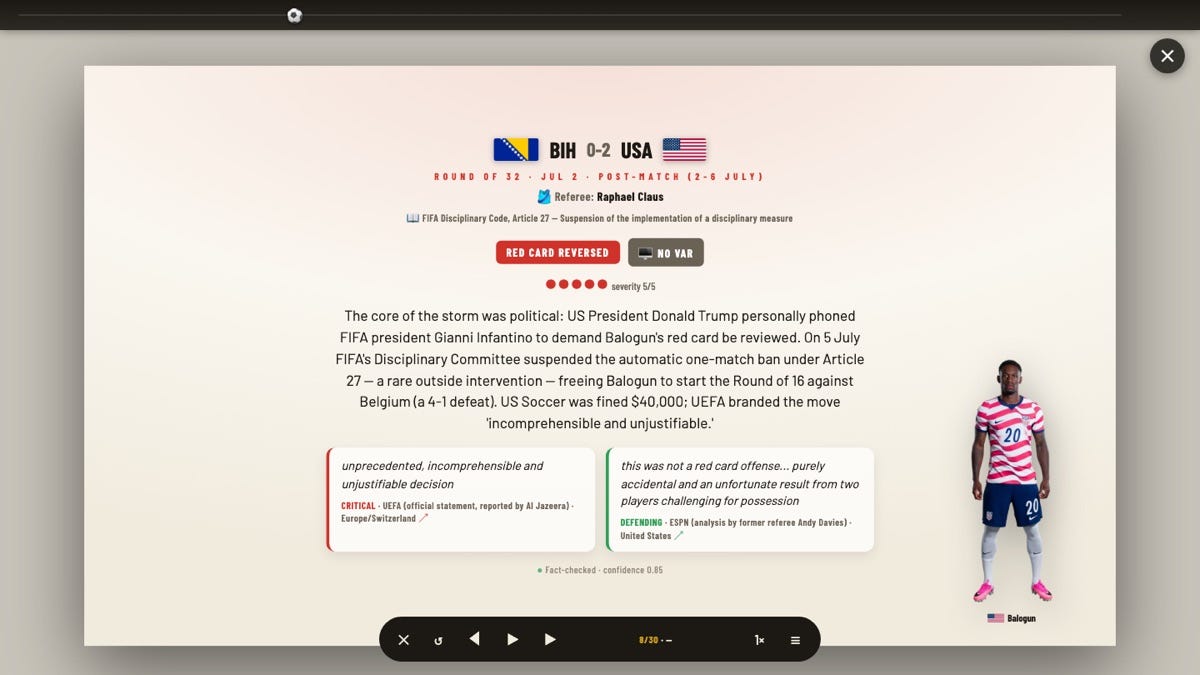
The follow-up card: the same incident’s off-field aftermath — FIFA’s Article 27 reversal — with the political core of the story called out.
Here the badges change to RED CARD REVERSED and NO VAR, the reference shifts to FIFA Disciplinary Code, Article 27, and the summary names the core of the storm — a phone call from a head of state to the FIFA president — with UEFA’s “incomprehensible and unjustifiable” on one side and a former referee’s defence on the other. Off-field cases like this drop the VAR crew line and show only the players actually named, so each card carries exactly the context that incident needs.
The whole thing is one self-contained page of vanilla JavaScript reading a handful of JSON feeds, hosted on GitHub Pages — no framework, no backend. The numbers behind the Top Cards, the film’s Stats tabs and the almanac come from FIFA’s own public data rather than being hand-entered.
A few conveniences tie it together: your preferences and timezone are remembered between visits, and so is your place in the film and the controversy tracker — close them and they reopen where you left off. Every view is deep-linkable too, so a reload drops you right back where you were.
Reproduced from the app’s own Credits page · Road to the Final · FIFA World Cup 2026.
Original design — Emilio Sansolini This whole project is an interactive web adaptation of Emilio Sansolini‘s original Road to the Final infographic. The core idea is entirely his — one single radial diagram of the entire knockout bracket, the “road to the final” concept spiralling into the trophy, and the whole visual language. Please go and admire the original artwork and follow his brilliant work at @EmilioSansolini.
Web adaptation, live data & the Film Built and maintained by Carlo De Marchis — “A guy with a scarf”: the interactive bracket, the automatic data sync, and the WC Movie (”Road to the Final — The Film”).
Football Data Portraits — Alexander Bogachev The gorgeous per-match visual on each result card is a Football Data Portrait by Alexander Bogachev. Every thumbnail links straight to his World Cup 2026 match pages — do explore them, they’re superb.
Sources of information Everything is drawn from official public feeds:
FIFA public API — fixtures, scores & winners, lineups, goals & assists, cards, penalty shoot-outs, referees, attendances and formations.
FIFA player ratings — powering the Power Rankings tab.
FIFA Fantasy — powering the Fantasy tab.
Match highlights — FIFA’s official YouTube playlist.
Player photos — FIFA media library; flags — flagcdn.com.
Built with Designed and developed with Claude (Anthropic) — Claude Design for the visual design and Claude Code for the build — and hosted on GitHub Pages. A single self-contained page, vanilla JavaScript.
A note & a disclaimer This is an independent, non-profit fan project, made purely to share a love of football and sports technology — and to give fans one single page to relive the World Cup, match by match. It brings together data, images and ideas from many creators, all used with respect and credited above. I’m fully aware I’m building on other people’s work, and I’m grateful for it. If you hold the rights to anything shown here and would rather it wasn’t, please just get in touch and I’ll remove it right away — even if it would be a genuine pity to lose it.
And a personal note: Claude helped me enormously here — enough to make me feel like I had a big UX and dev team behind me again — but this also took plenty of my own brain-power and more than a few late nights. Made with love.
— Carlo De Marchis, “A guy with a scarf”
Screenshots captured from the live site. World Cup 2026 · Road to the Final.
Comments
Nothing yet. Say the first thing.
Sign in to join the conversation.