
As organizations rapidly adopt AI tools, AI developer productivity has become a top priority for engineering leaders. Claude, with its advanced reasoning and coding capabilities, is a massive force multiplier.
However, as your team creates highly effective, context-aware “Claude Skills” (custom prompts, Model Context Protocol (MCP) servers, and project-specific instructions), a new challenge emerges:
How do you scale and share these AI capabilities across dozens or hundreds of repositories?
Without a centralized strategy, teams end up with fragmented prompt libraries, duplicated effort, and inconsistent AI outputs.
In this guide, we will explore three proven strategies for distributing and maintaining global Claude Skills across your organization to achieve seamless AI workflow automation and build powerful shared AI tooling.
A “Claude Skill” in a modern engineering context typically consists of:
Custom Instructions:
./skills/skill.mdfiles that dictate how the AI interacts with your specific codebase.Prompt Templates: Standardized markdown files containing architectural guidelines, testing standards, or PR review checklists.
MCP Servers: Scripts and configurations that allow Claude to interact with your internal APIs, databases, or cloud infrastructure.
When you centralize these skills, you ensure that every developer — whether they are on the frontend, backend, or DevOps team — has access to the most optimized, up-to-date AI context. This reduces hallucination, enforces coding standards automatically, and accelerates onboarding.
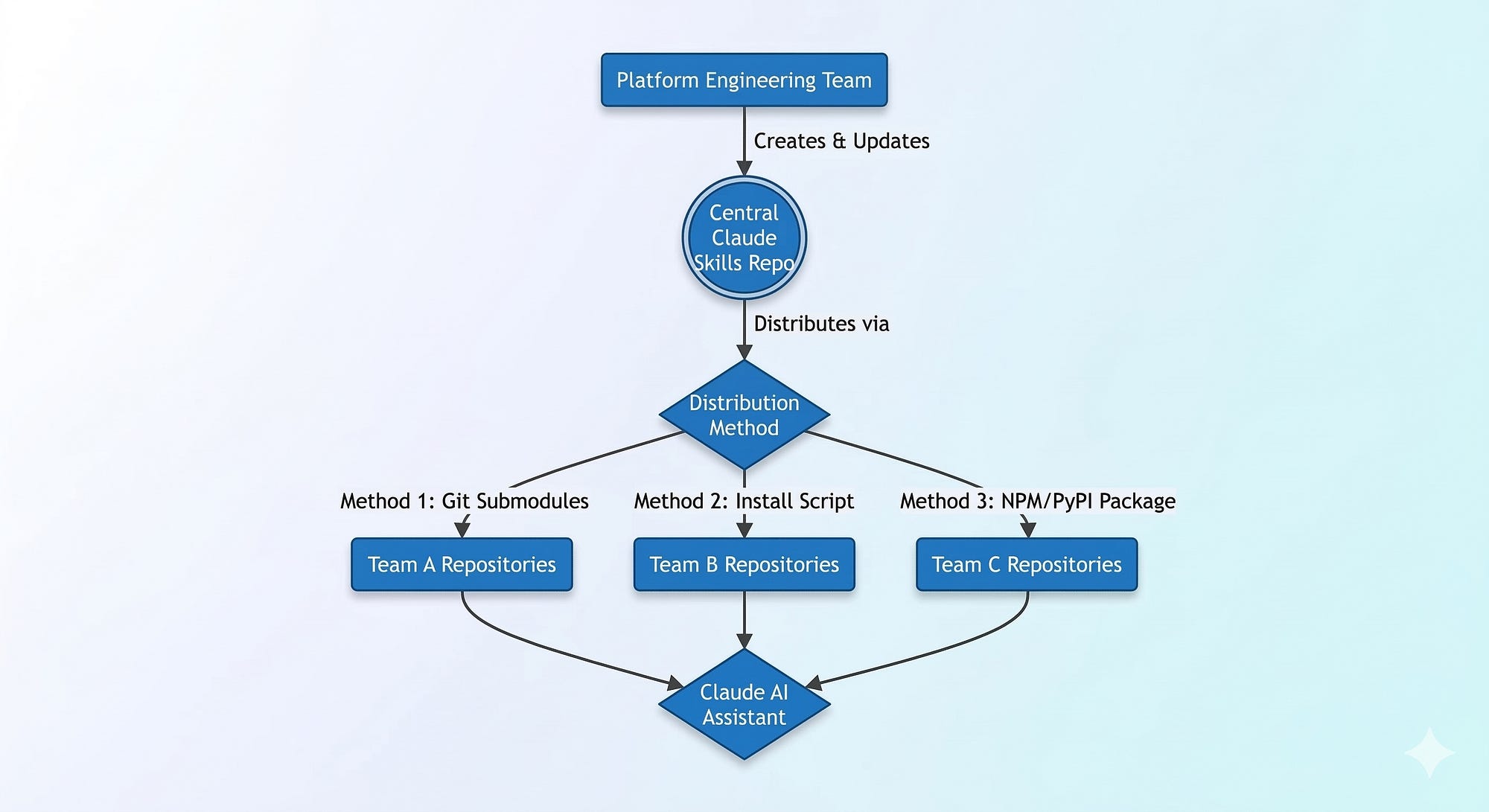
For many engineering teams, the simplest way to share code is through standard Git mechanisms. Git Submodules allow you to keep a dedicated repository of Claude Skills and embed it into any project.
First, create a centralized repository named org-claude-skills:
org-claude-skills/
├── skills/
│   ├── code-review.md
│   ├── write-tests.md
├── mcp-servers/
│   ├── internal-wiki-search/
│   └── jira-integration/
├── global-instructions.md
└── README.md
To add these skills to a target application repository, a developer simply adds the skills repo as a submodule.
# Navigate to your application repository
cd my-node-backend
# Add the centralized skills repository as a submodule
git submodule add https://github.com/your-org/org-claude-skills.git .claude-skills
# Initialize and update
git submodule update --init --recursive
Pros: No new infrastructure required; strictly tied to Git versions.
Cons: Submodules can be cumbersome for developers unfamiliar with updating them.
For teams that want to automate the distribution of AI developer productivity tools without the overhead of Git submodules, an installation script is the perfect middle ground. This allows you to fetch the latest prompt templates and configurations dynamically.
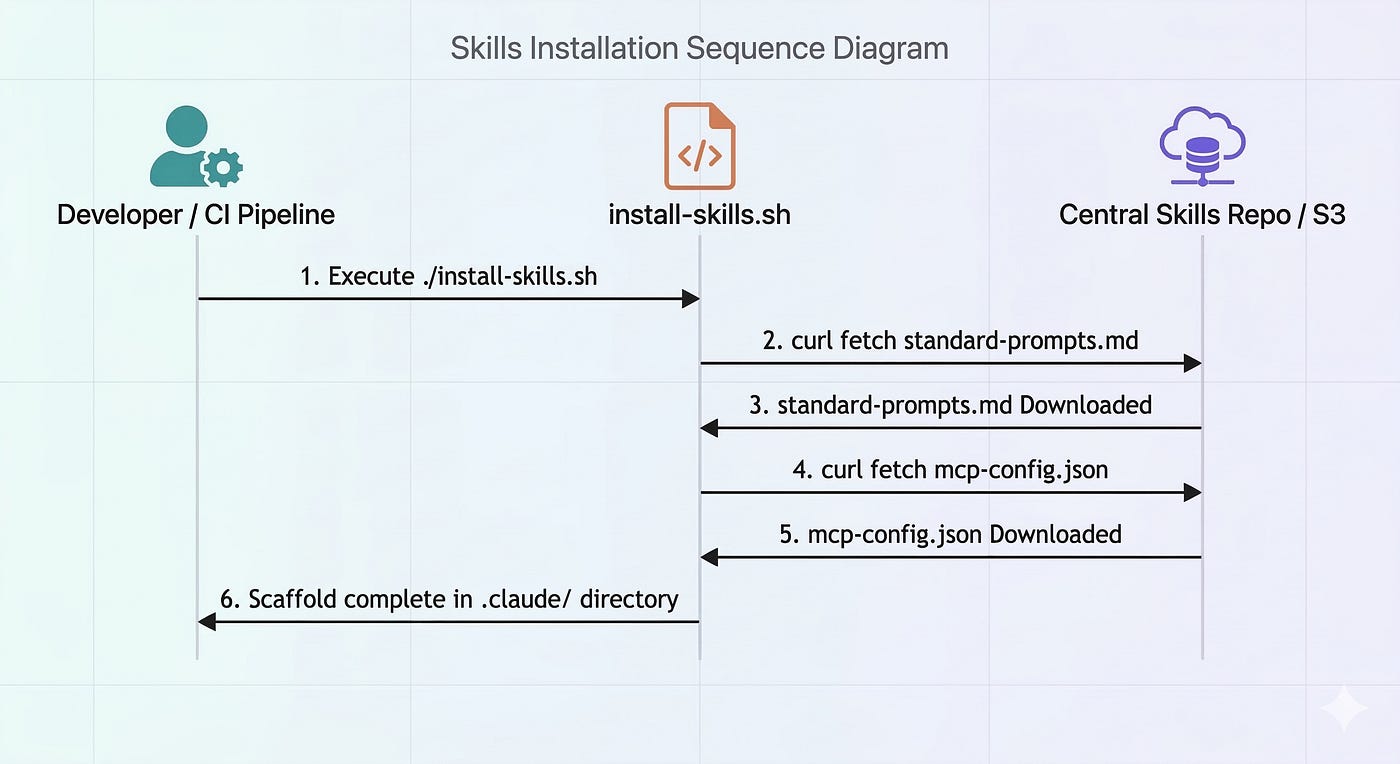
Scripting Workflow
Host your Claude Skills in a central repo or an S3 bucket.
Provide developers with a simple
curlcommand.The script downloads the relevant skills into a
.ai/or.claude/directory in their local project.
#!/bin/bash
# install-skills.sh - Automate shared AI tooling distribution
SKILLS_REPO_URL=https://raw.githubusercontent.com/your-org/org-claude-skills/main)
TARGET_DIR=”.claude”
echo “Installing Global Claude Skills...”
mkdir -p $TARGET_DIR/prompts
# Download global coding standards
curl -s “$SKILLS_REPO_URL/prompts/frontend-standards.md” -o “$TARGET_DIR/prompts/frontend-standards.md”
curl -s “$SKILLS_REPO_URL/prompts/testing-guidelines.md” -o “$TARGET_DIR/prompts/testing-guidelines.md”
# Download MCP Config template
curl -s “$SKILLS_REPO_URL/mcp-config.json” -o “$TARGET_DIR/mcp-config.json”
echo “Claude Skills successfully installed in $TARGET_DIR/”
You can integrate this script into your CI/CD pipeline (e.g., GitHub Actions) to ensure that automated AI code reviewers always have the absolute latest prompt templates before analyzing a PR.
For enterprise-scale platform engineering teams, packaging Claude Skills as reusable libraries via native package managers (NPM, PyPI) provides the ultimate level of version control and seamless integration.
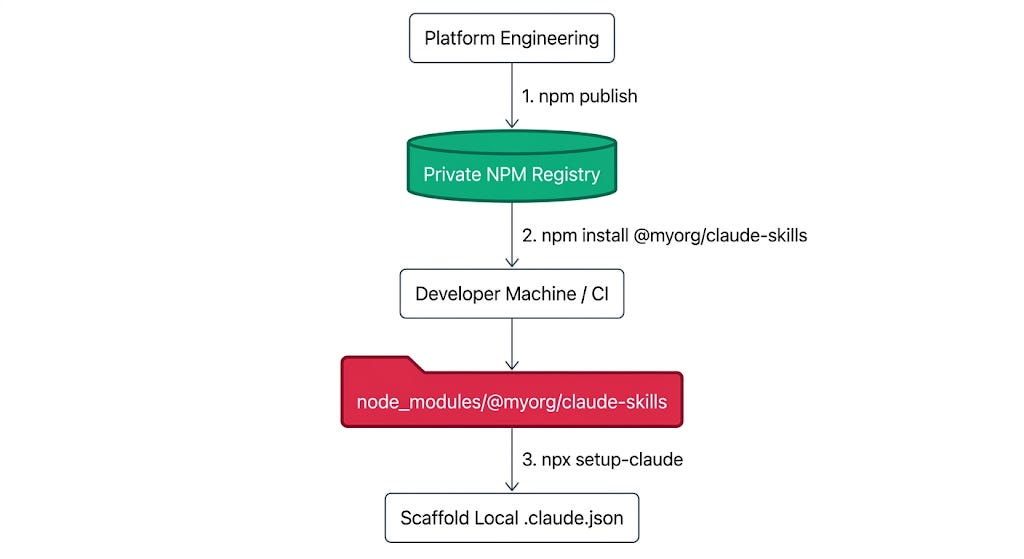
If your engineering org uses Node.js, you can create a package named @myorg/claude-skills.
claude-skills-package/
├── package.json
├── index.js           # Exports paths to prompts and MCP tool definitions
├── prompts/
│   └── standard-react-component.md
└── bin/
    └── setup-claude.js # CLI tool to scaffold local AI configs
Publish the package to your private NPM registry:
npm publish --access restrictedDevelopers can now install the skills just like any other dependency:
npm install @myorg/claude-skills --save-devYou can then provide an executable binary in the package to scaffold the AI context locally:
# Scaffolds the .claude.json or MCP settings using the package data
npx setup-claude-skills --type frontend
Pros: Excellent version control, semantic releases, and a familiar developer workflow.
Cons: Language-specific (NPM for JS, PyPI for Python), which might be an issue in polyglot organizations.
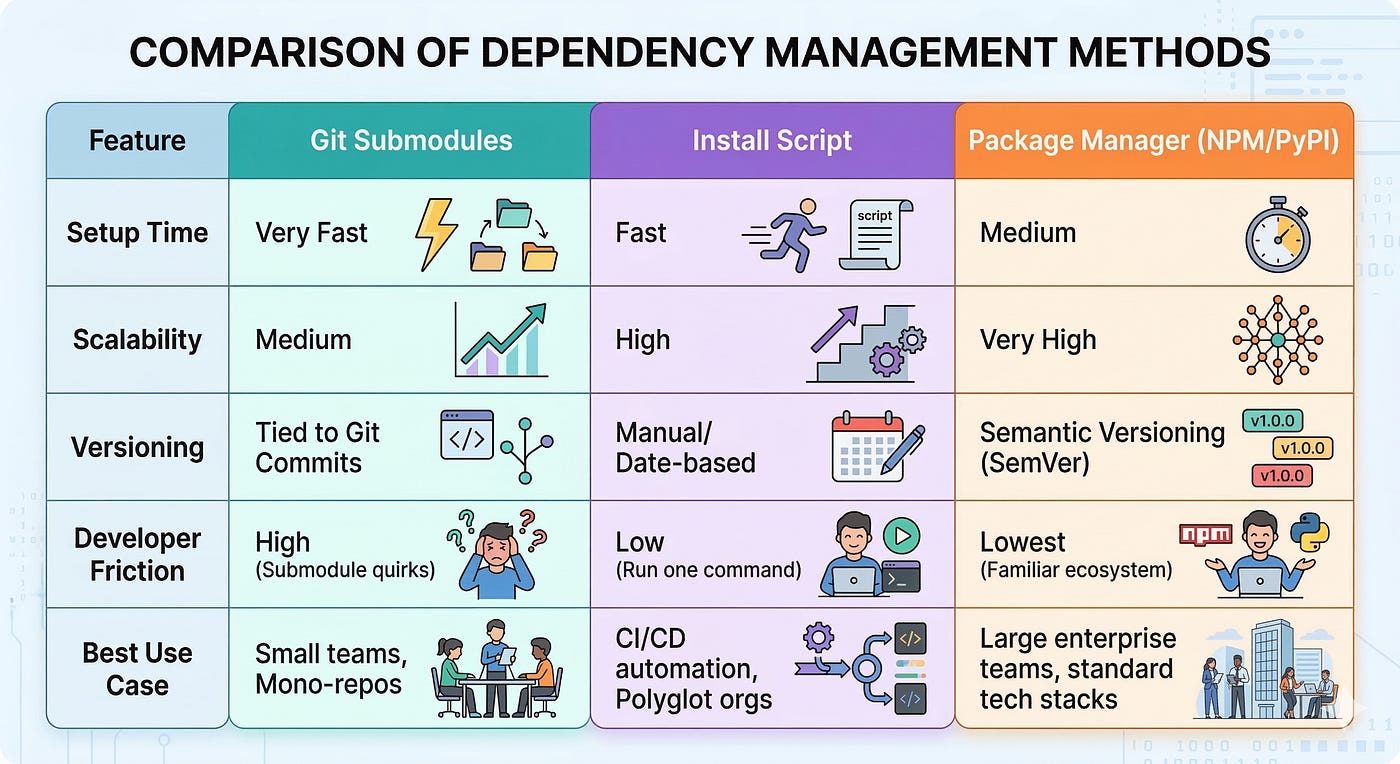
Regardless of the distribution method you choose, adhere to these best practices when scaling AI developer productivity:
Versioning is Critical: AI models change, and so do effective prompting strategies. Always version your skills. If a prompt breaks due to a new Claude model update, you need the ability to roll back.
Documentation for AI (and Humans): Write self-describing metadata for your skills. Use XML tags (e.g.,
<skill_description>) inside your prompt files so the AI understands when to use a specific skill.Security & Secrets: Never hardcode API keys or internal secrets inside shared Claude Skills. Use environment variable placeholders (e.g.,
{{JIRA_API_KEY}}) and rely on local.envfiles or secure secret managers during runtime execution.
Adding global Claude Skills across multiple repositories transforms how your organization leverages generative AI.
If you are a small team, start with Git Submodules.
If you manage a polyglot environment with diverse languages, use an Install Script.
If you are a Platform Engineering team supporting hundreds of engineers, invest in Package Managers to distribute AI context as version-controlled code.
By standardizing your AI tooling, you ensure that every prompt is highly engineered, secure, and ready to accelerate your software development lifecycle.
Hopefully, this saves you from the headache of managing 50 different .claude folders.
How are you handling skill distribution across your teams?
If you’ve found a cleaner way to sync these—or if you’ve run into any symlink quirks—drop a comment below. I’d love to see how others are tackling this!
Thank you :)
Comments
Nothing yet. Say the first thing.
Sign in to join the conversation.