
Every session, Claude starts fresh. No memory. No context. CLAUDE.md is how you fix that — permanently.
You open Claude Code. You start typing. And almost immediately you find yourself explaining — again — that your project uses App Router, not Pages Router. That you run pnpm, not npm That you want typed components only, please.
Claude doesn’t know. It can’t. Every session is a blank slate. You’re repeating yourself to one of the most capable tools you’ve ever used — and that’s just wasteful.
CLAUDE.md is the fix. One markdown file. Loaded automatically. Every single time.
Think of it like this:
CLAUDE.mdis onboarding documentation for your AI teammate — the briefing you’d give a brilliant new engineer on their first day, so they stop asking obvious questions and start shipping.
CLAUDE.md is a plain markdown file that Claude Code reads at the start of every session. It becomes part of Claude’s context automatically — you don’t reference it, attach it, or paste it. It’s just there.
You can use it to document anything Claude can’t infer from your code alone: build commands, test workflows, project structure, naming conventions, architectural decisions, gotchas, and domain-specific terminology.
There’s no required format. Keep it short. Keep it human-readable. Every line should answer the question: what would Claude get wrong without this?
CLAUDE.md works in layers. More specific files override more general ones.
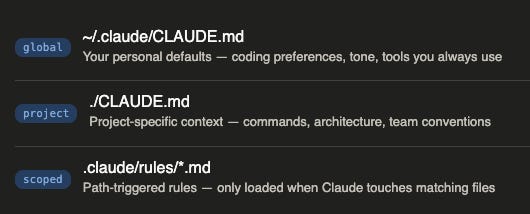
The project CLAUDE.md is where most of your leverage lives. Start there.
Don’t write it from scratch. Use the /init command. Claude Code will scan your project — package files, config, directory structure — and generate a starter CLAUDE.md tailored to what it finds.
# in your project directory
/init
Then prune it ruthlessly. The generated file often includes things Claude already knows. Delete anything that isn’t genuinely project-specific. Shorter is better — every line competes for attention with your actual task.
The single highest-impact instruction you can add: tell Claude how to verify its own work.
# CLAUDE.md:
# Verification
After making code changes, always run:
1. `pnpm lint`   — catch style issues
2. `pnpm test`   — verify nothing broke
3. `pnpm build`  — check for type errors
When Claude knows how to check its own work, it catches mistakes before you ever see them. This one pattern measurably improves output quality across every task.
This is just as important. Overloaded CLAUDE.md files actively hurt performance — when there are too many instructions, Claude doesn’t just ignore the new ones. It starts ignoring all of them uniformly.
Frontier models can reliably follow roughly 150–200 instructions. Claude Code’s system prompt already uses ~50. That leaves you around 100–150 before things quietly start degrading.
❌ Code style rules — use a linter. LLMs are slow and expensive compared to ESLint.
❌ Things Claude already knows — TypeScript syntax, common frameworks, async/await.
❌ Credentials — use environment variables; reference them by name only.
❌ Rapidly-changing info — use session prompts for volatile context.
❌ Full documentation — link to docs, don’t reproduce them.
When a single file gets unwieldy, split it. Create a .claude/rules/ directory and drop focused rule files inside:
your-project/
├── CLAUDE.md          # core project context
└── .claude/
    └── rules/
        ├── testing.md    # testing conventions
        ├── api-rules.md  # backend-specific rules
        └── security.md   # security requirements
Files in .claude/rules/ with YAML frontmatter specifying paths: are lazy-loaded — they only enter context when Claude touches matching files. This is powerful: you can have detailed rules for your API layer that never clutter a UI-only task.
Every line must earn its place. Ask: would Claude make a mistake without this? If no — delete it.
Use /init to generate, then prune. Deleting is always faster than writing from scratch.
Always include your verification commands. This single instruction has the highest return of anything you can add.
Keep it human-readable. If a new team member couldn’t scan it in two minutes, it’s too long.
Treat it as a living document. Add lines when Claude makes a mistake that a clear instruction would have prevented.
CLAUDE.md is one of the highest-leverage things you can configure in your entire development environment. A good one transforms Claude Code from a capable but context-blind assistant into something that actually knows your project — your commands, your architecture, your quirks.
Run /init. Delete the noise. Add your verification steps. Commit it. Then watch how much less you repeat yourself.
Comments
Nothing yet. Say the first thing.
Sign in to join the conversation.