
In Finding Space Part 1 we looked at the 5 scenarios of photo management. From stand-alone-every-photo-on-one-device (hello, iPhone only users) to a distributed network of devices that share the responsibilities of your photos health and wellness. Effective photo management is a balancing act of space, convenience, and security.
In Finding Space Part 2 we focussed on how Apple created a frictionless system that supports multiple devices through iCloud, and the role of a Primary Device to give you local access to your whole collection of Original media.
Which brings us to the big picture. Creating a photo management strategy that you understand, supports the way that making, managing, and sharing pictures fits your lifestyle, and is sustainable in the long run.
Because time is the essential ingredient.
If there is anything negative about digital photography, it’s the feeling of impermanence. Or perhaps, less value.
A lot of us still have one foot firmly planted in the analog photo print / photo album / wall print experience. There’s intrinsic value in the physical form, plus the perception of “oneness.” That there’s an original image which is unique and irreplaceable.
There is still the original image, what some developers call an “instant,” but it is easily duplicated and shared in either the original or edited versions. Which makes it less remarkable when viewed on several devices and in different formats. Digital removes the “artifact” component of a picture and whatever portion of that contributes overall image value. Even a scanned image carries a bit more integrity, to me, than a straight to pixel digital image. Perhaps it’s a generational thing that will become extinct, but as a Baby Boomer there’s a difference.
Another aspect is that mobile has made the cost of pictures essentially zero. There’s no real skin in the game like pacing yourself to get the most out of a 24 exposure film roll. Or paying for the processing and double prints. Not to mention the fact that we all carry that little camera with us every day.
Pictures are free and easy.
There’s virtually no friction left in the process.
No downloading. No save to a folder. No need to organize on import.
We can actually whip out our phone, snap a shot, and share it to the world in less time that it took us to cock the shutter on our film single lens reflex for the next shot.
Which means, as a visual species, that we’ve adopted photos as a memory accessory in addition to what they’ve always done - illustrate our vision of the world around us.
Or maybe we’re just illustrating more of the world.
The upshot, as it relates to storage, is that we take more photos than ever and will likely continue that growth every year. Estimates are over 2 Trillion photos taken worldwide in 2025.
One stat is that the average person takes about 3500 images per year. That’s an average of 9.5 photos per day.
35,000 photos over 10 years.
175,000 over 50 years.
But who knows? The actual numbers vary widely, even if the trends are consistent.
As a Photo Manager I’ve seen several 200k+ photo collections already. Those are 10k image years, if we count the iPhone launch in 2007 as the beginning.
In my collection, I have:
1632 images in 2023.
2116 images in 2024.
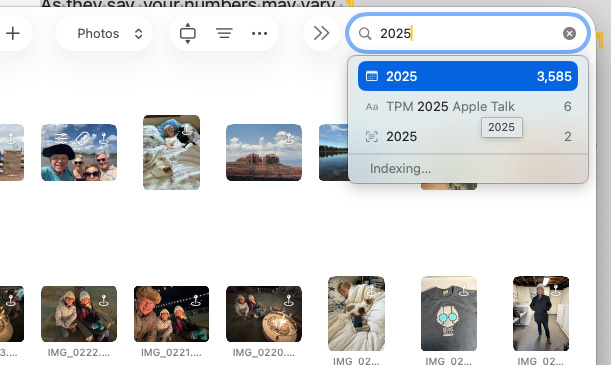
3589 images in 2025.
As they say, your numbers may vary.
You can figure out your annual photo count by putting a year in the Apple Photos search bar.
Which brings us all the way back to our plans for digital real estate.
The takeaways are these:
Images have become a part of everything we do. In addition to their creative benefits, we use photos to document, record, remind, and communicate.
Whatever your own photo usage looks like, it’s going to need more storage over time, guaranteed.
Our photography experience is going to be driven by technology and support. Whether it’s developing a do-it-yourself routine, hiring a photo manager, or relying on artificial intelligence to update, cull, and create meaningful stories, they need the same kind of attention for your digital home as you do for your real home.
Up until now, digital photo organization and management was mostly a storage issue. It was about filling volumes and folders and albums with images. The right ones in the right place.
But the sheer number of pictures we’re going to be dealing with, and the kinds we have to keep straight, means that our thinking needs to change. Containers alone aren’t enough, we need systems to keep everything straight.
Apple is already pushing us in this direction. The new navigation in Apple Photos is offering up Collections - where our Library is reimagined in subject matter groups - as a way to quickly drill down and find your photo in an efficient manner. With little or no scrolling.
You can also filter out Screenshots from the Library view and find them instead in their own Screenshots Collection. For all but the most recent pictures, the Library view just isn’t as useful as it once was.
And the same thinking went into the Apple Photos Ecosystem as a way to manage the big picture. If you have an iPhone (Capture photos), iCloud (Backup and Distribute Photos), and Mac (Manage and Backup Photos), you’ve got everything you need to have a complete photo environment. As your collection grows, you have the flexibility to add more storage and create multiple backups if you choose. As you get more in tune with how you want to curate your collection, your changes get synced across all your devices.
If you are in the iPhone only or iPhone + iCloud camp, the time has never been better to add a Mac to complete your ecosystem. Both the new Mac Neo laptop and the Mac mini desktop are in the under $700 range and will complete the system.
In the end, proper photo management comes down to being realistic about your storage needs, anticipating the inevitable growth, and taking advantage of the technology to merge your photography with your lifestyle. Eliminate friction wherever you can. Swiping to find, manual organizing,
Build your digital real estate portfolio so you and your family can enjoy a photo collection that will support and nurture your life experience every day.

Comments
Nothing yet. Say the first thing.
Sign in to join the conversation.