
What exactly is a CRM? In simple terms, any application or platform responsible for managing and handling interactions with customers falls under the umbrella of Customer Relationship Management.
CRMs are everywhere. If you are looking for popular examples in the market today, you will find:
Frappe (An open source option built using Django)
Odoo
Salesforce CRM
Microsoft Dynamics
HubSpot CRM
Freshworks CRM
They are the digital backbone of modern commerce. Businesses are run by humans (at least until AI takes over completely), and every growing business handles massive volumes of customer data. A CRM is the management software that sits in the middle. It helps the business manage bookkeeping, invoicing, and all sorts of daily transactions. Think of it as a highly advanced Library Management System, but instead of tracking library books, you are tracking people, assets, and money.
This brings me back to where my software journey really started. The year was 2017. I had just landed my very first internship as an IT Developer at the Tinplate Company of India in Jamshedpur.
I was handed a massive responsibility for an intern. The organisation tasked me with building an internal CRM solution. They needed a centralised platform to manage their employees and track their hardware assets.
The Problem Statement: The company wanted an internal web portal. Employees needed to log into the system, view their assigned IT assets (like computers and electrical devices), and create service tickets if they encountered any hardware issues.
The constraints were strict. The tech stack had to match the organisation’s existing infrastructure. We had to use C#, .NET, Bootstrap, and MySQL. Furthermore, the entire development and testing lifecycle had to be completed within 45 days using Agile methodologies.
We had a team of five interns. We quickly divided the workload and assigned ownership based on our strengths:
Dev A: Data Modeling and Architecture
Dev B: UI and UX
Dev C: Database Integration
Dev D: Testing
Dev E: Core Logic and Coding
After a couple of days of deep research and heavily relying on Stack Overflow, we mapped out our Entity Relationship models and Data Flow Diagrams on a whiteboard. Once we understood how the data would move through the system, we built our first prototype and went in for our first review.
The review was a brutal but necessary learning experience. We received a lot of feedback on the UI. The core issue was that we had completely over engineered the design.
The biggest takeaway from that meeting was a fundamental rule of UX. Factory employees are not always tech savvy. They will not spend more than five minutes trying to understand how to log in or navigate a complex menu just to report a broken mouse.
We went back to the whiteboard with a completely different perspective. We redesigned the interface to put “Actions” front and center. When a user logs in, the first thing they see should be the exact buttons they need to create a ticket or view an asset. By making their intentions clear immediately, users spend time actually doing things rather than trying to figure out how the application works.
For the backend, we opted for a monolithic approach to keep infrastructure costs and complexity low.
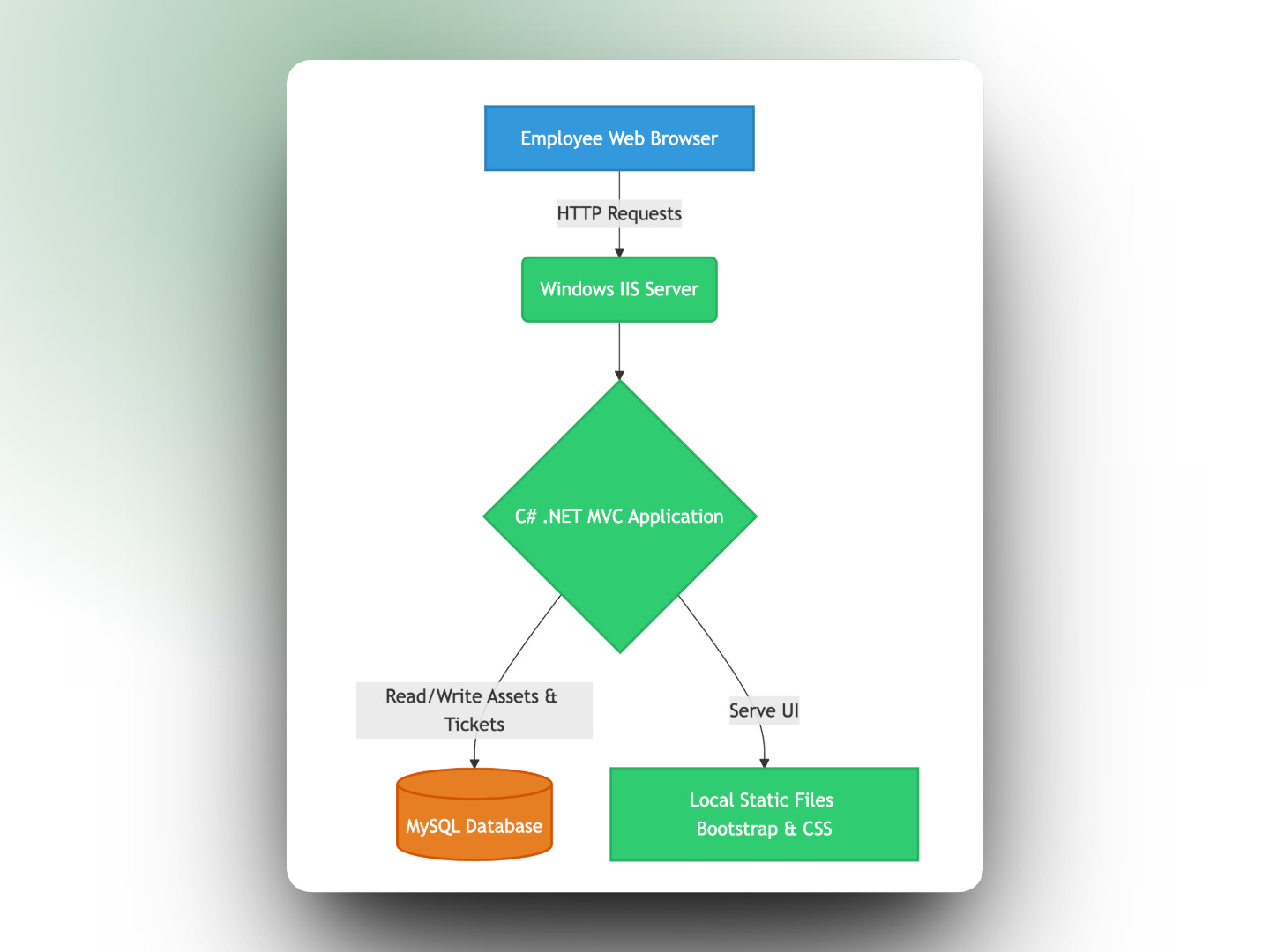
We hosted the static files directly on the local Windows server. The IT department provided us with credentials to an internal MySQL instance.
Coming from a Python background, learning C# on the job was fascinating. The architecture followed the MVC (Model View Controller) pattern. We utilised parent templates and child templates to keep the frontend code clean. Writing the backend logic helped us practically understand core Object Oriented concepts like abstraction, encapsulation, and inheritance.
We completed the V1 build well within the 45 days. The senior developers were happy, and the application was pushed to their staging environments the very next week.
Our initial development was successful enough that the management team extended our internship by three more weeks. Naturally, with extra time came extra requirements.
We were tasked with adding three major features:
Barcode and QR Code Support
Email Notifications
Proper Ticketing Chain Management
When we released V1, the ticketing module was essentially a baby. It was purely unidirectional. If an employee created a service ticket, the system sent a simple SMS to the IT team and attached a basic status flag in the database. When the issue was fixed, the ticket was marked closed.
But what happens if the ticket is reopened? The old system had no history log.
Furthermore, manually typing in IT asset serial numbers was time consuming and prone to human error. We needed to implement Barcode and QR code scanning. We also had to upgrade our notification channels from basic SMS text messages to detailed emails.
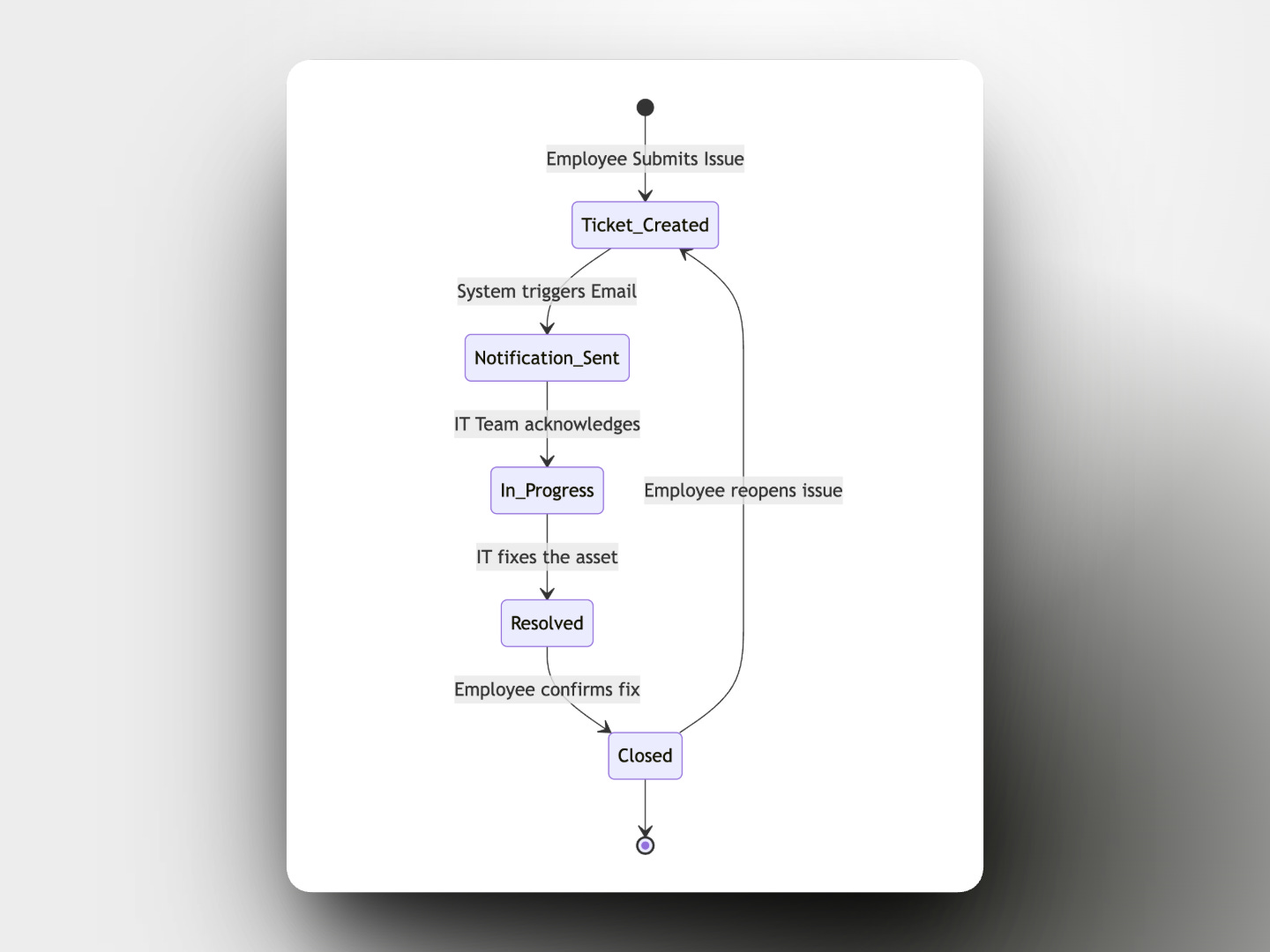
We received massive data dumps containing over 300 rows of existing hardware assets that needed to be migrated into our new system. Our data models went through significant transformations to accommodate these new fields without breaking the existing V1 data.
We were incredibly lucky to have senior developers step in and write code alongside us during this phase. This was a heavy lift for five interns.
We completed the extended project in 31 days. We overshot our three week extension by about 10 days due to some unforeseen bugs with the barcode scanning logic, but the final delivery was a massive success.
That summer in 2017 taught me exactly what a CRM is and how modern software fundamentally reduces execution time for large organisations.
No posts
Comments
Nothing yet. Say the first thing.
Sign in to join the conversation.