
Last week 520k lines of code leaked from Anthropic to show how Claude Code runs. If you’re curious, here’s one write up. This is one of the strangest security breaches of the year: one of the top closed AI agents was accidentally made open sourced from a source map file that was not removed in review process.
The way the team plans to fix that kind of breach from happening in the future? More Claude Code in the process.
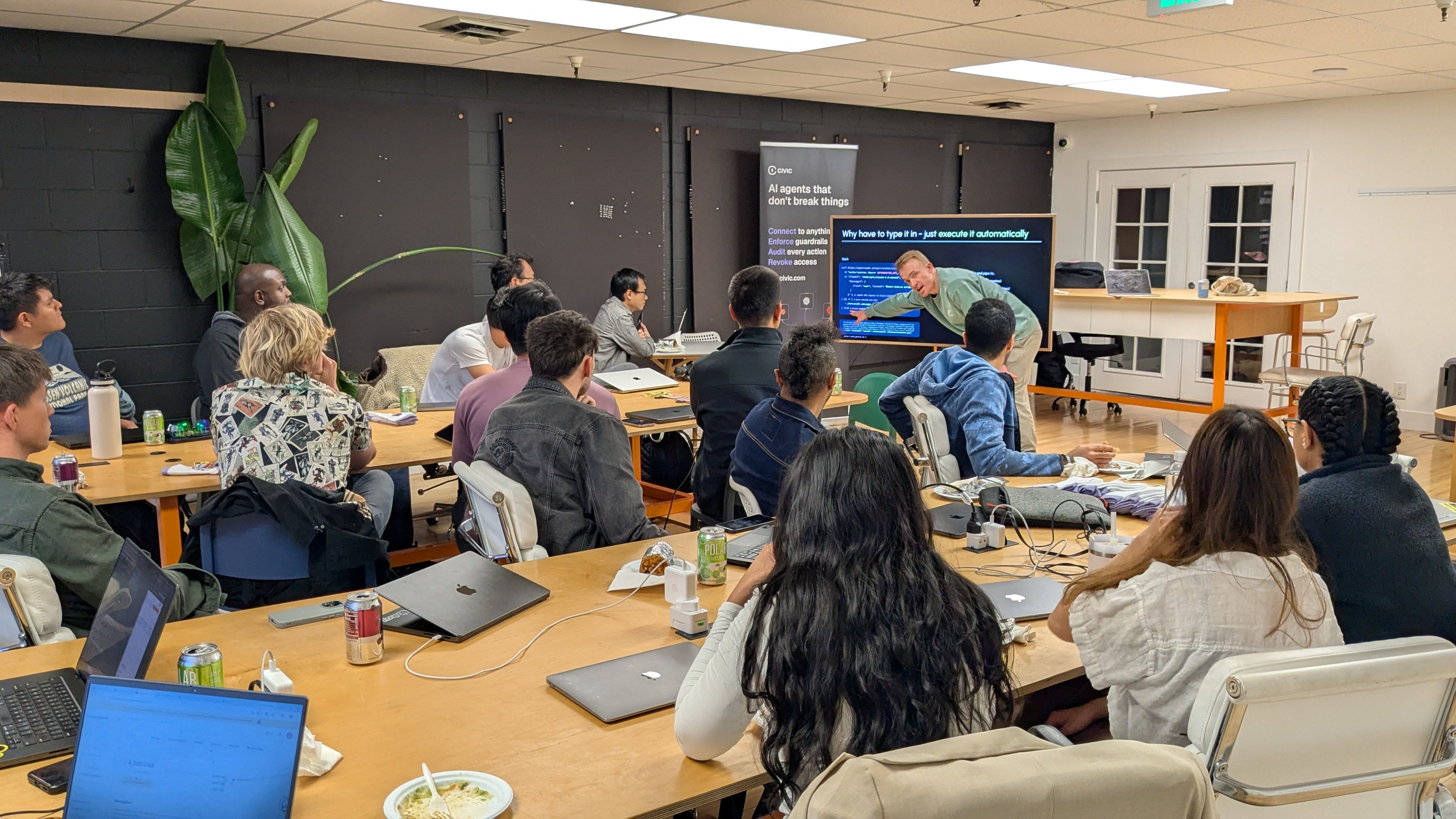
At the same time as that was happening online, we ran a workshop in person with Will Sentance, founder of Codesmith and fellow at South Park Commons, for how to write an agent from scratch in 20 lines of code.
Inspired by the intentionally open sourced agent, OpenClaw, this walks through how a self improving agent loop is built from the ground up in JavaScript. It covers the essentials for a self improving agent that can be run locally, which can add its own skills and tools, better design its own TUI, and more. All built within 2 hours, line by line, with many people joining having no technical background.
This workshop was supported by Titus Capilnean and Nancy Li of Civic Technologies , helping ensure agents are secure from run one with guardrails and permission management.
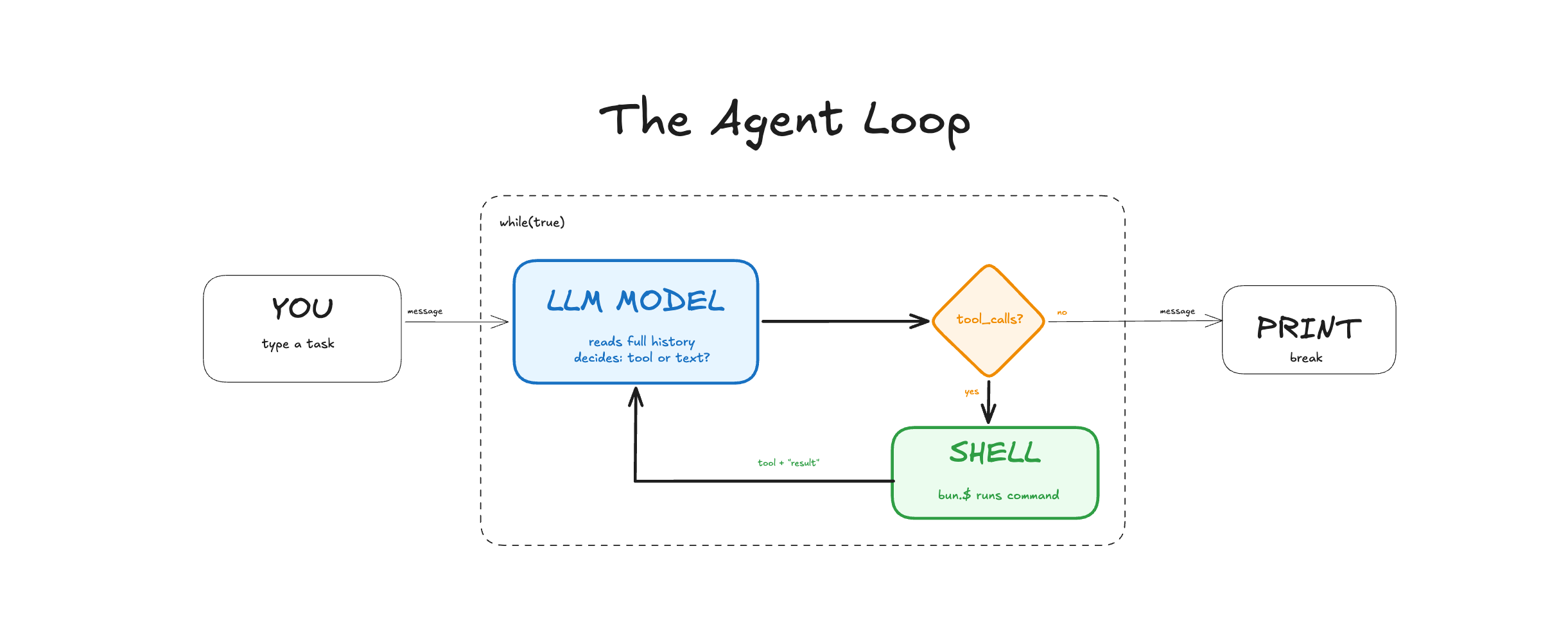
Every AI coding agent, including Claude Code, Cursor, Devin, Codex, OpenClaw, runs a version of this same loop. The user types in a message which gets sent to a large language model that decides if it will use a tool and what tool to use. As it calls a tool, it runs the command and feeds back the tool and result to the large language model, looping until it decides to break and print message. There can be different tools and different parts to the loop, but this is the simplest agent loop.
Setup: Install Bun, get an OpenRouter API key, verify the connection
01 Curl Basics: Talk to an AI model with raw HTTP. Understand POST, auth, and the message format.
02 Pipe & Execute: Extract the AI’s response with jq and pipe it into bash. Use natural language to generate the commands used in step 1.
03 JavaScript Agent: Move from curl to fetch, from jq to JSON, from piped bash to Bun.$
04 While Loop Agent: Add memory (messages array) and retry logic (while loop that feeds errors back)
05 Tool Calling: Structured tool use — the AI signals “run this” vs “here’s my answer”
Extra builds
Skills System: Extend the capabilities of the agent with markdown files. No extra code.
Ralph Loop: Solve the context management problem with continuous looping and a log of progress.
Here are the 20 lines:
const messages: { role: string; content: string }[] = [
  { role: "system", content: "Return only mac bash commands. No backticks. Output raw string only." },
];
for await (const line of console) {
  messages.push({ role: "user", content: line });
  while (true) {
    const data = await (
      await fetch("https://openrouter.ai/api/v1/chat/completions", {
        method: "POST",
        headers: { Authorization: `Bearer ${process.env.OPENROUTER_API_KEY}` },
        body: JSON.stringify({ model: "openrouter/free", reasoning: { exclude: true }, messages }),
      })
    ).json();
    const message = data.choices[0].message;
    messages.push(message);
    try {
      await Bun.$`sh -c ${message.content}`;
      console.log("✓", message.content);
      break;
    } catch (error: any) {
      messages.push({ role: "user", content: `Command failed: ${error.message}` });
      console.log(`✗ Failed: ${message.content}. Retrying...`);
    }
  }
}
A walkthrough line by line:
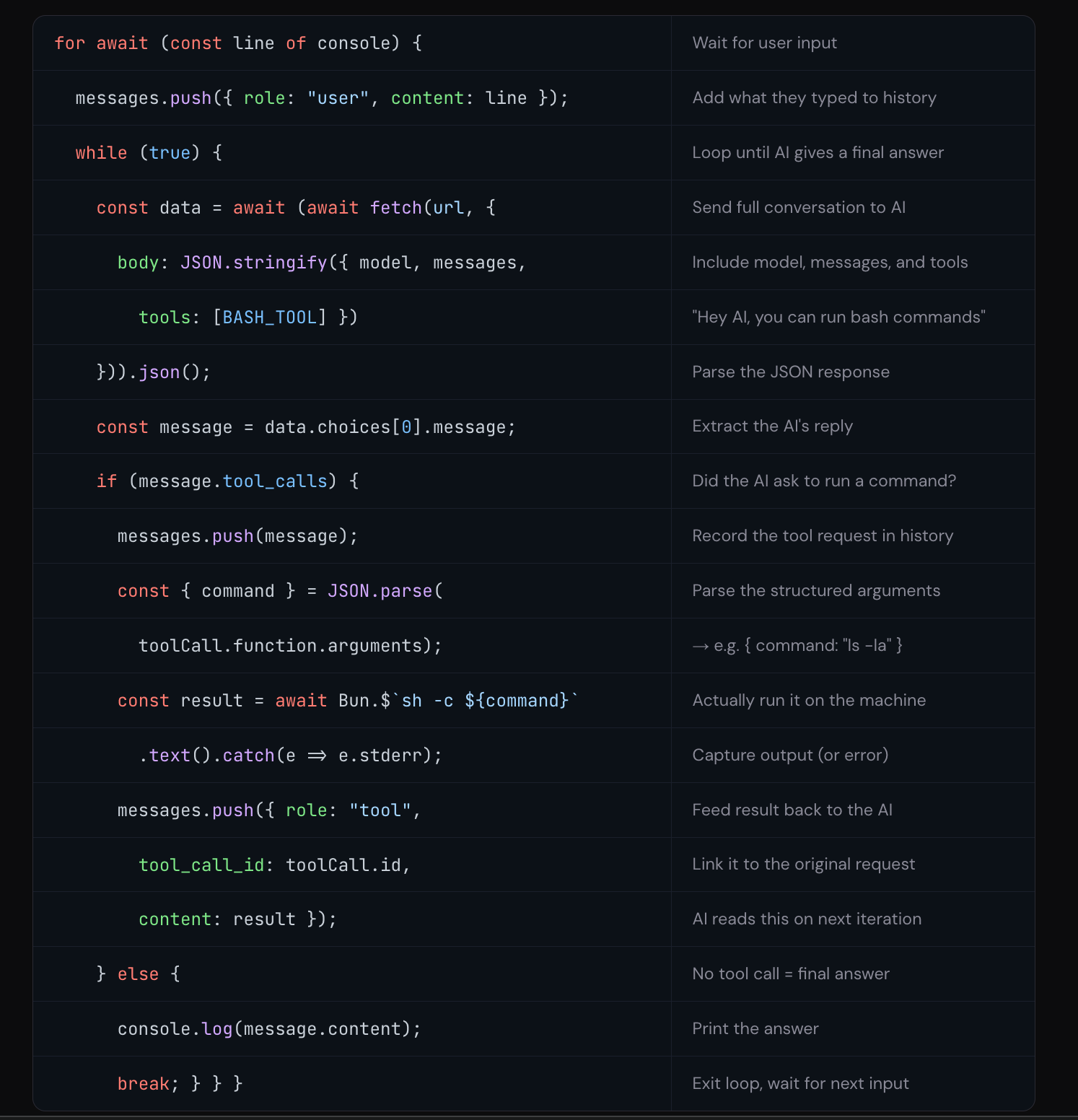
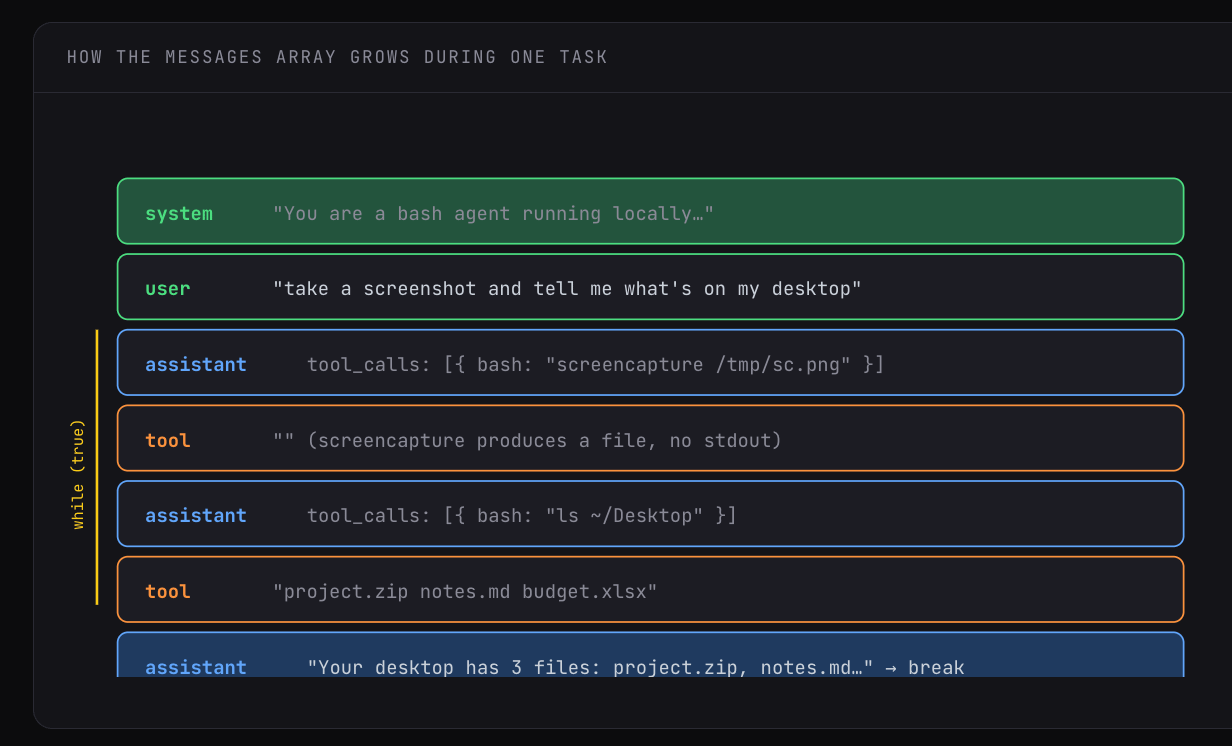
That’s the whole agent. The while(true) is the engine. It chains as many tool calls as it needs (list files, read one, edit it, run tests). Each tool run and response gets added back into the message array and sent back to the large language model for next steps before it decides to respond with text and break.
Before anyone wrote a single line of code, we needed two things: a way to run JavaScript (Bun), and a way to talk to AI models (an OpenRouter API key). Challenge 00 was the setup: install Bun, create a free OpenRouter account, copy your API key into a .env file, and run a quick curl command to make sure everything was wired up.
Then came the first lesson: what actually happens when you “talk to an AI”?
Challenge 01 stripped away every layer of abstraction. No SDK, no library, no chatbot UI. Just curl, a command-line tool that makes raw HTTP requests. The same thing your browser does a thousand times a day. Now in the terminal to see each step building up to the API call.
First, hit the URL:
curl https://openrouter.ai/api/v1/chat/completions404 error. Curl defaults to a GET request, and this endpoint only accepts POST. HTTP has methods, and we’ve got to use them.
Next, switch to POST by adding a body:
curl https://openrouter.ai/api/v1/chat/completions \
  -d '{}'
401 error. Different number, different problem. The server received the request this time. It just doesn’t know who you are. That’s authentication.
Add an API key in a header:
curl https://openrouter.ai/api/v1/chat/completions \
  -H "Authorization: Bearer $OPENROUTER_API_KEY" \
  -d '{"model": "openrouter/free", "reasoning": {"exclude": true},
       "messages": [{"role": "user", "content": "Say hello."}]}'
A real response comes back. a big JSON blob with the model’s reply buried inside at choices[0].message.content. That’s the large language model responding. 404 → 401 → 400 → message walks through method, auth, and required fields.
Challenge 01 ended with a JSON blob on screen. The AI’s reply was in there, but buried under layers of metadata, including choices, message, content, role. To extract the reply, use pipes, the | character in bash that takes the output of one command and feeds it as input to the next.
It helps chain tools together like the plastic knobs of a lego piece connecting other pieces.
The first tool chained is jq, a command-line JSON processor, that pulls out the exact value. It’s combined with the -r flag to strip the JSON quotes to guarantee a raw string. This turns a noisy API response into a clean, usable command.
The build-up went like this:
Step 1 — Pretty-print the full response to see what you’re working with:
curl [the full API call] | jq '.'Step 2 — Extract just the AI’s reply:
curl [the full API call] | jq -r '.choices[0].message.content'Now the only thing on screen is the raw command the AI generated, like screencapture screenshot.png.
Step 3 — Pipe that command straight into bash:
curl [the full API call] | jq -r '.choices[0].message.content' | bashA screenshot appears on your desktop.
Three tools, three pipes:
curlfetches the AI’s responsejqextracts the commandbashruns it.
Now any sentence can be typed in natural language to get your computer to do a thing like take a screenshot. No code, just three existing unix tools stitched together with a large language model.
It’s important to say this can be dangerous as the large language model can return any command that can run locally, like delete all files. In production this would sandbox execution, have a human in the loop, and/or validate commands.
The curl pipeline from Challenge 02 was like magic: English in, screenshot out. But it was also held together with tape. If the LLM returned a markdown code fence around the command, it would break. If the command failed, you’d get a cryptic error and no way to recover. If you wanted to ask a follow-up question, you’d have to retype the entire curl command.
This next step is about translating the pipeline into JavaScript, with real data structures, error handling, and control flow. The good news is it’s a one to one translation. Every piece of the curl pipeline has a direct JavaScript equivalent.
First, curl with headers and a JSON body becomes fetch, JavaScript’s built-in way to make HTTP requests:
const response = await fetch("https://openrouter.ai/api/v1/chat/completions", {
  method: "POST",
  headers: { Authorization: `Bearer ${process.env.OPENROUTER_API_KEY}` },
  body: JSON.stringify({
    model: "openrouter/free",
    reasoning: { exclude: true },
    messages: [{ role: "user", content: "Return only a mac bash command to take a screenshot." }],
  }),
});
jq -r '.choices[0].message.content' becomes plain JavaScript property access. Once JSON is parsed, you just navigate the object:js
const data = await response.json();
const cmd = data.choices[0].message.content;
| bash becomes Bun.$, Bun’s built-in shell API that lets you run commands from JavaScript:
await Bun.$`sh -c ${cmd}`;That’s the script. Run it with bun run agent.ts and you get the same screenshot, but now you’re in a real programming language. You can add console.log(cmd) to see what’s about to run. You can wrap things in try/catch. You can build on it.
The point of this challenge wasn’t to do anything new. It was to prove that the curl pipeline and the JavaScript version are the same thing with the same URL, same headers, same body, same response shape. The only difference is that now you have a real language under you instead of duct-taped shell commands.
Challenge 03 was a one-shot script: send a message, get a command, run it, done. If the command failed, the script crashed. If you wanted to ask something else, you had to re-run the whole thing. There’s no conversation, only a single request and a single response.
To start to turn it into an agent, there are two things that get added: a messages array and a while loop.
The messages array is the AI’s memory. AI models are stateless, meaning they have zero memory between API calls. It’s like waking up with amnesia. Every time you call the API, you have to send the entire conversation history from scratch. The model reads all of it, generates a response, and immediately forgets everything.
So if you want context across turns, you have to maintain it yourself.
const messages = [
  { role: "system", content: "Return only raw bash commands. No backticks." },
];
That array starts with a system prompt and grows with every exchange. When the user types something, you push a { role: "user" } message. When the AI responds, you push its message too. Next time you call the API, the model sees everything that’s happened so far.
The while loop is what gives the agent persistence. Instead of crashing on failure, the loop catches the error, pushes it back into the messages array as a user message (”that command failed, here’s the error”), and lets the AI try again:
while (true) {
  // call the API with the full conversation...
  const message = data.choices[0].message;
  messages.push(message);
  try {
    await Bun.$`sh -c ${message.content}`;
    break;  // worked → exit
  } catch (error) {
    messages.push({ role: "user", content: `Command failed: ${error.message}` });
    // loop continues → AI sees the error and tries a different approach
  }
}
Wrapping all of this in a for await (const line of console) loop means the script stays alive between tasks. Type an instruction, the agent executes it (retrying if needed), then waits for your next instruction with full memory of what just happened.
We went from running a script to talking to something. You can now say “take a screenshot,” then say “open that file” and it would know what “that file” meant because the conversation is in the messages array.
Everything up to this point had the same fundamental hack at its core: we told the AI “respond with a raw bash command and nothing else” and hoped it listened. Sometimes it did. Sometimes it wrapped the command in backticks. Sometimes it added “Sure! Here’s the command:” before it. Every one of those variations would break the script.
Tool calling replaces that hack with a real protocol. Instead of hoping the AI returns a clean string, you tell the API “this model has access to a tool called bash that takes a command argument.” Now the AI has two distinct ways to respond:
Option 1 — it wants to run a command. The response comes back with a tool_calls field containing structured JSON:
{
  "role": "assistant",
  "tool_calls": [{
    "id": "call_abc123",
    "function": {
      "name": "bash",
      "arguments": "{\"command\": \"screencapture /tmp/screenshot.png\"}"
    }
  }]
}
Option 2 — it wants to give a final answer. The response comes back with a content field containing plain text:
{
  "role": "assistant",
  "content": "Done — screenshot saved to /tmp/screenshot.png."
}
No ambiguity. You check one field — message.tool_calls — and you know exactly what the AI wants to do. The command is always cleanly extracted from structured JSON, never parsed out of free text.
You define the tool as a JSON schema that gets passed in every API request:
const BASH_TOOL = {
  type: "function",
  function: {
    name: "bash",
    description: "Run a bash command on the local machine",
    parameters: {
      type: "object",
      properties: { command: { type: "string", description: "The bash command to execute" } },
      required: ["command"],
    },
  },
};
And the loop logic becomes a clean if/else instead of a try/catch:
if (message.tool_calls) {
  // AI wants to run a command
  messages.push(message);
  const toolCall = message.tool_calls[0];
  const { command } = JSON.parse(toolCall.function.arguments);
  const result = await Bun.$`sh -c ${command}`.text().catch(e => e.stderr || e.message);
  messages.push({ role: "tool", tool_call_id: toolCall.id, content: result });
  // loop continues — AI sees the result
} else {
  // AI is done — print and break
  console.log(message.content);
  break;
}
There’s a new message type here: role: "tool". In Challenge 04, we pushed errors back as role: "user" messages. That was a hack. We were pretending the user said “that failed.”
With tool calling, there’s a proper role for tool results. The tool_call_id field links the result back to the specific request the AI made, so when the model reads the conversation history, it knows exactly which command produced which output.
The other big shift: the loop no longer breaks on successful execution. It breaks when the AI decides to respond with text. That’s an important difference.
This is the final form. The 20 lines of code are the same pattern running inside Claude Code, Cursor, Codex, and every other AI coding tool. Different tools plugged in, better error handling, more guardrails — but the same loop.
We had some time at the end for people to use their new agent and make it better.
We covered agentic skills, a way to log workflows, context, and samples as a markdown file the agent can use.
Want the agent to log every command it runs with a timestamp? Write a markdown file that says so.
Want it to always explain what it’s about to do before doing it? Another markdown file.
Voice transcription with ffmpeg and Whisper? Describe the workflow in markdown and the model executes it.
No integration code, no new tool definitions. It’s natural language instructions that become part of the agent’s behavior. This is exactly how production agent systems like Claude Code handle capabilities. The “skills” on disk are markdown files the model reads at the start of every conversation.
Also, there’s a module on GitHub on extending for longer running tasks for a Ralph Loop. This in short externalizes the messages in context to a file that can be read into different sessions. More here.
With agent loops being able to control a computer and read files, it’s easy for things to go wrong:
Prompt poisoning, when an agent reads a website or message with malicious text inserted
Authorization management, when starting to connect an agent to other tools, like Gmail or Slack
Guardrails, ensuring that the agent is not doing anything it’s not supposed to
Titus Capilnean from Civic Technologies showed how they help act as a layer between an agent and managed authorizations through their MCP server. Every kind of agent, from Claude Code to OpenClaw can use Civic. More here.
1. Every AI coding agent — Claude Code, Cursor, Devin, Codex, OpenClaw — runs a version of the same loop: send messages to a model, check if it wants to use a tool or respond with text, feed results back, repeat until it breaks.
2. AI models are stateless, like waking up with amnesia. Every time you call the API, you send the entire conversation history from scratch. The messages array is the memory, and you maintain it yourself.
3. Tool calling is what turns a chatbot into an agent. Instead of parsing free text and hoping the model listened, it uses a structured protocol to signal "run this command" versus "here's my answer."
4. You can extend an agent's capabilities by dropping a markdown file into a folder. No code changes. Skills are just natural language instructions the model reads and follows.
5. When a task outgrows a single conversation, externalize state to files and loop in short iterations so the model never accumulates enough stale context to lose track of the goal.
Will Sentance for leading the workshop, including everyone, and enabling this kind of understanding for people with all backgrounds
Titus Capilnean and Nancy Li for the support and sharing important security considerations when working with agents
Nate Padgett and Studio 45 for the physical space for these kinds of workshops to happen
See you at the next build!
Hi I’m Michael, Founder of Worldwide Studios, where we help people build with the latest AI tools, hardware, and applied sciences. From 2hr intros like this one to 100 day fellowships, we help people make sense of how things are changing to solve real problems.
No posts
Comments
Nothing yet. Say the first thing.
Sign in to join the conversation.