
Now (after last week’s article) that we know what the people and stakeholders shall do, we will take a closer look at the organizational side of things. In this and the next artice, I will cover the following aspects:
A more detailed look at the roles in an architecture program (which might give you some ideas on potential gaps in your processes).
The potential implications on your technical configuration.
The organizations that are involved in the overall governance design.
An example of implementing an Architecture Review Board as an example of one of those organizations in a previous project.
Take this article with a grain of salt, since your organizational setup might differ. However, what I have typically seen in organizations was similar to the roles in figure 1:
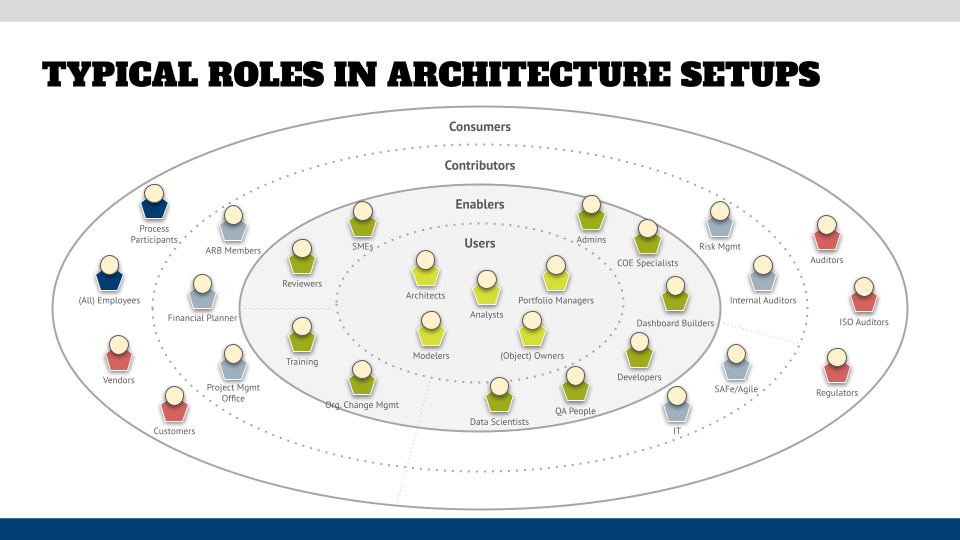
The high-level types of roles in programs can be clustered into two big buckets, which also might be reflected by the license structure of your tool: creators and contributors.
The creator category contains two types of roles — the users and the enablers.
The user category contains all the people who do the actual architectural work and include Architects, Analysts, Modelers, but also Owners (such as application or process owners, who will make changes in your tool and approve items) and Portfolio Managers. The latter can cover different types of portfolios, such as projects or applications — their task is not necessarily to own the objects in the portfolios but to manage and coordinate the items logically, for example in the context of large transformations or for a specific business unit. The shared characteristic of these roles is that they all will work directly with your tool and therefore need to know the tool very well, but also need to understand their role in the governance processes.
The enabler category includes different groups of roles that are “part-time” involved in the actual work — the main group might be the Center of Excellence (COE) personnel which can include Admins, Specialists for methods and running the COE, Developers and Dashboard Builders, as well as “shared” resources like QA People and Data Scientists that will be deployed to projects as needed. Another group can include Organizational Change Management Specialists and Training personnel, and the third group will include roles like (business or SOX) Reviewers and Subject-Matter Experts (SMEs). The shared characteristics of these roles is that they will work in a limited capacity with your tool, but bring their specialty to the party. A Data Scientist, for example, will bring their data modeling tool and provide Python/SQL coding skills that are not necessarily needed to create the artifact for the use case. However, all the enablers require at least the “doer” knowledge of what you defined them to do in your governance processes, but not necessarily need to understand the “rules of engagement” or how things like delegation will work — they are “just” playing their role.
The contributor category includes two sub-categories: (hands-on) contributors and consumers.
Contributors typically include “content roles”, such as decision makers or specialists in the form of Committee Members, Budget Planners and Controllers, or the Project Management Office. It also includes roles that help running the system, such as IT people who operate the IT technology for you (backups, upgrades, interfaces, etc.) or (Scaled) Agile people who will help to manage architecture projects. Lastly, the Risk Management people and Internal Auditors will be players in your program. The main characteristics of these roles is that they mostly will only read the content of your architecture work, but they will have an input on how to make that content better, while not directly working in your tool — they will most likely work directly with your users and the Reviewers/SMEs where applicable.
The last group are the consumers, which are in theory everyone who has the need to view the architecture content. This can be the Process Participants who perform in your processes or — even wider defined — everyone in your organization. But it can also contain external roles (red in the diagram above), such as Auditors (risk, ISO, etc.), Regulators, Vendors, and also Customers in case you provide technical services and integrations with them. The main characteristics of them is that they just need to be able to understand / view the content that you create. One thing you want to consider is the format of that content — not everyone is familiar with reading diagrams or navigating through a sequence of forms to get to the content of interest (or they might wear gloves on a worksite or do not have computers/tablets available), so you might want to think what alternative ways of giving them the content might be … the good old printout might just be what is needed. Alternatively, think about how that content could be integrated into their workspace (machinery, workflows) or embedded in their environment (augmented or in real life, such as signs). Unfortunately, most of the current tools fall short outside the computer setup, but I have high hopes that the vendors will wake up and see the potential of other representations.
As you have seen, the different roles have widely different requirements on your tool configuration, and there are a few aspects you need to consider next.
The first one is to translate the requirements into the various areas that your tool allows you to configure. These are typically structured in these categories:
Licenses — and to be more specific, user licenses, since there might be other parts of your licenses that you will need for parts of your tool stack that are not relevant for users. For example, when you look at typical process mining license setups you will see user licenses, but also connection and data processing licensing and other fees that make the license setup as clear as mud (and I guess that is intentional, just like with your cell phone contracts :-( Licenses, however, typically constrain areas of functionality of your tool. Can your user view or edit items? Does she have admin access, or can she use specialty functionality in your tool, such as simulation or process mining? The structure of licenses is different from vendor to vendor and might overlap with the next category of privileges.
Privileges describe what a user is allowed to do. While a certain license might be required to access a certain part of the tool, some tools also have the concept of privileges, which will give you the option to further define what roles can and cannot do. An example would be an Admin — they need an admin license to even see the admin section of the tool, but if you want to be more granular you can further define different types of admins with privileges — can the role manage users, do backups, etc.? Or do you specify User Admins for each main org unit in your program so that they can administer their users, and you do not have to do that centrally? Or you have Developers who typically also use an admin-type license, but you want these roles to be only allowed to create and manage dashboards and reports, but not the overall installation and its configuration.
Then you have permissions — these are used to define access rights to specific areas of your architecture. The general rule that I apply in my projects is that everyone can view (and reuse) things, but can only define items in areas that they are assigned to. This means that I set up structures in the tool that allow an org unit (user group) only to edit “their” content (an HR group can only edit the HR processes or IT can only edit applications). Everyone can see what these groups create so that, for example, everyone only picks from a list of IT-managed applications and doesn’t “invent” their own. However, don’t be surprised how “creative” humans will be if they don’t find what they are looking for — I have seen tons of created objects outside the official areas, for example applications, risks, or controls. That might be because there is inconsistent naming of things in your organization and the users just didn’t find them, or they were not aware that they are not supposed to create those items — this can be a failure on the governance process side or a lack of training that you might want to improve going forward. In any case, you need a means of finding these scenarios (reports) and consolidating them, but also a proper permissions setup that will allow you to do this (e.g., all “official” apps will live in one specific area that only IT can edit, and your report will find all applications used in the database whose object definition exist outside the sanctioned area. You also might want to think of automating these reports and trigger workflows to mitigate the inconsistencies.
Lastly, you might have specific tool configuration items that are applied to roles. For example, your risk and compliance users might want to see a specific indicator if a subprocess in a process diagram includes risk-relevant information without the need to open another subprocess diagram. This information might not be relevant for other users and clutter the interface so that you might want to configure that in a different configuration file(s) — in the ARIS example from the Technical Governance segment this would be done via filters, templates, and the portal configuration.
My recommendation is to create a matrix as shown in figure 2 below. When you do this, keep in mind that it includes licenses/privileges/permission structures for all tools and that you standardize your roles into groups that are consistently applied over the whole user population.
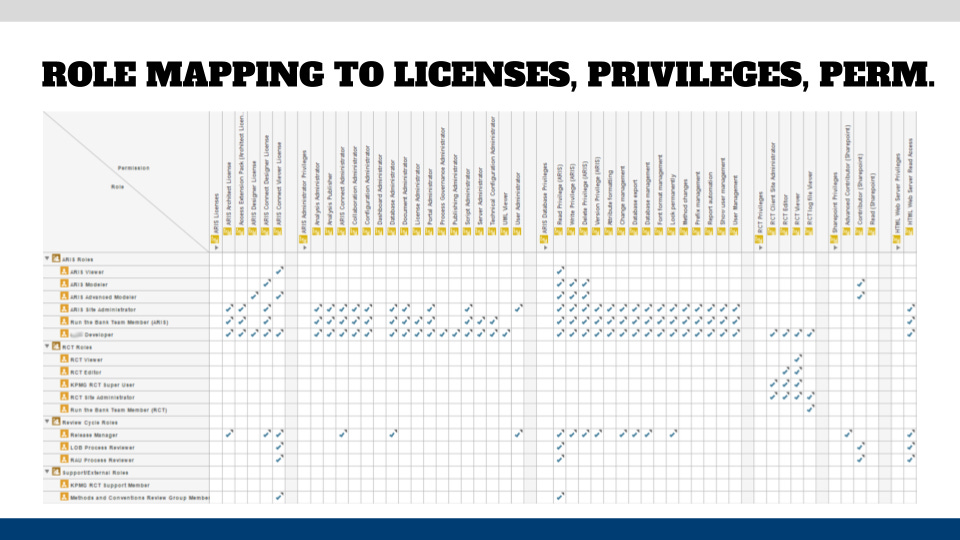
This can be done by creating user groups that are aligned to the role groups. You might have a user group of “HR modelers” and “IT modelers” and both user groups refer to the definition of the “Modeler” role group and the users in both user groups can do the same thing and the only differences are in the permissions.
And just to have it said, try to avoid granting licenses, privileges, and permissions on an individual user level. This will rapidly become a user management nightmare to maintain, and you might fall out of favor when your security people will do an audit of your setup and see that you have a million different configurations. The worst-case scenario is that you cannot quickly and logically explain how you consistently applied the three items to your users.
Now that we have done our “homework” regarding the tools, let’s take a look at the wider setup of the organization topic next week.
We will discuss the different areas that you want to cover in your program and -spoiler alert- “let’s stand up a CoE” is the wrong answer. We will also take a look at how I’ve stood up one of these org units in a previous project with a standards organization.
No posts
Comments
Nothing yet. Say the first thing.
Sign in to join the conversation.