
Follow us on LinkedIn, X, Bluesky
Release date: August 12, 2026
Downloads: Windows: x64 Arm64 | Mac: Universal Intel silicon | Linux: deb rpm tarball Arm snap
Welcome to the 1.133 release of Visual Studio Code. This release gives you more flexibility in Claude sessions, keeps long chats easier to follow, and refreshes local HTML previews as you work.
-
Change model provider for Claude sessions: Switch providers between turns without reconfiguring the agent host.
-
Agents window without GitHub sign-in: Use Claude with your existing API key when GitHub sign-in is unavailable.
-
Auto-reload HTML files: Preview HTML changes immediately without manual refresh.
Happy Coding!
VS Code is rolling out gradually to all users. Use Check for Updates in VS Code to get the latest version immediately.
To try new features as soon as possible, download the nightly Insiders build, which includes the latest updates as soon as they are available.
Agents
Agent host
The agent host lets you connect to the same agent session from multiple VS Code windows. It runs agent harnesses in a dedicated process based on the Agent Host Protocol (AHP). The agent host's Copilot agent is powered by the Copilot SDK, which aligns its behavior and functionality with the Copilot CLI, the standalone GitHub Copilot app, and other Copilot products.
We're actively developing the agent host. The screenshot below shows how to select the Copilot harness on the agent host in the editor window:
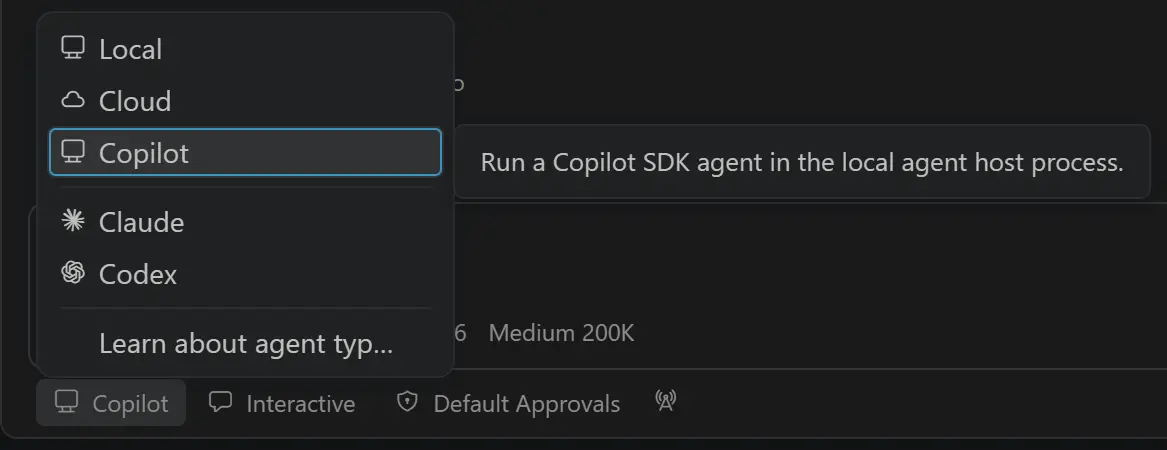
You can learn more in our VS Code Agent Host documentation. If you have any feedback or requests, please let us know by filing an issue.
Support for the Agent Plugins standard
Plugins bundle agent customizations into something you can install in one step. The catch has been that every agent tool expected its own layout, so publishing the same skill and MCP server to several tools meant maintaining a separate package for each.
Agent Plugins 1.0 replaces those per-tool layouts with one open standard, and VS Code was part of its launch on August 6 along with other agent clients. A plugin that follows the standard is a directory with a plugin.json manifest, skills in skills/, and MCP server configuration in mcp.json.
VS Code loads those portable components, and it also reads Copilot-specific components from the com.github.copilot namespace in the same package:
If you'd like to read release notes for previous VS Code versions, go to Updates on code.visualstudio.com.
Comments
Nothing yet. Say the first thing.
Sign in to join the conversation.