
When you think "I want AI to be able to reference the knowledge I've accumulated," most people probably think of RAG (Retrieval-Augmented Generation) first. Split the documents into chunks, generate embedding vectors, load them into a vector DB, and run similarity search. That was my plan too.
But before starting, I decided to measure it just once: how many seconds would it take to run a plain grep full-text search across my 6,783 note files?
The answer was 0.14 seconds. That changed my approach.
🤖✍️ This article was co-written with AI — an AI agent (Claude Code) generated the draft based on actual collaborative work with Ebisuda, who then reviewed and revised the content before publishing.
This series introduces the skills I've actually implemented and use myself. This time it's about the side that lets AI pull from accumulated knowledge — the design of a skill called wiki-query.
I use Obsidian as a shared "second brain" for both me and AI. Technical notes, web clippings, video records, project logs, decision records — years' worth has piled up in a single folder.
The problem is that whatever has piled up is as good as nonexistent if it can't be retrieved.
Even I sometimes can't recall, "wait, I wrote about this somewhere." A plain AI agent, of course, knows nothing about the contents of my folders. It ends up answering with generic knowledge from scratch every time. The measured numbers I painstakingly collected, the traps I fell into in the past — none of it gets used at all.
So I built wiki-query. When I say "tell me what you know about this," the AI searches across everything I've accumulated and returns a synthesized answer.
When building this skill, the first thing I did wasn't choosing a search infrastructure — it was measuring. Here are the numbers I re-measured again today.
* Target: 6,783 Markdown files (roughly 58MB of body text combined)
* Full-text search for "Claude Code" → 1,219 files matched, in 0.14 seconds
* Ran it three times in a row: 0.14 / 0.14 / 0.15 seconds
Vector search starts to pay off once the "can't retrieve if the wording differs" problem becomes a real pain point, and once full-text search stops being practical at scale. A few thousand files and tens of megabytes of text sits well below that threshold.
As a result, wiki-query has no vector DB. It doesn't call an embedding model. There's no server running a persistent index. The skill itself is just a single ~5KB instruction document. No scripts, no config files, no external services.
This isn't cutting corners — it's a decision made after measuring.
RAG is a powerful tool, but whether you need it is determined by scale. If you start building without measuring this, you end up permanently carrying operational costs that never had to exist in the first place — regenerating embeddings, keeping the index fresh, and so on. I consider the decision not to build something you don't need to build just as much a part of the design as the decision to build it.
Since I didn't build out the search side, I put that investment into the structure of the storage side instead. Here's what it looks like as of today (all measured figures).
* Systematic knowledge pages: 265
* Records of resolved issues (KB entries): 116
* Decision records (ADRs): 14
* Web clippings: 917 / technical notes: 114 / video records: 325
What matters is that these aren't just sitting there — they have a defined shape. Rather than putting the intelligence of search into an algorithm, I put it into the structure of the data and the AI's judgment. That's the design of this skill.
From here, I'll walk through concretely how that "shape" is actually designed and how the AI is made to query it — using the contents of the instruction document and an actual execution trace.
* A three-way branching design that changes the search entry point based on the "type" of question
* How the cross-cutting layer and the project-specific layer are separated
* Why the querying side and the accumulating side are completely separated
* A metadata design that discards candidates without reading a single character of the body text (this is where it really pays off)
* An actual trace of querying with a single keyword (72 files → how many does it narrow down to?)
* What can be generalized and taken away from this design
* #1 Giving an AI Agent "Domain Expertise" — An Overview of Skills Design
* #2 When an AI Agent Gets a Clock — Design Patterns for Scheduled Execution
* #3 Five Minutes in the Morning Runs the Whole Day — The Design of goodmorning Automation
* #4 "What Should I Do Right Now?" — Decision Support Answered by AI
* #5 Having Three AIs Debate — Structured Multi-Agent Consensus Building
* #6 Articles Write Themselves — The Design of an AI Article-Writing Pipeline
* #7 Fighting AI's "Forgetting" — Cross-Session Context Restoration
* #8 AI Grows on Its Own — Carrying "Experience" Into the Next Session with the learn Skill
* #9 Five Minutes at Night Ends the Day — The Design of goodnight Automation
* #10 Twenty Minutes on the Weekend Puts the Week in Order — The Design of weeklyreview Automation
* #11 Morning, Night, and Week All Rest on One Shell — Task Management Primitives for AI
* #12 Just Step on the Scale and AI Reads Your Condition — The Design of IoT Health Data Integration
* #16 AI Reads the Numbers Without Even Opening Studio — The Design of the YouTube Stats Skill
* #20 Why Do AI Commits Mix Languages? — A Rule Design That Adapts Writing to the Publication Target
* #22 Don't Include Everything — Sorting Borrowed Rule Sets Into "Always-On" and "On-Demand"
* #23 Posting to Four Platforms at Once With Zero Lines of Custom Code — The Design of a Bundling Skill
* #24 When You Let AI Do the Promotion, It Spoils the Punchline — Building "Not Saying It" Into the System
* #26 An API That Cuts Off After 45 Seconds — A Skill Designed to Stop You Before You Fall In
* #27 A Skill With Not a Single Line of Code — A Design That Keeps AI From Writing "Secrets"
* #28 I Called the AI and It Said "Good Work! 🎉" — Another Entry Point for Calling AI From a Script
* #29 Don't Let the AI That Wrote It Review It — Building a Second Opinion Into the System
* #30 The Audit Reports 1,000 "Problems" Every Week. Is the Wiki Broken, or Is the Audit?
*
Both the query skill introduced in this article and the mechanism that keeps accumulating knowledge behind it run on top of "Ebi Workspace (formerly claude-workspace)," a plugin that works with Claude Code / Codex. Along with project management, context restoration, and the skill execution infrastructure, the AI Wiki covered in this article is included in the same purchase. The reason for setting up this foundation is so you don't have to adopt "storing" and "retrieving" separately.
The AI co-authoring environment for this article also runs the open-source "Ebi Agent Chat Relay." It's the execution infrastructure that drives Claude Code / Codex from Discord and handles conversation, handoff, and conflict avoidance across multiple sessions. Its former name was CCDB (Claude & Codex Discord Bridge), and that old name still lingers in places like the repository name due to a gradual renaming migration.
👉 Ebi Agent Chat Relay (GitHub)
The instruction document that constitutes the skill is written in the following order:
When it triggers
What to look for, and in what order
How to search
How to answer
What to suggest after answering
What to do if the pages found are low quality
What's interesting is that item 3, "how to search," is the shortest of all. Use full-text search and filename search, and do an AND search across multiple keywords. That's it. There's almost nothing written about search techniques.
What's long instead is item 2, "what to look for, and in what order." That's where the entire design lives.
I divide the storage of knowledge into three places:
* wiki — systematic understanding of "what is X"
* KB — records of resolved issues (retrieved by symptom)
* ADR — records of decisions made when choosing something (retrieved by why it was done)
The instruction document specifies changing which one to check first depending on the type of question.
* Symptoms, errors, "I'm stuck" type questions → check KB first
* "Why is it like this?" or "what was chosen?" type questions → check ADR first
* "What is X?" systematic understanding → check wiki first
This works because even with the same keyword, the shape of the answer you want is different.
Take the keyword "authentication token cache," for example. If someone wants to know "what is a token cache in the first place," showing them a bug record from a past run-in with a specific environment isn't helpful. Conversely, showing a general conceptual explanation to someone whose cache is failing and their system is down right now is the worst possible response. What they want is only: "have I run into this same symptom before?"
Full-text search can't make this distinction. Given the same keyword, it returns the same results. The only thing that can make the distinction is whatever reads the intent behind the question — in other words, the AI. That's why it's not the search algorithm but the instruction document that says: "look at the type of question and change the entry point."
Another axis is the "reach" of the knowledge.
* Cross-cutting layer — general knowledge that applies across any project
* Project-specific layer — knowledge closed off to a particular project, environment, or client
I physically separate these into different folders. The instruction document specifies checking the cross-cutting layer first, and if the context is clear, also checking the project-specific layer. In today's measurement, the cross-cutting layer held 265 wiki entries / 116 KB entries / 14 ADR entries, while the project-specific layer held 115 ADR entries / 25 KB entries / 15 wiki entries. A notable feature is that decision records are overwhelmingly concentrated in the project-specific layer — because technology choices always come bundled with the circumstances of a specific project.
Why separate them? There are two reasons.
The first is that mixing them makes the knowledge unreusable. If knowledge like "this setting is required in this environment" gets mixed with specific names or internal values, it can't be applied elsewhere in similar situations. My practice is to distill only what can be generalized into the cross-cutting layer, stripping out the specific information.
The second is that the handling constraints differ. The project-specific layer contains information that can't be shared externally. The end of the instruction document explicitly states: "information from confidential contexts must not be disclosed externally." When the layers are physically separated, you know which one you're touching the instant you look at the path.
Incidentally, this skill exists in two versions: a local one for my own environment, and a plugin-distributed one. Diffing the two, the only differences were the execution path and the wording of this one line about confidentiality. As a design, the separation is clean.
This might be the most important decision of all.
wiki-query writes nothing. It only reads.
So who creates the 265 knowledge pages? A separate set of jobs that run on a schedule: a job that generates and updates topic pages from web clippings, a job that merges hand-written technical notes into existing pages, a job that extracts knowledge worth recording from that day's work sessions, a job that detects similar topics and consolidates them, a job that diagnoses quality, and a job that splits pages that have grown too large. The index file is also auto-generated, currently listing "265 topics / 798 sources" as of today.
I separated the reading side from the writing side because they require opposite qualities. The reading side needs to be fast, harmless even when it fails, and runnable at any time. The writing side needs to be careful, leave a history, and be recoverable if something goes wrong. Mixing these into a single skill produces a dangerous design where a file gets rewritten just because you asked a question.
Thanks to this separation, wiki-query has become a tool I can "casually invoke as many times as I want." Since it only reads and never rewrites anything, there's nothing to lose even if a query comes up empty. That's why I've set a separate rule — "for technical questions, check the index first" — so it gets consulted even without me calling the skill by name. It's precisely because the tool has no side effects that it can be left always-on.
The weakness of full-text search isn't speed — it's matching too much. When a single keyword returns dozens of hits out of thousands of files, the AI can't possibly read all of them. There's a limit to how much it can read, and the more low-relevance files get crammed into the context, the blurrier the answer becomes.
So I made it possible to narrow things down using just the first few lines of each file. Every page begins with a machine-readable metadata block.
* type — is this systematic knowledge, a resolution record, or a decision record?
* read_when / skip_when — under what circumstances should this page be read, and when can it be skipped?
* symptom (for resolution records) — what symptom does this record cover?
* decision (for decision records) — what was chosen?
* scope — is this cross-cutting knowledge or project-specific knowledge?
* freshness / confidence — how quickly does this knowledge go stale, and how confident is it?
* updated — the last update date
The instruction document specifies: "before opening the body, use only these fields to make a judgment call and narrow it down to the top 10. Read the body only after narrowing." This is a design for doing the discarding work at the cheapest possible point.
There's one operational tip here: whenever you change the format on the accumulation side, keep the reading side's instructions in sync in the same release. read_when / skip_when were fields I added to the accumulation side later. At the moment they were added, the reading side's instructions still only looked at type and symptom. It's a state where only the accumulation side has evolved while the reading side gets left behind. This kind of drift doesn't throw an error. It shows up as "information that should be usable quietly going unused while performance alone degrades." So even in the distributed plugin, I made sure that format changes on the accumulation side and instruction updates on the reading side go into the same version (the release from the day I wrote this article is exactly that case).
And for this design to hold together, the metadata itself needs to be mechanically audited. The mechanism that periodically checks whether every page contains the required fields and whether the values match spec is the very thing I built in the previous article (#30), and it's still doing its job here as-is. The reading side's design, in other words, hangs entirely on the writing side's quality assurance.
Since it's all been design talk with no concrete feel to it, I ran an actual query today with a single keyword: "Managed Identity" (a mechanism for service-to-service authentication in the cloud without holding credentials).
Checking things in the order specified by the instruction document, the results were as follows.
* Across the entire storage folder: 72 files matched
* Cross-cutting systematic pages → 5
* Cross-cutting resolution records → 1 (symptom: telemetry shows zero events even though the connection string is correct)
* Cross-cutting decision records → 0
* Project-specific decision records → 2 (technology choices for a particular personal-development project)
72 hits became 8 files worth reading. And those 8 were selected purely from the metadata, before the body of a single one was ever opened.
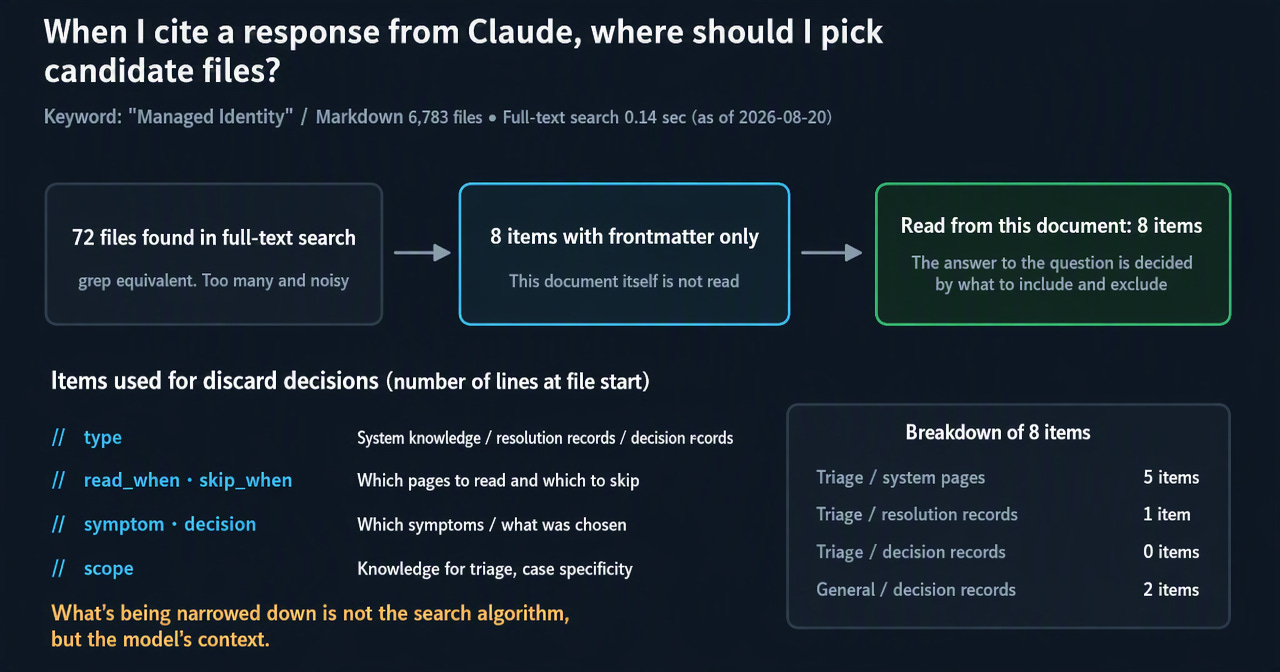
Two things become clear from this.
First: the layered design works exactly as intended. The cross-cutting layer holds conceptual explanations and past failures, while the project-specific layer holds "why this project chose this authentication method." If everything had been mixed into a single folder, it would have been buried among the 72 hits.
Second: the quality of auto-generated metadata varies. Of the 5 systematic pages, 4 had a read_when field that was a mechanical sentence like "when investigating or making decisions about X." That's nothing more than a rephrasing of the page title and doesn't do much for narrowing things down. The one that did work had something specific written in it: "when deciding the difference between resource, audience, and App ID URI." In other words, metadata doesn't work just by existing — it only becomes usable for discarding decisions once it's written specifically. Auto-generated defaults are a starting point, not a finished product.
Here's a summary of the parts that generalize.
1. Measure the naive approach before building search infrastructure. At a scale of a few thousand files, full-text search may well be more than enough. Build RAG without measuring first, and you'll be permanently saddled with operations that never had to exist — regenerating embeddings, keeping the index fresh.
2. The intelligence of search can live on the data side instead of the search side. Full-text search can't judge "what should be looked at first." Only something that can read the intent behind the question can judge that. If you attach a type (symptom, decision, or concept) at the time of storage, narrowing works without writing a single search algorithm.
3. Do the narrowing at the cheapest possible point. Discard candidates using the first few lines of metadata before ever reading the body. This isn't for speed — it's for the quality of the answer. The more low-relevance candidates you cram into the context, the blurrier the answer gets.
4. Separate the reading mechanism from the writing mechanism. The qualities each requires are opposites. Mix them and you get a dangerous tool that rewrites itself just because a question was asked. Separate them, drive side effects to zero, and the tool can be left always-on.
5. That said, keep the two separated pieces in sync within the same release. If you change the writing side's format, update the reading side's instructions along with it. Drift here won't throw an error — it just means information that should be usable goes unused. The only way to handle the kind of drift that degrades things quietly is to enforce synchronization through the system itself.
An automated system looks healthy as long as it's running. But looking healthy and performing at full capacity are two different things.
Next time, I'll cover another skill that's actually running in production.
No posts
Comments
Nothing yet. Say the first thing.
Sign in to join the conversation.