
If you store an API key somewhere separate from the runbook, six months later you'll start from scratch wondering, "Which value does this procedure actually use?"
That said, you can't just write it in plaintext inside an Obsidian note that's under Git version control. Encrypting it and embedding it in place solves the placement problem, but one important question still remains.
Can that ciphertext actually still be decrypted today?
The skill I'm introducing this time, age-secret, is a Claude Code / Codex skill that encrypts secrets directly into the place they're needed in a Markdown note, and then checks every day — even after they've been saved — that they can still be decrypted.
🤖✍️ This article was co-written with AI — an AI agent (Claude Code) auto-generated the draft based on actual collaborative work with Ebisuda, who then reviewed and revised the content before publishing.
This series introduces the skills I've actually implemented and use myself. This is #32 in the "Claude Code Skills Catalog."
Keeping the value only in a password manager is safe, but you still need to record, somewhere in the note, which entry to reference. Conversely, if you write the plaintext right next to the procedure, the mapping is easy to follow, but it's not easy to remove the value later once it's landed in Git history.
What age-secret deals with is the small, annoying problem sitting between these two extremes.
I don't want to separate the procedure from where the secret lives
I only want ciphertext to go into Git
I also want to catch the accident where decryption silently stops working when I actually need it
The point of turning this into a skill isn't to shorten the encryption command. It's to make sure that even when you ask the AI, "record this secret in the note," it consistently follows the same steps every time — an input method that leaves no plaintext behind, key separation, how to handle sample entries, and periodic verification.
Ciphertext can be correct at the moment it's saved and still break afterward — a character dropped during a copy, manual reformatting, a changed header, a lost key file. None of these are easy to notice just by looking at it.
So this skill periodically collects the ciphertext inside the vault and checks whether it can actually be decrypted with the real private key. That said, the checker itself, which handles secrets, must not become a new leak path.
This raises four design questions.
How do you encrypt a secret without leaving it in shell history?
How do you actually decrypt every entry without letting the plaintext flow back into the process or a log?
What distinction lets you exclude only sample entries without missing genuinely broken real data?
How do you detect ciphertext that's broken so badly — header and all — that it disappears from the extraction target entirely?
The concrete answers to these four questions, along with the implementation and verification results, are covered in the second half of this article.
#1 Giving an AI Agent 'Expert Knowledge' — The Big Picture of Skills Design
#2 When an AI Agent Gets a Clock — Design Patterns for Scheduled Execution
#3 Five Minutes in the Morning Runs the Whole Day — Designing goodmorning Automation
#4 'What Should I Do Right Now?' — Decision Support Answered by AI
#5 Making Three AIs Debate — Structured Multi-Agent Consensus Building
#6 Articles That Write Themselves — Designing an AI Article-Writing Pipeline
#7 Fighting AI 'Forgetfulness' — Restoring Context Across Sessions
#9 Five Minutes at Night Closes the Day — Designing goodnight Automation
#10 Twenty Minutes on the Weekend Puts the Week in Order — Designing weeklyreview Automation
#11 Morning, Night, and Week All Run on One Shell — Task Management Primitives for AI
#12 Just Step on the Scale and the AI Reads Your Condition — Designing IoT Health Data Integration
#14 Say the Word After You Write, and It Goes Out to Every Platform — Automating Article Promotion
#15 One Line In, and It Reaches Even the Formal Places — Designing a LinkedIn Posting Primitive
#16 The AI Reads the Numbers Without Ever Opening Studio — Designing a YouTube Stats Retrieval Skill
#20 Why Do AI Commits Mix Languages? — Designing Rules That Adapt to Where They're Published
#22 Don't Load Everything In — Sorting Borrowed Rule Sets Into 'Always-On' and 'On-Demand'
#23 Posting to Four Platforms at Once With Zero Lines of Custom Code — Designing a Bundling Skill
#25 Upload a Video and an Article Is Already Written — The 78 Days It Quietly Stopped Working
#27 A Skill With Not a Single Line of Code — Designing So the AI Never Writes a 'Secret'
#28 I Called the AI and It Said 'Good Work Today 🎉' — Another Way In: Calling AI From a Script
#29 Don't Let the AI That Wrote It Review It — Building a Second Opinion Into the System
#30 The Checker Reports 1,000 'Problems' Every Week. Is It the Wiki That's Broken, or the Checker?
#31 Before Building RAG, I Measured grep — It Took 0.14 Seconds, So I Decided Not to Build Search
*
The system introduced in this article is built on top of "Ebi Workspace" (formerly claude-workspace), a paid plugin for Claude Code / Codex. Beyond project management, context restoration, and a skill execution framework, an optional AI Wiki is also included in the same purchase.
The AI co-writing environment for this article also runs the open-source "Ebi Agent Chat Relay." It's a conversation and coordination platform that drives Claude Code / Codex from Discord and handles the AI Lounge, claiming work items, and avoiding collisions across multiple sessions. It was formerly named CCDB (Claude & Codex Discord Bridge), and the old name still shows up in places like the repository name and the CLI because the rename is being rolled out in stages.
👉 Ebi Agent Chat Relay (GitHub)
This is a learning site that reorganizes official documentation and Japanese-language explainer videos — covering everything from Windows, Microsoft 365, and Azure to generative AI — into an order where you can see what to learn next. The learning map and free videos can be viewed without signing up.
👉 Ebi Study — Technology, in the order you can actually use it.
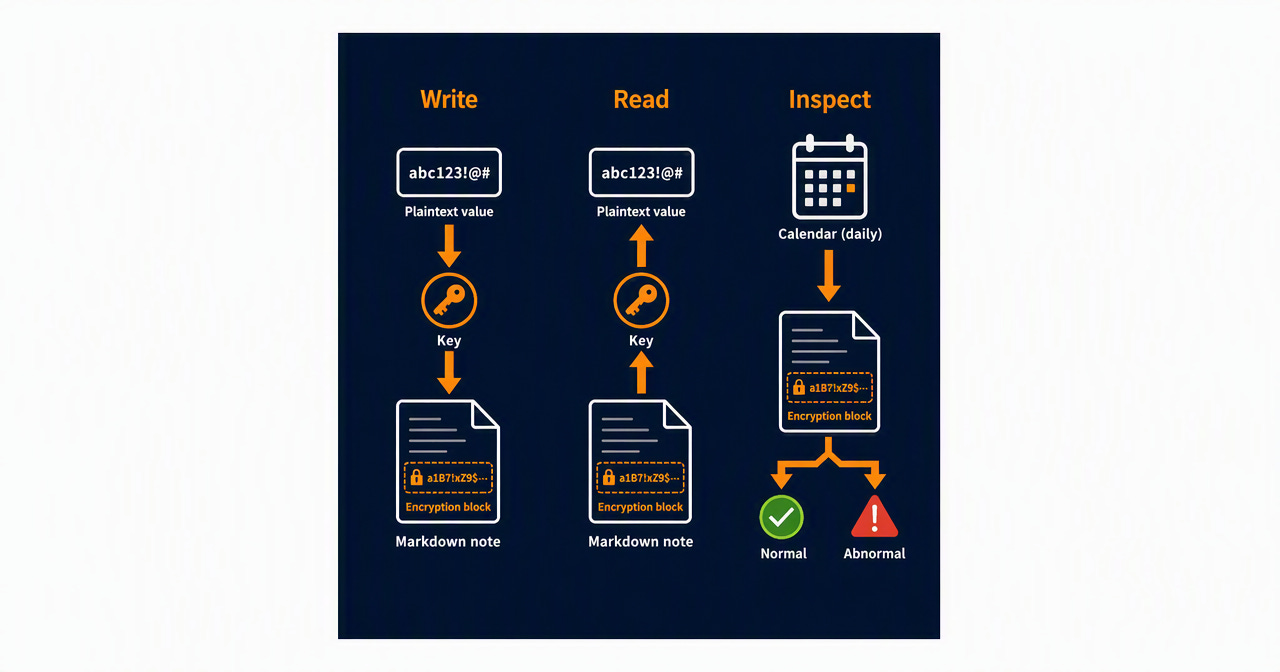
age-secret is a skill for embedding secrets directly into Git-managed Markdown notes using age's ASCII armor format.
The mechanism is split into three parts.
Write — receive the plaintext via an interactive prompt that doesn't echo to the screen, and place only the ciphertext in the note
Read — decrypt only the needed block using a private key kept outside of Git
Verify — decrypt every piece of real data in the vault every day, discard the plaintext, and keep only the pass/fail result and the count
Key-based encryption might sound like a big deal, but age can handle small pieces of text as ASCII armor, which makes it a tool that pairs well with Markdown. The ciphertext stays in the note, and the decryption key stays somewhere else.
The first thing to avoid is writing the actual API key directly on the command line, since the command itself can end up in shell history.
The value is captured via an interactive prompt that doesn't echo to the screen, and it's passed to age without adding a trailing newline.
PUB=$(age-keygen -y /path/to/your/keys.txt)
IFS= read -rsp 'Secret: ' SECRET
printf '\n'
printf '%s' "$SECRET" | age -r "$PUB" -a
unset SECRET
Three things matter here.
Never write the actual value on the command line
Use printf '%s' so no unintended trailing newline gets mixed in
Use -a to produce ASCII armor that can be pasted into Markdown
For example entries in articles or documentation, use a dedicated header that's distinguishable from real data.
-----BEGIN AGE ENCRYPTED FILE (SAMPLE)-----
...
-----END AGE ENCRYPTED FILE (SAMPLE)-----
Real data uses the regular header without SAMPLE. Since changing even a single character makes ciphertext undecryptable, it's never manually reformatted.
The reason it's fine to put ciphertext in the note is that the private key used for decryption is never put into the same Git repository.
Key handling comes as this set of three practices.
Keep the private key file outside of Git version control
Set the file's permissions to 600
Back up the private key to a password manager in case the machine fails
If you lose the key, the ciphertext stops being "securely stored data" and becomes data that even you can never read again. Decide where the key lives and where it's backed up before you encrypt anything.
This doesn't reduce your dependence on a password manager to zero. The difference is that the password manager no longer needs to hold the mapping between each secret's name and its procedure — it only needs to consolidate the key backup required for recovery.
Checking whether the file exists, whether the header is correct, or whether the string looks like Base64 doesn't prove that it can actually be decrypted.
The verification script extracts every regular age block in the vault and actually decrypts each one, one at a time, with the private key. In the check run on August 24, 2026, 20 pieces of regular ciphertext were checked with age 1.3.1, and all 20 decrypted successfully. Four sample entries are kept separate via the SAMPLE header.
The scope of verification is age blocks embedded in Markdown inside the vault. It does not include JSON or YAML encrypted with SOPS, or ciphertext outside the vault.
The verification result only outputs the following information.
The number of entries checked
The number that decrypted successfully
The file and line number of any failures
The first line of the error age returned
The decrypted secret itself is never shown.
In a design where Python receives the decrypted result and then discards it, the entire plaintext still ends up sitting in the Python process's memory, if only briefly.
So standard output is sent directly to the OS's null device. Only standard error and the exit code are returned to Python.
result = subprocess.run(
["age", "-d", "-i", str(KEY_FILE)],
input=block.encode(),
stdout=subprocess.DEVNULL,
stderr=subprocess.PIPE,
check=False,
)
This lets the verification script determine "whether decryption succeeded" without ever holding on to the decrypted value. It's a measure to reduce accidental log output and residue left in process memory — not a boundary that blocks another process running as the same user, which can read the private key, from accessing it.
There's a problem with the approach of writing ... inside a regular header and having the verification script automatically ignore it: the same characters would appear if someone accidentally truncated a real piece of ciphertext partway through.
So the header with SAMPLE is used only for sample entries. A regular header without SAMPLE gets checked no matter what's written inside it. Broken real data that's nothing but an ellipsis is also treated as a decryption failure.
Counting only decryption failures misses the case where a block's opening header itself is broken and it never even gets included in the extraction target. If 20 real entries become 19, and all 19 remaining ones decrypt successfully, a naive check would report success.
That's why the verification script saves, per vault, the number of real entries from the last successful run. If the current count drops below the baseline, the exit code is 1 even if there are zero decryption failures. The baseline is never lowered automatically.
FAIL Real-entry count dropped from the last successful run: 20 -> 19
[FAILED] Real entries: 19 blocks / Decrypted successfully: 19 / Failed: 0
Only when a secret has been intentionally removed do you confirm the reason and explicitly accept the current count as the new baseline.
python3 verify-age-blocks.py --accept-current-count
The baseline is only updated when every single decryption succeeds. This is so a broken state never gets recorded as the new normal. Blocks that were already missing before the very first run can't be compared against anything, so a human confirms the expected count when the baseline is first established.
The verification runs every day from a local scheduler. On success, it just leaves the count in the log; it only sends a notification when there's a decryption failure, a drop in count, or an anomaly in the checker itself.
Even when using the scheduler through a browser, the premise is that the control surface is never exposed externally. In my environment, both the web listener's default and the actual configuration are restricted to loopback, and state-changing requests from external origins are rejected. I never set up a configuration that exposes an unauthenticated admin API to the LAN or the internet.
What matters isn't "having a verification script" — it's that it gets invoked every day and failures actually reach a human.
age-secret is a good fit when you want to place a short secret used in a personal environment as ciphertext right next to its explanation in Markdown.
If you want to encrypt and edit values while preserving JSON or YAML structure, SOPS is the better fit. I use SOPS 3.13.3 in my environment. If you need to split permissions across multiple people, keep an audit log, or run rotation in an organized way, you need a secrets management platform like Key Vault. In environments where you can fetch values at runtime from a password manager's CLI, you can also choose to write just a reference name in the note instead of putting ciphertext there.
age-secret isn't meant to replace any of these. Its scope is narrowly focused on the problem, in a personal Markdown runbook, of "the secret goes off to some other place and you lose track of the mapping."
In situations where you can choose a design that holds no secret at all, you should prioritize something like Managed Identity, which I introduced in #27 A Skill With Not a Single Line of Code — Designing So the AI Never Writes a 'Secret'. Writing an encrypted secret is the option you fall back on when you can't eliminate the secret.
This mechanism is meant to let a limited set of secrets in a personal environment coexist with the note. It's not a universal secrets management platform.
If the private key is ever stolen in the future, past ciphertext still sitting in Git history can also be decrypted. Simply revoking or rotating the value doesn't remove the old ciphertext from history.
Encrypting many secrets with the same key also widens the damage if that key ever leaks. You need to decide whether to split keys by the importance or purpose of each secret.
What permission 600 prevents is reading by a different, unprivileged Unix user. It's technically still readable by root, and by Claude Code or Codex running under the same user privileges.
If you ask the AI to decrypt something, you also open a path for the value to end up in tool output, conversation logs, or the transcript. The periodic verification never returns values to the AI, but it doesn't automatically protect the logs from the moments when a human actually uses the value.
Since decryption runs automatically every day, the verification process must be able to read the private key without any human input. A design that protects the private key with a passphrase or hardware every single time is incompatible with unattended, full-batch verification. Here, I've chosen early detection of undecryptable ciphertext, and in exchange accepted the constraint that the key can't be isolated from other processes running as the same user.
All the verification guarantees is that the ciphertext can be decrypted. Whether the token has been revoked, whether it's expired, or whether it holds more privilege than it needs all require separate checks.
Anyone who knows the public key can create new ciphertext addressed to it. age verifies the integrity of the ciphertext, but it isn't a signature that proves the identity of whoever created it.
If you write plaintext into a note without using the skill, it can go straight into Git history as is. Set up repository-wide secret scanning and pre-commit checks separately, and don't rely on the skill alone as your last line of defense.
The ciphertext gets duplicated across Git, sync services, backups, and mobile devices. It won't turn into plaintext unless it meets the private key, but it does increase the amount of material that could be read retroactively if the key ever leaks in the future.
For a personal test environment or limited automation, combining in-note ciphertext with periodic decryption is a practical option that keeps information from getting scattered.
On the other hand, secrets for organizations, customers, or production environments are out of scope here. In those cases, the value should be stored in a secrets management platform like Key Vault, and the principle is to write only the secret's name or URI in the note.
Rather than "it's encrypted, so it can be treated the same everywhere," choose where a secret lives based on the impact of a leak and who can access the key.
If you want to try age-secret, you don't need to start with a bulk migration. Start by picking just one low-impact secret.
Generate the key outside of Git and decide where to back it up
Encrypt via interactive input without writing the plaintext on the command line
Embed the ciphertext where it's needed in the note
Confirm on the spot that it can be decrypted
Check the count from the first verification run, and confirm the next day's scheduled run succeeds too
It doesn't end the moment you encrypt and save something. Treat it as a complete operation only once you're regularly confirming that decryption still works, that the saved count hasn't dropped, and that you'll actually receive a notification if it ever fails.
No posts
Comments
Nothing yet. Say the first thing.
Sign in to join the conversation.