
Welcome to the first installment of Interactive Brokers Issue of the Day, a new series where I document the daily boss fights I have with IBKR.
Most of my working day seems to go to fighting with Interactive Brokers. So I decided to turn that pain into content. At one point, I had an open issue that took them over a year to fully resolve. If you’ve ever felt alone, stupid, or wondered “maybe it’s just me” while fighting IBKR, you should know: you’re not alone on this trip.
Let’s get into today’s issue.
I’m trying to close an investors account, I transfer all of the cash to another account… but I still see a negative USD cash balance by converting CAD to USD in Trader Workstation. Simple enough, right? Wrong.
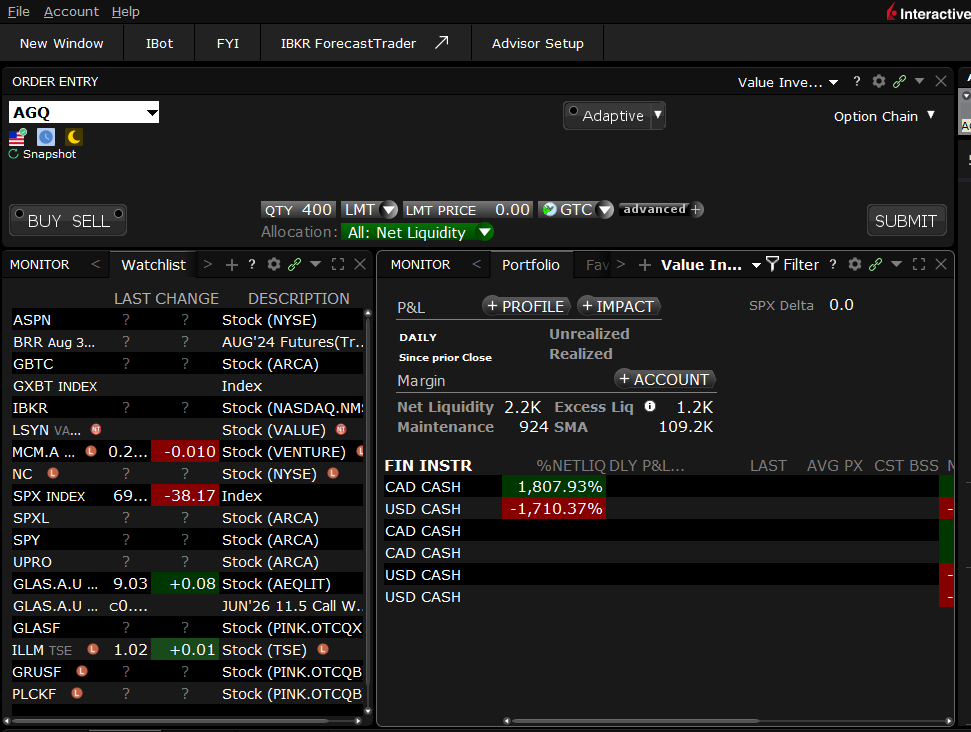
1. Portfolio -> Market Value -> Real FX Balance
2. Right-click CAD -> Close Currency Balance / FX Conversion
3. Confirmation accepted
That’s it. That’s the official workflow. The dialog closes, TWS acts like everything worked.

- The FX conversion does not appear as an order
- The Pending (All) window is empty
- No FXCONV or USD.CAD order is visible or executable
- USD cash remains negative and continues accruing interest
So the platform confirmed my action, then did absolutely nothing. My USD balance is still short and I’m still paying interest on it.
If you run multiple strategies across different currencies or trade on international exchanges, FX management is not optional. A silent failure in the conversion workflow means:
- You’re paying margin interest on a debit you thought you fixed
- Your available buying power is wrong
- Your risk calculations are off
And you won’t know any of this unless you go back and double-check everything.
Comments
Nothing yet. Say the first thing.
Sign in to join the conversation.