
In September 2024, I wrote about using o1-mini to generate Reveal.js slide decks. I re-read it recently, expecting to notice how much the models have improved. And they have. But most of what changed the workflow came from everything around the model: skills, MCPs, file creation, browser use. I barely thought about any of that in 2024. The whole article was about the model.
Back then, creating AI-generated presentations meant:
Download the Reveal.js framework
Open index.html in a text editor
Craft a careful prompt with specific instructions to prevent the model from breaking things
Copy the output from the chat
Paste it into your file
Save, refresh, review
Prompt again for adjustments
Repeat the copy-paste cycle
The article included guardrails you needed to add to your prompt: specific URLs for styles and plugins, the original index.html contents. The model would reliably mess these up otherwise.
It worked. But the friction was constant, and the relationship with the model was almost adversarial. The whole article was essentially: here’s how to work around the things it gets wrong.
There’s a category of tools that express things you’d normally do in a UI as code instead. Markdown. HTML. Reveal.js. Mermaid diagrams. They give you precise control, but they’ve traditionally required you to be comfortable reading and writing code.
Here’s an example of what the AI has to write to create a four slide deck:
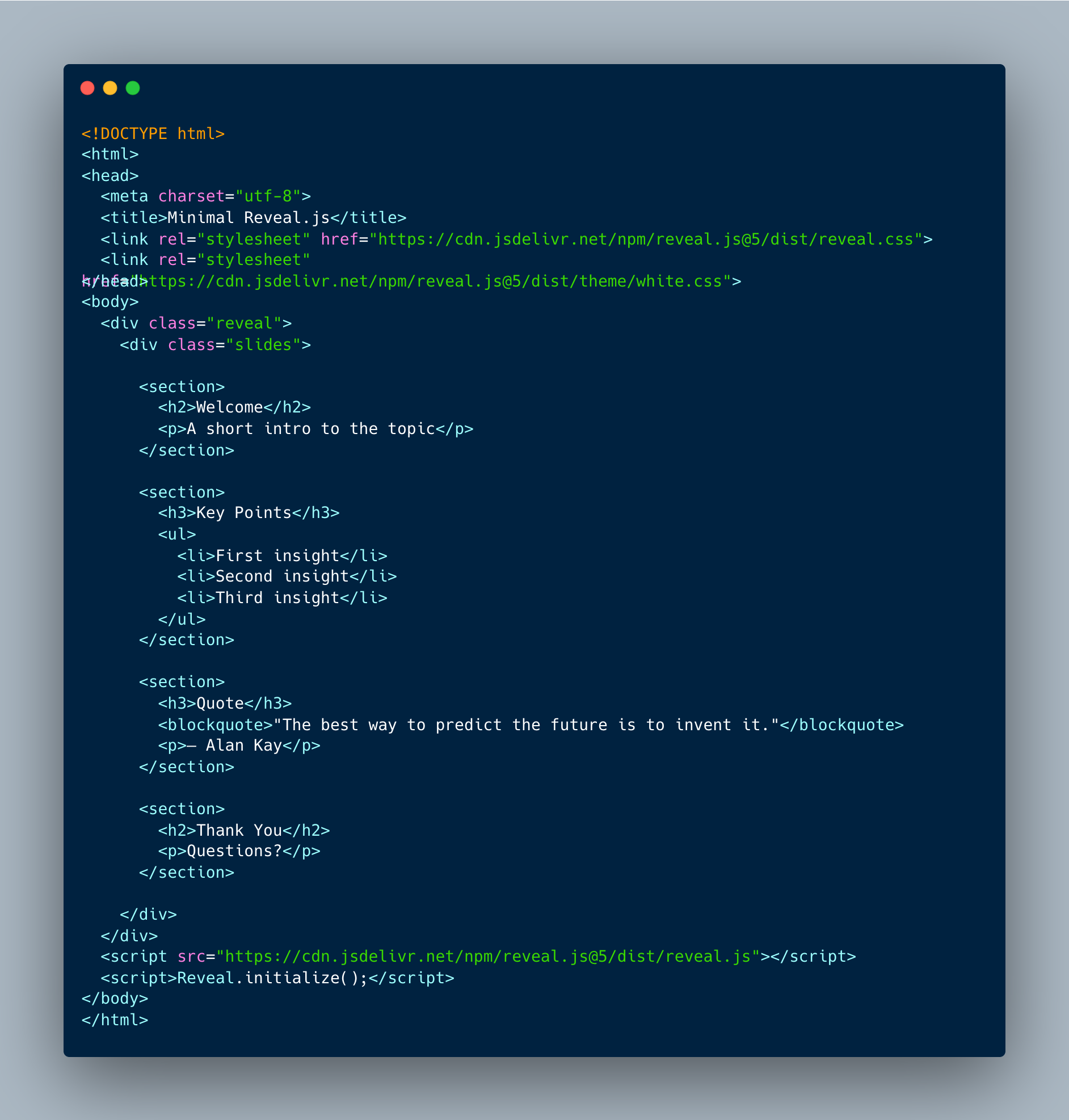
Working with a UI where you can click and drag stuff to where you want it would be easier for people to use, but not for AI. This format, basic HTML, is very easy for it to write, customize for you, based on your own descriptions. That was the core insight in 2024, and it still holds. The model capabilities, the tooling, and the way you interact with them have all changed around it.
And to be clear; there are other tools out there. Claude in PowerPoint is great, NotebookLM does a really solid job, but with this approach, there’s no need for any extra paid subscriptions. The HTML approach allows you to have a lot of control over the outcome, and freedom to use this with whatever tool you like without being locked in.
“Technically feasible” and “actually practical” are different things. The 2024 workflow was the first one. Three things moved it to the second.
Back then, you’d figure out the right prompt instructions and guardrails, maybe save them somewhere to reuse later. Every session started with re-explaining context. Skills and MCPs changed that. They let you encode knowledge once (your styling guide, brand guidelines, examples of what good output looks like) and pull in relevant content on the fly. The model can look up how you explained a concept in a previous article, grab your style guide, and apply both to the new deck. If you’re making slide decks regularly, you build a skill with your preferences, and creating a new deck on any topic takes minutes. That’s reusable infrastructure, and it compounds in a way that individual prompts never did.
On the model side, outputting long code that works is expected now. The guardrails I wrote about in 2024 (including specific URLs, pasting the original file contents) aren’t necessary because the models don’t break those things as often.
The tooling caught up too. In 2024, the model was a text generator you manually wired into your workflow. Now it can go fetch information on its own. I prepare workshops for clients, and the model pulls meeting transcripts where I discussed what that client wants to cover, grabs the relevant skills and examples, and builds a tailored slide deck from all of that. Browser use lets it look at reference pages and extract styles. File creation means no more copy-paste cycles. The model outputs actual files.
Self-verification might be the biggest shift. After building the slides, I can tell the model to go through them, take screenshots, and check its own work. It runs for ten to fifteen minutes, iterating and fixing things it spots. A single prompt gets you to a decent result because the model catches its own mistakes before you see them.
The numbers tell the story: building a fully tailored, well-styled slide deck used to take one to two hours. Now it takes about twenty minutes, and the quality is better than what I used to produce manually.
To show the difference, I recreated the same task: generate a slide deck from article content.
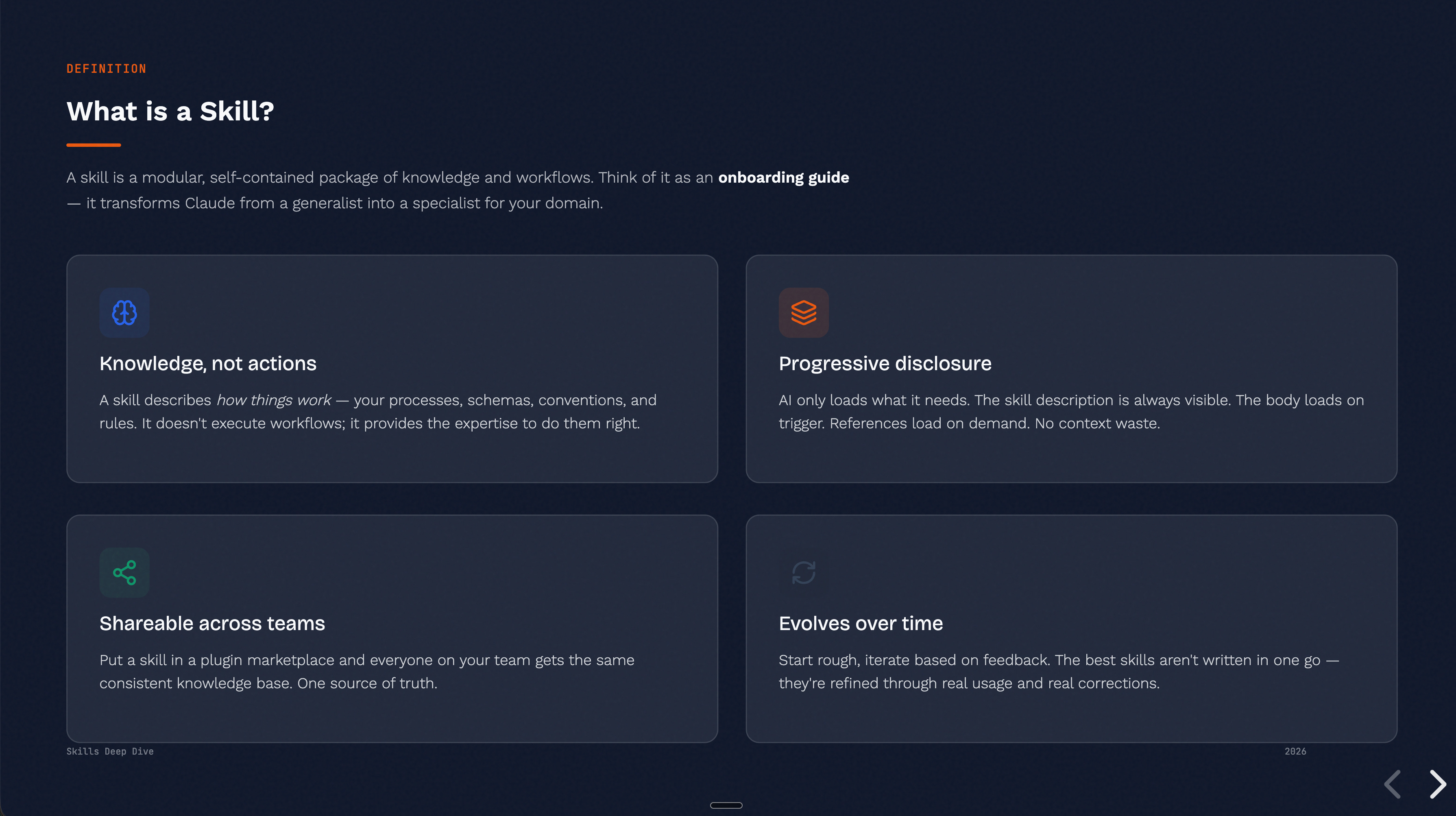
As one example: we recently built a this slide deck explaining skills for our community, using the Reveal.js skill. Five parts, consistent styling, code examples, diagrams. The model pulled in relevant content, applied our style guide, and iterated on the result.
The prompt was roughly: “I’ve explained skills a few times in meetings. Look up how I explain it. Grab the skill creator skill as well, and use the frontend design skill to put together a good-looking slide deck.” Two or three follow-up prompts to correct minor mistakes and adjust styling. Total time: ten to fifteen minutes. And that was without an example slide deck to work from.
That’s the 2026 workflow. No framework download, no copy-paste, no carefully crafted guardrails to prevent breakage. One prompt that tells the model where to find the content, which skills to use, and what to build. A few corrections. Done.
The slide deck came out of Autonomee, the community I run with Goda. We build these kinds of workflows together — skills, MCPs, AI systems — and share what works. If you want to go from reading about this to actually building it, that’s where it happens.
The models still make mistakes. That hasn’t gone away. But when a model gets something wrong, you can fold that learning back into the skill. Add an example of what not to do, clarify a constraint, include a reference for something it tends to get wrong. Next time, it doesn’t make that mistake. The skill accumulates corrections over time, which means the process speeds up the more you use it.
The core insight from 2024 (AI makes code-based frameworks usable for non-coders) was correct. What I underestimated was how easy it would become to bring in relevant content. Skills and MCPs mean the model can pull in your style guide, reference how you explained something before, fetch meeting notes where a client described what they want. Making a good presentation has always been mostly about gathering and organizing the right content, and that’s exactly where the real time savings come from.
Back then, the excitement was that o1-mini’s output was coherent enough to actually use. You’d still clean things up, still go back and forth, but the base was solid enough to work with. Most of that back-and-forth has collapsed now. The interesting questions are about orchestration: chaining capabilities together, encoding domain knowledge, building verification into the process.
The output quality has improved — I don’t want to undersell that. Looking back, I forget how much manual cleanup was involved in 2024. You get fewer errors now, and you iterate less. But if you give a 2026 model the same bare-bones prompt you would have used in 2024, just “create a slide deck about X,” the improvement is modest. Most models at various price points can one-shot a decent-looking page of HTML.
The dramatic gain comes from the context around it. Can the model understand what you actually mean by “good” when you give it instructions? Can it pull information from different sources — your style guide, your previous work, a client’s meeting notes — and use all of that to produce something tailored? That’s where a generic slide deck becomes a good one. In 2026, the ability to fetch, understand context, and iterate matters far more than raw output quality alone.
I keep wondering whether this pattern holds beyond slide decks. For this specific use case, “prompt engineering” has clearly become “workflow design.” I suspect that’s true more broadly, but I’d want to test it on a few more examples before making that claim.
The original article is still available here. Worth reading not for the instructions (those are outdated) but as a snapshot of what “cutting edge” meant eighteen months ago. Check out autonomee here.
No posts
Comments
Nothing yet. Say the first thing.
Sign in to join the conversation.