
TLDR: Substack and LinkedIn both cracked down on AI content this year, and they did it in opposite ways. Substack added a public AI detector and a box where writers explain their process. LinkedIn said nothing and just quietly limits reach on posts it reads as machine-made, while offering AI features of its own. LinkedIn creator Nika Kotláriková shows us what that looks like from inside the platform and shares the process she uses to write with AI without losing her own thinking. The lesson is the same: write down your own rules for AI before someone else writes them for you. If you want more deep dives like this, Subscribe.

If you want to build an online presence for your business, you’ve probably thought about LinkedIn.
We’ve all heard the pitch. It’s the professional network. It’s where the CEOs are. Post there and clients will find you. And to be fair, some of that holds up. LinkedIn has about 1.3 billion members. And roughly 80% of all business leads that come from social media come from LinkedIn.
Personally, though, I use it as a discovery engine. I post top of funnel material there and I send people back to this newsletter. I haven’t cracked the code for it yet, but I do believe there’s potential in it.
Plus, I believe that Unpromptability means showing up where your readers might be. This doesn’t mean being tied to just one platform.
For a lot of experts, that place is LinkedIn.
New here? I’m James. I help founders and creators build AI systems that make them impossible to replace. My mission is to help you use AI to become irreplaceable at what you do by turning your expertise into systems no one else can copy.
This piece is written with Nika Kotláriková of Business & Marketing With Nika, who built her largest community on LinkedIn and reports on the platform from the inside.
If you want the foundation this sits on, start with Most Creators Are Preparing For AI Wrong.
In July, Substack added an AI detector. A reader can scan any post and get a number showing how much of it a machine wrote.
I wrote about it twice, here and here. In both articles, my conclusions come down to one line: A scan can see the tool you used, it can’t see you.
The feed argued about it for weeks. Scores, false positives, whether writers were about to get dragged into the town square for using Claude.
Then I got curious about the platforms outside. LinkedIn has the same flood of AI content … and it handled it in almost the opposite way. Same problem, two answers, and neither platform is done deciding.
So I asked Nika Kotlarikova, one of the best LinkedIn creators I know with a thriving 10k follower community on Substack. Here are her thoughts.
We can all agree that AI has made our lives easier in many ways. (Content creation, research, new inventions.)
But AI also comes with its downsides.
I feel this especially as a creator on LinkedIn, where I have my largest community.
In today’s edition, we’ll look at how LinkedIn views artificial intelligence and how to use it without sabotaging your attempts to grow your personal brand with AI.I’ve divided this article into three parts:
The situation on LinkedIn from a creator’s perspective
LinkedIn’s stance on AI
How I personally use AI
If you’re also seeing phrases like “It’s not X, it’s Y,” “Here’s something nobody talks about,” “Agree?”, “Here’s why,” and “The best part?” more and more often in your feed, you can probably guess what’s happening.
We’re all starting to sound the same because people are using AI to create their posts.
Some take it a step further and use AI to generate their images, too.
But the worst part comes when people start using AI to write their comments.
Most of the time, it’s just a paraphrase of the original post, an agreement with the author, followed by a long wall of text. Sometimes, it also comes with too many emojis and tagging the author.
It feels impersonal, and real communication starts to disappear.
And we’re not the only ones noticing it.
LinkedIn is noticing it, too.
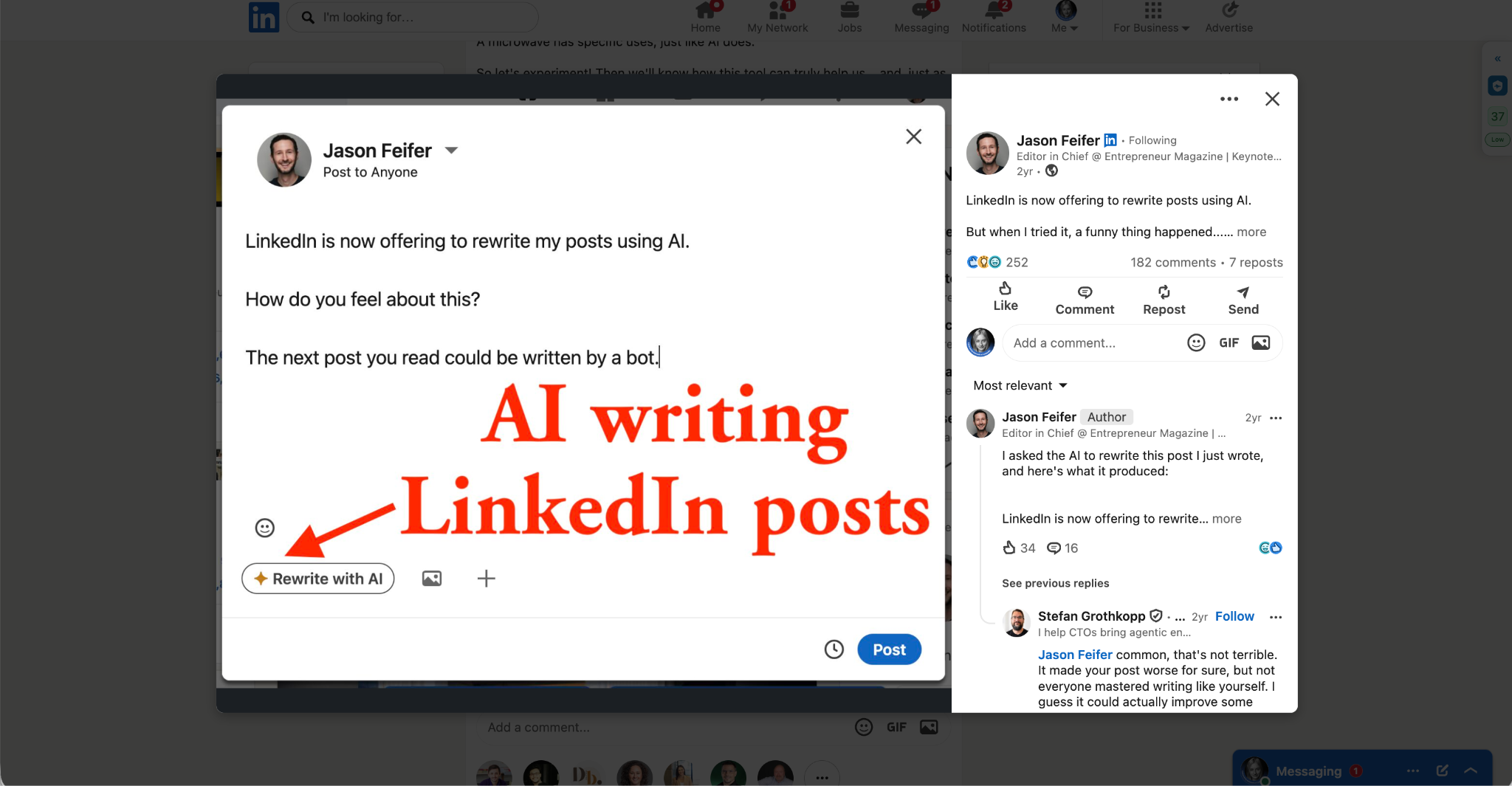
Every social platform benefits from keeping as many people on the platform for as long as possible. The more attention it gets, the more valuable its advertising space becomes to advertisers.
But if the platform is filled with AI-generated posts, followed by AI-generated comments from other AI-assisted creators, it starts to resemble the dead internet theory.
Who will be watching the ads?
Who will be buying from advertisers?
AI? Maybe in the future.
Still, LinkedIn has taken steps to limit the role of AI on the platform. For example:
LinkedIn systems can detect automated activity, and excessive activity can result in restrictions on your account. Sometimes, even manual activity can trigger LinkedIn’s AI detection systems, which is why you should monitor how much and how frequently you engage.
LinkedIn’s newer algorithms, 360 Brew, can also detect AI-generated patterns and may choose not to prioritise this type of content.
LinkedIn has even introduced a feature for reporting AI-generated spam.
On the other hand, this can be counterproductive, since people can sometimes mislabel content as AI-generated when it isn’t.
There’s also a certain irony to LinkedIn’s approach. The platform itself offers automated AI-generated reply suggestions to users, while its own technical support is, at least to some extent, AI-powered too.
So what should we actually do with AI in our content creation process?
I don’t want to sound like an anti-AI movement, but in my opinion, we should complement AI and not leave everything to it. Yes, it can save a lot of time and our brain activity, so we can potentially gain time to learn other, more important things. But how many people will actually do that? Probably not very many.
My goal is to use AI in a way that I can learn something, increase my cognitive capacity and at the same time not lose critical and creative thinking.
So, when using AI to create LinkedIn posts, try to think first about how you would structure the post yourself.
Then, when you ask AI to improve it, analyse why its version is better. What exactly makes the improvement? Try to understand.
I wouldn’t call these hacks, but this is how I personally use artificial intelligence.
Most of the time, I write my own draft first and then ask AI to polish it.
I also ask Claude to identify which parts of my writing contain typical AI phrases. If something sounds too AI-generated to me, I replace it with my own version.
I use Grammarly AI to fix grammar and phrasing.
I also sometimes ask AI to rate my post and give me feedback on how it would evaluate it.
For visuals, I use AI to create an initial concept for the graphic I want. Then, I try to recreate or adapt it in Figma, since AI-generated visuals can sometimes get a CR label.
As you can see, the relationship between AI and LinkedIn is quite complicated. But I’m sure you can find your own way by finding a reasonable compromise.
You can use AI to make many things easier, but don’t forget to remain human and to actually connect with people who want to make new friends.
The internet has given us the ability to connect across continents. You never know when those connections might eventually bring us together in the real, offline world.
Wishing you all the best on that LinkedIn journey! Yours, Nika
Look at what Nika does. She writes her own draft first. Then she asks AI to improve it. Then she studies why the new version is better (or not). She takes AI image concepts and rebuilds them by hand in Figma.
She’s not using AI to pass some scan. She’s using AI to protect her thinking. That’s why it still works when LinkedIn changes its algorithm again, and when Substack changes its mind about Pangram.
Platforms keep moving.
You have to hold the line. Your standard has to hold still.
So do this today: Write down where AI is allowed in your work, where it isn’t, and why. Write for as long as you can, as specifically as you can. When the next platform policy lands, you’ll already have your own answer ready.
Then, just keep showing up as a person.

Comments
Nothing yet. Say the first thing.
Sign in to join the conversation.