
A recording from our live building session with Claude Design
Thank you to everyone who tuned into our live video!
We hosted this one on Substack instead of LinkedIn Live and it went about as well as you’d expect 😅
I know we seem like we can’t commit to a platform, but why do none of them have all of the basic capabilities for promo/distribution/live event features you’d expect??
Riverside, you’re next.

Now, the actual reason you’re here.
The whole point of this season is that Bojana and I get to be the guinea pigs so you don’t have to switch your workflow every time Anthropic ships something new. 🥹
Claude Design was just released and I wanted to see if it actually saves time on the kind of stuff I make every week, or if it’s just another tool I’ll abandon after one test.
Us marketers spend a stupid amount of time on design.
Most of us don’t have a dedicated designer sitting next to us who can drop everything and turn around a graphic in an hour.
Waiting three days for a Figma file when you need something live tomorrow is not a workable timeline, and that’s true for a lot of roles outside of marketing too.
PMs, founders, content people, ops, anyone who needs visuals as part of their actual job but isn’t formally a designer. I know you feel this pain!
I’ve already been doing all of my design work in Claude Code: I brainstorm and wireframe in Claude Code first, get the structure and layout 80% to 90% of the way there, and only then move into Figma to clean up the parts I want to control by hand.
Claude Code can get me there, but it takes a lotttttt of work (and tokens).
I need detailed brand guidelines, access to existing Figma files, very specific examples and a painfully detailed prompt. And a lot of back and forth until I’m happy with the result.
For Claude Design, I’m manifesting less prompting, less back and forth, less time spent in Figma cleaning up the details, and a more intuitive environment for design🤞
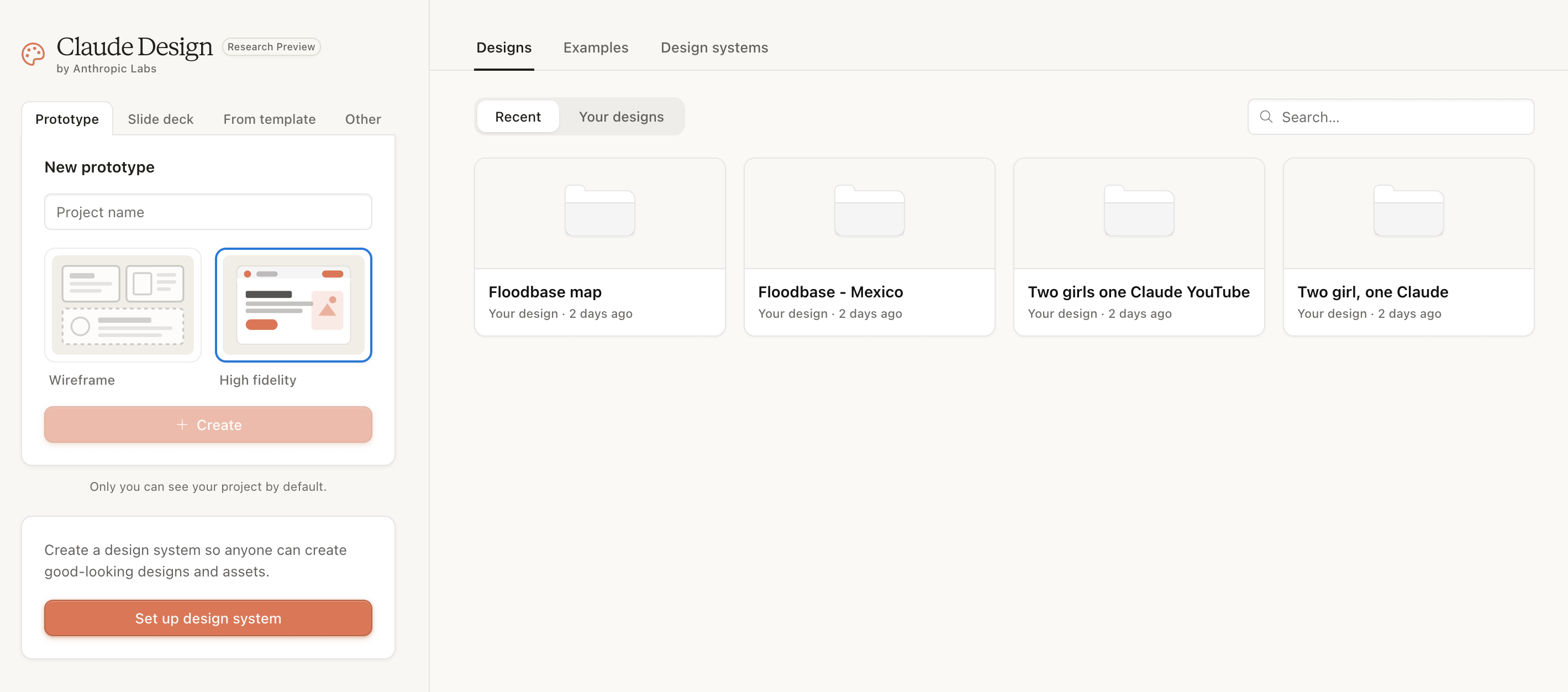
If you missed the launch, Claude Design is a separate environment from Claude Code that’s specifically built for visual work.
It runs on Claude Code under the hood, so the generation quality is what you’d expect, but the interface is more like a Figma-lite editor where you can click into any text or element and tweak it directly.
It’s currently in research preview for Pro, Max, Team, and Enterprise subscribers, so expect some glitches.
We’re the test group, how exciting! 😅
This is the comparison I wanted to see and I think it’s the most useful part of this episode for anyone deciding if Claude Design is worth opening.
I wanted to share my Claude skill /linkedin-post-optimizer for people to download as a skill.md they can run in their own Claude. Yes, I’m hoping for engagement on this one 😄 I wanted a nice visual to go with the text.
Here’s the LinkedIn carousel I generated with Claude Code. In one shot, but it had existing brand elements and guidelines to work with, so it wasn’t starting from scratch.
I asked Claude to make it into an SVG file for me and added it to Figma:
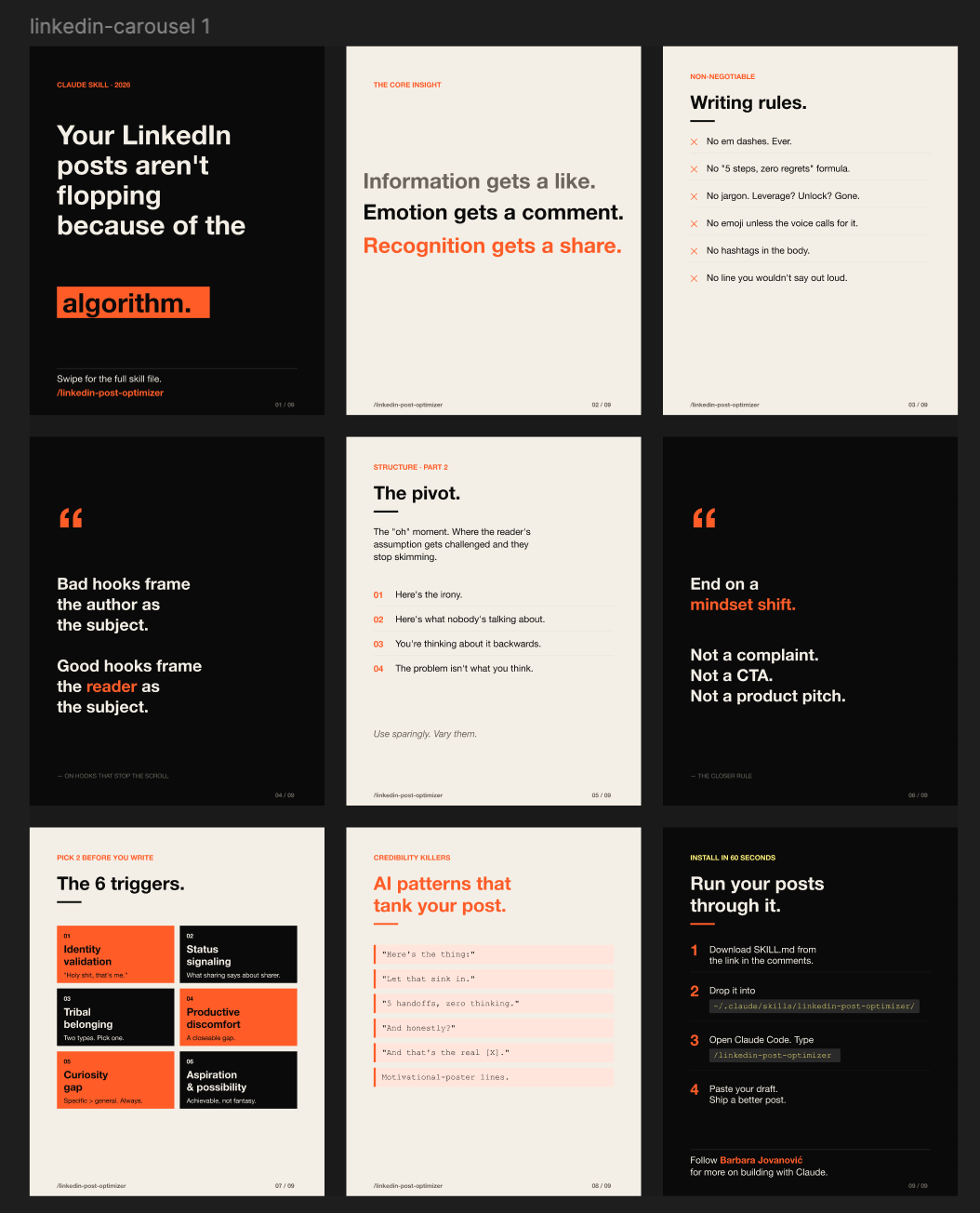
Meh. I’d rather not post a visual if it’s this generic. My biggest disappointment here was that it barely pulled any information from the skill itself. I have over 9K characters of dense instructions and rationale that goes into this skill I use DAILY. It rewrites an existing LinkedIn post into a version optimized for engagement (comments, reposts, discussion vs just likes). So I know there was better info it could have resurfaced for the visuals.
Now, the Claude Design version (also one-shot, with the same skill content distilled into a prompt because Claude Design can’t read skills directly yet):
Claude Design had almost no context docs to work with (no brand guidelines), but the output was still noticeably better on the first try.
It picked up on the kind of design taste I was leaning toward without me describing it in any detail. I just said dark background and minimal, and it figured out the rest for me.
Now, if you follow a lot of people using Claude Design in the last 1-2 weeks, you’ll start noticing this exact design layout, fonts and colors as a dead giveaway they used Claude Design. I’ll give it another week until your LinkedIn is flooded with graphics looking exactly like the one it generated for me 😅
To avoid becoming one of many — always provide branding guidelines, context docs and source materials. Do as I say, not as I do! 😂 If you don’t give it a design system to mimic up front, you’ll get the default Claude Design aesthetic and so will everyone else using it.
Upload 3-5 reference screenshots of designs whose look you actually want to use as inspiration, name the specific tokens you care about (font, spacing, color logic), and have Claude build the design system first before you ask for any actual screens.
So basically, do what you’d do with a real designer.
But by this point, I was very excited to keep using Claude Design.
Bojana was less impressed and that’s fair.
I need her to keep me grounded when I get excited about new tools. She’s a busy Head of Content and only adopts tools that can truly save her time, energy and produce great results.
Claude Design has some work to do to impress Bojana.
I uploaded our PNG headshots (already background-removed), our logo, our brand guides, and our existing YouTube thumbnail template.
I asked it to make a YouTube thumbnail that is better optimized for engagement, has less text, and is better quality than the one we currently have.
Yes, I basically said “Make it pop!” but we only had 5 minutes left during our event to try this! Give a girl a break. 😮💨
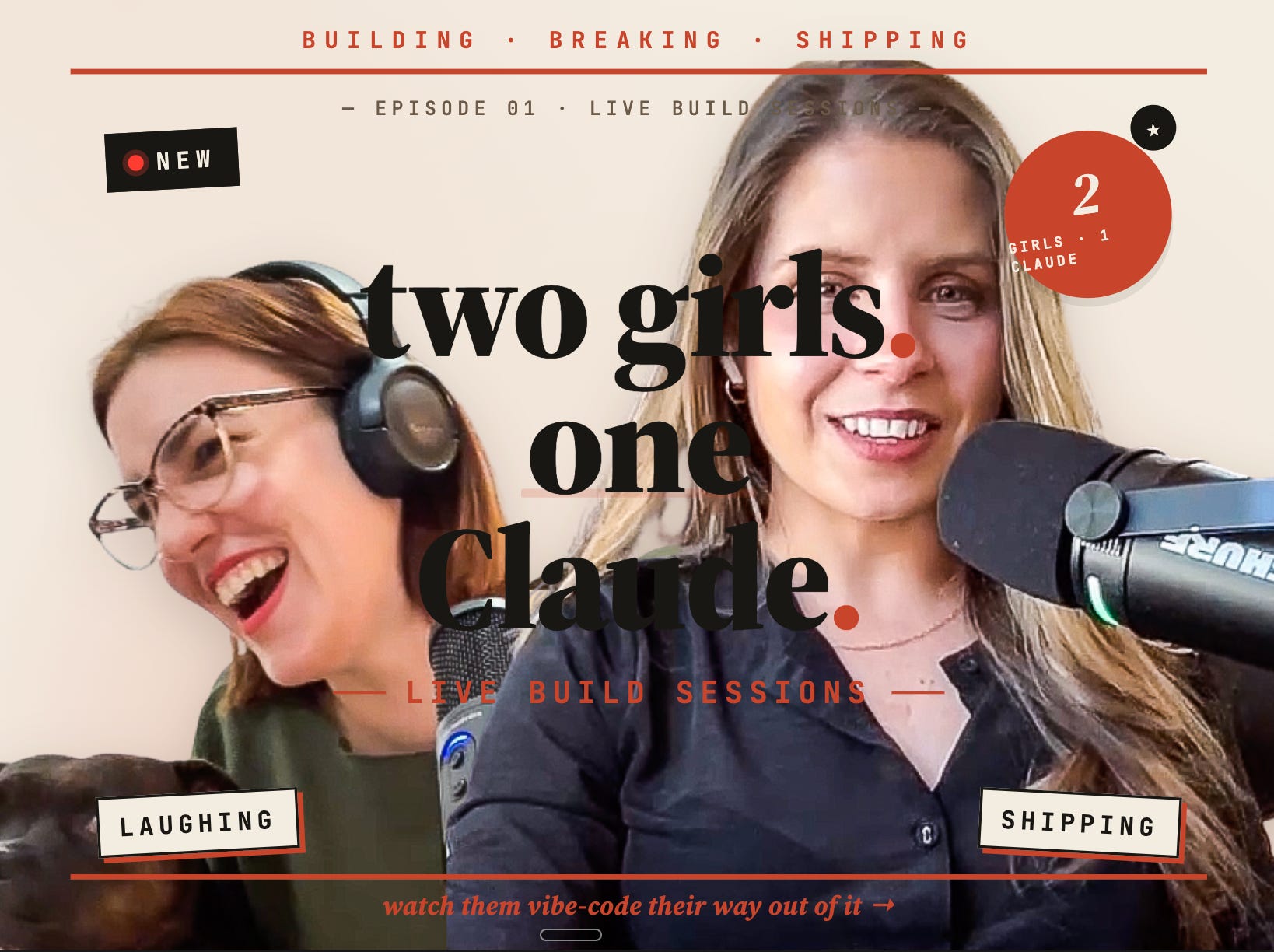
Big yikes. We’ll have to be much more specific with prompts, although I would expect Claude Code AND Design to know not to fully overlap elements like this by default.
I rarely get something completely unusable like this from Claude Code.
Tho, to be honest, it’s a same kind of layout glitches I’ve been getting in Claude Code when I try to manipulate photos there. So it’s not surprising, because Claude Design runs on Claude Code, but I was hoping the dedicated environment would handle images more gracefully.
I want to be fair to a tool that’s a few weeks old, but I have to call this out because it slowed both of us down.
A lot of the buttons and menu options feel like they do roughly the same thing and I’m never sure which one I should be using.
Uploading docs usually results in some kind of glitch, which just makes me use it less. But with less context you give it, the worse the output will be.
Also, when I asked Claude (in regular chat) how to feed Claude Design my skill file, it was almost unaware of Claude Design’s existance. In the clerb, we all fam? Guess not.
That tells you it’s new enough that even the rest of the Claude product suite doesn’t fully know what it can do.
For Bojana, the dealbreaker on her own first try was the setup. The first time she opened it on a Friday night, it asked her to set up a full brand guideline before doing anything useful. That’s the sixth tool this year that’s asked her to do that. She bounced.
This is just v1 and I think there’s a lot more to come.
I agree that the Figma-killer narrative is overhyped tho. The most useful framing I saw is that Claude Design isn’t really after Figma’s active users, it’s after the much larger group of people who never became Figma users in the first place. PMs, founders, marketers, anyone who needs a credible visual without learning Figma.
And people are already building great things with it:
- Figma
- Victor Dibia’s “Designing with AI” newsletter - has a really good edition on Claude Design
- Ryan Mather (Design at Anthropic) posted a mega useful guide for Claude Design
Yall are NOT ready for this. We have our first guest on Two girls, one Claude, Sam. He’s a growth lead and our resident GTM guy.
Sam walks through the system he built that runs his outbound and lead gen on its own, and how he uses the same setup to test which vertical his agency should focus on.
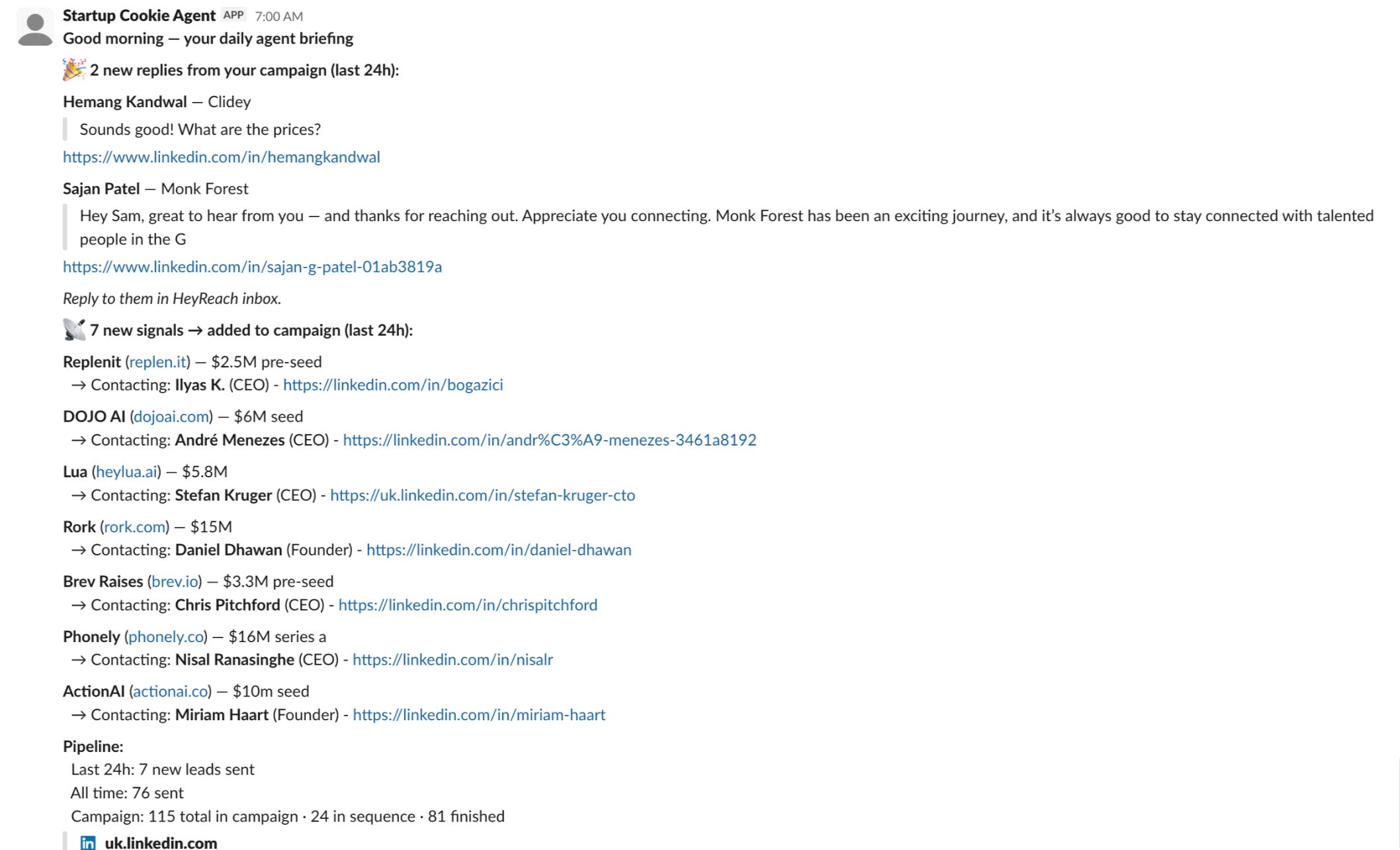
Here’s a preview of what Sam sees in Slack every morning:
Available for iOS and Android
Comments
Nothing yet. Say the first thing.
Sign in to join the conversation.