
As of Unity Behavior v1.0.4 - the issue described in this post is fixed. Kudos to the dev team for their rapid turnaround!
I’m a big fan of tools that allow people to build fun stuff whatever their skill level, and that’s a big part of the reason why I like using Unity so much. Though it indeed remains pretty difficult to make a game without getting your hands dirty with some code sooner or later, I always find myself drawn to ‘no-code’ features - whether it be Visual Scripting or Unity’s recently-released Behavior (or ‘Behaviour’, if you like to spell things correctly) package, which allows developers to implement AI behaviour on characters or any other in-game system.
I like the educational and illustrative possibilities these tools provide, and they can also be an interesting way to approach a tricky problem from a new angle.
With the release of the Behavior package, Unity finally provides something that Unreal has had for years. Though the Unity asset store contains a fair few different implementations of this functionality, it feels only right that Unity would provide its own, so this is a welcome addition to the toolkit in my view.
In a recent post, I built something resembling a gladiator battle arena, and decided that this would be the perfect testing ground for the new Behavio(u)r package:
The behaviour I wanted to implement for my enemy gladiator is very basic, but would be enough to start building some battle mechanics around:
When the player is not close to the enemy, the enemy patrols the arena.
If the player comes within a certain distance of the enemy, then the enemy should abort its patrol and chase the player.
If the player moves too far away again, then the enemy should revert back to its patrolling behaviour.
Here’s what that looks like with the new Behavior editor:
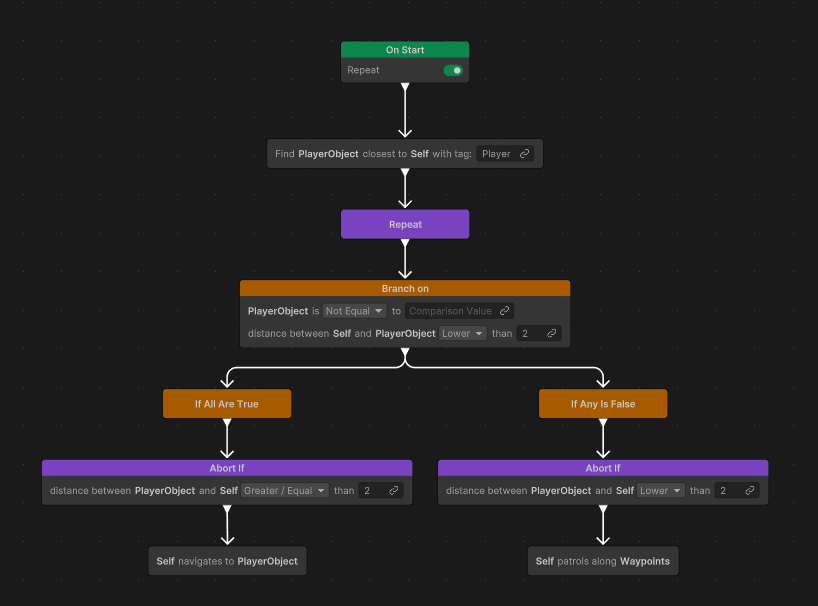
Aside from the ‘Repeat’ and the ‘Abort If’ nodes, this tree should be fairly self-explanatory to anybody with a beginner-level understanding of Unity.
Unfortunately, this tree, as simple as it is, fails immediately with a cryptic warning spamming the console:

If we jump over to our behaviour graph and debug the enemy gladiator object, we see the following:

To work out what the above warning message is talking about, let’s take a look at that failing node in its default state:

This node requires three Blackboard Variables. In ‘AI lingo’, a Blackboard is a container for the data the AI system needs to do its job, and we can create multiple variables within a blackboard.
Nodes within the behaviour tree can read from, or write to, the variables in the Blackboard, and in this case, we need the following:
A ‘Target’ variable
This is the placeholder variable for the GameObject we want to look for.
An ‘Agent’ variable
This is the GameObject we’re treating as the ‘origin’ of our search.
A ‘Tag’ variable
This requires a string which corresponds to a Unity GameObject Tag
Let’s look again at how this node is used in our behaviour tree:

As you can see, all fields are populated with a Blackboard variable (with the exception of the ‘Tag’ field, which I just entered directly since I’m lazy).
The warning message Unity was incessantly spitting out at us reads:
FindClosestWithTagAction: No agent or target provided.Clear as mud! We obviously have provided both an agent and a target, so what’s the issue?
Let’s look at our Blackboard:

Here, ‘Self’ is a special, pre-defined Blackboard variable which always refers to whichever GameObject is running the graph. This makes it very handy to use as the input to our node’s ‘Agent’ field.
‘Waypoints’ is the container for our list of waypoints that the enemy should patrol between, and ‘PlayerObject’ is the container for the object we’re looking to find.
As you can see, both ‘Waypoints’ and ‘PlayerObject’ exist as variables, but do not have a value set. That’s ok, because we just need these to act as placeholders and will populate their value later. Or at least, that was the plan…
Comments
Nothing yet. Say the first thing.
Sign in to join the conversation.