
My mornings used to look like this: open laptop, see a Twist notification, reply to it, notice an email while doing that, get halfway through the email, remember a task I forgot to add to Todoist, add three tasks while I’m at it, look up, it’s three hours later and realize I’ve done a lot of things but none of the ones I actually planned to do.
Reactive mode before 10 am = 🫠
The thing that changed it is kind of embarrassing…
I made “Start work 🚀” a daily recurring task.
What that actually looks like
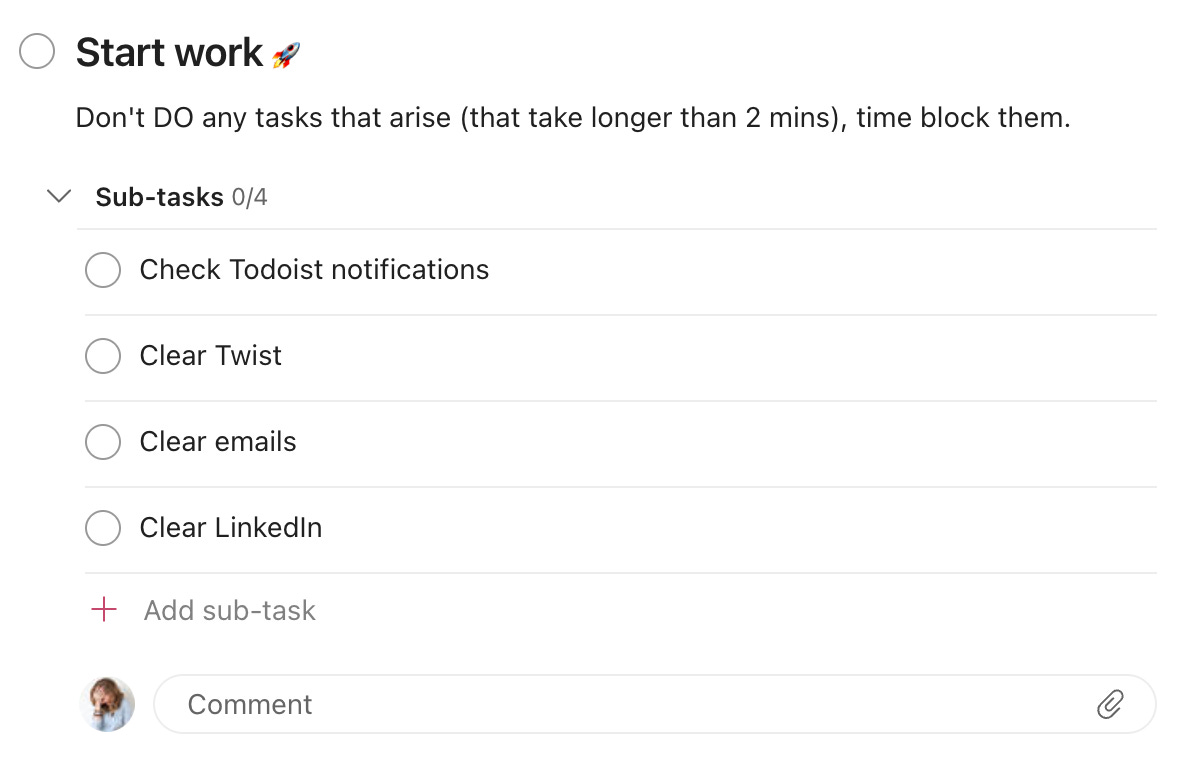
It lives in my Naomi’s Work project, and it shows up every single weekday morning. It has four sub-tasks:
Check Todoist notifications
Clear Twist
Clear emails
Clear LinkedIn
And at the top of the task, a note to myself: Don’t DO any tasks that arise (that take longer than 2 mins) – time block them.
That’s it.
Before I touch anything on my actual task list, I complete these four things in order. I start informed, and not reactive. I know what’s come in overnight, what needs attention today, and what can wait. And then, only then, do I open my Todoist Today view and actually begin my pre-planned tasks.
Why it works (three reasons, because I can’t pick just one)
The first is that it stops me from diving straight into reactive mode. Instead of letting whatever landed in my inbox dictate my morning, I process everything in a controlled, deliberate order. And the outcome of this process lets me begin my day with all of the context I need to do a good job.
The second is that it makes starting feel less like a cold plunge. There’s something about having a defined first step that lowers the activation energy of the whole day. I’m not staring at a list of 14 tasks, wondering where to begin. I’m just doing the “Start work” task. And by the time I’m done, I’ve got some momentum.
The third is that it prevents my morning maintenance from eating the whole day. That note to myself (“don’t DO any tasks that arise”) is the key. Without it, I’d spend hours “just quickly” handling things that surfaced during a single inbox sweep. With it, those things get a time block later in the day, and my morning actually stays productive.
Maintenance is work. Plan accordingly.
Here’s something we don’t talk about enough: the daily upkeep of your systems is real work. Clearing your inbox, reviewing notifications, and processing your task lists – none of this is visible. It takes time and mental energy, and if you don’t account for it, it will quietly eat the time you need to spend on everything else.
By making “Start work” a proper recurring task, I’ve given maintenance its rightful place in my day. It’s not squeezed in around the edges. It has a slot, a structure, and a boundary. Once those four sub-tasks are checked off, maintenance is done, and I move on.
If you do adopt this launchpad task, though, I can’t stress enough that you must time block it as well. As we all know, entire workdays can be lost simply to processing email. I find an hour is enough to sweep through those four sub-tasks, get all the info I need, and then intentionally discard the rest. This is not about inbox zero.
I was reminded of this daily routine recently when onboarding our new social and community marketer, Carly. 🥳 When I walked her through my “Start work” task, she immediately saw the value. Not just as a way to get organized, but as a way to feel ready for the day. Having that launchpad gave her daily momentum and a structure that prevents daily upkeep from swallowing her whole morning before she even starts.
A practical starting point
If you want to try this, create a recurring daily task called whatever feels right to you… Start work, Morning sweep, Launch sequence, whatever. Add three to five sub-tasks that represent your actual daily maintenance: the places you check, the things you process, the notifications you clear. Then add a note at the top reminding you of the rule: if something takes longer than two minutes, time block it – don’t do it now.
Complete that task before you touch anything else. See how the morning feels different.
Of course, if you’re an Eat the Frog person, then this task is for after your frog. 🐸
“The secret of getting ahead is getting started.”
Mark Twain
If the “Start work” task resonates but your morning brain simply refuses to type, this one's for you. Kirsti shows how she uses Ramble to speak her tasks directly into Todoist. And it's exactly as satisfying as it sounds. 😌
If something crops up in your launchpad task and you don’t want to tackle it immediately, then Quick Add is your friend. You can add a task at super speed from a variety of places and get on with your sweep.
Press Q anywhere in Todoist, type (or Ramble) the task, add a due date in plain language (“tomorrow 2 pm”), and you’re back to your sweep in about five seconds. On desktop, set a global shortcut in Settings → Desktop, and you don’t even need to be in Todoist; you can be in any app and add a task. On mobile, the Todoist widget (on Apple and Android) does the same job.
And if you’d like me to dive a bit deeper into how to triage your inboxes and prioritize efficiently, let me know in the comments below. I have a lot more to say on that, but this email is long enough. 🙊
Have a wonderful March, folks.
See ya in April.
Naomi (🙋♀️ real human) and the Todoist team
No posts
Comments
Nothing yet. Say the first thing.
Sign in to join the conversation.