
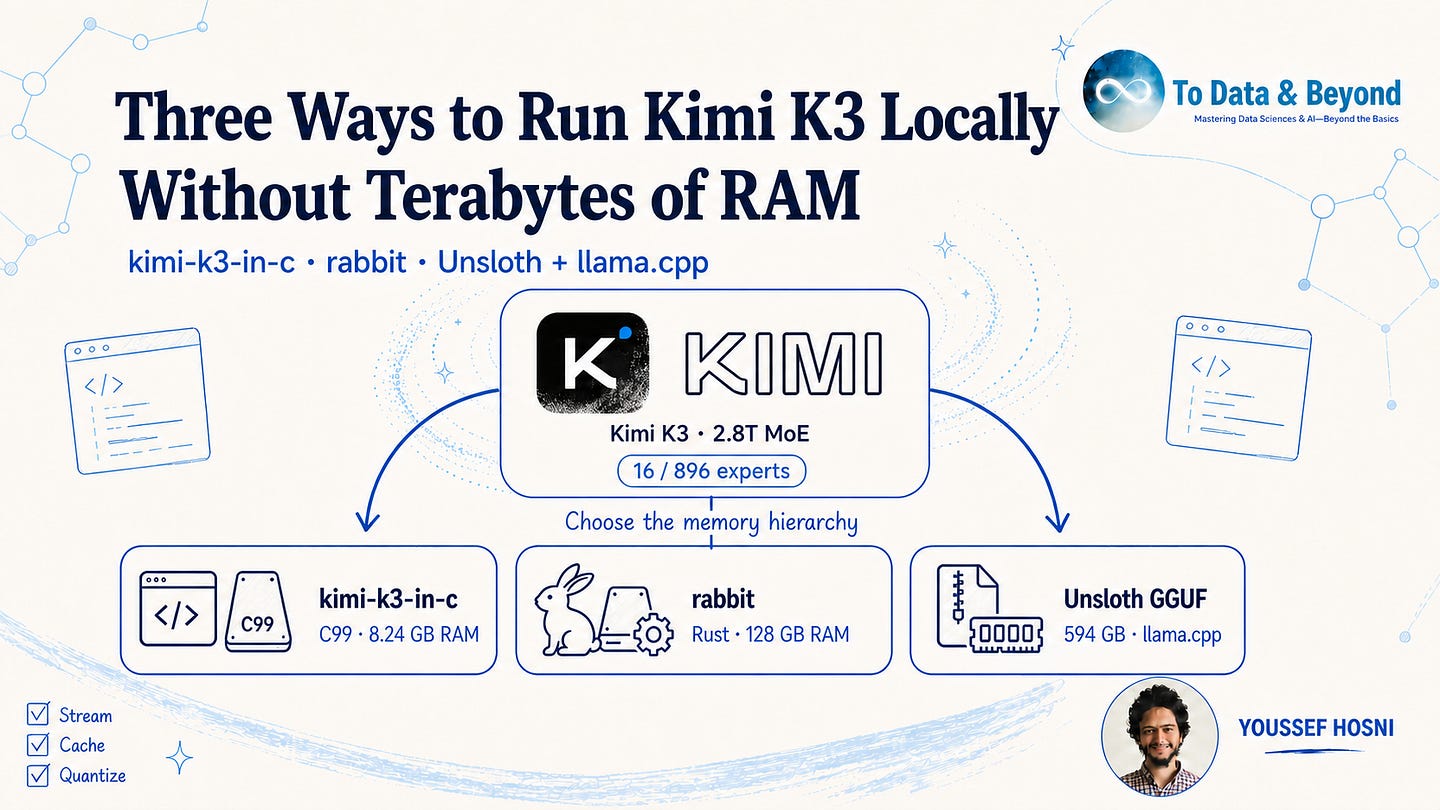
Kimi K3’s official checkpoint occupies 1.56 TB, which makes a conventional load-every-weight-into-memory deployment a datacenter problem. The model is sparse, however, and two public runtimes use that structure to run it on smaller machines. One keeps Moonshot’s expert weights intact and streams them from NVMe; the other shrinks the checkpoint to 594 GB and relies on llama.cpp’s memory hierarchy.
Neither method makes Kimi K3 small. The full-weight route still needs roughly 1.8 TB of free storage with operational headroom, while the 1-bit route needs about 683 GB under the same planning policy. They avoid terabytes of resident RAM by placing most weights in another tier, which makes storage speed, cache behavior, and runtime kernels part of token latency.
This guide gives the commands for both methods, the published evidence available for each, and a capacity script to run before downloading hundreds of gigabytes. The Kimi inference commands could not be executed in this workspace because the model artifacts are not present; every shown inference result is therefore labeled as project-reported rather than locally captured.
Hands-On Loop Engineering Course
Why a 1.56 TB model can run without 1.56 TB of RAM
Method 1: reach the 8.24 GB RAM floor with kimi-k3-in-c
Method 2: stream the official checkpoint from NVMe with Rabbit
Choose the method and verify the machine before downloading
Get All My 9 Books With 60% Off
I am hosting a 3-hour live workshop on Context engineering. You will learn what context engineering really means in practice, and why it’s one of the most important factors shaping the quality of agents’ outputs.
Date: Sunday, 30 August · 18:00–21:00 EEST
Early bird price is $35 with CONTEXT35 until 16 August at 23:59 EEST. After that, the original price is $50.

Get all my 10 AI Courses with 60% off
The official model card describes Kimi K3 as a 93-layer Mixture-of-Experts model with 2.8 trillion total parameters and 104 billion activated parameters. It has 896 routed experts and selects 16 per token. The routed experts use MXFP4 weights, while attention, shared experts, the output head, and the vision path remain at higher precision.
Selecting 16 of 896 experts means 1.79% of the routed expert pool enters each token’s path. That fraction does not mean 98.21% of the checkpoint can be deleted, because different tokens can select different experts. The complete pool must remain available on disk or across a distributed memory domain even when only a small subset is read and multiplied for the current token.
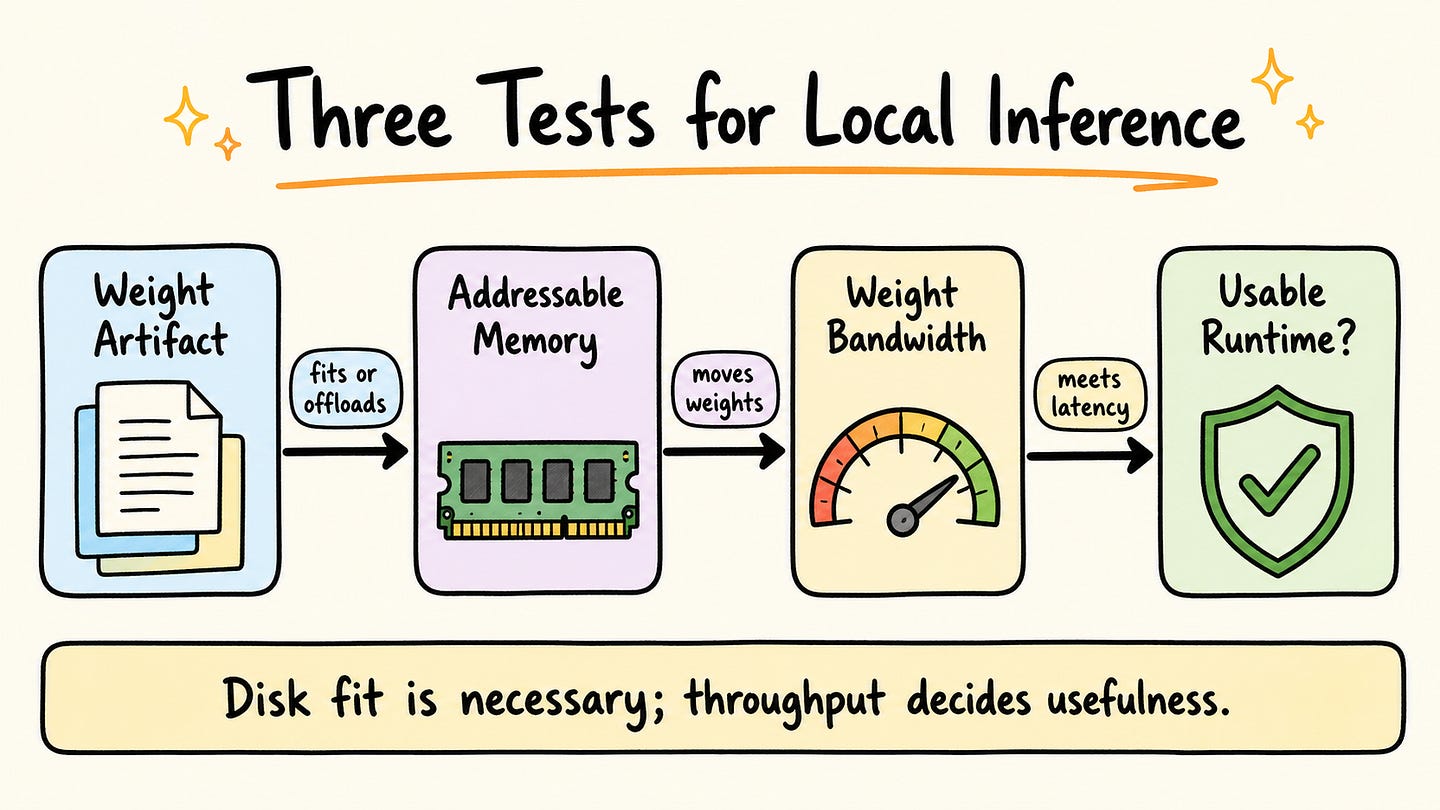
The official Hugging Face repository reports 1.56 TB across 96 Safetensors shards. A local machine therefore has to pass three separate tests: enough disk for the artifact, enough addressable memory for the dense working set and caches, and enough bandwidth to move selected expert weights without violating the application’s latency target.
Kimi K3 can avoid terabytes of resident RAM because only selected experts enter each token’s path, but every expert still has to remain available in a storage or memory tier.
Get all my 10 AI Courses with 60% off
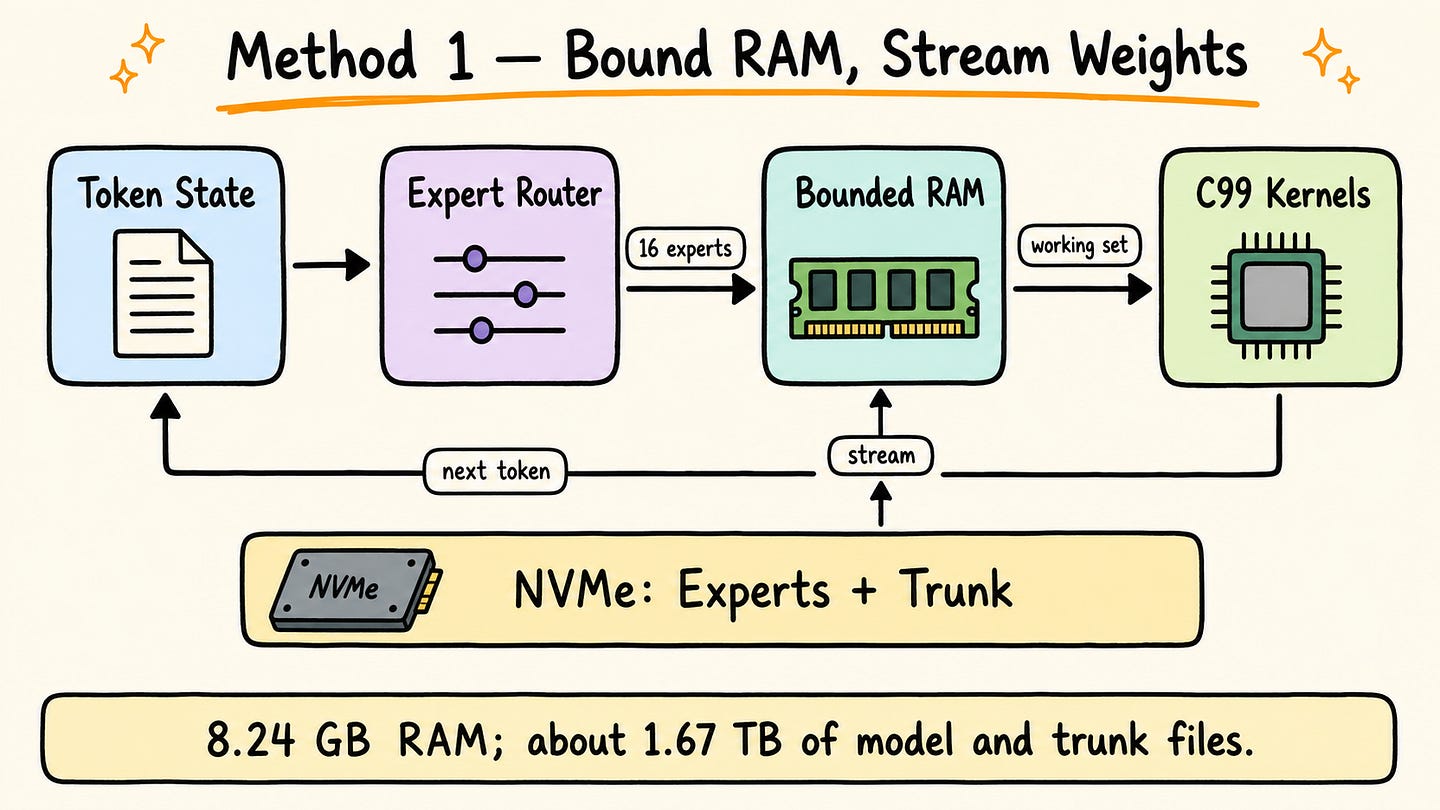
kimi-k3-in-c is a portable C99 engine for x86-64 Linux with AVX2 and FMA. It has no BLAS, framework, or GPU dependency. The engine keeps a bounded dense-trunk window and expert cache in RAM, while routed experts remain in Moonshot’s packed MXFP4 representation on disk.
This is the minimum-memory method. The project reports an 8.24 GB peak RSS with its laptop preset, but the storage requirement is larger than the official checkpoint: approximately 1.56 TB for 96 shards plus 108.81 GB for the packed dense trunk. The repository recommends about 1.7 TB free before additional operational headroom.
Build and validate the engine before downloading the checkpoint. The weightless test suite uses a smaller model with the same tensor graph and checks generated tokens against its committed PyTorch reference.
# terminal — method 1: build and validate kimi-k3-in-c
git clone https://github.com/FareedKhan-dev/kimi-k3-in-c.git
cd kimi-k3-in-c
make -j
make test
./scripts/k3-doctor.sh
The build was attempted in this macOS workspace, but Apple Clang rejected the project’s OpenMP flag before make test or k3-doctor.sh could run. This is a captured environment failure rather than an expected success block; use the documented x86-64 Linux target or install a compatible OpenMP toolchain.
clang: error: unsupported option ‘-fopenmp’
make: *** [build/src/core/k3_ops.o] Error 1
The full setup downloads the official shards, verifies their byte counts, and packs the dense trunk into a file arranged for bounded streaming. These commands were not executed in this workspace because they require approximately 1.67 TB before filesystem headroom.
# terminal — method 1: download and pack the full checkpoint
export HF_TOKEN=hf_your_token_here
./scripts/download-model.sh /mnt/models/kimi-k3
./scripts/pack-trunk.sh /mnt/models/kimi-k3 /mnt/models/kimi-k3-trunk
Run the lowest-memory preset with incremental decoding enabled. The tokenizer comes from the official checkpoint, so --tok points to the same model directory.
# terminal — method 1: run at the project’s lowest memory preset
./bin/k3 /mnt/models/kimi-k3 \
  --trunk /mnt/models/kimi-k3-trunk \
  --preset laptop \
  --tok /mnt/models/kimi-k3 \
  --prompt “The capital of France is” \
  --gen 8 \
  --incremental
The following result is project-reported, not captured in this workspace. The published laptop run generated eight tokens in 261.5 seconds, or 32.69 seconds per token, with an 8.24 GB peak RSS.
--- generated text ---
 Paris.”,
+            “The Eiffel
----------------------
8 tokens in 261.5 s, 32.69 s/token average
PEAK RSS for the whole run: 8.24 GB
More memory changes placement rather than greedy output. The project reports a 127.92 GB server-preset run at 10.69 seconds per token and byte-identical output across memory budgets. Those are repository measurements, so reproduce them on the target NVMe and CPU before assigning a service-level objective.
kimi-k3-in-cdemonstrates the lowest verified RAM floor, but it replaces memory capacity with roughly 1.67 TB of files and storage-bound token latency.
Get All My 9 Books With 60% Off
Get all my 10 AI Courses with 60% off
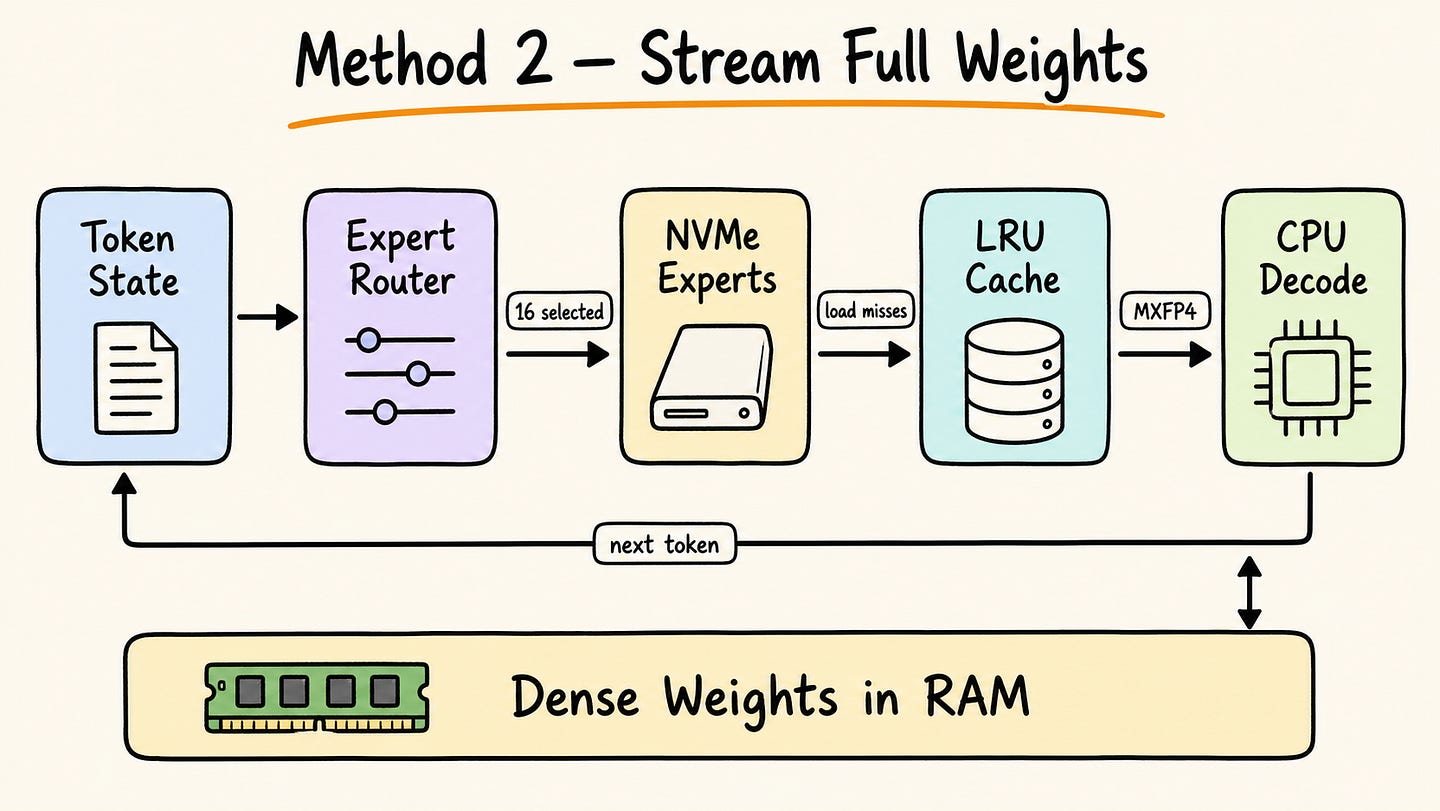
Rabbit keeps dense components resident, and loads routed experts from disk through an LRU cache, persistent hot-expert pins, and the operating system page cache. It reads Moonshot’s native MXFP4 expert tensors directly from the 96 official shards, so there is no checkpoint conversion and no additional quantization loss on the routed experts.
This is the fidelity-first method. Plan for approximately 1.56 TB of model files, plus filesystem headroom, on fast local NVMe. The published run used x86–64 Linux, a Ryzen AI 9 HX 370, 128 GB RAM, no GPU, and two consumer NVMe drives. Rust and Git are required to build the engine; huggingface_hub supplies the checkpoint download command.
The complete setup sequence is below. Set KIMI_MODEL_DIR to a dedicated model volume rather than a system disk. This block was not executed here because the 1.56 TB checkpoint exceeds the workspace’s available storage.
# terminal — method 2: build rabbit and download the official checkpoint
git clone https://github.com/ferrumox/rabbit.git
cd rabbit
cargo build --release
cargo test
python3 -m pip install -U huggingface_hub
export KIMI_MODEL_DIR=/mnt/models/kimi-k3
hf download moonshotai/Kimi-K3 --local-dir “$KIMI_MODEL_DIR”
Once all 96 shards are present, start with a short deterministic prompt. The command names the model directory explicitly and limits generation so a slow first run has a bounded completion time.
# terminal — method 2: first correctness run from the rabbit repository
./target/release/rabbit \
  --model “$KIMI_MODEL_DIR” \
  --prompt “What is the capital of France?” \
  --max-tokens 40
The following output is project-reported, not captured in this workspace. The published run records a 610-second load, 412.8-second prefill, and 2,698.1 seconds for 40 generated tokens.
loading model (dbits=4, ebits=4)...
model loaded in 610.0s (93 layers, 896 experts/layer)
prefill (7 tokens)...
prefill done in 412.8s
...response[”answer”] == “Paris”...
40 tokens in 2698.1s
That generation averages 67.45 seconds per token. Rabbit labels the measurement a correctness-first floor: its Kimi K3 MXFP4 multiplication path was scalar, and the run spent 60–70% of decode time in compute rather than disk I/O. A larger cache or faster SSD cannot remove a scalar-kernel bottleneck, so treat this method as an engineering and fidelity demonstration until measurements on the target host say otherwise.
Full-weight streaming removes the terabyte-RAM requirement without changing Moonshot’s routed-expert representation, but the published first run was measured in tens of seconds per token.
Get All My 9 Books With 60% Off
Get all my 10 AI Courses with 60% off
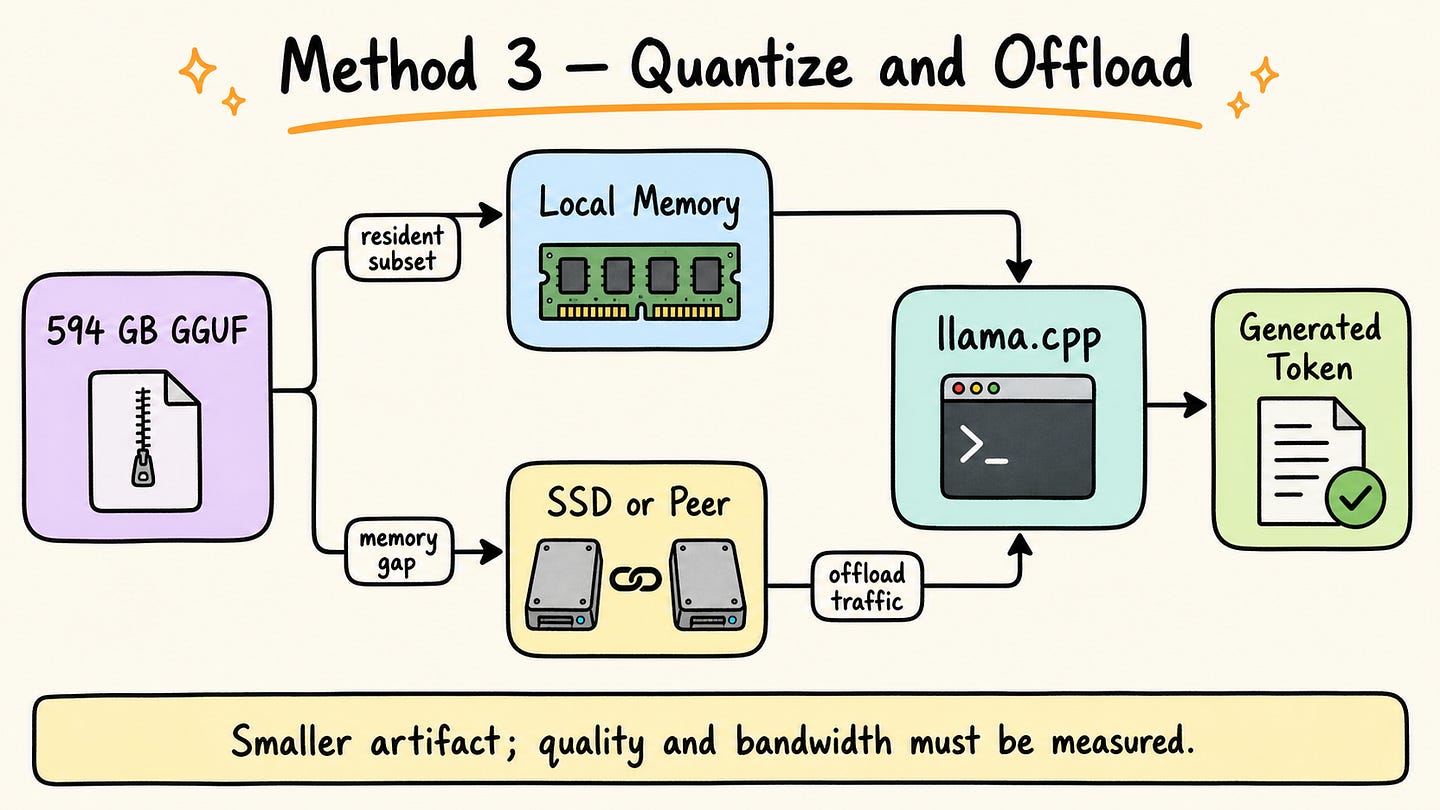
Unsloth reduces the storage problem before inference. Its UD-IQ1_S directory contains 14 GGUF shards totaling 594 GB. The announcement calls this a dynamic 1-bit model and reports 78.9% retained “accuracy,” but it does not define a universal benchmark or aggregation method for that percentage. Treat the figure as publisher-reported and validate the quant on the intended tasks.
This method avoids terabytes of both RAM and disk, but 594 GB still does not fit inside a 128 GB Mac. It needs a larger unified-memory machine, aggregate memory across supported peers, or storage-backed mmap/offload. Unsloth’s wording describes a Mac Studio connected with a 128 GB device; it should not be paraphrased as a standalone 128 GB Mac holding the complete quant in memory.
As of August 5, 2026, the upstream Kimi K3 text-support pull request remains open. Use the tested Unsloth Kimi K3 branch rather than assuming an arbitrary llama.cpp release contains the required model and full-size fixes. The build below enables CUDA when available; on Apple Silicon, remove -DGGML_CUDA=ON because Metal support is selected by the platform build.
# terminal — method 3: build the Kimi K3 llama.cpp branch on Linux + NVIDIA
git clone --branch kimi-k3-fullsize-vision --single-branch \
  https://github.com/unslothai/llama.cpp.git llama.cpp
cmake -S llama.cpp -B llama.cpp/build \
  -DBUILD_SHARED_LIBS=OFF \
  -DGGML_CUDA=ON
cmake --build llama.cpp/build --config Release -j \
  --target llama-cli llama-server
Run the smallest published quant by using its exact UD-IQ1_S tag. The -hf loader downloads the 14 shards into the Hugging Face cache before loading them. Set that cache to a model volume with at least 683 GB free under the 15% headroom policy used in this article.
# terminal — method 3: download and run the 594 GB quant
export HF_HOME=/mnt/models/huggingface
./llama.cpp/build/bin/llama-cli \
  -hf unsloth/Kimi-K3-GGUF:UD-IQ1_S \
  --ctx-size 16384 \
  --temp 1.0 \
  --top-p 1.0 \
  --prompt “What is the capital of France?”
To expose the same quant through a local OpenAI-compatible endpoint, replace the CLI with the server binary. Start at a modest 16K context because recurrent state, KV state for full-attention layers, runtime buffers, and image inputs consume memory beyond the GGUF files.
# terminal — method 3: local OpenAI-compatible server
./llama.cpp/build/bin/llama-server \
  -hf unsloth/Kimi-K3-GGUF:UD-IQ1_S \
  --ctx-size 16384 \
  --host 127.0.0.1 \
  --port 8080
No output is shown for these llama.cpp commands because they were not run in this workspace: the 594 GB artifact is unavailable here. An independent 512 GB Mac Studio report used a different 389.4 GiB mixed quant and measured 3.36 tokens/second. That result demonstrates a faster local topology but does not benchmark UD-IQ1_S or a 128 GB configuration.
The 594 GB GGUF is the smaller route, but a 128 GB host still needs roughly 466 GB from another memory or storage tier before runtime overhead is counted.
Get all my 10 AI Courses with 60% off
Choose kimi-k3-in-c when the machine has very little RAM but can dedicate roughly 1.67 TB to the checkpoint and packed trunk. Choose rabbit when 128 GB is available, and a smaller Rust codebase reading the official shards directly is preferable. Choose UD-IQ1_S when storage reduction matters enough to accept quantization risk and target-task evaluation is available.
If none of the three methods meets the latency target, use a hosted API or a multi-accelerator deployment instead of treating successful loading as successful serving. The C and Rust measurements are correctness demonstrations; the Unsloth route needs both a topology-specific speed measurement and a quality evaluation.
The following standard-library script checks the three capacity profiles before a download starts. It uses decimal gigabytes to match the publisher-reported artifact sizes and applies a clearly labeled 15% disk-headroom policy. The script was executed in this workspace; its output below is captured rather than estimated.
# capacity_preflight.py
from dataclasses import dataclass
DISK_HEADROOM = 1.15  # Operational policy, not a model requirement.
@dataclass(frozen=True)
class Scenario:
    name: str
    weight_gb: float
    extra_disk_gb: float
    memory_gb: float
    free_disk_gb: float
def assess(s: Scenario) -> str:
    required_disk = (s.weight_gb + s.extra_disk_gb) * DISK_HEADROOM
    gap = max(0.0, s.weight_gb - s.memory_gb)
    residency = min(100.0, 100.0 * s.memory_gb / s.weight_gb)
    memory_mode = “resident” if gap == 0 else “offload/stream”
    disk_state = “PASS” if s.free_disk_gb >= required_disk else “FAIL”
    return (
        f”{s.name}: disk={disk_state} (need {required_disk:.1f} GB), “
        f”memory={memory_mode}, resident<= {residency:.2f}%, gap={gap:.2f} GB”
    )
scenarios = [
    Scenario(”kimi-c-laptop”, 1560, 108.81, 8.24, 2000),
    Scenario(”rabbit-128GB”, 1560, 0, 128, 2000),
    Scenario(”unsloth-q1-128GB”, 594, 0, 128, 800),
    Scenario(”unsloth-q1-640GB”, 594, 0, 640, 800),
]
print(f”Routed experts selected per token: {16 / 896:.2%}”)
for scenario in scenarios:
    print(assess(scenario))
Run it from the directory containing the file:
python3 capacity_preflight.pyCaptured output from the executed file:
Routed experts selected per token: 1.79%
kimi-c-laptop: disk=PASS (need 1919.1 GB), memory=offload/stream, resident<= 0.53%, gap=1551.76 GB
rabbit-128GB: disk=PASS (need 1794.0 GB), memory=offload/stream, resident<= 8.21%, gap=1432.00 GB
unsloth-q1-128GB: disk=PASS (need 683.1 GB), memory=offload/stream, resident<= 21.55%, gap=466.00 GB
unsloth-q1-640GB: disk=PASS (need 683.1 GB), memory=resident, resident<= 100.00%, gap=0.00 GB
The 640 GB scenario represents aggregate addressable capacity, not a promise that any two devices can be combined. Confirm that the chosen runtime supports the placement topology, then reserve additional memory for the operating system, runtime buffers, model state, and the selected context length.
Passing the disk test makes a download feasible; measured decode latency and a target-task quality evaluation make a local Kimi K3 deployment usable.
For the first successful run, record the runtime commit, exact checkpoint or quant, prompt renderer, context length, cache settings, hardware topology, peak resident memory, storage reads, prefill time, and decode time. Then evaluate representative coding, tool-use, and reasoning tasks. Those measurements define the local operating envelope more reliably than the fact that one prompt eventually produced a token.
I am hosting a 3-hour live workshop on Context engineering. You will learn what context engineering really means in practice, and why it’s one of the most important factors shaping the quality of agents’ outputs.
Date: Sunday, 30 August · 18:00–21:00 EEST
Early bird price is $35 with CONTEXT35 until 16 August at 23:59 EEST. After that, the original price is $50.

Comments
Nothing yet. Say the first thing.
Sign in to join the conversation.