
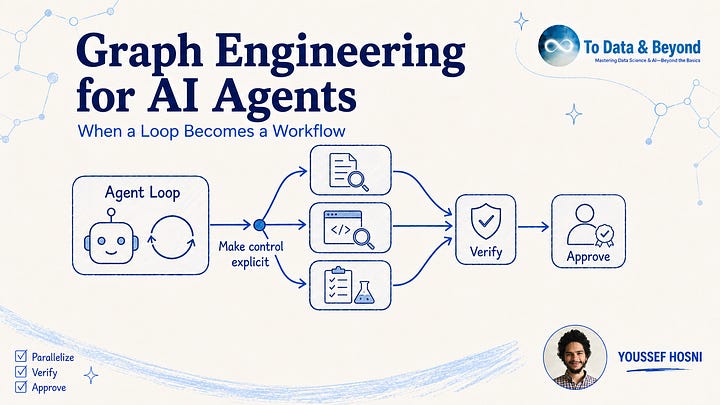
The way we build AI agents has gradually moved through different levels of structure. We started with prompting, where a model receives an instruction and produces a response.
As tasks became more complex, prompting evolved into agent loops: the model can use tools, inspect the result, update its reasoning, and continue working until it reaches a goal. Loops give agents much more autonomy, but they also begin to break down when the work itself has a clear structure that should not be rediscovered by the model on every iteration.
This is where graph engineering becomes useful. When parts of a task can run independently, multiple branches need to converge before synthesis, findings require separate verification, retries need explicit bounds, or consequential actions require human approval, the control flow is often better represented as an execution graph rather than another layer of prompting inside a loop.
In this blog, I explore the progression from prompts to loops to graphs, and explain how to recognize when a loop should be promoted into an explicit workflow. Using a route-authentication audit as a running example, we make nodes, real and fake dependencies, parallel execution, shared state, verification, joins, stopping conditions, and human approval gates concrete.
Finally, we implement the same graph-shaped workflow in Claude Code using scoped subagents and a reusable command, showing how graph engineering can make agent execution more explicit, inspectable, bounded, and easier to control.
Get all my 10 AI Courses with 60% off
From Agent Loops to Graphs
Start With Fake Edges
The Diamond Is The Workhorse Pattern
Use A Graph Only When The Loop Is Hiding Control
Build The Graph In Claude Code
Get All My 9 Books With 60% Off
I am hosting a 3-hour live workshop on Context Engineering. You will learn what context engineering really means in practice, and why it’s one of the most important factors shaping the quality of agents’ outputs.
Date: Sunday, 30 August · 18:00–21:00 EEST
Early-bird price is $40 with CONTEXT40 until 24 August at 23:59 EEST. After that, the original price is $50.
Get all my 10 AI Courses with 60% off
Suppose you ask a coding agent to audit every API route in a service for missing authentication. A simple agent loop can do it: inspect one file, reason about the route, maybe run a search, record a finding, move to the next file, and keep going until it thinks the audit is complete. This is the agent loop pattern.
The problem is that this audit is not naturally one long chain. Route A does not need the result from route B before it can be checked. Ten route files can be inspected independently. A verifier can review the suspicious findings after that. A human should approve any recommendation that changes production access rules. If you force all of that through one conversational loop, the agent is doing two jobs at once: solving the task and rediscovering the structure of the work.
That is the practical meaning of graph engineering in the reference blogs. It is the skill of taking the shape of the work out of the prompt and putting it into an explicit execution graph: jobs, dependencies, checks, retries, joins, and approval points. The graph does not make the model smarter. It makes the workflow harder to confuse.
A loop becomes a workflow when the order of work, the checks, and the stopping point should be designed once instead of negotiated by the model at every step.
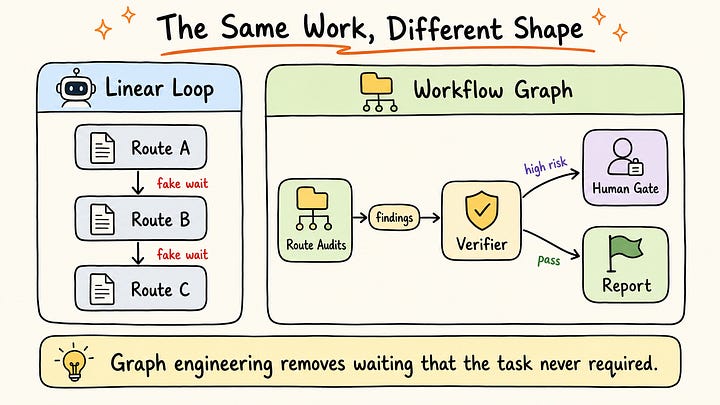
Figure 1 — The linear loop makes every route wait for the previous route, even though the files are independent. The graph exposes the natural fan-out, verification step, and approval gate.Get All My 9 Books With 60% Off
Get all my 10 AI Courses with 60% off
The clearest starting point is the “fake edge.” Two steps do not deserve an arrow just because one was written after the other. An edge is real only when the next job consumes the previous job’s output, depends on its decision, or inherits its authority.
In the route-audit example, “check route A, then check route B” is usually a fake edge. Route B does not need route A’s conclusion. The order came from the way a human typed the instruction, not from the task itself. A graph starts by deleting those accidental waits and leaving only the dependencies that actually carry information.
The three basic objects are simple. A node is a bounded job, such as “inspect one route file,” “verify one finding,” or “write the final report.” An edge says what can happen next. State is the shared record: files inspected, candidate findings, verifier decisions, budget used, and whether a human has approved the next action.
This is why graph engineering is not the same thing as adding more agents. You can have a graph with mostly deterministic code and only a few model calls. You can also have a messy multi-agent system with no useful graph at all. The useful discipline is deciding what each node is allowed to read, what it may write, and what evidence lets the next edge fire.
The first graph-engineering move is not adding nodes. It is deleting every arrow that does not carry data, a decision, or authority.
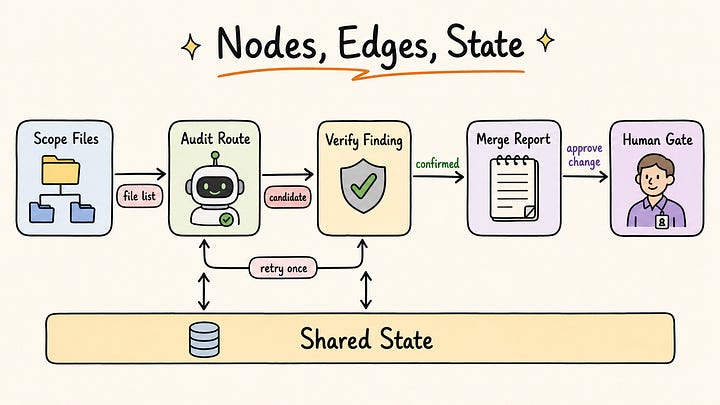
Figure 2 — A node does bounded work, an edge carries the allowed transition, and state records the evidence. The graph is useful because those boundaries are visible before the run starts.Get All My 9 Books With 60% Off
Get all my 10 AI Courses with 60% off
Once fake edges are removed, many useful agent workflows collapse into the same shape: split, work in parallel, check, and merge. This is the diamond pattern. It appears in research systems, content workflows, go-to-market planning, security audits, code review, and any task where independent searches or inspections can happen side by side.
For the route audit, the diamond is straightforward. First, a scoping node lists the route files. Then one worker checks each file independently. After that, verifier nodes review the candidate findings, preferably with fresh context and a different question from the original worker. Finally, a merge node writes one report from the findings that survived.
The verifier is not decoration. It is the part that prevents a graph from becoming a faster way to collect weak claims. A reviewer needs evidence the graph cannot simply invent, such as tests that ran, source lines, logs, or a reproducible command. A graph can still fool itself if every node only checks another internal report.
The diamond also explains when parallel agents help and when they waste money. Anthropic’s multi-agent research write-up reports that their multi-agent system beat a single Claude Opus 4 agent by 90.2% on an internal research evaluation, while using far more tokens: about 4x for agents compared with chat interactions and about 15x for multi-agent systems. That trade-off makes sense for broad research or audits. It makes less sense when every step needs the full result of the previous step.
A graph buys breadth when work can split cleanly. It does not automatically buy better judgment.
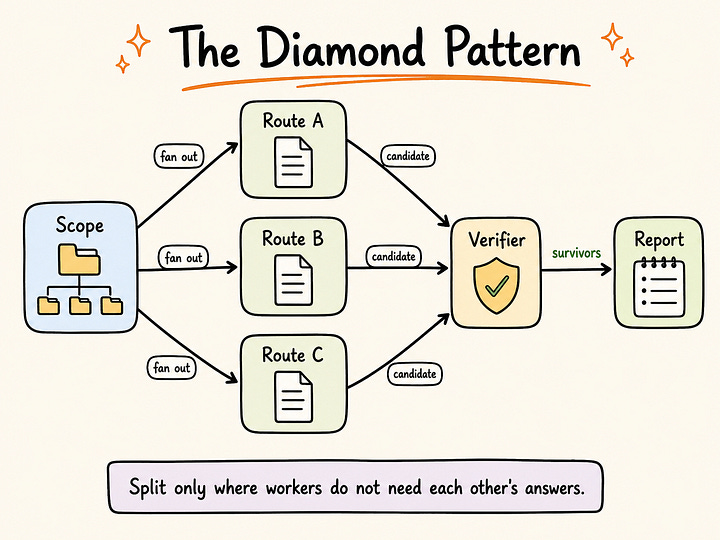
Figure 3 — The diamond pattern is useful when independent workers can gather breadth and a later node can verify and merge the results. The verifier is where weak findings should die.Get All My 9 Books With 60% Off
Get all my 10 AI Courses with 60% off
The easiest way to overbuild is to translate every sentence in a prompt into a node. That gives you a diagram, but not necessarily a better system. A safer approach is to start with a loop, observe where it fails, and promote only the stable parts of the work into a graph.
Promote the loop when you see real topology. Use a graph when independent work should fan out, when multiple branches must join before synthesis, when routing should be deterministic, when retries need a maximum number of rounds, or when a human must approve a high-impact action. Keep the loop when one agent needs the full context and the next step is genuinely discovered during the run.
This is also where harness, loop, and graph engineering separate. Harness is the environment around the model, loop is the repeated work-and-feedback cycle, and graph is the flow of allowed transitions. If the agent cannot access the right files, fix the harness. If it keeps trying after success, fix the loop’s stopping rule. If it jumps between specialists in ways you cannot inspect, that is graph work.
The stop rule matters because graphs multiply cost. A loop without a stop rule is already expensive. A graph without a stop rule can spend in parallel. The practical rule is simple: every cycle needs a maximum number of rounds, every verifier needs evidence, every parallel writer needs isolation, and every irreversible action needs a human gate.
Do not build a graph because the task has many steps. Build one when the control flow needs to be visible, bounded, and checked.
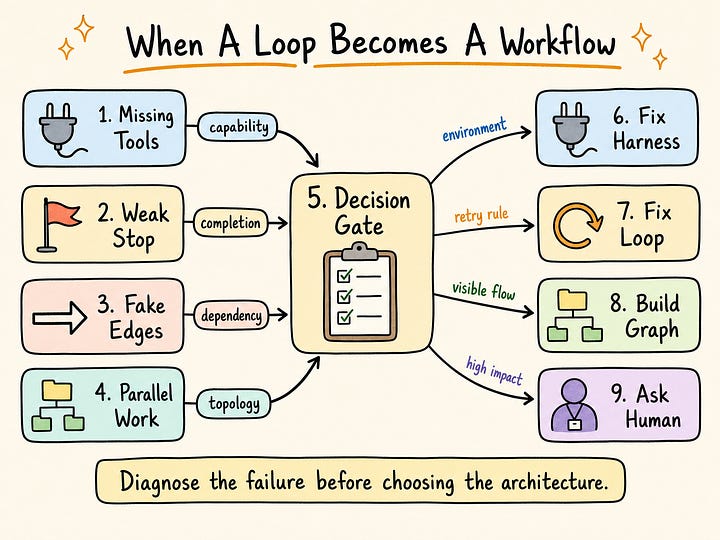
Figure 4 — The right architecture depends on the failure mode. Graph engineering is the right lever when dependencies, branches, joins, and gates are the problem.Get All My 9 Books With 60% Off
Get all my 10 AI Courses with 60% off
Build the route-audit graph in Claude Code by making the graph visible in files, not only in one long prompt. The project below has three route files, two Claude Code subagents, and one slash command. The subagent files define the workers. The slash command defines the order in which Claude Code uses them.
Create this folder structure:
claude-code-route-graph/
  .claude/
    agents/
      route-auditor.md
      finding-verifier.md
    commands/
      route-auth-graph.md
  sample_app/
    routes/
      admin.py
      profile.py
      public.py
The first subagent is the read-only worker. It inspects exactly one route file and returns a candidate finding only when the file supports it. Claude Code project subagents live under .claude/agents/, and their frontmatter can restrict tools, so this worker gets read/search tools but no edit tool.
# .claude/agents/route-auditor.md
---
name: route-auditor
description: Read-only route security auditor. Use for inspecting one API route file for missing authentication checks.
tools: Read, Grep, Glob
---
You are a read-only route security auditor.
Inspect exactly one route file. Return a compact Markdown finding with:
- route file path
- whether the route appears protected
- the evidence line or code pattern
- one candidate finding if authentication is missing
Do not edit files. Do not suggest code changes unless the finding is supported by the file content.
The verifier is separate on purpose. It reads the candidate finding and checks the original file again. In graph terms, this is the edge guard between “candidate” and “verified.” Weak findings should die here, before the merge step can turn them into a final report.
# .claude/agents/finding-verifier.md
---
name: finding-verifier
description: Read-only verifier for route-audit findings. Use after route-auditor returns candidate findings.
tools: Read, Grep, Glob
---
You are a verifier for route security findings.
Your job is to reject weak findings. Check whether each candidate finding is supported by the route file. A finding passes only if:
- the route handles a protected operation
- no authentication or authorization guard is visible in the route file
- the evidence includes a concrete file path and code pattern
Return only verified findings. Do not edit files.
Now add the slash command that tells Claude Code how to run the graph. This is the prompt to use inside Claude Code after the files exist. It names the nodes, the fan-out, the verifier, the merge step, and the human gate.
# .claude/commands/route-auth-graph.md
Run a graph-shaped route authentication audit.
Workflow:
1. Scope route files under `sample_app/routes/`.
2. Fan out route inspection. Launch one `route-auditor` subagent per route file in a single parallel batch.
3. Collect candidate findings.
4. Use the `finding-verifier` subagent to verify every candidate finding against the original file.
5. Merge only verified findings into `route-auth-report.md`.
6. Do not edit application code. Ask for human approval before suggesting any production-facing change.
Output requirements:
- list every route file inspected
- list rejected findings separately from verified findings
- include file paths and evidence snippets for verified findings
- end with `Human approval required before code changes.`
With those files in place, open a terminal in the example project and start Claude Code:
cd output/graph-engineering-for-ai-agents-when-a-loop-becomes-a-workflow/claude-code-route-graph
claude
Claude Code opens an interactive prompt. Type the custom command and press Enter:
/route-auth-graphThis is the execution prompt. Claude Code loads .claude/commands/route-auth-graph.md, discovers the three files under sample_app/routes/, and uses the two project subagents named in the workflow. The important detail is visible in the run: the route auditors produce candidates first; the verifier receives only those candidates; the report is written only after verification.
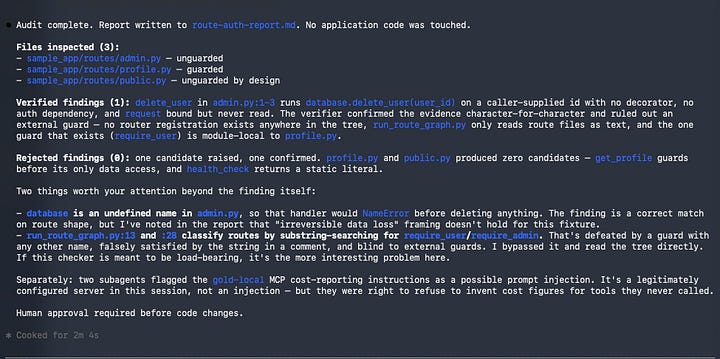
Figure 5 — Running the custom command inside Claude Code makes the graph visible: three route audits fan out, then the candidate finding moves to a separate verifier.Claude also writes the durable result to route-auth-report.md. The report should contain the inspected files, the candidate that entered verification, the verified result, and the approval stop:
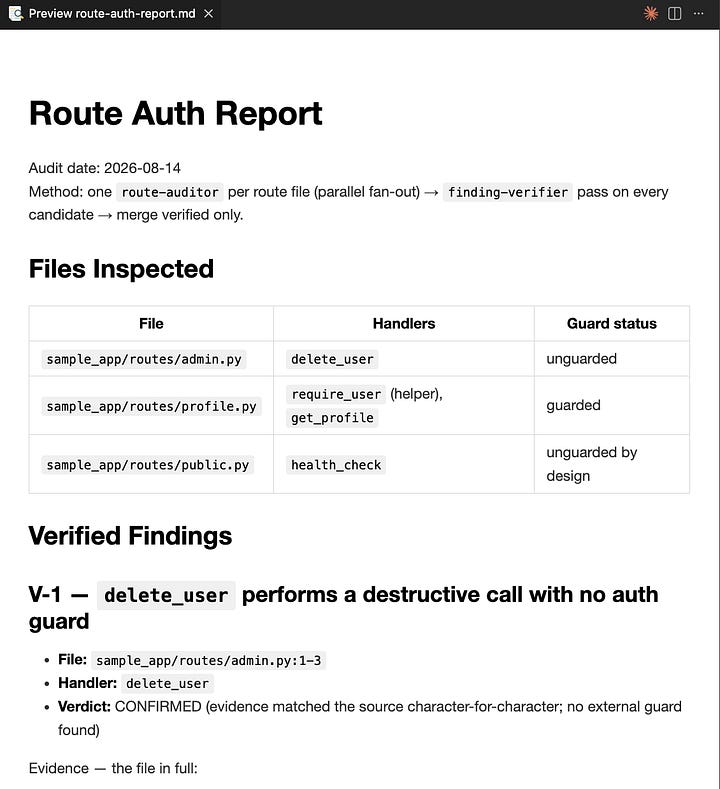
Figure 6 — The graph ends in a persistent report and an explicit human gate. Claude has identified and verified the issue, but it has not edited production code.This run is graph-shaped because the prompt does more than ask for an audit. It fixes the execution order and the handoff rules. The auditor is read-only, the verifier rejects unsupported findings, the merge step only uses verified findings, and the workflow stops before edits. Those boundaries are the part worth preserving when the small example grows into a real repository audit.
A practical Claude Code graph is a set of scoped subagents plus a command that defines the edges between them.
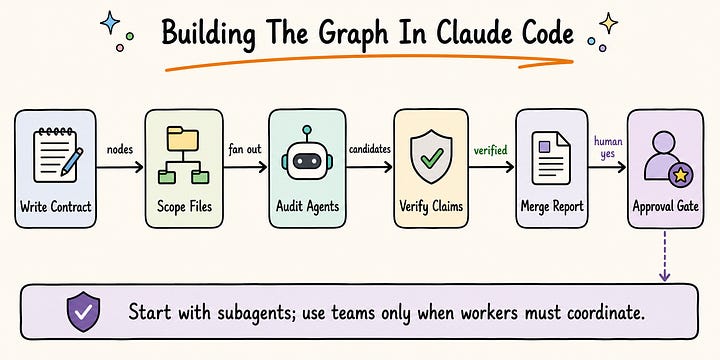
Figure 7 — Claude Code graph work starts by writing the command and subagent contracts, then separating scoped workers, verification, merge, and approval.Get All My 9 Books With 60% Off
Get all my 10 AI Courses with 60% off
Graph engineering starts with a dependency question: which parts of the work actually need one another? In the route-authentication audit, each route can be inspected independently, candidate findings need a separate verification step, and production changes require human approval. Once those constraints are visible, the workflow has a natural graph. The graph is useful because it preserves those decisions across runs instead of asking the model to reconstruct them from a broad instruction every time.
That structure improves control, but it does not guarantee a correct result. A verifier that only rereads another agent’s summary can confirm the same mistake. Useful verification must return to evidence outside the agents’ claims: source lines, test results, logs, tool output, or another reproducible artifact. Parallel workers also consume more tokens and introduce more state to manage, so they are justified only when the task contains genuinely independent work.
The practical rule is to begin with the smallest loop that can complete the task. Add a graph when accidental ordering creates delays, when retries and stop conditions need explicit bounds, when independent checks should run concurrently, or when authority must pass through a human gate. In that form, graph engineering is less about adding agents and more about making execution inspectable: each node has a bounded job, each edge has a reason to exist, and each completed run leaves evidence that can be checked.
I am hosting a 3-hour live workshop on Context Engineering. You will learn what context engineering really means in practice, and why it’s one of the most important factors shaping the quality of agents’ outputs.
Date: Sunday, 30 August · 18:00–21:00 EEST
The early-bird price is $40 with CONTEXT40 until 24 August at 23:59 EEST. After that, the original price is $50.
Comments
Nothing yet. Say the first thing.
Sign in to join the conversation.