
Another Sunday, another gem from top developers for you!
This week, our guest author is Noam Efergan, a Senior Mobile Engineer at Yazio specializing in iOS development.
A self-taught developer based in the UK, he’s also a technical writer with a particular interest in CI/CD, automation, and modern mobile development practices.
Beyond his engineering work, Noam is a core member of the SwiftLeeds team and an active contributor to the iOS community, sharing his experience through articles, conference talks, and open discussions about mobile engineering.
Let’s see how a coding task can lead to a marketing video matching the latest updates.
P.S. You can check out Noam’s work on LinkedIn, X, and website.
Every time I made a meaningful change to Dee’s interface, I created a second task for myself: remake the marketing.
A label moved, a timer changed, or a new state appeared. Suddenly an App Store screenshot was stale, a clip no longer matched the product, or a translated screen had to be recorded again. Recreating the right state by hand was often slower than the UI change itself. Timers kept moving, animations settled at different moments, and sample data was never quite identical.
That is a familiar indie developer problem. The person building the product is also producing the screenshots, launch posts, and promo videos. Repeating fragile setup work is a poor use of that person’s time.
I eventually stopped treating marketing assets as files I created manually. I started treating them as build artifacts that should be reproducible from the real app.
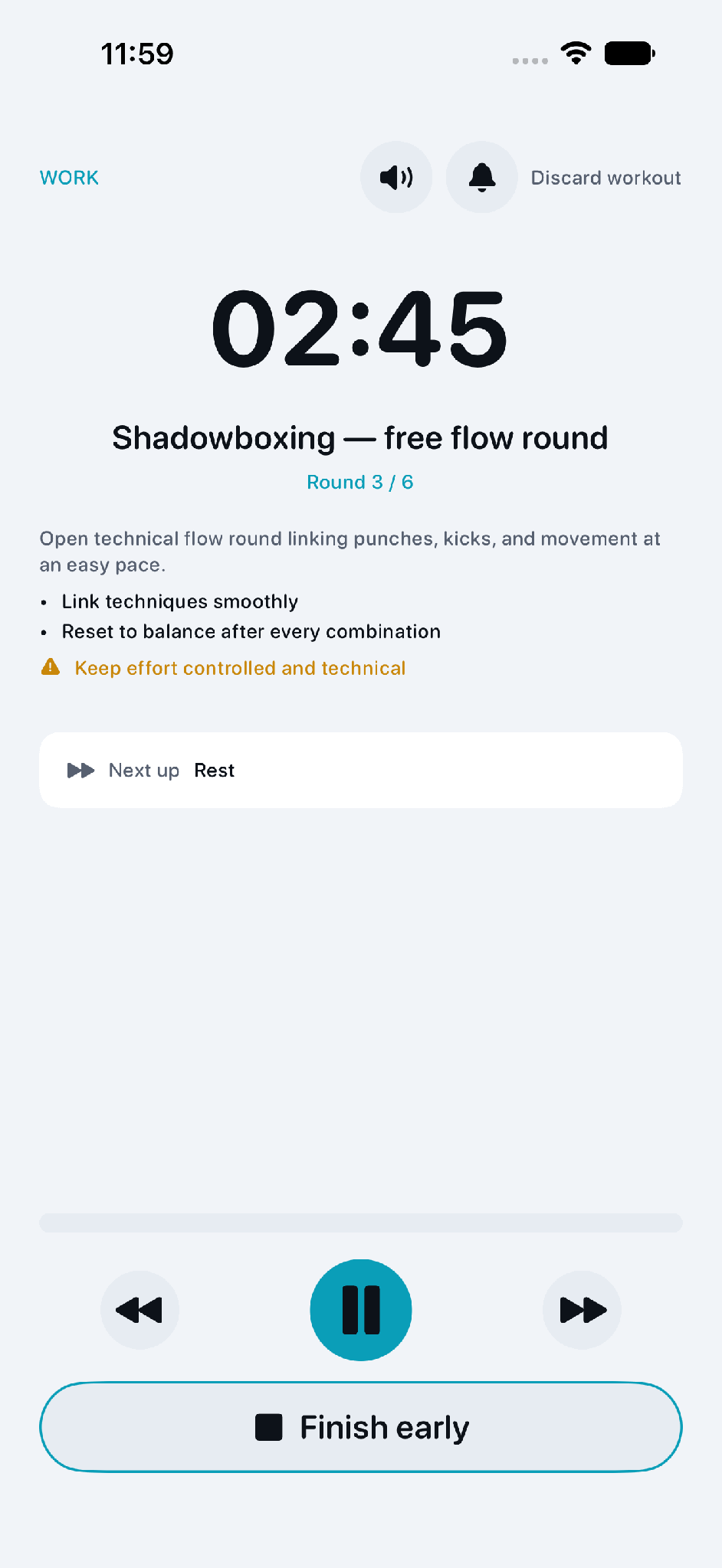
Dee is a Muay Thai training app with time-based workout screens. That makes manual capture especially awkward. By the time I navigate to the correct round, dismiss the right controls, and start recording, the timer has already changed.
The solution begins inside the app. In debug builds, a launch argument selects a named marketing state. Each state creates the same typed models used by the product, but with controlled input. A frozen clock stops the timer from drifting while XCTest waits for the interface.
The important part is not the particular launch argument. It is the boundary. Marketing fixtures control dependencies and data, but they do not replace the production view with a separate mock screen. If I change the actual workout layout, the next capture contains that change.
Keeping the fixtures debug-only also prevents this tooling from becoming a hidden route through the release app.
Once the app can launch directly into a stable state, XCUITest becomes a reliable camera operator. The test starts the requested mode and locale, waits for the real screen, and stores the screenshot as a named attachment.
I currently run the capture flow across six locales. Locale is just another launch input, so translated screens follow the same path as English instead of becoming a separate manual checklist.
Animations introduced another source of flakiness. A view can be accessible before the simulator has produced a complete frame. For the more animated screens, the test samples screenshots until it receives the same PNG twice. If the compositor never settles, the test fails rather than quietly exporting a broken image.
That failure is useful. When a UI change invalidates a fixture or makes a screen unstable, I find out during capture. I do not discover it weeks later while assembling launch material from an old folder.
The XCTest attachments are extracted from the result bundle and copied into a small marketing workspace. From there, Remotion turns the real app captures into code-driven vertical video.
The composition controls timing, transitions, captions, framing, and audio. The current example renders at 1080 by 1920, 30 frames per second, and 12 seconds. It uses Dee’s captured screens, and the composition can include a cue copied from the app’s shipped resources rather than recreating the interface or sound for the advertisement.
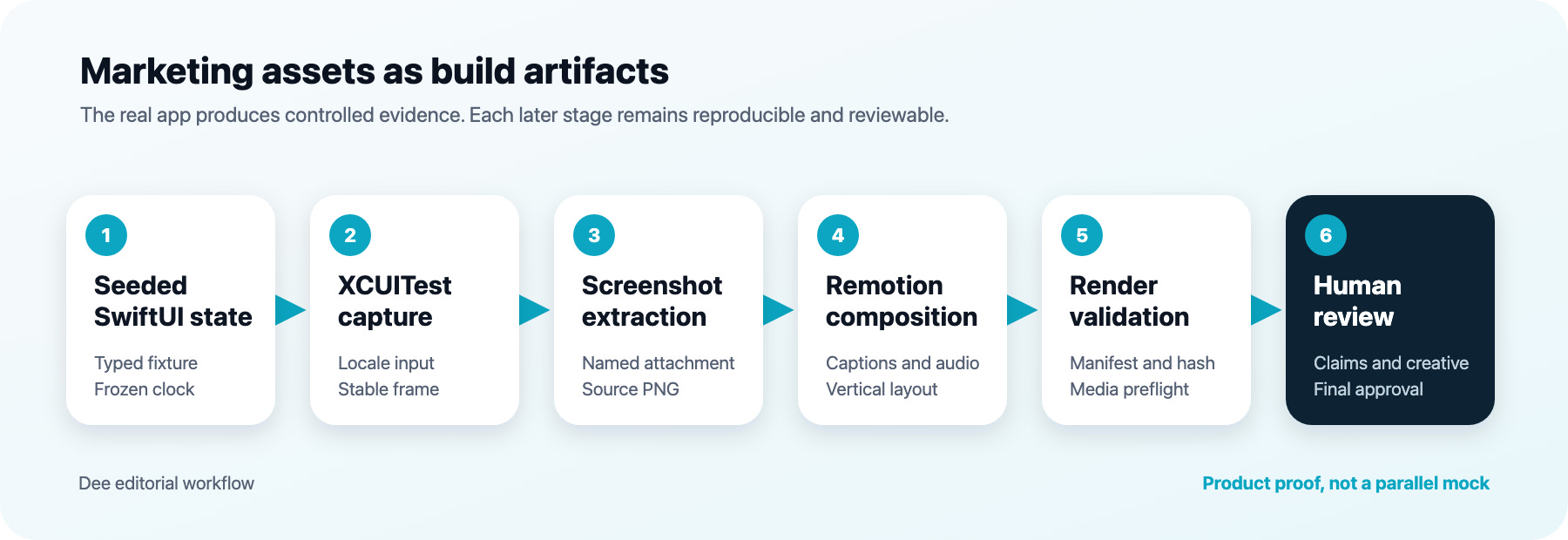
I also added a capture manifest and hashes around the process. The manifest binds the exact screenshots, audio, and composition properties used by a render. Preflight checks dimensions, captions, asset provenance, and whether inputs changed after capture. Human review remains the final step.
This is more machinery than a single promo clip needs. It becomes valuable because the output is recurring. One source capture can support App Store screenshots, social video, carousels, and localized variants without pretending that a design mock is the shipping product.
Coding agents helped me move faster through repetitive plumbing, test cases, and review. They were useful for tracing asset paths and checking consistency across the Swift and TypeScript sides. They did not decide what the product should claim, which screen represented it honestly, or whether the final creative was ready to publish. Those decisions stayed with me.
The pipeline still has a maintenance cost. Fixtures must evolve with the app. UI tests need care around animations and simulator behaviour. Remotion adds another toolchain. If I needed one screenshot for one launch, I would take it manually.
I would consider this approach when an app has dynamic screens, several locales, frequent UI changes, or an ongoing need for product content. Start with one painful state, not a complete marketing platform. Add a launch argument, freeze its dependencies, capture it in a UI test, and only automate the next stage when repetition justifies it.
The larger lesson for me is that testability has uses beyond tests. When an app can reproduce an exact state on demand, it becomes easier to debug, demonstrate, localize, and market. The best part of this workflow is not that it produces a video. It is that the video remains connected to the product that users will actually open.
No posts
Comments
Nothing yet. Say the first thing.
Sign in to join the conversation.