
AI assistance note: Hate reading AI slop? This article was rated 70% human written by Substack and Pangram. We used some AI assistance to structure our thoughts, but the ideas and opinions are entirely ours. Rest assured, you are not wasting your time reading slop.
If you have recently been on X, you might have come across posts on how instead of spending their time prompting an agent directly, developers should be designing systems that prompt agents for them. In June, Addy Osmani published an article that cemented this as a practice called ‘loop engineering’ and soon after LangChain published its own framework for thinking about loops.
Take away all the hype though and nobody really knows how to implement it in a useful way. So much so that in early July, the community at AI Engineer World’s Fair was debating whether the hype had outrun the actual practice.
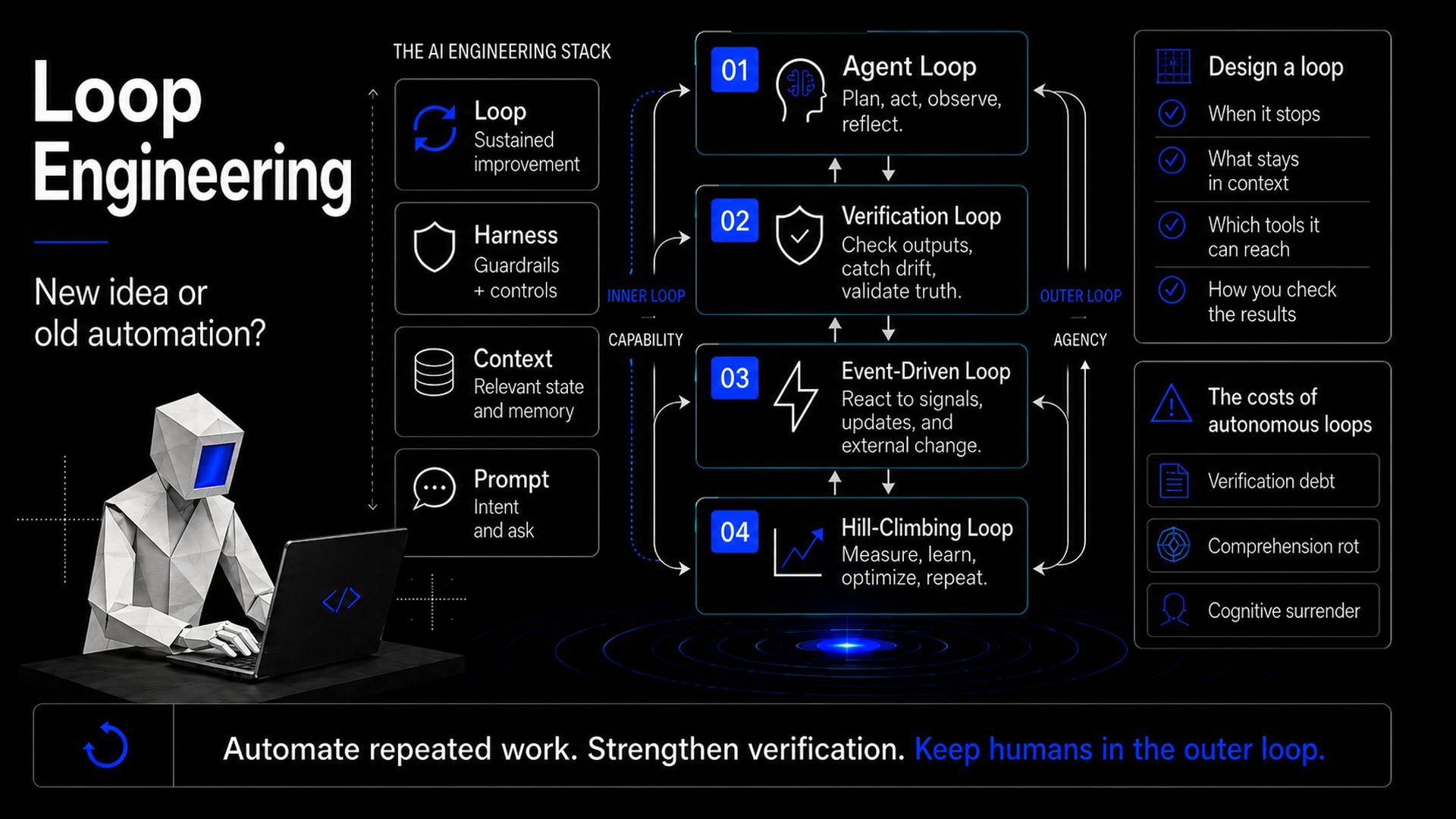
To understand what loop engineering is, let’s look at where it sits on the ladder of all the ‘AI Engineering’ practices;
You start with Prompt engineering which is about what you tell a model.
Context engineering deals with what the model has available to it at a given moment.
Harness engineering is about designing one run which includes things like the tools, permissions, retries and actions.
Loop engineering sits on top of all this and asks how that harnessed agent can run itself repeatedly.
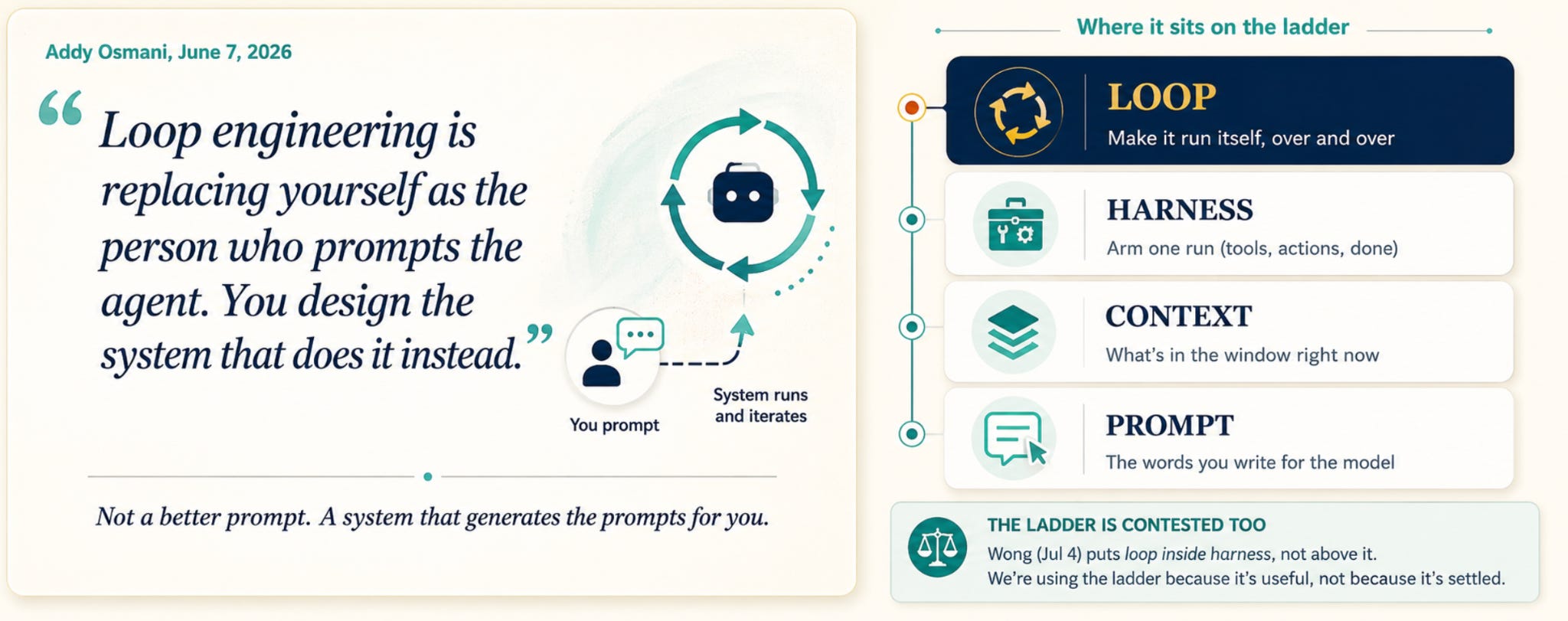
While the hierarchy is a good reference, it is not universally agreed upon, with some people like Lilian Weng treating loops as part of the harness rather than a separate layer above it.
When people think of “loop engineering,” they often use it to describe several related ideas, some of which have existed for years under other names.
Last year, Geoffrey Huntley created the “Ralph loop,” which was simply a bash while-loop. It worked by feeding the exact same prompt to a coding agent over and over again in a fresh context window. It was noted then, that this technique is bad in a non-deterministic world.
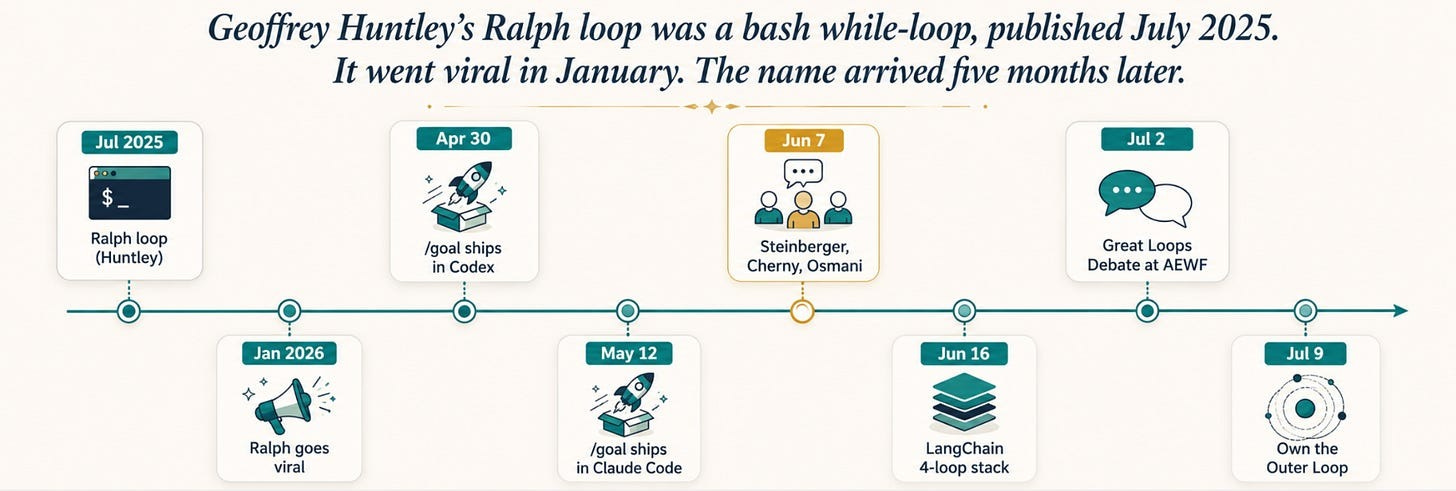
Earlier this year, a tutorial called “ship working code while you sleep” that used Ralph Loops went viral, and things escalated. Codex shipped a /goal command, and soon after, Hermes and Claude Code added similar built-in commands to every major coding harness.
At a workflow level, it feels very similar to ReAct agents, where the agent is acting, observing, and revisiting steps whenever necessary. Traditional software systems have also used cron jobs, hooks, workflow engines and DAGs to automate repeated work for a long time.
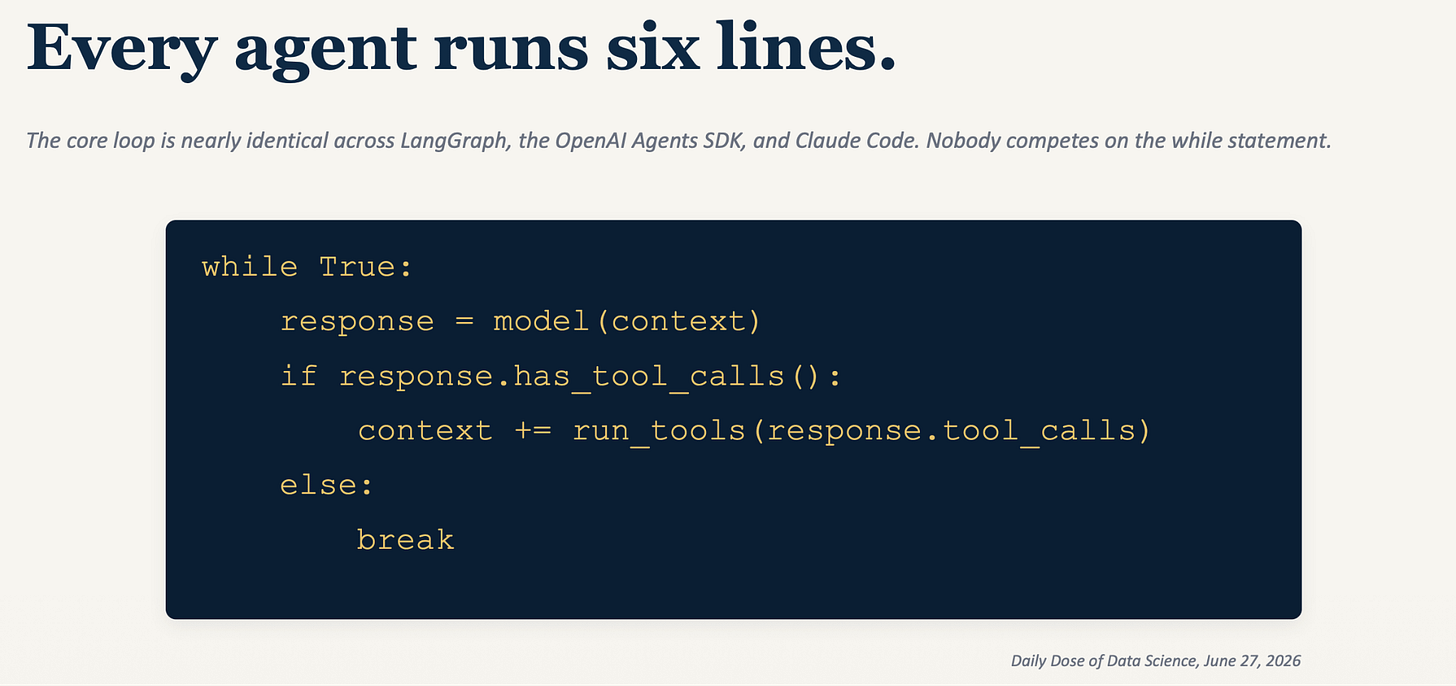
At its core, the steps of running a loop are straightforward.
You send context to the model. If the response has tool calls, you run the tools and append the results. If not, you break out of the loop.
There are four things you have to think about when designing loops:
When it stops: You have to define maximum iterations, budget caps, how you detect progress in workflows and what your final completion or success looks like so that the loop does not keep running forever.
What stays in context: You need to think about methods like compaction, handing off messy subtasks to sub agents and offloading some part of the output to different files or to the disk. This is important so that old tool outputs, dead ends, and stale reasoning don’t pile up and make your model feel dumber as the runs get longer.
Which tools it can reach: Fewer tools improve the success rate. Whenever you are writing to a file, you have to make sure it is safe to repeat or go over. If multiple agents are in the same file, you must ensure it is a safe write. You also need a subagent to check the errors you get and determine what to do with them e.g. setting escalation conditions.
How you check the results: You must pick a model that is different than the one you used to generate the output. This is important because if the same model is judging its own output, it will mostly agree with itself and lead to bias.
Now that we have looked at how to define a loop, lets look at the kinds of systems that can benefit from them. LangChain has mapped this out into a four-loop stack which can be thought of as 4 architectural layers you can deploy.
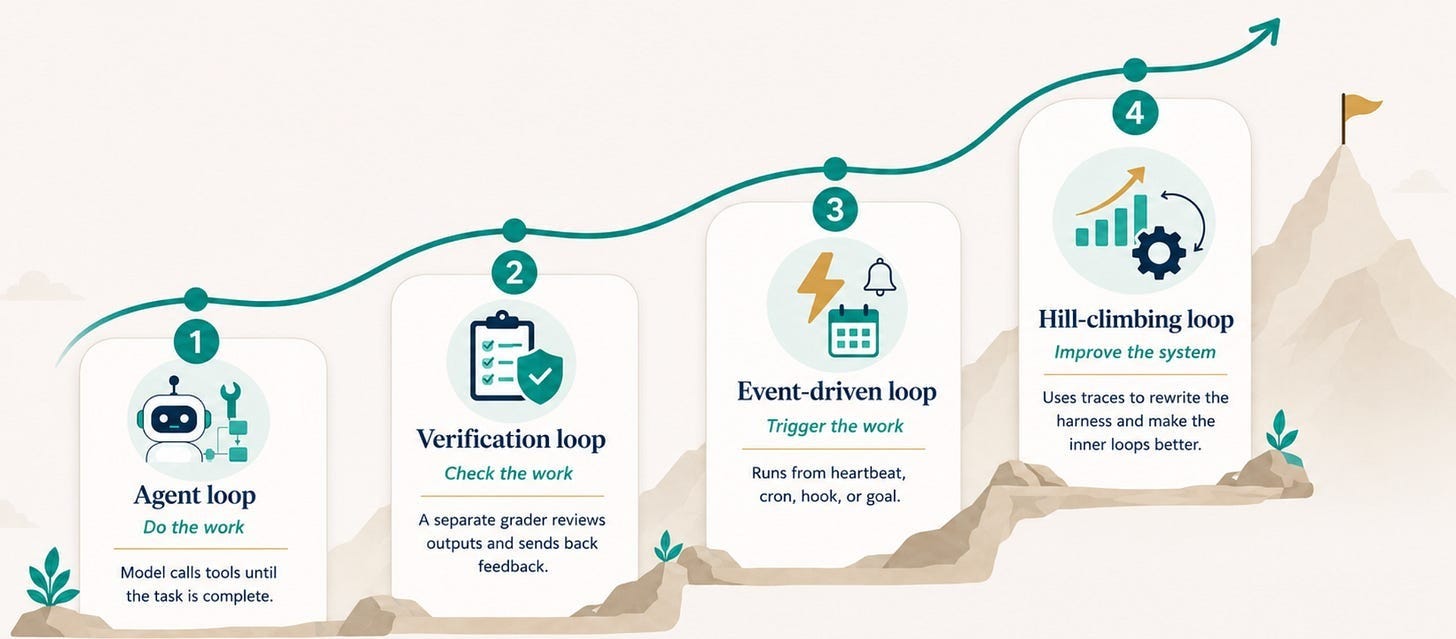
This is how most teams are currently using loops. It is the simplest layer where the model calls tools until it believes the task is complete.
Let’s take the example of a code documentation agent. It might receive a request, inspect a repository, plan the changes, edit the relevant files and open a pull request without anybody manually telling it which tool to call at each step.
The verification loop adds a grader around the agent loop which keeps checking the output against a rubric and sends it back with feedback if it fails. It can be anything, deterministic like a simple type check, a linter, or even the regular tests that you do in software development. It can also be another model acting as a judge.
As we saw in loop design, the model for the judge has to be different from the grader. Simply asking the generator to be more self-critical doesn’t work because the same system would still be reasoning from many of the same assumptions.
An open challenge Lilian Weng talks about here is how these verification and self-improvement loops are more prone to reward hacking because it is essentially optimizing for the metric you provide, which can cause overfitting.
This is the layer where the agent stops waiting for you to kick it off and has something in the environment trigger it:
A heartbeat can continuously watch logs or system health.
A cron job can perform a scheduled code review or dependency audit.
A hook might fire when a pull request is pushed or a CI job fails.
A goal-based loop can keep iterating through a refactor or migration until a condition is met.
This is also where designing the stopping condition becomes important because if a goal-based loop has no clear limit, “keep going until this is fixed” can easily turn into a model burning tokens for hours.
The is an interesting one because it isn’t just about automating the work but going beyond and improving the system doing that work.
Every time an agent executes, it creates a trace that records its reasoning, tool calls, and actions showing how it got to the results. An analysis agent scans these traces to figure out what went wrong or where friction occurred, then tweaks the system’s prompt or code harness accordingly. Rather than feeding outputs back into the start of the user workflow, it rewrites the internal logic so future runs perform better.
Andrej Karpathy’s AutoResearch project shows this idea in action. The system runs an experiment, checks if the result improved, keeps what worked, and moves on to the next attempt. A caveat here is that a recursive loop does not automatically guarantee self-improvement and the base model still needs to be capable enough to recognize and produce genuine improvements.
This pattern clearly separates the inner and outer loops:
The inner loop (capability): The core engine doing the actual work. It writes code, uses tools, checks results, and iterates.
The outer loop (agency): The decision layer that chooses what to build and determines what gets deployed or blocked. It handles oversight through evaluations, feedback, and human input.
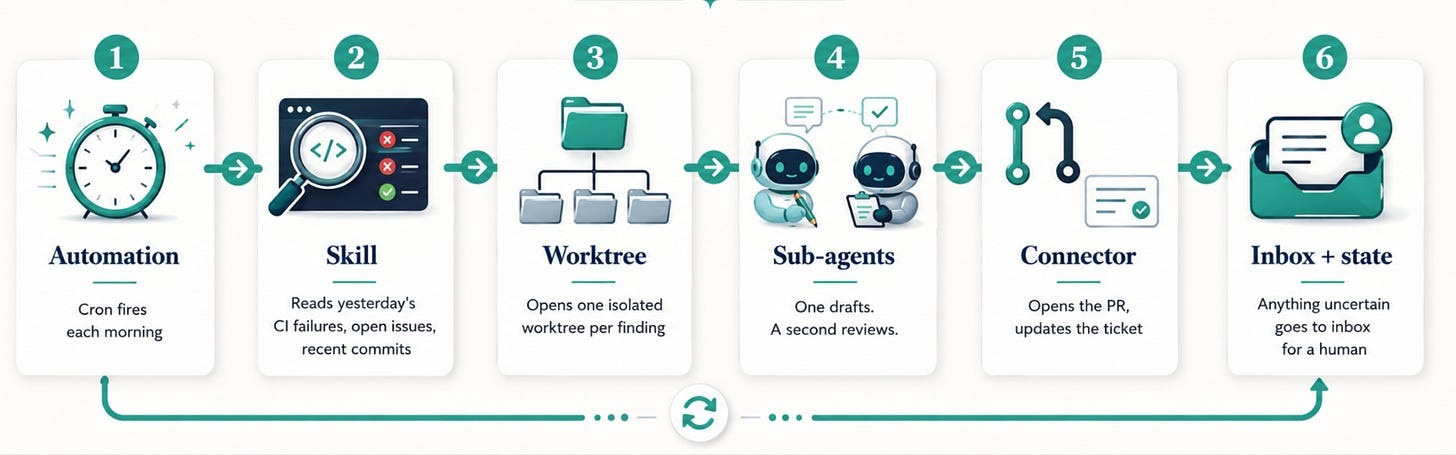
An engineer’s morning triage routine that uses a cron job, agent skills, sub-agents and a connector as shown below is a good example of an automated workflow.
Skeptics ask the basic question of whether Loop Engineering is just traditional software automation rebranded under a fancy new name. As we saw in the origin of loops, many practices have existed from long before.
Loops are built to keep trying, which means they can burn through tokens quickly when a task takes longer than expected or gets stuck. This can create a very real cost problem.
Lastly, even if Loop Engineering proves to be a reliable pattern, there is a good chance much of it will simply get absorbed into the tooling. We’ve already seen that happen with techniques that started as manual workarounds and later became built-in features, such as slash commands.
Some problems become more evident after a loop has been running for a while.
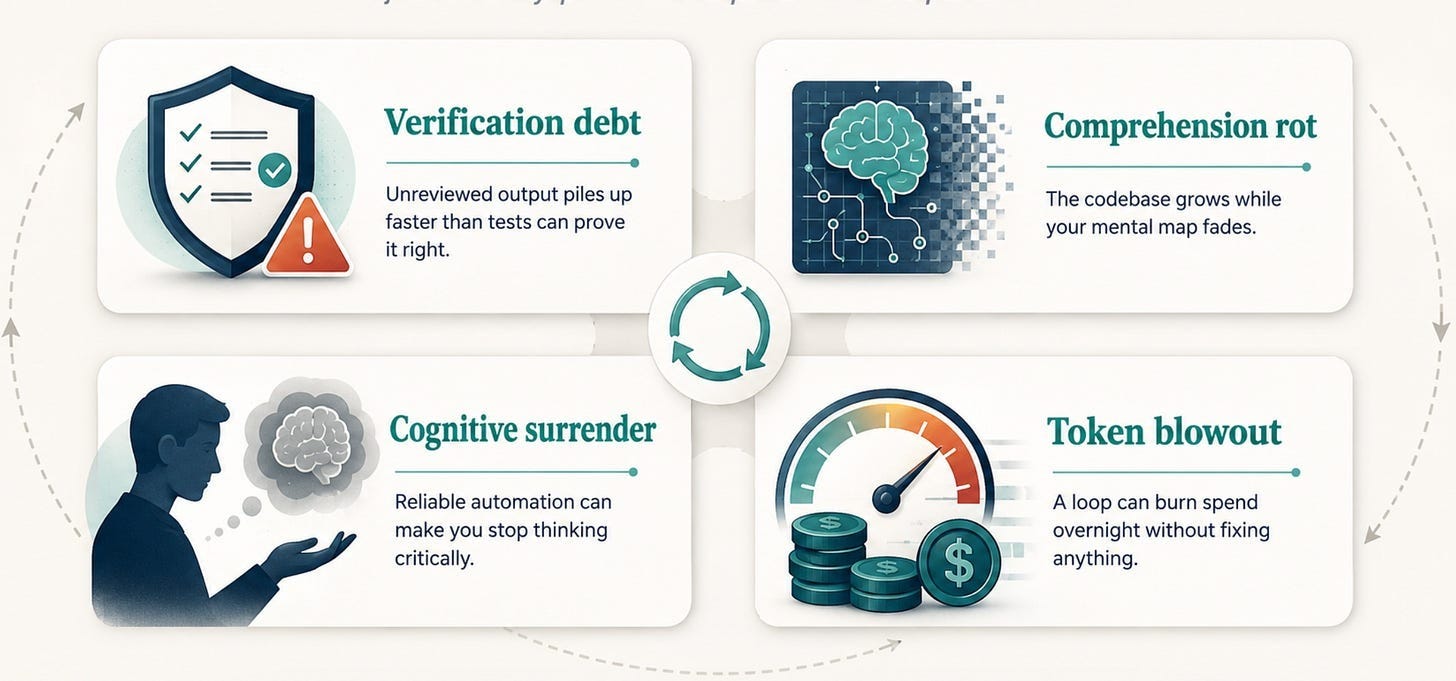
A loop can open twenty pull requests overnight and still miss problems that the tests were not designed to catch. That is how verification debt starts to build. If the team starts to rely more and more on AI and those changes get merged without anyone really going through them, the codebase can quickly outgrow the team’s understanding of it, leading to comprehension rot.
Once the loop becomes reliable, it also gets easier to stop checking and manual code reviews become less rigorous leading to cognitive surrender. Add token costs on top and a loop that might have looked efficient, becomes expensive to trust.
This is also why not every workflow needs a loop. If a task rarely happens, or if success is difficult to define, the time spent designing and maintaining the loop may never pay off.
Loops are easier to justify when the work repeats and there is a clear signal for whether the next iteration improved anything. Tests, migrations, version upgrades and model tuning are obvious examples. They become much harder when “correct” is subjective or difficult to verify.
This article grew out of a live Chai & AI session conducted by Prahitha Movva where we got into loop engineering and whether it is a genuine shift or mostly a rebrand. All our Maven cohort members get access to our Chai and AI community, check out our cohort here.
No posts
Comments
Nothing yet. Say the first thing.
Sign in to join the conversation.