23.05
a service module for
cgit/nginx
is available. Read only if you want a summary on making modules.
NixOS, and by consequence nix are
powerful
Turning one person into two
productivity wise. Enforcing reproducibility and to some extent immutability,
catches and prevents lots of interesting errors.
tools
Looking forward to trying out other
alternatives like Guix.
for freelance
programmers like myself. After trying out Gitea for a
while, it’s about time to switch back to
cgit for hosting
my public repositories. Gitea and cgit are
both self hosted git front-ends — the former being
more resource heavy and featureful than the latter.
This website runs on a NixOS server so switching to cgit means setting up a
basic module. Modules are a set of lower level
implementations that combine to create a higher level system configuration. A
cgit module is already
available
in NixOS using lighttpd but it does not fit my use
case. Let’s wire up a module that implements cgit.
Module Interface
Writing a module yourself provides the luxury of defining the interface that
invokes the implementation. I’ll create an imaginary interface that matches my
use
This is all the “front end” code needed
to expose my self hosted repositories.
case and worry about the implementation details later. The
upstream service module is preemptively
disabled
In reality you would namespace this
module to avoid magic switches like disabledModules.
by
adding it to disabledModules to possibly prevent future conflicts.
nix
{
  imports = [
    ../modules/cgit/module.nix
  ];

  disabledModules = [ "services/misc/cgit.nix" ];

  services.cgit = {
    enable = true;
    package = pkgs.callPackage ../servers/cgit/default.nix {};
    domain = "thedroneely.com";
    subDirectory = "/git";
    authorizedKeys = [
      "ssh-rsa AAAAB3NzaC1yc2EAAAADAQABAAABAQC8aD3uJ937DKFXN1BYDAezG2umwj4k6 key"
    ];
    mirrors = {
      dotfiles = { owner = "thedroneely"; url = "https://github.com/tdro/dotfiles.git"; };
      "thedroneely.com" = { owner = "thedroneely"; url = "https://github.com/tdro/thedroneely.com"; };
    clones = {
      cgit = { owner = "thedroneely"; url = "https://git.zx2c4.com/cgit"; };
    };
    extraConfig = ''
      robots=noindex
    '';
  };
}
My imaginary interface is quite ambitious. Given an imported service module, it
wants to be able to swap in and out the source code, change the domain name,
support website subdomains and subdirectories, mirror and clone repositories,
expose the git shell, and append
extra
Implementing extraConfig can overwork your module. Use
a structural settings
setup if you can.
configuration on the fly. Let’s try to make
that happen and turn it into a real interface.
Module Framework
The simplest module has a structure where if enabled — nothing happens. My
cgit module in modules/cgit/module.nix starts off bare.
nix
{ pkgs, lib, config, ... }:

let

  service = "cgit";
  cfg = config.services.${service};

in {

  options.services.${service} = {
    enable = lib.mkOption {
      type = lib.types.bool;
      default = false;
    };
  };

  config = lib.mkIf cfg.enable { };
}
To sum it up — if services.cgit.enable = true then everything inside
config evaluates.
Module Options
The config options of the services.cgit attribute set is derived from the
options.services.cgit attribute set. Each option has a name which is the
attribute set itself, a type, a default value, and optionally a description and
example field that generates higher level
documentation.
This is my own module, so
we’ll skip the description and example fields.
The module will
contain all options needed for the implementation.
nix
{
  options.services.${service} = {

    enable = lib.mkOption {
      type = lib.types.bool;
      default = false;
    };

    package = lib.mkOption {
      type = lib.types.package;
      default = pkgs.cgit;
    };

    domain = lib.mkOption {
      type = lib.types.str;
      default = "${cfg.user}.example";
    };

    user = lib.mkOption {
      type = lib.types.str; default = service;
    };

    authorizedKeys = lib.mkOption {
      type = lib.types.listOf lib.types.str; default = [ ];
    };

    title = lib.mkOption {
      type = lib.types.str; default = "Repositories";
    };

    description = lib.mkOption {
      type = lib.types.str; default = "Browse repositories";
    };

    directory = lib.mkOption {
      type = lib.types.str; default = "/srv/${cfg.user}";
    };

    repository = lib.mkOption {
      type = lib.types.str; default = "${cfg.directory}/repos";
    };

    subDirectory = lib.mkOption {
      type = lib.types.str; default = "";
    };

    extraConfig = lib.mkOption {
      type = lib.types.str; default = "";
    };

    customStatic.enable = lib.mkOption {
      type = lib.types.bool; default = false;
    };
  };
}
Module Implementation
The difficulty of the implementation will depend on your familiarity with a
piece of software and its operational dependencies. Lets create a cgit user,
set its shell to git, bind the ssh authorized keys from the interface to the
cgit user, and make the home directory the location that stores the
repositories.
nix
{
  config = lib.mkIf cfg.enable {
    users = {
      groups.${cfg.user} = { };
      users.${cfg.user} = {
        createHome = true;
        home = cfg.repository;
        isSystemUser = true;
        shell = "${pkgs.git}/bin/git-shell";
        openssh.authorizedKeys.keys = cfg.authorizedKeys;
        group = cfg.user;
      };
    };
  };
}
The home directory as the repository directory avoids configuring the git
shell’s fetch and push remote urls. The ssh remote urls would be of
the form owner/repository relative to that folder.
text
origin	cgit@thedroneely.com:thedroneely/cgit (fetch)
origin	cgit@thedroneely.com:thedroneely/cgit (push)
Using systemd as a crutch we ensure that the top level directory and the
repository directory have the right permissions and exist. If
services.cgit.customStatic.enable is true, then the module creates a static
directory for custom assets.
nix
{
  config = lib.mkIf cfg.enable {
    systemd.tmpfiles.rules = [
      "z ${cfg.directory} 755 ${cfg.user} ${cfg.user} - -"
      "d ${cfg.repository} 700 ${cfg.user} ${cfg.user} - -"
      (lib.optionalString (cfg.customStatic.enable) "d ${cfg.directory}/static 755 ${cfg.user} ${cfg.user} - -")
    ];
  };
}
At this point, enable old school
FastCGI and let
nginx know about the socket address. The
regular
expressions
During a configuration
switch NixOS automatically checks the nginx configuration for path traversals
and other misconfigurations with
gixy.
for nginx
are such that if services.cgit.subDirectory is an empty string it defaults to
the root of the domain, otherwise it would be a subdirectory.
nix
{
  config = lib.mkIf cfg.enable {
    services.fcgiwrap = { enable = true; user = cfg.user; group = cfg.user; };

    services.nginx.virtualHosts.${cfg.domain} = {

      locations."~* ^${cfg.subDirectory}/static/(.+.(ico|css|png))$" = {
        extraConfig = ''
          ${lib.optionalString (!cfg.customStatic.enable) "alias ${cfg.package}/cgit/$1;"}
          ${lib.optionalString (cfg.customStatic.enable) "alias ${cfg.directory}/static/$1;"}
        '';
      };

      locations."${cfg.subDirectory}/" = {
        extraConfig = ''
          include ${pkgs.nginx}/conf/fastcgi_params;
          fastcgi_param CGIT_CONFIG ${cgitrc};
          fastcgi_param SCRIPT_FILENAME ${cfg.package}/cgit/cgit.cgi;
          fastcgi_split_path_info ^(${cfg.subDirectory}/?)(.+)$;
          fastcgi_param PATH_INFO $fastcgi_path_info;
          fastcgi_param QUERY_STRING $args;
          fastcgi_param HTTP_HOST $server_name;
          fastcgi_pass unix:${config.services.fcgiwrap.socketAddress};
        '';
      };
    };
  };
}
Next we would need the most basic cgitrc configuration passed to nginx and
fastcgi for cgit to operate, keeping in mind the possible options defined at
the onset.
nix
{ pkgs, lib, config, ... }:

let

  cgitrc = pkgs.writeText "cgitrc" ''
    css=${cfg.subDirectory}/static/cgit.css
    logo=${cfg.subDirectory}/static/cgit.png
    favicon=${cfg.subDirectory}/static/favicon.ico
    root-title=${cfg.title}
    root-desc=${cfg.description}
    snapshots=tar.gz tar.bz2 zip

    readme=:README
    readme=:readme
    readme=:readme.txt
    readme=:README.txt
    readme=:readme.md
    readme=:README.md

    ${cfg.extraConfig}

    about-filter=${cfg.package}/lib/cgit/filters/about-formatting.sh
    source-filter=${cfg.package}/lib/cgit/filters/syntax-highlighting.py
    remove-suffix=1
    section-from-path=1
    scan-path=${cfg.repository}
  '';

in { ... }
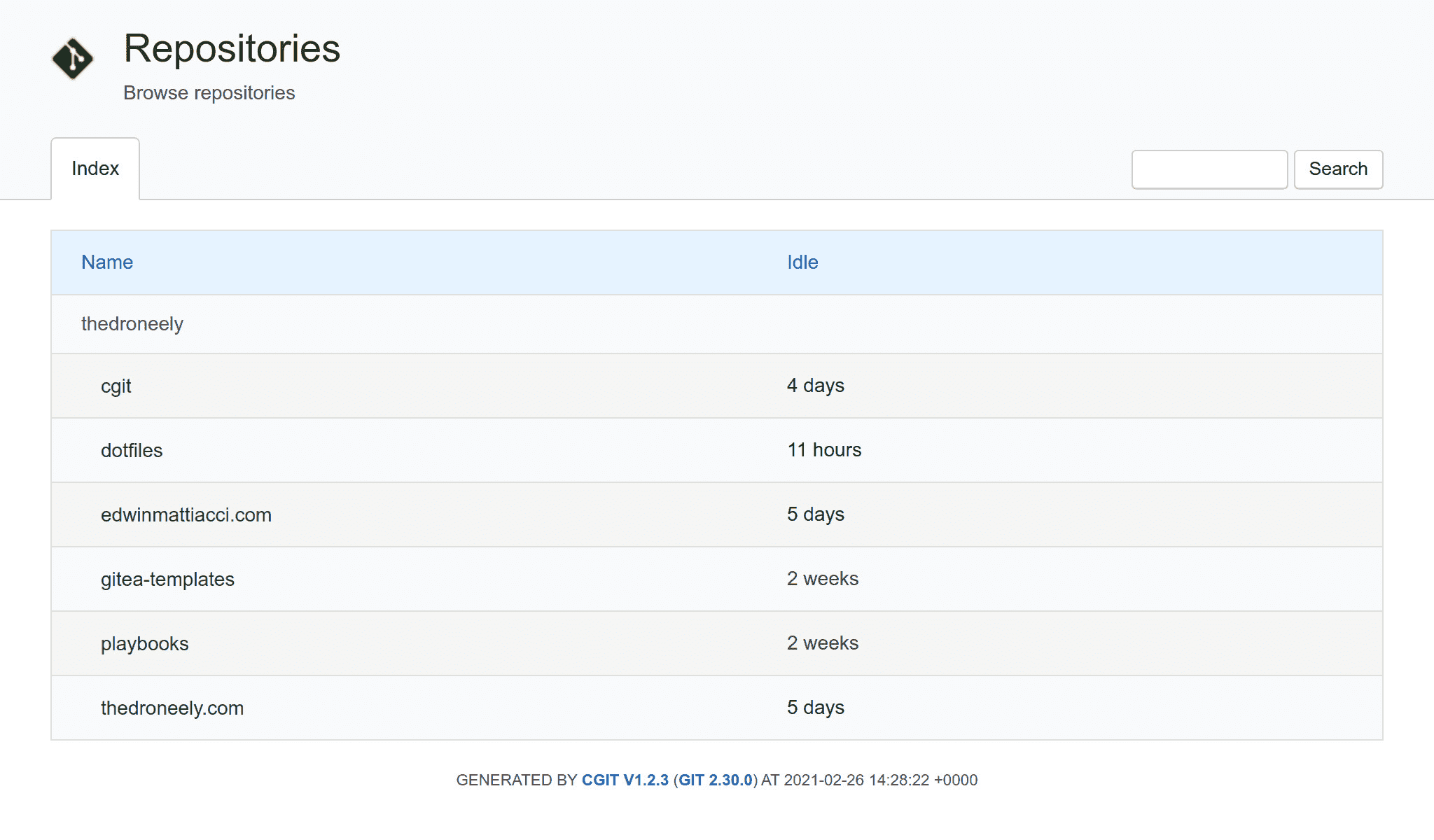
The final part is to set up mirroring and cloning from the interface. This is
where it gets hairy. We can lean on systemd services to set up git mirroring
and cloning services. The cloning services will probably be a one time action,
but mirroring will happen periodically using timers. One could jam everything
into a single systemd service but it would be nice to sort of “orchestrate”
git cloning and mirroring over a set of systemd services and timers. To try
this out — let’s add two options that expect a named attribute set of
sub-modules where a repository url and a local owner are the options for
cloning and mirroring.
nix
{
  options.services.${service} = {

    mirrors = lib.mkOption {
      type = lib.types.attrsOf (lib.types.submodule {
        options = {
          owner = lib.mkOption { type = lib.types.str; };
          url = lib.mkOption { type = lib.types.str; };
          description = lib.mkOption {
            type = lib.types.str;
            default = "Unnamed mirrored repository; edit the description file to name the repository.";
          };
        };
      });
      default = { };
    };

    clones = lib.mkOption {
      type = lib.types.attrsOf (lib.types.submodule {
        options = {
          owner = lib.mkOption { type = lib.types.str; };
          url = lib.mkOption { type = lib.types.str; };
          description = lib.mkOption {
            type = lib.types.str;
            default = "Unnamed cloned repository; edit the description file to name the repository.";
          };
        };
      });
      default = { };
    };
  };
}
Writing the mirror and clone urls directly as attribute sets containing those
sub-options is now acceptable.
nix
{
  imports = [
    ../modules/cgit/module.nix
  ];

  services.cgit = {
    mirrors = {
      dotfiles = { owner = "thedroneely"; url = "https://github.com/tdro/dotfiles.git"; };
      "thedroneely.com" = { owner = "thedroneely"; url = "https://github.com/tdro/thedroneely.com"; };
    };
    clones = {
      cgit = { owner = "thedroneely"; url = "https://git.zx2c4.com/cgit"; };
    };
  };
}
Here’s a disclaimer; I’m not too
familiar
There might be a more elegant way.
with functional
programming, but to achieve my configuration, it looks like somehow we would
need to map over every attribute set and instantiate the option name–value
pairs across every systemd service and timer.
In the
Nix Package Manual
there is an interesting function called lib.attrsets.mapAttrs' that allows
changing the attributes of a given set by the name–value pairs of another
attribute set. The mapping function has to return a name–value pair.
Prodding
The :p argument in front of the
nix expression evaluates and prints the result recursively. If you did not do
this you’d get the short output: { systemd-service-name-service1 = { ... } };
this function inside nix repl confirms that behavior.
nix
{
  nix-repl> :l <nixpkgs>
  nix-repl> :p lib.attrsets.mapAttrs' (name: value: lib.attrsets.nameValuePair "systemd-service-name-${name}" { option = value.one; } ) { service1 = { one = 1; two = 2; }; service2 = { one = 1; two = 2; }; }
  { systemd-service-name-service1 = { option = 1; }; systemd-service-name-service2 = { option = 1; }; }
}
Great now let’s set up the framework of systemd services that will mirror
cgit repositories automatically using git clone --mirror.
nix
{
  config = lib.mkIf cfg.enable {
    systemd.services = lib.attrsets.mapAttrs' (repo: mirror:
      lib.attrsets.nameValuePair "cgit-mirror-${mirror.owner}-${repo}" {
        description = "cgit repository mirror for ${mirror.url}";
        after = [ "network.target" ];
        path = [ pkgs.git pkgs.shellcheck ];
        script = ''
          set -euxo pipefail
          shellcheck "$0" || exit 1
          repo () { printf '${mirror.owner}/${repo}'; }
          mkdir -p "$(repo)"
          git clone --mirror '${mirror.url}' "$(repo)" || \
            git --git-dir="$(repo)" fetch --force --all
        '';
        serviceConfig = {
          User = cfg.user;
          Group = cfg.user;
          WorkingDirectory = cfg.repository;
        };
      }) cfg.mirrors;
  };
}
Using the
update
The update
operator
(//) is perhaps the most useful operator. It merges (union) two attribute sets
A and B together to produce a new set C. The second set B overwrites or
updates (takes precedence) the top level attributes that are identical to set
A and set B.
operator
(//), merge the systemd service attributes into a complete set that will
also clone cgit repositories automatically using git clone --bare.
nix
{
  config = lib.mkIf cfg.enable {
    systemd.services = lib.attrsets.mapAttrs' (repo: mirror:
      lib.attrsets.nameValuePair "cgit-mirror-${mirror.owner}-${repo}" {
        description = "cgit repository mirror for ${mirror.url}";
        after = [ "network.target" ];
        path = [ pkgs.git pkgs.shellcheck ];
        script = ''
          set -euxo pipefail
          shellcheck "$0" || exit 1
          repo () { printf '${mirror.owner}/${repo}'; }
          mkdir -p "$(repo)"
          git clone --mirror '${mirror.url}' "$(repo)" || \
            git --git-dir="$(repo)" fetch --force --all
        '';
        serviceConfig = {
          User = cfg.user;
          Group = cfg.user;
          WorkingDirectory = cfg.repository;
        };
      }) cfg.mirrors // lib.attrsets.mapAttrs' (repo: clone:
        lib.attrsets.nameValuePair "cgit-clone-${clone.owner}-${repo}" {
          description = "cgit repository clone for ${clone.url}";
          wantedBy = [ "multi-user.target" ];
          after = [ "network.target" ];
          path = [ pkgs.git pkgs.shellcheck ];
          script = ''
            set -euxo pipefail
            shellcheck "$0" || exit 1
            repo () { printf '${clone.owner}/${repo}'; }
            mkdir -p "$(repo)"
            git clone --bare '${clone.url}' "$(repo)" || true
          '';
          serviceConfig = {
            User = cfg.user;
            Group = cfg.user;
            WorkingDirectory = cfg.repository;
            RemainAfterExit = "yes";
          };
        }) cfg.clones;
  };
}
To wrap up, activate the mirroring services using systemd timers instantiated
with the same mapping method.
nix
{
  config = lib.mkIf cfg.enable {
    systemd.timers = lib.attrsets.mapAttrs' (repo: mirror:
      lib.attrsets.nameValuePair "cgit-mirror-${mirror.owner}-${repo}" {
        description = "cgit repository mirror for ${mirror.url}";
        wantedBy = [ "timers.target" ];
        timerConfig = {
          OnBootSec = "1";
          OnUnitActiveSec = "3600";
          RandomizedDelaySec = "1800";
        };
      }) cfg.mirrors;
  };
}
Maintenance
To keep the repositories well oiled, run git maintenance after mirroring and
cloning. Running the maintenance command will reset cgit's idle time
measurements. Fix the idle times by getting the latest commit time stamp and
touching each repository’s
packed-refs with that time stamp.
shell
git --git-dir="$(repo)" maintenance run
touch -m --date "@$(git --git-dir="$(repo)" log -1 --format=%ct)" "$(repo)"/packed-refs || true
Conclusion
The power of nix in NixOS with its functional approach is truly wild. The
language is viewed as
difficult
For me, it
feels more like writing in a configuration language that happens to have the
powers of a programming language for the task at hand.
and
obscure by a
majority
Though one can’t help
but think that if someone wrapped this all up nice and pretty with an integrated
VSCode-esque front-end, it would
go mainstream overnight. The market is that simple after all.
but in about an hour of having to think recursively one could set up
logic that connects the various parts of a software stack
seamlessly with a high degree of correctness. Automation systems like
Ansible begin to look like mere
toys. Imagine if it ever reaches a point where one could swap out entire init
systems seamlessly. Nix however comes with trade–offs, operations are slow, can
take up lots of disk space and memory, and if it breaks — well, good luck.
Comments
Nothing yet. Say the first thing.
Sign in to join the conversation.