
A few years ago, an engineer at a mid-sized fintech company got paged in the middle of the night because the checkout page felt “sluggish.”
It wasn’t down. It wasn’t throwing 500 errors. It was just... painfully slow for roughly 4% of users.
The engineer pulled up the metrics dashboard. The 99th percentile (P99) latency for the checkout service was sitting comfortably at 220ms—well within their 500ms Service Level Agreement (SLA). The dashboard was glowing green. Everyone closed their laptops and went back to sleep.
Except the problem didn’t go away.
Every night during peak traffic, the same 4% of users watched the checkout spinner wheel crawl past 3 full seconds. It took two weeks of frustrating debugging to discover what was actually happening:
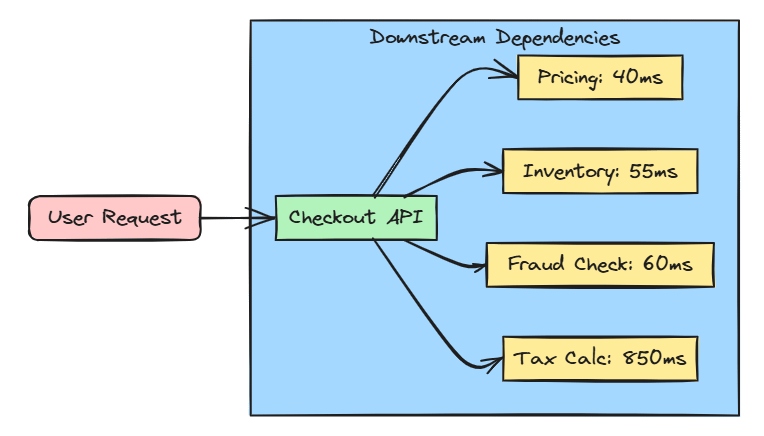
The checkout endpoint was fanning out to 14 downstream microservices in parallel—pricing, inventory, fraud scoring, loyalty points, tax calculations, recommendations, and more.
Every single service had a perfectly respectable P99 latency of ~100ms. But when you chain 14 services together and wait for all of them, 1 out of every 25 requests is mathematically guaranteed to hit at least one slow dependency.
Nobody had done the math. Nobody ever thinks to—until it bites them in production.
This is the Tail Latency Trap, and it is one of the most underrated forces shaping how distributed systems actually feel to real human beings.
Almost every backend engineer eventually works on a service that needs to call multiple downstream services to build a single response. Think about a product page, checkout flow, search results, user dashboard, or social media feed. What the user sees is rarely coming from a single service—it’s usually assembled from several services working together.
The challenge is that most of us naturally think about latency one service at a time. We look at a downstream service with a good P99 latency and assume the overall request will be just as fast.
Unfortunately, that’s not how distributed systems behave.
As soon as a request depends on multiple services, latency starts to compound. The more downstream calls you make, the higher the chance that one of them will be slow. This means the overall latency doesn’t just increase a little—it can grow much faster than most engineers expect.
Understanding this principle changes the way you design systems. Instead of only explaining latency problems after they happen, you can identify the risks early and build architectures that avoid them in the first place.
To understand why this happens, imagine booking a flight across the country with four separate connecting flights.
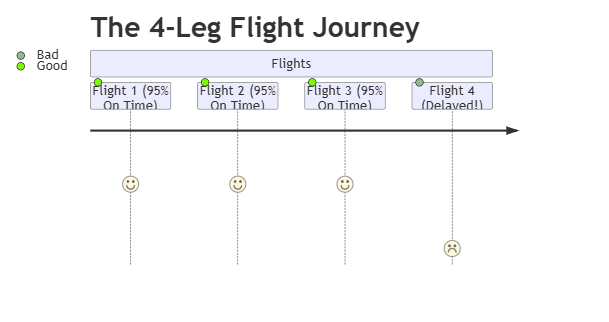
Each individual flight has a 95% chance of departing on time. In high school or college, a 95% is a solid “A” grade. That sounds safe, right?
Not quite. Your probability of making the entire trip without a single delay isn’t 95%. It’s:

Add a fifth connecting flight, and your odds drop to 77%. The more connections you chain together, the higher the chance that something goes wrong, even if every individual airline leg boasts a great record.
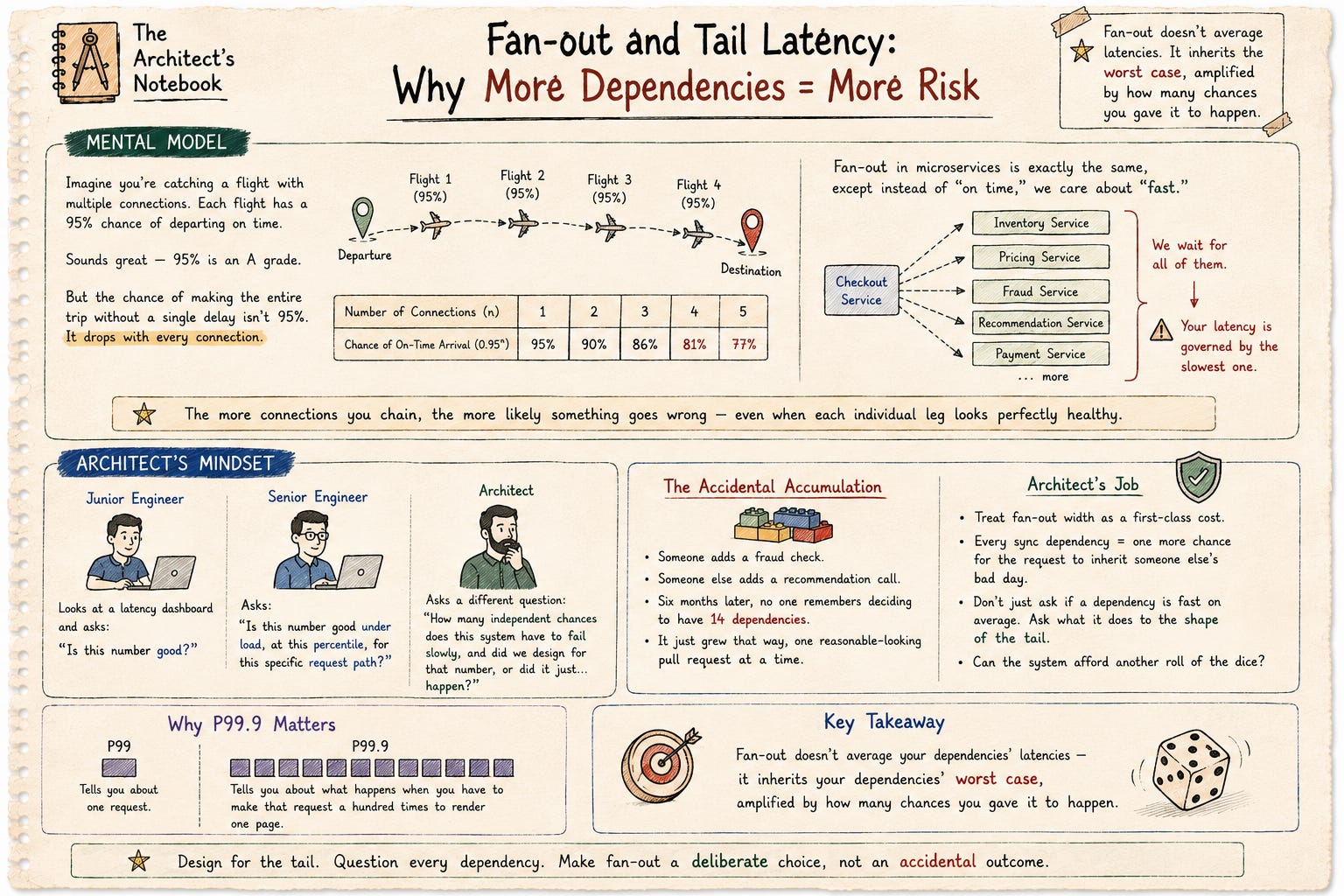
Microservices fan-out behaves the exact same way. If your Checkout Gateway calls 10 downstream services in parallel and waits for all of them to return:
Your effective response time is governed entirely by the single slowest dependency.
Fan-out doesn’t average out your dependencies’ latencies—it inherits the worst-case scenario, amplified by how many chances you gave it to happen.
Let’s put some numbers behind this idea. Saying latency gets “worse” isn’t enough architects need to understand how much worse.
First, a quick refresher on percentiles.
P99 latency means 99% of requests complete within a certain time, while the slowest 1% take longer.
P99.9 latency is even stricter. It means 99.9% of requests finish within that time, and only 1 in 1,000 requests is slower.
That small difference is important because P99.9 captures the rare but expensive delays caused by things like garbage collection pauses, cold cache misses, lock contention, and network hiccups.
Now let’s look at what happens when a service calls multiple downstream services in parallel.
If a single dependency has a probability p of responding within a target time (for example, 100 ms), and your service waits for n independent dependencies to complete, then the probability that all of them finish within that time is:

If every service has a 99% success rate (p = 0.99), watch what happens as you add dependencies (n):

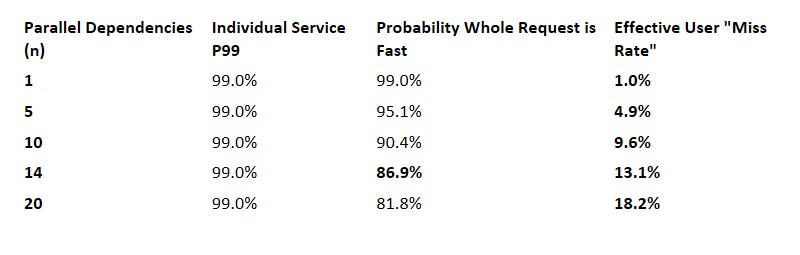
For example, suppose each dependency has a 99% chance of responding within 100 ms, and your request fans out to 14 services.
0.99¹⁴ ≈ 0.869
This means there’s only about an 87% chance that all 14 services respond within 100 ms.
In other words, around 13% of requests will have at least one slow dependency, even though every individual service is meeting its own P99 SLA.
Nothing is broken. No service is violating its SLA.
This slowdown happens simply because you’ve combined many services into a single request. It’s not a bug—it’s a fundamental property of distributed systems.
Your individual service dashboards will be glowing green, but 1 out of every 8 users will experience an annoying lag.
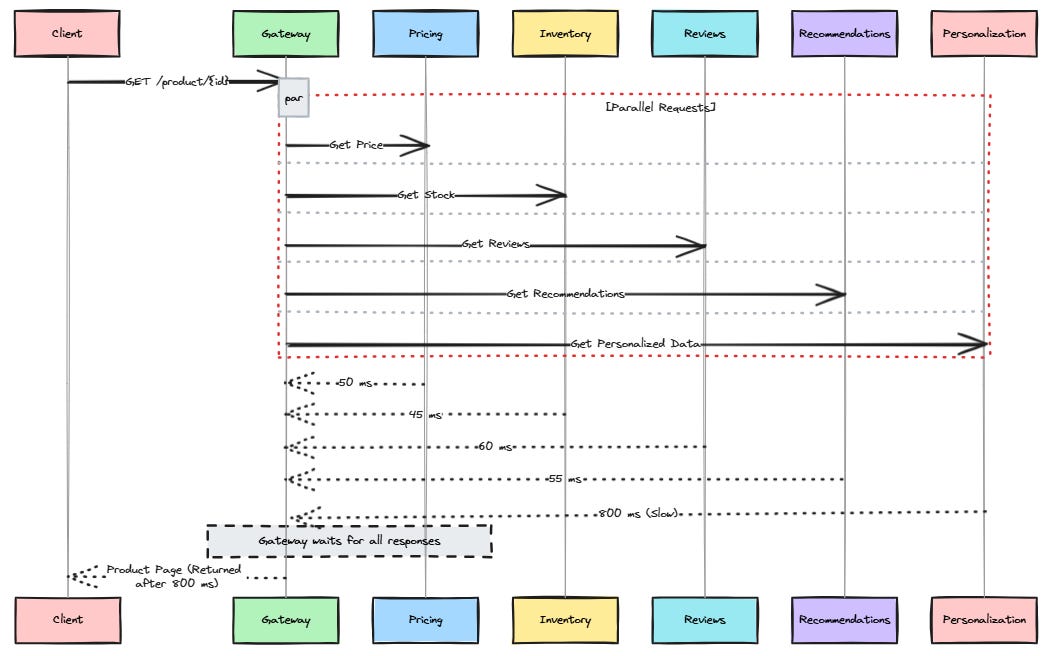
Let’s look at a common example: building a product page.
When a user opens a product page, the information usually doesn’t come from a single service. Instead, one service collects data from several downstream services and combines everything into a single response.
The client sends a request to
/product/{id}.The Gateway receives the request.
The Gateway sends requests in parallel to:
Pricing Service
Inventory Service
Reviews Service
Recommendations Service
Personalization Service
The Gateway waits for all responses (or until a timeout occurs).
Once it has enough data, it combines the results and returns the final product page to the client.
Each downstream service owns its own data and has its own latency.
The Gateway doesn’t own those services, but it does own the final user experience because it has to wait for all of them before responding.
This is where tail latency gets amplified.
If even one dependency is slow, the entire page becomes slow unless the Gateway uses aggressive timeouts or fallbacks.
A dependency that is slow but eventually succeeds can actually be worse than one that fails immediately. A failure can trigger retries or fallbacks, while a slow response simply keeps the request waiting, consuming threads, connections, and other resources.
Imagine five downstream services.
Four respond in 50 ms.
One responds in 800 ms.
The user doesn’t experience the average response time—they experience 800 ms because the Gateway has to wait for the slowest dependency.
In distributed systems, the slowest dependency often determines the overall response time.
Here is how this failure mode usually sneaks into production codebases.
In C#, developers often reach for Task.WhenAll() to execute calls in parallel:
Task.WhenAll is honest: it waits for everyone. If your recommendation engine stutters for 4 seconds due to a background database re-index, your user waits 4 seconds for their shopping cart to load.
A better approach sets strict time bounds on non-critical dependencies:
How do top engineering teams at companies like Google, Netflix, and Amazon handle this? They treat fan-out width as an explicit system cost.

Not all data is created equal. On a checkout page:
Critical: Pricing, Inventory, Payment Processing (Must succeed).
Non-Critical: Recommended items, Loyalty points, User reviews (Nice to have).
Never let a non-critical dependency hold the core page render hostage.
If your Recommendation service is lagging, don’t throw an error or stall the user—just drop the recommendation widget from the UI and return the rest of the page instantly.
Stop judging health from leaf-node microservice dashboards. Measure latency at the API Gateway or Orchestrator level where responses are assembled. Track P99.9, not just P99.
If a request to a downstream service takes longer than the expected P95 latency, fire a duplicate “hedged” request to a second instance. Whichever instance responds first wins, and you cancel the second.
This isn’t just theory—it’s something many large-scale systems deal with every day.
Google explained this in its well-known “The Tail at Scale” paper. A single user request may fan out to hundreds of backend services. As the number of downstream calls grows, the chances of at least one slow response become very high, making the overall request slower.
Netflix has also shared similar experiences. A single API request can trigger dozens of backend calls, and one slow dependency can delay the entire response.
The important point is that this isn’t unique to companies like Google or Netflix. It’s simply a result of probability. Whether you’re running a global platform or a startup with a checkout page, the same principle applies whenever a request depends on multiple services.
A service may have an excellent P99 latency, but that doesn’t mean the overall user experience is fast.
Users don’t interact with individual services—they interact with the final composed response. That’s why you should measure latency at the composition layer (such as an API Gateway or Backend-for-Frontend), not just at each downstream service.
A 99% success rate sounds almost perfect.
But at scale, the remaining 1% can represent thousands or even millions of slow requests. When your application calls multiple services in parallel, those slow requests become even more visible because a single slow dependency can delay the entire response.
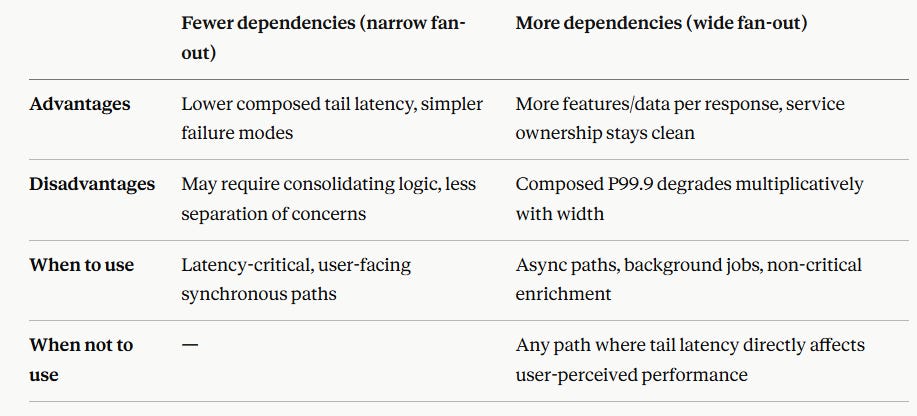
Every new synchronous call in your request path increases fan-out.
Think of it as another chance for the request to be delayed.
Before adding a new dependency, ask:
Does this data really need to be fetched synchronously, or can it be cached, precomputed, or loaded asynchronously?
Reducing unnecessary synchronous dependencies is one of the simplest ways to improve system latency.
Before approving a pull request that adds a new synchronous downstream call, ask your team these 4 questions:
Is this dependency mandatory to fulfill the core request?
No? Move it to an asynchronous event, or wrap it in a strict timeout with a default fallback.
What happens to our “all-fast” probability when we add this call?
Calculate
P(all fast) = 0.99^n. Can your SLAs handle the extra miss rate?
What is this dependency’s P99.9 latency?
Ignore average response times. Look specifically at its tail outliers.
Does our composition layer measure metrics at the gateway?
Make sure your alerting fires based on user-experienced latency, not individual service health.
Average latency doesn’t tell the full story. If you want to understand what users actually experience, look at P99 and especially P99.9 latency.
Fan-out doesn’t average response times. The overall request is usually limited by the slowest dependency, and the more dependencies you add, the more often that happens.
The impact grows quickly. The probability that every dependency responds within your target latency is P(all fast) = pⁿ. For example, increasing fan-out from 5 to 14 services, with each meeting a 99% P99 SLA, nearly triples the chance that the overall request will miss its target.
Measure latency where requests come together. The user experiences the latency of the composed response, so that’s where your most important latency metrics should be.
Every synchronous dependency has a cost. Before adding another service call, ask whether it really belongs in the critical request path.
Timeouts and graceful degradation reduce the impact of slow dependencies, but they don’t eliminate tail latency amplification.
In Part 2, we’ll look at hedged requests—a common technique for reducing tail latency—and discuss when they help and the trade-offs they introduce.
If this article changed the way you think about fan-out and latency, you’ll probably enjoy what’s coming next.
This publication is for engineers and architects who want to understand how distributed systems behave in the real world—not just how they look in architecture diagrams.
In Part 2, we’ll explore hedged requests—a technique often recommended for reducing tail latency—and, more importantly, the hidden load amplification trade-offs that are easy to overlook.
If that sounds useful, consider subscribing so you don’t miss it.
Comments
Nothing yet. Say the first thing.
Sign in to join the conversation.