
👋 Get weekly insights, tools, and templates to help you build and scale design systems. More: Design Tokens Mastery Course / YouTube / My Linkedin
I am not affiliated with any of the suggested tools
I know what you’re thinking.
“Vector databases? That’s for AI engineers and data scientists. What does that have to do with my design system?”
Here’s the thing: Vector databases solve a problem that design systems desperately need to solve, too.
They organize information by meaning, not just by structure.
And that changes everything.
The Problem With How We Organize Design Systems Today
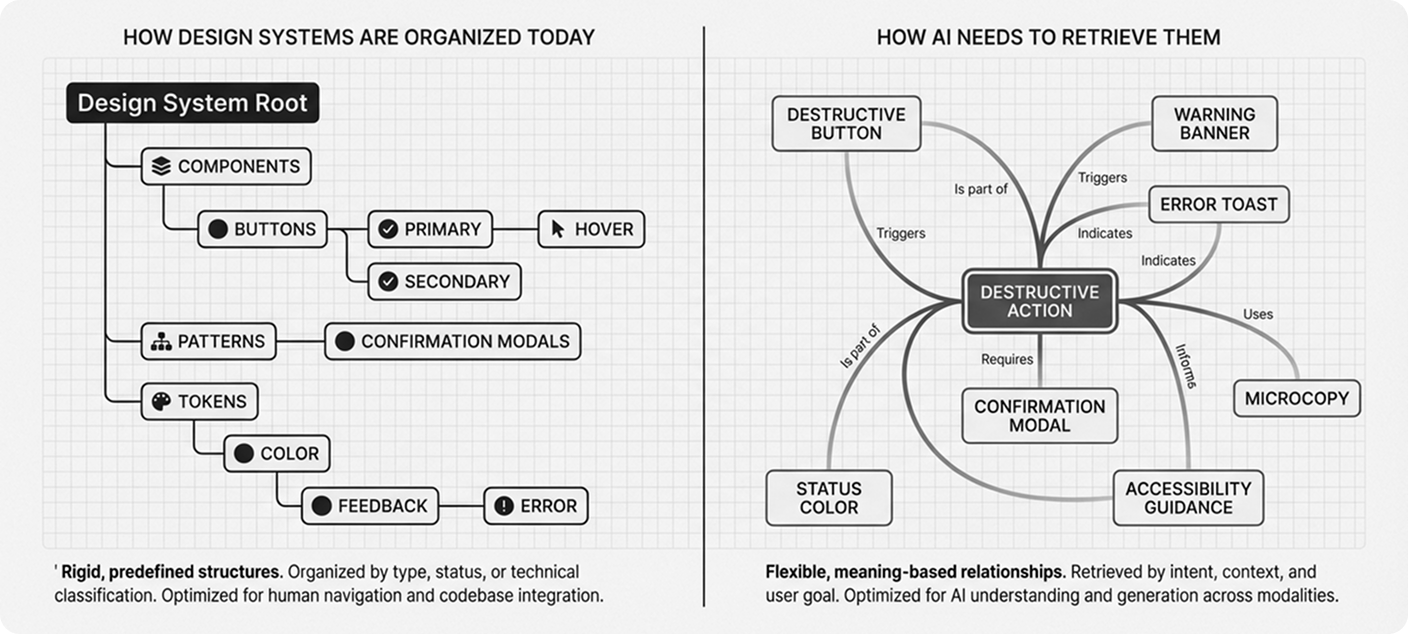
Right now, your design system is probably organized like a SQL database.
You have rigid hierarchies:
Components → Buttons → Primary → Hover State
Tokens → Color → Background → Primary
It’s clean. It’s logical. It works.
But here’s what it doesn’t do: It doesn’t help you find things based on what they mean or why you’d use them.
When a designer asks, “What should I use for a destructive action?” they have to translate that intent into your taxonomy. Is that a “danger button”? A “negative action”? A “warning state”?
You didn’t have to memorize the exact folder structure in your brain. You just had to know the right keywords.
But what if your design system could understand intent?
How Vector Databases Actually Work
Let me show you what I mean.
Vector databases don’t store data in rows and columns. They store meaning as high-dimensional numerical coordinates.
Here’s a simple example:
When you search for “king” in a vector database, it doesn’t just find exact matches. It finds concepts that are semantically similar:
“queen” (same domain, different gender)
“monarch” (same meaning, different word)
“ruler” (related concept)
The database understands that these concepts cluster together in meaning-space.
Now imagine applying that to your design system.
What Changes for Humans
You Can Search by Intent, Not Just by Name
Instead of browsing through component categories, you could ask:
“Show me all patterns that convey urgency”
And your design system would return:
Error messages
Warning banners
Destructive action buttons
Toast notifications with alert icons
Red status indicators
These components live in completely different parts of your taxonomy. But they share semantic meaning.
That’s the power of meaning-based organization.
You Can Finally Solve the “New Component vs. Variant” Debate
I’ve sat through countless design system meetings where teams debate:
“Do we need a new component, or is this just a variant of what we have?”
I’ve seen this firsthand. When you’re looking at a system with 50, 80, even close to 100 components, the overlaps become invisible. Manual audits catch some of them. But naming differences, context differences, and organic growth across teams create duplicates that no spreadsheet review will surface.
Vector logic could actually quantify similarity between components.
Compare two components based on:
Visual embeddings (how they look in Figma)
Code structure (how they’re built)
Token usage (what design decisions they share)
Usage context (where they appear in products)
If two components score high similarity across these dimensions, you probably don’t need both.
You might be wondering, “How accurate is this really?”
That’s fair. But here’s what I’ve learned: You don’t need perfect similarity scores. You need better visibility into what you already have.
Even a rough similarity map helps you spot duplicates that manual audits miss.
What Changes for Agents
AI Tools Actually Know What to Use
Here’s where it gets interesting for agentic design.
Right now, when an AI tool generates a UI, it relies on your component names and descriptions. It’s essentially doing keyword matching.
But with vector-based context retrieval, the AI could understand:
“I’m building a form validation error. What components, patterns, tokens, and accessibility guidelines are semantically related to this task?”
The system retrieves:
Similar error patterns from your existing designs
The correct tokens (not just “red” but “color.feedback.error”)
Accessibility requirements for error announcements
Validation timing patterns
Microcopy guidelines for error messages
All pulled together by meaning, not by manual tagging.
Design Tokens Could Become Behavioral
Traditional tokens store values: color.blue.500 = #3B82F6
Vector-inspired tokens could store behavioral meaning:
How assertive (0.8 on a scale)
How calm (0.2)
How noticeable (0.9)
Now imagine an adaptive interface that reads the user’s context and adjusts its tone.
Picture a checkout flow. The payment fails. Instead of the UI just swapping in a red banner, the entire interface shifts. Visual assertiveness dials down. Calmness increases. The system isn’t just showing an error state. It’s modulating the experience to match the emotional weight of the moment.
A celebration moment? It cranks up energy and noticeability.
The same components, but contextually tuned based on meaning vectors, not just static values.
Components Gain Semantic Elasticity
In agentic systems, context determines behavior.
Take a toast notification. It can:
Confirm a successful action
Warn about a risky operation
Inform about system status
Celebrate an achievement
Right now, you’d handle these with separate variants or different components entirely.
But with vectorized meaning, a single component could adapt based on detected intent.
The system reads the context (”this is a celebration”) and adjusts:
Color intensity
Animation style
Icon selection
Duration on screen
All semantically informed, not hardcoded.
Compare that to manually coding every possible variant upfront. The difference is massive.
The Reality Check
Let me be honest: Most design systems aren’t ready for this yet.
This isn’t because the technology doesn’t exist. Vector databases are mature. Embedding models are accessible.
The challenge is conceptual.
We’ve built design systems around structure: hierarchies, taxonomies, strict naming conventions.
Shifting to meaning-based organization requires rethinking:
How we document components
How we describe patterns
How we train our teams
How AI tools interact with our systems
It’s a fundamental shift from “what is this thing called?” to “what does this thing mean?”
What This Actually Looks Like
You don’t have to rebuild your entire design system around vectors tomorrow.
But you can start thinking differently today.
Here’s what that might look like:
Start with documentation:
Add semantic descriptions to components: “This pattern expresses urgency and requires immediate attention.”
Tag components with intent, not just categories: “confirmation,” “prevention,” “celebration.”
Describe usage contexts: “Use when the user needs reassurance that their action succeeded.”
Experiment with embeddings:
Generate vector embeddings for your component descriptions
Build a simple similarity search
See what clusters emerge naturally
Augment, don’t replace:
Keep your existing taxonomy
Layer semantic search on top
Let both approaches coexist
The next generation of design systems will likely blend:
Token databases (structured facts)
Vector databases (semantic meaning)
Context engines (runtime reasoning)
➡️ That’s how you get agentic design systems. Systems that understand why a component exists, not just what it’s called.
Try This
If you’re ready to experiment, here’s where to start:
Pick 10-20 components from your system
Add a semantic description for each: What’s its purpose? When would you use it? What feeling does it convey?
Use an embedding model (OpenAI’s text-embedding-3-small works well) to generate vectors
Run similarity comparisons between them
Look at what clusters together
You might discover patterns you didn’t know existed.
You might find duplicates hiding under different names.
You might see how your system could be organized by meaning instead of taxonomy.
And that’s when design systems start to get really interesting. 🙃
Next week, I will share more about Agentic Design Systems, my setup, and MCP. ✨
Stay tuned,
Romina
— If you enjoyed this post, please tap the Like button below 💛 This helps me see what you want to read. Thank you.
Want more actionable insights like this? Subscribe & never miss a post! ❤️
💎 Community Gems
Building Effective AI Coding Agents for the Terminal: Scaffolding, Harness, Context Engineering, and Lessons Learned
AI agents suffer from the same problem as large design systems:
Context collapse. A new 55-page paper on terminal coding agents explains why.👇
AI agents in long sessions forget their instructions, bloat their context, and start making bad decisions.
🔗 Link
Comments
Nothing yet. Say the first thing.
Sign in to join the conversation.