
👋 Get weekly insights, tools, and templates to help you build and scale design systems. More: Design Tokens Mastery Course / YouTube / My Linkedin
Today I’m releasing Taste 1.0, a new model specifically designed for design system work.
Key capabilities:
Generates components that match your system’s conventions
Knows when to use
ghostvssecondaryvstertiaryUnderstands your spacing scale, your naming patterns, your anti-patterns
Ships accessibility by default
Never invents a new variant when an existing one works
Availability: today.
The model is a folder of markdown files. 🙃
I knoooow. You were hoping for something with 400 billion parameters and a clever name. But here is the thing:
You ask AI to generate a component. It ships something that looks fine. Then you paste it into your product, and it sticks out. Wrong spacing. Wrong naming. Wrong defaults. Wrong “feel”.
And you think: “I need a better model.”
You probably do not.
You need a “taste layer,” or in other words, an opinionated, structured set of guidelines. The best model in the world does not know what “good or good looking” means at your company. It does not know that you rejected outline buttons in 2025. It does not know that your spacing scale is 4px-based, not 8px. It does not know that color.text.muted it is for helper text, not placeholders.
No model knows this. No model will ever know this.
Unless you tell it.
That is what your set of markdown files can be. Your judgment, decisions, and taste, saved as context.
Two signals that this is where we are heading
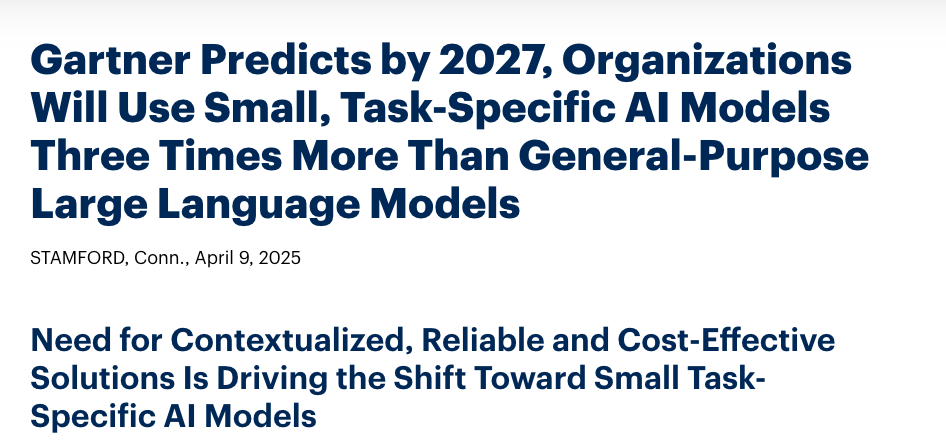
First, Gartner predicts that by 2027, organizations will use small, task-specific AI models 3x more than general-purpose LLMs (Gartner press release).
However, we already moved from “pick a smart model” to “build a smart system”. And please don’t get me wrong, which model you choose still affects what you get in the end.
Model system vs model taste
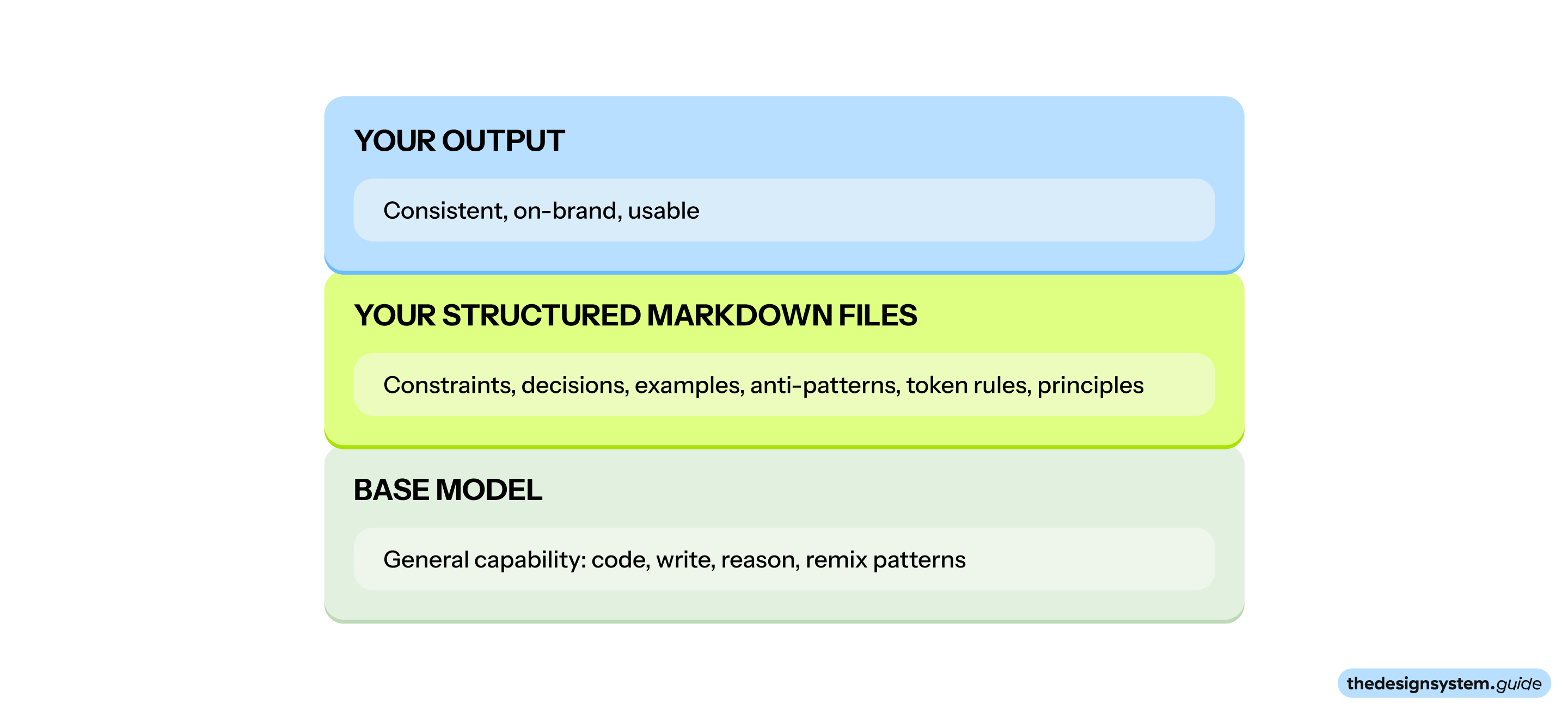
Here is the simplest way I can explain it:
Model system: the base model’s general capability. It can write, code, reason, and remix patterns. (Claude, GPT, Gemini, Llama, etc.)
Model taste: your organization’s judgment layer. It defines what “good” means here. (Your markdown files: ds-core.md, ds-components.md, etc.)
Your taste lives in the files you maintain:
ds-core.mdsays “use semantic tokens, never raw hex”ds-components.mdsays “max 4 variants per component.”ds-tokens.mdsays “we rejected 8px spacing in favor of 4px for density”
These files shape what gets produced and what gets rejected. They act like a conditioning layer on top of the base model.
I know what you are thinking
“Okay, but is this just documentation with a new name?”
Not really. These are opinionated, specific, structured guidelines for building user interfaces.
But here is what changes when you treat it like a system component:
You version it.
You review it.
You prune it.
You enforce it.
You write constraints so people and agents can ship consistently.
Routing is the shift
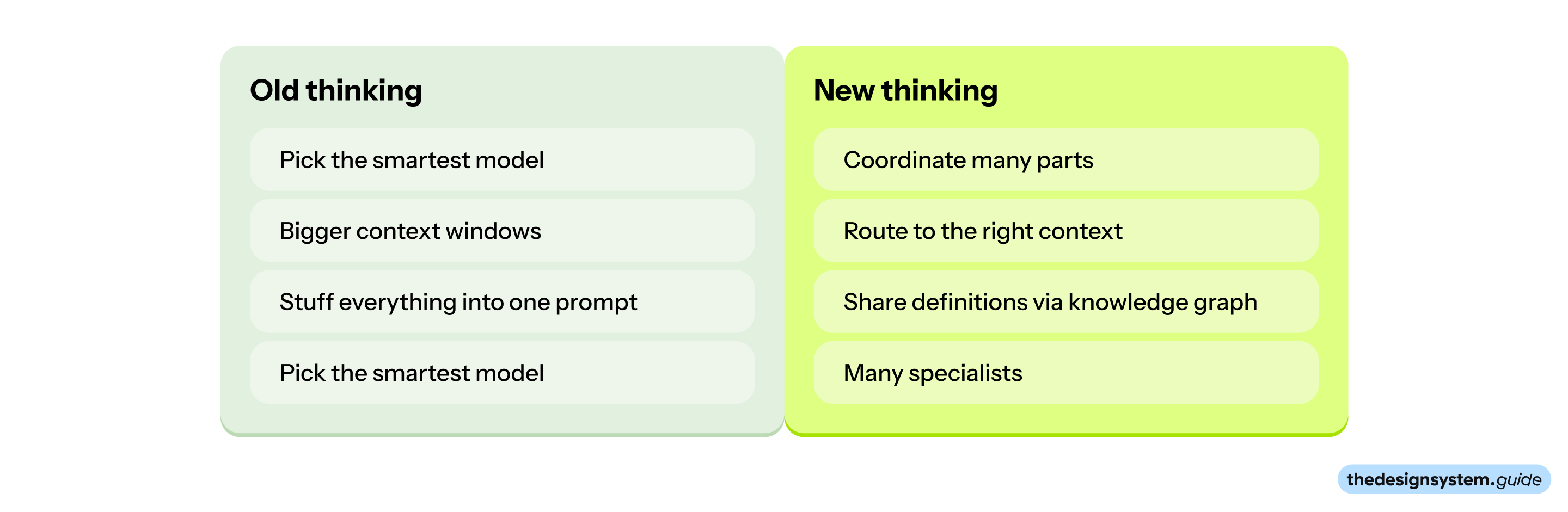
You do not ask every model to solve everything.
You first figure out what kind of problem this is. Then you route it to the right specialist.
Agent workflows need three things:
Routing: decide which specialist should answer.
Memory: keep decisions and context over time.
Specialization: use narrow experts instead of one generalist.
It is all about system design. Ask yourself, “How do we design an intelligent system made of many parts?”
The research backs this up. A 2025 study on instruction-following capacity (IFScale benchmark) found that even the best frontier models only achieve 68% accuracy when given 500 instructions. Most models show one of three degradation patterns:
Threshold decay: near-perfect until ~150 instructions, then sharp decline
Linear decay: steady, predictable drop across the spectrum
Exponential decay: rapid early degradation, then floors at 7-15% accuracy
The takeaway: do not stuff everything into one prompt. Route to specialists with focused context.
Knowledge graph as the glue
When you split work across multiple specialists, you need something that keeps them aligned. That is the knowledge graph.
A knowledge graph is a structured representation of concepts and their relationships.
Think of it like this: instead of a flat list of definitions, you have a map. The map shows what things are, how they connect, and what rules govern their relationships.
In technical terms: nodes (things) plus edges (relationships) plus properties (attributes).
In practical terms: a shared vocabulary that everyone and everything can reference.
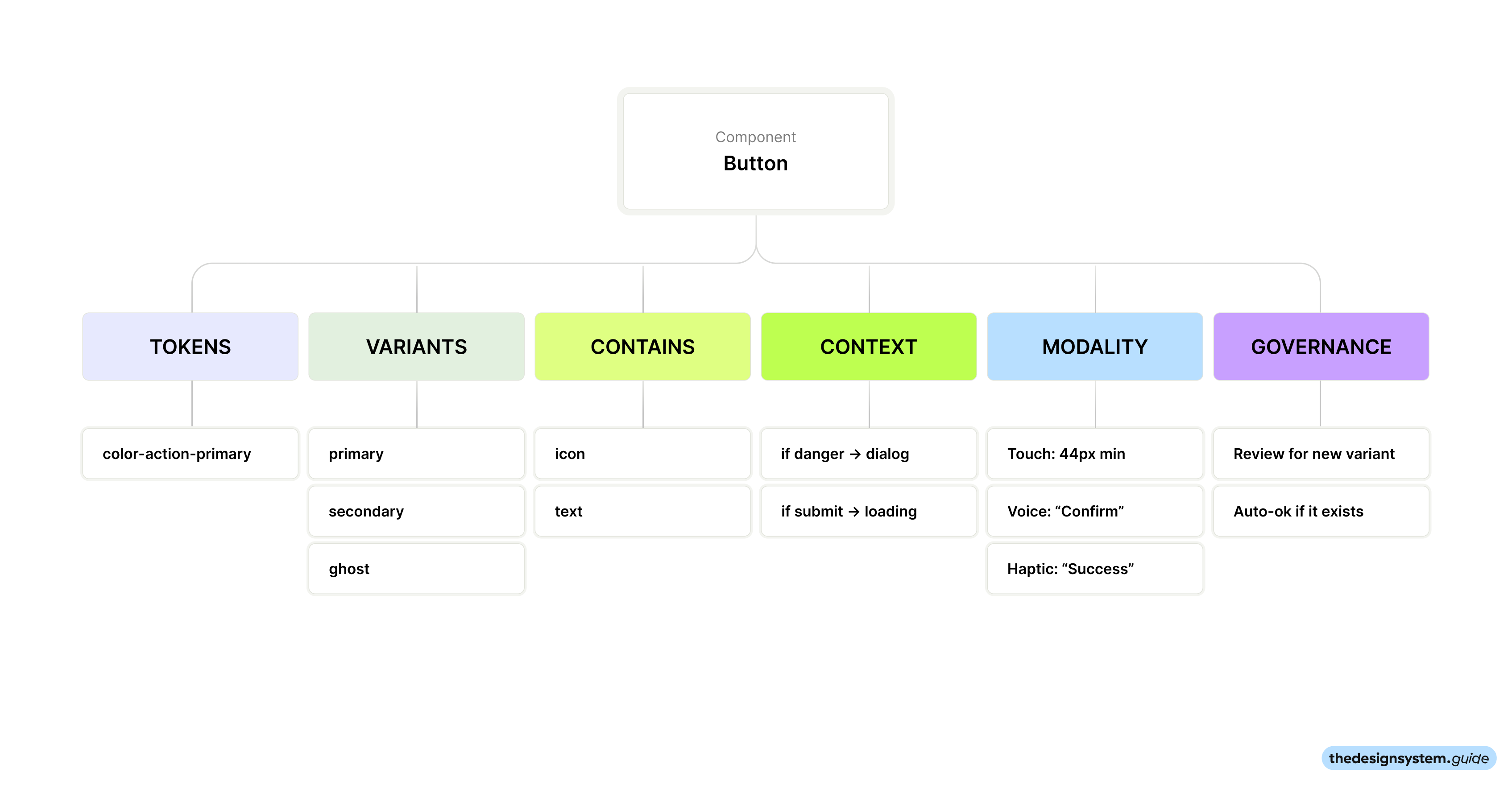
What does this mean for design systems?
For design systems, the knowledge graph answers questions like:
What is a “Button”? What variants exist? What tokens does it use?
What is
color.text.muted? When do you use it? What is it not for?What is a “Card”? How does it relate to “Surface”? Can they nest?
What counts as a “pattern” vs a “component” vs a “primitive”?
Without this, you get drift. One agent generates a GhostButton. Another generates a Button with variant="ghost". A third generates a TextButton. All three think they did the right thing.
With a shared knowledge graph, every specialist checks the same source before generating. They use the same names, the same relationships, the same constraints.
How is this different from regular documentation?
Regular documentation describes things. A knowledge graph connects things.
For example:
“Use muted text for secondary content” → color.text.muted → applies to → helper text, timestamps, captionsThe key difference: a knowledge graph makes relationships explicit. An agent can traverse it. “What tokens does Button use?” “What components can go inside Card?” “What is the difference between muted and secondary?”
What should you put in your design system knowledge graph?
Design systems are evolving into intelligent context-aware systems.
Start with the foundation layers, then build toward the future.
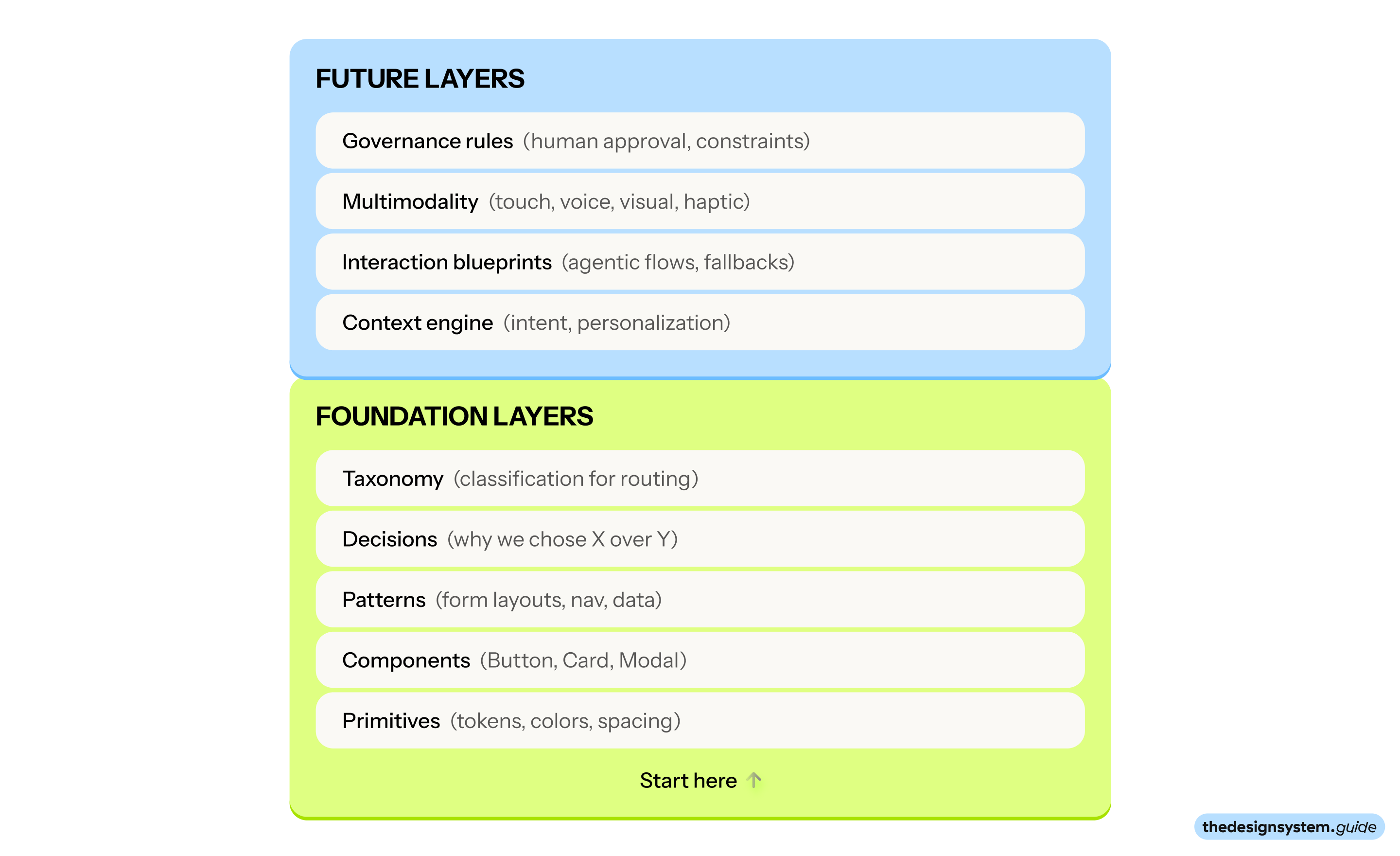
Foundation layers (what you need today)
1. Primitives
The lowest-level building blocks.
Colors (and their semantic mappings)
Spacing scale (and when to use each step)
Typography scale (and what each level is for)
Radius, shadow, motion tokens
Example:
- Always use Tailwind CSS defaults
- Never use primitive design tokens on components
2. Components
The UI building blocks.
Name, variants, states
Which tokens each component uses
Composition rules (what can go inside, what cannot)
Accessibility requirements
- Check existing components before creating new ones
- Never hardcode colors
- Always check Storybook (link/token)
- Always check Figma UI kit (link) via Figma MCP
- Always check Gitlab (link)
- and so on ...
3. Patterns
Combinations of components that solve recurring problems.
Form layouts
Navigation patterns
Data display patterns
Empty states, loading states, error states
- Always include one call to action
- Follow these rules for combining components (XY)
4. Decisions
The “why” behind everything.
Why we chose X over Y
What we tried and rejected
When to break the rules
5. Taxonomy
The classification system that makes routing work.
design vs engineering
tokens vs components vs patterns
new work vs existing pattern
Future layers
These are the layers that turn a design system into an experience system.
6. Context engine
How the system adapts to who is using it and what they need.
Intent detection rules: what signals indicate the user wants X vs Y?
Personalization mappings: user type → defaults, density, complexity
Platform adaptation: web vs mobile vs embedded vs voice
Locale rules: what changes per region, language, or market?
Brand adaptation: how does the same component express different brands?
Example entry:
Intent: user wants to delete something
- Signals: clicked delete icon, selected items + pressed backspace, said "remove"
- Response pattern: show confirmation dialog (AlertDialog, not Dialog)
- Modality options: visual confirmation, haptic feedback on mobile, voice confirmation
- Escalation: if bulk delete > 10 items, require explicit confirmation
7. Interaction blueprints
Agentic flows and adaptive behaviors.
Flows that shift based on user behavior (not just screen size)
Proactive assistance patterns: when does the system offer help?
Fallback rules: what happens when intent is unclear?
Handoff patterns: when does the system escalate to a human?
Example entry:
Flow: onboarding
- Adaptive rule: if user skips 2+ steps, offer "skip to dashboard" option
- Proactive assist: if user pauses > 10 seconds on a field, show tooltip
- Modality switch: if voice detected, offer voice-guided onboarding
8. Multimodality mappings
One intent, expressed in the best way for the context.
Touch, visual, audio, voice, gesture
Haptic, text, ambient, motion
Which modality is primary vs fallback for each intent?
How do modalities combine?
Example entry:
### Action: confirm destructive action
- Visual: red button + confirmation dialog
- Voice: "Are you sure you want to delete [item]?"
- Haptic: warning vibration pattern before confirm
- Fallback order: visual → voice → haptic
9. Governance rules
How the system stays aligned at scale.
Which decisions require human approval?
Which outputs get auto-validated vs flagged for review?
What are the hard constraints that never bend?
How do you handle conflicts between agents?
You do not need fancy tooling to start
Start with markdown that acts like one:
Design Specs:
Colors:
- Background: #3B82F6 (primary), #FFFFFF (secondary)
- Text: #FFFFFF (primary buttons), #1F2937 (secondary buttons)
- Border: #E5E7EB (1px)
- Focus ring: #3B82F6 with 2px offset
Typography:
- Font family: Inter
- Font size: 14px (small), 16px (medium), 18px (large)
- Font weight: 500 (medium), 600 (semibold for primary)
- Line height: 1.5
Spacing:
- Padding: 8px 16px (small), 12px 24px (medium), 16px 32px (large)
- Gap between icon and text: 8px
- Minimum height: 32px (small), 40px (medium), 48px (large)
Visual effects:
- Border radius: 6px
- Box shadow: 0 1px 2px rgba(0,0,0,0.05)
- Hover: darken by 10%, lift shadow to 0 2px 4px rgba(0,0,0,0.1)
- Transition: all 150ms ease
This is not as powerful as a real graph database. But it gives you 80% of the benefit: shared definitions, explicit relationships, and a single source that agents can reference.
Why this matters for multi-agent systems
When you have a single model doing everything, you can embed context into a single prompt.
When you have many specialists, that breaks down. Each specialist sees a slice. If they do not share definitions, their outputs conflict.
The knowledge graph is the glue:
All specialists reference the same definitions
Outputs stay semantically aligned
The system scales without drift
Without it, small models drift. Outputs contradict each other. Your system falls apart.
With it, models stay modular and coherent.
Binary tree routing: a mental model that makes this click
Think of routing like a decision tree. Each step narrows the problem.
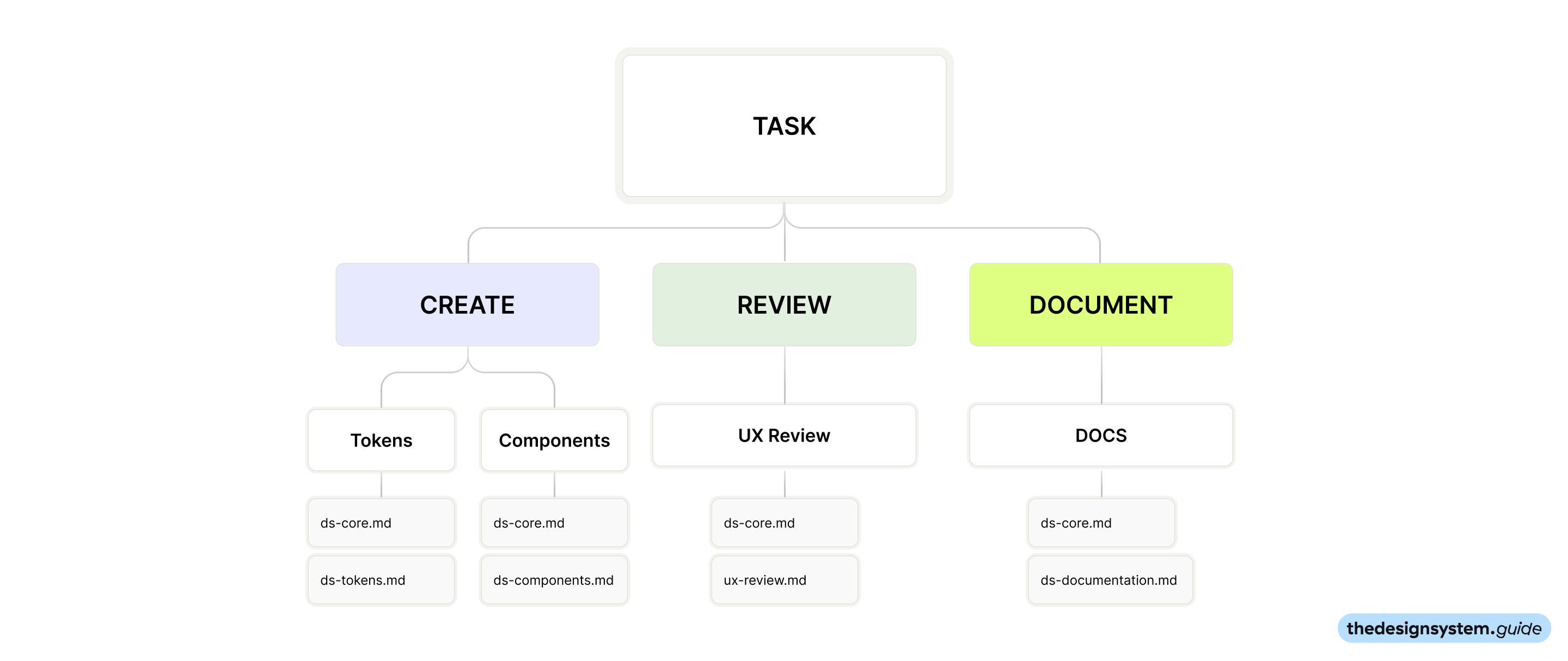
Every decision reduces complexity until you hit the right specialist.
This is why small models work. They do not need to understand everything. They only need to understand their slice.
So, what I mean by “markdown is an additional model”
I mean, it behaves like a conditioning layer:
It constrains behavior. It tells the system what “good” looks like.
It compresses decisions. It prevents re-litigating the same debates.
It generalizes across tasks. UI, copy, naming, motion, tokens, component APIs.
It stays cheap to update. You edit a file. You do not retrain a model.
The taste kit: a folder of markdown files
Here is the key insight: if you are heading toward multiple specialists doing small things, your context files should mirror that.
Do not put everything in one giant CLAUDE.md.
Create multiple markdown files, each specialized for a specific design system task. When you route a task to a specialist, you give it only the context it needs.
The folder structure
.cursor/
├── ds-core.md           # Shared foundations (tokens, principles, stack)
├── ds-components.md     # Component creation and modification
├── ds-tokens.md         # Token decisions and naming
├── ds-prototyping.md    # Rapid prototyping rules
├── ds-ux-review.md      # UX review checklist and criteria
├── ds-documentation.md  # Writing component docs
├── ds-migration.md      # Migrating legacy patterns
└── ds-accessibility.md  # A11y requirements and testing
Each file is specific. Each file gets loaded only when relevant.
File 1: ds-core.md (shared foundations)
This is the only file every specialist sees. Keep it short.
# Design system core
## Stack
- React + TypeScript
- Tailwind CSS with design tokens
- Radix primitives for accessible components
## Principles (in priority order)
## Token rules
## Naming
File 2: ds-components.md (creating and modifying components)
Load this when the task is “create a component” or “add a variant”.
# Component creation rules
## Before creating a new component
## Component structure
## Variant rules
## Composition
## Anti-patterns
File 3: ds-tokens.md (token decisions)
Load this when the task involves tokens, theming, or color decisions.
# Token rules
## Naming convention
Examples:
## When to create a new token
## When NOT to create a token
## Token relationships
## Decisions log
File 4: ds-prototyping.md (rapid prototyping)
Load this when speed matters more than polish.
# Prototyping rules
## Goal
## What to skip
## What to keep
## Prototype checklist
## Output format
File 5: ds-ux-review.md
You can specify how to create automated screenshots, review work, review colors, etc.
# UX review criteria
## Consistency check
- [ ] Uses existing components (not custom implementations)
- [ ] Uses semantic tokens (not hardcoded values)
- [ ] Follows established patterns (not inventing new ones)
- [ ] Matches existing density and spacing rhythm
## Interaction check
- [ ] Interactive elements have visible focus states
- [ ] Destructive actions use confirmation dialogs
- [ ] Loading states use skeleton patterns
- [ ] Error messages appear near the action
## Accessibility check
- [ ] Color contrast meets WCAG AA (4.5:1 for text)
- [ ] Interactive elements are keyboard accessible
- [ ] Icon-only buttons have aria-label
- [ ] Form inputs have visible labels
## Content check
## Red flags (block the PR)
File 6: ds-documentation.md (writing component docs)
Load this when documenting components.
# Documentation rules
## Every component needs
## Writing style
## Props table format
## Do not include
The workflow: propose, route, generate, validate
If you want this to work in real teams, you need a repeatable workflow.

Step 1: Propose the intent
Write a short intent plus constraints in the PR description. One paragraph max.
Step 2: Route it
Decide which specialist should answer.
Start with a simple taxonomy:
design / engineering
tokens / components / content
new pattern / existing pattern
Step 3: Generate with constraints
Give the specialist the minimum context it needs:
ds-core.md(always)the task-specific file (
ds-components.md,ds-ux-review.md, etc.)one canonical example if relevant
Step 4: Validate
Check the output against your rules:
Does it use the right tokens for the right reason?
Did it introduce a new variant?
Does it follow your naming and composition patterns?
Does it ship accessibility by default?
Step 5: Capture the decision
If you accept a new pattern, write down why.
If you reject it, write down the rejection rule.
This is how taste compounds instead of resetting every quarter.
Where to start
Start with two files and one task.
Understand what a consistent, accessible, coherent UI looks like
Know when to say NO to a new variant
Capture decisions so taste compounds
Evaluating output against real standards, not just “does it work?”
Here is a 60-minute plan:
Create
ds-core.mdwith your stack, principles, and token rules. Keep it under 30 lines.Pick your most common task. Component creation? UX review? Prototyping?
Create the matching task file. Start with
ds-components.mdords-ux-review.md.Run one generation using only those two files as context.
Review the output. What did it get right? What rule was missing?
Then iterate. Add one file per week as new tasks come up.
Pro tip: If you use Claude Code, start with Plan Mode. It reads your codebase and markdown files before generating anything. This is exactly the “route first, then execute” pattern. Let it analyze your context files, propose an approach, then generate. You will catch misunderstandings before they become wasted code.
In short
You do not win in 2026 by picking the smartest model. You win by designing the system around it: routing, memory, specialization, and a shared source of truth.
Markdown is one of the fastest ways to build a taste layer that scales.
You got this.
Enjoy, Romina 🙌
Related read
🔗 Gartner predicts by 2027, organizations will use small task-specific AI models three times more than general-purpose large language models - Gartner press release on the shift toward smaller, task-specific models.
🔗 How to Write Good AI Agent Specs by Addy Osmani - Practical guide on structuring specs for AI agents, with emphasis on modular context and clear boundaries.
🔗 How Many Instructions Can LLMs Follow at Once? - Research showing instruction-following degrades significantly as instruction count increases.
— If you enjoyed this post, please tap the Like button below 💛 This helps me see what you want to read. Thank you.
Want more actionable insights like this? Subscribe & never miss a post! ❤️
💎 Community Gems
Hackathon
February 6-8 2026 - Online
I am part of the jury and will also help you to hack faster ;) See you there. 😊
🔗 Link
Comments
Nothing yet. Say the first thing.
Sign in to join the conversation.