
Hey Builders👋,
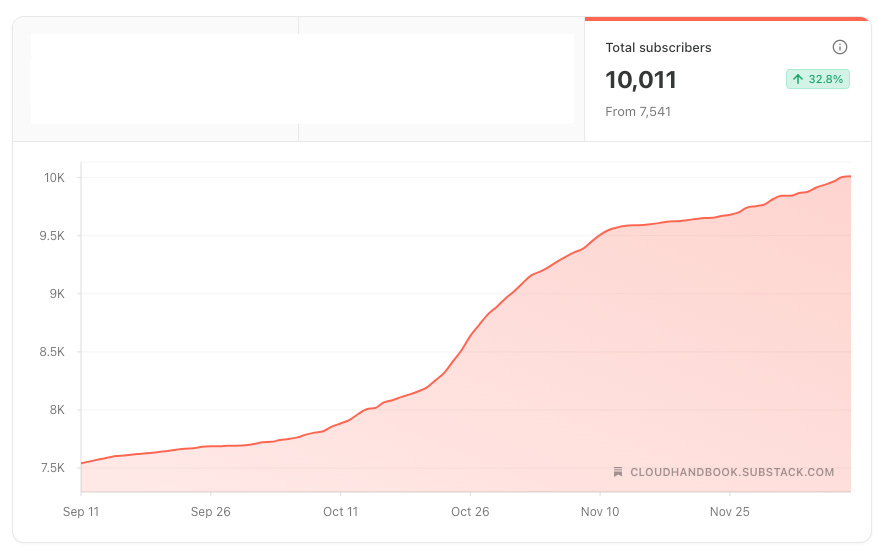
We crossed 10,000+ subscribers this week. And I wanted to take a moment to celebrate with you all.🥳
Thank you for reading The Cloud Handbook and supporting my work.
Also, I get asked a lot about AWS credits, exam vouchers, and resources. Although I am unable to help every one of you, I am giving away $500 AWS Credits to one lucky paid subscriber (only). This way, I can ensure you are serious about learning and building. The winner will be announced in two weeks from now.
Let’s talk about my upcoming book now.
When I first started learning cloud, one thing I struggled a lot with was Linux. Linux is a must-have skill for cloud builders like us.
More than 90% of cloud runs on Linux. No matter what, you can not skip Linux in the Cloud.
The book is titled Linux Essential for Cloud — Enough Linux to Excel in Your Cloud Career.
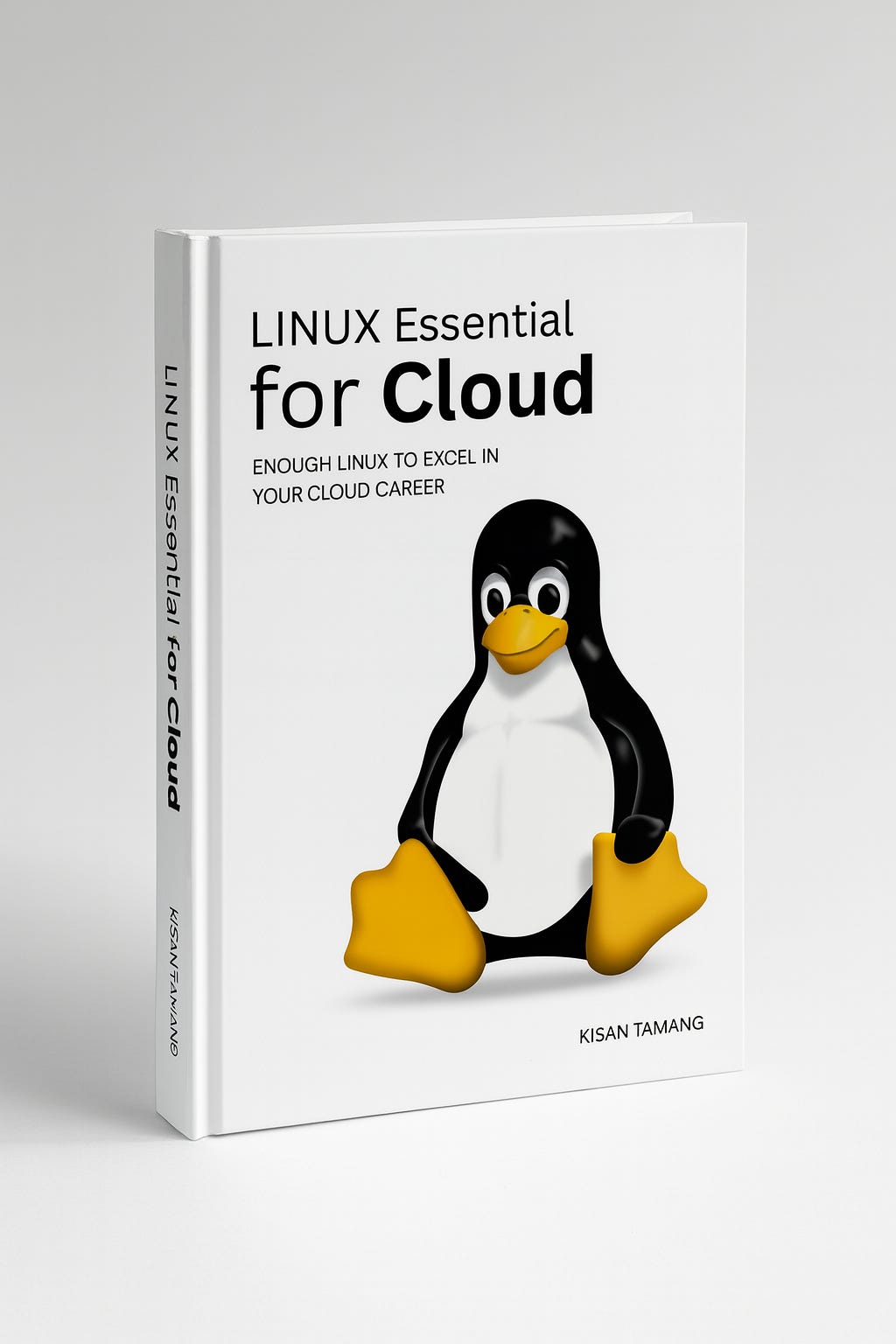
So far, we are making so much progress in the book. I am aiming to launch it by the end of December and am looking for advice and feedback from you.
Here are the skills I expect you to learn from this book. These are the non-negotiable Linux skills for Cloud Builders:
Comfort with Linux Terminal
Package Management
System Services and Daemon
Networking Fundamentals
User, Group, and Permission Management
Storage and File System in Linux
Logs and System Monitoring
Shell Scripting
Working with Git and SSH
Container and Linux Internals
Security Best Practices
The book is very brief and skips most of the advanced part. I have written this book to be more practical rather than too theoretical.
Here’s the first look at the Table of Contents.
Your feedback helps shape this book.
1.1 What is Linux? – The operating system powering cloud environments.
1.2 Why Linux Dominates the Cloud – Stability, security, and open-source culture.
1.3 Linux Distributions Explained – Ubuntu, Amazon Linux, CentOS, and others.
2.1 Using Linux on Your Local Machine – WSL, VM, or dual boot.
2.2 Spinning Up a Cloud Server (EC2) – Beginner-friendly AWS setup.
2.3 Connecting to Linux Servers (SSH Basics) – Cloud-native login workflow.
3.1 The Command Line Interface (CLI) – How the shell works.
3.2 Essential Commands (ls, cd, pwd, mkdir, rm…) – Everyday operations.
3.3 File and Directory Structure – /home, /var, /etc, /tmp, and cloud importance.
3.4 Working With Files (nano, vim, cat, grep) – Reading and editing logs, configs.
4.1 User & Group Management – Adding engineers, automation accounts.
4.2 Permissions & Ownership – chmod, chown, umask, and cloud security.
4.3 Sudo & Privilege Management – Least privilege and secure operations.
5.1 Understanding Linux Processes – Foreground, background, daemons.
5.2 Monitoring Tools – top, htop, ps, systemd.
5.3 Troubleshooting Performance – CPU, RAM, disk, network bottlenecks.
6.1 APT, YUM, DNF Basics – Installing and updating software.
6.2 Managing Dependencies – Real-world cloud use cases.
6.3 Hardening & Patching Servers – Security patching for production.
7.1 Understanding Volumes & Partitions – Cloud storage concepts.
7.2 Mounting & Managing Filesystems – ext4, xfs, nfs.
7.3 AWS Examples: EBS, Instance Store, S3 Mounting – Practical cloud workflows.
8.1 IP Addressing, DNS, Routing – Concepts every cloud engineer must know.
8.2 Using Network Tools (ss, netstat, curl, ping) – Testing connections.
8.3 Firewall Basics (ufw, iptables) – Securing cloud instances.
8.4 AWS Examples: Security Groups, VPC Flow Logs – Cloud-native networking.
9.1 Understanding Linux Logs – auth, syslog, app logs.
9.2 Using journalctl, dmesg, tail – Root-cause analysis.
9.3 Shipping Logs to the Cloud – CloudWatch, ELK, OpenSearch basics.
10.1 Bash Scripting Basics – Variables, loops, conditions.
10.2 Automating Linux Tasks – Backups, updates, checks.
10.3 Writing Scripts for Cloud Automation – EC2 bootstrap scripts, logs.
11.1 Installing & Using Git on Linux – Core commands.
11.2 SSH Keys & GitHub – Secure authentication.
11.3 Version Control in Cloud Projects – IaC, configs, deployments.
12.1 Why DevOps Needs Linux – Servers, pipelines, automation.
12.2 CI/CD on Linux – GitHub Actions, GitLab, CodePipeline examples.
12.3 Deploying Code to Linux Servers – Blue-green & zero-downtime basics.
13.1 How Containers Use Linux – Namespaces, cgroups.
13.2 Docker Installation & Basics – Images, containers, volumes.
13.3 Running Apps in Containers – Cloud-native workflows.
14.1 Why Kubernetes Needs Linux – Nodes, pods, networking.
14.2 k3s & Minikube Setup – Beginner-friendly cluster.
14.3 Deploying Workloads to Kubernetes – Simple hands-on example.
15.1 SSH Hardening, Key Management – Avoiding security breaches.
15.2 Firewall Rules & Server Isolation – Defense in depth.
15.3 CIS Benchmarks & Cloud Best Practices – Compliance basics.
16.1 Spot Instances, Right-Sizing, Auto-Tuning – Linux performance impacts.
16.2 Storage Optimization – Clean logs, reduce unused volumes.
16.3 Efficient Compute Usage – CPU scaling and monitoring.
17.1 Project Overview – Simple app + EC2 + Nginx + database + logging.
17.2 Deploy EC2 and Configure Linux – SSH, users, firewall, packages.
17.3 Deploy and Configure Nginx – Reverse proxy, SSL.
17.4 Connect to a Managed Database – RDS example.
17.5 Containerize the App – Build, push, deploy.
17.6 Set Up Observability – CloudWatch logs, metrics.
17.7 Automate Deployment – CI/CD pipeline.
17.8 Optimize & Harden – Security and cost tips.
18.1 Fixing SSH Issues
18.2 Fixing Disk/Storage Alerts
18.3 Fixing High CPU/Memory
18.4 Fixing Network Connectivity Problems
Although these are the topics I have covered so far, I will be editing heavily, so there might be changes in the final version. I would love to hear your feedback on what should be added, removed, and so on. Feel free to reply to this email, comment below, or DMs.
Thanks for reading. See you at the next one. Keep learning and building.
Thanks for reading The Cloud Handbook! This post is public, so feel free to share it.
📦 Containers vs 🔲 VMs
·
August 5, 2025
When working in the cloud, there are two technologies you can not miss. And these two technologies absolutely dominate Cloud. They are containers and virtual machines (VMs).
💰19 Ways to Cut your Cloud Cost in Half!
·
November 27, 2025
Is your company bleeding in cloud bills? You’re not alone. Public cloud waste in 2025 is typically estimated at 20–30% of total cloud spend, with some surveys and models suggesting even higher waste in many organizations.
Linux Essentials for Cloud — Part 1
·
August 12, 2025
Hi—this is Kisan from The Cloud Handbook. Each week I share about Cloud, DevOps, System Design deep dives and technologies around it. If you have not subscribed yet, you can subscribe here.
How to Become an AWS Community Builder.
·
December 4, 2025
This guide provides how I became an AWS Community Builder, how it changed my career and life, and how you can become one. I am providing 1:1 guidance to my paid subscribers.
Comments
Nothing yet. Say the first thing.
Sign in to join the conversation.