
Written by Ameya Khare and Justin Lu
At Airtable, we’ve built an agentic framework that powers all of our AI features, including Omni, our conversational app builder, and Field Agents, which are AI-powered fields that can autonomously gather insights and create content within an Airtable base. These agents are capable of reasoning, planning, and orchestrating actions to accomplish complex tasks with minimal input. In this post, we’ll take you under the hood to explore the architecture that makes this all possible.
Background
In 2024, Airtable launched its first AI product, the AI field, enabling users to dynamically generate content from their data using generative AI. The introduction of the AI field was quickly followed with additional AI features, like AI in automations, AI-generated select options, and AI formula generation. Most recently, we relaunched Airtable as an AI-native app platform, introducing AI agents that can automate thousands of hours of work in seconds.
While the original AI capabilities above were great for a variety of simple use cases, they were incapable of reasoning through problems that required dynamic decision making or retrieving additional data beyond what had been provided upfront. For example, Airtable couldn’t perform more complicated tasks like fetching data from the internet or a base, analyzing data in a base, or building interfaces.
Additionally, we wanted to create a way for users to engage with AI, provide feedback, and ask follow-up questions through a more conversational interface. To accomplish this, we needed to build a system that could ingest a user’s request and take any necessary actions to drive it to completion.
Agent architecture
Based on the requirements above, we came up with a few necessary features for our agentic framework. We needed our agent to be able to remember information, perform predefined actions, and autonomously decide which of those action(s) were needed to accomplish the user’s request.
We built our agent as an asynchronous event-driven state machine. The agent would consume and process events; for each event type, a specific component would handle that event. To this end, we created three main components:
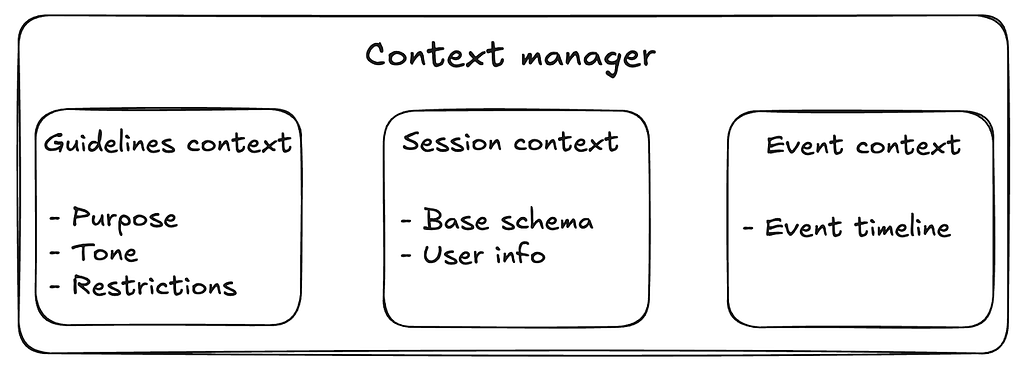
- The context manager maintains all of the information accessible by the agent to accomplish the user’s task. It’s responsible for ‘remembering’ guidelines context (instructions for tone and purpose), session context (Airtable base, workspace, interface, or currently visible page), and event context (chronological list of events).
- The tool dispatcher exposes tools (predefined actions) to the agent and runs tools when requested.
- The decision engine takes in all of the context from the context manager and decides the next step to take in the agent loop. This is the ‘brain’ of the agent and dictates the control flow via an LLM, human-in-the-loop, or a fixed workflow.
Agent state machine
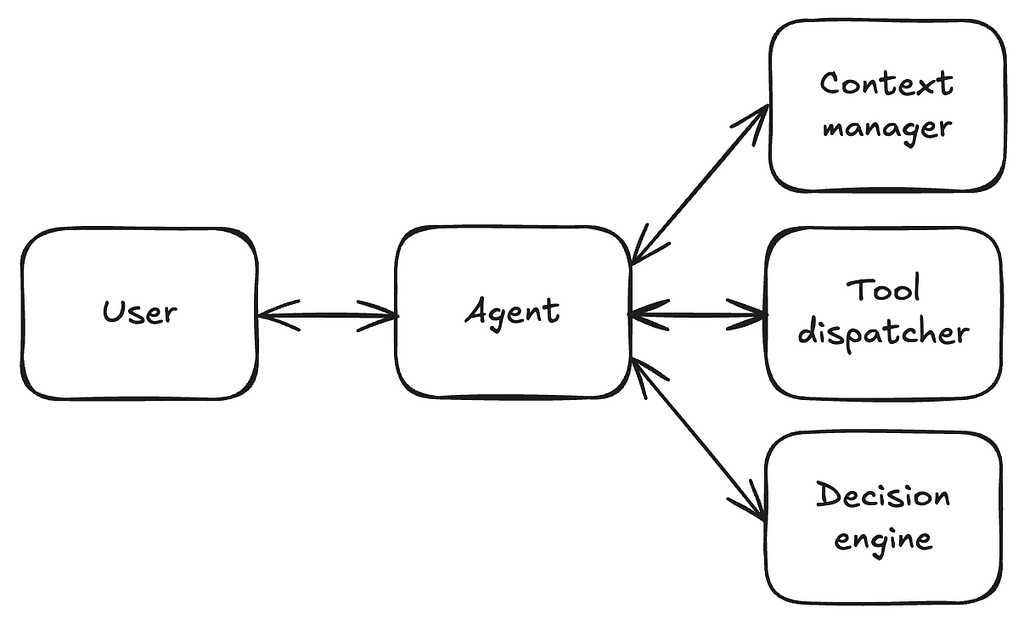
The agent consumes events, writes these events to the context manager, and then triggers the appropriate handler for the event. It’s responsible for keeping things ‘moving along’ during the agent loop. We refer to the full cycle of events from the user’s initial prompt to the final response as an interaction.
Events
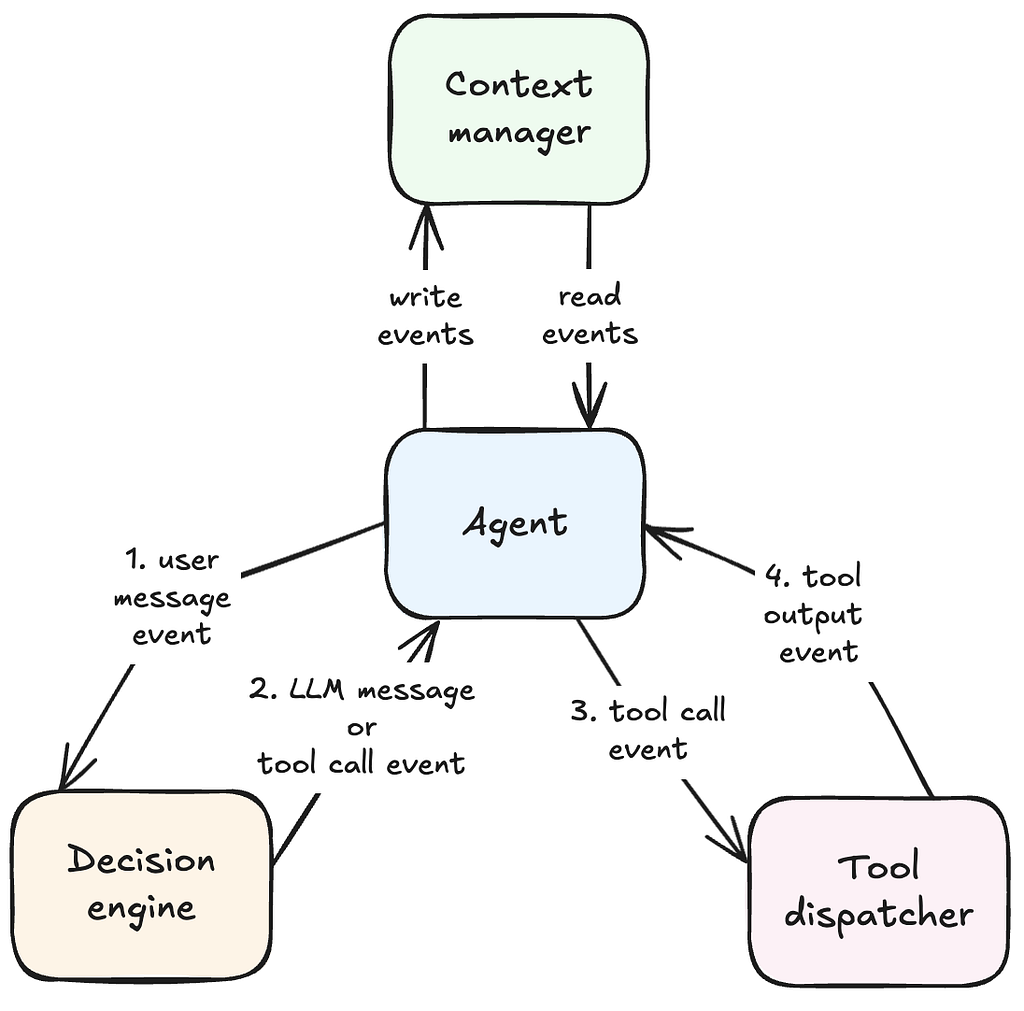
There are a few main events that the agent consumes and passes to the appropriate components:
- A user message event is produced by the user sending a message into the interaction. This triggers the decision engine to call the backing LLM to decide what step to take next.
- A tool call event is produced by the decision engine when the backing LLM decides to run a tool to accomplish the user’s request. This triggers the tool dispatcher.
- A tool call output event is produced by the tool dispatcher when it finishes executing a tool. This again triggers the decision engine to call the backing LLM.
- An LLM message event is produced by the decision engine when the backing LLM produces a final output message. This ends the agent loop.
Context manager
The agent’s behavior is driven by the context that it’s given. The context represents the ‘world’ that the agent can see, manipulate, and use in its decision-making process. The agent uses different types of context that each serve their own purpose.
Guidelines context
Guidelines are instructions that the user has specified to customize the behavior of the agent. This can include the purpose of the agent (e.g. “You are an agent that analyzes call transcripts”), the tone of the agent (e.g. “Be concise and to the point”), or restrictions on how the agent operates (e.g. “Only respond in French”).
Session context
Session context contains information that is relevant for the current base and the current user.
Base context is more static, and is relevant to all users who might be using an agent in a base. This includes (but is not limited to):
- Tables
- Columns in each table
- Interfaces and pages
User context includes things that are specific only to the current user. This includes (but is not limited to):
- The user’s active view (e.g. page, selected column, timezone)
- Name and email
- Role and permissions
Session context is essential in ensuring that an agent can produce high-quality responses. Users may not be specific in their requests to an agent; for example, their request could be, “Show me the projects at risk”. The agent can only produce a valid response if it knows that there is a table called “Projects” with a column named “Status” that has a select option named “At Risk”.
Event context
The agent’s fundamental unit of operation is the event. The user submits a message which causes the agent to start the agent loop, and more events are produced until there’s a terminal event. As these events get produced, they get added to the context manager. These events serve two purposes: they are consumed by the agent to decide the next step in the agent loop and they maintain a history of the interactions that are rendered to the user.
Decision engine
The decision engine is the “brain” of the agent, backed by an LLM. It executes the following steps each time it is invoked:
- Serializes context into LLM provider API objects (OpenAI, Anthropic, etc.)
- Invokes the LLM provider inference APIs
- Parses the response. If the LLM invokes tools, we emit a tool call event. Otherwise, we emit an LLM message event containing a final response
Serialization
Before the decision engine can invoke provider APIs, we must convert context and events into the message formats expected by the provider APIs.
There are three different types of messages that most AI providers expose:
- User messages: these are messages triggered by an end user
- Assistant messages: these are messages produced by the provider
- System messages: top-level directives that help guide the LLM toward its final response
Guidelines and session context are converted into system messages. Event context gets serialized as user and assistant messages, as these represent back-and-forth interactions between the user and the agent.
Tool dispatcher
The tool dispatcher runs tools requested by the decision engine. When the tool call is finished running, the tool dispatcher sends a tool call output event to the agent. Depending on the agent’s purpose, the tool dispatcher exposes a different set of pre-defined tools.
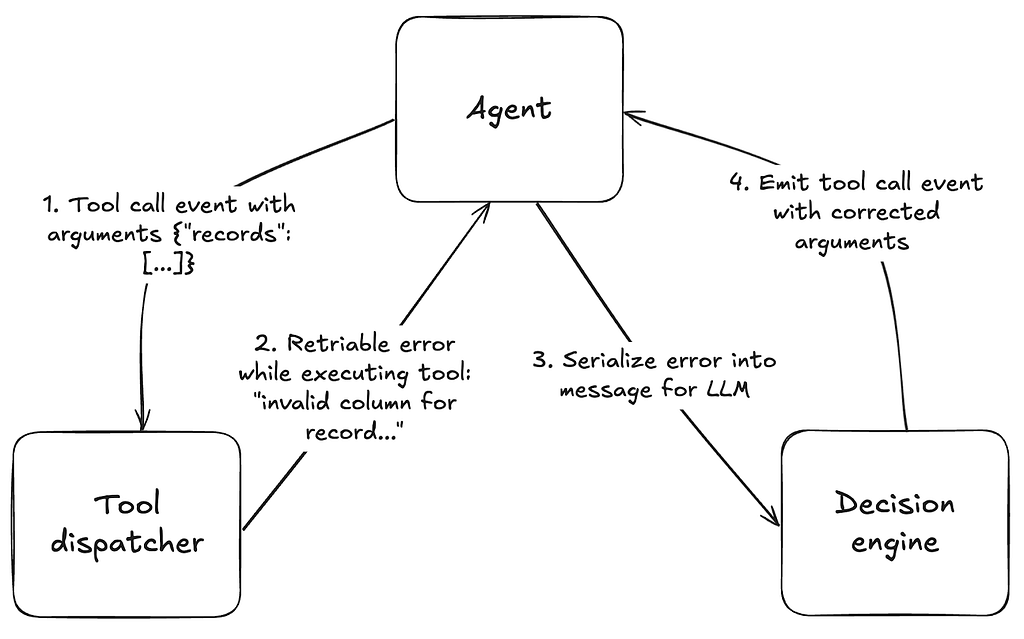
Error handling is essential in ensuring that agent loops can self-correct and users can understand why the agent failed. All tools at Airtable return errors that include the following information:
- Whether the error is retriable or not; if not, it ends the agent loop
- A helpful message to expose to the decision engine (LLM) if the error is retriable
- A user-visible error message
Tool call output events trigger the decision engine, and the tool call failure information is passed back to the LLM. In most cases, with a descriptive error message, the LLM can self-correct and re-run the tool with different arguments, or provide the user with a reason as to why their request failed.
Handling large context
One challenge that we’ve faced is ensuring that all the context can fit into an LLM’s context window. These context windows have finite limits and as a result, we must sometimes select the most relevant context to forward to the LLM. There are a few different heuristics we use in our agent framework.
Trimming
Trimming is a general strategy that removes content from the context before forwarding it to the LLM.
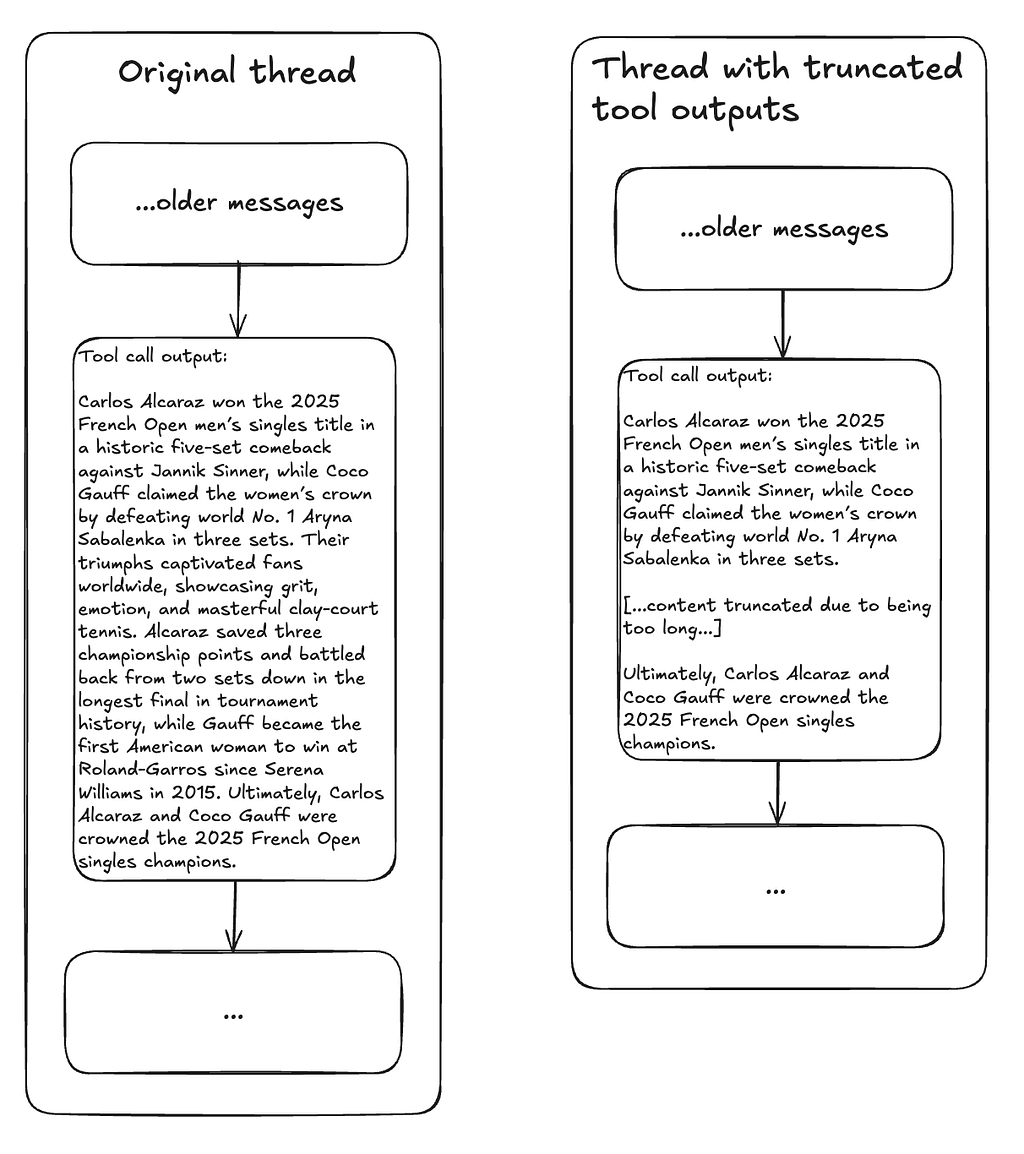
Truncating tool responses
Tool calls may result in large outputs; for example, when we search the internet, the output may contain a lot of redundant or unnecessary information. Given that tool call outputs for older interactions may not be as relevant, we truncate these first. For the tool outputs that we truncate, we remove the middle portion because LLMs typically weigh the beginning and end of messages more heavily. [1]
Removing older messages
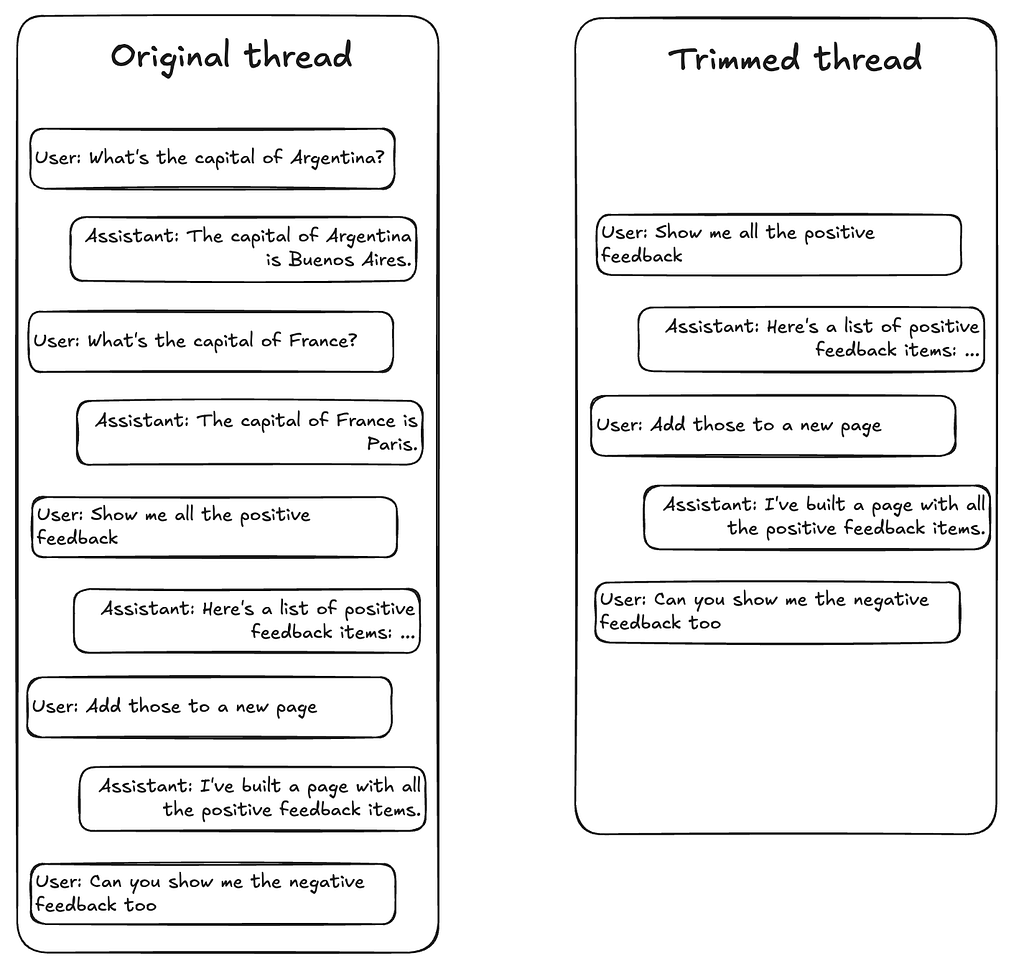
If a message conversation gets too long and we’re unable to truncate the tool call output, we’ll start removing messages from earlier in the thread, as these are less likely to be relevant. While this may mean the agent can’t accurately answer questions about earlier interactions, the user is often referencing more recent interactions.
Filtering base schema
For large bases, the base schema consumes a large majority of the context size. We’ve employed a few strategies to reduce the size of the schema:
- Remove irrelevant IDs. Certain IDs are never referenced by the LLM, and so it’s unnecessary to keep them in the context. IDs are randomly generated and consume many tokens.
- Alias necessary IDs. We shorten alphanumeric strings to reduce token usage; using this method results in ~15–30% reduction in tokens, inference latency, and cost depending on the AI model.
- Remove columns. If there are many columns, we’ll start removing columns from tables that the user isn’t currently interacting with. We try to retain as many columns as possible, including the primary column and foreign linked columns.
- Remove tables. If there are too many tables for the LLM’s context window, we’ll iteratively remove them from the schema, except for the table that the user is currently looking at.
Summarization
We can use LLMs to summarize content and minimize removal of relevant information.
For example, for large bases, asking a question such as, “Analyze the sentiment across all the feedback” would require us to pull in content from all records into the LLM. Instead, we divide the records amongst many different LLM calls, have each LLM call perform the request on its set of data, and aggregate the results using another LLM with a summarization prompt, producing what is effectively a ‘summary of summaries.’
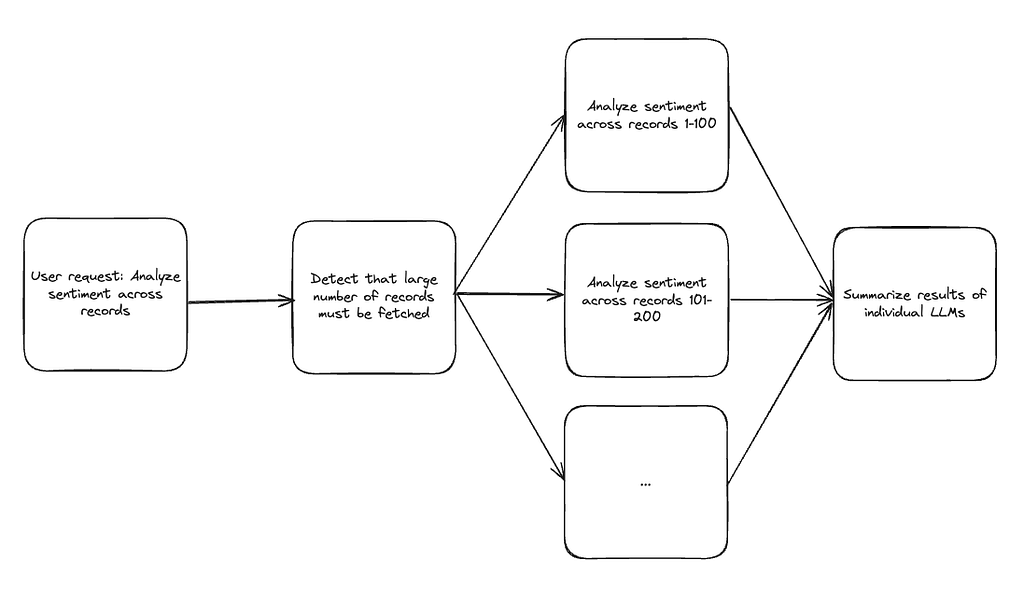
We can take advantage of the fact that each LLM inference call has its own context window and parallelize the handling of the user’s request across many calls. This approach mirrors the principles of MapReduce: dividing large tasks across parallel workers (LLM calls), then aggregating results into a coherent summary.
Conclusion
While we could have used an existing agentic framework, we were surprised to find that it wasn’t difficult to build one ourselves. Using agentic frameworks can be useful for quickly building a new system, since they define simple abstractions like tools, chaining, prompt serialization, and inference APIs. However, building our own agent allowed us to avoid over-abstracting components, gave us finer control over prompts, and gave us greater control over observability of the system. As a result, our ability to quickly iterate on the agent was significantly improved.
We’ll continue to make improvements to our agent to expand its capabilities. Two areas we’re working on extensively are context engineering and transforming our agent from an LLM-driven state machine to a fully autonomous system that can create and run its own custom tools. If that sounds interesting to you, come work with us!
How we built AI agents at Airtable was originally published in The Airtable Engineering Blog on Medium, where people are continuing the conversation by highlighting and responding to this story.
Comments
Nothing yet. Say the first thing.
Sign in to join the conversation.