
🚀 MCP: Model Context Protocol is a Unified AI Context Management, Cross-Platform Integration, and Production-Ready Context Sharing
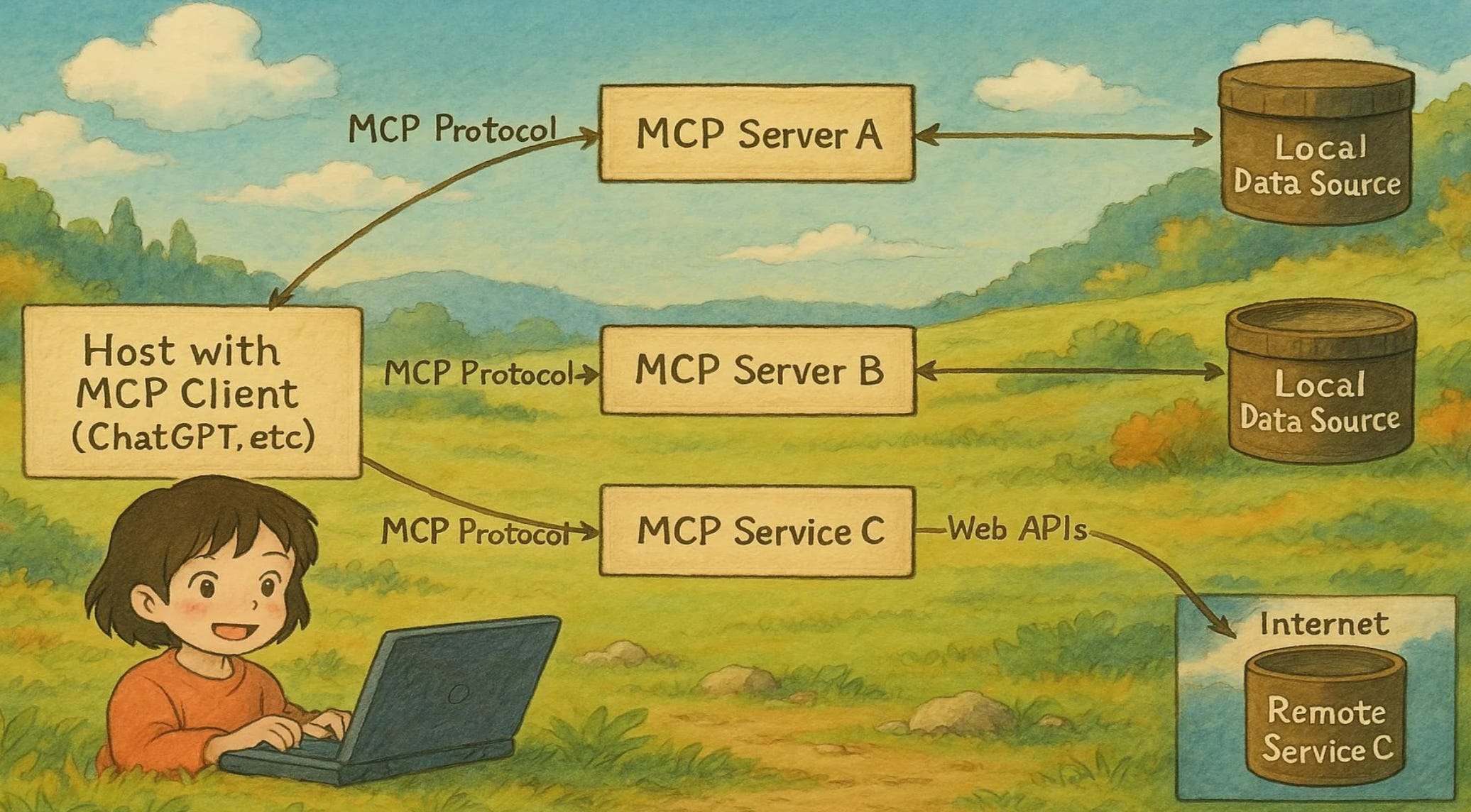
I’ll not go into what MCP is and why you should use it, I’ve already covered that multiple times, and I wrote a detailed book on this!
You've built your AI application. Now the real question - how fast will you scale when it needs to share context across different models, platforms, and services without losing critical information?
This guide walks through practical workflows for implementing the Model Context Protocol (MCP), with real examples and configuration snippets. The focus is on simple setups you can build on, with notes on how to scale them for production environments.
Focus on two areas:
Context Sources and Providers
File system access for document context
Database connections for structured data
API integrations for real-time information
Memory stores for conversation history
Context Consumers and Applications
LLM applications requiring external context
Multi-modal AI systems needing diverse inputs
Agent frameworks with tool requirements
Chat interfaces with persistent memory
Start with the Python MCP server for rapid development:
pip install mcp
# Basic MCP server setup
from mcp import Server, types
from mcp.server.models import InitializationOptions
import asyncio
class DocumentMCPServer:
    def __init__(self):
        self.server = Server("document-context")
        self.setup_handlers()
    def setup_handlers(self):
        @self.server.list_resources()
        async def handle_list_resources() -> list[types.Resource]:
            return [
                types.Resource(
                    uri="file://documents/",
                    name="Document Library",
                    description="Access to document collection",
                    mimeType="text/plain"
                )
            ]
        @self.server.read_resource()
        async def handle_read_resource(uri: str) -> str:
            if uri.startswith("file://documents/"):
                file_path = uri.replace("file://documents/", "")
                with open(f"./documents/{file_path}", 'r') as f:
                    return f.read()
            raise ValueError(f"Unknown resource: {uri}")
# Start the server
server = DocumentMCPServer()
asyncio.run(server.run())
For TypeScript/Node.js environments:
npm install @modelcontextprotocol/sdk
import { Server } from "@modelcontextprotocol/sdk/server/index.js";
import { StdioServerTransport } from "@modelcontextprotocol/sdk/server/stdio.js";
const server = new Server(
  {
    name: "database-context",
    version: "0.1.0",
  },
  {
    capabilities: {
      resources: {},
      tools: {},
    },
  }
);
server.setRequestHandler("resources/list", async () => {
  return {
    resources: [
      {
        uri: "postgres://users",
        name: "User Database",
        description: "Access to user information",
        mimeType: "application/json",
      },
    ],
  };
});
server.setRequestHandler("resources/read", async (request) => {
  const { uri } = request.params;
  if (uri === "postgres://users") {
    const users = await fetchUsersFromDatabase();
    return { contents: [{ uri, mimeType: "application/json", text: JSON.stringify(users) }] };
  }
  throw new Error(`Unknown resource: ${uri}`);
});
const transport = new StdioServerTransport();
await server.connect(transport);
💡 Pro tip: Start with file-based resources for development, then add database and API integrations for production workloads requiring real-time data.

Set up tools that your AI applications can call:
# MCP tools for external integrations
@server.list_tools()
async def handle_list_tools() -> list[types.Tool]:
    return [
        types.Tool(
            name="search_documents",
            description="Search through document collection",
            inputSchema={
                "type": "object",
                "properties": {
                    "query": {"type": "string", "description": "Search query"},
                    "limit": {"type": "integer", "description": "Max results", "default": 10}
                },
                "required": ["query"]
            }
        ),
        types.Tool(
            name="get_user_profile",
            description="Retrieve user profile information",
            inputSchema={
                "type": "object",
                "properties": {
                    "user_id": {"type": "string", "description": "User identifier"}
                },
                "required": ["user_id"]
            }
        )
    ]
@server.call_tool()
async def handle_call_tool(name: str, arguments: dict) -> list[types.TextContent]:
    if name == "search_documents":
        results = await search_document_index(arguments["query"], arguments.get("limit", 10))
        return [types.TextContent(type="text", text=json.dumps(results))]
    elif name == "get_user_profile":
        profile = await fetch_user_profile(arguments["user_id"])
        return [types.TextContent(type="text", text=json.dumps(profile))]
    raise ValueError(f"Unknown tool: {name}")
_meta namespace tip The MCP specification reserves any
_metakeys whose prefix containsmodelcontextprotocolormcp. When you attach custom metadata to resources, tools, or prompts, use your own organization-specific prefix (for exampleacme.ai/). Also remember to include an explicit"required": []array at the top level of everyinputSchema, even when no parameters are mandatory.
Configure tool integration with LLM applications:
# mcp-config.yaml
servers:
  document-server:
    command: python
    args: ["document_mcp_server.py"]
    env:
      DOCUMENTS_PATH: "/app/documents"
      INDEX_TYPE: "elasticsearch"
  database-server:
    command: node
    args: ["database_mcp_server.js"]
    env:
      DATABASE_URL: "postgresql://user:pass@localhost:5432/app"
      CACHE_TTL: "300"
client:
  timeout: 30000
  retry_attempts: 3
  log_level: "info"
Integrate MCP with your AI applications:
# LLM application with MCP integration
from mcp import ClientSession, StdioTransport
import subprocess
class MCPEnabledChatbot:
    def __init__(self):
        self.mcp_sessions = {}
        self.setup_mcp_connections()
    async def setup_mcp_connections(self):
        # Connect to document server
        doc_process = subprocess.Popen(
            ["python", "document_mcp_server.py"],
            stdin=subprocess.PIPE,
            stdout=subprocess.PIPE,
            stderr=subprocess.PIPE
        )
        doc_transport = StdioTransport(doc_process.stdin, doc_process.stdout)
        self.mcp_sessions["documents"] = ClientSession(doc_transport)
        await self.mcp_sessions["documents"].initialize()
    async def process_user_query(self, query: str, user_id: str):
        # Get available resources and tools
        resources = await self.mcp_sessions["documents"].list_resources()
        tools = await self.mcp_sessions["documents"].list_tools()
        # Search for relevant context
        search_result = await self.mcp_sessions["documents"].call_tool(
            "search_documents",
            {"query": query, "limit": 5}
        )
        # Prepare context for LLM
        context = f"User query: {query}\n"
        context += f"Relevant documents: {search_result[0].text}\n"
        # Call LLM with enriched context
        response = await self.call_llm_with_context(context, query)
        return response
chatbot = MCPEnabledChatbot()
💡 Production consideration: Use connection pooling and implement health checks for MCP servers to ensure reliable context access.
Set up caching for frequently accessed resources:
# Redis-based resource caching
import redis
import json
from datetime import timedelta
class CachedMCPServer(DocumentMCPServer):
    def __init__(self):
        super().__init__()
        self.redis_client = redis.Redis(host='localhost', port=6379, db=0)
        self.cache_ttl = 300  # 5 minutes
    async def handle_read_resource_cached(self, uri: str) -> str:
        # Check cache first
        cache_key = f"mcp_resource:{uri}"
        cached_content = self.redis_client.get(cache_key)
        if cached_content:
            return cached_content.decode('utf-8')
        # Fetch from source
        content = await self.handle_read_resource(uri)
        # Cache the result
        self.redis_client.setex(
            cache_key,
            self.cache_ttl,
            content
        )
        return content
    async def invalidate_cache(self, uri_pattern: str):
        """Invalidate cached resources matching pattern"""
        keys = self.redis_client.keys(f"mcp_resource:{uri_pattern}*")
        if keys:
            self.redis_client.delete(*keys)
Implement resource monitoring and metrics:
# Resource access monitoring
from prometheus_client import Counter, Histogram, start_http_server
resource_requests = Counter('mcp_resource_requests_total', 'Total resource requests', ['uri', 'status'])
resource_duration = Histogram('mcp_resource_duration_seconds', 'Resource fetch duration')
class MonitoredMCPServer(CachedMCPServer):
    def __init__(self):
        super().__init__()
        start_http_server(8000)  # Prometheus metrics endpoint
    async def handle_read_resource_monitored(self, uri: str) -> str:
        with resource_duration.time():
            try:
                content = await self.handle_read_resource_cached(uri)
                resource_requests.labels(uri=uri, status='success').inc()
                return content
            except Exception as e:
                resource_requests.labels(uri=uri, status='error').inc()
                raise
Deploy multiple MCP servers for different context types:
# docker-compose.yml for MCP infrastructure
version: '3.8'
services:
  mcp-document-server:
    build: ./servers/document-server
    volumes:
      - ./documents:/app/documents:ro
    environment:
      - ELASTICSEARCH_URL=http://elasticsearch:9200
    depends_on:
      - elasticsearch
  mcp-database-server:
    build: ./servers/database-server
    environment:
      - DATABASE_URL=postgresql://postgres:password@postgres:5432/app
    depends_on:
      - postgres
  mcp-api-server:
    build: ./servers/api-server
    environment:
      - EXTERNAL_API_KEY=${EXTERNAL_API_KEY}
      - RATE_LIMIT_PER_MINUTE=100
  mcp-gateway:
    build: ./gateway
    ports:
      - "8080:8080"
    environment:
      - DOCUMENT_SERVER_URL=http://mcp-document-server:3000
      - DATABASE_SERVER_URL=http://mcp-database-server:3001
      - API_SERVER_URL=http://mcp-api-server:3002
    depends_on:
      - mcp-document-server
      - mcp-database-server
      - mcp-api-server
Configure load balancing and failover:
# MCP client with multiple server support
class MultiServerMCPClient:
    def __init__(self, server_configs):
        self.servers = {}
        self.server_health = {}
        self.setup_servers(server_configs)
    async def setup_servers(self, configs):
        for name, config in configs.items():
            try:
                session = await self.connect_to_server(config)
                self.servers[name] = session
                self.server_health[name] = True
            except Exception as e:
                logger.error(f"Failed to connect to {name}: {e}")
                self.server_health[name] = False
    async def call_tool_with_fallback(self, tool_name: str, arguments: dict):
        # Try servers in priority order
        for server_name in self.get_healthy_servers():
            try:
                tools = await self.servers[server_name].list_tools()
                if any(tool.name == tool_name for tool in tools):
                    return await self.servers[server_name].call_tool(tool_name, arguments)
            except Exception as e:
                logger.warning(f"Tool call failed on {server_name}: {e}")
                self.server_health[server_name] = False
        raise Exception(f"No healthy servers available for tool: {tool_name}")
Deploy MCP servers with proper security:
# k8s-mcp-deployment.yaml
apiVersion: apps/v1
kind: Deployment
metadata:
  name: mcp-server
spec:
  replicas: 3
  selector:
    matchLabels:
      app: mcp-server
  template:
    metadata:
      labels:
        app: mcp-server
    spec:
      containers:
      - name: mcp-server
        image: your-registry/mcp-server:latest
        env:
        - name: MCP_SERVER_ID
          valueFrom:
            fieldRef:
              fieldPath: metadata.name
        - name: DATABASE_URL
          valueFrom:
            secretKeyRef:
              name: mcp-secrets
              key: database-url
        resources:
          requests:
            memory: "512Mi"
            cpu: "250m"
          limits:
            memory: "1Gi"
            cpu: "500m"
        livenessProbe:
          httpGet:
            path: /health
            port: 3000
          initialDelaySeconds: 30
          periodSeconds: 10
        readinessProbe:
          httpGet:
            path: /ready
            port: 3000
          initialDelaySeconds: 5
          periodSeconds: 5
💡 Security tip: Implement proper authentication and authorization for MCP servers, especially when accessing sensitive resources like databases or external APIs.
The Model Context Protocol (MCP) provides a standardized way for AI applications to access external context sources. Developed by Anthropic and adopted by the broader AI community, MCP enables seamless integration between LLMs and various data sources.
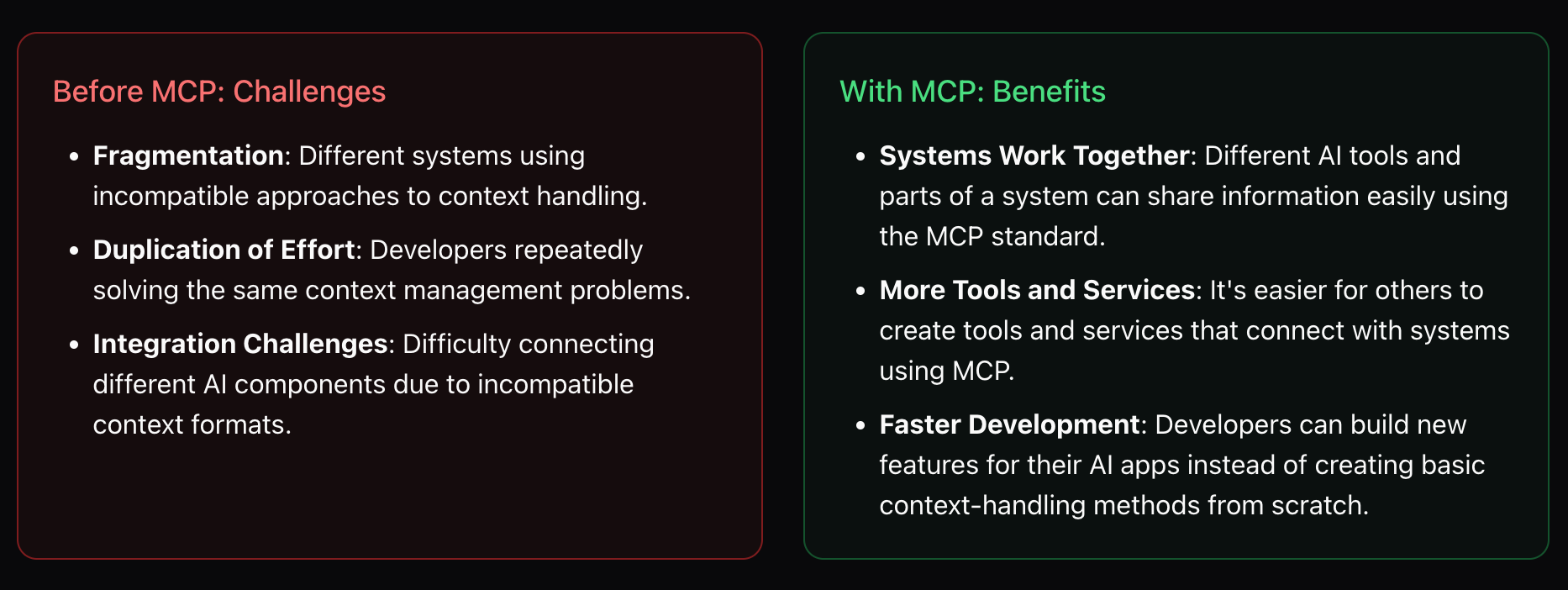
Key benefits for production deployments:
Standardized interfaces: Consistent API across different context providers
Security isolation: Controlled access to sensitive resources
Scalable architecture: Support for multiple concurrent clients and servers
Tool integration: Unified approach to external function calling
Migration path for existing systems:
Identify current context sources and access patterns
Implement MCP servers for high-priority resources
Update AI applications to use MCP clients
Gradually migrate all context access to MCP standard
[ ] Monitor MCP server health and response times
[ ] Update MCP SDK versions and security patches
[ ] Review and optimize resource caching strategies
[ ] Test failover scenarios for critical context sources
[ ] Audit resource access permissions and security
[ ] Scale MCP servers based on client demand
[ ] Backup server configurations and resource mappings
[ ] Monitor compliance with MCP protocol specifications
💡 Community engagement: Join the MCP Protocol discussions on GitHub and contribute to the evolving standard. The protocol is actively developed with input from major AI companies and the open-source community.
AWESOME DEVOPS MCP SERVERS: https://github.com/rohitg00/awesome-devops-mcp-servers
Thanks for reading AI Shorts Issue on MCP! This post is public, so feel free to share it.
No posts
Comments
Nothing yet. Say the first thing.
Sign in to join the conversation.