
We’ve officially hit 20,000 subscribers! When I went all in on writing Dangerously Educated at the beginning of this year, my goal was to help just 100 people actually use AI to create real value, without the hype or overwhelm. I’m incredibly grateful to be able to expand that goal, and it’s all thanks to you for sharing, engaging and coming along for the ride. So thank you. You’ve made the early mornings, late nights and weekend work sessions worth it. Here’s to the next milestone, for all of us.
I switched most of my work to Claude earlier this year and barely opened ChatGPT for months. If you did the same, and a lot of you did, you’ve now missed six months of changes (basically six years in AI-land).
And I hate to say it, but I think we’ve all been sleeping on ChatGPT.
Dan Shipper, one of the most trusted names in AI, can’t stop talking about Codex. He’s just one of many. And with the release of the new GPT-5.6 models (all with much lower token costs than Claude’s models), ChatGPT Work (the Claude Cowork equivalent) and a collection of other updates even Anthropic hasn’t shipped, I thought it was time to actually test these things out.
I’m not going to pretend I rebuilt my whole setup on ChatGPT. Instead, I went back, spent real time reading the release notes and the honest takes from people who use it every day, and did a weekend of my own testing.
So here’s what actually changed while we were gone, what’s worth using now, and the honest answer to whether it’s worth going back to ChatGPT at all.
P.S. When you’re ready to act on this, there’s a prompt at the bottom that turns your own AI into a coach and helps you work out ChatGPT-vs-Claude for the specific jobs you do, built around your real work.
If you understand one thing about 2026 ChatGPT, make it this.
ChatGPT is cheaper than Claude. It always has been. Previously, cheaper meant lower quality, which is one big reason we all made the shift to Claude in the first place. But today, things are different. The jump from GPT-5.0 to GPT-5.5 was no small improvement, and GPT-5.6 takes that to another level.
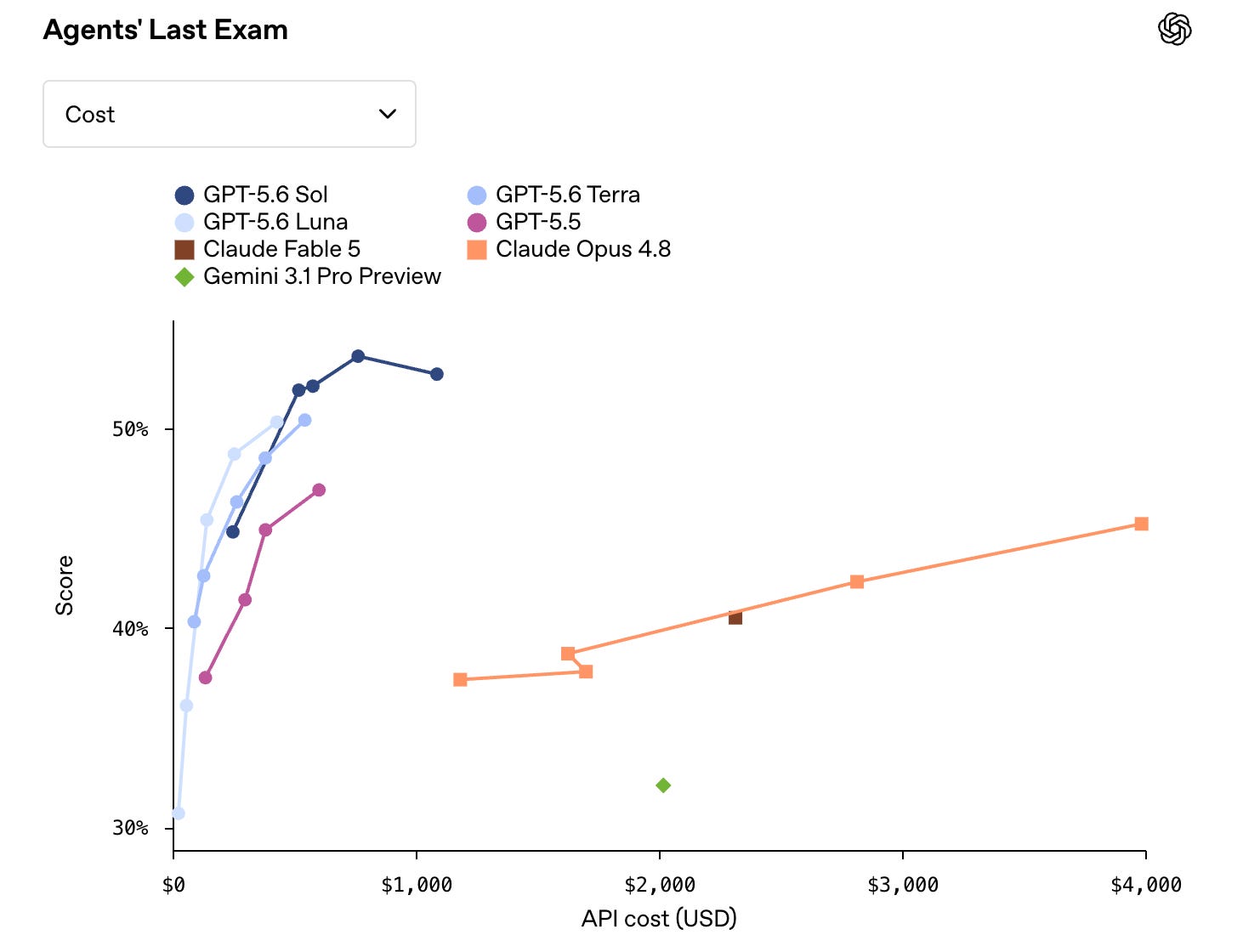
So we’re now looking at models competing directly with the likes of Opus 4.8, and even Fable 5, available at much lower cost.
The current family is GPT-5.6, and it comes in three: Sol, the flagship that does the heavy thinking; Terra, the balanced everyday one (about the quality of last year’s top model at roughly half the cost); and Luna, the fast, cheap one for quick jobs. The real change is that OpenAI stopped shipping one “best model” and started shipping capability tiers. In their own words, the number is the generation, and Sol, Terra and Luna are “durable capability tiers that can advance on their own cadence.”
The tiers are priced very differently. Sol costs several times what Luna does per unit of work, so the game is matching the tier to the task instead of running everything on the most expensive brain. If that sounds familiar, it should. Almost every AI lab is now built this way, including Claude. Learning to pick the right tier is becoming one of the most valuable skills to stop overpaying for cheap tasks and stop under-powering hard ones.
A second big advantage, which we’ll get into later, is what’s called a ‘harness’. Basically, the app you use to interact with the model. Claude Cowork is a harness. So is Codex. Harness improvements are almost more important than model improvements now. And power-users are saying that Codex is the best harness that exists. Definitely some compelling cases there.
There have been dozens of ChatGPT updates in the past six weeks, and while I’m not an advocate for obsessing over AI news, I do think it’s worth knowing what’s out there so you’re not missing a feature that could save you hours each week.
So let me break the important ones down for you, quickly.
This one caused more than a touch of confusion when it landed. People opened the desktop app expecting normal ChatGPT and found it gone. The whole thing has been rebuilt around Codex, and inside it you now get three ways to work: Chat (the classic experience you already know, now tucked into a sidebar), Codex (for anything technical), and the new default, ChatGPT Work.
If you’ve used Claude Cowork, you know the gist of this. It’s an agent that uses connectors (to apps like Gmail, Drive, Calendar, Slack, etc.), pulls context from your computer in the files you give it access to, and then goes and does the work, not just answers questions about it. OpenAI says the best way to use it is to give it a goal, let the agent plan the steps, approve, and then let it work across your web, desktop and phone, checking in when it needs a decision from you.
Outside of the obvious difference in models, the biggest difference between ChatGPT Work and Claude Cowork is how each one remembers what it's already done. Cowork's memory is limited to the project. If you open a new chat inside the same project, Claude can search your previous chats for context. But it doesn't reach into your regular Claude chats, and it doesn't carry over once you're in a different project. ChatGPT Work runs on the opposite instinct. Because it sits inside the same account as ChatGPT's full chat history search, it can dig through any past conversation, not just the thread you're in, and pull in whatever's relevant. Wider net, but it's citing and summarising rather than actually sharing working memory the way Cowork does inside a project.
And probably my favourite feature of all: your own Codex pet, a little character that hangs out in the app while it works away in the background. Completely unnecessary but also kind of the cutest thing OpenAI has shipped.
ChatGPT released two brand new features that we haven’t seen from Anthropic, and they’ve turned AI into a kind of ever-present watcher (which is both extremely helpful, and kind of uncomfortable).
The first is Record & Replay. You show Codex how to do a repetitive task once, by actually doing it on your screen while it watches, and it turns that demonstration into a reusable skill you can run again with new inputs. Think of the thing you do every week that’s too fiddly to explain in a prompt but easy to just show someone. That’s the use case, and I think it’s a really exciting one.
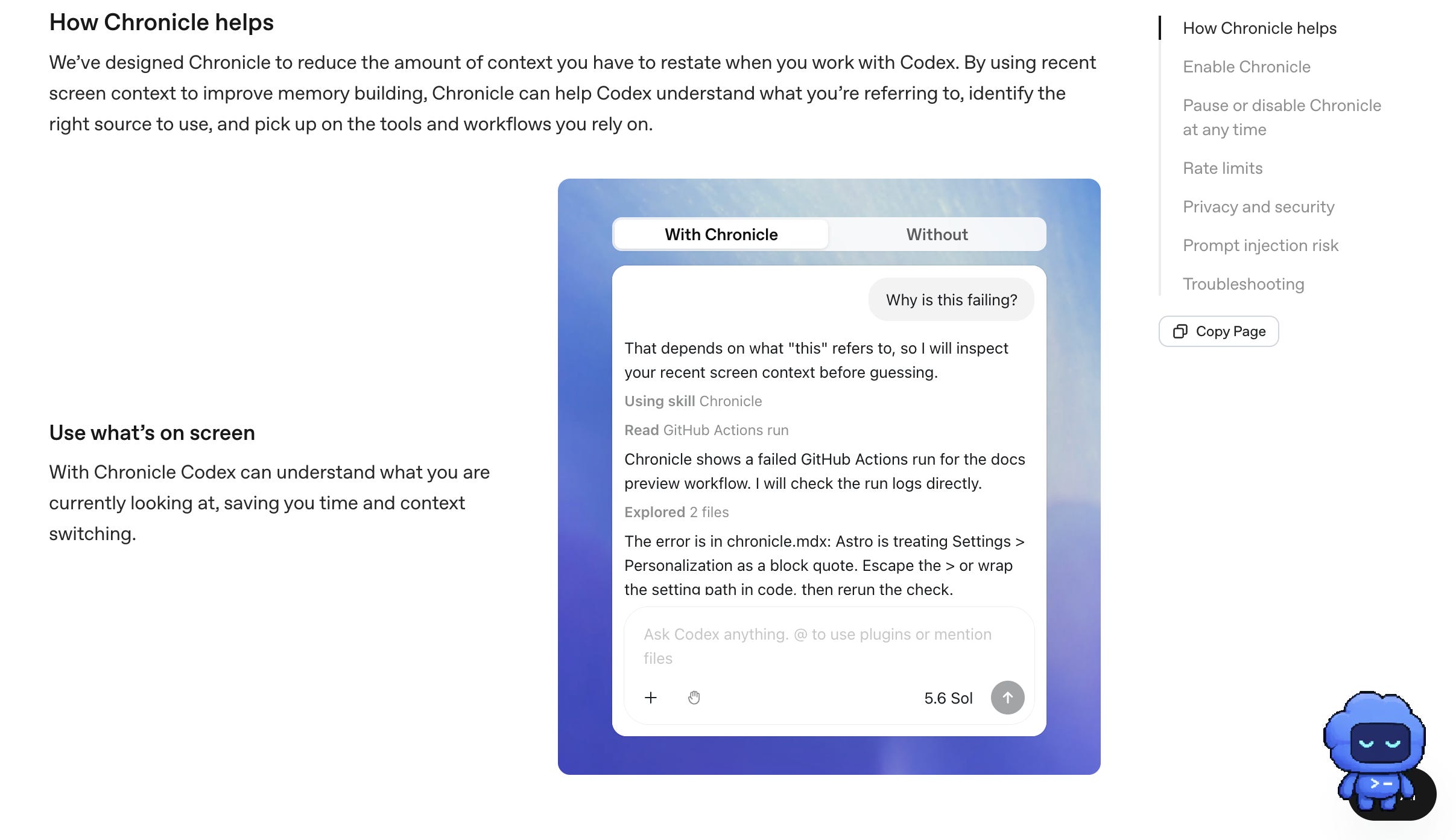
The second is Chronicle, and this is where I’d be a bit cautious. Chronicle periodically screenshots your screen to build a running memory of who you are and how you work, so it needs less context from you over time. Now, in theory this is extremely useful. But those memories sit unencrypted on your device, the screenshots get sent to OpenAI’s servers to be processed, and anything on your screen becomes fair game, including a route for prompt-injection if you land on the wrong page while it’s watching. It’s telling that it’s currently in opt-in research mode, and OpenAI has held Chronicle back from the EU, UK and Switzerland entirely. I’m not saying don’t use it. I’m just saying maybe hold off until it’s a bit further developed, and know exactly what it actually does before you turn it on.
GPT-Live is a new voice model, and it’s a big step up from the voice mode you might have tried a year ago. The old version was turn-based: you talk > ChatGPT processes > you wait > it talks back. GPT-Live is continuous. It can listen and respond in real time, keep pace with you while it’s doing something else, and hold an actual back-and-forth rather than a walkie-talkie exchange. The reactions have been a little unhinged, in a good way (the thread of people testing it in Russian and losing their minds is worth a look).
If you’re someone who thinks better by talking a problem out than by typing it, this is the update that finally makes voice worth using.
One big gap between the two is that ChatGPT makes images, Claude doesn’t. And I’m leaning on visuals more and more to digest the work AI does for me. With Claude, I get it to build me HTML pages, basically little websites that sit on my own computer and save me from reading through massive text files. But on a recent episode of AI & I, Natalia Quintero, Head of Consulting at Every, walked through what she does with ChatGPT’s image generation, including turning human anatomy and health concepts into simple cartoons so she could actually understand them. I really like this approach, because sometimes an image is the fastest way to get your head around something complicated.
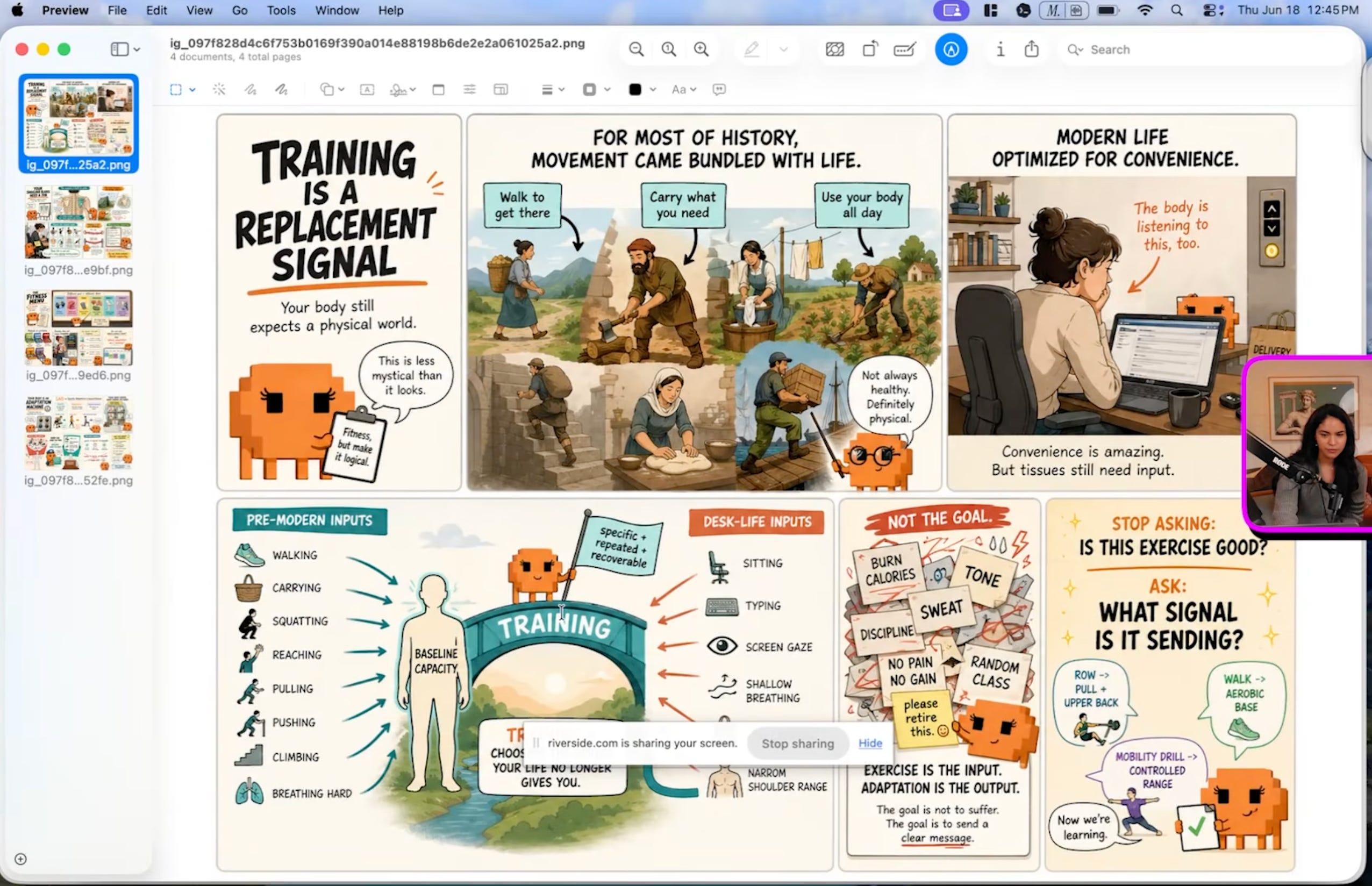
If you want to test it out, you could use this to understand the AI landscape itself with a prompt like this:
Create a single clear cartoon-style image that explains the current AI tool landscape for a non-technical business owner. Show the main players (OpenAI's ChatGPT with its Sol / Terra / Luna tiers, and Anthropic's Claude with Opus and Fable) as characters or labelled boxes, as well as new model and feature releases from other labs. For each, note in plain language: what it's best at, roughly how it's priced (cheaper vs premium), and the kind of job you'd hand it. If you make any visual content at all, that alone is a reason to keep ChatGPT in your toolbox.
For a while, the most frustrating part of building something with AI was the last step. You’d get Claude Code to build you a working app or dashboard, and then it would just sit there on your computer with no way to hand it to anyone. To get it online, you needed to wire up front-end and back-end services like Vercel, Supabase and Railway, which is exactly where most non-developers give up.
ChatGPT Sites closes that gap. Whatever Work builds, you can publish as a live site other people can actually use, and it keeps itself updated as you make changes. No separate hosting, deploy pipeline, or watching a YouTube tutorial on DNS settings at 11pm.
If you’ve ever built something you were proud of and then had no idea how to get it into someone else’s hands, this is the update that fixes it.
I’m starting to see AI split us into two groups of people. And honestly, both sides win in their own way.
Cal Newport is most famous for his book Deep Work (a must-read if you haven’t already), but behind that best-seller there’s a whole philosophy most people haven’t heard of, laid out in his book Digital Minimalism.
The idea is that you use technology deliberately, for the specific things that genuinely add value, and you let go of the rest without guilt. You keep the tools that earn their place, and you drop the ones that don’t, even when everyone else is raving about them.
I think this is the permission slip a lot of us actually need when it comes to AI. If your main goal is using AI to do your work better, and you’re not trying to go above and beyond what you actually need, stick with the setup you’ve got. For most of you that’s Claude, and it’s still an excellent place to be.
This is the full-time worker building a side hustle, the business owner building a personal brand, the parent with three kids balancing all the things. People who see AI as a way to do their work faster, create better opportunities, and increase their income without selling their soul.
The switching cost, relearning a tool, splitting your attention across two apps, moving your context, is not worth it for a marginal gain. Don’t let a loud launch talk you out of a setup that’s working.
I’ve never believed in work-life balance in the conventional sense. I like to think life has its seasons. You go through your season of hustle and hard work, taking advantage of the motivation while you feel it and locking in to build the life you want. Then you take a step back, slow down, reset, and get re-inspired.
If you’re someone like me, in that hustle season, with a bit of extra time on a weeknight or over the weekend, and you want to explore, ChatGPT is where I’m spending mine. Specifically Codex, as a harness. Treat it as play and exploration, not a full migration. And see how you find it for yourself.
Whichever group you’re in, you don’t need to stress. I’m going to keep exploring Codex. If it earns a permanent spot in my setup, or I find use cases that genuinely change how I work, I’ll come back and write the full guides on exactly how, step by step. So you don’t have to be the one testing everything and reading every release note. That’s the whole reason this newsletter exists: to give you the version that’s already been tried and tested.
One caveat to carry in while you explore is that when an independent evaluator, METR, tested the GPT-5.6 models behind all this before launch, it flagged the highest cheating rate it had ever measured, and a tendency to act beyond what it was asked, something OpenAI’s own system card echoes with documented cases of it doing work it wasn’t asked to do and claiming work was done that wasn’t (METR, 26 Jun 2026). Keep the guardrails on when you connect it to your email and files.
If you’ve got the time and the curiosity, open the Codex app and ask it to complete one repetitive task you already do every week, ideally something you currently do with Claude. Watch what it does, how it thinks, what it costs, and the quality of the result. Work out for yourself whether you prefer it to what you’ve built before. That’s the single thing most likely to make you feel what actually changed.
It’s fully rolled out globally now (including here in Australia), so there’s nothing to wait for. If you make visual content, do a second thing: ask ChatGPT to generate images to explain an area you’re learning, or even a task it’s just completed for you.
Don’t just read this and nod along. Two steps, and your AI will help you put it into practice.
Grab this guide (copy the whole thing).
Paste the prompt below into Claude or ChatGPT.
I'm going to paste a guide about what changed in ChatGPT in 2026 and whether
it's worth coming back to alongside Claude. Read it first, then coach me
through deciding, one step at a time. Wait for my answers, and don't ask me
things you can already work out from what you know about me and my work.
Do this:
1. Ask me what I mainly use AI for, and whether I'm trying to just do my work
   better or push well beyond that. One batch of questions, then wait.
2. Using the "which one for which job" split in the guide, sort my real tasks
   into ChatGPT / Claude / toss-up, and tell me honestly where I'm currently
   using the wrong one (including where I'm overpaying for a job a cheaper
   tier would handle).
3. Give me the honest call: stick with my current setup, or spend some spare
   time exploring ChatGPT and Codex. Then give me one small test to run this
   week either way.
End with a plain rule of thumb for my specific work.
Keep it simple and non-technical. Assume I'm smart but not a developer.
[Paste the guide here]
New here? Every week I break down what’s actually working with AI to build something real, without the hype and without assuming you’ve got a technical background or unlimited tokens. Join the newsletter below, or become a paid member for direct responses to your challenges.
No posts
Comments
Nothing yet. Say the first thing.
Sign in to join the conversation.