
Disclaimer: While this post uses OpenAI examples, similar functionality is available with other providers.
Most of the time, when you interact with a large language model (LLM), it’s through a chatbot. You type free text, and it responds with the same. Sounds simple—but chatbots are inherently unpredictable. Users will push the boundaries, asking wild or unexpected things.
This unpredictability makes it hard to expose chatbots directly to your customers. Many companies avoid it altogether, instead providing features that leverage LLMs under the hood but with constrained inputs—for example, document summarization. One button, one predictable result.

Here’s a typical prompt for summarization:
You are an expert summarizer. Read the following text carefully and produce a clear, concise summary that captures the key ideas, important facts, and overall meaning.
Instructions:
Focus on the main points, not minor details.
Write in your own words (no copy-pasting).
Preserve accuracy and neutral tone.
Keep the summary within 500 words.
If the text contains multiple sections, summarize each section briefly.
If requested, provide a structured output (e.g., bullet points, paragraphs, or executive summary).
Text:
[Insert text here]
Output format:
    Title: [Optional summary title]
    Summary: [Your summary here]
This works well for plain text, but what if you want links to the original sections?
Well… LLMs know HTML so they can generate those links too, right? Just ask them!
You are an expert summarizer. Read the following text and create a structured summary using HTML-like tags.
Instructions:
Divide the text into logical sections based on headings, topics, or context.
For each section:
Wrap the summary in <section> tags.
Include a <title> tag for the section name.
Write a concise summary (2–4 sentences).
Add a <link> tag inside the section with the URL, anchor, or reference to the original section.
Use clear, accurate, and neutral language.
Output must be valid HTML-style markup (not Markdown).
And it will generate something like this:
<section>
  <title>Introduction</title>
  <p>The article introduces the concept of decentralized finance (DeFi) and explains how blockchain technology enables peer-to-peer financial systems without intermediaries.</p>
  <link>https://example.com/article#introduction</link>
</section>
<section>
  <title>Market Growth</title>
  <p>The text discusses the rapid expansion of DeFi markets, noting the increase in total value locked (TVL) and the entrance of institutional investors.</p>
  <link>https://example.com/article#market-growth</link>
</section>
<section>
  <title>Challenges and Risks</title>
  <p>The author highlights major risks such as smart contract vulnerabilities, regulatory uncertainty, and liquidity issues that could hinder growth.</p>
  <link>https://example.com/article#challenges</link>
</section>
You can use this output directly or parse it programmatically.
If LLMs were similar to what we are used to in the programming world, our article could be ended by now…
… however, they are inherently non-detereministic. Even with precise instructions they might not follow the format we specify. This can result in a broken UI, failed parsers fail or attempts to insert invalid data into a database.
So what? Just retry the generation, right? It will eventually output something which adheres to our format.
But that takes time and token usage, not to mention the tight rate limits providers have nowadays.
There has to be a better way!
Instead of relying solely on prompting, you can define a tool schema that enforces structure. For example:
tool = {
    “name”: “create_section”,
    “description”: “Create a blog section with title, body, and link”,
    “parameters”: {
        “type”: “object”,
        “properties”: {
            “title”: {”type”: “string”},
            “body”: {”type”: “string”},
            “link”: {”type”: “string”, “format”: “uri”}
        },
        “required”: [”title”, “body”, “link”]
    }
}
Now use the tool:
response = client.chat.completions.create(
    model=”gpt-5”,
    messages=[{”role”: “user”, “content”: our_summarization_prompt}],
    tools=[tool],
    tool_call={”name”: “auto”}
)
Output is now guaranteed to match the schema:
{
  “tool”: “create_section”,
  “arguments”: {
    “title”: “AI in Daily Life”,
    “body”: “AI helps us in various ways ...”,
    “link”: “https://example.com/ai-daily”
  }
}
Even though the LLM is generating text, schema enforcement ensures valid, predictable output. But how does it work?
LLMs work by predicting the next token in a sequence. Using specific techniques, we can filter these token predictions to ensure that the output conforms to a predefined schema.
Even if some tokens have a higher probability, they are excluded if they would violate the schema, leaving only valid options.
The set of allowable next tokens can be determined using methods like finite state machines, regular expressions, or other rule-based approaches.
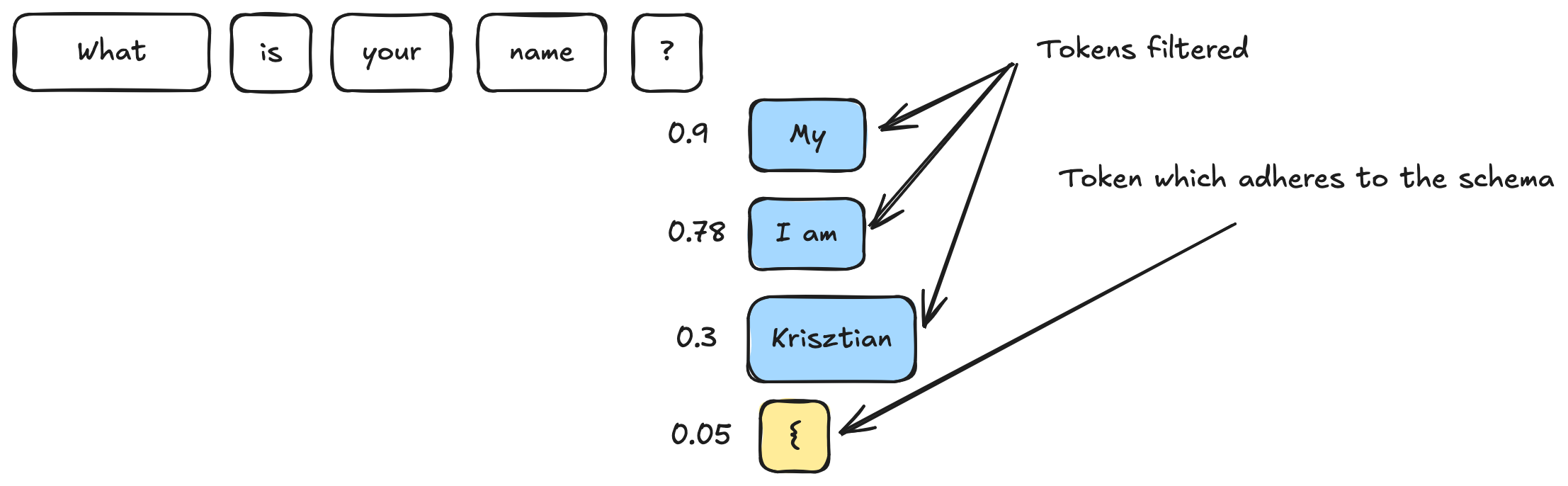
This is what powers tool calling and it is the same approach used by OpenAI’s json_schema response format, which ensures your output fits a strict structure while still leveraging LLM capabilities.
response = client.responses.create(
    model=”gpt-5”,
    input=prompt,
    response_format={
        “type”: “json_schema”,
        “json_schema”: {
            “name”: “summary”,
            “schema”: {
                “type”: “object”,
                “properties”: {
                    “sections”: {
                        “type”: “array”,
                        “items”: {
                            “type”: “object”,
                            “properties”: {
                                “title”: {”type”: “string”},
                                “body”: {”type”: “string”},
                                “link”: {”type”: “string”, “format”: “uri”}
                            },
                            “required”: [”title”, “body”, “link”]
                        }
                    }
                },
                “required”: [”sections”]
            }
        }
    }
)
But in this case the output is not hidden inside the tool call section of the output.
So the next time you are thinking of creating some homegrown solution to enforce structured output, think twice or retry twice!
No posts
Comments
Nothing yet. Say the first thing.
Sign in to join the conversation.