
If you have labeled data: use AdalFlow’s LLM-AutoDiff to automatically tune your PROMPT and DEMOS for higher accuracy/F1 with full observability.
If you lack labels: use Output-vs-Output (OvO) self-supervised prompt battles. A separate judge model picks winners, it’s no ground truth required so the prompt gets stronger over rounds.
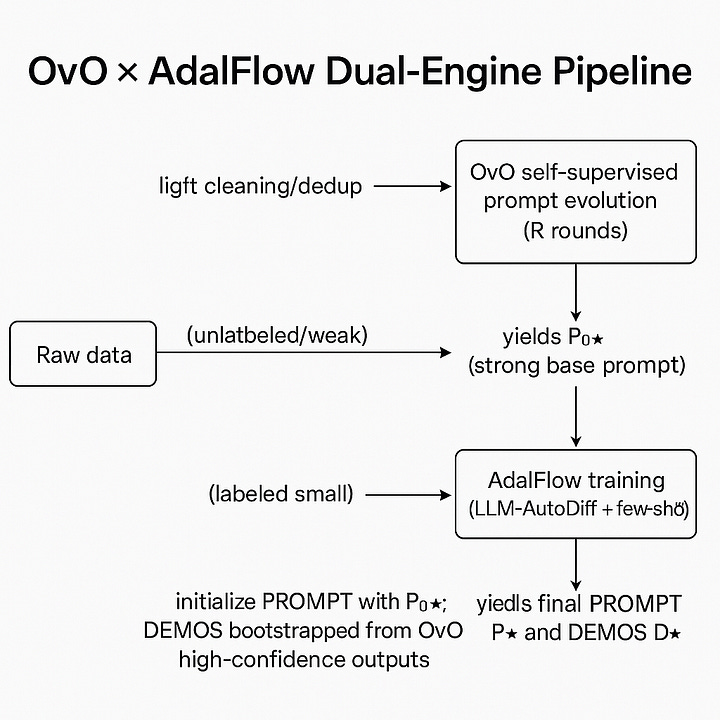
Best of both: pretrain a good base prompt with OvO on unlabeled data, then fine-tune that prompt (plus auto-bootstrapped few-shot demos) with AdalFlow on a small labeled set for faster convergence and lower cost.
ML/LLM engineers who want practical, cheap accuracy gains without a huge labeling campaign.
Product teams that need observable tuning and versioned artifacts (prompts/demos/metrics).
Researchers evaluating self-play style prompt optimization.
Two optimization paths
Why combine these two
A unified classification pipeline
Hands-on Project
Conclusion
👉 Self‑Prompting + AdalFlow Optimizer Colab
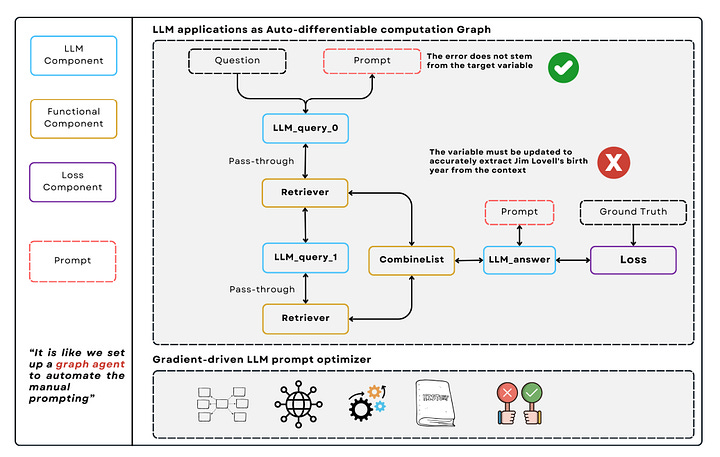
Goal: Auto-optimize PROMPT and DEMOS against validation metrics (accuracy, F1).
Mechanics: Treat prompts/demos as parameters; define metrics; run LLM-AutoDiff; get observability and reproducibility.
Use when: You have at least a small labeled set and you want stable, auditable improvements.
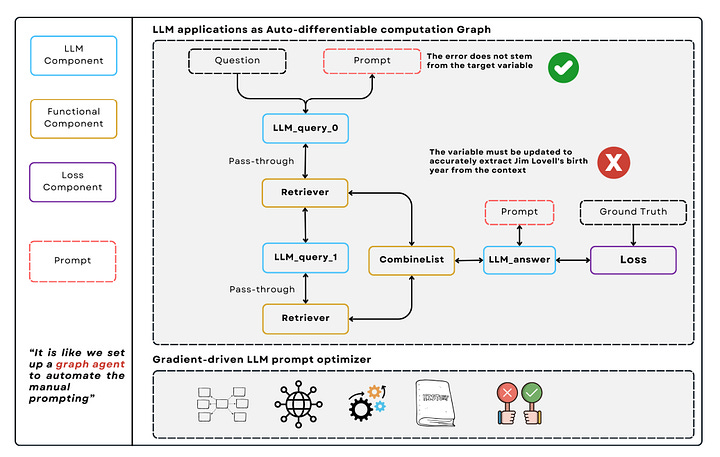
Representing an LLM application as an auto-differentiable computation graph, Source: Ref[5]
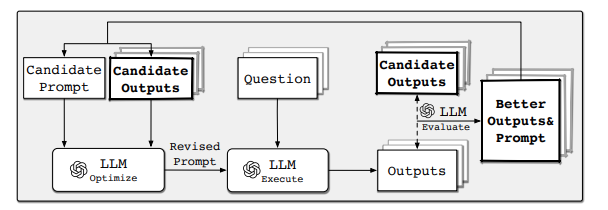
Goal: Make progress without ground truth; a judge model chooses winner between two outputs (A vs B).
Mechanics: Candidate prompts fight on small batches; judge picks winners; we mutate the winner to produce the next generation; early-stop, debias, and cap costs.
Use when: Cold start on mostly unlabeled data, to get a solid P₀(base prompt) before supervised tuning.
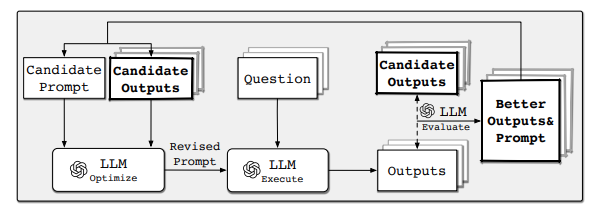
Self-Supervised Prompt Optimization, Source: Ref[4]
Signal summary: AdalFlow optimizes with metric alignment (needs labels). OvO optimizes with preference alignment (no labels). Chaining both is robust and economical.
In real life there usually have a little labeled data and a lot of unlabeled data.
Only supervised → slow cold start, costly labeling.
Only self-supervised → weaker guarantees, harder to validate for prod.
The hybrid plan, faster convergence, better metrics, and lower token spend.:
Run OvO self-supervision first to forge a stronger base prompt (no labels needed),
Feed that base prompt as a PROMPT initialization to AdalFlow and add a few few-shot DEMOS (auto-bootstrapped from high-confidence OvO outputs) to do LLM-AutoDiff on a small labeled set.
👉 Self‑Prompting + AdalFlow Optimizer Colab
Pick your model(s).
Define input fields and your label set, e.g.,
{”label”: “...”, “score”: ...}.Split the system prompt into Task Definition / Output Format / Guardrails for controllability and future tuning.
Below is a drop-in skeleton. Replace run_model(...) and judge_outputs(...) with your actual LLM calls. The mock is there so you can run end-to-end immediately.
from typing import List
BASE_TEMPLATES = [
    “You are a precise classifier. Output JSON with fields {label, score}. Task: {task}”,
    “Classify strictly into target labels. Respond as JSON {{\”label\”: ..., \”score\”: ...}}. Task: {task}”,
    “Follow format: {{\”label\”: \”positive|negative|unknown\”, \”score\”: 0~1}}. Task: {task}”,
    “Return only JSON. No extra text. Task: {task}”,
    “Be conservative; choose ‘unknown’ if low confidence. Task: {task}”,
]
def propose_prompts(task_desc: str, k: int = 5) -> List[str]:
    import random
    random.shuffle(BASE_TEMPLATES)
    return [t.format(task=task_desc) for t in BASE_TEMPLATES[:k]]
EXEC_TEMPLATE = “”“<SYS>
You are a strict text classifier. Only output JSON: {{”label”: “...”, “score”: 0~1}}.
Valid labels: {labels}. If unclear, use “unknown”. No extra text.
</SYS>
User text:
{input}
“”“
JUDGE_TEMPLATE = “”“<SYS>
You are a judge. Two model outputs (A/B) are given for the same input.
Pick the better one ONLY by JSON: {{”winner”: “A”|”B”}}. Criteria:
1) Correct label (if deducible), 2) Format validity, 3) Cautious use of ‘unknown’.
No explanation, no extra fields.
</SYS>
Input: {input}
Output A: {out_a}
Output B: {out_b}
“”“import json
from typing import Tuple, Dict
def run_model(prompt: str, x: str, labels: str) -> Dict:
# Replace with your actual LLM call using `prompt`
# --- MOCK so the script runs end-to-end ---
def mock(x):
xl = x.lower()
if any(k in xl for k in [”good”, “love”, “great”, “awesome”]):
return {”label”: “positive”, “score”: 0.9}
if any(k in xl for k in [”bad”, “awful”, “terrible”, “hate”]):
return {”label”: “negative”, “score”: 0.9}
return {”label”: “unknown”, “score”: 0.55}
return mock(x)
def judge_outputs(x: str, out_a: Dict, out_b: Dict) -> str:
# Replace with a real judge LLM call using JUDGE_TEMPLATE if desired
def valid(y): return isinstance(y, dict) and “label” in y and “score” in y
if valid(out_a) and not valid(out_b): return “A”
if valid(out_b) and not valid(out_a): return “B”
return “A” if out_a.get(”score”, 0) >= out_b.get(”score”, 0) else “B”from typing import Sequence
import random
def mutate(p: str) -> str:
tweaks = [
“ Be conservative.”,
“ Only output JSON.”,
“ Prefer ‘unknown’ on ambiguity.”,
“ Ensure reproducibility with stable format.”,
“ Use robust label reasoning.”,
]
return p + random.choice(tweaks)
def ovo_optimize(
unlabeled_samples: Sequence[str],
task_desc: str,
labels: Sequence[str],
rounds: int = 8,
k: int = 4,
n_per_round: int = 4,
patience: int = 2,
seed: int = 7,
):
random.seed(seed)
label_str = “|”.join(labels)
pool = propose_prompts(task_desc, k=k)
best_prompt, best_win = None, -1
stall = 0
for r in range(1, rounds + 1):
wins = [0] * len(pool)
batch = random.sample(list(unlabeled_samples), min(n_per_round, len(unlabeled_samples)))
for x in batch:
i, j = random.sample(range(len(pool)), 2)
p_i, p_j = pool[i], pool[j]
out_i = run_model(EXEC_TEMPLATE.format(input=x, labels=label_str), x, label_str)
out_j = run_model(EXEC_TEMPLATE.format(input=x, labels=label_str), x, label_str)
w = judge_outputs(x, out_i, out_j) # “A”|”B”
if w == “A”: wins[i] += 1
else: wins[j] += 1
idx = max(range(len(pool)), key=lambda t: wins[t])
gen_best, gen_win = pool[idx], wins[idx]
if gen_win > best_win:
best_prompt, best_win = gen_best, gen_win
stall = 0
else:
stall += 1
if stall >= patience:
break
pool = [gen_best] + [mutate(gen_best) for _ in range(k - 1)]
return best_prompt
def bootstrap_demos_from_ovo(unlabeled_samples, best_prompt, topk=6):
demos = []
for x in unlabeled_samples[: topk * 3]:
y = run_model(EXEC_TEMPLATE.format(input=x, labels=”positive|negative|unknown”),
x, “positive|negative|unknown”)
if y.get(”score”, 0) >= 0.8 and y.get(”label”) in {”positive”, “negative”}:
demos.append({”input”: x, “output”: y})
if len(demos) >= topk:
break
return demosWe will use the following overall template with system_prompt, output_format_str, and few_shot_demos variables. task_desc_template will be used to render the final classification task description from class names and each label’s description. TRECExtendedData is a dataclass that extends TrecData with a rationale field. This will ensure our generator to first leverage ‘Chain-of-Thought’ reasoning before predicting the final class_name.
template = r”“”<START_OF_SYSTEM_MESSAGE>
 {{system_prompt}}
 {% if output_format_str is not none %}
 {{output_format_str}}
 {% endif %}
 {% if few_shot_demos is not none %}
 Here are some examples:
 {{few_shot_demos}}
 {% endif %}
 <END_OF_SYSTEM_MESSAGE>
 <START_OF_USER_MESSAGE>
 {{input_str}}
 <END_OF_USER_MESSAGE>
 “”“
task_desc_template = r”“”You are a classifier. Given a question, you need to classify it into one of the following classes:
 Format: class_index. class_name, class_description
 {% if classes %}
 {% for class in classes %}
 {{loop.index-1}}. {{class.label}}, {{class.desc}}
 {% endfor %}
 {% endif %}
 - Do not try to answer the question:
 “”“
 @dataclass
 class TRECExtendedData(TrecData):
     rationale: str = field(
         metadata={
             “desc”: “Your step-by-step reasoning to classify the question to class_name”
         },
         default=None,
     )
     __input_fields__ = [”question”]
__output_fields__ = [”rationale”, “class_name”] # it is important to have the rationale before the class_nameWe will subclass from Component for our final task pipeline. We use DataClassParser to streamline the process of output formatting and parsing.
class TRECClassifierStructuredOutput(adal.Component):
  def __init__(self, model_client: adal.ModelClient, model_kwargs: Dict):
         super().__init__()
         label_desc = [
             {”label”: label, “desc”: desc}
             for label, desc in zip(_COARSE_LABELS, _COARSE_LABELS_DESC)
         ]
         task_desc_str = adal.Prompt(
             template=task_desc_template, prompt_kwargs={”classes”: label_desc}
         )()
         self.data_class = TRECExtendedData
         self.data_class.set_task_desc(task_desc_str)
         self.parser = adal.DataClassParser(
             data_class=self.data_class, return_data_class=True, format_type=”yaml”
         )
         prompt_kwargs = {
             “system_prompt”: adal.Parameter(
                 data=self.parser.get_task_desc_str(),
                 role_desc=”Task description”,
                 requires_opt=True,
                 param_type=adal.ParameterType.PROMPT,
             ),
             “output_format_str”: adal.Parameter(
                 data=self.parser.get_output_format_str(),
                 role_desc=”Output format requirements”,
                 requires_opt=False,
                 param_type=adal.ParameterType.PROMPT,
             ),
             “few_shot_demos”: adal.Parameter(
                 data=None,
                 requires_opt=True,
                 role_desc=”Few shot examples to help the model”,
                 param_type=adal.ParameterType.DEMOS,
             ),
         }
         self.llm = adal.Generator(
             model_client=model_client,
             model_kwargs=model_kwargs,
             prompt_kwargs=prompt_kwargs,
             template=template,
             output_processors=self.parser,
             use_cache=True,
         )
     def _prepare_input(self, question: str):
         input_data = self.data_class(question=question)
         input_str = self.parser.get_input_str(input_data)
         prompt_kwargs = {
             “input_str”: adal.Parameter(
                 data=input_str, requires_opt=False, role_desc=”input to the LLM”
             )
         }
         return prompt_kwargs
     def call(
         self, question: str, id: Optional[str] = None
     ) -> Union[adal.GeneratorOutput, adal.Parameter]:
         prompt_kwargs = self._prepare_input(question)
         output = self.llm(prompt_kwargs=prompt_kwargs, id=id)
return outputIn this taske pipeline, we have prepared two trainable prameters: system_prompt and few_shot_demos and each is of type adal.ParameterType.PROMPT and adal.ParameterType.DEMOS respectively. We will need TGDOptimizer to optimize system_prompt and BootstrapOptimizer to optimize few_shot_demos.
Now, we will define a subclass of AdalComponent to prepare the pipeline for training. We have set up the eval_fn, loss_fn, along with methods to configure backward engine for the text optimizer, as well as a method method to configure teacher generator for the demo optimizer.
class TrecClassifierAdal(adal.AdalComponent):
    def __init__(
        self,
        model_client: adal.ModelClient,
        model_kwargs: Dict,
        teacher_model_config: Dict,
        backward_engine_model_config: Dict,
        text_optimizer_model_config: Dict,
    ):
        task = TRECClassifierStructuredOutput(model_client, model_kwargs)
        eval_fn = AnswerMatchAcc(type=”exact_match”).compute_single_item
        loss_fn = adal.EvalFnToTextLoss(
            eval_fn=eval_fn,
            eval_fn_desc=”exact_match: 1 if str(y) == str(y_gt) else 0”,
        )
        super().__init__(
            task=task,
            eval_fn=eval_fn,
            loss_fn=loss_fn,
            backward_engine_model_config=backward_engine_model_config,
            text_optimizer_model_config=text_optimizer_model_config,
            teacher_model_config=teacher_model_config,
        )
  def prepare_task(self, sample: TRECExtendedData):
        return self.task.call, {”question”: sample.question, “id”: sample.id}
    def prepare_eval(
        self, sample: TRECExtendedData, y_pred: adal.GeneratorOutput
    ) -> float:
        y_label = -1
        if y_pred and y_pred.data is not None and y_pred.data.class_name is not None:
            y_label = y_pred.data.class_name
        return self.eval_fn, {”y”: y_label, “y_gt”: sample.class_name}
    def prepare_loss(
        self, sample: TRECExtendedData, y_pred: adal.Parameter, *args, **kwargs
    ) -> Tuple[Callable[..., Any], Dict]:
        full_response = y_pred.full_response
        y_label = -1
        if (
            full_response
            and full_response.data is not None
            and full_response.data.class_name is not None
        ):
            y_label = full_response.data.class_name
        y_pred.eval_input = y_label
        y_gt = adal.Parameter(
            name=”y_gt”,
            data=sample.class_name,
            eval_input=sample.class_name,
            requires_opt=False,
        )
        return self.loss_fn, {”kwargs”: {”y”: y_pred, “y_gt”: y_gt}}
The following code shows our default training configuration. We use a batch size of 4, 12 steps, and 4 workers to call LLMs in parallel. The optimize_order is set to sequential to first train the text optimizer and then the demo optimizer. This training strategy has been working well. With the text optimized, this might boost the performance for the teacher model. With the teacher model’s reasoning, the demo optimizer can learn to reason better even with merefly one demonstration from the teacher. When we are at the sequential optimization order, we will end up with 24 steps trained.
In addition, you can try mixed for the optimization order, where at each step, it will update both the text optimizer and the demo optimizer.
def train(
    model_client: adal.ModelClient,
    model_kwargs: Dict,
    train_batch_size=4,  # larger batch size is not that effective, probably because of llm’s lost in the middle
    raw_shots: int = 0,
    bootstrap_shots: int = 1,
    max_steps=12,
    num_workers=4,
    strategy=”constrained”,
    optimization_order=”sequential”,
    debug=False,
):
    # TODO: ensure the teacher prompt gets updated with the new model
    adal_component = TrecClassifierAdal(
        model_client=model_client,
        model_kwargs=model_kwargs,
        text_optimizer_model_config=gpt_4o_model,
        backward_engine_model_config=gpt_4o_model,
        teacher_model_config=gpt_4o_model,
    )
    print(adal_component)
    trainer = adal.Trainer(
        train_batch_size=train_batch_size,
        adaltask=adal_component,
        strategy=strategy,
        max_steps=max_steps,
        num_workers=num_workers,
        raw_shots=raw_shots,
        bootstrap_shots=bootstrap_shots,
        debug=debug,
        weighted_sampling=True,
        optimization_order=optimization_order,
        exclude_input_fields_from_bootstrap_demos=True,
    )
    print(trainer)
    train_dataset, val_dataset, test_dataset = load_datasets()
    trainer.fit(
        train_dataset=train_dataset,
        val_dataset=test_dataset,
        debug=debug,
    )
In this case, we did not use val_dataset as we did diagnose and as shown in Table 1, the val dataset is not a good indicator for the test accuracy. Thus, our final training strategy is to directly validate on the test dataset.
At the end of the training, we will print out the ckpt path where you can look up all the details about the trained prompt. Here is our above training:
Loading Data: 100%|█████████████████████████████████████████████████████████████████████████████████████████████████████████████████████████████████████████████████████| 144/144 [00:00<00:00, 51011.81it/s]
Evaluating step(24): 0.8426 across 108 samples, Max potential: 0.8819:  75%|█████████████████████████████████████████████████████████████████████▊                       | 108/144 [00:00<00:00, 1855.48it/s]
Fail validation: 0.8348623853211009 <= 0.8819444444444444, revert
Training Step: 24: 100%|█████████████████████████████████████████████████████████████████████████████████████████████████████████████████████████████████████████████████████| 12/12 [03:05<00:00, 15.46s/it]
Saved ckpt to /Users/.adalflow/ckpt/TrecClassifierAdal/constrained_max_steps_12_848d2_run_7.json
Training time: 823.8977522850037s
We can see that the training takes only 14 minutes. We use 12 steps, and the learning curve is shown in Fig 1. Here is our trained system prompt and the demo prompt:
system_prompt = “You are a classifier. Given a question, you need to classify it into one of the following classes:\nFormat: class_index. class_name, class_description\n0. ABBR, Abbreviation or acronym\n1. ENTY, Entity, including specific terms, brand names, or other distinct entities\n2. DESC, Description and abstract concept, including explanations, characteristics, and meanings\n3. HUM, Human being\n4. LOC, Location, including spatial information, geographical places\n5. NUM, Numeric value, including measurable figures, quantities, distances, and time\n- Focus on correctly identifying the class based on the question’s main inquiry:”
few_shot_demos = “rationale: The question is asking for a specific term used to describe the sum of\n  all genetic material in an organism.\nclass_name: ENTY”
We can see that compared with our initial prompt, it adds some concise explanation to each class. The demo prompt is also short, directly from a teacher model teaching the student model to do rationale to reach to the final class_name.
Evaluate before shipping
def eval_on_valid(final_prompt, final_demos, valid_labeled):
    tp = 0
    for x, y in valid_labeled:
        out = run_model(EXEC_TEMPLATE.format(input=x, labels=”positive|negative|unknown”),
                        x, “positive|negative|unknown”)
        tp += int(out.get(”label”) == y)
    return {”accuracy”: tp / max(1, len(valid_labeled))}
metrics = eval_on_valid(final_prompt, final_demos, valid_labeled)
print(”Final metrics:”, metrics)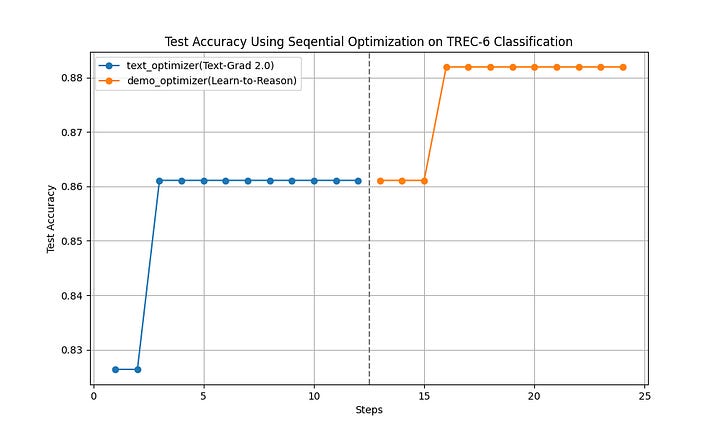
Learning Curve on training system task instruction and on one-shot demonstration, Source : [1]
Treat PROMPT and DEMOS as trainable parameters. AdalFlow will refactor them towards your supervised metric.
Seeding AdalFlow with OvO’s P₀★ and few-shot demos typically cuts iterations and saves tokens.
Version everything: dataset snapshot, seeds, metrics, final prompt/demos, and model versions for reproducibility.
This dual-engine recipe lets you pre-train a strong base prompt with OvO self-supervision (no labels, low cost) and then finish with AdalFlow’s LLM-AutoDiff on a small labeled set to lock in stable, observable gains. Treat PROMPT and DEMOS as first-class, trainable parameters; initialize them from OvO; and version everything. In practice, this combo reduces iterations, controls token spend, and yields a self-improving classifier you can confidently ship.
In the coming articles, we will publish additional tutorials and updates on the latest advances in AI agents. If this was helpful, please subscribe to stay informed about future releases.
For more information, the Documentation is available.
For more open-source code, follow the Github and give a ⭐️. We’d love your feedback!
[1] SylphAI Inc., “AdalFlow (GitHub repository),” GitHub, [Online]. Available: https://github.com/SylphAI-Inc/AdalFlow. Accessed: Sep. 23, 2025.
[2] SylphAI Inc., “AdalFlow Tutorials,” SylphAI Documentation, [Online]. Available: https://adalflow.sylph.ai/index.html. Accessed: Sep. 23, 2025.
[3] SylphAI Inc., “AdalFlow Developer Notes,” SylphAI Documentation, [Online]. Available: [insert developer notes URL]. Accessed: Sep. 23, 2025.
[4] Jinyu Xiang, Jiayi Zhang, Zhaoyang Yu,…, “Self-Supervised Prompt Optimization,” 2025
[5] Li Yin1, Zhangyang “Atlas” Wang, “LLM-AutoDiff: Auto-Differentiate Any LLM Workflow,” [2025**]**
No posts
Comments
Nothing yet. Say the first thing.
Sign in to join the conversation.