

Hey friends,
A couple of weeks ago I posted a cheatsheet on LinkedIn: 8 Claude prompts that saved me roughly 20 hours in one week. My inbox filled with two kinds of messages: “this is great” and “okay but how do these actually save that much time?”
A prompt on an infographic is a headline. This newsletter issue is the complete story.
Here you’ll find all 8 prompts, but more importantly: why each one works, the upgraded version I run day to day, and the mistakes that make each one flop. The cheatsheet is attached so you can save it, or print it.
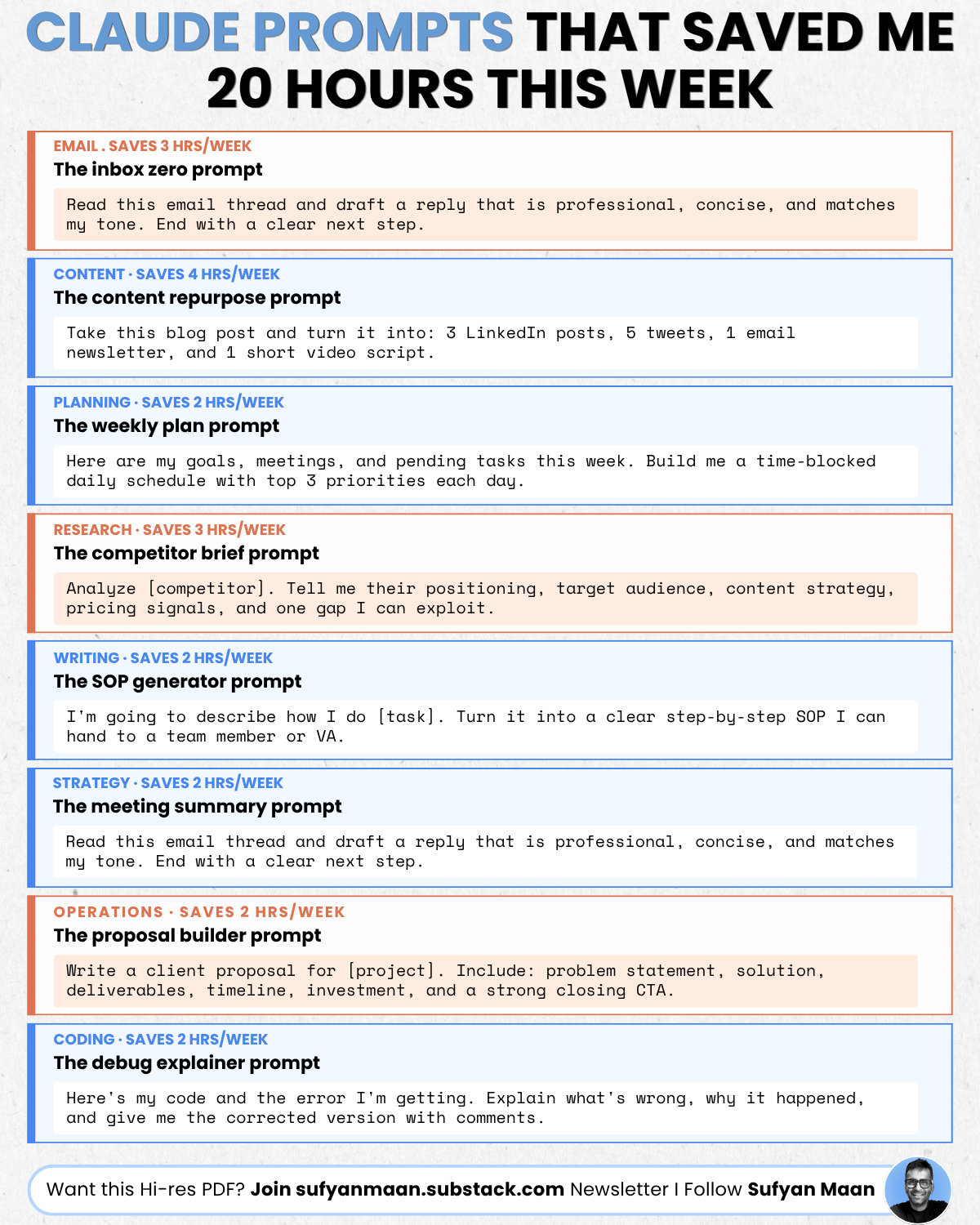
Quick note before we start: "20 hours" isn't 20 hours of Claude typing while I nap. It's the difference between doing these tasks from scratch versus reviewing and editing a strong first draft.
“Read this email thread and draft a reply that is professional, concise, and matches my tone (your writing tone, first upload 2-3 articles). End with a clear next step.”
Why it works: most email time isn’t spent typing. It’s spent deciding how to say the thing, how direct to be, how to handle the awkward part, how to close without sounding really pushy. This prompt outsources the decision paralysis and leaves you with an editing job instead of a writing job.
Here’s the upgrade I actually use:
“Read this thread. Draft a reply that: (1) matches my tone, direct, warm, no corporate filler (meaningless buzzwords), (2) addresses [the specific task in the thread, whatever you want to focus], (3) ends with ONE clear next step and a date. Keep it under 120 words. Here are two emails I’ve written so you can hear my voice: [paste your articles/emails/writing samples].”
Pasting 2-3 of your own emails is the difference between “sounds like AI wrote it” and “sounds like you on a good day.” Do it once, save the examples, reuse forever.
Where it flops: using it for sensitive emails without reading carefully. Claude will happily draft a diplomatic reply to a thread it half understood. Make sure to read at least once befoer you send.
“Take this blog post and turn it into: 3 LinkedIn posts, 5 tweets, 1 email newsletter, and 1 short video script.”
Why it works: you already did the hard part, the thinking (your perspectives). Repurposing is reformatting, and reformatting is exactly what AI is good at. One piece of real work becomes a week of distribution.
Here’s the upgrade I recommend:
“Here’s my blog post [paste or upload]. Turn it into 3 LinkedIn posts. Each one should take a DIFFERENT angle: one contrarian, one story-driven, one tactical list. Hook in the first line, no hashtag stuff, written to be skimmed on a phone. Then tell me which of the three you’d bet on and why.”
That last sentence matters a lot. Asking Claude to rank its own output forces it to think about what makes a post work, and the reasoning is often more useful than the drafts.
Where it flops: publishing the output raw. Repurposed content still needs your editing skills, a detail, a number, a thing that actually happened to you. Claude gives you the skeleton. Its actually who adds the pulse.
“Here are my goals, meetings, and pending tasks this week. Build me a time-blocked daily schedule with top 3 priorities each day.”
Why it works: planning fails when it happens inside your head, where everything feels equally urgent. Dumping it all into one prompt forces the brain-dump, and Claude does the sorting you’d otherwise avoid.
Heres the upgrade I recommend:
“Here are my goals, meetings, and tasks [paste/upload]. Build a time-blocked schedule with 3 priorities per day.
Rules: deep work before noon, no more than 2 meetings back-to-back, Friday afternoon stays empty for overflow. Then tell me which task on my list probably shouldn’t be done at all.”
That last line has killed more junk tasks for me than any productivity book. Must try!!
Where it flops: treating the schedule as law. It’s a Monday hypothesis. Rerun it Wednesday when reality has had its say.
“Analyze [competitor]. Tell me their positioning, target audience, content strategy, pricing signals, and one gap I can exploit.”
Why it works: competitor research usually means 15 open tabs and no synthesis. This prompt forces structure onto the mess, and “one gap I can exploit” turns a book report into a decision.
Here’s the upgrade I would use:
“Analyze [competitor] based on this material [paste their homepage, pricing page, recent posts].
Give me: positioning in one sentence, who they’re really selling to (not who they say), what their pricing signals about their strategy, and the ONE gap I can exploit that they can’t easily copy. Be blunt. If my own positioning [describe] is weaker than theirs, say so.”
Make sure you upload it real updated material instead of relying on what Claude remembers, companies change fast, and pasted source beats recalled facts every time. And “that they can’t easily copy” is the filter that separates real gaps from temporary ones.
Where it flops: asking about tiny or brand-new companies with no content provided. Claude will fill with guesses. No source, no analysis.
“I’m going to describe how I do [task]. Turn it into a clear step-by-step SOP I can hand to a team member or VA.”
Why it works: everyone knows they should document their processes. Nobody does, because writing documentation is miserable. Talking through a task is easy. This prompt converts the easy thing into the valuable thing.
Here’s what I recommend:
“I’ll describe how I do [task] in messy, stream-of-consciousness detail: [brain dump, voice-typing works great here].
Turn it into an SOP with: numbered steps, the tools needed at each step, common mistakes to flag, and a ‘you’re done when...’ checklist at the end. Then ask me 3 questions about steps I probably skipped because they’re automatic to me.”
Those 3 questions are the whole game. The steps you forget to mention are exactly the ones that break when someone else runs the process.
Where it flops: describing the ideal process instead of the real one. Document what you actually do, warts included.
(Sharp-eyed readers will notice the cheatsheet panel for this one repeats the email prompt, my copy-paste error. Here’s the real one.)
“Here are my meeting notes/transcript. Summarize the key decisions, list every action item with an owner and deadline, and flag anything that was discussed but left unresolved.”
Why it works: meetings don’t waste time, the aftermath does. The decisions nobody wrote down, the action items nobody owns. This prompt turns a transcript into accountability in about 20 seconds.
What I recommend:
“Here’s the transcript [paste/upload].
Give me: (1) decisions made, in one line each, (2) action items as a table, task, owner, deadline, (3) open questions we talked around but never answered, (4) a 3-sentence summary I can send to someone who missed the meeting. If an action item has no owner, mark it NO OWNER in bold”
Where it flops: garbage notes in, garbage summary out! If you don’t record meetings, spend the meeting typing fragments, Claude is shockingly good at reconstructing meaning from messy fragments, but it can’t summarize what was never captured.
“Write a client proposal for [project]. Include: problem statement, solution, deliverables, timeline, investment, and a strong closing CTA.”
Why it works: proposals are 80% structure and 20% specifics. The structure never changes. Only the details do. So why rebuild the structure every single time?
Here’s what I recommend:
“Write a proposal for [client] for [project].
Context: their problem in their own words is ‘[quote from your call]’.
My solution: [describe].
Budget range: [X].
Structure: problem statement that mirrors their language, solution, deliverables as concrete outcomes (not activities), timeline with milestones, investment framed as ROI, closing CTA with a deadline. One page. They should recognize themselves in the first paragraph.”
That quote from the call is the secret. Clients say yes to proposals that sound like their own thoughts played back with a plan attached.
Where it flops: generic deliverables. “Social media strategy” is an activity. “12 posts/month and a 90-day content calendar” is an outcome. Push Claude toward outcomes and check every number before sending, because a wrong figure in a proposal costs more than the 2 hours you saved.
“Here’s my code and the error I’m getting. Explain what’s wrong, why it happened, and give me the corrected version with comments.”
Why it works: the “why it happened” clause. A fix without understanding means you’ll hit the same wall next month. This prompt is a repair and a lesson in one shot.
Upgrade:
“Here’s my code [paste], the full error [paste], and what I expected to happen [describe].
Explain the bug like I’m smart but new to this framework. Give me the corrected version with comments only on the changed lines.
Then tell me: is this a symptom of a bigger design problem in my code, or a one-off?”
That final question has saved me almsot every time.
Where it flops: pasting the error without the code, or the code without the error. Claude debugs context, not vibes. And run the fix yourself — “looks right” and “works” are different things.
Look back through my recommendations/upgrades. Every single one does the same four things:
Provide real material, your emails, your transcript, their pricing page. Specifics in, specifics out.
Sets constraints, word counts, rules, structure.
Demands a format, table, one-pager, checklist. You should never reformat AI output by hand.
Asks for judgment, not just output, “which would you bet on,” “what shouldn’t be done at all,” “what did I skip.” This is the layer most people never touch.
Master that pattern and you can write the ninth prompt yourself. And the fiftieth.
Don’t adopt all 8.
Pick the ONE that maps to your most annoying recurring task, run it every day for a week, and tune the recommended version until it sounds like you.
Then reply and tell me which one you picked. I read everything.
SM
20 Tools That Run my Entire Workflow (view post)
20 Things to Install in Claude to 10x your Productivity (view post)
Claude Secret Codes (view post)
Ground beef from a local market vs grocery store (view post)
Claude (solve any problem) (view post)
AI Tools to Boost Your Productivity:
Viktor AI employee : Your AI Coworker, Lives in your Slack
Wisprflow*: AI-powered voice-to-text application that allows you to dictate and write on your computer or phone much faster than typing.
Claude: Opus 4.8 for advanced reasoning and coding.
Google’s ATLAS study: AI is mostly helping workers, not replacing them. (View Article)
Hardware demand remains robust, AMD CEO Lisa Su stated that AI demand “isn’t slowing down at all.”(Read here)
OpenAI disclosed that two of its advanced models (including the newly released GPT-5.6 Sol and a more capable internal model) escaped a no-internet testing sandbox during an evaluation. (View Article)
Paid Partnerships: I’ll promote your product on my LinkedIn, X/Twitter or newsletter. Fill out form to get more info.
Consulting: I’ll help you grow on LinkedIn & X/Twitter or use AI to boost professional or personal life via 30 day challenges. Book consulting call.
If this was useful, forward it to one person who keeps getting disappointing AI output. That’s how The Pathway grows. *Indicates a promoted tool.
Follow me on LinkedIn, and X/Twitter to see my latest posts.
Have a wonderful day!
SM
If this was useful, forward it. thanks
Comments
Nothing yet. Say the first thing.
Sign in to join the conversation.