

Teams can be frustrated by the delays that some Code line Policies add to software development. This leads them to explore workflows that don’t involve branching at all — pushing changes directly to the Main Line. While this approach seems promising, and may even work well for some teams, it ignores the significance of the essential attribute of a branch: isolation — something the “direct to Main” approach doesn’t take away.
While branches can be a source of distraction, they can also be a way to maintain focus when done well. In this article, I’ll explain why -- even as complex branching strategies are a source of problems, skipping branching isn’t the answer. Worth noting: the question of using branching is distinct from whether Pull Requests make sense.
A branch is an isolated, diverging code stream. If the Main Line has the latest code, creating a branch off the Main Line means that there is work that isn’t being integrated immediately. That isolates those working on the branch from worrying about disruptions from work elsewhere. It also isolates the Main Line from disruption. This can improve flow in the short term, but when isolated too long, can cause problems when you try to integrate changes later. Branches also provide each stream with the opportunity to explore new ideas without immediately disrupting the main Code Line, thereby advancing technical progress.
We normally think of a branch as something that is backed by a Software Configuration Management repository, such as GitHub. But code checked out to a workspace shares the same attributes.
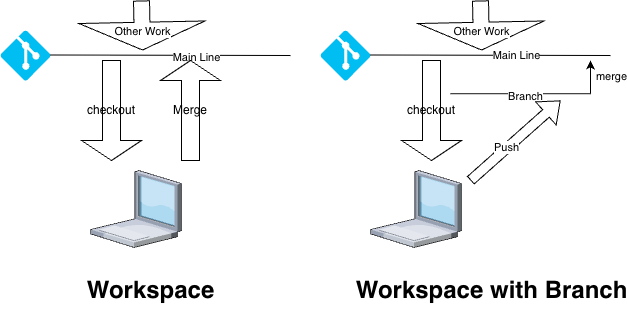
Branching becomes problematic when:
It leads to work being isolated from other developers’ work for an extended period of time.
The branching mechanics add a non-trivial amount of complexity and overhead to your process.
Either of these things (or something else) makes it hard to merge changes into your workspace or to integrate changes into a shared code line.
None of these things is essential to using branches. Use of advanced branching strategies is particularly problematic, both in terms of cognitive and workflow overhead. If the above items are a regular part of your environment or you are doing “advanced branching” on a regular basis (or more than rarely), you are probably doing something wrong.
Short-lived branches — an approach to Trunk Based Development — balances the challenges of branching with the benefits. Accelerate, which describes an effective code line process, notes that short-lived branching work as well as pushing changes directly from a workspace. The problem with branching isn’t creating a branch.
While we like to discuss the problems that manifest when branching isn’t aligned with team goals, there are some benefits you can get if you use a branch, backed by a repository:
A copy somewhere else (which may or may not be useful, but it at least makes the work visible).
An easy forum to get feedback from those not in the room, whether synchronous or asynchronous.
A way to ensure that you run checks —including any that may or may not run locally easily.
Local branches have fewer advantages than shared ones, but they are still valuable: an obvious one being the ability to checkpoint your work if you are doing experiments.
You may not need the things branches offer, but it’s worth noting that files in your workspace, without a backing branch, don’t fully isolate you from the perils of branching, but can introduce other risks and challenges. A workspace is a divergent work stream — in other words, a branch.
A complex branching strategy can add significant overhead to your process, often for little value. But abandoning branching entirely can bring its own problems. Be wary when you have long-lived branches or complex integration policies. But don’t just avoid branching because it can go wrong. Branching can and should be used thoughtfully, and can help your flow.
Code in your workspace has all of the downsides of a branch, with none of the transparency or automation that a branch in an SCM tool enables.
Branching done well is:
Intentional: you know the purpose of the branch, and aren’t branching solely out of ritual or habit.
Simple (or only as complex as it needs to be)
Short: Code is integrated quickly
The goal is to integrate code quickly, even when you have code in your workspace that isn’t backed by an SCM system. There are many approaches to branching. If your branching strategy gets in your way, consider if you’re doing it wrong, and what you can do to simplify it and speed your workflow. And if you decide to use a no-branch strategy, consider how you will ensure that work in progress in workspaces gets integrated quickly.
No posts
Comments
Nothing yet. Say the first thing.
Sign in to join the conversation.